Do you have pop-ups or your computer infected with trojan or spyware ? Learn how to ask us for help, click here!

How to remove Antivirus Soft (Uninstall instructions)

Antivirus Soft is a new rogue antispyware program from the same family of malware as Antivirus Live. The program is distributed with the help of trojans. When the trojan is started, it will download and install Antivirus Soft onto your computer and configure it to run automatically when you logon to Windows.

When Antivirus Soft is started, it will imitate a system scan and detect a lot of various infections that will not be fixed unless you first purchase the program. Important to know, all of these reported infections are fake and don’t actually exist on your computer! So you can safely ignore the scan results that Antivirus Soft gives you.

While Antivirus Soft is running, it will block the ability to run any programs as a method to scare you into thinking that your computer is infected with malware. The following warning will be shown when you try to run the Notepad:

Application cannot be executed. The file notepad.exe is infected.
Do you want to activate your antivirus software now.

What is more, the rogue will flood your computer with warnings and fake security alerts. Some of the alerts:

Windows Security alert
Windows reports that computer is infected. Antivirus software
helps to protect your computer against viruses and other
security threats. Click here for the scan your computer. Your
system might be at risk now.

Windows Security alert
Application cannot be executed. The file rundll32.exe is
infected.
Do you want to activate your antvirus software now?

Last but not least, Antivirus Soft will hijack Internet Explorer so that it will randomly show a warning page with the “Internet Explorer Warning – visiting this web site may harm your computer!” header. Of course, all of above warnings and alerts nothing more but a scam and like false scan results should be ignored!

As you can see, Antivirus Soft is a scam that designed with one purpose to trick you into purchasing so-called full version of the program. Do not be fooled into buying the software! Instead of doing so, follow the removal guide below in order to remove Antivirus Soft and any associated malware from your computer for free.

Symptoms in a HijackThis Log

O4 – HKLM\..\Run: [RANDOM] %UserProfile%\Local Settings\Application Data\[RANDOM]\[RANDOM]sysguard.exe
O4 – HKCU\..\Run: [RANDOM] %UserProfile%\Local Settings\Application Data\[RANDOM]\[RANDOM]sysguard.exe
O4 – HKLM\..\Run: [RANDOM] %UserProfile%\Local Settings\Application Data\[RANDOM]\[RANDOM]ftav.exe
O4 – HKCU\..\Run: [RANDOM] %UserProfile%\Local Settings\Application Data\[RANDOM]\[RANDOM]ftav.exe

Use the following instructions to remove Antivirus Soft (Uninstall instructions)

Step 1.

Download HijackThis from here, but before saving HijackThis.exe, rename it first to iexplore.exe and click Save button to save it to desktop. If you can`t download the program, the you should repair the proxy settings of Internet Explorer. Run Internet Explorer, Click Tools -> Internet Options. Select Connections Tab and click to Lan Settings button. Uncheck “Use a proxy server” box. Click OK. Click Apply. Click OK.

Doubleclick on the iexplore.exe on your desktop for run HijackThis. HijackThis main menu opens.

Click “Do a system scan only” button. Look for lines that looks like:

R1 – HKCU\Software\Microsoft\Windows\CurrentVersion\Internet Settings,ProxyServer = http=127.0.0.1:5555
O4 – HKLM\..\Run: [arlsknkw] C:\Documents and Settings\user\Local Settings\Application Data\lqtwnu\wqcmsysguard.exe
O4 – HKCU\..\Run: [arlsknkw] C:\Documents and Settings\user\Local Settings\Application Data\lqtwnu\wqcmsysguard.exe
O4 – HKCU\..\Run: [vcspymsv] “C:\Users\Owner\AppData\Local\bbenmt\badwsftav.exe
O4 – HKCU\..\Run: [udcqinjy] “C:\Users\Owner\AppData\Local\rhjimj\bogjsftav.exe

Note: list of infected items may be different, but all of them have “sysguard.exe” string in a right side and “O4″ in a left side.

Place a checkmark against each of them. Once you have selected all entries, close all running programs then click once on the “fix checked” button. Close HijackThis.

Step 2.

Download MalwareBytes Anti-malware (MBAM). Close all programs and Windows on your computer.

Double Click mbam-setup.exe to install the application. When the installation begins, keep following the prompts in order to continue with the installation process. Do not make any changes to default settings and when the program has finished installing, make sure a checkmark is placed next to Update Malwarebytes’ Anti-Malware and Launch Malwarebytes’ Anti-Malware, then click Finish.

If an update is found, it will download and install the latest version.

Once the program has loaded you will see window similar to the one below.

malwarebytes-antimalware1
Malwarebytes Anti-Malware Window

Select Perform Quick Scan, then click Scan, it will start scanning your computer for Antivirus Soft infection. This procedure can take some time, so please be patient.

When the scan is complete, click OK, then Show Results to view the results. You will see a list of infected items similar as shown below. Note: list of infected items may be different than what is shown in the image below.
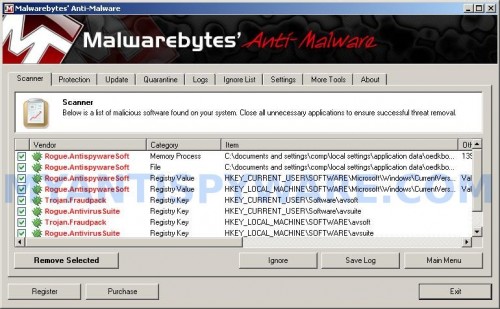
Malwarebytes Anti-malware, list of infected items

Make sure that everything is checked, and click Remove Selected for start Antivirus Soft removal process. When disinfection is completed, a log will open in Notepad and you may be prompted to Restart.

Note: if you need help with the instructions, then post your questions in our Spyware Removal forum.

Antivirus Soft creates the following files and folders

%UserProfile%\Local Settings\Application Data\[RANDOM]
%UserProfile%\Local Settings\Application Data\[RANDOM]\[RANDOM]sysguard.exe

Antivirus Soft creates the following registry keys and values

HKEY_CURRENT_USER\Software\AvScan
HKEY_CURRENT_USER\Software\Microsoft\Windows\CurrentVersion\Run\[RANDOM]
HKEY_LOCAL_MACHINE\SOFTWARE\Microsoft\Windows\CurrentVersion\Run\[RANDOM]

Share and Enjoy:
  • Print
  • Digg
  • Sphinn
  • del.icio.us
  • Facebook
  • Mixx
  • Google Bookmarks
  • Slashdot
  • Twitter
January 30, 2010 on 11:21 am | In Rogue Anti Spyware, Tutorials - HowTo | 134 Comments |


134 Comments »

RSS feed for comments on this post.

  1. Just wanted to drop a note here… I got infected with this Antivirus Soft trojan and went through a nightmare trying to get rid of it. In the end, the only thing that worked was HijackThis. MBAM didn’t even find it.

    BUT… for future readers, they’ve apparently gotten smarter since you posted this because they changed the filenames from sysguard.exe to some random filename like csxytib.exe. I found four entries in the HijackThis list with random letters in the O4-….[random]….(random).exe.

    Since the letters in the brackets seemed random, and a google search on all four filenames returned no results, I figured it couldn’t be a legitimate entry. If it were, somewhere on *some* page on the entire internet, there would be a reference to it.

    And when it comes right down to it, the trojan had turned my desktop into a boat anchor anyway, so how much worse could I hurt it by removing these?

    I checked those 4 file entries (as well as one entry that looked just like the one you noted above that begins with R1) and the problem went away.

    A clean reboot, and all was well. Thank goodness!!!

    I just wanted to share the fact that the “designers” of this trojan have changed the filename in those O4 entries to random letters, just in case anyone else ends up with this stupid thing too.

    Thanks.

    Comment by Twintrbl — February 1, 2010 #

  2. Thank you very much for your help, I was so lost til I found this page, my computer runs much better and antivirus soft is gone, when I ran Highjack software I checked all the box’s I assumed that was the right thing to do, whether it was or not it did the trick..Thank you again

    Comment by Ryan — February 3, 2010 #

  3. This scamware was a major pain!
    Nowhere was the ????sysguard.exe to be found.
    So I renamed files that were created about the time of the infection in the C:\Documents and Settings\user\Local Settings\Application Data diredtory. Bingo! Errors in the scamware started occuring.
    Now I had the name of the directory and file name the rest was hijackthis and spybotSd!
    But the clencher was that the information I needed to know was in the post by Twintrbl!
    I will read all the posts! I will read all the posts! I will read all the posts!
    Thanks everyone :)

    Comment by R. Frank — February 3, 2010 #

  4. When I got this virus it didn’t have the sysgaurd name on it’s executable file either. I learned that the program took a lot of memory and sorted my processes by memory and then googled the highest one’s until one didn’t have any hits. It started with “hybysf” and once I stopped that file suddenly my real antivirus program could find a virus when I scanned. I hope this helps the next poor soul.

    Comment by Althea — February 3, 2010 #

  5. Just wanted to say this guide was a huge help!! I did a scan for my processes and the culprit in my case was mspfsftav.exe.

    Comment by Matthew — February 4, 2010 #

  6. I can’t run any of the anti spy programs and I can’t access the task manager. I’m at a loss here.

    Comment by Prince — February 4, 2010 #

  7. Prince, read first step above, you need download HijackThis and rename it in Save dialog to iexplore.exe <= most important!

    Comment by Patrik — February 5, 2010 #

  8. Prince you must right click on the download HijackThis from here. Where the here is highlighted, then rename in iexplore.exe, then you will be able to open it.

    Comment by Ant — February 5, 2010 #

  9. Hey guys I need help when I open the iexplore.exe
    I found the first line R1… but I cant find these

    O4 – HKLM\..\Run: [arlsknkw] C:\Documents and Settings\user\Local Settings\Application Data\lqtwnu\wqcmsysguard.exe
    O4 – HKCU\..\Run: [arlsknkw] C:\Documents and Settings\user\Local Settings\Application Data\lqtwnu\wqcmsysguard.exe
    O4 – HKCU\..\Run: [vcspymsv] “C:\Users\Owner\AppData\Local\bbenmt\badwsftav.exe”
    O4 – HKCU\..\Run: [udcqinjy] “C:\Users\Owner\AppData\Local\rhjimj\bogjsftav.exe“

    Comment by Pearl — February 5, 2010 #

  10. Pearl, you should fix O4 lines that have sysguard.exe or ftav.exe right part or ask for help in our Spyware removal forum.

    Comment by Patrik — February 5, 2010 #

  11. This is a great post. I thank you for all your help.

    Comment by John P — February 5, 2010 #

  12. How do I fix them? and thanks for the reply :]

    Comment by Pearl — February 5, 2010 #

  13. I went to check again and I cant see the 04 lines with sysguard.exe or ftav.exe

    Comment by Pearl — February 5, 2010 #

  14. Okay, I cannot download anything or access anything. It says to follow these instuctions but I am accessing this site from my desktop and my laptop (which is infected) will not allow my to download or access anything. Can anybody help me please?

    Comment by Pat — February 5, 2010 #

  15. OMG…this is way out of my capibilities…I have this stupid thing and I know I couldn’t do the above..I am computer challanged….I’m thinking about taking it into the shop…on husband’s computer now and almost afraid to look up anothing on the virus for fear of infecting his too….

    Comment by Judi — February 5, 2010 #

  16. Pearl, you should select lines that have sysguard.exe or ftav.exe right part and click Fix checked button.

    Comment by Patrik — February 6, 2010 #

  17. Pearl, then open a new topic in our Spyware removal forum. Don`t forget to include your HijackThis log.

    Comment by Patrik — February 6, 2010 #

  18. Pat, you have “fixed” proxy settings as i posted above ?

    Comment by Patrik — February 6, 2010 #

  19. There are not a lot of locations on the internet dealing with this particular attack…at least that I could find. The information here was spot on, and I REALLY appreciate everyone’s input. It worked, and that’s the key.

    Thank you.

    Comment by Evan — February 6, 2010 #

  20. I could only find one ftav.exe file. Is that the only one I check? I could not find any other sysguard or ftav ones in the O4 section.

    I also found a lot of R1 though. Am I supposed to only check R1 – HKCU or all of R1?

    Comment by Eve — February 6, 2010 #

  21. Need a little help here. I’ve downloaded Hijack this, but when I try to open it, the agreement flickers up for a moment and then Antivirus Soft closes it and tells me it’s infected and I am not allowed to open it.

    Getting a little frustrated — please advise.

    Comment by Schuler — February 6, 2010 #

  22. I could only find one ftav.exe file. Is that the only one I check? I could not find any other sysguard or ftav ones in the O4 section.

    Ys, fix only the one line. Its ok.

    I also found a lot of R1 though. Am I supposed to only check R1 – HKCU or all of R1?

    Fix only “R1 – HKCU\Software\Microsoft\Windows\CurrentVersion\Internet Settings,ProxyServer = http=127.0.0.1:5555″

    Comment by Patrik — February 7, 2010 #

  23. Schuler, you need rename HijackThis.exe before running.

    Comment by Patrik — February 7, 2010 #

  24. I did rename the file, that’s what’s been bothering me.

    I’m also having IE automatically opened and run to multiple pornographic and ED related websites which is weird considering I am not an IE user and was not using IE when this thing downloaded itself.

    Comment by Schuler — February 7, 2010 #

  25. THANK YOU!!!!!!

    My computer is back to normal! Follow this procedure EXACTLY and you will have no trouble understanding/removing \ANTIVIRUS SOFT\!

    (The first comment was also very helpful) If you’re unsure what to place a check mark next to, simply Google it.

    Comment by Scott — February 7, 2010 #

  26. very helpful info! thanks!

    Comment by Scottie Talent — February 7, 2010 #

  27. GREAT POST…I thank you for all your help!!!!

    I found only two entries in the HijackThis list O4-….[random]….(random)ftav.exe.. removed both the entries…restarted…and BINGO…my laptop is back to normal…Can’t thanks you guys enough…God Bless you!!!!!

    Comment by Sanjeev Thakur — February 7, 2010 #

  28. So I think i got all the files that are HKLM and and HKCU but i opened up the Hijack This scan again just to make sure and there’s a bunch of files that are like 02 BHO: (no name) with a string of letters and numbers, than at the end it says (no file) should I delete those too?

    Comment by Max — February 7, 2010 #

  29. at the end it says (no file) should I delete those too

    Yes, you can fix them too.

    Comment by Patrik — February 7, 2010 #

  30. I have a quick question. I did the fix a few days ago and it worked, but then just last night this stupid program found itself back onto my computer. Do I need to keep doing this forever?

    Comment by Gabbs — February 7, 2010 #

  31. Eventually had to remove my hard drive and follow these directions on a completely separate computer.

    Not fun but it did work.

    Comment by Schuler — February 7, 2010 #

  32. I found this an easy one to get rid of, but I cant prevent it from returning. So whats causing it to get back into my /temp folder a few times a week? Cant find any trojans on my system. and it seems to get installed after visiting myspace.
    and yes the .exe is most always a random name.
    hit me up (reaper at pimpmymob.com)

    Comment by Leonard — February 7, 2010 #

  33. I would like to extend my gratitude to this website and all the people involved for their invaluable help in removing Antivirus Soft. I have extremely limited knowledge of anything like this, but with your help, was able to follow the step by step instructions…PHEW!!!!! Many many thanks. Tom

    Comment by Tom Dignam — February 7, 2010 #

  34. I was able to find 2 of the O4 files ending in ftav.exe, but did not have the R1 file like the one stated above. I removed the 2 ftav.exe files but the antivirus soft keeps coming back. Someone help me please! I have to pay bills on my computer and can’t until I can get rid of this.

    Comment by Sarah — February 8, 2010 #

  35. I’m having the same problem as Schuler. I’ve renamed HijackThis and it still shuts it down immediately when I open.

    Comment by Thomas — February 8, 2010 #

  36. This is as good as information gets! HijackThis file along with the registry info helped me repair my laptop. Again, “MBAM didn’t even find it.” THANK YOU!!!

    Comment by Gman — February 8, 2010 #

  37. Gabbs, probably your have infected with a trojan that reinstalled the rogue. Ask for help in our Spyware removal forum.

    Comment by Patrik — February 8, 2010 #

  38. Leonard, open a new topic in our Spyware removal forum.

    Comment by Patrik — February 8, 2010 #

  39. You can run this procedure using “Safe Mode with Network Support.” The only issue was that I couldn’t update the malwarebytes definitions, but was able to run hijackthis and run the scan. Cleaned most of it out. Then, upon rebooting, updated the malwarebytes definitions and running the scan, again. Finding a few straggler objects.

    Thanks for the procedure!

    Comment by Jonathan — February 8, 2010 #

  40. Hey! I got this virus. But problem is I dont know how to take it off. :( I downloaded micro hijack. im looking at the list but dont know wat to check. :( please help this is the thing that shows
    Logfile of Trend Micro HijackThis v2.0.2
    Scan saved at 6:13:38 PM, on 2/8/2010
    Platform: Windows Vista SP2 (WinNT 6.00.1906)
    MSIE: Internet Explorer v8.00 (8.00.6001.18882)
    Boot mode: Normal


    End of file – 17091 bytes

    Comment by Jose — February 8, 2010 #

  41. I have read ALL the comments posted in this thread. I can’t get hijackthis to work. even after renaming it. My task manager, the
    un section and anything I download is disabled. Comes back saying it can not be opened because it is infected. then askes if i would like to download the antivirus software.i as well have tried the pskill stuff. it will not let me download the new link that was made to bypass this virus. SOMEONE PLEASE HELP?!?!

    Comment by Bay — February 9, 2010 #

  42. Soo…if the sysguard.exe files don’t show up after the scan, is it possible they have a different name?

    Comment by naomi — February 9, 2010 #

  43. Ok. So I installed hijackthis but I can get passed where you accept the terms of use or whatever. It closes right when I get there.

    Comment by lovely — February 9, 2010 #

  44. Jose, fix also the following line:
    O4 - HKCU\..\Run: [yjgwvhwq] C:\Users\Lino\AppData\Local\hmfkew\mxyqsftav.exe

    Comment by Patrik — February 10, 2010 #

  45. How can I download this stuff when I can not open browser – it just directs me to the AV Soft website.

    Comment by Mike — February 10, 2010 #

  46. Bay, if after renaming HijackThis to iexplore.exe (in Save dialog), HijackThis won`t run, try re-download it, but rename to userinit.exe, or winlogon.exe, or explorer.exe.

    Comment by Patrik — February 10, 2010 #

  47. naomi, yes look also for files that have “ftav.exe” at right.

    Comment by Patrik — February 10, 2010 #

  48. Mike, uncheck “Use a proxy server” box in Internet Explorer proxy settings.

    Comment by Patrik — February 10, 2010 #

  49. I am another one having trouble.

    I am in safemode, and got Trend Micro HijackThis open, with the list up.

    I cannot find any of the sysguard or ftav files…what else should I be looking for?

    Thanks in advance

    Comment by Justin — February 10, 2010 #

  50. Has anyone run into an instance where MalwareBytes will be scanning and the computer shuts down? I haven’t found anything saying that this virus will do that, but the “window” that pops up says Antivirus Soft. I’m fighting and fighting to get rid of this thing, but I can’t help but wonder if I’m not trying to remove the correct thing. I haven’t tried the hijackthis thing, (I was following removal instructions from another website) and am about to do so. But I wanted to ask ahead of time, so that if this doesn’t work, I could hope to look forward to an answer instead of getting frustrated.

    Comment by Anna — February 10, 2010 #

  51. I think that I was able to get rid of the virus following the advice listed here. Time will tell. I would like to add, that if someone pays close attention to the startup tab in msconfig, they can start to disable the virus there. I started my machine in safe mode, and went into the startup tab and noticed 4 entries that didn’t look “right” and I had never seen before. I disabled them on start up and was able to run hijackthis (after renaming it) with no problems. Thanks to everyone for their help.

    Comment by Anna — February 10, 2010 #

  52. What if I did all of these steps, yet when it came to the Malware scanning for threats nothing showed up? No Trojan or any other type of “threat” was found. What should I do then if I still have an Antivirus Soft problem yet malware is not detecting it?

    Comment by Arielle — February 10, 2010 #

  53. Hey! Thank you so much for this! Yeah, they changed a LOT. I clicked all of the random files I saw in Hijack this. I didn’t see any of the ones listed above. This stupid virus is HORRIBLE.

    Comment by Ashley — February 11, 2010 #

  54. Justin and Anna, ask for help in our Spyware removal forum.

    Comment by Patrik — February 11, 2010 #

  55. Thanks for the advice on removing antivirus soft. I got rid of it using highjack and malwarebytes, however, after changing my prxy settings in internet options, I no longer can use options and they dissapeared in my control panel. Can someone tell me how to get them back? Thanks Mike

    Comment by mike — February 11, 2010 #

  56. Mike, Click Start, Run.
    Type regedit and press Enter.
    Registry editor opens.
    Navigate to the following keys by expanding the + at left of each key at left:
    HKEY_CURRENT_USER
    Software
    Policies
    Microsoft
    Internet Explorer
    Control panel

    In right part of window, right click to Proxy and select Delete.
    Close registry editor.
    Run Internet Explorer and try enable/disable proxy.

    Comment by Patrik — February 11, 2010 #

  57. I don’t understand how I’m supposed to do any of this when my computer has been totally hijacked. It wont even let me open the control panel! HELP PLEASE!!

    Comment by Bridget — February 11, 2010 #

  58. Thanks Patrick, I got all the way to control panel but there is no proxy. My screen came up REG SZ value not set and Home page REG [0x00000000[0]. Any more help is appreciated. Mike

    Comment by mike — February 11, 2010 #

  59. Bridget, if you can`t download HijackThis, then use another computer to downloading it, then move it to infected pc using a flash or cd disk.

    Comment by Patrik — February 11, 2010 #

  60. Mike, remove “control panel” key from “Internet Explorer” key.

    Comment by Patrik — February 11, 2010 #

  61. Oh waw, this is very neat! thanks a bunch for the big help. I was watching some movies at watchmoviesonline when suddenly a strange AV appeared. So shocked, confused, panic and frustrated at first. thanks for this good instructions!

    Comment by Jacques — February 12, 2010 #

  62. Just received this on my computer, but I’m running with Firefox, not IE. What should I do to remove??

    Comment by jist — February 12, 2010 #

  63. I had antivirus soft infect my computer last thursday. I turned my computer off and didn’t do anything with it for a week. When I turned it back on, all of the antivirus soft symptoms and annoyances seemed to be gone. I have run hijackthis and malware bytes, and neither of them found anything. However, my computer keeps freezing, invariably every 3 to 15 minutes or so after I turn it on, no matter what I am doing. Does anyone know if the freezing could be linked to antivirus soft?

    Comment by Lauren — February 12, 2010 #

  64. I am so distressed at having this on my laptop. I can’t even get to a website on internet explorer on my laptop. I tried to uncheck the Proxy Settings on internet explorer, but it wouldn’t work. The Apply button wouldn’t show up and I still can’t access a website. I tried to download Hijack via Mozilla, but it won’t let me rename it. Someone please help!!

    Comment by Elizabeth — February 13, 2010 #

  65. jist, follow above steps.

    Comment by Patrik — February 13, 2010 #

  66. Lauren, open a new topic in our Spyware removal forum, i will check your PC.

    Comment by Patrik — February 13, 2010 #

  67. Elizabeth, download HijckThis using Mozilla. Once loaded, right click it and select rename, type iexplore and press Enter. Run it.

    Comment by Patrik — February 13, 2010 #

  68. Thanks Patrik! I ended up figuring out a way to bypass the internet explorer problem. In order to get the Apply button to work, I changed settings under the General tab of Internet Options to “trick” it into allowing me to Apply the Proxy changes. However, I had to redo this each time I clicked a link on internet explorer. It worked, but just took a lot of time.

    Just wanted to say thanks so much for all the help! This is coming from someone who has had minimal experience with computers, but I followed the directions precisely and seem to have gotten rid of the virus. Time will tell!

    Comment by Elizabeth — February 13, 2010 #

  69. I just deleted everything with a 04 by it!! And so far so good!! Thanks

    Comment by Diggz — February 13, 2010 #

  70. This was a nightmare. I think I’m fixed but we will see. I couldn’t get malware to run at first but I did get Hijack This to run after renaming it. After that I had two programs to check/delete. After that I could run Malware and my system is coming up clean. I’ll be back if this didn’t work. ;) Thanks

    Comment by jane — February 14, 2010 #

  71. I have this problem on my laptop and I can not log in how do I get this progam on it to remove the problem
    if I coln the drive out side drive and plug it in a computer can I run this progam or norton to get ride of this
    thank

    Comment by lewis — February 14, 2010 #

  72. I just got infected with this virus tonight and even though I followed the instructions, Malwarebytes didn’t find jack.
    (But maybe that’s because it was already installed on my system WEEKS ago… I don’t know.)

    It’s like what Twintrbl (the guy below me) said. They’ve UPDATED this virus but my two entries (in hijackthis) had “ftav.exe“ on the end so be sure to check for those!
    Also be sure to google any .exe file with random letters as the file name. If google turns up nothing, it’s most likely not a real program extension.

    Comment by NoirRaven — February 15, 2010 #

  73. lewis, you can`t login to windows in all modes (Safe mode and Normal mode) ?

    Comment by Patrik — February 15, 2010 #

  74. I got this annoying Antivirus Soft programme on my laptop just now and it’s pretty shocking to me!

    Followed the steps outlined and I’m finally back into business!!! If there are any problems that arise, I may have to look into it. Thanks!

    Comment by Simon — February 15, 2010 #

  75. I followed the directions. I used a jump drive to get the programs to my laptop and ran them while in safe mode. I got rid of the programs this listed to with HijackThis. When I ran malwarebytes, nothing showed up. I restarted my computer, this time in normal mode, and it’s still there.

    Comment by Mint — February 15, 2010 #

  76. I rebooted my laptop again, this time in safe mode, and I ran HijackThis again. There is one 04 file.
    “O4-HKLM\…\RUN: [NvCplDaemon] RUNDLL32.EXE C:\WINDOWS\system32\NvCpl.dll,NvStartup”
    I’m sure I got rid of every single one the first time, so what caused this to come back, and how can I fix it?

    Comment by Mint — February 15, 2010 #

  77. This worked great – thanks so much! I’m all right with computers but I’m no whiz and I was at a loss – none of my scans would find it. HijackThis worked great, though.

    Comment by Flute — February 16, 2010 #

  78. —-Everyone try this!!!!!—

    As soon as your computer starts hit ctrl+alt+delete and get into your proccesses! If you do it at the earliest possible moment you should be able to beat startup on antivirus soft. You can then find the virus and turn it off, giving you complete freedom to download, install and run whatever to get rid of it.

    Comment by Collin — February 16, 2010 #

  79. Mint, the line is ok, don`t remove it.

    Comment by Patrik — February 16, 2010 #

  80. Hi, I’m trying to remove the virus and have downloaded HiJack This. I’m just wondering which 04 files I’m supposed to delete? All of them?

    Comment by jana — February 16, 2010 #

  81. Jana, if you unsure, then ask for help in our Spyware removal forum.

    Comment by Patrik — February 16, 2010 #

  82. Followed the instructions and it worked perfect!!! Thanks

    Comment by Michael H — February 16, 2010 #

  83. Thanks for the incredibly helpful advice; I was able to clean my dad’s computer off and all is working well.

    This will show my ignorance, but I was wondering if the virus might have transferred itself to our extended drives (external hard drive connected to desktop that was infected, Ipod, flash drive). Should I scan those as well? I disconnected them once I realized we’d gotten this virus.

    Comment by Jenni — February 16, 2010 #

  84. I got rid of this little bugger as follows:

    1. Found a randomly named folder in the C:\Documents and Settings\user\Local Settings\Application Data directory that was created about the time the infection kicked in.

    2. Opened the folder and renamed the executable file (which ended with -”ftav”).

    3. Restarted my computer.

    4. At this point, because the executable was not initiated, I was able to use HijackThis and Malwarebytes to clean things up.

    5. So far, so good. Thanks for the good advice!

    Comment by Al — February 16, 2010 #

  85. Just removed this from a clients computer a couple days ago. Ive removed this before though, but one thing to know, this form of malware connects you to a private VNC(virtual network connection) so safe-mode with networking isnt a good idea like some articles mention. Samem with malware scans because your connected to someones server and they still have network access to block or compromise your AV’s. So scan in safe mode. Or the best way

    Safe mode-> Regedit-> use the above mentioned Reg key areas, but the programs name will be all different names like ftav, tfav, or randomnumbersandlettersav, but “av” is always there so its not hard to spot.

    After you remove the keys, install, update and scan with malwarebytes, then subsequently asquared to assure there are no leftover executables or reg keys leftover

    Comment by h4x0r — February 16, 2010 #

  86. Step one worked perfectly to get rid of it. I’m doing step two to make sure I’ve got no other issues here that I didn’t know about.
    For HiJack This, I just marked the ones in R1 and O4 that had names I didn’t recognize, and it worked.

    Comment by Natasha — February 16, 2010 #

  87. Here’s what worked for me:

    After Windows boots up, press Ctrl+Alt+Delete. Click on the “processes” tab and then click the “Mem Usage” tab to sort them from highest to lowest. You will likely have a .exe file near the top of your list (mine was called brwjsftav.exe). I searched this file on Google and found no record of it, so I knew something was up. I selected this file and ended the process and then the pop-ups finally stopped. I now knew that I was onto something. I then ran Hijack This and found this file under the O4- listings. I deleted the file and restarted. Problem solved.

    Comment by Ryan — February 17, 2010 #

  88. I ran the Malwarebytes program and it did not detect any files ..

    Though i did run the HiJackthis program and checked off the files that were suspicious and all the pop-ups stopped coming out.

    I restarted my laptop and still, nothing is popping out, no virus threats but i can’t help to think that i still have it on my laptop.

    What should I do ?

    Comment by Jimmy — February 17, 2010 #

  89. Jenni, no, only if the malware was installed with an other trojan. Attach the drive to a computer. Don`t open the disk, run an antivirus and check it.

    Comment by Patrik — February 17, 2010 #

  90. Jimmy, looks like your PC is clean. Also you can scan your computer with an online anti-virus scanner.

    Comment by Patrik — February 17, 2010 #

  91. I had the problem too, but its now sorted out.

    Instructions to remove.

    Press Ctrl+Alt+Delete when your almost in the desktop (If you press too late task manager will not open).

    In task manager look at the processes, google
    them in firefox anything that doesnt show up in google is the one to close.

    I had process kboqsftav.exe running which I googled & no results were shown. I chose to close
    it.

    Then I installed Hijackthis, I ran scan & removed files given in original post(Thanks).

    O4 – HKLM..Run: [RANDOM] %UserProfile%Local SettingsApplication Data[RANDOM][RANDOM]sysguard.exe

    O4 – HKCU..Run: [RANDOM] %UserProfile%Local SettingsApplication Data[RANDOM][RANDOM]sysguard.exe

    O4 – HKLM..Run: [RANDOM] %UserProfile%Local SettingsApplication Data[RANDOM][RANDOM]ftav.exe

    O4 – HKCU..Run: [RANDOM] %UserProfile%Local SettingsApplication Data[RANDOM][RANDOM]ftav.exe

    Mine were named slightly different but
    was easy to figure out!

    Remove them & you should be back to normal.

    Robert Pires

    Comment by Robert Pires — February 17, 2010 #

  92. If you can’t get Hijack this to work, you can try to use a program called Rkill ( I got it from Bleepingcomputer.com). It will automatically stop the processes of this vicious Malware, so you can run Malwarebytes. Here is the link:http://download.bleepingcomputer.com/grinler/rkill.exe.

    Good luck all, this one really sucked to get rid of.

    Comment by Anthony Nelson — February 17, 2010 #

  93. This forum was a lifesaver. When I did the scan the file was called vwhrsftav.exe.

    Best of luck to anyone needing to read this. Don’t give up though – it is entirely possible to beat this virus.

    Comment by wsal — February 17, 2010 #

  94. Thank you so much guys!

    It worked perfectly!

    Comment by Gato — February 17, 2010 #

  95. I have a whole list of stuff an don’t know which to delete. I don’t want to delete something I need

    Comment by Sissy — February 17, 2010 #

  96. Am I gonna mess up my comp too much if I delete something I shouldn’t

    Comment by Sissy — February 18, 2010 #

  97. Hey everyone I really tried to use this guide and it didn’t work. I don’t know what I am doing, really and I don’t really know anyone who knows anything to help me anyway. :(

    This is driving me insane. Doesn’t help I have anxiety problems as it is.

    I tried to delete the files that look odd even by googling what I didn’t know. It didn’t work. And it’s getting worse.

    Comment by Noraye — February 18, 2010 #

  98. BEST SOLUTION LOG OFF YOUR CPU THEN LOG BACK IN IMMEDIATELY PRESS Ctrl+Alt+Delete. Click on the “processes” tab and then click the “Mem Usage” tab to sort them from highest to lowest. You will likely have a .exe file near the top of your list everyone will prob be different. I searched this file on Google and found no record of it, so I knew something was up. I selected this file and ended the process and then the pop-ups finally stopped. I now knew that I was onto something. I then ran Hijack This and found this file under the O4- listings. I deleted the file and restarted. Problem solved.

    MY RESULTS MIXED WITH “RYAN’S”

    Comment by ilkan — February 18, 2010 #

  99. >>> After Windows boots up, press Ctrl+Alt+Delete. Click on the “processes” tab and then click the “Mem Usage” tab to sort them from highest to lowest. You will likely have a .exe file near the top of your list (mine was called brwjsftav.exe)….I selected this file and ended the process and then the pop-ups finally stopped…I then ran Hijack This and found this file under the O4- listings.

    This procedure worked for me. Only difference was that I had to disable the proxy setting in IE to get Net access back. Thanks, Ryan!

    Comment by Joe — February 18, 2010 #

  100. Thanks for your help. Excellent feed back. All is working well. Getting use to this fix, recently had to remove security 2010 last month.

    Comment by David Coupe — February 19, 2010 #

  101. None of the listed files show up during the scan.

    Comment by jbaer — February 19, 2010 #

  102. Sissy, if you unsure, ask for help in our Spyware removal forum.

    Comment by Patrik — February 19, 2010 #

  103. Noraye, please open a new topic in our Spyware removal forum. I will help you.

    Comment by Patrik — February 19, 2010 #

  104. If you can’t dowload go to the task maanger as soon as you boot (before the virus has a chance to activate) and hit ALT+CTRL+DELETE and go to process and look for any process that ends with either FSTAV.exe or Sysguard.exe and end the process. This will allow the computer to work as normal so you can download and run the applications.

    Comment by Adler — February 19, 2010 #

  105. Thanks for all the help, and all the comments were very helpful. Lets hope this one doesn’t come back :)

    Comment by Misery — February 19, 2010 #

  106. I went in to safe mode and did a system restore to the previous day ad thats all it took, no more popups…. but is the malware still hiding on my system??

    Comment by Bob — February 19, 2010 #

  107. 13 days later AntiVirus Soft came right back. I’ve been running on a limited Windows account since I first removed the little bugger which I’d hoped would prevent unauthorized installations.

    Guess I was wrong.

    Any thoughts?

    Comment by Schuler — February 19, 2010 #

  108. Bob, anyway download Malwarebytes Anti-malware and perform a scan.

    Comment by Patrik — February 20, 2010 #

  109. I love you I love you I love you!

    ONLY this page saved me

    Comment by Terry — February 20, 2010 #

  110. thanks man hijack worked! Unfortunately, malwarebytes didn’t find it and I been had it downloaded before I downloaded hijack. I’m just glad my computer works again thanks!

    Comment by Whatzup — February 21, 2010 #

  111. This program had taken over my computer so bad that I couldn’t get to the the hijack this website (i couldn’t get to any web site) so I used a different computer and saved it on a USB Drive in order to run it on my laptop with the malware. I ran the Hijack this and deleted all the files I thought might be it. Luckily I deleted enough of it that I was able to get to the malware bytes website and download it and that was able to find the rest of it. Only two day later windows wouldn’t load at all, all i was getting was a blue screen. I used my reinstall disc and it was able to repair the windows that I had on the computer and it saved everything and it has been working fine for about 2 weeks.

    Comment by TBird — February 23, 2010 #

  112. If your system allows a “System Restore” feature to return your computer to an earlier operating state, then this is an easy fix. This worked for me. Just choose an earlier date than the date you got this annoying virus and follow the instructions and you’re done. You may have to select this feature from safe mode because in regular mode this virus won’t let you get there. But in safe mode you can do a system restore. To get to safe mode keep tapping F8 as your computer is starting up. To whoever came up with this virus, may I say to you — you are scum!

    Comment by Try this — February 24, 2010 #

  113. Thanks for your input everyone! I used Ryan’s advice (Feb 17) and it worked perfectly for me. I highly recommend trying that strategy. I can’t help but wonder how many people have fell for the scam and bought anti-virus soft? Too many I’m guessing. Education is the best defense against the losers who create this mess. A big THANK YOU and CHEERS to the developers of this site and all those who have contributed on this forum.

    Comment by Tyler — February 25, 2010 #

  114. I’ve been able to get rid of this mostly. Malwarebytes doesn’t find anything in a scan, and I don’t receive any pop-ups, but when I run HiJack there are still two entries that show up that end with the ftav.exe. I check them and try and “fix” them, but they still remain.

    Any ideas?

    Comment by Corey — February 25, 2010 #

  115. Corey, probably a trojan reinstalls it every time when you booting your PC. Please open a new topic in our Spyware removal forum. I will check your PC.

    Comment by Patrik — February 26, 2010 #

  116. Thank you much for the help.

    Comment by SB — February 28, 2010 #

  117. Thanks for this website! Helped me out a ton. Great advice by Ryan (Feb. 17th). I only had one file with the O4-string that was affected (besides the R1-string file). My O4-string ended with a y….stag.exe so they are definitely changing up the virus. But again if search for the processes by memory its not too difficult to find. Thanks again to this website!

    Comment by SC — March 1, 2010 #

  118. I just went through this mess… I used Hijack and Malwarebytes and it’s gone for now… The needles in the haystack were two O4 files that ended in “pllstav.exe”. I found them using the advice above and google. Thanks to all who submitted feedback!

    Comment by Scott — March 1, 2010 #

  119. Thank you for the tremendous help in removing this monster of a virus. I was pulling my hair trying everything I know and nothing was working I was ready to give up and then I came across this website. I used Hijack first renaming it to ‘iexplore.exe’ and that worked great then I used Malwarebytes to remove the rest of the malware/virus. Thanks again so much.

    Comment by Perla — March 1, 2010 #

  120. Thanks so much for this site and the links. However, the comments were the most helpful due to the update to the malware.

    The method that worked for me was a simple system restore from safe mode. I highly recommend trying this method first then scanning your computer with both these anti-malware programs to make sure no traces remain.

    Comment by HC — March 2, 2010 #

  121. Thanks so much to this website! I followed the directions, and it worked. Yes, the file names have changed slightly, but the “av” ending is always in the file name near the end. NOTE: I only had the R1 file and one of the O4 files found by Hijack. When I then ran Malware (after the Hijack find and removal of 2 files), it found nothing malicious. I rebooted the computer and went to the control panel because I realized the appdata files are hidden in Vista. Once I unhid them, I found one more “av” file hanging around, deleted it and restarted the computer. Everything is fine now!

    Comment by Susanne — March 2, 2010 #

  122. I cann’t figure out how to rename it? i googled it and it didn’t helped me because it pops up and then is bolded but you cannt hit it… can yuo right click it? Oh and I really hate whoever made this right now!! they need to put them in jail this has been infecting my computer for months and today it started with the stupid this site is bad thing.. help!!

    Comment by Sara — March 3, 2010 #

  123. You are a life saver; I got infected last night. I only had 2 O4 entries. They were not exactly named as any of the files mentioned above, but they did end in “tav” which made it a pretty dead give away when compared to the above posts. Hope that helps

    Comment by Cranston — March 3, 2010 #

  124. Sara, please open a new topic in our Spyware removal forum.

    Comment by Patrik — March 4, 2010 #

  125. I got the Antivirus Soft virus and followed the directions on this as posted and it went away. However after running Malwarebytes’ and rebooting the problem popped up again. Right now it is away as I redid everything except running Malwarebytes’.

    I also have another problem in all this is that I can’t run Internet Explorer and can only run Firefox.

    Comment by Cam — March 4, 2010 #

  126. Cam, please ask for help in our Spyware removal forum.

    Comment by Patrik — March 5, 2010 #

  127. An easier way to remove it is to install malware anti-malware bites. then if you normaly double click it wont work so you right click and then select run as. it should open and preform a full scan.
    sinceirly,
    Bob The Builder
    {p.s. I just cant say my real name!}

    Comment by bob the builder — March 7, 2010 #

  128. In order to rename the hijack, don’t double click on it, right click and click on save as and then rename it and save it to your desktop.

    Comment by melissa howerton — March 7, 2010 #

  129. Thanks for the help. I already had hijack this and was able to execute the above fixes from safe mode with networking. Seems to have worked like a charm.

    Comment by rick — March 8, 2010 #

  130. I followed the intstructions (i think) after downloading the hijack this. i looked for the lines that look like R1 HKCU but didnt see any with any ending in ftav.exe or sysguard.exe but did find the one that said RI HKCU\software\microsoft\windows and fixed it. then after an error sign popped up Error code 732 (12027.0).

    Comment by Cynthia — March 11, 2010 #

  131. i tried downloading HijackThis and it’s not showing up on my desktop anywhere and i can’t find it in my computer. When i went to download it, all it said was save as or cancel. couldn’t rename it or anything. Am i just stupid? Help me please. thanks.

    Comment by Katie — March 11, 2010 #

  132. Im sorry the error code was 732 (12029,0).

    Comment by Cynthia — March 11, 2010 #

  133. how do you know which one to delete and check? ahh this is such a pain! they all have different names and ect. which one and how od i know? ty!

    Comment by dylan — March 11, 2010 #

  134. Cynthia, open a new topic in our Spyware removal forum. I will check your PC.

    Comment by Patrik — March 12, 2010 #

Leave a comment

XHTML: <a href="" title=""> <abbr title=""> <acronym title=""> <b> <blockquote cite=""> <cite> <code> <del datetime=""> <em> <i> <q cite=""> <strike> <strong>


My Anti Spyware - Free antispyware programs and Spyware Removal Instructions.
