Do you have pop-ups or your computer infected with trojan or spyware ? Learn how to ask us for help, click here!

How to remove Antivirus Live (Uninstall instructions)

Antivirus_LiveAntivirus Live is a rogue antispyware program. It is a clone of widely spread rogue called Antivirus System Pro. The software usually spreads with the help of trojans. Once downloaded and installed Antivirus Live will register itself in the Windows registry to run automatically when Windows loads.

When running, it will start a scan your computer and reports numerous infections to make you think that your computer is infected with trojans, spyware and other malware. Then Antivirus Live will ask you to pay for a full version of the program to remove these infections. Of course, all of these infections are fake and don’t actually exist on your computer. So you can safely ignore them!

Antivirus Live blocks the ability to run any programs. The following warning will be shown when you try to run the Notepad:

Application cannot be executed. The file notepad.exe is infected.
Do you want to activate your antivirus software now.

What is more, while Antivirus Live is running , you will be shown fake Windows Security Center, nag screens, warnings and fake security alerts from your Windows taskbar. The rogue will also change the proxy setting of Internet Explorer to redirect you to the Antivirus Live site.

As you can see, Antivirus Live is a scam. Do not be fooled into buying the program. Instead of doing so, follow these removal instructions below in order to remove Antivirus Live and any associated malware from your computer for free.

Symptoms in a HijackThis Log

O4 – HKLM\..\Run: [ekwdvdwk] C:\Documents and Settings\username\Local Settings\Application Data\username\gxymsysguard.exe
O4 – HKLM\..\Run: [RANDOM] %UserProfile%\Local Settings\Application Data\[RANDOM]\[RANDOM]sysguard.exe
O4 – HKCU\..\Run: [RANDOM] %UserProfile%\Local Settings\Application Data\[RANDOM]\[RANDOM]sysguard.exe

Use the following instructions to remove Antivirus Live (Uninstall instructions)

Step 1.
Download HijackThis from here, but before saving HijackThis.exe, rename it first to iexplore.exe and click Save button to save it to desktop. If you can`t download the program, the you should repair the proxy settings of Internet Explorer. Run Internet Explorer, Click Tools -> Internet Options. Select Connections Tab and click to Lan Settings button. Uncheck “Use a proxy server” box. Click OK. Click Apply. Click OK.

Doubleclick on the explorer.exe on your desktop for run HijackThis. HijackThis main menu opens.

Click “Do a system scan only” button. Look for lines that looks like:

R1 – HKCU\Software\Microsoft\Windows\CurrentVersion\Internet Settings,ProxyServer = http=127.0.0.1:5555
O4 – HKLM\..\Run: [arlsknkw] C:\Documents and Settings\user\Local Settings\Application Data\lqtwnu\wqcmsysguard.exe
O4 – HKCU\..\Run: [arlsknkw] C:\Documents and Settings\user\Local Settings\Application Data\lqtwnu\wqcmsysguard.exe
O4 – HKCU\..\Run: [wpolkxos] C:\Documents and Settings\user\Local Settings\Application Data\ovugbs\rwjrsysguard.exe

Note: list of infected items may be different, but all of them have “sysguard.exe” string in a right side and “O4″ in a left side.

Place a checkmark against each of them. Once you have selected all entries, close all running programs then click once on the “fix checked” button. Close HijackThis.

Step 2.
Download MalwareBytes Anti-malware (MBAM). Close all programs and Windows on your computer.

Double Click mbam-setup.exe to install the application. When the installation begins, keep following the prompts in order to continue with the installation process. Do not make any changes to default settings and when the program has finished installing, make sure a checkmark is placed next to Update Malwarebytes’ Anti-Malware and Launch Malwarebytes’ Anti-Malware, then click Finish.

If an update is found, it will download and install the latest version.

Once the program has loaded you will see window similar to the one below.

malwarebytes-antimalware1
Malwarebytes Anti-Malware Window

Select Perform Quick Scan, then click Scan, it will start scanning your computer for Antivirus Live infection. This procedure can take some time, so please be patient.

When the scan is complete, click OK, then Show Results to view the results. You will see a list of infected items similar as shown below. Note: list of infected items may be different than what is shown in the image below.
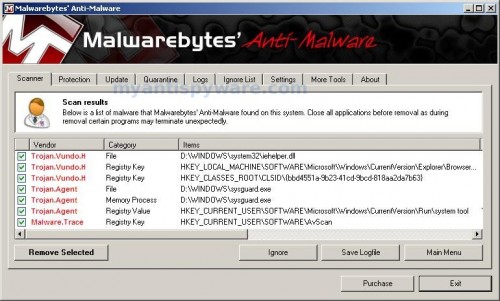
Malwarebytes Anti-malware, list of infected items

Make sure that everything is checked, and click Remove Selected for start Antivirus Live removal process. When disinfection is completed, a log will open in Notepad and you may be prompted to Restart.

Note: if you need help with the instructions, then post your questions in our Spyware Removal forum.

Antivirus Live creates the following files and folders

%UserProfile%\Local Settings\Application Data\[RANDOM]
%UserProfile%\Local Settings\Application Data\[RANDOM]\[RANDOM]sysguard.exe

Antivirus Live creates the following registry keys and values

HKEY_CURRENT_USER\Software\AvScan
HKEY_CURRENT_USER\Software\Microsoft\Windows\CurrentVersion\Run\[RANDOM]
HKEY_LOCAL_MACHINE\SOFTWARE\Microsoft\Windows\CurrentVersion\Run\[RANDOM]

Share and Enjoy:

  • Print
  • Digg
  • Sphinn
  • del.icio.us
  • Facebook
  • Mixx
  • Google Bookmarks
  • Slashdot
  • Twitter
December 7, 2009 on 12:43 pm | In Rogue Anti Spyware, Tutorials - HowTo | 74 Comments |


74 Comments »

RSS feed for comments on this post. TrackBack URI

  1. It was a very helpful tips how to prevent the live virus through computer.

    Comment by Anti Spyware — December 7, 2009 #

  2. i didnt dl the hijackthis.exe…

    i just dl’ed malwarebytes on another pc…put it on my usb….turned my infected pc on…opened up task manager before spyware kicked in….disabled it…installed malwarebytes and did scan…removed…restarted muthafukka is now gone…i swear i got it from mininova as well…:(

    but yeh this thing disabled everything….but malwarebytyes is the bomb!!

    Comment by benny ball bag — December 9, 2009 #

  3. Got this virus first at home 2 days ago and had to do a system restore before I could even run anything after that ran Spyware doctor sorted. However Yesterday my bro brought his laptop in infected with this. Couldn’t do system restore as he had it switched off! Tried to install Malware Bytes but couldn’t! Sussed out that after when you log on it takes a minute for Antivirus to kick in, CTRL ALT Delete googled the various processes then \

    Comment by jackpotjonny — December 11, 2009 #

  4. Thank you! I had a lot of trouble since I couldn’t disable the proxy server. I loaded the malwarebytes and hijack this programs onto a usb on a non-infected computer and loaded them on the infected computer before the Virusware loaded. Unfortunately, the Visurware would keep closing them. So, I restarted the infected computer in safe mode, ran Hijack and Malwarebytes. All appears to be perfect now. Many thanks for helping me to be rid of this nuisance.

    Comment by Brett — December 11, 2009 #

  5. Shouldn’t this be illegal for them, Antivirus Live, to give your computer a virus (fake or otherwise) that forces you to purchase their software to remove the virus that they themself gave you in the first place? What authority could this company be turned in to to be investigated?

    Comment by klondikes — December 11, 2009 #

  6. Considering the virus closes Hijack This before it can finish, this information was not helpfull. Thanks anyways – guess I’ll have for format my hard drive and start from scratch.

    Comment by angelnb — December 12, 2009 #

  7. angelnb, make a new topic in our Spyware removal forum. I will help you.

    Comment by Patrik — December 12, 2009 #

  8. hey i think my anti virus live is on steroids. it won’t open malware, explorer, task manager, spy doctor etc. i’ve tried every method out there and it won’t work! any suggestions?

    Comment by matt — December 17, 2009 #

  9. Download RKill by Grinler from here.
    Before saving rkill.com, rename it first to explorer.exe and click Save button to save it to desktop.

    Double click the RKill desktop icon. If you are using Vista please right click and select Run as Administrator.

    A black screen will briefly flash indicating a successful run. If the tool does not run and you will be shown a message that stats that rkill is infected, then without closing the message, try to run rkill once again.

    Now you can run Malwarebytes Anti-malware.

    Comment by Patrik — December 17, 2009 #

  10. Thanks heaps. I downloaded malwarebytes on another pc and used the to load it on the desktop. I managed to start it before the antivirus live started. all fixed thanks. My computer would not start in safe mode.

    Comment by Rosco — December 19, 2009 #

  11. A very big THANK YOU. Its been a nightmare, but your clear precise instructions worked perfectly.

    Comment by loganthecat — December 19, 2009 #

  12. Could not load anything. went to safe mode, ran as explained and now am spyware free

    Comment by Josh — December 19, 2009 #

  13. Rosco, try SafeBootRepair to restore Safe mode.
    Download it from here.

    Comment by Patrik — December 20, 2009 #

  14. Hey, this is all a sham! While Antivirus Live is a headache, using the Malwarebytes solution is s sham to. It wants you to buy it, to remove anything it finds. I’m pissed at symantec for not having a removal tool.

    Comment by Yoda — December 20, 2009 #

  15. very simply:
    - open windows in “safe mode”
    - search your pc for (sysgaurd.exe) and make sure you check on “search hidden files and folders” from the “more advanced options”
    - delete all files contain [random]sysguard.exe, for example: wmcqsysguard.exe.
    - to ensure complete removal, scan your pc with malwarebytes
    good luck

    Comment by ayman.egypt — December 20, 2009 #

  16. Where is this website at I had to buy the god dam program to get it to uninstall and would like to talk to them about canceling my account.

    Comment by Jeff — December 22, 2009 #

  17. Restart your system in SAFE MODE then everything works great!
    Thank You

    Comment by Sdh — December 24, 2009 #

  18. I GOT RID OF “ANTI VIRUS LIVE” FOR FREE
    1. I DOWNLOADED “MALWAREBYTES” TO A USB FLASH DRIVE, THROUGH A UNINFECTED COMPUTER.
    2. I THEN STARTED THE INFECTED COMPUTER IN “SAFE MODE”. AND INSTALLED “MALWAREBYTES” AND RAN A SCAN.
    3. POOF….THE VIRUS WAS GONE !

    I TRYED “SPYWARE DOCTER” FIRST AND IT DIDNT WORK.

    Comment by TONY DEE — December 25, 2009 #

  19. So far so good. My netbook was infected with this lousy virus.

    I did exactly what the instructions said and so far the netbook is working fine.

    The sites I was at when I got it was NoradSanta.com and a site with Santa jokes (for my son).

    Thanks for the help.

    Smed

    Comment by Smed — December 25, 2009 #

  20. thanks! worked perfectly, i started in safe mode and the rest worked as expected. this was a life saver!!!!

    Comment by randy — December 25, 2009 #

  21. No luck following anyones advice. Have I got the latest version. Safe mode still has the pop ups saying virus. Rkill says ‘too big a program’ in the black box

    Comment by Timmyt — December 26, 2009 #

  22. Timmyt, ask for help in our Spyware removal forum or try following:
    Download exeHelper from here and save it to your desktop.
    Double-click on exeHelper.com to run the fix.
    A black window should pop up. Press any key to close once the fix is completed.
    If the tool does not run and you will be shown a message that stats that exeHelper is infected, then without closing the message, try to run exeHelper.com once again.

    Now you can run Malwarebytes Anti-malware.

    Comment by Patrik — December 27, 2009 #

  23. It worked. Had to use Safe Mode but the steps were right on. Thanks all.

    Comment by Richard Gruver — December 27, 2009 #

  24. Didn’t go to safe mode. Instead, as soon as PC booted up, CTRL-ALT-DEL to open TaskManager to get rid of the sysguard.exe. Checked proxy settings off in IE. Then ran REGEDIT and got rid of each registry manually. Why didn’t Norton pick this up when it came into my computer?!?!

    Comment by Jake — December 28, 2009 #

  25. Just a heads up that I had a case of “advanced” antivirus live, I was looking up football playoff scenarios, and hit a site with a ton of popups (running adblock in firefox, still got them), nothing short of booting into safemode worked for me. Just curious, is quick scan enough, or should I opt for complete scan?

    Comment by Nate — December 28, 2009 #

  26. I have XP, and I think I have some mutated version of Antivirus Live, because EVERY removal help site I’ve gone to has failed.

    I’ve downloaded everything from Spyware Doctor to AVG to Microsoft Malicious Software Removal, and I’ve done this using firefox, and when I go to open the files, Antivirus Live pops up with a window saying they are infected files and can’t be opened.

    I’ve done the thing in Explorer disabling the LAN settings, but Antivirus Live keeps re-enabling it over and over and over and over, and then floods my screen with pornographic adware popups.

    I don’t know what else to do. Nothing I’ve done so far has gotten past the downloading-the-file-phase, and I’m at my wits end. Three hours of trying to figure something out, and I’m two seconds away from throwing my computer across the room.

    Comment by Danielle — December 28, 2009 #

  27. Followed almost to a key- I could not boot using safe mode, I would only get a blue screen moments after selecting the process. AND after I downloaded HijackThis, Antivirus Live refused to let it run. So i restarted the computer and quickly booted up Hijack this immediately, before the malware could actually start playing its evil tricks. this worked, I found only two cases of the “sysguard”, both in 04 as stated. Once I deleted this, my internet explorer worked fine, and since I already had MalwareBits anyway, I was finally able to run it now that HiJackThis cooled off AVL. After the quick scan, I was prompted to restart, which I did. I can find no traces of the malware.

    THANKS!!!!!!

    Comment by Vito — December 28, 2009 #

  28. Nate, if the instructions above does not help you, then ask for help in our Spyware removal forum.

    Comment by Patrik — December 29, 2009 #

  29. Danielle, you have used HijackThis before Malwarebytes Anti-malware ?

    Comment by Patrik — December 29, 2009 #

  30. This is good info, thanks for the help. My friend has this piece of crap virus. I hope he gets it deleted. Thanks!

    Comment by AndehXCK — December 29, 2009 #

  31. I have tried this method but I am stuck at the first hurdle. I opened up this website on my laptop in order to remove Antivirus Live from my mum’s home PC. However, when I uncheck the ‘allow proxy’ box from Lan Setting, I am unable to apply this change in settings and it does not take effect. Is there any way of solving this?

    Comment by Timothy — December 30, 2009 #

  32. Hi Guys,

    Thank yo SO MUCH for this website….
    You guys just woke me up from my malware nightmare:-) Keep up the great work, cheers

    Comment by Michael — December 30, 2009 #

  33. Timothy, you need stop malware processes. Use exeHelper or rkill.

    Comment by Patrik — December 30, 2009 #

  34. I actually had to pay for the program, but intend to have the payment cancelled when the bill comes due.

    Is there any thing I can do to avoid it in the first place

    Jim

    Comment by Jim — December 30, 2009 #

  35. Precisely HOW DOES ONE get this???!!!!

    The first time I appear to have gotten this, I was when on YouTube paying music videos (Trans Siberian Orchestra). Actually infected twice under different set of random prefix names.
    The second time, a week later, I was on match.com!!
    Both times a couple of strange things occurred. IE hung while a page was coming up. Acrobat reader started to open, and then Norton firewall notified me that [random]sysguard.exe was trying to go to the internet.

    Prior the second time I was infected, I had checked everything running on the PC, and all was ligit.
    Is it possible that msmsgs.exe is a vehicle for this virus? Time will tell. Since I removed it from my startup (not sure whether or not it always was there) I have not gotten it again.

    BTW, a few extra tips for manual removel. I did not have to use anything extra.

    1)Try to bring up the task manager while booting. After the first [random]sysguard.exe comes up, kill it but KEEP watching, it will often come up again (see item 3).

    2) The directory \Documents and Settings\username\Local Settings\Application Data will become hidden. After you delete the programs and directories, run a REGISTRY scan (norton). It should report the Registry entries associated exe’s with the virus (but not AVSAN)

    3)In the Registry look at both the CURRENT_USER and LOCAL_MACHINE. Entries will be in both places.

    Comment by Byron — December 30, 2009 #

  36. I had tried all of those steps but the Malwarebytes and Microsoft online scanner still detect the infected file.
    The infected file is “xqacvz.sys”

    Can somebody help me?

    Comment by Pond — December 30, 2009 #

  37. I have had the same problem. If you can’t rkill or exehelper to work, do the following.

    Re-start your computer and as soon as the Windows desktop appears, right click the taskbar at the bottom as quickly as you can.

    In the white drop down box, Click on “Task Manager” and wait for this to open. This allows the task manager box to remain open. If you wait and try Ctrl-Alt-Del, Antivirus Live will already be loaded and it wont open!

    In the Task Manager click on the “Processes” tab at the top.

    In the bottom left side corner check the box labeled “Show Processes From All Users.”

    Look for the files ending with “sysguard.exe” It will have other letters before that, and there may be more than one process running.

    Click the filename, then click the “End Process” button. Make sure you have all instances of this type closed.

    Now follow the steps above about turning off proxy in IE, installing and running anti-malware.

    Remember , DON’T RESTART your computer until after the anti-malware has been run, or AntiVirusLive will reload at startup!

    Comment by Patrick — December 31, 2009 #

  38. cool

    Comment by Ignacius — December 31, 2009 #

  39. Please help, I’m going crazy! After 3 days, literally, with SpyDoctor, the best they could get me to was being able to boot up in safe mode. In regular boot up I have no icons on my desktop. I was about to reformat in the new year when I came across your site. I have downloaded to my laptop the Hijack this and malwarebytes exe and transferred to my infected desktop, Hijack found a nokksguard file which I deleted, then ran the malware and it found several problems, including the nokksguard file, which Spydoctor had found earlier and had me rename it to Viruss000, can I post the log, if it will help?. With renewed anticipation I was hoping this would be the fix, but alas I am still only able to boot up in safe mode, so no internet access and no icons on my desktop in normal mode. Can anyone help before I reformat. Many thanks.

    Bob

    Comment by BobG — December 31, 2009 #

  40. Hey all,

    I found Antivirus Live on my computer, I mean I saw a whole performance of it. I restarted the computer in safe mode and did a system recovery to one week ago. I restarted windows and logged in, quickly started the task manager but never saw any *sysguard.exe coming up. I think I tried to open some program and my computer freezed while beeping, so I figured it should still be infected. I went back to safe mode and installed malwarebytes anti-malware, ran a full scan and found something identified as Rootkit.mbr!! I went ahead and erased it along with all the files that had been saved since I last logged into the computer (5 days before).

    My computer is still slow and it freezes if I try to run malwarebytes. Any advice?? Thanks.

    Also, how possibly did my computer get infected if I didn’t visit any suspicious website? I have AVG free 8.5 installed on that computer.

    Comment by Brownie — December 31, 2009 #

  41. Pond, probably xqacvz.sys is malicious driver. Try remove it using Avenger, download it from here.
    Unzip and run it.
    Paste the following text in Input script Box:
    Drivers to delete:
    xqacvz

    Then click on ‘Execute’.
    Also you can ask us for help in our Spyware removal forum.

    Comment by Patrik — January 1, 2010 #

  42. Bob, please make a new topic in our Spyware removal forum (include HijackThis log).

    Comment by Patrik — January 1, 2010 #

  43. Brownie, please follow these steps.

    Comment by Patrik — January 1, 2010 #

  44. I will do it now, thanks Patrik.

    Bob

    Comment by BobG — January 2, 2010 #

  45. Hi Patrik, I posted to the other forum, there is a red star against the post, have I missed something?

    Many thanks,

    Bob

    Comment by BobG — January 2, 2010 #

  46. wow this was a bad one…paralised my computer.

    i couldnt download any of the files on the website above BUT, the best thing that worked for me was to have a 2nd laptop to dowloand the files with and a usb key.

    Restart your computer in command prompt and run the files from your USB there…this will prevent any of the virus’ applications from preventing a succeful removal or stopping the removal tool from loading if you loaded windows fully.

    if you do this, the app works great and within 20 minutes i was back up

    thank you!

    Comment by SB — January 2, 2010 #

  47. Bob, sorry for delay. Today, i will answer you.

    Comment by Patrik — January 3, 2010 #

  48. couldn’t run MBAM or any other programs so booted my laptop up in safe mode. Opened task manager…..no sign of sysguard.exe, performed a search for sysguard.exe…..no sign of it, ran MBAM and it didn’t find any infections!!! yet when i run my laptop in normal mode the virus is there!

    Comment by Kev — January 3, 2010 #

  49. Hey Folks,
    I really can’t thank you enough. You’re all Legends.
    I was about to head down the format hard drive road when I came across your site.
    I had to download the RKill program to get anywhere first, then the instructions above worked a treat.
    I’m back in control……for a while anyway :-)
    Thanks Heaps

    Comment by Damian — January 3, 2010 #

  50. Thanks for this – I never realized how easy this problem was to fix!!

    Comment by Regsitry Cleaner Reviews — January 3, 2010 #

  51. I have this evil virus too…If you actually buy the product will they stop annoying you?

    rkill worked really well and i was able to open task manager again..

    internet explorer is completely infected however, firefox works well. I’m usig malwarebytes to try and remove it

    thanks,

    Kat

    Comment by Katrina — January 3, 2010 #

  52. Kev, probably your PC is infected with a new version of the rogue. Ask for help in our Spyware removal forum.

    Comment by Patrik — January 4, 2010 #

  53. Insane job patrick! if i wasnt a broken student i would donate

    Comment by JP — January 5, 2010 #

  54. Found the file, renamed it, rebooted the renamed file didn’t load then I restored to yesterday.

    Comment by Ted — January 8, 2010 #

  55. I did what Jake posted on Dec 28th and worked finally (Ran REGEDIT) thanks. Still downloaded the 2 programs above for good measure. what a PITA!

    Comment by michD — January 9, 2010 #

  56. Thank you! Thank you! Thank you! It worked beautifully!

    Comment by Brandy — January 9, 2010 #

  57. Thank you so much for these comments here! They saved my computer. I did exactly what Tony Dee did on Dec 25th. I downloaded malwarebytes to a usb flash drive on an uninfected computer. Then I started the infected computer in Safe Mode, installed the Malwarebytes and ran a scan. I ran the full scan which took about 1 1/2 hr. But WELL worth it, after the scan, the virus was GONE!
    Malwarebytes is the BEST !!

    Comment by Jen — January 10, 2010 #

  58. Holy cow, this malware is tough to clean. I’ve tried these instructions (fixing IE, HijackThis, Malwarebytes) and it still comes back. Trying a second time. My question is if I’m going to run Regedit and delete keys, what part of the last two ones do I delete:

    HKEY_CURRENT_USER\Software\Microsoft\Windows\CurrentVersion\Run\[RANDOM]
    HKEY_LOCAL_MACHINE\SOFTWARE\Microsoft\Windows\CurrentVersion\Run\[RANDOM]

    Do I delete the whole “Run” folder and its contents? Or am I looking for something specific in the Run folders?

    If I delete the Run folders and then do something like CCCleaner registry repair, will that restore anything that shouldn’t have been deleted or will it bring the malware back for some reason?

    Thanks!

    Comment by Jeff — January 10, 2010 #

  59. Jeff, best way for you – open a new topic in our Spyware removal forum. I will help you.
    And don`t remove whole “Run” folder!

    Comment by Patrik — January 11, 2010 #

  60. Hi all …

    I got rid of AntiVirus Live using the steps described, but now my comp has created an “administrator” user account, when I had no accounts before, and it logs me out immediately after I try to log in. Is there another thread I can see to get answeres on this problem please?

    Thanks in advance.

    Comment by Ray — January 11, 2010 #

  61. Ray, you account have administrator privileges ? If yes, remove the “new” account.

    Comment by Patrik — January 11, 2010 #

  62. Hey Patrik.

    Thanks for the response. I can’t get in to do anything with my computer. I get to the login page and it flashes up my desktop background for a moment then logs me out. I’m going to try and re-install XP as I believe the problem is a deleted registery file caused by the AntiVirus Live Trojan.

    I’ll keep you posted.

    Ray.

    Comment by Ray — January 11, 2010 #

  63. Thanks Patrick, I seem to have gotten rid of it with the help of regedit, hijack this, and Malwarebytes run a second time. As for deleting stuff in the registry, I didn’t see anything that looked unusual in the HKEY_LOCAL_MACHINE\SOFTWARE\Microsoft\Windows\CurrentVersion\Run\[RANDOM], so I didn’t delete anything, but I fear I deleted the contents of the “Run” folder (but not the folder itself) in the HKEY_CURRENT_USER\Software\Microsoft\Windows\CurrentVersion\Run\[RANDOM]
    My Print to PDF seems to be acting funny, not sure how to restore what was in there…any help would be appreciated…even if pointing to another website…Thanks.

    Comment by Jeff — January 11, 2010 #

  64. Nothing is working for me cant gt task manager or anything up the malware is asking me to pay but it wont let the ie come up to allow me to do that. someone please help me

    Comment by Danny — January 12, 2010 #

  65. Jeff, what shows PC when you trying print to PDF ?

    Comment by Patrik — January 13, 2010 #

  66. Ran a real simple fix for this…download superantispyware.com on mozilla or safari, your IE7 or 8 is toast. The malware will not allow you to run the install. shut down your unit and when it reboots, as soon as your desktop comes up click on the install for superantispyware and run the program, allowing for it to scan for garbage. If you start the process before antivirus live starts its process, you will win the battle here. Continue to “x” out the windows it brings up while Superantispyware does its thing. This malware cannot block processes running in front of it and you will be able to scrub it off your machine. At the end of the scan your machine reboots and Antivirus live is gone. Be sure to go back and change the proxy settings in IE when you are all done…better yet, don’t ever surf with IE!!!

    Comment by Keith — January 15, 2010 #

  67. I downloaded the malware application with mozilla firefox. However, after downloading, it would not open to allow me to run the scan so I had shutdown and restart the computer click on f8 and then go into \safe mode with networking\. Only then was i able to open the application and run the scan. Did a full scan check, 4 trojan files were found. I had those removed and now my computer is running fine. Thanks so much for this information.

    Comment by smith — January 16, 2010 #

  68. That’s a pretty clever trick, renaming a removal tool “iexplore.exe”, the one application the virus doesn’t block. The problem is that the virus hijacks IE, and you can’t use another browser unless it’s already running at the time you’re infected. At least, that’s the case in some versions of the virus, which seems to be adapting itself to prevent more and more removal methods.

    If you have another computer on your network running Windows, you can kill it remotely, following the instructions I posted in another forum (scroll down through the comments to the date January 17, 2010 to find my post):
    howtogeek.com/howto/8693/how-to-remove-antivirus-live-and-other-roguefake-antivirus-malware/

    Jeff – Yes, you are looking for something specific in the Run key. The name of the entry is randomized, but it will be obvious which one it is, because it looks like just a bunch of gibberish. That’s what you want to delete. The Run key contains a list of programs that run when you start the computer (HKLM) or when you log on (HKCU). Deleting it can break some legitimate applications, as you’ve discovered.

    To restore it, you can try doing a System Restore to a point in time before you deleted it, but be careful, the virus’s entries could also return if you restore to a point in time after you were infected.

    Comment by Adi Inbar — January 18, 2010 #

  69. Got Antivirus live. Tryed to go to safe mode with networking, won’t go anywhere keeps coming back to windows did not start correctly over and over. Will not even open windows now. Help

    Comment by kat — January 18, 2010 #

  70. Wow — got blasted by this crap while trying to finish an assignment. Locked out of everything on my computer. Fortunately, I was able to look up this site’s instructions on my phone and fix things in a few hours at no cost. I got in front of the evil program with an immediate ctrl-alt-del and killed the *sysgaurd.exe processes in the Task Manager. This gave me time to search & destroy before I got locked up again. Thanks, all & good luck to those who are still struggling or see it in the future…

    Comment by DPC — January 19, 2010 #

  71. This worked PERFECTLY on my laptop.

    Only difference is I used another computer to download the programs and then USB to laptop.

    THANK YOU!

    Great instructions also.

    Comment by deCap — January 26, 2010 #

  72. Thank you! I was unable to download other tools to remove the virus, even when using another computer to download onto a thumbdrive and attempting to download onto my laptop from USB. I was able to download HijackThis onto my laptop from the thumbdrive, however, and even though AntiVirus Live was trying to run (popping up windows frequently) while Hijack was running, it still successfully completed and I was able to erase the contaminated file. Then Malwarebyte ran without a problem, and I deleted the trojan file. This was my third attempt to remove this virus, so thank you again!!

    Comment by lisa — January 27, 2010 #

  73. Thanks a million for your instructions on removing the nasty Antivirus Live plague. It came up on my machine (via an e-mail, I think) out of nowhere and took it over. I hope the creator(s) of this plague rot in hell.

    Thanks again!

    Comment by Wayne — January 29, 2010 #

  74. managed to get it of my computer after a few go due to the advice on here(downloaded malwarebytes.com after getting onto my computer through safe mode ‘repair computer’ way ) thanks you kind people out there

    Comment by steve — April 4, 2010 #

Leave a comment

XHTML: <a href="" title=""> <abbr title=""> <acronym title=""> <b> <blockquote cite=""> <cite> <code> <del datetime=""> <em> <i> <q cite=""> <strike> <strong>


My Anti Spyware - Free antispyware programs and Spyware Removal Instructions.
