![]() | Do you have pop-ups or your computer infected with trojan or spyware ? Learn how to ask us for help, click here! |
MalwareBytes Anti-malware – free spyware, malware, trojan remover.
Malwarebytes’ Anti-Malware is designed to quickly detect, destroy, and prevent malware, spyware, trojans. Can detect and remove malware that even the most well-known Anti-Virus and Anti-Malware applications on the market today cannot.
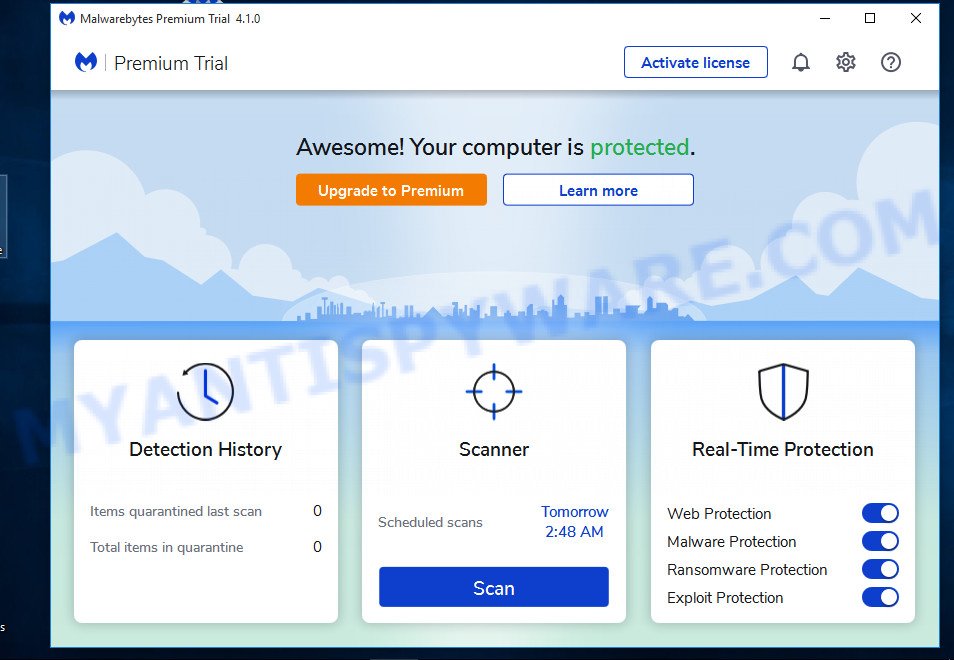
The interface is plain and simple to use. Malwarebytes’ Anti-Malware scan system allows performing a quick scan or a full scan, depending on your needs.
MalwareBytes Anti-malware Features:
- Support for Windows 2000, XP, and Vista
- Light speed quick scanning
- Ability to perform full scans for all drives
- Malwarebytes’ Anti-Malware Protection Module(requires registration)
- Database updates released daily
- Quarantine to hold threats and restore them at your convenience
- Ignore list for both the scanner and Protection Module
- Settings to enhance your Malwarebytes’ Anti-Malware performance
- A small list of extra utilities to help remove malware manually
- Multi-lingual support
- Works together with other anti-malware utilities
- Command line support for quick scanning
- Context menu integration to scan files on demand
How to use MalwareBytes Anti-malware
- Download MalwareBytes Anti-malware (MBAM).
- Close all programs and Windows on your computer.
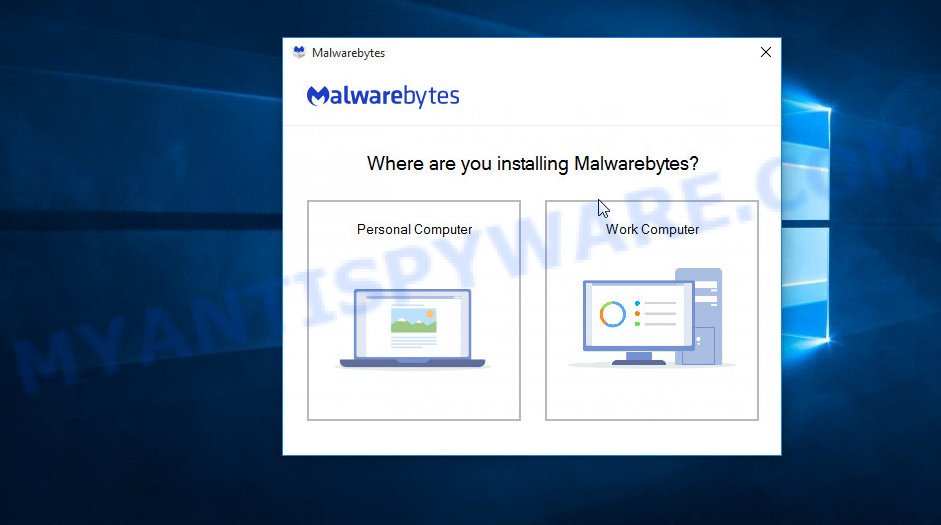
- Double Click mbam-setup.exe to install the application. When the installation begins, keep following the prompts in order to continue with the installation process. Do not make any changes to default settings and when the program has finished installing, make sure a checkmark is placed next to Update Malwarebytes’ Anti-Malware and Launch Malwarebytes’ Anti-Malware, then click Finish.
- If an update is found, it will download and install the latest version.
- Once the program has loaded, select “Perform Quick Scan”, then click Scan.
- The scan may take some time to finish,so please be patient.
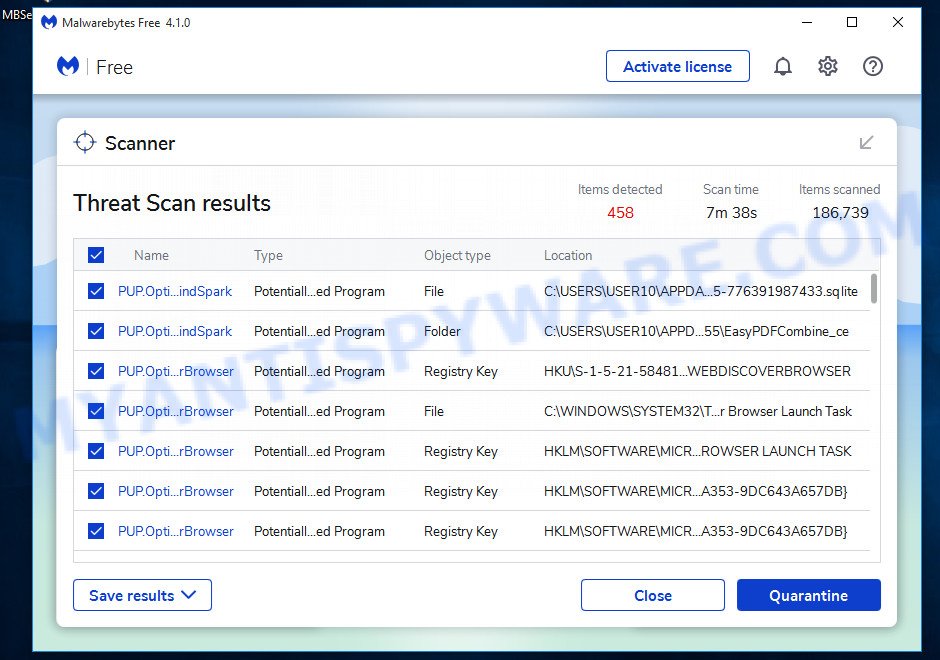
- When the scan is complete, click OK, then Show Results to view the results.
- Make sure that everything is checked, and click Remove Selected.
- When disinfection is completed, a log will open in Notepad and you may be prompted to Restart.
Download MalwareBytes Anti-malware
From Malwarebytes.org link 1
From Malwarebytes.org link 2
Questions and answers.
1. I cannot download Malwarebytes Anti-malware.
Probably your computer infected with DNSChanger trojan. Read and follow these instructions: How to remove trojan DNSChanger.
2. Malwarebytes Anti-malware won`t install, run or update.
Read following instructions: Malwarebytes won`t install, run or update – How to fix it
3. Got error code 731 (0,9).
Try restarting the computer, it should solve the error.
Your current antispyware software let an infection through ? Then you may want to consider purchasing the FULL version of MalwareBytes Anti-malware to protect your computer in the future. MalwareBytes Anti-malware Full version features scheduled scanning, scheduled updating and highly advanced Real-Time Protection to ensure protection from installation or re-installation of potential threats as you surf the Internet.
August 28, 2008 on 12:53 am | In Best Programs, Free Software, Spyware protection and removal | 155 Comments |155 Comments »
RSS feed for comments on this post. TrackBack URI
Leave a comment
My Anti Spyware - Free antispyware programs and Spyware Removal Instructions.


Hallo Men, I’m infectes
Comment by Markus — August 31, 2008 #
Very good program
Comment by Markus — August 31, 2008 #
I am not able to download the MalwareBytes Anti-malware from the following portion :
Download MalwareBytes Anti-malware from here or here.
Please guide me further
Comment by V.Narayanan — September 6, 2008 #
Probably spyware blocked download of MalwareBytes Anti-malware.
I would recommend you follow these instructions.
Comment by Patrik — September 6, 2008 #
Thanks
Comment by jim — September 8, 2008 #
my computer infected by anti-virus xp2008
please help me to remove this in my computer
Comment by Jin — September 14, 2008 #
Jin, please read these instructions.
Comment by Patrik — September 14, 2008 #
please help
Comment by Francois — September 14, 2008 #
Francois, How i can help you ?
Comment by Patrik — September 15, 2008 #
I’m infected with Micro AV spyware
Comment by Kevin Helms — September 19, 2008 #
Thanks
Comment by Rosjier — September 20, 2008 #
Kevin, please read these instructions.
Comment by Patrik — September 20, 2008 #
GOOD IS FREE
Comment by LOUIE — October 5, 2008 #
ive been infected with virusremovoer2008 please help
Comment by Brandon — October 17, 2008 #
Brandon, please read these instructions.
Comment by Patrik — October 18, 2008 #
Hey, I was infected with what I think was AntiSpyware 2008 (Changed my desktop background, demanded that I download the file, disabled start menu / my computer etc…) – basically it made running my computer impossible, so I reformatted using the HP emergency recovery tools.
The bulk of the problem has gone, but there still seems to be a browser hijack happening that prevents me from accessing a number of websites like Youtube, google, facebook and instead redirects me to a page called ‘Microsoft security center’ with a link to Antispyware.
I’ve tried scanning with Malwarebytes and AVG, both of which deleted a couple of infected files, but the problem still persists. Help please?
Comment by Dan — October 20, 2008 #
Dan, please read these instructions. I will help you.
Comment by Patrik — October 20, 2008 #
Thanks
Comment by mike — October 22, 2008 #
Excelente programa!!
Muito bom!
Estão todos de parabéns!!
Vlw!
Comment by Eduardo — October 23, 2008 #
I got infected with spyware 2009 i can´t start internet expoler its deleting my hole files. i downloaded malware but dont helps , someone can help me
Comment by perry — October 25, 2008 #
Perry, please read these instructions. I will help you.
Comment by Patrik — October 25, 2008 #
I was unable to download the file on the infected computer so I saved it to a cd on another non-infected computer and then installed Malwarebytes Anti-Malware from the cd.
Comment by Paul — October 26, 2008 #
thanks
Comment by murad — October 31, 2008 #
Thank you so much for putting this information together. It worked!
Comment by Jessica — November 9, 2008 #
ok so i have ran this twice on my computer and it says all of the files have been removed… however when the computer restarts the program still comes up and tries to run
what do i do
Comment by Jamie — November 10, 2008 #
Jamie, please read these instructions. I will help you.
Comment by Patrik — November 10, 2008 #
I have tried 3 different applications to try to get rid of the Trojan and finally this one did the trick!
Thank you and i will definitely recommend this to others!
Comment by Andrew — November 12, 2008 #
I have downloaded malwarebytes but i cant get it loaded. I cant even uninstall it. can sombody help me get rid of antiviruspro2008??
Thanks
Comment by Mike L — November 15, 2008 #
I even tried saving malwarebytes to a disk from a non-infected computer and loading on the infected machine as another poster stated and I cant not get it to load. please help
Comment by Mike L — November 15, 2008 #
Mike, try these methods:
1. Rename mbam-setup.exe to zse12bn.exe (or another random name). Run the file.
2. Reboot computer in the safe mode.
Run mbam-setup.exe again.
3. Read these instructions.
Comment by Patrik — November 15, 2008 #
I cant get hijackthis to begin the download. it goes to a blank page. also I found 2 files similar to mbam-setup.exe but nothing exact. when changing the name the system would not reboot properly. I did a system restore to get the machine to boot windows.
Any Ideas?
Comment by Mike L — November 17, 2008 #
Mike, restart your computer in the Safe mode with networking by doing:
Follow these instructions again.
Comment by Patrik — November 17, 2008 #
Patrik,
Thanks for trying to help! I have followed the instructions again. I have even d/l mbam-setup.exe, changed the name to a pen drive. The d/l is still blocked. I have tried the same for HijackThis with out any luck, all in safe mode. GRRR this is a tough one.
Any ideas?
Comment by Mike L — November 18, 2008 #
help to down load
Comment by james — November 20, 2008 #
Read these instructions again.Start a new thread at the Myantispyware forum by using the New topic button. Give brief details of your problems. Wait for help.
Comment by Patrik — November 20, 2008 #
my computer has been infected by antivirus 2009
Comment by eric — November 20, 2008 #
Was successful in removing the annoying Antivirus Trigger Alert on my laptop. Great virus remover!
Comment by Jenny — November 25, 2008 #
.ah.
Comment by c. uccio — December 3, 2008 #
thanks
Comment by lyn — December 10, 2008 #
Thank God I found you shareware! Could not get winiguard off my vista system with anything else. If anyone has any doubts as to Malwarebytes capabilities or claims, they can rest at ease. Try it, you won’t be disappointed!
Thanks again. Thinkin about upgrading to pro..believe it.
Comment by randy — December 12, 2008 #
Thank you very much.
Your application together with Avenger was the only way to get rid of TDDServ.sys trojan.
Now my system is free of all parasites!!!
Comment by ilgaz — December 14, 2008 #
help to down load
Comment by shmuel — December 14, 2008 #
shmuel, if you cannot download Malwarebytes Anti-malware, then probably your computer infected with TDDServ.sys trojan. Read and follow these instructions: How to remove trojan TDSServ.
Comment by Patrik — December 15, 2008 #
I thank you for providing MalwareBytes it cleaned up my antivirus 360.
Thanks again.
Regards,
Pasha
Comment by Pasha — December 15, 2008 #
THANK YOU. IT WORKED! Harry
Comment by Harry — December 16, 2008 #
I’m infected with winweb security,please explain me how i can delite it
Comment by tozba37 — December 18, 2008 #
tozba37, please follow these steps.
Comment by Patrik — December 18, 2008 #
These instructions worked perfectly.
Blessings be upon you for the wealth of information!!
Comment by Drewhaha — December 19, 2008 #
Hello this is Umakant gupta. My computer infected by a new kind of Malware work of windefender 2009 and somne hackers,windefender is itselef a Malware.
So Please prevent with this windefender 2009. It’ll assure you to remove all kind of malware but no windefender2009 is a malware in itself.
Thank you Malwarebytes.
its working nice, this s/w is god for me and my computer who saved us me and my computer also.
Thanks again Malwarebytes
Comment by Umakant Gupta — December 21, 2008 #
I have tried scanning w/ AVG and also Malwarebytes Anti-Malware but i still cannot get rid of Antivirus 360 and Registry defender. I dont know what else to do and im sick of it popping up, can anyone help me please
Comment by corey — December 24, 2008 #
corey, looks like your computer infected with fresh version of antivirus 360 virus, please follow these instructions.
Comment by Patrik — December 24, 2008 #
After I scanned to see if any infections were on it and i noticed that i had 2 infections. Also these infections were from the \
Comment by Dean — December 26, 2008 #
oops acidently submitted above ^
continued- System Security program which is not real. Once I scanned, cleared the virus and restarted, it came back!! How do i get rid of this virus once and for all?
Comment by Dean — December 26, 2008 #
Dean, please follow these instructions. I will help you.
Comment by Patrik — December 26, 2008 #
thnks for helping
Comment by w — December 27, 2008 #
My computer (older model) was infected with Antivirus Trigger and I tried half-a dozen different download scans (some of which tied up the machine for hours)–to get rid of it. None worked until I discovered you guys. Fast (relative to the others) And it worked! Thanks so much!
Comment by Gig Thurmond — December 27, 2008 #
thanks good
Comment by pardeep — December 28, 2008 #
I’m not a coputer guy but I do have a problem with AntiVirus Trigger. It has cut off my access to the internet. When I try to download Malwarebytes, it installs then freezes up when it looks for updates on Malwarebytes.org.
Help!!
sjb
Comment by sjb — December 28, 2008 #
sjb, please follow these instructions. I will help you.
Comment by Patrik — December 28, 2008 #
Everytime I press on the link to download the program it said that it can not display…Please help…
Comment by Jim — January 3, 2009 #
Looks like your computer is infected with dnschanger trojan. Follow these steps.
Comment by Patrik — January 3, 2009 #
thanks
Comment by tim form — January 10, 2009 #
I’m asked to help a friend who’s (probably) got the MS Antispyware 2009 on his Windoxs XP machine, but who can’t get on the internet anymore.
Can I download “MalwareBytes Anti-malware” on my machine (Mac OS X), copy it onto a CD or USB-stick and load it onto his machine? I’d prefer CD, so my USB-stick cannot get infected)
Comment by Peter — January 15, 2009 #
Yes of course. CD is best choice.
Comment by Patrik — January 15, 2009 #
Hi,
I have been trying to get rid of some malware including Antispyware 2008. I downloaded Malwarebytes, was able to run it, but freezes when quarantining the infections. Please help.
I have tried unselecting some of the infections and going on a group by group basis but still does not work. Is stalls and tells me the program is not responding.
Any help would greatly appreciated.
Rudy
Comment by Rudy — January 16, 2009 #
Rudy, please read and follow these instructions.
Comment by Patrik — January 16, 2009 #
hullo, ive downloaded and installed perfectly… no problems here, excellent web-site btw, i notice this program gets mentioned alot in various posts ( i take it it must be good then) i just wandered what your thoughts were comparing it to spysweeper or Xoft,… keep up the good work!!
Comment by zen_buddah — January 17, 2009 #
hey i downloded malwarebytes’ aniti- malware but the window only stays open for 10 sec and the it closes so i cant scan. can u help me.
Comment by rj — January 23, 2009 #
Looks like your computer infected with trojan that blocked running of MBAM. Read and follow these steps.
Comment by Patrik — January 23, 2009 #
i want to update my malwarebytes’ anti-malware but i dont have an internet connection how can i update???? Please help….
Comment by Julius — January 23, 2009 #
Julius, update is not possible w/o internet connection.
Comment by Patrik — January 23, 2009 #
Everytime I try to run the Malware it closes after about 5 seconds. I tried to remove the trojanDNSChanger but I couldn’t find any of those drives it says to remove. Please help it’s my computer at work
Comment by Patricia — January 27, 2009 #
Malwarebytes- worked to remove system guard 2009,
it took 3 scans to completely remove. I need a good registry clean up for all those other spyware programs I removed from my pc that didn’t work, any suggestions?
Comment by gamemisconduct — January 29, 2009 #
gamemisconduct, try CCleaner.
Comment by Patrik — January 30, 2009 #
Patrik, thanks ccleaner worked great, any suggestions on a antivirus
Comment by gamemisconduct — January 30, 2009 #
Good free antivirus programs: AVG and Avast.
Comment by Patrik — January 30, 2009 #
Patrik, AVG worked great, any other suggestions, thanks again.
Comment by gamemisconduct — January 31, 2009 #
Read the topic.
Comment by Patrik — January 31, 2009 #
I have read every one of your instructions, i have followed them exactly. Unfortunatley, System guard 2009 keeps coming back. How do i get rid of this annoying program otherwise?
Comment by Sarah — February 1, 2009 #
Sarah, read and follow these steps.
Comment by Patrik — February 1, 2009 #
I have the same thing going on. pissing me off. Is the Maleware download the Cyberderfender Trial? I am downloading cyberdefnder based on the link in instructions. Is this the right thing to download??????
Comment by Bill — February 1, 2009 #
My computer always crashes. I must be infected bad. It sais I have the Sinowal.Trojan, Trojan.win32.injectk, and xtgoj6119471.exe what the puck??? Help
Comment by Bill — February 1, 2009 #
To All: I did not buy this program, did some more seaching and found where you can get both the register clean up as well as the maleware removal for less money at xoftSpySE (search for it) and they have an offer that expries today. It is working for me. Got rid of the virus and computer is running much better and faster. Like she did out of the box.
Comment by Bill — February 1, 2009 #
for you info, i purchased XoftSpySE and RegCure for the price on XoftSpySE. Around 40 bucks.
Comment by Bill — February 1, 2009 #
*splat* I pwn3d that bug! Patrik, thanks so much for caring, it’s tremendously appreciated. Even by those who don’t leave a comment to show their gratitude. So I speak for every one of those lazy critters when I shout: I WANT TO KISS YOU! x
Comment by X. — February 1, 2009 #
Dear Patrick
So far so good-I followed your instructions and now my pc seems to be working normally again without the agressive and unwelcome warnings of the antispyware fraudster. The antimail virus seems to have gone. I share the sentiments (not literally) of the last writer. Incidentally, several websites offer a clean up for money. That sounds a bit like a protection racket to me.
Thanks again Patrick.
Yorick
Comment by YorickJenkins — February 2, 2009 #
thanks for this piece of software!
Comment by robert — February 3, 2009 #
The Avenger and Malware app worked like a charm. I think everything runs much better and faster now. Thanks.
Comment by Mike H — February 10, 2009 #
I need help… I have the antivirus 360 but am unable to download the malware?? Help
Comment by Brandie — February 11, 2009 #
Brandie, please follow these steps.
Comment by Patrik — February 12, 2009 #
The antivirus 360 downloaded on my computer. I need help removing it please.
Comment by Lacie — February 13, 2009 #
When ever i click on a download link it says: Internet Explorer cannot display the webpage.
HELP, nothing is working!
Comment by rafiel — February 15, 2009 #
Patrik,
Hi there. I’m really struggling with some malware that I can’t seem to remove. The rapport from smitfraudfix is below. Any ideas?
SmitFraudFix v2.396
…
Comment by Chris Norris — February 17, 2009 #
Chris, please follow these steps.
Comment by Patrik — February 17, 2009 #
infected with antivirus xp pro system running really slow. Was able to install malwarebytes’ anti-malware, upon running program it freezes after some time running due to low resources. Can this be resolved?
Comment by Joe — February 19, 2009 #
Joe, please follow these steps.
Comment by Patrik — February 19, 2009 #
troublemaking windowsclick.com. I am trying your tool to get rid of it…
Comment by keke — February 20, 2009 #
I run trend Micro anti. and seem to have picked up TROJ_Generic.Dit. Cant seem to get rid of the bug. Is this bug bad? help!
Comment by drew — February 24, 2009 #
I have TROJ_Generic.Dit (bad)?
Comment by drew — February 24, 2009 #
i’m having problems updating the database. don’t know if it’s the malware but if there’s a workaround that would be appreciated.
Comment by Jo — February 26, 2009 #
Jo, probably your computer is infected, please follow these steps.
Comment by Patrik — February 27, 2009 #
my computer was infected wit antivirus360 so i did a scan wit avenger. after i restart my computer, my internet bacame kinda slow and i can’t run my Malwarebytes’ Anti-Malware
Comment by Josh — February 27, 2009 #
antivirus360 just automatically downloaded onto my computer so i followed da guide to remove antivirus360. it told me to run avenger which i did. after rebooting my, internet seem extremely slow, i cant get to any website, and i cant open n run Malwarebytes’ Anti-Malware. please help
Comment by Josh — February 27, 2009 #
Josh, please follow these steps. I will help you.
Comment by Patrik — February 27, 2009 #
i clicked on download HijackThis but it said adress not found. theres really notin wrong with my computer. its still fast except my internet is mad slow now and my disk defragmenter wont work. should i just restore my computer to an earlier time?
Comment by Josh — February 27, 2009 #
Yes, try it. After a restore procedure, scan your PC with Malwarebytes Anti-malware and an antivirus program.
Comment by Patrik — March 1, 2009 #
hey this is a great site but when i download malwarebytes it’s goes throught the whole process but when i click on it, the program doesn’t come up.
Comment by Daniella — March 1, 2009 #
Daniella, try rename mbam-setup.exe to myapp.exe and try to run again.
Comment by Patrik — March 1, 2009 #
how will i do that?
Comment by Daniella — March 2, 2009 #
I am not really able to do anything on my computer. I keep getting an antivirus2009 popup, I can’t get online and the background on my screen has changed. I downloaded malwarebytes and tried to do a scan but it takes days and never finishes. Please help..
Comment by Gina — March 6, 2009 #
Gina, please follow these steps.
Comment by Patrik — March 7, 2009 #
Hi, I had the antivirus xpro virus on my computer, i ran the malware and it worked great!! However… i now don’t have an internet connection….. any help?
Much appreciated!
C
Comment by Christi — March 8, 2009 #
Christi, make a new topic at our forum and include more information about your problem.
Comment by Patrik — March 8, 2009 #
I have downloaded hijackthis and run a scan but it does not open in notepad so I am not able to copy/paste here. My notepad will open when i go to it just not with my hijackthis log.
Comment by Gina — March 9, 2009 #
the two download links provided are saying that they dont exist and I cant get the software. Im infected with the UACD.sys trojan…
Comment by Brett — March 9, 2009 #
Brett, just checked both links. It are ok for me.
Comment by Patrik — March 10, 2009 #
Hi, i ran the malwarebyte and after that i tried to restart my laptaop. But I am not able to login. it comes till login screen and then I get a Windows genuine software screen saying.. resolve later or now. whatever i click, it goes back to booting and again the same login screen. please help
Comment by sanjay — March 15, 2009 #
sanjay, try it.
* Restart your computer
* After hearing your computer beep once during startup, but before the Windows icon appears, press F8.
* Instead of Windows loading as normal, a menu should appear
* Select the “Last Known Good Configuration..” option.
* Press Enter.
Comment by Patrik — March 15, 2009 #
Hi Patrik:
I tried this and also booting in safe mode, but same problem. nothing works. I dont know where is the problem- in registry or MS windows has done some prank regarding their genuine software stuff. any other suggestions, patrik?
Comment by sanjay — March 15, 2009 #
Looks like some system files or registry entries are damaged. You can repair system files and registry using Windows Installation disk (select repair mode).
Comment by Patrik — March 15, 2009 #
Malwarebytes admits to uploading many different versions of MBAM.
I tried to use MBAM and it was VERY weak, i’d recommend using a good program like Avast! Free Home Edition, which works for me.
Comment by Cor'e =) — March 16, 2009 #
Every Malwarebytes affiliate have a specially compiled version of MBAM.
Comment by Patrik — March 16, 2009 #
thanks very much. This really worked
Comment by Danny — March 27, 2009 #
IT was great
Comment by Chris Detweiler — March 29, 2009 #
OMG…thank you so much…your software saved my computer…thank you thank you thank you!!! You are a livesaver…could not figure out how to get the PAV software off my computer…Malwarebytes did the trick…and it was so quick & easy to download and removed it NO PROBLEM!!! 100 thank you’s go out to you!!!!!!
Comment by Selene — April 10, 2009 #
I installed Malwarebytes’ from a CD and it worked just fine the first time I used it (March 28, 2009). Found some issues, I fixed them and all was well in my world. I have noticed some strange activity on my computer lately…nothing that you noted above as a symptom of a particular virus, but just small differences. I started Malwarebytes’ and tried to update it, but it popped up an error message saying I wasn’t connected to the internet or a firewall wouldn’t allow me to download the updates. I immediately tried to go to their website and I cannot access it. Can you give me some advice as to what may be wrong and what I can do to fix it?
Comment by Leslie — April 11, 2009 #
Looks like your computer infected with a trojan that blocked access to Malwarebytes site. Ask help at our forum.
Comment by Patrik — April 11, 2009 #
I have been tearing my hair out for days – it’s bad enough being grey, I don’t want to be bald too! I have had the Bas***d WinCodecPro trojan, and have tried everything to get rid of it. I downloaded MalwareBytes yesterday, ran the scan, and bingo!
I love you all!
Comment by Howard — April 24, 2009 #
o Important: Rename the downloaded mbam-setup.exe file to mb.exe to help work around certain malware that will block it from being run.
1: Go to Control Panel > Programs and Features and uninstall Malwarebytes.
Next redownload Malwarebytes but rename it before you download it to your desktop. As you are in the process of downloading when you get to the point that the \
Comment by John — April 26, 2009 #
Balance of my info.
“enter name of file to save to” box appears, in the “filename” slot, rename mbam-setup.exe to something.exe, then click Save.
If it installed but will not run navigate to this folder:
2: C:\Programs Files\Malwarebytes’ AntiMalware
Rename all the .exe files in the Malwarebytes’ Anti-Malware folder and try to run it again.EC74
Comment by John — April 26, 2009 #
When I try to install the program, when the installer gets the extracting point, I get a message saying I have to Close the program, but the installer still completes, but I can’t open the program without that happening… I can’t open the program in general. vista help.
Comment by Zack. — April 29, 2009 #
Zack, ask help at our forum.
Comment by Patrik — April 30, 2009 #
I have downloaded Personal Antivirus, thinking that it was real. However, it’s not, every time I visit a web page, a screen comes up telling me the sites blocked. I’ve tried so many things to try and fix this, but nothing seems to be working. HELP PLEASE!
Comment by Briana — May 7, 2009 #
Briana, please follow these steps. I will help you.
Comment by Patrik — May 7, 2009 #
Thank you very much for this instruction it worked immediately and proper^^ (64 infections found…) pheeew good they’re gone and i guess avenger is of no use anymore for it is to dangerous for common user?
Comment by Savior — May 15, 2009 #
Use Avenger only with scripts that published here or under qualified supervision.
Comment by Patrik — May 15, 2009 #
I keep getting pop ups of spyware protect 2009 alert……I have not clicked yes…but it still is popping up. What do I do to get it off?
Thanks,
Heather
Comment by Heather — May 15, 2009 #
this is not free you need to suscribe to it
can some one gimmey a actvation code plz
Comment by Javin — May 16, 2009 #
Javin, Malwarebytes Anti-malware is free for use. Probably you have downloaded a tool from a Google ad.
Comment by Patrik — May 18, 2009 #
I got a virus on my dell computer,(Where on one account I cannot even open the user it just shuts down) and someone with the same kind of virus suggested using malwarebytes anyway, we cannot get the program to load on the computer, it goes through the set up, then it gets stuck everytime. We even tried to load it through safemode, but it didn’t work either. Please help.
Comment by Katie — June 2, 2009 #
Katie, ask help at our Spyware removal forum.
Comment by Patrik — June 3, 2009 #
How to remove UACd.sys trojan from my computer? please reply. My computer is going mad again,. I have delete it’s driver. what’s next?
Comment by Isaax — June 11, 2009 #
thank you for assistance in removing ‘Person Antivires’ down loaded from ‘Facebook’
Comment by rogered — June 11, 2009 #
Isaax, use these UACd.sys trojan removal instructions
Comment by Patrik — June 11, 2009 #
it is persian thanks: mamnoon ممنون
Comment by mehdi — June 12, 2009 #
Hello…both my sister and i got our pc’s infected with this stupid “personal antivirus” and we live thousands of miles apart ( she is in phx, i am in n.c.), and i just wanted to say thanks so much for putting this up here. I would have never known to take it out, or that it was a hoax. God bless you for telling others how to get rid of it as well, some people would have just kept this information to themselves. We definately appreciate it!!!
A good deed never goes unnoticed…
Comment by andreea ilioi — June 13, 2009 #
I’ve been infected with fast antivirus 2009 help!!! I’ve downloaded malware No help…
Comment by Elizabeth — June 22, 2009 #
Elizabeth, please follow these steps. I will help you.
Comment by Patrik — June 23, 2009 #
Thanks a lot. Had personal antivirus and this got rid of it with no problem. Thanks again
Comment by Dennis — June 24, 2009 #
It worked, I can’t believe it! I am actually free of the irritating pop-ups and scary messages!
Thank you so much
Comment by JULIE — June 26, 2009 #
My computer is also infected. I followed the steps here and after some problems I reached step 3 and could install MalwareBytes. When I run the scan, it detects 6 infected files and then it just closes the window. So, I guess the virus prevents the program to complete the scan. Is that possible? So, I can’t even \
Comment by Alex — June 29, 2009 #
Sorry, the rest of my message was: I cannot fix any problems. The window just disappears. Thanks for your help!
Comment by Alex — June 29, 2009 #
Alex, then follow these steps.
Comment by Patrik — June 29, 2009 #
i cannot even make it to this page on my infected computer, i keep getting interupted by my screen asking to buy the virus software remover plz help asap
Comment by Jordan — June 29, 2009 #
Jordan, reboot your in the Safe mode with networking (read the article: How to reboot computer in Safe mode, but select second option in the Advanced Options Menu). In the mode follow above steps again.
Comment by Patrik — June 29, 2009 #