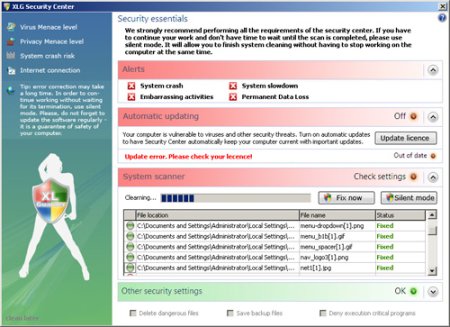
XLGuarder is a rogue antispyware. The program uses scare tactics (such as pop-ups and fake system notifications), infects systems via misleading advertising on free download, warez and porn websites, trojans and browser security holes. XLGuarder put popups looks like a Microsoft Security Center screen.
HijackThis shows infections:
O2 – BHO: (no name) – {D032570A-5F63-4812-A094-87D007C23012} –
How to remove xlguarder and xlg security center:
Go to Start > Control Panel > Add or Remove Programs and remove the XLGuarder.
Download Avenger and unzip to your desktop.
Open notepad and copy/paste the text in the quotebox below into it:
Windows Registry Editor Version 5.00
[HKEY_ALL_USERS\Software\Microsoft\Windows NT\CurrentVersion\Winlogon\]
“Shell”=-
[-HKEY_ALL_USERS\Software\sysutils]
[-HKEY_CLASSES_ROOT\CLSID\{D032570A-5F63-4812-A094-87D007C23012}]
[-HKEY_CLASSES_ROOT\iebho.TIEAdvBHO]
[-HKEY_LOCAL_MACHINE\SOFTWARE\Microsoft\Windows\CurrentVersion\Explorer\Browser Helper Objects\{D032570A-5F63-4812-A094-87D007C23012}]
[-HKEY_LOCAL_MACHINE\SOFTWARE\Microsoft\Windows\CurrentVersion\Uninstall\sysutils]
Save this as fix.reg to your Desktop (remember to select Save as file type: All files in Notepad.).
Double-click on the fix.reg. When it asks if you would like to merge the information, press the Yes button and then the OK button when it is done.
Run Avenger, copy,then paste the following text in Input script Box:
Files to delete:
%Windir%\iebho.dll
%Windir%\sysutils\settings.ini
%Windir%\sysutils\sounds\01.wav
%Windir%\sysutils\sounds\02.wav
%Windir%\sysutils\sounds\03.wav
%Windir%\sysutils\sysutil.exe
%Windir%\sysutils\sysutil_s.exe
%Windir%\sysutils\uninstall.exe
%Windir%\sysutils\warning\alertpage.jpg
%Windir%\sysutils\warning\spacer.gif
%Windir%\sysutils\warning\warningpage.html
%Windir%\sysutils\winsystip.exe
%UserProfile%\Start Menu\Programs\Protection\Uninstall XLG.lnk
Then click on ‘Execute’.
Your computer will be reloaded.
If you are still having problems with your PC after completing these instructions, then I would recommend you follow these instructions – How to use Spyware Removal Forum .