![]() | Do you have pop-ups or your computer infected with trojan or spyware ? Learn how to ask us for help, click here! |
Malwarebytes won`t install, run or update – How to fix it
If Malwarebytes Anti-malware or any of your security programs won’t install, run or update, then you’ve probably got malware or the effects of malware on the computer (some types of malware will disable Malwarebytes Anti-malware and other security tools).
Malwarebytes Anti-malware or any of your security programs won`t install
Fix 1: Before saving Malwarebytes Anti-malware or any of your security programs, rename them first.
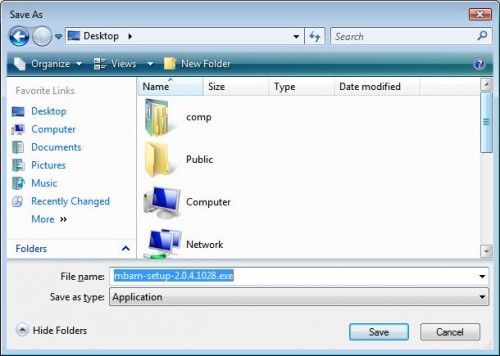
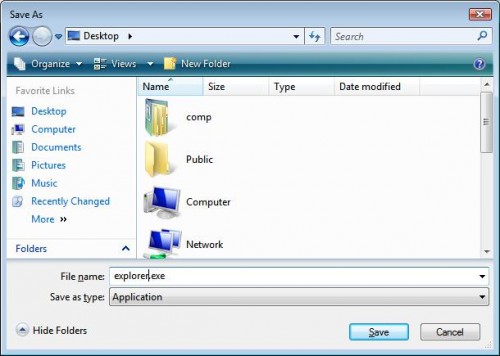
You clicked on a download link and a Save dialog opens. Change file name and click on Save. For example, before you save Malwarebytes Anti-malware, rename mbam-setup.exe to something like mapp.exe (or use any random name) and then click on Save and save it to your desktop. Double Click mapp.exe to install the application.
Note: several good names that you can use: explorer.exe, iexplore.exe, firefox.exe, userinit.exe
Fix 2: Change Malwarebytes Anti-malware or another security program installation file extension.
Turn on “show file extensions for known file types” by doing:
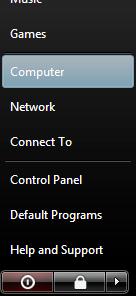
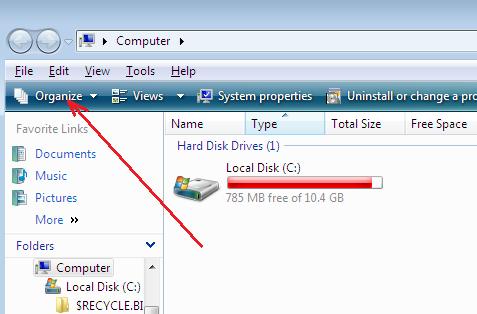
- Double-click on the My Computer icon.
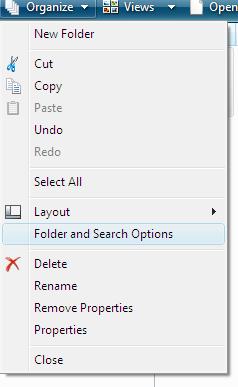
- Select the Tools menu and click Folder Options.
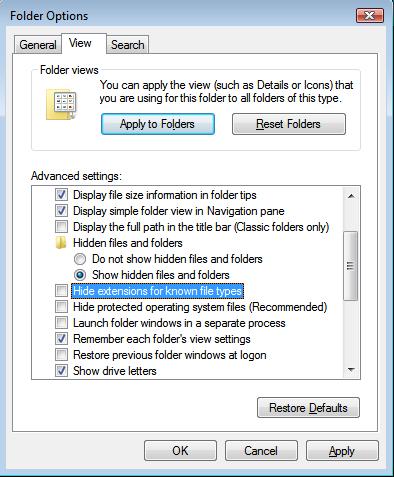
- After the new window appears select the View tab.
- Put a checkmark in the checkbox labeled Display the contents of system folders.
- Remove the checkmark from the checkbox labeled Hide file extensions for known file types.
- Press the Apply button and then the OK button.
- Now your computer is configured to show file extensions for known file types.
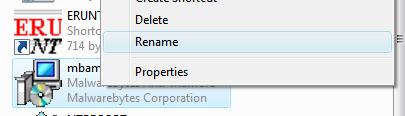
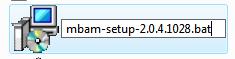
Right-click on an installation file (the mbam-setup.exe file for Malwarebytes Anti-malware) and change the .exe extension to .bat, .com, .pif, or .scr. Press Enter and then double-click on it to run.
Malwarebytes Anti-malware won`t install or run, it displays a code 2 error box
The infection is deleted a core executable (mbam.exe) file of MalwareBytes` Anti-malware. To fix it:
- Click Run, type %ProgramFiles% and press Enter.
- Open Malwarebytes’ Anti-Malware
- Click here to download a Malwarebytes` Anti-malware core executable file with random name.
- Save the file to the folder above.
- Run it.
Malwarebytes Anti-malware or any of your security programs won`t run
Fix 1: Rename the main executable file.
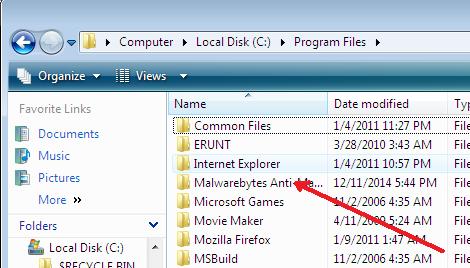
- Click Run, type %ProgramFiles% and press Enter.
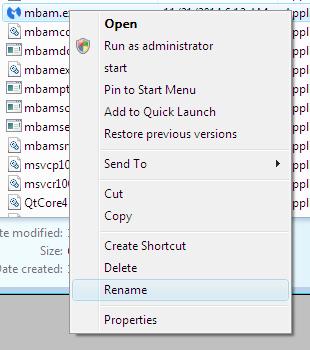
- Open a home folder of your security program, right-click on the main executable file and click Rename.
- Type a new name (try explorer.exe or use any random) and press Enter.
- Double-click on the file to run.
An example for Malwarebytes Anti-malware, click Run, type %ProgramFiles% and press Enter. Open Malwarebytes’ Anti-Malware folder, right-click on the mbam.exe file, select Rename, type myapp.exe and press Enter and then double-click on it to run.
Fix 2: Boot your computer in the Safe mode.
- Restart your computer.
- After hearing your computer beep once during startup, but before the Windows icon appears, press F8.
- Instead of Windows loading as normal, a menu should appear.
- Select the first option, to run Windows in Safe Mode.
Run Malwarebytes Anti-malware or your security program.
Fix 3: Log in Windows using a new created user account.
- Click Start -> Settings -> Control panel.
- Click User Accounts and create a new account.
- Reboot your computer and login Windows using a previously created user account.
Run Malwarebytes Anti-malware or your security program.
Fix 4: Run TDSSKiller.
Probably your computer is infected with TDSS trojan/rootkit. It may block various antivirus and antispyware programs from running.
Download TDSSKiller from here and unzip to your desktop.
Open tdsskiller folder and run TDSSKiller. Follow the prompts.
Malwarebytes Anti-malware won`t run, Windows displays “Windows cannot not access the specified device, path, or file. You may have inappropriate permissions to access the item” error
Download this file
Save it next to mbam.exe (the file is located in the Malwarebytes Anti-malware home folder). Once done, drag and drop mbam.exe into Inherit.exe. Click OK and attempt to run Malwarebytes Anti-malware once again.
Malwarebytes Anti-malware won`t update
Fix 1: Manually download and install Malwarebytes Anti-malware update.
- Download Malwarebytes Anti-malware updates from here or here and save it to your desktop.
- Double-click on mbam-rules.exe to install.
Fix 2: Copy the Malwarebytes Anti-malware definitions (rules.ref) from a clean computer.
You can update through MBAM’s interface from a clean computer, copy the definitions (rules.ref) located in C:\Documents and Settings\All Users\Application Data\Malwarebytes\Malwarebytes’ Anti-Malware from that system to a usb stick or CD and then copy it to the infected machine.
Cannot use the Internet and download Malwarebytes Anti-malware or another security program
You will need access to another computer that has a connection.
From the computer download and save a setup package (installation file) to a flash, usb, jump drive or CD. Now transfer it to the infected machine, then install and run the program.
If you cannot transfer to or install on the infected machine, try running the setup package (installation file) directly from the flash drive or CD by double-clicking on the file so it will install on the hard drive.
110 Comments »
RSS feed for comments on this post. TrackBack URI
Leave a comment
My Anti Spyware - Free antispyware programs and Spyware Removal Instructions.


OMG thank you so much LOL
this really helped me my malwarebytes wouldnt
run cuz the Malware and it was getting so annoying
Comment by Mason — June 15, 2009 #
OMG HELP HELP HELP HELP~
I can download the malwarebytes software and install it, but It will not run. I tried each fix you listed above, it still did not open and run.
Researched a little bit more and found Combofix, great and all, but yep, downloaded, WON’T Install.
I am almost ballheaded over this one. I have done scans with my AVG and I also used Windows Defender and Advanced System Care Pro for scans, they did no detect anything. But I am still have alot of instability on my pc. I keep getting those crazy *debug* error messages. I think I have a variant of the Windowsclick trojan because when I did a root kit scan, I got some suspicious files. I am trying to get them off my pc, but can’t get other spyware/malware removal programs to work. I am seriously going to shoot my computer with a shotgun. I have visited your site frequently in the last week and figured it was time I asked for help.
This is the last file of the *16* rootkit items AVG *finally* produced.
\
Comment by Melissa — June 22, 2009 #
Melissa, please follow these steps. I will help you.
Comment by Patrik — June 22, 2009 #
Thank you so much
The Malware saved my computer big time.
I had over 58 objects infected and it
helped me get rid of it. Thank you!
Its a good program to use. Dont be scared
not to use it
Comment by Cynthia — June 30, 2009 #
Personal Anitivirus was downloaded to my computer and now it will not go away at all. I am going to throw the dang computer if it does not go away. It wont let me do anything at all. I have tried the steps and still nothing. Is there anything else I can do. I am trying to download malwarebytes.org and i won’t let me at all. It shuts it off on me.
Comment by megan — July 3, 2009 #
Megan, try these Personal Antivirus removal instructions.
Comment by Patrik — July 3, 2009 #
DO THIS! IT WORKS!
I’ve been having the same problem. I tried renaming mbam.exe as myapp.exe, etc. Still MBAM did not start. I tried different names and what not. Then I remembered this annoying bug redirects me to all sots of webpages when I click on a link on the Internet but mostly to sites advertizing an antispyware program (stopzilla). I checked reviews on reliable sites and learned it’s malware, a rogue program, meaning that’s the program they want me to install in my computer. No way! So what did I do? I renamed the mbam.exe with the name of the malware(stopzilla.exe)!!! It worked!!!
MBAM opened, I scaned, got rid of some spyware, updated, scanned again all files and got rid of more. (TAKE THIS STOPZILLA!!!)
I did the same (rename the exe file) with Ad-Aware and Superantispyware and they got rid of more. Still I can’t open or update Spyware Doctor to get rid of more. I’ll keep trying and update you guys on this.
Comment by xavier acosta — July 20, 2009 #
Thx!It really works.I been trying and trying but this made it simple.Thx again.You rocks
Comment by Gwaan — July 21, 2009 #
ive been having the same problem too. i have had this problem for 3 weeks so my computer was basically destroyed. protection system didnt let me go on the internet at all. i tried downloading malwarebytes so many times its not even funny. i just downloaded it today. i renamed everything im glad protection system is that stupid. everything is running and i hope it stays that way. i have one question what is the best antivirus for windows xp computer?
Comment by ronald — July 22, 2009 #
A few good and free antivirus apps: AVG and Avast.
Comment by Patrik — July 22, 2009 #
Help – I have the “system security protect your pc” malware. Have tried all the ideas on this site. Was able to download malwarebytes to a usb from another computer and install it onto the infected one but it only runs for 3 sec.
Help please.
Comment by winter — July 26, 2009 #
winter, then only one. Ask for help at our Spyware removal forum.
Comment by Patrik — July 26, 2009 #
Thanks very much for the help. I’ve had so many computers that malwarebyteswould not install on and all I had to do was change the program name. Thanks again!
Comment by Chris Wakelin — July 30, 2009 #
I am having a problem running the MBAM program. I can download it but then it asks me what program to use to run it, and I have no idea. Help!
Comment by Chris — July 30, 2009 #
Try it:
Click Start, Run. Type command and press Enter. Type notepad and press Enter.
Notepad opens. Copy all the text below into Notepad.
Windows Registry Editor Version 5.00[HKEY_CLASSES_ROOT\exefile\shell\open\command]
@="\"%1\" %*"
Save this as fix.reg to your Desktop (remember to select Save as file type: All files in Notepad.)
Double Click fix.reg and click YES for confirm.
Reboot your computer.
Comment by Patrik — July 30, 2009 #
I seem to need help. I have tried all the steps, but my malware: “Windows Antivirus Pro” appears to have blocked every move for me. For your “Fixes” above:
1. Despite renaming my Malwarebytes, Adaware and Spybot executables, they will not run.
2. Folder Options no longer listed in My Computer, so I can’t unhide extensions.
1. Will not run after name change.
2. Blue screen of death when trying to boot in Safe Mode
3. Cannot create new user accounts.
I tried downloading malwarebytes on another pc, loaded setup exe to an sd card, even installed the program (using that setup exe) onto the same sd… then renamed all exe’s on the sd… then tried to launch the renamed exe’s (i named them all “bat” files) on the infected pc… they wouls still not launch.
Have I stumped you? Reinstall XP with reformat?? Say it aint so!!
Thx for any help! Glenn
Comment by Glenn — July 30, 2009 #
Glenn, please follow these steps so that I can have a look at the current condition of your machine.
Comment by Patrik — July 30, 2009 #
Thx Patrick, I am registering now and doing the Hijack steps… but as a side note, while I was awaiting your reply here, I clicked on your name and found the steps to remove Windows Antivirus Pro… I was able to complete the OTM step, but when trying to double click on the fix.reg notepad file on my desktop, I got an error saying my administrator would not allow changes to reg… but I am the admin and only user to my XP Pro pc… am I close? Thx!
Comment by Glenn — July 30, 2009 #
Update: i tried the Hijack steps, but failed… I installed HijackThis and ran a scan with log file… the scan happened, seemed to finish and present the log file… however, within 5 seconds, poof, the window disappeared before i could do anything… so i could not save the file or even copy/paste the text… i have now tried reinstalling and relaunching HijackThis, but it will not relaunch…
Comment by Glenn — July 30, 2009 #
Glenn, please make a new topic at our Spyware removal forum.
Comment by Patrik — July 30, 2009 #
RENAMING THE SETUP FILE TO STOPZILLA.EXE WORKED!!!! After hours of research, I finally got it! Thank you so much
Comment by Tina — July 31, 2009 #
TY SO MUCH XAVIER! ive been trying to remove malware from my comp that alerts me with fake viruses and wants me to buy some “winiguard” program and it disabled all other virus removal tools. after i renamed my malwarebytes to “winiguard” it worked perfectly. ty again xavier u saved my computer from the bat…
Comment by Craig — July 31, 2009 #
could not download the exe. got it via USB stick.
had to change the name to get it to run.
Got an error code while runnign Amti-Maleware. came up immeditatly upon finding an infected object, each time
731 (0, -2147221008)
noted 51 objects when the scan finished, but then the list was empty when I clicked
Comment by mike — August 2, 2009 #
mike, try to run MalwareBytes in Safe mode. Also you can ask us for help at our spyware removal forum.
Comment by Patrik — August 3, 2009 #
ive done ur steps to get the steps to install mbam. its currently running the scan on safe mode, but three times now a window has popped up that says mbam has encountered a problem and needs to close. this is after about 3-5 mins of running and i see that its found 4-6 infections. what can i try?
Comment by marnie — August 7, 2009 #
My system was hijacked by WindowsClick.com and so none of the Antivirus programs including Malwarebytes would run.
Did some research and came to this site. I followed the instructions to the letter and it worked!
Thankyou, Thankyou and thankyou guys!
Comment by Sheikh — August 10, 2009 #
just some extra info i thought id share. i could install most the security programs but it seems like most of em need to be downloaded upon install now like a download manager… the last 2 jobs i did the malware blocked the domains for updating/downloading. so a quick fix is (in an updated copy of xp at least) run c:\windows\system32\mrt.exe if it wont run make a copy and rename it (just like steps above.) and do a full scan. it will find the dns changer and remove it. now you can install your security suite and spybot. (i find that malwarebytes wont run till after i do spybot) just my 2 cents. hope it helps.
Comment by Craig — August 10, 2009 #
I am unable to install the program. Every attempt freezes during the *Finishing Installation* portion of the install process. I have tried to install the file from safemode, as well as changed both the filename and the extension with no luck. Is there any other way I can install the file?
thank you so much for your help.
Comment by Emilio — August 26, 2009 #
Emilio, looks like a malware blocks it. Ask for help at our Spyware removal forum.
Comment by Patrik — August 26, 2009 #
I have google redirect virus. When I try to download malwarebytes i get the not commected to internet/ problem with website page. Did i goof
Comment by kevin — August 30, 2009 #
Kevin, try these instructions: How to remove trojan DNSChanger or ask for help at our Spyware removal forum.
Comment by Patrik — August 31, 2009 #
Thank you! I managed to get rid of personal antivirus that had attacked my computer. It took a while but it worked!
Comment by Sofia — September 8, 2009 #
Thank you for putting up these instructions, I am still waiting for malwarebytes to download. I have it but it is disabled. I appreciate the work that you put into this. I got the Police Pro virus from YouTube which I hardly go on.
Comment by Bonnie — September 10, 2009 #
Bonnie, try these Police Pro virus removal instructions or ask for help in our Spyware removal forum.
Comment by Patrik — September 10, 2009 #
i can install Malwarebytes, spybot search and destroy and hijackthis but after they’re instlled i try to run them and to they start going for 1-3 secs then the program shuts down. if i try to restart the app i get a windows error saying i dont have permisson or authoritie to run the program anymore and i get locked out. i run avg and spybot doctor and they say im fine, but i get locked out of maleware remover programs when i run them, namely Malwarebytes and spybot search and destroy. got any help for me?
Comment by kawaii — September 14, 2009 #
oh on side note i recently got the window police pro virus and all hell broke loose. after i try to remove this i count run those programs anymore.
Comment by kawaii — September 14, 2009 #
kawaii, ask for help in our Spyware removal forum.
Comment by Patrik — September 14, 2009 #
I have successfully installed Malwarebytes but it will not run after renaming .exe file. I am also unable to rename it in safe mode as it tells me the file is read only and is access is denied. Help
Comment by George — September 14, 2009 #
George, make a new topic at our Spyware removal forum.
Comment by Patrik — September 16, 2009 #
i tried this, but it’s not working. i renamed it, i’ve tried various malware removal programs, none of it is working for me.
Comment by bri — September 24, 2009 #
Hi I tried to rename and install Malwarebytes but it would not allow me to complete the intallation. There was a pop-up box which says \
Comment by Sherry — October 26, 2009 #
Sorry the pop-up box says
Unable to execute file: C:\Program Files\Malwarebytes’ Anti-Malware\mbam.exe
CreateProcess failed: code 2.
The system cannot find the file specified.
I’ve been doing this for 4 hours now. Appreciate your help. Tnx.
Comment by Sherry — October 26, 2009 #
Sherry, your PC is infected with a trojan that block Malwarebytes Antimalware. Ask for help in our Spyware removal forum.
Comment by Patrik — October 26, 2009 #
Will do. Thanks Patrik.
Comment by Sherry — October 26, 2009 #
I have tried every fix above and cannot run spybot or malware. With a few of the attempts malwarebytes would open and start a quick scan but the terminate after 2 seconds. When I try to run my security programns I get
Windows cannot access the specified device, path, or file. You may not have the appropriate permission to access the file.
I tried to join the spyware forum but HiJack was closed after the scan before I could copy the notepad and no one has told me what to try now. Please help.
I also recently removed Security Tools virus from my computer but had not done a full scan since then and am now having these problems.
Would appreciate any help!
Comment by Taja — October 29, 2009 #
Taja, anyway make a new topic in our Spyware removal forum.
Comment by Patrik — October 30, 2009 #
malwarebytes wont scan when i get it open… it closes after 5 seconds… tried all the fixes above and nothing worked… plz help
Comment by David — October 31, 2009 #
David, then only one – ask for help in our Spyware removal forum.
Comment by Patrik — November 1, 2009 #
So far so good, I had to download the .exe because the malware was blocking it, it worked so far and is finding infected files, so far 4 files and only 1 min into the scan.. :-/
Comment by Dave — November 26, 2009 #
Dave, try run Malwarebytes Anti-malware in the Safe mode.
Comment by Patrik — November 27, 2009 #
I’m having similar problems to those discussed here and can’t find a solution.
“Personal Protector” is the offender. Spybot S&D will locate and claims to have fixed the 15 harmful files but PP is able to reinstall. I can’t install malwareytes or hijackthis in normal or safe mode (I’ve tried renaming them as well).
I was about to start deleting registry files as discussed on some posts but can’t muster the nerve…
Help??
Comment by Kevin — November 28, 2009 #
Kevin, open a new topic in our Spyware removal forum. I will help you.
Comment by Patrik — November 28, 2009 #
My computer (not this one) is infected with some sort of virus. I have downloaded malwarebytes and i have run the program, but it will not allow an update and is using definitions from sep 2009. I have another unvirused computer and a usb key. Is there a way to copy the updated definitions from a clean computer to a folder in the infected computer?
Please help.
Thx
Comment by Ern — November 29, 2009 #
Ern, read the “Malwarebytes Anti-malware won`t update” part of instructions above.
Comment by Patrik — November 30, 2009 #
I was having major headahces getting ANY security software to run. Been trying to fix my PC for the last 16 hours straight and I was getting nowhere. Most software would install but couldn’t do anything after that. I followed the instructions further up regarding changing the filename of mbam.exe to stopzilla.exe. What do you know, the bloody thing ran first time – thank you for that post – YOU ARE A LIFESAVER!!
Comment by Mick Barber — December 7, 2009 #
Nice one, renamed setup file and it installed.
Once installed it would not run.
I then renamed execution file and it ran perfect.
Thanks
Comment by the dude — December 9, 2009 #
My Malwarebytes Anti-malware were installed after I downloaded and renamed it to something random. But the mbam.exe won’t run after installation no matter what I rename it to. So this is what I did:
I uploaded mbam.exe as an email attachment and sent it to myself. I downloaded that same attachment and renamed to some random name and saved to the original folder that mbam.exe was in. I ran this new file that I just downloaded and it works
Comment by Cora — December 20, 2009 #
my laptop is affected with this stupid security tools…been trying to run the antimalware but i mbam-setup doesnt seem to run at all..
:(
i even tried renaming it as stopzilla.exe but yet this freaking thing doesnt run… PLEASE HELP ME!!
Comment by sakina — December 20, 2009 #
sakina, follow these Security Tool removal instructions.
Comment by Patrik — December 21, 2009 #
I couldn’t get it to run either – no error message, nothing. It wouldn’t uninstall either – it would flash up the ‘are you sure’ message really quickly and then just disappear.
So I had a look in the malwarebytes directory of one of my working computers, and found that the file ’ssubtmr6.dll’ was 2K different in file size. I copied that file from the working computer to the stricken one and guess what? MBAM is running! Obviously this is no help whatsoever to someone without an extra computer… sorry about that!
Comment by jbng — December 24, 2009 #
thanks a LOT!
Comment by j — December 25, 2009 #
This sucks i downloaded the Malwarebytes Anti-malware installed it but it doesnt run when i double click i tried renaming it but still doesnt work
please help me!
Comment by David — December 27, 2009 #
David, if the instructions above does not help you then ask for help in our Spyware removal forum.
Comment by Patrik — December 27, 2009 #
Can someone help here. I am not able to run malwarebytes on my machine. it did install successfully but does not run. I spent straight 18 hours on this and performed all the diagnostics stated above.
Can someone please help?
Thanks
Comment by reuben — December 29, 2009 #
reuben, probably your computer infected with TDSS trojan. Try run TDSSKiller. Download it from here.
Comment by Patrik — December 30, 2009 #
Thank you so much! I could not for the life of me figure out why it wasn’t working but downloading it with a random name fixed it immediately and I was able to run it. It’s going through right now, so thankyouthankyouthankyou!
Comment by Kristina — January 8, 2010 #
OMG!!! Thank you so very, very much! I went through ALL the steps above and finally after more than 8 hours, I was able to remove this awful malware by putting the pc into safe mode. I just got this 2 weeks ago, have only done minimal things as of yet and had over 60 infections. Thank you thank you thank you.
Lori
Comment by Lori Kindler — January 10, 2010 #
I have “Antivirus live” worm. The first thing i did was disconect from my internet conection, now when i try to conect to a network it does nothing (does not pick any conections up and conect button is fazed out). When i go onto internet explorer the “TOOLS” button is not there so i can’t change proxy settings.
I manually deleted some HKEYS which has stopped all the pop ups.
I have tryed to run Malwarebytes but keep getting a message saying- “run-time error 53, file not found: advpack” whilst downloading from disk.
I’ve tryed changing the name of the file.
I tryed to run ‘ISPFIX’ ‘AVENGER’ TDSKILLER but say program not found.
I’m doing everything in safe mode.
Done Hijackthis and deleted the HKEYS recomended no other keys look suspicious to me, but as have no conection can’t copy and paste. Don’t want to usb it to my good computer incase it becomes infected.
went ahead and done combofix it said can’t complete deleting files as need administration rights.
can’t create a new user in control pannel.
I done ‘RKILL’ which gave me back taskmanager and folder options however can’t stop any processes in TM and click folder options does nothing.
Just let it run in normal mode and the wallpaper has changed to a random photo i’ve never seen before????
No programs work that were installed before virus.
Was using Avast at the time which alerted me to the virus but aparently did nothing! I just want to re-install windows but need to get some important files off first. These files are under hidden properties and as i can’t use my folder options i can’t get to them. Someone please help is there away off getting to my files without spreading this virus?
Comment by Kev — January 13, 2010 #
Kev, you can attach the infected drive to another PC, then scan it using an antivirus. Once finished, move all important files and re-install Windows.
Comment by Patrik — January 14, 2010 #
I am getting the same problem as everyone else except that I cannot download Malwarebytes. Site kep conencting me to Spyware doctor. Where can I see MalwareBytes?
Comment by Editha — January 16, 2010 #
Editha, open the following Malwarebytes Antimalware review, scroll down to “Download MalwareBytes Anti-malware” and click to a link.
Comment by Patrik — January 17, 2010 #
I’ve downloaded malwarebytes but will not install. Says version is corrupt. Tried the downloaded version and also tried it from a CD copied from a good PC. Both say they are corrupt versions even though I know they are not. Tried renaming both of them (file names and changing from .exe) and nothing.
Comment by Roger — January 20, 2010 #
I have done all of these things above, Have the Anti-virus Live worm as well.
I was able to get internet access by going into internet explorer -> Tools-> Internet Options -> Connections -> LAN setting -> and unchecked used proxy settings.
Now when I try to download the Malwarebytes software it gives me an Error Creating Registry key upon download. Then it doesn’t allow we me click on a hard-drive to scan.
Any advice?
Comment by Jennifer — January 21, 2010 #
Roger, probably your PC is infected with a virus that damages it. Try run DrWeb Cureit or Kaspersky Virus removal tool.
Comment by Patrik — January 21, 2010 #
Hey! I had to use a proxy website to get here since my malware is blocking this website but None of the suggestions worked for me. I read a comment about how someone changed theirs to stopzilla.exe so I just searched malwarebyes anti-malware and thhen let them redirect me. Mine kept showing search and destroy pro so I just changed it to searchanddestroy.exe and now it finally opened! Thanks for that great suggestion.
Comment by E — January 21, 2010 #
I GOT IT TO WORK
I had the stupid malware that tries to get me to install a fake Malware Defense program.
At first I downloaded Malwarbytes on my infected computer, by changing the exe file to mdefense.exe, which is the name of the fake anti virus program that got installed on my computer. It worked but I couldn’t run it.
I downloaded it from another uninfected machine, then renamed the mbam.exe to mdefense.exe. I moved all the malwarbytes files from the malwarbytes folder of the good computer on to my infected computer, BUT put the files in the Malware Defense folder. Which is the folder the trojan installed for the fake anti virus software. And malwarbytes opened and scanned!
Comment by Max — January 23, 2010 #
just wanted to say thank you. your writeup saved me my job today. all i did was dl the random mbam name. and move it to my malwarebytes folder. and mbam came right up. updated fine. and found 22 processes that needed to be cleaned. restarted and scanned in safe mode to be sure. 0 items found. then restarted in full windows. and quick scanned again. looks like all is well. thanks again.
Comment by Mike — January 26, 2010 #
Virus wouldn’t allow malwarebytes to be installed. Your assistance made it happen. Thanks! How do I support your website?
Comment by Bill Breyer — February 1, 2010 #
None of this works for me as I cannot enter Safe Mode; it just comes up with a blank blue screen.
I am infected with the rogue program XP Antispyware 2010.
Any ideas? Thanks.
Comment by davo — February 5, 2010 #
davo, follow the steps.
Comment by Patrik — February 6, 2010 #
I’m attempting to install Malwarebyets’ on my computer to get rid of Internet Security 2010, I installed with a new exe file name and re-named the program file. I now received a message stating to report the error code :732 (12029, 0) to you. PLEASE help me get this program running so I can get this malware off my computer!!
Comment by Jesse — February 9, 2010 #
Jesse, read above “Malwarebytes Anti-malware won`t update” and try fix 1 or fix 2.
Comment by Patrik — February 10, 2010 #
Patrik for some reason I can’t install the Malwarebytes in my computer…it is driving me crazy…please HELP ME!
Comment by Suzana — February 18, 2010 #
Suzana, if above instructions does not help you, then ask for help in our Spyware removal forum.
Comment by Patrik — February 19, 2010 #
it dosen’t do anything. when i click run nothing happens…no error msgs nothing…what to do?
Comment by jon — February 19, 2010 #
Xvaier is a LEGEND. This worked for me.
Used Fix.reg code (had to manually import by using RUN>regedit. Rebooted PC (pop ups then stopped). Downloaded mbam-exe using uninefected PC, renamed file and installed onto infected PC.
mbam would not run after install so I renamed file stopzilla.exe and hey presto, its running.
Comment by Neil UK — February 20, 2010 #
Jon, looks like you computer is infected with troja that stops malwarebytes. Ask for help in our Spyware removal forum.
Comment by Patrik — February 20, 2010 #
Okay everyone who is having trouble getting Malwarebytes to run even after renaming MBAM.exe to
something else like stopzilla.exe. I first renamed the MBAM.exe file and then it installed. However, no matter what I tried, it wouldn’t run. Rereading the posts above, I came across the one by”the dude” who said he renamed the exe file in the Malwarebytes program folder. Tried it and voila = opened and ran perfectly.
Comment by Nancy — February 21, 2010 #
patrik plse help me i have tried everything and when malewarebytes starts to run the rouge program:SECURITY ESSENTIALS 2010 gives me the bsod when maleware detects a problem
Comment by Beats from the middle east — February 23, 2010 #
Use the Security Essentials 2010 removal guidelines.
Comment by Patrik — February 24, 2010 #
I’m not having luck with any of these steps. Ultimately getting a 707/3/0 error message. Anyone able to help? My computer is quite crippled at this point. Thanks.
Comment by Jay — February 24, 2010 #
Addition to previous message: I just tried Fix #1 in the “Security programs won’t run” list above, but in going into program files, I don’t even see a mbam.exe file.
Comment by Jay — February 24, 2010 #
Jay, try reinstall Malwarebytes, If it does not help, then ask for help in our Spyware removal forum.
Comment by Patrik — February 25, 2010 #
I am able to downloand Malwarebytes but am unable to run/open the program. Everytime I try to I get a window that says \ This program does not have a program associated with it for performing this action. Create an association in the Folder Options control panel.\ What do I do. I have tried all the the other fixes you recommened but I still get this window everytime.
Comment by rachael — February 26, 2010 #
Rachael, try the following:
Click Start, Run. Type command and press Enter.
Type notepad and press Enter.
Notepad opens. Copy all the text below into Notepad.
Windows Registry Editor Version 5.00[-HKEY_CURRENT_USER\Software\Classes\.exe][-HKEY_CURRENT_USER\Software\Classes\secfile]
[-HKEY_CLASSES_ROOT\secfile]
[-HKEY_CLASSES_ROOT\.exe\shell\open\command]
[HKEY_CLASSES_ROOT\exefile\shell\open\command]@="\"%1\" %*"
[HKEY_CLASSES_ROOT\.exe]@="exefile"
"Content Type"="application/x-msdownload"
Save this as fix.reg to your Desktop (remember to select Save as file type: All files in Notepad.)
Double Click fix.reg and click YES for confirm.
Reboot your computer.
Comment by Patrik — February 26, 2010 #
I have renamed the mbam.exe to malware.exe and I was able to install the malwarebytes’ anit-malware but it won’t run and I’ve tried renaming it but nothing changes. I tried to install it again from the renamed mbam.exe but it freezes at extracting files. what do I do? help appreciated
Comment by Grant — February 28, 2010 #
Grant, run TDSSKiller before Malwarebytes. Read the instructions above.
Comment by Patrik — March 1, 2010 #
i got this crazy Antivirus vita 2010. I can’t run malwarebytes even after renaming it. I don’t know how to save it with different name because when i click on the download malwarebytes – i get a screen with the option of save and cancel, nothing with changing the name of the file. HELP PLEASE
(((
Comment by sickofit — March 1, 2010 #
Sickofit, you can rename it after downloading.
Comment by Patrik — March 2, 2010 #
OMG THANK U SO MUCH!!! this worked perfectly!!!!!
Comment by kristie — March 6, 2010 #
My computer is infected and I have the malwarebytes anti malware installed on my computer but I can’t get it to work. This has happened to me before and I had to uninstall it and install it again. This time I can’t do that because it wont let me get online. I was wondering if someone could explain to me how to download it from anothe computer onto a disk and then load it on my computer.
Comment by SARAH — March 6, 2010 #
Its simple. Download Malwarebytes installer (mabm-setup.exe) to another PC, them copy this file to your flash disk or using any burn software to cd disk. Insert the disk to infected pc and run it.
Comment by Patrik — March 7, 2010 #
I downloaded mbam-rules.exe from a clean computer and loaded it via flash drive onto my infected computer. I ran quick scan and thought that anitmalware defender had been quarantined. But after rebooting, antimalware defender is still active. I tried to update via the update tab and am getting error message 732. Any ideas?
Comment by kathy — March 7, 2010 #
I have a problem, I got Malwarebytes to install, but now when I click the icon for it, it will not open!! XP internet security things keep popping up all over my computer telling me I have 29 viruses, but I just x out because I think that is part of the virus. How do I get Malwarebytes to run!?
Comment by Karli — March 8, 2010 #
Was able to copy and run Malwarebytes in Safe mode. Quick scan completed found three items (deleted), tried rebooting and virus (Virus Protector) was still there. Please help.
Comment by Ken — March 9, 2010 #
Kathy, probably your computer also infected with TDSS trojan. Ty the steps.
Comment by Patrik — March 9, 2010 #
Karli, follow the instructions.
Comment by Patrik — March 9, 2010 #
Ken, try the updated Virus Protector removal instructions.
Comment by Patrik — March 9, 2010 #
hi tried all these fixes and more, two days of hassle with antivirus XP 2010, after all these attempts what can I do?
Comment by Ben — March 9, 2010 #
Ben, ask for help in our Spyware removal forum.
Comment by Patrik — March 11, 2010 #