AVG antivirus Resident Shield will prevent HijackThis and Combofix from fixing an infection. You must disable it before the start of the removal of spyware and malware. Use the instructions below to disable Resident Shield.
Use the following instructions to disable AVG antivirus Resident Shield.
Double click to AVG icon on your desktop and you will see AVG antivirus control center as shown below.
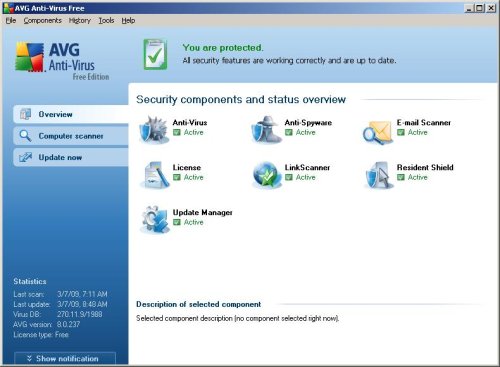
Click to Resident Shield and you will see Resident Shield window similar to the one below.
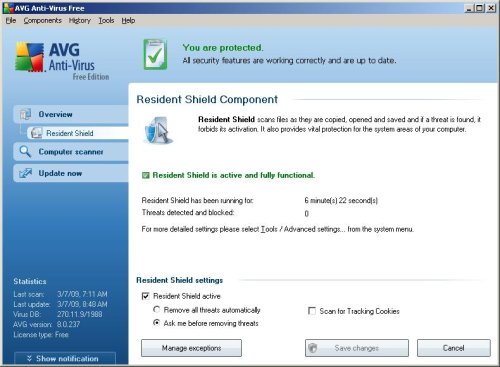
Uncheck Resident Shield Active box. Click Save Changes.
Note: You can re-enable Resident Shield using the same steps, but this time place a check to the Resident Shield Active box in Resident Shield component settings.





really helpful for tech support… thnks.
Tyvm, very helpful
What would be helpful is to know how to accomplish this through the task manager. There are a couple of tasks begining with AV* that can be terminated, but the ComboFix still reports AVG as running. When starting in safemode, AVG Control Interface won’t always load.
Any ideas?
Rob, if you have disabled AVG using the instructions above, then you can run combofix. But , that is better, ask for help in our Spyware removal forum.
thx i was ready to unistall
STOP popping up on my computer NOW
HELP AV 7 won’t let me install the Doctor!!
cathy, try the instructions.
its good.
to remove personal shield pro you will need to download anti spyware (eg stopzilla) onto a memory sick from a computer that is not infected.
then transfer stick to infected computer.
Kev.
I have AVG 2012 installed, and i don’t see any resident shield on the main screen. I am uninstalling. SOMETHING has gotten ahold of my computer. I did a scan with AVG this morning. It found nothing. The hard drive is constantly spinning. I am sticking with combofix. It does the trick more often than any!
I desperately want to turn off ‘resident shield’…but I have no resident shield option to click on to turn off.
By the way, the type the two words–they are not words.
I am sick to death of the AVG Resident Shield Alert popping up a dozen times before anything will open. How do I get rid of this?
Or must I simply remove wretched AVG from my computer and use something else!