ComboFix is a program written by sUBs, that removes spyware, malware, rogue antispyware apps and Vundo infections. Also it deletes a bunch of files related to the infections and is updated fairly regularly. When Combofix finished, it will produce a report for you. Power user can use the report to search and remove infections that are not automatically removed.
Download Combofix
How to use combofix:
Please use the official ComboFix guide bleepingcomputer.com/combofix/how-to-use-combofix or the following steps:
1. Temporarily disable your antispyware, antivirus and any antimalware real-time protection, so they may interfere with running of ComboFix.
2. Download Combofix.
Download combofix from the direct link above and save it to your Desktop.
3. Install Recovery console. (only Windows XP)
Skip the step, if the Windows Recovery Console is already installed.
- If you have Windows XP disk, then read the article: How to install and use the Windows XP Recovery Console.
- You should know version of Windows. Right click the My computer icon. Click Properties. In the window read information about your Windows version.
- Click here for open Microsoft’s website.
- Scroll down.
- Select the download that’s appropriate for your operating system and download setup boot disk installation to your Desktop. Use Service pack 2 version, if your Windows XP is Windows XP Service pack 3.
- Now close all open windows and programs.
- Drag the setup package and drop onto ComboFix.exe.
- Follow the prompts to start ComboFix and when prompted, agree to the End-User License Agreement to install the Microsoft Recovery Console.
- At the next prompt, click ‘Yes’ to run the full ComboFix scan.
- When the tool is finished, it will produce a report for you.
4. Run combofix.
- Close all programs. Your Task Bar should be clear of any program entries including your Internet Browser.
- Double click Combofix.exe icon on your Desktop to start it.
- If the Microsoft Windows Recovery Console is already installed, ComboFix will continue it’s malware removal procedures, if no, then follow the prompts to allow ComboFix to download and install the Microsoft Windows Recovery Console and when prompted, agree to the End-User License Agreement to install the Microsoft Windows Recovery Console. Once installed, you should see the following message:
The recovery console was successfuly installed.
Click ‘YES’ to continue scanning for malware
Click ‘NO’ for exitClick YES button.
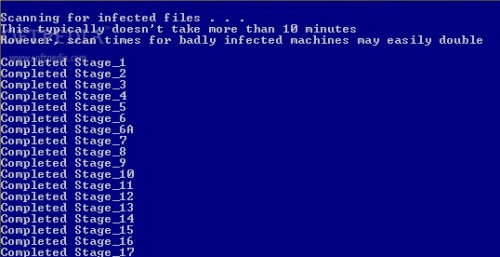
- The scan will temporarily disable your desktop, and if interrupted may leave your desktop disabled. If this occurs, please reboot to restore the desktop. Even when ComboFix appears to be doing nothing, look at your “drive access” light. If it is flashing, Combofix is still at work.
- When finished, it shall produce a log for you.
Note: Do not mouseclick combofix’s window while its running. That may cause it to stall
Questions and Answers:
1. I ran combofix which can affect autorun so now autorun and autoplay is not working.
Combofix prevents autorun of all CDs, floppies and USB devices to assist with malware removal & increase security. Read how to disable/enable autorun and autoplay.
2. No internet connection after running Combofix.
Restart your computer to restore back your connection. If it does not work, then click Start ->Settings -> Control Panel. Double click to Network connections. Locate your connection and right click on it. In the menu click to Repair option. When repair proccess has finished, your connection should be working again.
3. I ran combofix and got error message saying “This copy of combofix has expired”.
Download an updated copy from here or change your PC system time to some days ago (7days for example). Warning, only if first option don`t work.
4. How to uninstall combofix.
After using Combofix, you may uninstall it from your PC. Read how to uninstall combofix.
5. What should i do with QooBox and Combofix files ?
Use command: combofix /uninstall for uninstalling of combofix and removing all combofix files and QooBox directory. Read more here
6. Combofix is virus ?
No, No, No. Some security programs will incorrectly identify this tool as potentially or actually malicious due to some of it’s components. Although these files can be used maliciously, they are an integral part of the fix and I recommend you disable your antivirus.
I strongly suggest that you post your log at My AntiSpyware Forum and finally remove the items as directed by the Member helping you. This involves no analysis of the list contents by you. That will be done by the Help Forum Staff.
More Free Antispyware Tools: MalwareBytes Anti-malware – free spyware, malware, trojan remover, SDFix free trojan remover tool, SUPERAntiSpyware – free antispyware program.





Is this a trusting site
Hey thanks for this useful software…
I tried to run ComboFix and it was getting blocked by the rootkit. I rebooted and immediately opened ComboFix before the rootkit kicked in and it started running. Took about 30 minutes (including a reboot), but my computer is now clean, stinking antivirus rootkit is gone.
hello is the first time i will try this product
Dear all…. please I need to run the combofix under windows server 2003 ( ISA Server). but it gives me the incompatibility OS massage, please any suggestions
Moony, combofix is not compatible with your OS. Try to use Malwarebytes Anti-malware, SuperAntispyware.
useful for fixing my nuevaq.fm infection n oso a nasty false antispyware tat keep telling me my pc is heavily infected n refused to be turned off.well done combofix!!
Combofix got rid of google hijack……but it somehow managed to destroy my mobile broadband connection 🙁 weneva i plug it in nothing happens! please help, thanx
kuli, you connected through usb modem ?
The Combofix helped me to unhide the icons on my Desktop. Thx a lot!
I bought it and it clean up my system, however, it didn’t fix my conflict problem with my Wifi and other issues. I don’t know, perhaps I need to restart my system and see if it helped.
I was infected with Win Security Alert. Trojan was removed as well as other junk. But now my laptop is running with high CPU usage, so if I have 2 pages open it will almost stop running. What can be causing this? Ideas please?
Combofix is really good at his work and nice share.
Thanks
nice Antivirus combofix..
its really awesome
Tried running combofix on vista several times…initializes and runs an extract program. after a few minutes the admin screen comes up..however it takes while for any dialogue which says combofix preparing to run and than a message about taking 10 mins and possible longer..however nothing happens after that. left the computer running all night(12 hours) and nothing happened. tried several times but the result was the same…please help…trying to remove the pc repair virus.thanks in advance.
This program is a load of dog feces. It completely trashed my machine. It duplicated my documents and programs over and over and over again under it’s own drive. It took me three days to verify the proper location of the files and clean up the mess. THIS IS MALWARE! DON’T DOWNLOAD
Who is (sUBs)?…That is the real question I think we all want answered!
Or is this going to be another TrueCrypt-like saga, whereupon said developer wishes to remain anonymous for some strange reason also not disclosed?!
Not a very wise decision considering the fact that you expect so many end-users to blindly trust the software you expect them to download in order to perform a fix on their machine.
Please reveal yourself Mr. sUBs…
To say that the purported author sUBs deserves a reprieve from criticism about the vague nature of his identity and application is just a childish response to a perfectly reasonable and necessary inquiry?
How can anyone defend the honor of an author whom insists upon hiding themselves?!——-an action by the way, which defies the very idea of integrity!
To expect users to put so much trust in an application whose source and therefore integrity cannot be determined and confirmed, is in of itself a bit credulous to say the least and is why it is perfectly understandable that it would garner so much suspicion.
C’mon people…in a world so full of coruption and deception, what evidence do we really have that this author’s intentions are honorable?!
Prove it…Reveal yourself!
Let us know the true you!
Stop hiding behind a label that is simply just another mode of deception meant to deceive people into not recognizing whom you really are!
Just like hollywood stars, those, whom by their actions, promote something very public (albeit software), should not expect to escape public scrutiny for such actions just because…