SUPERAntiSpyware is a free spyware, malware, trojans remover. Easily remove over 1 million pests and threat components such as VirusRay, AntiVirGear, VirusProtectPro, DriveCleaner, SmitFraud, Vundo, WinFixer, SpyAxe, SpyFalcon, WinAntiVirus, AntiVermins, AntiSpyGolden and thousands more!
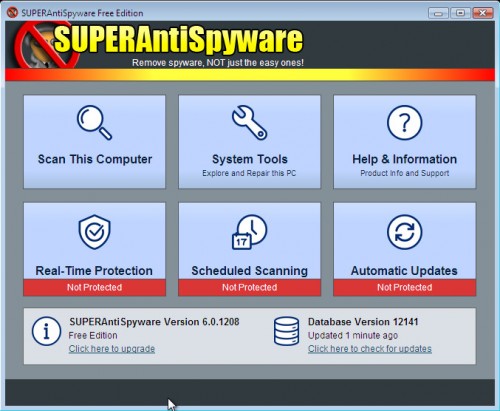
SUPERAntiSpyware Features:
- Quick, Complete and Custom Scanning of Hard Drives, Removable Drives, Memory, Registry, Individual Folders and More! Includes Trusting Items and Excluding Folders for complete customization of scanning!
- Detect and Remove Spyware, Adware, Malware, Trojans, Dialers, Worms, KeyLoggers, HiJackers, Parasites, Rootkits and many other types of threats.
- Light on System Resources and won’t slow down your computer like many other anti-spyware products. Won’t conflict with your existing anti-spyware or anti-virus solution!
- Repair broken Internet Connections, Desktops, Registry Editing and more with our unique Repair System!
- Works together with other anti-malware utilities.
- Context menu integration to scan files on demand.
How to use SUPERAntiSpyware:
- Download SUPERAntiSpyware.
- Close all programs and Windows on your computer.
- Double Click SUPERAntiSpyware.exe to install the application.This will start the installation of SUPERAntiSpyware onto your computer.
- When the installation begins, keep following the prompts in order to continue with the installation process. Do not make any changes to default settings and when the program has finished installing click on the Finish button.
- You will see a message stating that you should update the program before performing a scan. Click Yes. As SUPERAntiSpyware will automatically update itself.
- You will see SUPERAntiSpyware setup wizard. Follow the prompts. To close the Wizard press Finish.
- Protect home page dialog will be open. Click on the Protect Home Page button.
- You will now be at the main program.
- Click Scan your computer.
- Click Next.
- The scan may take some time to finish,so please be patient. When the scan is complete, result of scanning will be open, click OK.
- Click Next to start removing the found threats.
- If you are asked to reboot the machine, choose Yes.
Download SUPERAntiSpyware Free
If your current antispyware software let an infection through, you may want to consider purchasing the PRO version of SUPERAntiSpyware to protect your computer in the future. SUPERAntiSpyware Professional features highly advanced Real-Time Protection to ensure protection from installation or re-installation of potential threats as you surf the Internet.





cool
I NEED THIS TO GET RID OF ANTISPYWAREMASTER
Stevenson, please follow the steps: How to use Spyware Removal Forum
THANKS A LOT FOR UR SUPPORT
COOL
thanks for that
Hope this works.
Thankyou
thankkkkkkkkks
nice job