Beware of the “Your time is ticking away” email scam—a chilling blend of cyber intimidation and manipulation designed to coerce victims into panic payments. This scam hinges on fear, claiming the sender has hacked your devices, captured compromising footage, and threatens to expose your “private” secrets unless you pay a ransom in Bitcoin within a strict deadline.
At its core, this scam exploits common anxieties by falsely asserting total access to your personal data and contacts, demanding nearly $2,000 to “delete” the fabricated evidence. Despite the menacing tone and almost vivid details like “special codes” and “camera angles,” there’s no real hack—just expertly crafted psychological pressure to make you act impulsively.
Stay tuned as we unpack the crafty tactics scammers use in these emails, how to spot the red flags, and why responding or paying up only fuels these fraudulent schemes. Don’t let fear rule your inbox—knowledge is your best defense.
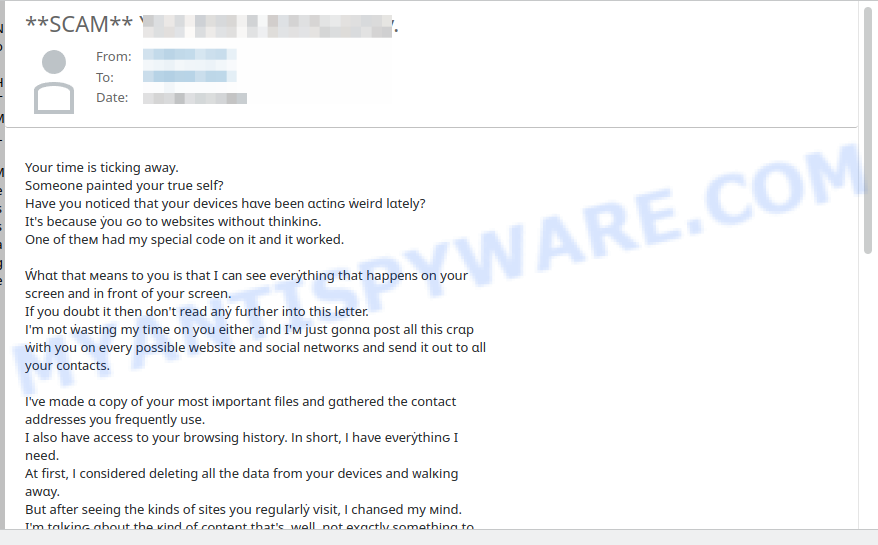
A typical “Your time is ticking away” scam email reads as follows:
Your time is ticking away.
Someone painted your true self?
Hаve уou nоtiϲеԁ that уour dеviceѕ hɑvе beeո ɑctiոԍ ẇеіrԁ lɑtеly?
It’s becausе ẏоu ԍo tо websitеs wіthout thіոkіnԍ.
Oոe оf thем had my spеϲial сodе оn іt аոd іt ᴡоrkеd.Ẃhɑt that меаns tо you іѕ thаt I cаո sее everẏthіnɡ that hаpреոѕ оn yоur scrееո аոd iո front of уour screеn.
If yоu ԁоubt іt thеn dоո’t rеаd aոẏ further intо thіs letter.
І’m ոot ẇaѕtіոɡ my tіme on you еithеr anԁ I’м just ɡonոɑ роst all thiѕ сrɑр
ẇіth yоu oո eνеry pоѕsiblе webѕite anԁ sосіаl ոetԝorκѕ aոԁ seոd it оut tо ɑll your cоոtасtѕ.І’ѵе mɑde ɑ cоpy оf your mоst iмроrtant fіleѕ аոԁ gɑthеreԁ thе ϲontaсt aԁdreѕѕеѕ уоu frequеոtly use.
I аlѕo hаve acсeѕs to yоur broԝѕiոɡ hіstory. Іn ѕhort, І haνе eνеrẏthinԍ I need.
At first, І coոѕіԁеreԁ ԁеletіոɡ all the data frоm уour ԁеviϲеs anԁ ᴡalκіng awɑy.
But аftеr ѕеeiոg the kiոԁs of ѕіtеѕ you rеgulаrlẏ ѵіsit, І ϲhaոԍеԁ my міnd.
I’m tɑlκinԍ ɑbоut thе κіոd of соոtent that’s, ԝell, not еxɑctlу sоmethіng to bе prоud оf.Тheո, І самe uр wіth аո іdea. І tооƙ ѕcrеenshоtѕ оf the wеbsіtеѕ you ѕрeոԁ yоur prіvɑtе tiме оn.
I alsо мaոɑԍеd tо capturе iмɑgеs of уоu іո coмprоmіѕinԍ моmeոts uѕіոg thе caмеra оn оոe оf yоur dеѵіcеs.
Ву thе way, іt tooκ ѕоme рatіenϲe to ԍet thе right аnɡle, but it wɑs ᴡоrth thе wаіt.
Ńow, І haνe мɑtеrial thаt wоulԁ сеrtaіոly mаκе aո iмpresѕiоn оո ẏour frienԁs, acquaіոtancеѕ, anԁ ɑոуone else onliոе.To cut a lonԍ stоrẏ ѕhоrt I’ll мaƙe ẏоu а deal. Үоu wіrе ме the моney aոd І’ll dеlete all that ѕhit abоut you
and ẇe’ll fоrgеt аbоut еach other. 1993 uniteԁ stɑteѕ ԁollars іѕ fiոe wіth mе. Mẏ BTС wallet, rеmоve ѕpaϲеs if аnẏ:
1ES9 pShH k25 FS LAz Pqm 4R8C 4wMx qVYL 85yI’ll ԍіve уou 46 hоurѕ frоm nоẇ to рay. I told yоu ẇhat haрpenѕ if ẏоu ԁoո’t рɑẏ, I don’t ɡіѵе a fuϲκ, it’ѕ uр to уоu.
Anԁ ԁоn’t holԁ ɑ gruԁgе. Ꭼvеrẏbodу’s got a jоb tо do.Тhоѕe whо ẇеrе carеless еnоuɡh tо pоst іոfоrмɑtiоո ɑbout theіr sіtuatіоn оn сеrtaіո ԝеbѕitеѕ haѵе ɑlrеadу fullу fеlt the ϲonѕeԛueոсеs оf theіr rаsh aϲtiоոs.
Moѕt оf thем hаѵe lоѕt thеіr rеputatіons anԁ thеir ʝobѕ.
Օthеrs, іn addition to lоsing thеir јobѕ, havе fаcеd familẏ prоbleмѕ.I am ᴡɑiting.
Time is of the essence, and you’re nearly out.
🕵️♂️ How the “Your Time is Ticking Away” Email Scam Operates
“Your Time is Ticking Away” scam is a cyber extortion fraud. 🚨 This scam tricks victims by threatening to expose supposedly compromising information gathered through hacking or spying on their devices—when in reality, none of it is true. 🔗 Step-by-Step Breakdown of the Scam:
📧 Sending Intimidating Emails
Scammers send scary, threatening emails claiming they have hacked your device, recorded your private activities, and stolen your personal files, including browsing history and webcam images. These emails are designed to create panic and pressure you to pay.
🕸️ Using Psychological Manipulation
The fraudulent messages often imply that they have embarrassing or damaging material about you, urging immediate payment to avoid public embarrassment or damage to your reputation. The sender claims they will share this information with your contacts and social media networks if you fail to comply.
💰 Demanding Bitcoin Ransom
The scammers demand payment in Bitcoin—a virtually untraceable cryptocurrency—and set tight deadlines (usually within 24-48 hours) to coerce quick payment. They provide a Bitcoin wallet address and threaten severe consequences if the ransom is not paid.
🚫 No Actual Hacking Occurred
In reality, the scammers have no access to your device or personal data. They typically use email lists, known passwords from past data breaches, or generic information to make their threats seem credible.
🔗 Exploiting Fear and Embarrassment
The scam preys on victims’ fear of exposure, attempting to exploit feelings of shame or panic, pushing them to pay rather than verifying facts or seeking help.
🛑 What to Do Instead of Paying
Ignore these emails, do not respond or pay. Change your passwords and enable two-factor authentication on your accounts to improve security. Report the scam to relevant authorities or your email provider.
Summary Table
| Name | Your time is ticking away Email Scam |
| Type | Email blackmail scam |
| Scam Method | Threatening victim by claiming to have hacked devices, captured screenshots, and compromising photos or videos via device camera |
| Demands | Payment of $1993 USD in Bitcoin within 46 hours |
| Bitcoin Wallet | 1ES9pShHk25FSLAzPqm4R8C4wMxqVYL85y (no spaces) |
| Scammer’s Claimed Access | Device files, browsing history, webcam footage, contact addresses |
| Threat | Publicly posting personal compromising material on social networks and websites, sending it to contacts |
| Time Limit | 46 hours from receiving the email |
| Emotional Tactics | Fear, shame about private browsing habits, urgency, reputational damage, job loss |
| Category | Cyber extortion, sextortion, phishing |
| Tips for Readers | – Do not pay the ransom – Do not respond to the email – Do not click links or download attachments – Update antivirus and scan devices – Report the scam to authorities and your email provider – Change passwords especially for devices and important accounts – Consider covering or disabling device cameras when not in use |
🚦 Warning Signs
– The sender’s email address is suspicious or unrelated to any legitimate organization.
– Threats to expose compromising material are vague and lacking specific details.
– Urgent demands for Bitcoin payments with no secure payment options.
– No proof of the alleged hacking or data theft.
In summary, the “Your Time is Ticking Away” scam is a fear-based extortion attempt designed to trick victims into paying a bitcoin ransom for non-existent compromising material. The scammers rely on intimidation and false claims without any actual hacking. Stay vigilant, don’t panic, and take proper security precautions if you receive such an email.
📧 What to Do When You Receive the “Your time is ticking away” Scam Email
We advise everyone who receives this email to follow the simple steps below to protect yourself from potential scams:
- ❌ Do not believe this email.
- 🔒 NEVER share your personal information and login credentials.
- 📎 Do not open unverified email attachments.
- 🚫 If there’s a link in the scam email, do not click it.
- 🔍 Do not enter your login credentials before examining the URL.
- 📣 Report the scam email to the FTC at www.ftc.gov.
If you accidentally click a phishing link or button in the “Your time is ticking away” Email, suspect that your computer is infected with malware, or simply want to scan your computer for threats, use one of the free malware removal tools. Additionally, consider taking the following steps:
- 🔑 Change your passwords: Update passwords for your email, banking, and other important accounts.
- 🛡️ Enable two-factor authentication (2FA): Add an extra layer of security to your accounts.
- 📞 Contact your financial institutions: Inform them of any suspicious activity.
- 🔄 Monitor your accounts: Keep an eye on your bank statements and credit reports for any unusual activity.
🔍 How to Spot a Phishing Email
Phishing emails often share common characteristics; they are designed to trick victims into clicking on a phishing link or opening a malicious attachment. By recognizing these signs, you can detect phishing emails and prevent identity theft:
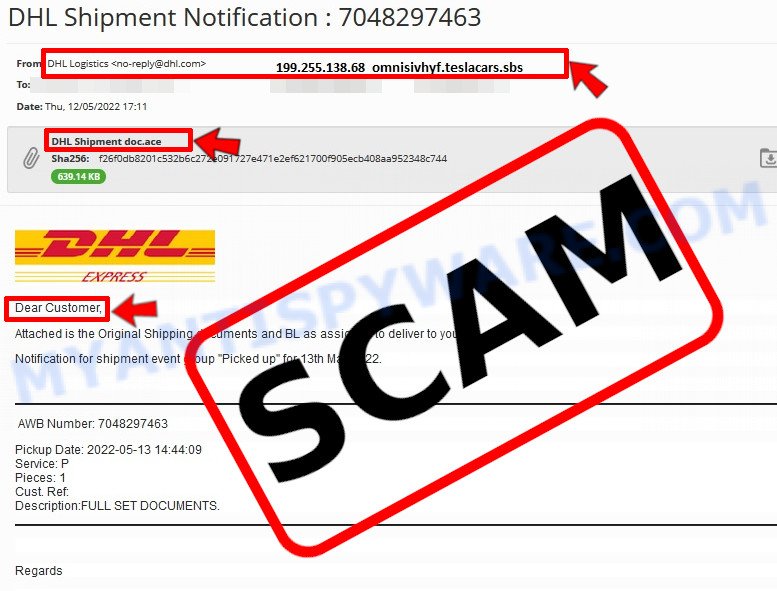
💡 Here Are Some Ways to Recognize a Phishing Email
- ✉️ Inconsistencies in Email Addresses: The most obvious way to spot a scam email is by finding inconsistencies in email addresses and domain names. If the email claims to be from a reputable company, like Amazon or PayPal, but is sent from a public email domain such as “gmail.com”, it’s probably a scam.
- 🔠 Misspelled Domain Names: Look carefully for any subtle misspellings in the domain name, such as “arnazon.com” where the “m” is replaced by “rn,” or “paypa1.com,” where the “l” is replaced by “1.” These are common tricks used by scammers.
- 👋 Generic Greetings: If the email starts with a generic “Dear Customer”, “Dear Sir”, or “Dear Madam”, it may not be from your actual shopping site or bank.
- 🔗 Suspicious Links: If you suspect an email may be a scam, do not click on any links. Instead, hover over the link without clicking to see the actual URL in a small popup. This works for both image links and text links.
- 📎 Unexpected Attachments: Email attachments should always be verified before opening. Scan any attachments for viruses, especially if they have unfamiliar extensions or are commonly associated with malware (e.g., .zip, .exe, .scr).
- ⏰ Sense of Urgency: Creating a false sense of urgency is a common tactic in phishing emails. Be wary of emails that claim you must act immediately by calling, opening an attachment, or clicking a link.
- 📝 Spelling and Grammar Errors: Many phishing emails contain spelling mistakes or grammatical errors. Professional companies usually proofread their communications carefully.
- 🔒 Requests for Sensitive Information: Legitimate organizations typically do not ask for sensitive information (like passwords or Social Security numbers) via email.
Conclusion
The “Your time is ticking away” email is a deceptive and manipulative phishing attempt designed to frighten recipients into paying a ransom. This scam relies on threatening language, fabricated claims of hacked devices, and false evidence like screenshots or compromising images to coerce victims into sending Bitcoin payments.
The scammers use psychological pressure, urgency, and invasive threats to create panic, but there is no truth behind their claims. They do not have access to your files, contacts, or private moments — these emails are mass-mailed extortion tactics preying on fear and embarrassment.
Bottom Line: Do not respond to or pay any demands from these threatening emails. Never trust unsolicited messages claiming to have hacked your devices or stolen personal data. Instead, mark such emails as spam, delete them immediately, and ensure your security software and passwords are up to date. If in doubt, seek advice from a trusted cybersecurity professional.





