HijackThis examines certain key areas of the Registry and Hard Drive and lists their contents. These are areas which are used by both legitimate programmers and hijackers. It’s up to you to decide what should be removed. Some items are perfectly fine. You should not remove them. Never remove everything. Doing that could leave you with missing items needed to run legitimate programs and add-ins.
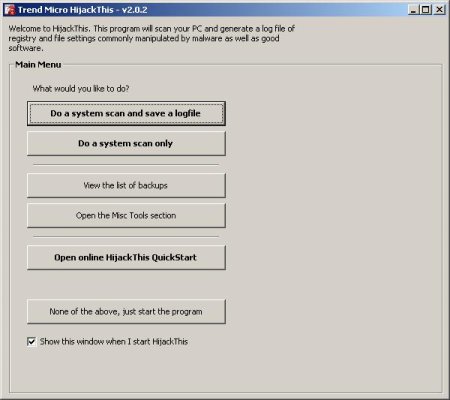
How to make a HijackThis log.
- Download HijackThis and save it to your Desktop.
- Doubleclick on the HJTinstall.exe icon for install (By default it will install to C:\Program Files\Trend Micro\HijackThis). Click on Install, It will create a HijackThis icon on the desktop.
- Once installed, it will launch Hijackthis. Click on the Do a system scan and save a logfile button. It will scan and the log should open in Notepad.
How to remove malware using HijackThis.
- Run HijackThis.
- Click on the Do a system scan only button.
- Place a checkmark in the box in front of each item you plan to remove.
- Click the Fix checked button.
- A confirmation box will appear. Click Yes. HijackThis will now remove the checked items.
How to make a Startup List using HijackThis.
StartupList is a utility which creates a list of everything which starts up when you boot your computer plus a few other items.
- Run HijackThis.
- Click on the Open the Misc Tools Section button.
- Click the Generate StartupList log button. A confirmation box will pop up. Click Yes.
- The Startup list text file will now be generated and opened on the screen.
- If you are posting at a Forum, please highlight all, and then copy and paste the contents into your Reply in the same post where you originally asked your question.
Note: If you have run and fixed anything with Spybot Search and Destroy or AdAware, please reboot before scanning.
Download HijackThis
Use the following link: HijackThis download link.
If you are seeking help, then I would recommend that you follow the instructions and post your HijackThis log in the spyware removal forum. Myantispyware.com team will help you.





Don`t post HijackThis logs here, go to Myantispyware forum for get free help!
Thanks
i need help with these browswer hijackers!
Johnson, read How to use Spyware Removal Forum – MUST READ for get free help.
i can not remove w32.virut.w
virus
by
combofix smithfroudfix & hijackthis
help me
Hemant, make a new topic at our spyware removal forum. I will help you.
When I dowloaded hjtinstall to my mac onto a usb drive to install into my PC. I rebooted my PC into use original boot,ini on the sys config utility. (it may have rebooted into a rogue boot.ini beause I get a weird prompt about access denied when I try to restart in a safe mode) and tried to open the hjtinstall.exe from both the usb drive and the desk top. I get the following prompt: THE SERVICE CANNOT BE STARTED, EITHER BECAUSE IT IS DISABLED OR BECAUSE IT HAS NO ENABLED DEVICES ASSOCIATED WITH IT. Any ideas?
ruth, the problem only with HijackThis ? Standart windows apps, notepad for example, works ok ?
Please read and follow these instructions, skip HijacThis section.
thanx
how to remove Autorun.inf
Esi, use Flash Disinfector.
Thanx…
I cannot install Hijack, what can I do?
Probably malware blocked it. Ask help at our forum.
I registered a new account for the forum, received an email, but didnt see the return email address nor the fax number.
Can someone help on the activation of the account?
I was able to get rid of the Malware Catcher 2009 but now I cant connect to the Internet. Appreciate help!
aaron, your account is activated.
StartupList report, 28/06/2009, 11:25:29 ص
StartupList version: 1.52.2
…
bo3bo3x86, please ask help at our Spyware removal forum.
Nice going. I dowloaded HijackThis, and it keeps shutting down. It won’t run on Vista Home
ralph, looks like you PC infected with malware that blocks it. Ask for help at our Spyware removal forum.
I’ve been trying to get rid of windows police pro. I followed all the directions on you post but couldn’t get MBAM to launch.
I wanted to post a HijackThis log on the forum but the program just shut down after a minute of scanning. I ran it from a USB drive in safe mode.
Please help, thanks.
StartupList report, 22.4.2010, 11:26:19
StartupList version: 1.52.2
Started from : C:\Program Files\Trend Micro\HijackThis\hijackthis.EXE
Detected: Windows XP SP2 (WinNT 5.01.2600)
Detected: Internet Explorer v6.00 SP2 (6.00.2900.2180)
* Using default options
==================================================
Running processes:
C:\WINDOWS\System32\smss.exe
C:\WINDOWS\system32\winlogon.exe
C:\WINDOWS\system32\services.exe
C:\WINDOWS\system32\lsass.exe
C:\WINDOWS\system32\svchost.exe
C:\WINDOWS\System32\svchost.exe
C:\WINDOWS\system32\svchost.exe
C:\WINDOWS\Explorer.EXE
C:\WINDOWS\system32\spoolsv.exe
C:\Program Files\Prevx\prevx.exe
C:\Program Files\Java\jre6\bin\jqs.exe
C:\WINDOWS\system32\ctfmon.exe
C:\WINDOWS\System32\nvsvc32.exe
C:\WINDOWS\System32\svchost.exe
C:\WINDOWS\system32\wuauclt.exe
C:\Program Files\Prevx\prevx.exe
C:\Program Files\Trend Micro\HijackThis\hijackthis.exe
C:\Program Files\Mozilla Firefox\firefox.exe
C:\WINDOWS\system32\wuauclt.exe
————————————————–
Checking Windows NT UserInit:
[HKLM\Software\Microsoft\Windows NT\CurrentVersion\Winlogon]
UserInit = C:\WINDOWS\system32\userinit.exe,
————————————————–
Autorun entries from Registry:
HKLM\Software\Microsoft\Windows\CurrentVersion\Run
NvCplDaemon = RUNDLL32.EXE C:\WINDOWS\system32\NvCpl.dll,NvStartup
————————————————–
Autorun entries from Registry:
HKCU\Software\Microsoft\Windows\CurrentVersion\Run
ctfmon.exe = C:\WINDOWS\system32\ctfmon.exe
————————————————–
Autorun entries in Registry subkeys of:
HKLM\Software\Microsoft\Windows\CurrentVersion\Run
[OptionalComponents]
=
————————————————–
Shell & screensaver key from C:\WINDOWS\SYSTEM.INI:
Shell=*INI section not found*
SCRNSAVE.EXE=*INI section not found*
drivers=*INI section not found*
Shell & screensaver key from Registry:
Shell=Explorer.exe
SCRNSAVE.EXE=C:\WINDOWS\System32\logon.scr
drivers=*Registry value not found*
Policies Shell key:
HKCU\..\Policies: Shell=*Registry key not found*
HKLM\..\Policies: Shell=*Registry value not found*
————————————————–
Enumerating Task Scheduler jobs:
At1.job
At10.job
At11.job
At12.job
At13.job
At14.job
At15.job
At16.job
At17.job
At18.job
At19.job
At2.job
At20.job
At21.job
At22.job
At23.job
At24.job
At3.job
At4.job
At5.job
At6.job
At7.job
At8.job
At9.job
{BB65B0FB-5712-401b-B616-E69AC55E2757}.job
————————————————–
Enumerating ShellServiceObjectDelayLoad items:
PostBootReminder: C:\WINDOWS\system32\SHELL32.dll
CDBurn: C:\WINDOWS\system32\SHELL32.dll
WebCheck: C:\WINDOWS\System32\webcheck.dll
SysTray: C:\WINDOWS\System32\stobject.dll
WPDShServiceObj: C:\WINDOWS\system32\WPDShServiceObj.dll
————————————————–
End of report, 3.673 bytes
Report generated in 0,063 seconds
Command line options:
/verbose – to add additional info on each section
/complete – to include empty sections and unsuspicious data
/full – to include several rarely-important sections
/force9x – to include Win9x-only startups even if running on WinNT
/forcent – to include WinNT-only startups even if running on Win9x
/forceall – to include all Win9x and WinNT startups, regardless of platform
/history – to list version history only
filip, please start a new topic in our Spyware removal forum. I will help you.
nice program perfecttttttttttt
My computer is infected with “Windows Security Center” Please tell me how I can get rid of it. thank you in advance
Earl, open a new topic in our Spyware removal forum. I will help you.
plz advise me how i get rid of fraudtool hijack as is keep coming up on security 360. is it a false readout. tks