Do you have pop-ups or your computer infected with trojan or spyware ? Learn how to ask us for help, click here!

How to remove System Protector (Uninstall instructions)

System Protector is a rogue antispyware program that uses fake alerts and false positives to trick you into buying the rogue and installed itself without your permission, through the use trojans. Once infected with these trojans your computer will display large amount of fake security alerts that tells you that your computer is infected and you should download and install System Protector in order to protect your computer.

During installation, System Protector configures itself to run automatically every time, when you start your computer. Once running, System Protector will scan your computer and reports false or exaggerated system security threats on the PC to trick you to buy the paid version of the program.

systemprotector
System Protector (more screen shoots 1)

While System Protector is running your computer will display fake security alerts stating that your computer is infected. All these alerts should be ignored, use the free instructions below for removing the System Protector and any associated malware from your computer.
Continue reading How to remove System Protector (Uninstall instructions)…

March 31, 2009 on 7:53 am | In Rogue Anti Spyware, Tutorials - HowTo | No Comments |


How to remove Ultra Antivir2009 (Uninstall instructions)

Ultra Antivir2009 is a rogue antispyware program, brother of the rogue antispyware programs named Virus Alert, Virus Melt and Virus Doctor. The rogue uses fake alerts and false positives to trick you into buying the rogue and usually installed itself onto your computer without your permission, through the use trojans.

During installation, Ultra Antivir2009 configures itself to run automatically every time, when you start your computer. Once running, it will scan your computer and reports false or exaggerated system security threats on the computer that cannot be removed unless you first purchase the software. In addition the program creates a few files. These files during the scan will determine as trojans and spyware.

Ultra Antivir2009 can be safely removed from your computer along with any other trojan infections if the proper steps are taken. If you are a non-techie computer user then this method of removing the rogue is for you.
Continue reading How to remove Ultra Antivir2009 (Uninstall instructions)…

March 28, 2009 on 10:49 pm | In Rogue Anti Spyware, Tutorials - HowTo | No Comments |


How to remove Virus Alert (Uninstall instructions)

Virus Alert is a rogue antispyware program, brother of the rogue antispyware programs named Virus Melt and Virus Doctor. Virus Alert uses fake alerts and false positives to trick you into buying the rogue. It usually installed itself onto your computer without your permission, through the use trojans.

When installed, Virus Alert configures itself to run automatically every time, when you start your computer. Once running, it will scan your computer and reports false or exaggerated system security threats on the computer that cannot be removed unless you first purchase the software. Running of Virus Alert may drastically slow the performance of your computer. Use the free instructions below to remove Virus Alert and any associated malware from your computer.
Continue reading How to remove Virus Alert (Uninstall instructions)…

March 26, 2009 on 8:37 pm | In Rogue Anti Spyware, Tutorials - HowTo | No Comments |


How to use Kaspersky virus removal tool

Kaspersky virus removal tool also known as AVPTool is a free program written by by Kaspersky® lab and designed to clean Virus/Trojans/Malware that are running on your computer. The tool uses the Kaspersky Anti-Virus engine and AVZ Antiviral Toolkit. AVPTool installation contains actual virus definitions.

Kaspersky virus removal tool main window

The interface is simple to use. AVPTool has two operating modes: automatic scan (uses for performing complete and custom scanning of hard drives, removable drives, memory, registry, startup objects, disk boot sectors and more) and manual cure (uses for performing manual system cure).
Continue reading How to use Kaspersky virus removal tool…

March 26, 2009 on 4:54 am | In Free Software, Tutorials - HowTo | 7 Comments |


How to remove Total Security (Uninstall instructions)

Total Security is a rogue antispyware program that a new version of widely spread rogue named as Antivirus 360. Like his brother and another fake security programs, Total Security uses fake alerts and false positives to trick you into buying the rogue. The rogue usually installed itself onto your computer without your permission, through the use trojans. Some days ago another rogue with the same name have been found. Read the article: How to remove Total Security 2009.

When installed, Total Security configures itself to run automatically every time, when you start your computer. Once running, it will scan your computer and list a large amount of infections, but all of these infections are fake, so you can safely ignore them.

TotalSecurity
Total Security

While Total Security is running you will be shown nag screens, fake security notifications from Windows task and a fake Windows Security Center called Protection Center that will recommend you register Total Security. Instead of doing so, use these free instructions below to remove Total Security and any associated malware from your computer.
Continue reading How to remove Total Security (Uninstall instructions)…

March 21, 2009 on 7:09 am | In Rogue Anti Spyware, Tutorials - HowTo | 43 Comments |


How to remove Renus 2008 (Uninstall instructions)

Renus 2008 is a fraud application, that classified as rogue antispyware program. Just like most fake antispywares, Renus 2008 uses fake alerts and false positives to trick you into buying the rogue. It usually installed itself onto your computer without your permission, through the use trojans.

rogue antispyware

During installation, Renus 2008 configures itself to run automatically every time, when you start your computer. Once running, it will scan your computer and reports false or exaggerated system security threats on the computer that cannot be removed unless you first purchase the software.

Renus 2008 also generates fake security alerts:

Your Computer might be at Risk!
Viruses have been detected!
Possible:

- Unauthorized access to your files, documents.
- Stealing from your banking accounts.
- Reading you private correspondence.
- Spam-mailing from your PC.

Highly recommended to destroy them immediately.

Renus 2008 may drastically slow the performance of your computer. Use the free instructions below for removing the Renus 2008 and any associated malware from your computer.
Continue reading How to remove Renus 2008 (Uninstall instructions)…

March 19, 2009 on 9:55 pm | In Rogue Anti Spyware, Tutorials - HowTo | No Comments |


How to remove WinPC Defender (Uninstall instructions)

WinPC Defender is a rogue antispyware program, brother of the rogue named XP Police Antivirus . Like other rogue antispyware programs, it is distributed through the use trojans. Once infected with these trojans your computer will display large amount of security alerts that tells you that your computer is infected and you should download and install WinPC Defender in order to protect your computer.

winpc defender
WinPC Defender (more screen shoots: 1, 2)

During installation, WinPC Defender configures itself to run automatically every time, when you start your computer. Once running, WinPC Defender will scan your computer and reports false or exaggerated system security threats on the PC to trick you to buy the paid version of the rogue, in order to remove the potential and reported threats.

While the Win PC Defender is running you may see false security alerts such as the following.

Trojan Detected!
A piece of malicious code was found in your system which can replicate itself if no action is taken. Click here to have your system cleaned by Win PC Defender.

Firewall Warning
Hidden file transfer to remote host was detected.

Also WinPC Defender will hijack Internet Explorer and randomly shows a “Insecure Internet Activity” warning page, instead of the site you are trying to browse to. These alerts and warnings are a fake and should be ignored! Use the free instructions below to remove WinPC Defender and any associated malware from your computer.
Continue reading How to remove WinPC Defender (Uninstall instructions)…

March 18, 2009 on 8:30 am | In Rogue Anti Spyware, Tutorials - HowTo | 20 Comments |


How to remove Personal Antivirus (Uninstall instructions)

Personal Antivirus is rogue antivirus/antispyware program, new version of General Antivirus. The rogue antispyware uses trojans, fake online malware scanners and advertising on the Internet for distribution. This advertisement tells that your computer is infected and offers to download and install Personal Antivirus to clean your computer.

personal-antivirus
Personal Antivirus

When installed, Personal Antivirus configures itself to run automatically every time, when you start your computer. Once running, it will scan your computer and list a large amount of infections, but these “infections” are fake. Then, Personal Antivirus said that you should purchase the program in order to remove them. Running of it may drastically slow the performance of your computer.

While Personal Antivirus is running your computer will display fake security alerts from your Windows taskbar. These alerts are a fake and should be ignored! Personal Antivirus can be safely removed from your computer along with any other trojan infections if the proper steps are taken. If you are a non-techie computer user then this method of removing Personal Antivirus and any associated malware from your computer is for you.
Continue reading How to remove Personal Antivirus (Uninstall instructions)…

March 18, 2009 on 7:03 am | In Rogue Anti Spyware, Tutorials - HowTo | 163 Comments |


How to remove WinCodecPro trojan and wmptray.exe (fake media codec)

WinCodecPro is a fake video codecs pack that advertised as a pack that contains all the video codecs and uses scare tactics to trick you into buying the fake software. WinCodecPro distributed through the use trojans. Once infected with the trojan your computer will display large amount of alerts that tells you that your media player, system or codecs are corrupted and that you should purchase WinCodecPro in order to fix these problems. These alerts are fake and generated by the C:\Program Files\MediaSystem\wmptray.exe. The file is a main component for this trojan.

A few fake alerts that WinCodecPro trojan generates:

Warning
Fatal Error: Windows can’t play the following media formats: AVI;ASF;WMV;AVS;FLV;MKV;MOV;3GP;MP4;MPG;MPEG;MP3;AAC;WAV;WMA;CDA;FLAC;M4A;MID. Update your video codec to resolve this issue.

Warning
Media codec has been destroyed. Risk of losing all your audio video files high. To resolve this issue, update your media codec immediately.

Warning
Critical media error! Your media driver is unstable. Video driver is corrupt and can no longer save your monitor settings. Driver is in critical mode. To restore your media drivers, update your video codec immediately.

Warning
Fatal Error: Can’t play audio video files. Update your video codec immediately to resolve this issue.

Warning
Internal error! Media player has been corrupted. Immediately update your video codec to resolve this issue.

Ignore these fake alerts and use the free instructions below for removing the WinCodecPro trojan, wmptray.exe and any associated malware from your computer.
Continue reading How to remove WinCodecPro trojan and wmptray.exe (fake media codec)…

March 16, 2009 on 8:52 am | In Malware, Tutorials - HowTo | 10 Comments |


How to remove Anti-Virus Number 1 (Uninstall instructions)

Anti-Virus Number 1 is a rogue antivirus/antispyware program, new version of Anti-virus-1 and Antivirus 360. Like Anti-virus-1 and other rogue antispyware programs, it uses advertising on the Internet for distribution that tells that your computer is infected and offers to download and install Anti-Virus Number 1. Also the program may use trojans for invisible installation on your computer.
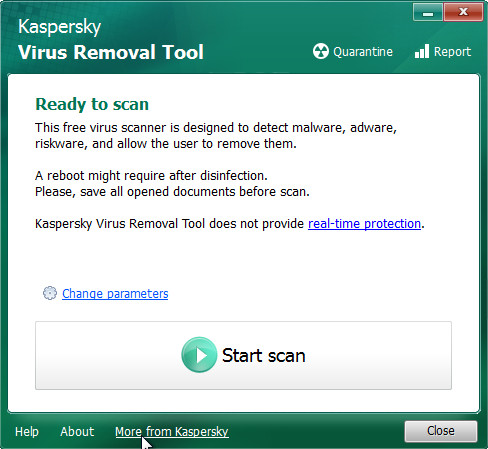
During installation, Anti-Virus Number 1 configures itself to run automatically every time, when you start your computer. Immediately after launch, the program starts scanning the computer and found a lot of trojans and spyware. All these infections are fake. Then Anti-Virus Number 1 said that you should purchase the program in order to remove them and protect your computer.

Anti-Virus Number 1 also generates false security alerts:

Internal conflict alert.
Anti-Virus Number-1 detected internal software conflict. Some applicztion tries to get access to system kernel (such behavior is typical to Spyware/Malware). It may cause crash of your computer.

Privacy Violation alert!
Anti-Virus Number-1 detected a Privacy Violation. A program is secretly sending your private data to an untrusted internet host. click here to block this activity by removing the threat (Recommended).

The fake alerts may drastically slow the performance of your computer. Use the free instructions below for removing the Anti-Virus Number 1 and any associated malware from your computer.
Continue reading How to remove Anti-Virus Number 1 (Uninstall instructions)…

March 16, 2009 on 7:58 am | In Rogue Anti Spyware, Tutorials - HowTo | 6 Comments |


Next Page »

My Anti Spyware - Free antispyware programs and Spyware Removal Instructions.