![]() | Do you have pop-ups or your computer infected with trojan or spyware ? Learn how to ask us for help, click here! |
How to remove Antimalware Doctor (Uninstall instructions)
Antimalware Doctor is a rogue antispyware program that distributed and installed throught trojans. The rogue detects false infections and displays numerous fake security warnings in order to scare you into thinking that your computer is infected with a lot of malware. It hopes that you will then purchase a full version of Antimalware Doctor.
When the trojan that installs Antimalware Doctor is started, it will download, then install the rogue on to your computer. During installation, the fake antispyware application will be registered in the Windows registry to run automatically when Windows loads. Immediately after launch, Antimalware Doctor will start to scan your computer and reports a lot of various infections that will not be fixed unless you first purchase the software. Important to know, all of these infections are a fake and do not actually exist on your computer.
What is more, Antimalware Doctor constantly displays various security alerts. However, all of these alerts ara fake and like the false scan results supposed to scare you into thinking that your computer is infected. So you can safely ignore all that the parasitic program gives you.
As you can see, Antimalware Doctor is a scam that created with one purpose to trick you into purchasing so-called “full” version of the program. If you find that your computer is infected with this malware, then be quick and take effort to remove it immediately. Use the removal guide below to remove Antimalware Doctor from your computer for free.
Symptoms in a HijackThis Log
O4 – HKCU\..\Run: [Antimalware Doctor.exe] C:\Windows\System32\Antimalware Doctor.exe
Use the following instructions to remove Antimalware Doctor (Uninstall instructions)
Download MalwareBytes Anti-malware (MBAM). Once downloaded, close all programs and windows on your computer.
Double-click on the icon on your desktop named mbam-setup.exe. This will start the installation of MalwareBytes Anti-malware onto your computer. When the installation begins, keep following the prompts in order to continue with the installation process. Do not make any changes to default settings and when the program has finished installing, make sure a checkmark is placed next to “Update Malwarebytes’ Anti-Malware” and Launch “Malwarebytes’ Anti-Malware”. Then click Finish.
MalwareBytes Anti-malware will now automatically start and you will see a message stating that you should update the program before performing a scan. If an update is found, it will download and install the latest version.
As MalwareBytes Anti-malware will automatically update itself after the install, you can press the OK button to close that box and you will now be at the main menu. You will see window similar to the one below.

Malwarebytes Anti-Malware Window
Make sure the “Perform quick scan” option is selected and then click on the Scan button to start scanning your computer for Antimalware Doctor infection. This procedure can take some time, so please be patient.
When the scan is finished a message box will appear that it has completed scanning successfully. Click OK. Now click “Show Results”. You will see a list of infected items similar as shown below.
Note: list of infected items may be different than what is shown in the image below.
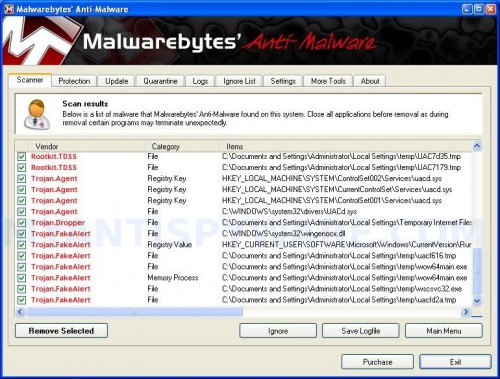
Malwarebytes Anti-malware, list of infected items
Make sure all entries have a checkmark at their far left and click “Remove Selected” button to remove Antimalware Doctor. MalwareBytes Anti-malware will now remove all of associated Antimalware Doctor files and registry keys and add them to the programs’ quarantine. When MalwareBytes Anti-malware has finished removing the infection, a log will open in Notepad and you may be prompted to Restart.
Note 1: if you can not download, install, run or update Malwarebytes Anti-malware, then follow the steps: Malwarebytes won`t install, run or update – How to fix it.
Note 2: if you need help with the instructions, then post your questions in our Spyware Removal forum.
Note 3: your current antispyware and antivirus software let the infection through ? Then you may want to consider purchasing the FULL version of MalwareBytes Anti-malware to protect your computer in the future.
Antimalware Doctor creates the following files and folders
C:\Windows\System32\enemies-names.txt
C:\Windows\System32\Antimalware Doctor.exe
Antimalware Doctor creates the following registry keys and values
HKEY_CURRENT_USER\Software\Microsoft\Windows\CurrentVersion\Uninstall\Antimalware Doctor
HKEY_CURRENT_USER\Software\Antimalware Doctor Inc
HKEY_CURRENT_USER\Software\Antimalware Doctor Inc\Antimalware Doctor
HKEY_CURRENT_USER\Software\Microsoft\Windows\CurrentVersion\Run | Antimalware Doctor.exe
58 Comments »
RSS feed for comments on this post.
Leave a comment
My Anti Spyware - Free antispyware programs and Spyware Removal Instructions.


Ran this routine but program keeps coming back, what is the next step?
Comment by Joseph — April 9, 2010 #
Joseph, open a new topic in our Spyware removal forum. I will help you.
Comment by Patrik — April 9, 2010 #
In my computer I have antivirus program but antimalware doctor named program is disturbing my pc how can i fix it ?
Comment by Dev — April 25, 2010 #
Dev, if the above instructions does not help, then ask for help in our Spyware removal forum. I will help you.
Comment by Patrik — April 27, 2010 #
I did it… Go to msconfig and check under start up for newer stuff. Usually is in /documents~settings/application data/(directory had a whole bunch of numbers) I disabled it for startup, then had to reboot. I went to Control panel after, and saw the uninstall was still there. Whe I clicked remove it opened the program, which I stopped with Task manager. Msconfig had the program checked to start again. So I copied the location, unchecked it and rebooted. I went to the location and when I opened it, it had a different name than AntiMalware Doctor but the enemies.txt was there. I deleted both, then the folder. I emptied the recycle bin and rebooted. Got rid of it, then went to conrol panel, found the antimalware doctor listing still there. I clicked remove and got the message saying it might have been already uninstalled
Comment by tom — April 27, 2010 #
coincidentally I also disabled a couple of weird named dlls in msconfig start up as well.
Comment by tom — April 27, 2010 #
Thanks for this removal tool. However I still don’t have access to System Restore. A message pops up saying Domain Administrator has blocked and there’s no access to System Properties to ‘untick’. Any ideas please?
Comment by Grizza — May 3, 2010 #
im unable to get into my run command options to get to the msconfig, due to the antimalware doctor. any ideas how to bypass the malware so i can remove it from starting up. i ran the mbam software once and it worked then the antimalware thing came back the next day. i run mbam now and it doesnt see the rogue malware. plese help any suggestions is appreciated.
Comment by Cesar — May 4, 2010 #
Grizza, try scan your PC with SuperAntispyware. If it does not help, then start a new topic in our Spyware removal forum.
Comment by Patrik — May 5, 2010 #
Cesar, start a new topic in our Spyware removal forum. I will check your PC.
Comment by Patrik — May 5, 2010 #
Malwarebytes’ successfully removed the dreaded malware program. MBAM will be added to my arsenal of anti-crap software!
Comment by Dane — June 2, 2010 #
thank you so much for the help. ive finally got rid of that antimalware doctor.
Comment by Anees — June 3, 2010 #
Patrik,
You are my hero. Luckily, moments after noticing the infection, I googled how to rid my computer and your help cured this (I hope) so thank you so much.
Comment by Eliz — June 3, 2010 #
you guys i had the antimalware virus thing and i downloaded this stopzilla thing and as soon as i finished installing it the antimalware disappeared and right after i went on to delete the stopzilla that i had just downloaded. now computer works just fine.
Comment by Sasha — June 5, 2010 #
Hello Patrick,
Your program apears to have removedAntimalware doctor. Thanks for the program and the clear instruction.
But I get the RUNDLL message hfvipvoo.dll. Stopping with Msconfig doe not work. Can you give advice.
grtz
erik.
Comment by Erik — June 5, 2010 #
Erik, please start a new topic in our Spyware removal forum. I will help you.
Comment by Patrik — June 6, 2010 #
I think Malwarebytes and Antimalware Doctor are by the same people. It’s like a good cop, bad cop.
They will create the problem with antimalaware doctor and then sell you the solution with malwarebytes.
Just get stopzilla and your problems are solved.
Comment by asd — June 18, 2010 #
I downloaded malwarebytes and it got rid of the antimalware doctor. However, some of my settings reverted to default. My computer is still slow and Will not let me access some programs or the internet after it has been on for a few hours. Please help
Comment by chelsey — June 22, 2010 #
chelsey, please start a new topic in our Spyware removal forum. I will check your PC.
Comment by Patrik — June 23, 2010 #
I have run mbam.exe and it says it removes antimalware doctor, but after removal I cannot access the internet and it is always there when I restart. What can I do??
Comment by Tim — June 25, 2010 #
Tim, check your proxy settings. Run Internet Explorer, Click Tools -> Internet Options. Select Connections Tab and click to Lan Settings button. Uncheck “Use a proxy server” box. Click OK. Click OK.
Comment by Patrik — June 26, 2010 #
I can get on the internet now. How can I prevent Antimalware Doctor from coming back when I restart the computer??
Comment by Tim — June 27, 2010 #
You mean “reinstall computer” ?
Comment by Patrik — June 27, 2010 #
hi i jus recently was attacked with the antimalware virus and i can’t access my internet to download this or any other helpful antimalware programs im posting this from a different computer so if someone could please help me i would greatly appreciate it
Comment by David R. — July 1, 2010 #
David, try download the suggested app in Safe mode with networking.
Comment by Patrik — July 2, 2010 #
Is the first walkthrough going to work or not?
Comment by Terence — July 9, 2010 #
Thank you very much for this information
Comment by salim — July 13, 2010 #
A company computer has been recently infected with this crap. I have tried walking them through MalwareBytes, Spyware Doctor, removing it manually, and a few other methods over the phone but nothing has removed AnitMalware Doctor. Any ideas?
I have tried it in safe mode, normal mode, safe mode with networking.
Comment by Shane — July 13, 2010 #
Shane, probably the computer is infected with a new version of the rogue. Please start a new topic in our Spyware removal forum. I will help you.
Comment by Patrik — July 14, 2010 #
antimalware doctor has invaded my laptop [pc]. i’ve looked everywehre for removal instructions but unfortunately, i am unable to successfully run the program because the malware seems to block any .exe apps from opening. it would say “application cannot be executed. the file mbam.exe is infected. do you want to activate your antivirus software now?” and of course i would click no. any suggestions ?
Comment by CAMILLE — July 18, 2010 #
CAMILLE, open a new topic in our Spyware removal forum. I will help you.
Comment by Patrik — July 18, 2010 #
thank you for those wonderful instructions. when this happened i freaked out bcuz i have an antivirus too, but it didnt detect it. i’m 15 and i don’t really understand computers and i thought that this was all and the computer would be useless. anyway, thanks a lot. you are THE BEST!!!
Comment by ritz — July 19, 2010 #
my computer got infected lastnite by antimalware doctor.i knew it wasnt my antivirus so ket saying no to when it asked me to remove programs and install saying someone trying to hack my details and viewing illegal webages…it says stuff like this the way you click remove programs.i still had it on my computer in ways like when im on the internet it would keep asking me to remove items so i downloaded free version of MalwareBytes.it seems to work so far as checked programs and antimalware is gone and checked recyle bin and it was in there so deleted it fully.
Comment by Gerard — July 19, 2010 #
hi
i picked up this antimalware doctor crap last night and am still trying to remove it. malware bytes no good, superantispyware no good. am running GMER at the moment, then will use tdsskiller.
this is the most aggressive virus i’ve ever had.
what worries me is that i’m sure i didn’t even click anything other than a link to get it.
what can we do to protect ourselves?
Comment by ian — July 19, 2010 #
I just got that Antimalware Doctor thing a little while ago… I Googled the instructions on how to remove it, since something similar totally ruined my last computer, and I came across this site. I followed all the instructions, and bam!! It’s gone. Thank you SO much for having this page to help save my new(ish, got in in March) computer!! ^_^
Comment by Noela — July 19, 2010 #
1. Make sure that you have all the Critical Updates recommended for your operating system and IE.
2. A well protected computer should have at least an antivirus and firewall, an antispyware is also great addition to your computers security.
3. Many of the exploits are directed to users of Internet Explorer. Try using a different browser – Firefox or Opera.
If you need a help, please start a new topic in our Spyware removal forum.
Comment by Patrik — July 19, 2010 #
please help!! I got the anti-malware doctor virus, removed it with the malwarebytes anti-malware, and it is gone, but it has done something to my security center and firewall, (which is was imitating or taking over during the infection). Now I cannot open my windows firewall, it was the service is not running and cannot open. My computer suddenly freezes from time to time and I have to turn it off, and the other day I suddenly was getting some porn program loading itself onto my computer. Please help !!!
Comment by seth — July 20, 2010 #
Hi,
I already have the Malwarebytes Anti-malware. I am still stuck with this horrible Antimalware Doctor. I have deleted all the quarantine and nothing is working. What is wrong?
Comment by Nick — July 22, 2010 #
Antimalware doctor is impossible to destroy..what a piece of shit. What can I do now? Nothing is working…
Comment by Nick — July 22, 2010 #
seth, start a new topic in our Spyware removal forum. I will check your PC.
Comment by Patrik — July 22, 2010 #
Nick, probably your computer also infected with a trojans that blocks a removal process. Please begin a new topic in our Spyware removal forum. I will help you.
Comment by Patrik — July 22, 2010 #
From this virus I learned my lesson in downloading. It really got me frustrated the whole night, I couldn’t even bare to turn my computer on. But thanks to this page, it saved my life. Thank you so much! I can’t thank you enough for this. <3
Comment by Rayanne — July 23, 2010 #
Does anyone else have this problem; after starting my computer and waiting a few minutes, the screen starts to flicker and then it all turns black. After that I have to reboot my comp.
Comment by Cat — July 24, 2010 #
Cat, try boot your PC in Safe mode and perform a scan with Malwarebytes.
Comment by Patrik — July 24, 2010 #
I’ve already done that and it doesn’t work, the screen still flickers and turns black when it finds the virus… I guess I’ll just have to re-install windows and do everything from the beginning. I don’t think the antimalware doctor is in my comp anymore, since it doesnt pop up. Thank you anyway.
Comment by Cat — July 24, 2010 #
You mean Mawlwarebytes ? Try scan your computer with Kaspersky Virus removal tool and DrWeb CureIt.
Comment by Patrik — July 24, 2010 #
Ok, so now I’ve tried several antivirus programs and nothing works. One thing I’ve noticed though is that even if I don’t use a antivirus program, the problem still remains. And it seems that the time it’s turned off is the time I can use the computer. If I’ve had it turned off for 10 minutes, I can use it for 10 minutes before it turns black and so on.
Comment by Cat — July 24, 2010 #
Cat, please open a new topic in our Spyware removal forum. I will check your PC.
Comment by Patrik — July 25, 2010 #
hey the antimalware doctor just came on my pc last night and i tried restoring to a previous date but this didnt work. i also downloaded malwarebytes anti malware and ran a scan with no luck. i need some help
Comment by conor — July 26, 2010 #
conor, probably your computer infected with a trojan that blocks a malware removal process. Please start a new topic in our Spyware removal forum. I will help you.
Comment by Patrik — July 26, 2010 #
I used hitman pro. It solved the problem
Comment by Maddevil — July 26, 2010 #
I have ran malware three times, and have tried to delete the Antimalware Doctor three times from the registry. Nothing happens. I reboot and it is still there. I ran the malware again and it only finds 2 infections. They are deleted. I reboot again and it still shows up. What do I do?
Comment by Nikki — July 27, 2010 #
Nikki, looks like your computer infected with a trojan that reinstalls the rogue. Please start a new topic in our Spyware removal forum. I will help you.
Comment by Patrik — July 27, 2010 #
My friend recently got this virus. And his computer wouldn’t let him launch any .exe file, I don’t know if that’s a characteristic of antimalware doctor or another virus, but that’s besides the point. I used Super Anti-Spyware portable edition which happens to run as a .com, found 33 different trojans in addition to antimalware doctor. Now it works pretty well. His internet didn’t work at first but it was set up to use a proxy that didn’t work, so I just unchecked that by going to Internet options, connections, LAN settings and voila… I then downloaded and ran Microsoft Security Essentials which picked up the leftovers, computer is good as new now
Hope this helps someone
Comment by Grant — July 29, 2010 #
edit^^^ All of this was pretty automated and free, so it is useful for those of us who don’t know exactly what we are doing
Comment by Grant — July 29, 2010 #
Patrick, can you tell me exatcly how to delete antimalware after not working on the above instructions!! pleaseeee.. geek suqad wants $199! no way.. and stupid mcaffe wants $89 to remove these program..
worried please hlp..
Nicole
Comment by Nicole — July 29, 2010 #
patrick,
antimalware doctor is what im trying to remove
Comment by Nicole — July 29, 2010 #
Nicole, if the instructions above does not help you, then please start a new topic in our Spyware removal forum. I will help you.
Comment by Patrik — July 30, 2010 #
