Do you have pop-ups or your computer infected with trojan or spyware ? Learn how to ask us for help, click here!

How to remove Internet Security 2010 (Uninstall instructions)

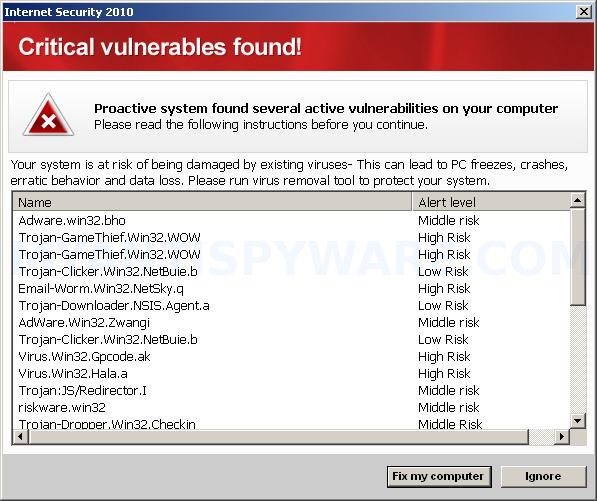
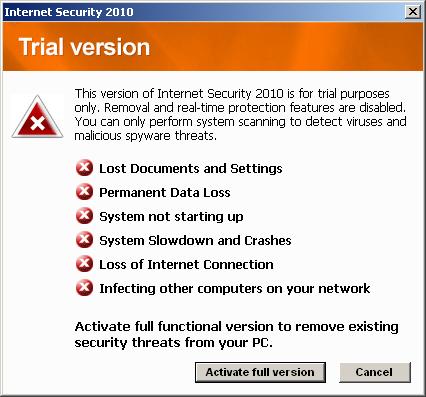
InternetSecurity2010Internet Security 2010 is a rogue antispyware program, clone of widely spread Advanced Virus Remover, which is also rogue antispyware program. The program distributed with the help of trojans. When Internet Security 2010 is installed, it will configure itself to run automatically when Windows loads.

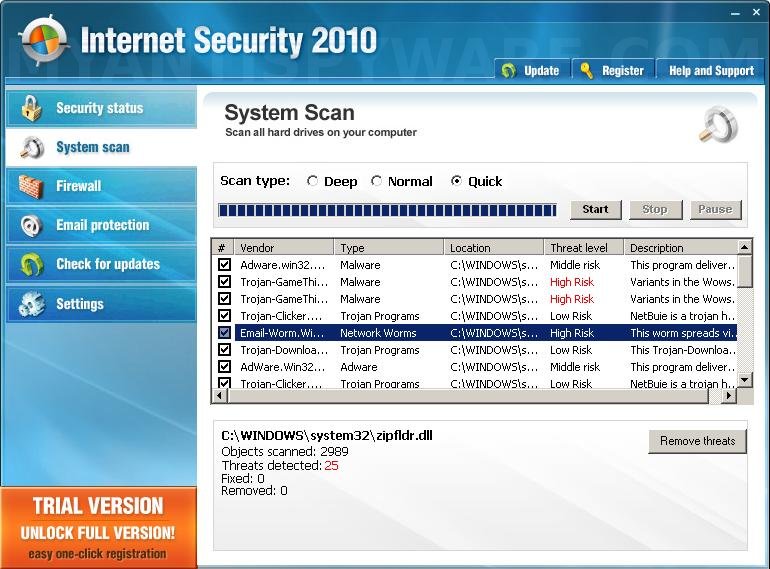
Once running, Internet Security 2010 will begin to scan your computer and list a variety of infections that will not be fixed unless you first purchase the program. Important to know, all of these infections are fake and do not actually exist on your computer, so you can safely ignore them.

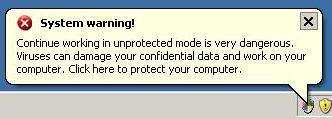
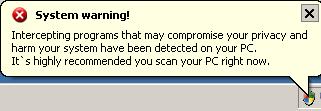
What is more, while Internet Security 2010 is running your computer will display nag screens, warnings and fake security alerts from your Windows taskbar. Some of the alerts:

System warning!
Continue working in unprotected mode is very dangerous.
Viruses can damage your confidential data and work on your
computer. Click here to protect your computer.

System warning!
Intercepting programs that may compromise your privacy and
harm your system have been detected on your PC.
It`s highly recommended you scan your PC right now.

Just like false scan results, all of these warnings are fake and should be ignored! If you find that your computer is infected with this malware, then be quick and take effort to remove it immediately. Use the removal guide below to remove Internet Security 2010 from the system for free.

More screen shoots of Internet Security 2010
Symptoms in a HijackThis Log

O4 – HKCU\..\Run: [Internet Security 2010] C:\Program Files\InternetSecurity2010\IS2010.exe

Use the following instructions to remove Internet Security 2010 (Uninstall instructions)

Step 1

Download HijackThis from here. Once Save dialog opens, please rename HijackThis.exe to iexplore.exe as shown below.


Save Dialog – HijackThis.exe


Save Dialog – iexplore.exe

Click Save button to save it.

Run HijackThis. Click “Do a system scan only” button. Now select the following entries by placing a tick in the left hand check box, if present:

F2 – REG:system.ini: UserInit=C:\WINDOWS\system32\winlogon32.exe
O4 – HKLM\..\Run: [smss32.exe] C:\WINDOWS\system32\smss32.exe
O4 – HKCU\..\Run: [smss32.exe] C:\WINDOWS\system32\smss32.exe
O4 – HKCU\..\Run: [Internet Security 2010] C:\Program Files\InternetSecurity2010\IS2010.exe

Once you have selected all entries, you will see a screen similar to the one below.
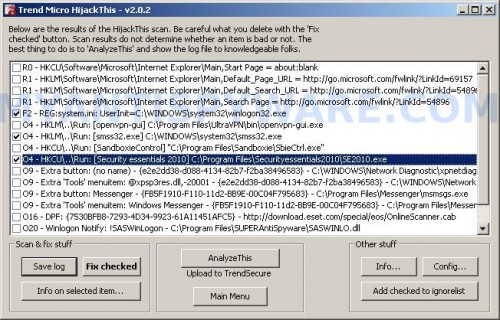

HijackThis

Close all running programs then click once on the “fix checked” button. Close HijackThis.

Step 2

Download LSPFix from here and unzip it to your Desktop.

Run LSPFix. Place a tick in the “I know what i`m doing”.

In the KEEP box select helper32.dll (if the file is not listed in KEEP box, then close LSPFix and go to step 3). Press “>>” button and you will see a window as shown below.
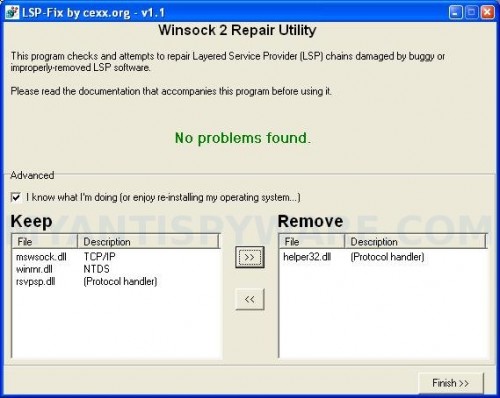

LSPFix

Press Finish>> button. When LSPFix is done removing the LSP you will see a summary box. Press OK. Reboot your computer.

Step 3

Download MalwareBytes Anti-malware (MBAM). Close all programs and Windows on your computer.

Double Click mbam-setup.exe to install the application. When the installation begins, keep following the prompts in order to continue with the installation process. Do not make any changes to default settings and when the program has finished installing, make sure a checkmark is placed next to Update Malwarebytes’ Anti-Malware and Launch Malwarebytes’ Anti-Malware, then click Finish.

If an update is found, it will download and install the latest version.

Once the program has loaded you will see window similar to the one below.

malwarebytes-antimalware1
Malwarebytes Anti-Malware Window

Select Perform Quick Scan, then click Scan, it will start scanning your computer for Internet Security 2010 infection. This procedure can take some time, so please be patient.

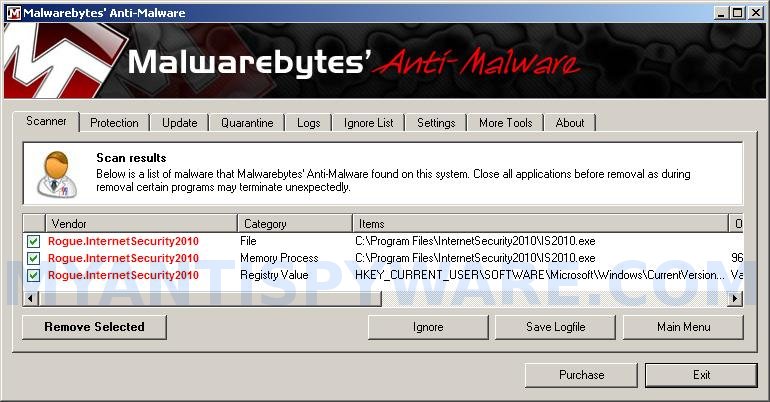
When the scan is complete, click OK, then Show Results to view the results. You will see a list of infected items similar as shown below. Note: list of infected items may be different than what is shown in the image below.
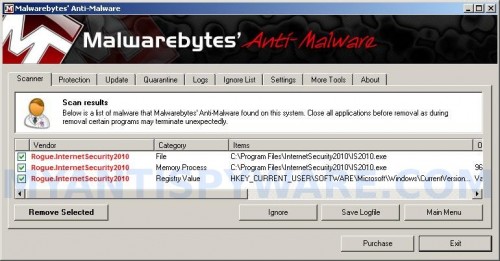
InternetSecurity2010_remover
Malwarebytes Anti-malware, list of infected items

Make sure that everything is checked, and click Remove Selected for start Internet Security 2010 removal process. When disinfection is completed, a log will open in Notepad and you may be prompted to Restart.

Note: if you need help with the instructions, then post your questions in our Spyware Removal forum.

Internet Security 2010 creates the following files and folders

C:\Program Files\InternetSecurity2010
C:\Program Files\InternetSecurity2010\IS2010.exe

Internet Security 2010 creates the following registry keys and values

HKEY_CURRENT_USER\SOFTWARE\Microsoft\Windows\CurrentVersion\Run\internet security 2010

Share and Enjoy:

  • Print
  • Digg
  • Sphinn
  • del.icio.us
  • Facebook
  • Mixx
  • Google Bookmarks
  • Slashdot
  • Twitter
December 10, 2009 on 1:01 pm | In Rogue Anti Spyware, Tutorials - HowTo | 89 Comments |


89 Comments »

RSS feed for comments on this post. TrackBack URI

  1. thanx

    Comment by dan valentine — December 10, 2009 #

  2. how the hell am i supposed to download malwarebytes if i can’t even open my browser???

    Comment by bob — December 12, 2009 #

  3. bob, make a new topic in our Spyware removal forum.

    Comment by Patrik — December 12, 2009 #

  4. If you have this problem, good chance you have win32 netsky worm. Currently fixing problem on another computer. Admin can email me if they want any more details.

    Comment by Noah — December 23, 2009 #

  5. If you require a Malvarebytes and youre computer browser does not work then try to find a computer that works and use a Flash…I suggest you to delete all the info or store it somewhere else if you have something important…Becouse there is a chance of the virus to get in the flash…

    Comment by Johnny — December 25, 2009 #

  6. On Christmas Eve, a co-worker’s workstation became infected with this virus on startup. This is the 4th time I have had to battle this. I found this website and this was the easiest fix ever, and it’s free. I would have paid $50 to get rid of the infection this easily! Since the infected workstation could not access the Internet I downloaded the solutions onto a flash drive and ran them from there. Also, once the workstation was cured, I had to delete Internet Security 2010 from the Program Files. It tried to start again on startup and I stopped that with Task Manager under Processes.
    I am SO happy I didn’t have to spend the weekend saving the data and formatting and reloading Windows!

    Comment by Jim — December 25, 2009 #

  7. Marry Christmas and Happy New Year to all.
    Thank you for your anti spyware, it completly crashed Internet Security 2010 and my PC works perfectly

    Comment by Rezo — December 27, 2009 #

  8. unbelievable. thanks so much. 100% legit. brilliant

    Comment by Nev — December 27, 2009 #

  9. internet security 2010 virus attack. McAfee quaritined the trojan but when I had McAfee remonve those quaritned files (3 of them) it made it so that I can not log on to my user account. I think it sabotaged the bootup program. Can I run my drivers/utilities CD that came w/ my computer to have bootup through the CD? Then I can insert the flash drive and run your anti spyware?

    Comment by judy — December 27, 2009 #

  10. This Malwarebytes sownload was completly ligit and work as advertise and was completly FREE. Thank you so much and I will be pushing this software for my company use. Thanks again!

    Comment by JEFF — December 28, 2009 #

  11. Probably the trojan has damaged Windows registry. Try boot your PC in last good configuration.

    Comment by Patrik — December 28, 2009 #

  12. malwarebytes is the shit !!!!! ive been trying to get rid of this asshole internet security 2010 for 3 days. used spy sweeper. ewido anti spyware, spyware doctor, ad aware, ca anti spyware and also ca antivirus. none helped. malwarebytes got rid of iy in about 20 minutes. i highly reccommend this fix.

    Comment by jeff — December 28, 2009 #

  13. I can’t login anymore! Once I login to windows then it takes me back to the login screen. please help me! ):

    Comment by Evan — December 28, 2009 #

  14. Try boot your PC in Last good configuration mode.

    Comment by Patrik — December 29, 2009 #

  15. I have tried to download this malware to remove internet security 2010 but I get some spy doctor and when I run the scan it says I need to register and pay. Is this virus preventing me from downloading malware???? Note I am in safe mode with networking because I can no longer login normally…this virus prevents me from acessing anything on my desktop including start menu!!!

    Comment by Kristen — December 29, 2009 #

  16. Kristen, try download Malwarebytes from here.

    Comment by Patrik — December 30, 2009 #

  17. Patrick, I cannot get the PC to log in as well. We have tried all types of safe mode as well as Last Known Good Config in hopes of doing a restore. None of these options will log in. It logs off before the personal settings are loaded (XP).

    Comment by ben — December 30, 2009 #

  18. Run regedit from other machine on the same network as the problem PC.

    click File > Connect to Another PC

    Navigate to
    HKEY_LOCAL_MACHINE\SOFTWARE\Microsoft\Windows NT\CurrentVersion\Winlogon\

    In the right pane, you should see

    C:\WINDOWS\System32\wsaupdater.exe,

    Change it so that it reads:

    C:\WINDOWS\System32\userinit.exe

    Comment by ben — December 30, 2009 #

  19. If internet security will not allow you to execute Malwarebytes software,try to manually delete the following files,

    IS2010.exe
    C:\Windows\System32\winlogon86.exe
    C:\Windows\System32\winhelper86.dll
    C:\Windows\System32\winupdate86.exe

    If you can’t find the files do a search.
    After you delete those files you should be able to run the Anti-Malware program.

    Unless you are willing to pay, Spyware Doctor is a waste of time.

    Comment by Scott — December 31, 2009 #

  20. so i downloaded it, but now it wont open. what can i do?

    Comment by erica — December 31, 2009 #

  21. Malware doesn’t seem to e removing the 2010 internet security! What else can I do?

    Comment by Alberto — December 31, 2009 #

  22. ive tried installing MBAM and Spyware Dr. Dr keeps trying to update but wont which wont let me run the program. Ive had MBAM installed already and then got infected so its corrupted MBAM.EXE. Ive tried the flash drive to install it to pc and didnt work. Tried installing the program on the flash drive on a dif pc then tried running it on the infected one and get an exception error… Im running out of ideas. Please someone help.

    Comment by Joseph — January 1, 2010 #

  23. ben, looks like Windows registry or system files are damaged.

    Comment by Patrik — January 1, 2010 #

  24. Do not remove C:\Windows\System32\winlogon86.exe before restore default Windows registry. Read the article.

    Comment by Patrik — January 1, 2010 #

  25. erica and Joseph, use instructions from my previous comment.

    Comment by Patrik — January 1, 2010 #

  26. Alberto, ask for help in our Spyware removal forum.

    Comment by Patrik — January 1, 2010 #

  27. Alright, so I tried removing the ‘Internet Security 2010′ thing with the Malware Bytes Anti-Malware program yet it didn’t work. After I performed the scan it said that it found the infected items, so I removed them, restarted my computer yet the problem is still there. Help?

    Comment by Cassandra — January 2, 2010 #

  28. i downloaded it on another computer got it installed and running on my comp it worked but will not update say error 732 (12007, 0)
    it also removed loads of infected files but upon restart the internet security 2010 is still there!!! pls can anyone help thanks!

    Comment by dee — January 2, 2010 #

  29. Internet security 2010 has infected my system i cannot get into windows i cannot get into windows in the safe mode or safe mode with networking everytime I try to logon it logs me right off I have tried to download malwayre bytes but it does nothing please give me step by step instructions

    Comment by roger — January 2, 2010 #

  30. I ran the Maleware and it said that it deleted all the IS2010 but when i restarted the computer, it was still on there and my Maleware program is gone and i cant access the net cause it says that it is blocked or something like that. Someone please help

    Comment by Tim — January 2, 2010 #

  31. Cassandra and dee, looks like your PC is infected with a hidden trojan that reinstalls the rogue. Ask for help in our Spyware removal forum.

    Comment by Patrik — January 3, 2010 #

  32. roger, make a new topic in our Spyware removal forum. Probably your PC also infected with winupdate86 trojan. Read the instructions.

    Comment by Patrik — January 3, 2010 #

  33. Tim, looks like your PC is infected with a new variant of the rogue. Please ask for help in our Spyware removal forum.

    Comment by Patrik — January 3, 2010 #

  34. I had a problem with that internet security last night… today my internet wouldnt work so I called my internet provider and the y suspended my account because there was attacks on my comp, and they were afraid that there system would get infected. so now if I get attacked and they have to suspend me again I lose my internet through them for good.

    Comment by Sara — January 4, 2010 #

  35. I had a bad case of 2010. I tried the deleting fixes but the malware had disabled both CTR ALT DEL and the ability to delete files.

    I had to load Spyware Doctor via a flash drive because internet was also disabled. It was a mess.

    My AVG missed the infection so I decided the $39 for a combo anti-virus and clean-up tool was worth it.

    Everything is now back to normal – though Spyware Doc blocks LOTS of websites as being on a list of banned sites.

    Worked for me.

    Comment by Angela — January 5, 2010 #

  36. After the software tried to delete the Internet Security 2010..my computer crashed and is stuck in a non-stop cycle showing no drives exist now. Can not figure out how to stop it. Please help!

    Comment by zech — January 6, 2010 #

  37. zech, try boot you PC in the Last good configuration mode.

    Comment by Patrik — January 6, 2010 #

  38. i was able to do system restore. initially was not able to while first combating the problem, but i rebooted in “last good config”. when it rebooted, the problem was still there, however i quickly clicked on system restore just to see, and to my surprise it was there and it allowed me to. im not much of a techie, so maybe it was luck

    Comment by thang — January 8, 2010 #

  39. thang, if the instructions above does not help you, then ask for help in our Spyware removal forum.

    Comment by Patrik — January 8, 2010 #

  40. I was hit by this. I installed spyware doctor and ran the check. It did find some threats but asked you to purchase to get rid of the virus. I closed it. Now, it won’t let me log into windows. I tried every mode. Every time as soon as i logged int, it will log off. Please help!

    Comment by Dennis — January 8, 2010 #

  41. Dennis, read comments here. Try copy userinit.exe to winlogon86.exe or winlogon32.exe).

    Comment by Patrik — January 9, 2010 #

  42. Had a bear of a time killing this, If you delete the winlogon386 you will get the logging on then immediate logoff. You will have to run an XP repair from CD. IF you kill it with Malwarebytes (and it is not ieasy if the IS2010 has been running awhile) then restore the internet connection in IE, Under connections the crapwad IS2010 inserts a proxy server, and under the TCP/IP advanced settings it changes the TCP/IP filtering to permit only. Check these and you can update malwarebytes and restore internet connectivity

    Comment by Chuck — January 9, 2010 #

  43. Thank God for this site after i finally figured out what was going on. I had several virus along with is2010, i followed the steps exactly everything worked and i got rid of all the viruses. I have norton 360 and all of this was not detected. Thank You again.

    Comment by Ramona — January 11, 2010 #

  44. Tried removing IS2010 with Windows removal tools and scan also own virus software. Didn’t touch it. Followed your instructions and MBAM nailed it. Thank you very much, worked a dream.

    Comment by Martin — January 12, 2010 #

  45. Thank Goodness for your site! IS2010 is history on my computer.

    Comment by Danielle — January 13, 2010 #

  46. Followed all the instructions and thought i had it, but now, I can’t login… i try to, then it immediately logs me off. I just tried the BartPE, but received error messages and was unable to create a disk to bypass the login issues. Any recommendations? PLEASE HELP!

    Thanks.

    Comment by marc — January 13, 2010 #

  47. marc, boot your computer in Recovery console using Windows installation disk (R option).
    Once loaded, type cd system32 and Press Enter.
    Type copy userinit.exe winlogon86.exe and press Enter.
    Type copy userinit.exe winlogon32.exe and press Enter.
    Type exit and press Enter to reboot your computer.

    Comment by Patrik — January 14, 2010 #

  48. I have the problem with my computer. It blocked REGEDIT, Task Manager and the Run box. It also didn’t allow me to start the computer in anything different than Normal Mode (no Safe Mode, Command prompt only, etc.). I downloaded and ran the IRKILL.exe program but it wasz also interrupted by the virus some how.

    I’m now performing a full scan from MBAM. Will post later the results.

    Comment by Erwin — January 15, 2010 #

  49. No good luck with MBAM. It found over 17 issues but after restart I still get the pop-ups and the background. I found the background file and was able to delete it and restore my background but after restart it reappeared. :-(

    Will continue on Monday and post the results.

    Comment by Erwin — January 15, 2010 #

  50. Although i dont want to use Maleware, i was Rogers Anti-Virus and Anti-spyware. It had already tooken out 3 trojans from thist Secuirty 2010 Program but im not sure if it can completley take it out, atm im still doing a virus scan. Can anyone tell me Can the internet Secuirty 2010 Program be completley taken out with Rogers Anti-Virus

    Comment by Jason — January 16, 2010 #

  51. Followed instructions but the malwarebytes program keeps freezing up,any solution to that part please and thank you.

    Comment by Don — January 16, 2010 #

  52. Jason, Malwarebytes Anti-malware is good and free malware remover. Also you can try SuperAntispyware.

    Comment by Patrik — January 17, 2010 #

  53. Don, try these steps.

    Comment by Patrik — January 17, 2010 #

  54. i think i successfully deleted the “internet security 2010″ virus but now when i go to Facebook or ask.com it gives me a maroon colored screen and says the site has been restricted. What other steps do i need to take to get rid of this problem? THANKS FOR YOUR HELP!!!

    Comment by brandee — January 17, 2010 #

  55. i think i successfully deleted the virus but when i go to facebook or ask.com it gives me a maroon colored screen and says the site is restricted. how do i rid this problem? THANKS FOR ALL YOUR HELP

    Comment by brandee — January 17, 2010 #

  56. Well… apparently it took a couple of restarts and it allow me to get into Safe Mode where I was able to delete the rest of the files associated to IS2010. The Task Manager was also disabled by the virus but there are instructions in the Internet on how to reset the Task Manager. In my case it was an entry in the registry that has to be deleted.
    MBAM seems to be a good program but I will take note of SuperAntispyware for the future.

    Thanks!

    Comment by Erwin — January 18, 2010 #

  57. THANK YOU! THANK YOU! PIZZA! :D THIS SERIOUSLY WORKS! NO JOKE! I LOVE YOU!

    Comment by Ana — January 19, 2010 #

  58. Like others, IS2010 gets to the point of a windows login screen but bounces back to the login screen after trying to login each time. Safe mode doesn’t work (get blue screen of death). How does one get to the file system, at least, via DOS or whatever. I can’t get anywhere to be able to do anything. Most of the posted solutions talk about installing this or that software but I can’t even got to a place where I can install or delete anything. The only thing I can get to is the windows login screen, nothing more. Ideas please?

    Comment by Larry — January 20, 2010 #

  59. Larry, boot your computer in Recovery console using Windows installation disk (R option).
    Once loaded, type cd system32 and Press Enter.
    Type copy userinit.exe winlogon86.exe and press Enter.
    Type copy userinit.exe winlogon32.exe and press Enter.
    Type exit and press Enter to reboot your computer.

    Comment by Patrik — January 21, 2010 #

  60. Hi there.

    I would like to say thank you. The information here has been extreamly helpfull. My Mother’s PC had become infected with this along with the “FAKE WORM.WIN32.NETSKY” package of nasties. I would strongly recomend that if you experiencing this problem, then follow the “FAKE WORM.WIN32.NETSKY” guide first. It would be better to spend half an hour or so doing that to ensure that the fix works.

    Again, many thanks for the help.

    James

    Comment by James — January 21, 2010 #

  61. when locked out of regedit – click RUN and use CMD and then regedit. it may take 3-4 tries to get it open – then find the reg key mentioned and delete it – and run Malwarebytes. This removed it from my system. Thanks for the info

    Comment by zach — January 30, 2010 #

  62. I ranMalwarebytes and it didn’t get rid of IS2010..
    I bought Kaspersky Anti-virus and it can’t get rid of it.
    As I am writing this note, IS2010 screen popped up asking me to install and purchase for $$49.00
    My computer reboots itself now at various intervals of time..sometimes I can be on 10 min..sometimes more..
    HELP!

    Comment by Martha — January 30, 2010 #

  63. Hey guys, I can’t login…Safe Mode is not working, Last Known Good not working, etc.

    I have no clue where to go from here.

    I HATE “INTERNET SECURITY 2010″!!!

    Any help would be wonderful.

    Comment by Mike — January 31, 2010 #

  64. Martha, ask for help in our Spyware removal forum.

    Comment by Patrik — January 31, 2010 #

  65. Mike, you need use Recovery console. Read my answer to lawrence (“Comment by Patrik — January 17, 2010″) here.

    Comment by Patrik — January 31, 2010 #

  66. Be aware that the writers of IS2010 have already made changes to keep their application from being uninstalled. The following files have changed:
    C:\Windows\System32\winlogon86.exe
    C:\Windows\System32\winhelper86.dll
    C:\Windows\System32\winupdate86.exe

    The numbers at the end of each file (86)are now different and may show-up as 32, 36 or some other value.

    Here is how I removed it from several machines:
    1) Booted into Safe Mode
    2) Brought up processes (Ctrl+Alt+Del)Task Manager
    3) Selected IS2010 and anything else (such as IS.exe or InternetSecurity) and killed the process.
    4) Went into Program Files and deleted the IS2010 folder.
    5) Ran cCleaner with Prefetch selected with all other selected defaults.
    5) Searched Windows for IS2010
    6) Searched Windows for Internet Security
    7) Deleted what was found in 6-7.
    8) In the registry, searched for 6-7 and deleted.
    9) Emptied the Recycle Bin.
    10) Ran Maylwarebyte and deleted
    11) Ran Spybot and deleted.
    12) Searched the Program list and deleted IS2010 wherever found.
    13) Ran Microsoft’s Malicious Software Removal Tool using “full scan”. Deleted anything found.

    NOTE: If any of Microsoft’s tools are disabled, go to Kelly’s-Korner kellys-korner-xp.com/xp_tweaks.htm and search for what you need. Works in XP, Vista and Wdws.7.

    14) Go into System Configuration Utility (Run \ MSCONFIG) and disable any start item such as IS2010, InternetSecurity, etc.

    15) Reboot to see where you are.

    LAST: Unfortunately, even when you see that IS2010 is gone, your browser will continue to be hijacked. This can also apply to Firefox.

    16) If you have System Restore back AFTER doing all of the above, then try for a System Restore to a point “way back” from when the infestation happened. Don’t restore back to within a couple of days. Go a month back if you can.

    Good Luck.

    Comment by Steverz — January 31, 2010 #

  67. MORE: I have noticed that some people cannot use “Safe Mode” or “Last Known Good Configuration”. The way to do this when you don’t have the ability to do those, is to go to another machine and create a Boot Disk from “Ultimate boot” from ubcd4win.com . This will allow you to work from the boot CD/DVD in a Windows environment. From there you would do 1-7 from above, then boot back into Windows and do numbers 8 )smiley face) through 16.

    Of course, you can save alot of time if you have your data backed-up. Then you would just run the Windows CD/DVD, delete the system partition, create a new partition, select NTFS quick format and reinstall Windows followed by the MB drivers. You are guarenteed to be clean.

    Another way is to boot using the Windows CD/DVD (Recovery Console) and select “Repair”. In repair you would use DOS commands to change the directory until you were in Program Files. From there you would delete IS2010 folder, then reboot to Windows to see where you are.

    ALL OF THE ABOVE, THIS POST AND MY PREVIOUS POST WILL WORK. IT’S UP TO YOU TO DETERMINE HOW ADVANCED YOUR ARE AND WHICH YOU WISH TO TRY FIRST.

    Again, Good Luck.

    Comment by Steverz — January 31, 2010 #

  68. I have run Avast then Windows Defender and then Malwarebytes and all that seems to be left is the Browser Icon. I checked the processes and see no alien programs running. HOWEVER, I still am blocked from many social networking sites. I CAN’T FIGURE OUT WHY!!!!! The damn program must still be lingering on my computer as I get a system infected maroon colored message on my browser when I try and Access Wiki and Facebook! ugh!

    Comment by Matt Nawrath — February 2, 2010 #

  69. OMG thank you so much for the instructions. I had the same problem with other people about not being able to log on. I actually booted windows XP from the CD and had to repair the OS before I was able to follow the instructions. Followed the instructions to the T. I didn’t have to do the first part of deleting specific files because luckily I didn’t find them.

    But the Malware software worked perfectly and got rid of that damned thing. The computer is back to normal! THANK YOU THANK YOU!

    Comment by wanda — February 2, 2010 #

  70. ive downloaded the MBAM program it seems to have delted the spyware.. it found some infections

    anyway when i open ANYTHING on my laptop all i see is

    ‘This file does not have a program associated with it for performing this action. Create an association in the Set Associations control panel.’

    PLSSS HELPPPP

    Comment by gulli — February 10, 2010 #

  71. gulli, “ANYTHING” = any program, or any text document or image ?

    Comment by Patrik — February 11, 2010 #

  72. anything = any programs such as windows media player and also text documents got to do with word. i can open notepad when you go ‘RUN’ type in ‘notepad’ thats about it.

    some sites were asking to make a exefix.reg file. and to save it which i did. i saved this on the registry

    Windows Registry Editor Version 5.00

    [-HKEY_CURRENT_USER\Software\Classes\.exe\shell\open\command]
    [-HKEY_CURRENT_USER\Software\Classes\secfile\shell\open\command]
    [-HKEY_CLASSES_ROOT\.exe\shell\open\command]

    [HKEY_CLASSES_ROOT\.exe]
    @=”exefile”
    “Content Type”=”application/x-msdownload”

    [-HKEY_CLASSES_ROOT\secfile]

    any help pls?!

    Comment by gulli — February 11, 2010 #

  73. Gulli, try use the following reg file:
    Windows Registry Editor Version 5.00

    [HKEY_CLASSES_ROOT\exefile\shell\open\command]
    @="\"%1\" %*"

    Comment by Patrik — February 11, 2010 #

  74. first of all thank you so much for helping me patrick.

    i tried that, still doesnt work, dont mean to be a burden on you anymore

    if i reboot my laptop i shouldnt have the spyware anymore and everything should be back to normal right?

    i read it on a site it said not to reboot it as the spyware will come back.. if you can confirm that for me would be great

    Comment by gulli — February 12, 2010 #

  75. Try safety.live.com run a full scan. Once the virus is identified click remove. Install Microsoft security essencials to keep your PC protected at all time. Once you have done this install MBAM and run a quick scan, removed the unwanted files and you will be ok. Hope this help.

    Comment by Angel — February 12, 2010 #

  76. angel, already done all of that and funnily enough in the same order you said lol

    ill just reboot and see what happens

    Comment by gulli — February 13, 2010 #

  77. I had this virus, couldn’t get to anything (i.e. Internet) to download MBAM. Ran CA Anti-Spyware, it seamed to “grab” it… now I have no Internet and all my programs (i.e. last configuration, outlook, sony vaio help) all asks me what to open with and won’t allow me to do anything.
    Any ideas?

    Comment by kristen — February 23, 2010 #

  78. Kristen,
    Click Start, Run.
    Type command and press Enter.
    Type notepad and press Enter.
    Notepad opens.
    Copy all the text below into Notepad.
    Windows Registry Editor Version 5.00

    [-HKEY_CURRENT_USER\Software\Classes\.exe]
    [-HKEY_CURRENT_USER\Software\Classes\secfile]
    [-HKEY_CLASSES_ROOT\secfile]
    [-HKEY_CLASSES_ROOT\.exe\shell\open\command]

    [HKEY_CLASSES_ROOT\exefile\shell\open\command]
    @="\"%1\" %*"

    [HKEY_CLASSES_ROOT\.exe]
    @="exefile"
    "Content Type"="application/x-msdownload"

    Save this as fix.reg to your Desktop (remember to select Save as file type: All files in Notepad.)
    Double Click fix.reg and click YES for confirm.
    Reboot your computer.

    Comment by Patrik — February 23, 2010 #

  79. I have tried the pc doctor, requires money, mbam, wont open, and a freeware from cnet adg or avg or something and nothing has fixed my problem. I cant get to the internet on the laptop. i cant find any of the files listed people mention. none of the files or folders are created as stated. but all of the same pop-ups, warnings, and Internet Security 2010 windows. if it has evolved it is tougher to find to kill. Any suggestions?

    Comment by corey — February 25, 2010 #

  80. Corey, if above instructions does not help you, then probably your PC is infected with a new version of the rogue. Please open a new topic in our Spyware removal forum. I will help you.

    Comment by Patrik — February 25, 2010 #

  81. I tried your steps but got caught up when I ran the HijackThis program…none of the files that you’re supposed to select and then fix showed up on mine; yet I keep getting the “Vista Internet Security 2010″ pop-ups every 5-10 minutes. I don’t know what to try now.

    Comment by Marissa — March 1, 2010 #

  82. Marissa, use the following steps.

    Comment by Patrik — March 2, 2010 #

  83. This works. You don’t need to see files. Just end process av.exe and run malware….you may have to keep ending av.exe process…..I actually had to print of instructions cos it kept shutting down my browser

    Comment by Vspud — March 4, 2010 #

  84. I’ve tried to follow the instructions with the Double Click fix.reg and click YES for confirm.
    but it won’t let continue. Also the XP Internet Security 2010 won’t allow me to access the internet (IE7 or Firefox)so i can’t download any malware. I’m working from a separate laptop to figure out how to remove this thing!

    Comment by Joyce — March 5, 2010 #

  85. Joyce, click right button to fix.reg and select Merge.

    Comment by Patrik — March 6, 2010 #

  86. Patrik, thank you again it wrked like a charm deleting the virus. However I cannot run any exe files at all it gives me the \cannot open file\. I saw that you answered the question some posts back but I need you to put it in dummy for me i.e. step by step if you don’t mind…Thank you again

    Comment by Jason — March 17, 2010 #

  87. Jason, use the first step from the instruction.

    Comment by Patrik — March 17, 2010 #

  88. Well, Patrik, it worked my computer seems to be funtioning normal. Dude, I have to say that I would totally marry you but alas I am already married, oh and I am a guy :-) In all seriousness I just wanted to thank you once agian. You know, you don’t HAVE to help people out but you CHOOSE to and that makes you special. Thank you, thank you, thank you.

    Comment by Jason — March 17, 2010 #

  89. ca security 2010 locked up my laptop. Can’t get any icons just wallpaper so how do I even being such as hit “start” won’t do anything. Please help

    Comment by Mema — June 18, 2011 #

Leave a comment

XHTML: <a href="" title=""> <abbr title=""> <acronym title=""> <b> <blockquote cite=""> <cite> <code> <del datetime=""> <em> <i> <q cite=""> <strike> <strong>


My Anti Spyware - Free antispyware programs and Spyware Removal Instructions.