![]() | Do you have pop-ups or your computer infected with trojan or spyware ? Learn how to ask us for help, click here! |
How to remove Total Security (Uninstall instructions)
Total Security is a rogue antispyware program that a new version of widely spread rogue named as Antivirus 360. Like his brother and another fake security programs, Total Security uses fake alerts and false positives to trick you into buying the rogue. The rogue usually installed itself onto your computer without your permission, through the use trojans. Some days ago another rogue with the same name have been found. Read the article: How to remove Total Security 2009.
When installed, Total Security configures itself to run automatically every time, when you start your computer. Once running, it will scan your computer and list a large amount of infections, but all of these infections are fake, so you can safely ignore them.
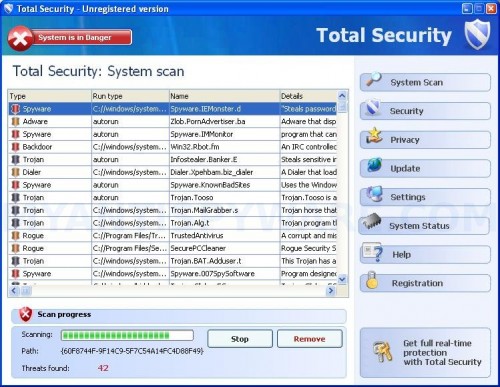
Total Security
While Total Security is running you will be shown nag screens, fake security notifications from Windows task and a fake Windows Security Center called Protection Center that will recommend you register Total Security. Instead of doing so, use these free instructions below to remove Total Security and any associated malware from your computer.
Symptoms in a HijackThis Log.
Variant 1:
O2 – BHO: &Research – {D263FA6D-84CC-48A8-9AF6-C664362B7A5B} – C:\WINDOWS\system32\winsource.dll
O4 – HKCU\..\Run: [12840894984709702141078366734454] C:\Program Files\TSC\tsc.exe
Variant 2:
O2 – BHO: &IE Help – {35A5B43B-CB8A-49CA-A9F4-D3B308D2E3CC} – C:\WINDOWS\system32\iehelpmod.dll
O4 – HKCU\..\Run: [TS] C:\Program Files\TS\tsc.exe
Use the following instructions to remove Total Security
1. Remove Total Security files.
Total Security can terminate antispyware software, so that you must remove Total Security files before start a cleaning process.
a)Automatically, using Avenger.
- Download Avenger from here and unzip to your desktop.
- Run Avenger, copy,then paste the following text in Input script Box:
Files to delete:
%windir%\system32\winsource.dll
%windir%\system32\iehelpmod.dllFolders to delete:
%ProgramFiles%\TSC
%ProgramFiles%\TSThen click on ‘Execute’.
- You will be asked Are you sure you want to execute the current script?. Click Yes.
- You will now be asked First step completed — The Avenger has been successfully set up to run on next boot. Reboot now?. Click Yes.
- Your PC will now be rebooted.
b) Manually.
- Reboot your computer in the Safe mode. Read the article: How to reboot computer in the Safe mode.
- Remove %windir%\system32\winsource.dll and %windir%\system32\iehelpmod.dll files, where %windir% is a Windows home folder (typically C:\Windows).
- Remove %programfiles%\TSC and %programfiles%\TS folders, where %programfiles% is a default Program Files folder (typically C:\Program Files).
- Reboot your computer in the normal mode.
2. Remove Total Security associated malware.
- Download MalwareBytes Anti-malware (MBAM). Close all programs and Windows on your computer.
- Double Click mbam-setup.exe to install the application. When the installation begins, keep following the prompts in order to continue with the installation process. Do not make any changes to default settings and when the program has finished installing, make sure a checkmark is placed next to Update Malwarebytes’ Anti-Malware and Launch Malwarebytes’ Anti-Malware, then click Finish.
- If an update is found, it will download and install the latest version.
- Once the program has loaded, select “Perform Quick Scan”, then click Scan.
- The scan may take some time to finish,so please be patient.
- When the scan is complete, click OK, then Show Results to view the results.
- Make sure that everything is checked, and click Remove Selected.
- When disinfection is completed, a log will open in Notepad and you may be prompted to Restart.
Note: if you need help with the instructions, then post your questions in our Spyware Removal forum.
Total Security creates the following files and folders.
%programfiles%\TSC
%programfiles%\TSC\tsc.exe
%windir%\system32\winsource.dll
%userprofile%\Application Data\Microsoft\Internet Explorer\Quick Launch\TSC.lnk
%userprofile%\Desktop\TSC.lnk
%userprofile%\Start Menu\TSC
%userprofile%\Start Menu\TSC\Help.lnk
%userprofile%\Start Menu\TSC\Registration.lnk
%userprofile%\Start Menu\TSC\TSC.lnk
%programfiles%\Common Files\System\Uninstall
%programfiles%\Common Files\System\Uninstall\Uninstall TSC.lnk
Total Security creates the following registry keys and values
HKEY_CLASSES_ROOT\CLSID\{35a5b43b-cb8a-49ca-a9f4-d3b308d2e3cc}
HKEY_CURRENT_USER\SOFTWARE\Microsoft\Windows\CurrentVersion\Ext\Stats\{35a5b43b-cb8a-49ca-a9f4-d3b308d2e3cc}
HKEY_LOCAL_MACHINE\SOFTWARE\Microsoft\Windows\CurrentVersion\Explorer\Browser Helper Objects\{35a5b43b-cb8a-49ca-a9f4-d3b308d2e3cc}
HKEY_CURRENT_USER\SOFTWARE\Microsoft\Windows\CurrentVersion\Run\ts
Note: %windir% is a Windows home folder (typically C:\Windows), %programfiles% is a default Program Files folder (typically C:\Program Files).
March 21, 2009 on 7:09 am | In Rogue Anti Spyware, Tutorials - HowTo | 43 Comments |43 Comments »
RSS feed for comments on this post.
Leave a comment
My Anti Spyware - Free antispyware programs and Spyware Removal Instructions.


I tried everything until I tried the Total Security removal hints above. Hours I put into it. I was about to give up and tried this and it worked!!!!!!!!!!!!!!!!!!!!!!!
Thanks a million
Comment by Brett — April 17, 2009 #
Yep, this actually did the trick for me as well… After MANY frustrations
Thanx a lot!
Comment by Annemette — August 8, 2009 #
after some one instoled total security on my computer it got a virus i want it removed i cant do nothng with my cumputer i need your help to get it off
Comment by carol — August 15, 2009 #
This worked perfectly. I am glad I checked for info first or I would have wasted a lot of time and energy on this problem. Thanks a lot.
Comment by Peter — August 15, 2009 #
carol, try follow these steps: http://www.myantispyware.com/2009/08/15/how-to-remove-total-security-2009-uninstall-instructions/
Comment by Patrik — August 15, 2009 #
whenever i try and open avenger on windows running normally total security doesnt let me open it. it doesnt let me open anything except internet explorer.
what should i do?
Comment by travis — August 16, 2009 #
travis, please read my previous comment.
Comment by Patrik — August 17, 2009 #
Didn’t help at all, winsource.dll isn’t even on my computer and this malware is still here
Comment by Herman — August 17, 2009 #
I tried the steps above with the use of Avenger but there arnt any files like winsource.dll and TSC on my system. So Avenger couldnt exeucute the scripts. I tried several removers and cleaners but cant get rid of this pain in the …
Any idees?
Comment by Pieter — August 20, 2009 #
Pieter, try to use these steps:
http://www.myantispyware.com/2009/08/15/how-to-remove-total-security-2009-uninstall-instructions/
Comment by Patrik — August 23, 2009 #
Pieter try dpoing a search for “total security” first and deleting all the files that are associated from total security and remove them from your trash bin too. Then run avenger. Thats what I did and it worked perfectly.
Comment by A.K. — August 26, 2009 #
Hi Guys/Girls
Im having real trouble with Total Security.
I downloaded Spyware Doctor but TS just blocks it right when I try and remove the problems found.
I’ve been through the manual steps here as well as those offered on other websites and am having problems.
1. When I search (manually in safe mode, following the exact instructions) for winsource.dll and TSC folder, they simply are not there.
2. When looking for the processes suggested elsewhere, they are not in the list either.
Im hesitant to download the suggested Avenger or MBAM as it is yet another download to go with the ones that already do nothing.
I’ve done a search of the C&D drives for Total Security and nothing has come up.
Please help!
Thanks
Comment by Matt — August 29, 2009 #
OK, quick update, I downloaded Malwarebytes on another computer and it is currently running on the infected one.
Will report back when finished (that’s if the pesky computer hasnt been tossed out the window first!)
Comment by Matt — August 29, 2009 #
Matt, probably your computer with Total Security 2009, try the instruction – http://www.myantispyware.com/2009/08/15/how-to-remove-total-security-2009-uninstall-instructions/
Comment by Patrik — August 29, 2009 #
Many thanks Patrick
MBAM seems to have fixed it but I have tis page bookmarked.
Great Job!
Thanks
Comment by Matt — August 29, 2009 #
IT WORKED!!! Ohhhhhh my god, thank you, IT WORKED!! I spent the better part of my day trying to get rid of this Total Security shite. A million thanks wouldn’t be sufficient. Thank you sooooooooooooo much!
Comment by Robin — September 9, 2009 #
thank you.. it worked. there is no winsource.dll in my system folder. but I did delete all TSC files following the instructions. removed all temp files and then tried to uninstall the total security… It worked………. thank you
Comment by Search — September 18, 2009 #
there are not any files listed above. anyway thanks
Comment by Narayan — September 19, 2009 #
Hi, thank you, thank you, thank you and thank you again. Avenger worked first time on my Notebook.
Thanks for sharing.
Comment by Kevin — September 20, 2009 #
Ok guys, after so many suggestions, I tried by doing it myself. TSC wasn’t letting me download any spyware removal – it’s hardly let me search the internet!
Alright You have to find the day that Total Security was installed on your computer. Try searching for it from your start menu you – “Total Security” and make sure you’re searching in hidden files also.
When it pops up, just go up to your views icon and select details. This will show you the dates something was modified or install.
One you’ve found the date, go into MY COMPUTER and click on your main drive (mine was C:). Make sure you select the details option under views from your toolbar above. Keep following each file that has a modified/created date of the date Total Security was installed on your computer.
I continued to follow mine and I ended up my COMMON FILES under PROGRAM FILES. So far, looking at everyone elses suggections, Total Security installs under a bunch of different files and is rarely the same one. So someone elses experience with the stupid thing might not resemble yours but it will cause the same problems!!!
I hope this helps!
Lynn
Comment by Lynn — September 20, 2009 #
Sorry forgot to add from above:
I followed mine until I found an UNINSTALL icon from Total Security. I double clicked and it uninstalled everything from TSC.
Comment by Lynn — September 20, 2009 #
Thanks for the instructions. The key seemed to be renaming the downloaded HijackThis as explorer.exe.
Also note that the file names shown in the HijackThis log could be variations on HKCU.
Big relief!!
Comment by C.K. — September 20, 2009 #
Tried a)Automatically, using Avenger– after reboot I got message \
Comment by Susan — September 20, 2009 #
after reboot got message “no rootkits found” Help
Comment by Susan — September 20, 2009 #
hey all,
thanks for the help. i seem to have been able to rid this thing on start up and i no longer see a quick launch icon.
however in add/remove programs i still see a total security icon however it doesn’t have the icon as a shield. is there anything i can do to get it out of there and can i consider it gone if it is still there?
Comment by travis — September 21, 2009 #
ahhh, nevermind.
just a left over. double clicked on it and it uninstalled the icon
Comment by travis — September 22, 2009 #
Hi guys, just like you all I don’t like Total Security, and here is an easy way to get rid of it,
1. Click the “START” button
2. Click “SEARCH”
3. Enter: C:\Program Files\Common Files\TSUninstall\Uninstall.lnk
Hope this works for all of you, it did for me!
Comment by I_Hate_Total_Security — September 24, 2009 #
If you have more than one user on your computer, go to the user that was not on at the time of infection and run your virus scan. Total Security was not even present on my user screen as it was on my husbands. Gone in a few moments.
Comment by bonnie — September 24, 2009 #
Hello, I have the Total Security virus on my computer. I cannot go to the Internet or open files from the flash drive. How do I remove the virus since I cannot install the software to remove. Could I put on a CD and run from the CD mode first?
Comment by Gera — September 25, 2009 #
the below uninstall option work. Thanks a lot
C:\Program Files\Common Files\TSUninstall\Uninstall.lnk
Comment by ravi — September 26, 2009 #
I am at a TOTAL LOST with this thing! I have read all the fixes but have no luck with it. I can’t even start my computer in safe mode, taskmanager regedit,system restore have all been disabled.I can’t install hijack this under any name, can’t find the TSC folder anywhere. any help?
Comment by dj — September 26, 2009 #
dj, ask for help in our Spyware removal forum.
Comment by Patrik — September 28, 2009 #
I started in safe mode and deleted c:\programme files\tcs folder. then using glary utilities, i removed it from start up menu. it does not appear on windows start. the only problem now is that i can not use internet explorer. for this, use i firefox.
moreover, when i looked for winsource.dll file in \windows\system32 folder, i did not found it there.
Comment by Rameshwar Singh — September 28, 2009 #
I used this site and followed the instructions and it worked great
Comment by Bob — September 28, 2009 #
Thanks for the uninstall option… IT WORKED!
Comment by Wayne — September 29, 2009 #
ok i clicked on perform quck scan and nothing happend it juet went away. does that mean i did it right
Comment by mya — September 30, 2009 #
THANK YOU THANK YOU THANK YOU!!!!! i finally got that stupid total security of my back!! ( i used the “Avenger” method) thank you again!!
Comment by Joshua — September 30, 2009 #
I almost broke my computer i was so mad, then i tried this and it worked!!!!!!! you saved my computer from this virus and me
Comment by Joe — October 1, 2009 #
Thak you, it´s the best webside of solutions in the world thank you very mouch i´am a people of Mexico and follow the way
Comment by Fher — October 1, 2009 #
I ran mbam it cleared everything out then the notepad came up and i exited out. I then reboted and the virus Total Security came back again how do i get it all the way out? thanks
Comment by darrin — October 2, 2009 #
darrin, ask for help in our Spyware removal forum.
Comment by Patrik — October 3, 2009 #
***(PLEASE READ BECAUSE THIS WILL WORK BECAUSE IT DID FOR ME)*** Hi guys, just like you all I don’t like Total Security, and here is an easy way to get rid of it,
1. Click the “START” button
2. Click “SEARCH”
3. Enter: C:\Program Files\Common Files\TSUninstall\Uninstall.lnk
Hope this works for all of you, it did for me!
Comment by Dion — October 6, 2009 #
As a comlete novice were computers are concerned,Iwas dismayed to find total security on my computer.On following your instrution total security is now gone. As a silver surfer i say a big THANKYOU
Comment by e mccarrick — October 20, 2009 #
