![]() | Do you have pop-ups or your computer infected with trojan or spyware ? Learn how to ask us for help, click here! |
How to remove VirusRemover2009 (Delete instructions)
VirusRemover2009 also known as VirusRemover 2009 is a rogue antivirus/antispyware program, brother of VirusRemover 2008. The program uses fake alerts and false positives to trick you into buying the software.
During installation, VirusRemover 2009 configures itself to run automatically every time, when you start your computer. Immediately after launch, the program starts scanning the computer and found a lot of trojans and spyware, some of these “infections”: Zlob.PornAdvertiser.ba, W32.Mumawow.Y, Trojan.Killwma and others. All these infections are fake. Then VirusRemover2009 said that you should purchase the program in order to remove them and protect your computer.
While VirusRemover 2009 is running your computer will display fake Windows Security Center called XP Security Center that will recommend you register VirusRemover2009, fake security alerts from your Windows taskbar and fake firewall alerts. Please ignore these alerts. Use the free instructions below to remove VirusRemover 2009 and any associated malware from your computer.
Continue reading How to remove VirusRemover2009 (Delete instructions)…
How to remove WinCleaner 2009 (Delete instructions)
WinCleaner 2009 is a rogue antispyware program that looks like ASC-AntiSpyware and Win Antivirus Vista/XP and designed to trick users into buying the fake software by using scare tactics. It is distributed through the use trojans. The rogue antispyware may drastically slow the performance of your computer.
During installation, WinCleaner 2009 is set to start automatically when your computer starts. Once running, it will scan your computer and list a large amount of infections, but some of these “infections” are actually legitimate Windows files. Then, WinCleaner 2009 said that you should purchase the program in order to remove them and protect your computer. Computer users are urged to avoid purchasing this bogus program! Use the free removal instructions below in order to remove WinCleaner 2009.
Continue reading How to remove WinCleaner 2009 (Delete instructions)…
How to remove PrivacyGuardPro (Delete instructions)
PrivacyGuardPro is a rogue privacy program that uses fake alerts and false privacy risks to trick you into buying the software. The rogue privacy program is distributed through the use fake online malware scanners that tells you that your computer has a variety of privacy risks and that you must install PrivacyGuardPro to protect your computer.
Once running, PrivacyGuardPro will scan your computer and list a variety of privacy risks on your computer to trick you to buy the paid version of the rogue. Computer users are urged to avoid purchasing this bogus program! Use the free removal instructions below in order to remove PrivacyGuardPro.
Continue reading How to remove PrivacyGuardPro (Delete instructions)…
How to remove Total Virus Protection (Delete instructions)
Total Virus Protection is a rogue antispyware program that uses fake alerts and false positives to trick you into buying the software.
During installation, TotalVirusProtection configures itself to run automatically every time, when you start your computer. Once running, it will scan your computer and reports false or exaggerated system security threats on the computer that cannot be removed unless you first purchase the software. Also Total Virus Protection finds are legitimate programs and labels them as spyware, for example c:\windows\system32\hypertrm.dll labels as Trojan.USBsteal, c:\windows\system32\6to4svc.dll labels as Dialer.Palazzo, c:\windows\system32\diskperf.exe labels as Backdoor.Netdevil, c:\windows\system32\kbdno.dll labels as Trojan.Anits.
Total Virus Protection may drastically slow the performance of your computer. It also generates false security alerts and pop ups. Use the free instructions below for removing the Total Virus Protection and any associated malware from your computer.
Continue reading How to remove Total Virus Protection (Delete instructions)…
How to remove MalwareDoc or Malware Doctor (Delete instructions)
MalwareDoc or Malware Doctor is a rogue antispyware program, brother of AntiSpy Knight. The fake antispyware software uses fake alerts and false positives to trick you into buying the software.
During installation, Malware Doctor configures itself to run automatically every time, when you start your computer. Once running, it will scan your computer and reports false or exaggerated system security threats on the computer that cannot be removed unless you first purchase the software. Also MalwareDoc finds are legitimate programs (c:\windows\notepad.exe, c:\windows\regedit.exe) and labels them as spyware.
Malware Doctor may drastically slow the performance of your computer. Use the free instructions below for removing the MalwareDoc and any associated malware from your computer.
Continue reading How to remove MalwareDoc or Malware Doctor (Delete instructions)…
How to remove Anti-virus-1 (Delete instructions)
Anti-virus-1 is a rogue antivirus/antispyware program that looks like Antivirus 360 and Antivirus 2010. Like other rogue antispyware programs, it uses malicious programs and advertising on the Internet for distribution. This advertisement tells that your computer is infected and offers to download and install Anti-virus-1. Also the program may use trojans for invisible installation on your computer.
During installation, Anti-virus-1 configures itself to run automatically every time, when you start your computer. Immediately after launch, the program starts scanning the computer and found a lot of trojans and spyware, some of these “infections”: Infostealer.Banker.E, Spyware.IEMonster.d, Zlob.PornAdvertiser.ba, Spyware.IMMonitor and others. All these infections are fake. Then Anti-virus-1 said that you should purchase the program in order to remove them and protect your computer.
Anti-virus-1 also generates false security alerts:
svchost.exe
Internal conflict alert.
Anti-virus-1 detected internal software conflict. Some applicztion tries to get access to system kernel (such behavior is typical to Spyware/Malware). It may cause crash of your computer.
Spyware activity alert!
Spyware.IEMonster activity detected. It is spyware that attempts to steal passwords from Internet Explorer, Mozilla Firefox, Outlook and other programs, including logins and passwords from online banking sessions, eBay, PayPal.
The fake alerts may drastically slow the performance of your computer. Use the free instructions below for removing the Anti-virus-1 and any associated malware from your computer.
Continue reading How to remove Anti-virus-1 (Delete instructions)…
How to remove Google searches redirect virus 7.7.7.0 (remove Rootkit.Win32.Agent.fwt)
Redirect to 7.7.7.0 is a result of wdmaud.sys trojan/rootkit activity. Once infected, google results redirected you to junk/scam sites. You can see the waiting for 7.7.7.0 in the bottom of the browser. It is caused by the file C:\Windows\system32\wdmaud.sys (reported as Rootkit.Win32.Agent.fwt). The legitimate wdmaud.sys actually exists at C:\Windows\system32\drivers\. Use the free instructions below for removing the wdmaud.sys trojan/rootkit from your computer.
February 19, 2009 on 5:54 am | In Trojan, Tutorials - HowTo | 4 Comments |How to remove ASC AntiSpyware or Win Antivirus Vista/XP (Delete instructions)
ASC AntiSpyware and his brother Win Antivirus Vista/XP are rogue antispyware programs.The software is distributed through the use trojans. During installation, Win Antivirus Vista/XP (ASC AntiSpyware) configures itself to run automatically every time, when you start your PC. The rogue antispyware may drastically slow the performance of your computer.
Once running, Win Antivirus Vista/XP (ASC AntiSpyware) will scan your computer and list a large amount of infections, but some of these “infections” (Trojan-PSW.Win32. OnLineGames.sxa, Trojan-Keylogger.Win32.QQHelper.aoc, Net-Worm.Win32.Kido.fx) are actually legitimate Windows files. Then Win Antivirus Vista/XP (ASC AntiSpyware) said that you should purchase the program in order to remove them and protect your computer. Please ignore these alerts. Use the free instructions below for removing the fake antivirus program from your computer.
Continue reading How to remove ASC AntiSpyware or Win Antivirus Vista/XP (Delete instructions)…
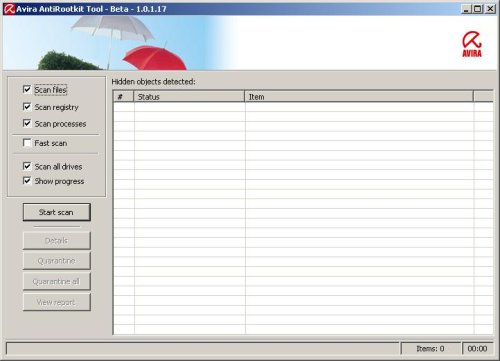
Avira AntiRootkit – detect and remove active rootkits (How to use)
Avira Antirootkit is free software that recognizes active rootkits. However, there are rootkits, which are used legally in programs. Avira Antirootkit also detects those. The software should only be used by knowledgeable users. Improper usage of this tool could result in damage to your applications or operating system.

Continue reading Avira AntiRootkit – detect and remove active rootkits (How to use)…
February 16, 2009 on 10:47 am | In Free Software | 3 Comments |How to remove Antispyware 3000 (Delete instructions)
Antispyware 3000 is a new rogue antispyware application that looks like Antivirus XP Pro and designed to trick users into buying the fake software by using scare tactics. It is distributed through the use pop-ups that stating that your computer is infected with spyware. If you close this popup then will open a webpage looking as online antispyware scanner, but in reality it is just a fake online scanner designed to make you think you are infected.
During installation, Antispyware 3000 is set to start automatically when your computer starts. Once running, it will scan your computer and list a large amount of infections. Then, Antispyware 3000 said that you should purchase the program in order to remove them and protect your computer. Computer users are urged to avoid purchasing this bogus program! Use the free removal instructions below in order to remove Antispyware 3000.
Continue reading How to remove Antispyware 3000 (Delete instructions)…
Next Page »
My Anti Spyware - Free antispyware programs and Spyware Removal Instructions.