Have you received an email saying someone sent you files via Smash, a service for sending large files? The message looks normal and comes from Smash, so it might seem safe. It usually says you can download the files safely before a certain date and time.
Question: Is this email from Smash safe to open, and can you trust the files it contains?
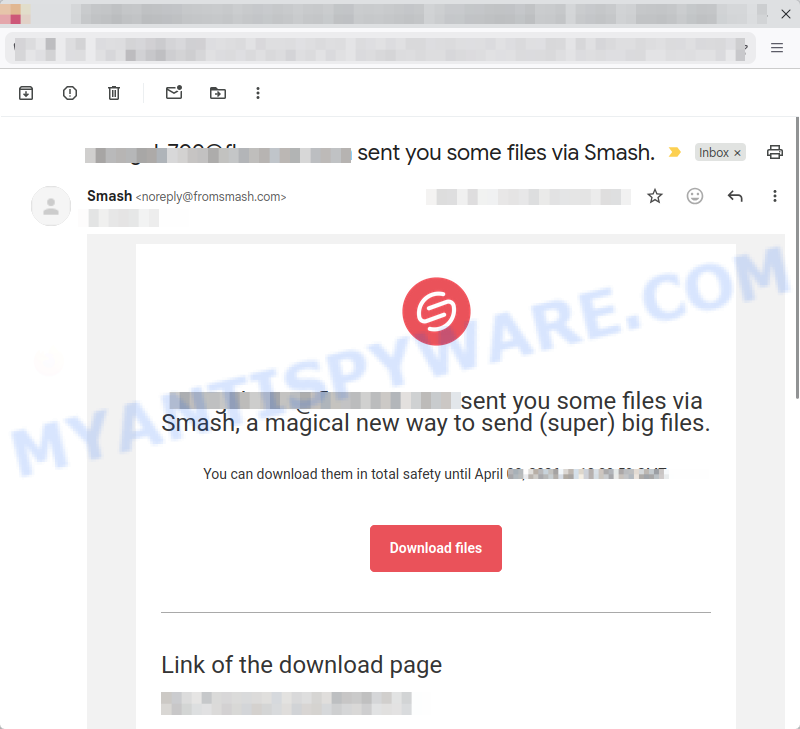
Investigation Findings: The email itself is from a real and legitimate service called Smash, which is used to share big files. However, scammers take advantage of this service by uploading fake files, like a PDF pretending to be from a bank. Inside the file, there is a link to a scam website that tries to steal your personal information. Because the email looks real and the file is hosted on a trusted service, it can bypass spam filters and trick users into opening dangerous files.
Answer: Although the email comes from a real service, it can still be part of a scam. Always be cautious with unexpected files, even if they come through known services like Smash. Before opening files, make sure you trust the sender and double-check with them if needed. Avoid clicking on links inside suspicious files. This is a fraudulent use of the Smash service to spread harmful files and scam websites. 💡 To protect yourself from scams like this, never open files from unknown senders and do not click on links inside unexpected documents. Also, keep your security software updated and watch out for unusual messages.
A typical “Sent you some files via Smash” scam email reads as follows:
[email protected] sent you some files via Smash, a magical new way to send (super) big files.
You can download them in total safety until April -, 2026 at 00:19:29 GMT.
Download files
Link of the download page
[link to a phishing file]
🕵️♂️ How the Smash Email Scam Operates
Smash Email Scam is a deceptive phishing technique exploiting a legitimate file-sharing service. 🚨 In this scam, cybercriminals use Smash, a real and trusted large-file transfer platform, to distribute malicious files or phishing documents disguised as genuine bank PDFs or other important documents containing links to scam websites. 🔗 Step-by-Step Breakdown of the Scam:
📤 Using a Legitimate Service
Scammers leverage Smash, a reputable service designed to send very large files securely, to bypass spam filters and email security systems. Because the message comes from Smash itself, it appears trustworthy and is less likely to be blocked or flagged.
📧 Sending Phantom File-Sharing Emails
Victims receive emails seemingly from acquaintances or unknown senders with messages like “[email protected] sent you some files via Smash, a magical new way to send (super) big files.” These emails contain links to download files, along with a false expiration date to create urgency.
🗂️ Hosting Malicious or Phishing Files
The files offered for download are often fake PDFs that pretend to be official bank statements or other sensitive documents but actually contain links leading to phishing websites designed to steal personal or financial information.
⚠️ Bypassing Security Measures
Since the files are hosted and distributed through Smash’s legitimate infrastructure, spam detectors and antivirus software may fail to detect the threat, allowing the scam to reach users’ inboxes more easily.
🕵️♂️ Social Engineering to Trick Users
The message’s trustworthy appearance, combined with references to well-known institutions and a real file-sharing platform, encourages recipients to click the download link without suspicion.
📉 Consequences for Victims
Users who download and open these files are exposed to phishing attacks that can lead to identity theft, financial loss, or malware infection.
🛑 Lack of Immediate Warning
Because the scam exploits a legitimate service, email providers and users often cannot easily distinguish the threat before the file is downloaded and opened.
In summary, the Smash Email Scam abuses a trustworthy file-sharing platform to deliver malicious or phishing files by circumventing spam filters and gaining victims’ trust through legitimate-seeming messages. The scam highlights the importance of vigilance and verification before downloading files—even from reputable services.
📧 What to Do When You Receive the “Sent you some files via Smash” Scam Email
We advise everyone who receives this email to follow the simple steps below to protect yourself from potential scams:
- ❌ Do not believe this email.
- 🔒 NEVER share your personal information and login credentials.
- 📎 Do not open unverified email attachments.
- 🚫 If there’s a link in the scam email, do not click it.
- 🔍 Do not enter your login credentials before examining the URL.
- 📣 Report the scam email to the FTC at www.ftc.gov.
If you accidentally click a phishing link or button in the “Sent you some files via Smash” Email, suspect that your computer is infected with malware, or simply want to scan your computer for threats, use one of the free malware removal tools. Additionally, consider taking the following steps:
- 🔑 Change your passwords: Update passwords for your email, banking, and other important accounts.
- 🛡️ Enable two-factor authentication (2FA): Add an extra layer of security to your accounts.
- 📞 Contact your financial institutions: Inform them of any suspicious activity.
- 🔄 Monitor your accounts: Keep an eye on your bank statements and credit reports for any unusual activity.
🔍 How to Spot a Phishing Email
Phishing emails often share common characteristics; they are designed to trick victims into clicking on a phishing link or opening a malicious attachment. By recognizing these signs, you can detect phishing emails and prevent identity theft:
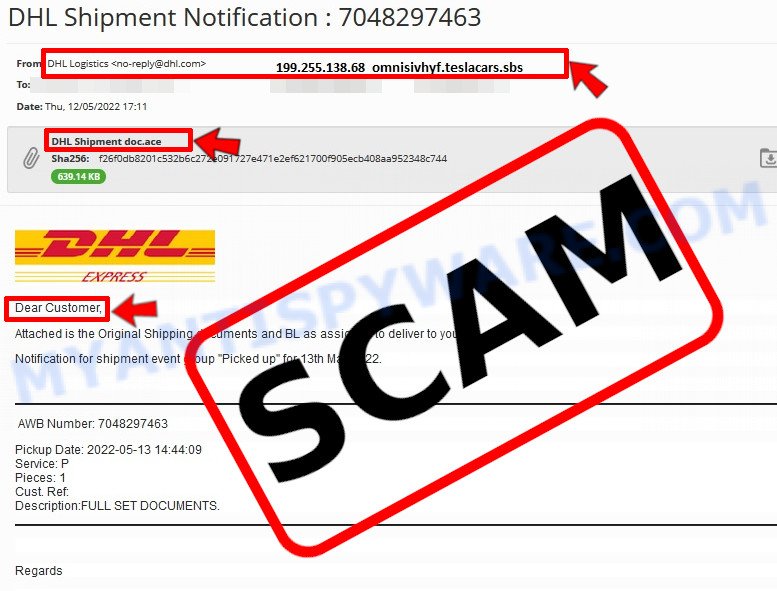
💡 Here Are Some Ways to Recognize a Phishing Email
- ✉️ Inconsistencies in Email Addresses: The most obvious way to spot a scam email is by finding inconsistencies in email addresses and domain names. If the email claims to be from a reputable company, like Amazon or PayPal, but is sent from a public email domain such as “gmail.com”, it’s probably a scam.
- 🔠 Misspelled Domain Names: Look carefully for any subtle misspellings in the domain name, such as “arnazon.com” where the “m” is replaced by “rn,” or “paypa1.com,” where the “l” is replaced by “1.” These are common tricks used by scammers.
- 👋 Generic Greetings: If the email starts with a generic “Dear Customer”, “Dear Sir”, or “Dear Madam”, it may not be from your actual shopping site or bank.
- 🔗 Suspicious Links: If you suspect an email may be a scam, do not click on any links. Instead, hover over the link without clicking to see the actual URL in a small popup. This works for both image links and text links.
- 📎 Unexpected Attachments: Email attachments should always be verified before opening. Scan any attachments for viruses, especially if they have unfamiliar extensions or are commonly associated with malware (e.g., .zip, .exe, .scr).
- ⏰ Sense of Urgency: Creating a false sense of urgency is a common tactic in phishing emails. Be wary of emails that claim you must act immediately by calling, opening an attachment, or clicking a link.
- 📝 Spelling and Grammar Errors: Many phishing emails contain spelling mistakes or grammatical errors. Professional companies usually proofread their communications carefully.
- 🔒 Requests for Sensitive Information: Legitimate organizations typically do not ask for sensitive information (like passwords or Social Security numbers) via email.
Conclusion
The “Sent you some files via Smash” email scam takes advantage of a legitimate file-sharing service to bypass spam filters and spread malicious content. While the email itself is a genuine notification from Smash, scammers exploit this trusted communication by uploading harmful files or documents containing phishing links disguised as bank statements or other sensitive information.
These deceptive files lead victims to fake websites designed to steal personal data. Because the emails come from a real service and contain what appears to be legitimate download links, traditional spam and phishing filters may not detect them, making users more vulnerable.
Bottom Line: Be cautious when receiving unexpected file-sharing emails, even if they appear to come from reputable services like Smash. Always verify the sender before downloading files, especially if the attachment urges you to open documents relating to financial or personal information. Remember, scammers abuse legitimate platforms to trick users, so staying vigilant and double-checking suspicious messages is crucial to avoid falling victim to these coordinated phishing and malware attacks.





