Beware of the BOA View Remittance Receipt Email Scam that’s tricking people by using legit file-sharing services. The scam starts with a genuine-looking notification saying someone has shared a file with you. Because these emails come from trusted platforms, spam filters and antivirus programs often let them slip right through, making the scam especially sneaky.
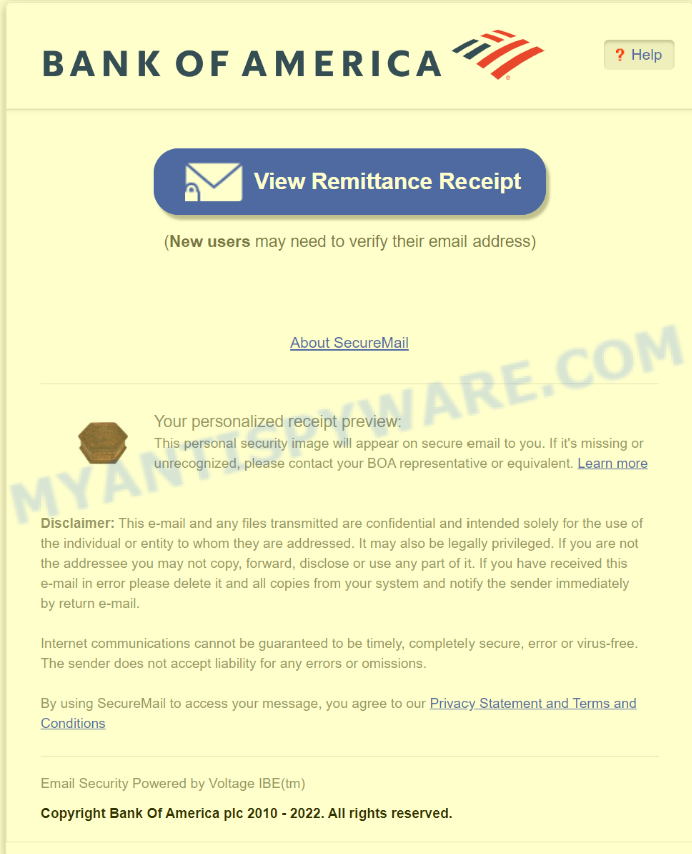
Once you click the link, it leads to a real file-hosting site, reinforcing the illusion of authenticity. But here’s the catch: the file you’re asked to download is dangerous. In this case, it’s a PDF containing a seemingly official “Bank of America” remittance receipt. Inside, there’s an image that, if clicked, takes you straight to a phishing site designed to steal your personal information. The scammers exploit the trust in legitimate services to bypass security defenses, luring users into a well-crafted trap.
In short: this scam hijacks trusted email systems to deliver malicious files masked as official documents, aiming to steal your data. Stay alert, don’t click suspicious links—even if the message looks legit—and always verify directly with the bank or service before downloading files.
A typical “BOA View Remittance Receipt Email” scam message reads as follows:
BANK OF AMERICA
? Help
View Remittance Receipt
(New users may need to verify their email address)
About SecureMail
Your personalized receipt preview:
This personal security image will appear on secure email to you. If it’s missing or unrecognized, please contact your BOA representative or equivalent.
Learn more
Disclaimer: This e-mail and any files transmitted are confidential and intended solely for the use of the individual or entity to whom they are addressed. It may also be legally privileged. If you are not the addressee you may not copy, forward, disclose or use any part of it. If you have received this e-mail in error please delete it and all copies from your system and notify the sender immediately by return e-mail.
Internet communications cannot be guaranteed to be timely, completely secure, error or virus-free. The sender does not accept liability for any errors or omissions.
By using SecureMail to access your message, you agree to our Privacy Statement and Terms and Conditions
Email Security Powered by Voltage IBE(tm)
Copyright Bank Of America plc 2010-2022. All rights reserved.
🕵️♂️ How the BOA View Remittance Receipt Email Scam Operates
The BOA View Remittance Receipt Email Scam is a deceptive phishing scheme. 🚨 It involves sending seemingly legitimate emails from file sharing services that claim someone has shared a file with you, tricking recipients into downloading malicious documents. 🔗 Step-by-Step Breakdown of the Scam:
📧 Sending Legitimate-Looking Emails
Scammers exploit real file sharing services that send email notifications when files are uploaded or shared. Since these emails come from trusted platforms, spam filters and antivirus programs usually allow them through. The email appears as a genuine alert that a file has been shared with you.
🔗 Luring Victims to Download Malicious Files
The email contains a link to a file hosted on the legitimate file sharing site. Interested recipients click the link, expecting a safe download, but are instead offered a malicious PDF or similar document.
📄 Disguising Malicious Content as Bank Documents
The downloaded PDF looks like an official Bank of America remittance receipt, with realistic logos, disclaimers, and legal language, designed to build trust. Inside the PDF is a clickable image or link.
🎯 Leading Users to Phishing Sites
Clicking the image in the PDF redirects users to a carefully crafted phishing website that mimics a legitimate Bank of America portal. These sites attempt to steal sensitive personal and financial information from unsuspecting victims.
🛡️ Bypassing Spam and Security Filters
Because the scam originates from reputable file sharing services, the emails evade typical spam and security detection measures, increasing the scam’s success rate.
⚠️ Ignoring Security Warnings
The emails include formal disclaimers, legal jargon, and references to email security features like “SecureMail” and “Voltage IBE,” which falsely reassure recipients about the message’s authenticity and safety.
💻 No Direct Malware Attachment
Instead of attaching malware directly, the scam uses a “two-step” attack: legitimate-looking emails lead to downloads of benign-looking PDFs, which only upon interaction redirect users to harmful phishing pages, avoiding immediate detection.
In summary, the BOA View Remittance Receipt Email Scam uses trusted file sharing services to deliver phishing PDFs disguised as official bank documents. This clever use of legitimate platforms allows scammers to bypass security filters and trick victims into providing sensitive data. Always verify unexpected file sharing notifications, do not click suspicious links or images within documents, and confirm directly with your bank before taking any action on such emails.
📧 What to Do When You Receive the “BOA View Remittance Receipt Email” Scam Email
We advise everyone who receives this email to follow the simple steps below to protect yourself from potential scams:
- ❌ Do not believe this email.
- 🔒 NEVER share your personal information and login credentials.
- 📎 Do not open unverified email attachments.
- 🚫 If there’s a link in the scam email, do not click it.
- 🔍 Do not enter your login credentials before examining the URL.
- 📣 Report the scam email to the FTC at www.ftc.gov.
If you accidentally click a phishing link or button in the “BOA View Remittance Receipt Email” Email, suspect that your computer is infected with malware, or simply want to scan your computer for threats, use one of the free malware removal tools. Additionally, consider taking the following steps:
- 🔑 Change your passwords: Update passwords for your email, banking, and other important accounts.
- 🛡️ Enable two-factor authentication (2FA): Add an extra layer of security to your accounts.
- 📞 Contact your financial institutions: Inform them of any suspicious activity.
- 🔄 Monitor your accounts: Keep an eye on your bank statements and credit reports for any unusual activity.
🔍 How to Spot a Phishing Email
Phishing emails often share common characteristics; they are designed to trick victims into clicking on a phishing link or opening a malicious attachment. By recognizing these signs, you can detect phishing emails and prevent identity theft:
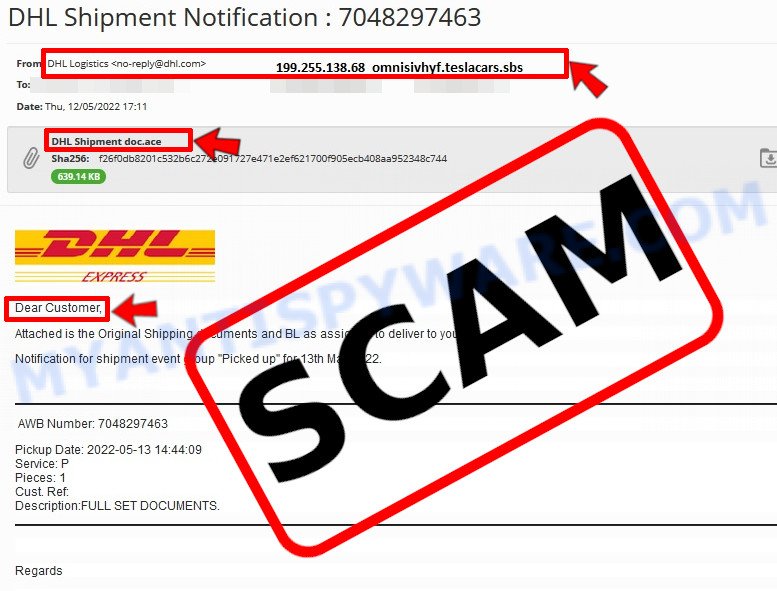
💡 Here Are Some Ways to Recognize a Phishing Email
- ✉️ Inconsistencies in Email Addresses: The most obvious way to spot a scam email is by finding inconsistencies in email addresses and domain names. If the email claims to be from a reputable company, like Amazon or PayPal, but is sent from a public email domain such as “gmail.com”, it’s probably a scam.
- 🔠 Misspelled Domain Names: Look carefully for any subtle misspellings in the domain name, such as “arnazon.com” where the “m” is replaced by “rn,” or “paypa1.com,” where the “l” is replaced by “1.” These are common tricks used by scammers.
- 👋 Generic Greetings: If the email starts with a generic “Dear Customer”, “Dear Sir”, or “Dear Madam”, it may not be from your actual shopping site or bank.
- 🔗 Suspicious Links: If you suspect an email may be a scam, do not click on any links. Instead, hover over the link without clicking to see the actual URL in a small popup. This works for both image links and text links.
- 📎 Unexpected Attachments: Email attachments should always be verified before opening. Scan any attachments for viruses, especially if they have unfamiliar extensions or are commonly associated with malware (e.g., .zip, .exe, .scr).
- ⏰ Sense of Urgency: Creating a false sense of urgency is a common tactic in phishing emails. Be wary of emails that claim you must act immediately by calling, opening an attachment, or clicking a link.
- 📝 Spelling and Grammar Errors: Many phishing emails contain spelling mistakes or grammatical errors. Professional companies usually proofread their communications carefully.
- 🔒 Requests for Sensitive Information: Legitimate organizations typically do not ask for sensitive information (like passwords or Social Security numbers) via email.
Conclusion
The BOA View Remittance Receipt Email Scam exploits legitimate file-sharing services to bypass spam filters and antivirus protections, making its fraudulent emails appear authentic and trustworthy. Scammers send emails notifying recipients of shared files or remittance receipts that seem to come from reputable sources like Bank of America, encouraging users to click on links leading to hosted files.
Instead of genuine documents, these files—often PDFs—contain embedded images that, when clicked, redirect users to phishing websites designed to steal personal and sensitive information. The scam leverages the credibility of secure messaging services and familiar email formats, complete with official-sounding disclaimers and branding, to deceive even cautious users.
Bottom Line: Always be vigilant when receiving unexpected file-sharing notifications or remittance receipt emails, even if they appear legitimate. Verify the sender independently and avoid clicking on links or downloading attachments without confirmation. If a document urges you to verify your email or provide sensitive information via embedded links, it is likely a scam. Protect your personal data by double-checking the authenticity of such messages before interacting with them.





