Have you received a text message claiming to be from Robinhood with warnings about your account being at risk and asking you to click a link to verify your details?
Question: Is this message really from Robinhood, and should you click the link to protect your account?
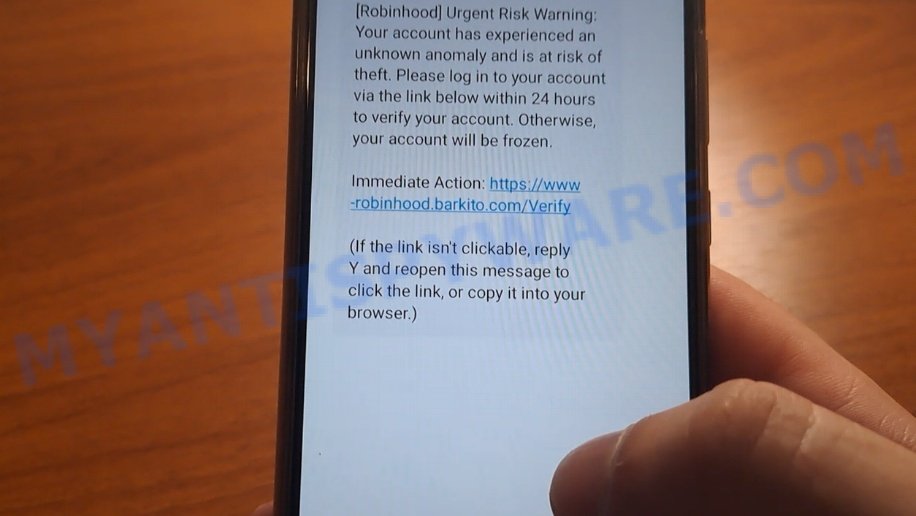
Investigation Findings: This message is fake and comes from scammers trying to steal your personal information. The link in the message does not lead to Robinhood’s official website but to a fake site designed to trick you into giving away your login details.
Answer: The Robinhood “Urgent Risk” Text is a fraudulent message pretending to be from Robinhood. 💡 To protect yourself from scams like this, never click links in unexpected messages asking for your account info. Instead, go directly to the official app or website to check your account. Additionally, enable two-factor authentication on your accounts to increase security and report suspicious messages to the company involved.
A typical “Robinhood Account Warning” scam text message may look like this:
[Robinhood] Urgent Risk
Warning:
Your account has experienced an unknown anomaly and is at risk of theft. Please log in to your account via the link below within 24 hours to verify your account. Otherwise, your account will be frozen.
Immediate Action:
https://www-robinhood.fflroyalty.com/
Verify
(If the link isn’t clickable, reply Y and reopen this message to click the link)
🕵️♂️ How the Fake Robinhood Account Scam Operates
This scam targets unsuspecting users by impersonating Robinhood’s security alerts.. 🚨 It’s a type of fraud where cybercriminals send fake warnings to trick individuals into providing login credentials on counterfeit websites.
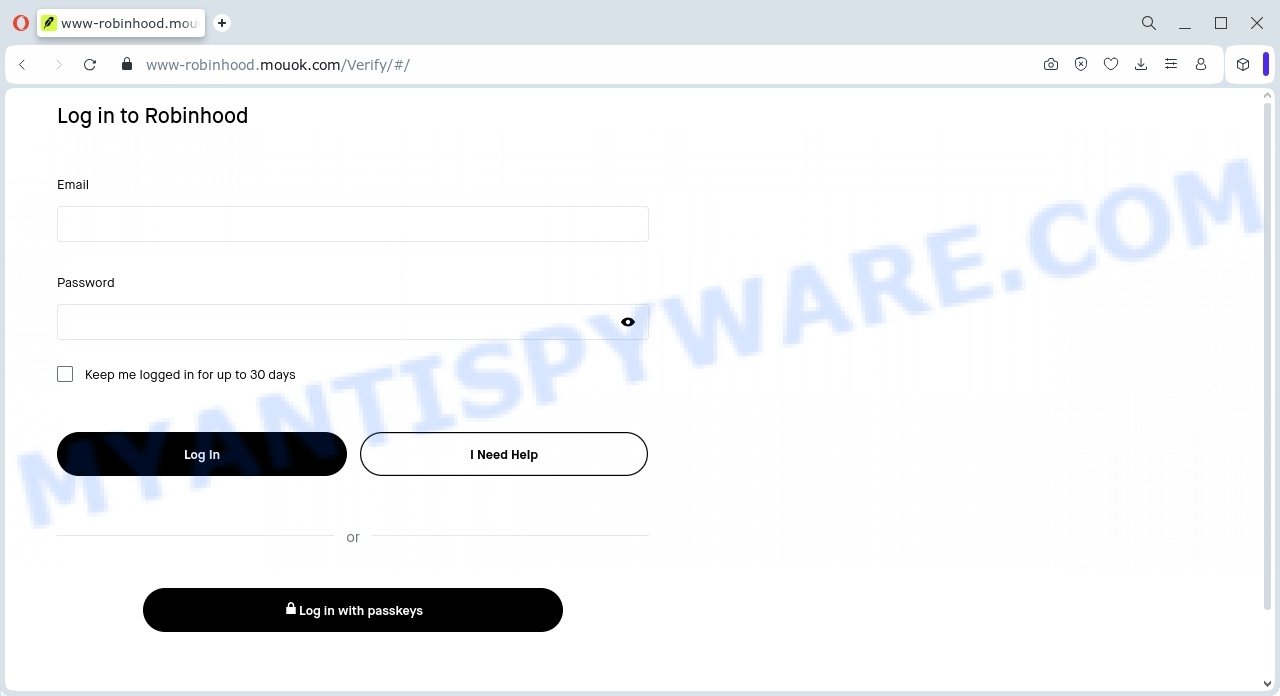
A fake Robinhood login page:
🔗 Step-by-Step Breakdown of the Scam:
📩 Sending Urgent Fake Alerts
Scammers send alarming messages, often via email or text, claiming that the victim’s Robinhood account has experienced suspicious activity or is at risk of theft. The message demands urgent action to avoid account suspension or freezing.
🔗 Linking to Phony Websites
Victims are directed to fake login pages designed to look like Robinhood’s official site, such as URLs like hxxps://www-robinhood.fflroyalty.com/. These counterfeit pages capture user credentials when victims attempt to “verify” their accounts.
🛑 Creating a False Sense of Urgency
The messages emphasize a tight deadline—usually 24 hours—to make victims panic and act quickly without verifying the message’s authenticity, increasing the chance they will fall for the scam.
🎭 Impersonating Official Communications
The scam messages mimic Robinhood’s branding, tone, and style to appear legitimate. They may use similar logos, colors, and terminology to deceive recipients.
🔐 Stealing Login Credentials
Once the victim enters their login information on the fake site, scammers harvest these credentials to gain unauthorized access to the real Robinhood accounts.
💸 Exploiting Stolen Accounts
Using the stolen credentials, fraudsters may attempt to drain funds, steal assets, or execute unauthorized trades, causing financial loss to the victim.
🚫 Offering No Real Support
Should victims try to seek help via the contact info from the scam message or site, they are met with non-responsive or fake support, leaving them vulnerable.
⚠️ Lacking Security Protections
The scam bypasses common security measures by presenting very convincing but fake warnings, exploiting user trust and fear of losing access to their investments.
In summary, the Fake Robinhood Urgent Risk Text scam 🚫 deceives users by sending fraudulent security warnings and directing them to counterfeit websites to steal login credentials. The scam leverages fake urgency, professional-looking pages, and official-sounding messages to trick victims. Always verify suspicious alerts by accessing your Robinhood account directly through the official website or app and avoid clicking links in unsolicited messages.
Summary Table
| Name | Fake Robinhood Account Warning Text Scam |
| Type | Phishing / Text Message Scam |
| Target | Robinhood users |
| Modus Operandi | Sending urgent scam text messages claiming account risk and prompting users to verify account via malicious link |
| Scam Text Example | [Robinhood] Urgent Risk Warning: Your account has experienced an unknown anomaly and is at risk of theft. Please log in via link within 24 hours or account will be frozen. Link: hxxps://www-robinhood.fflroyalty.com/ |
| Link Characteristics | Fake URL resembling Robinhood site but with suspicious domain (e.g. fflroyalty.com) |
| Potential Consequences | Account compromise, theft of personal and financial information |
| Tips for Readers | Do not click unknown links, verify alerts by visiting official Robinhood website or app directly, enable two-factor authentication, report suspicious messages to Robinhood |
| Category | Phishing, Social Engineering, Financial Scam |
📱 What to Do When You Receive the “Robinhood Account Warning” Scam Text Message
We advise everyone who receives this message to follow these simple steps to protect themselves from potential scams:
- ❌ Do not believe this message.
- 🔒 NEVER share your personal information or passwords via text.
- 🚫 Do not click on any links in suspicious messages.
- 🔍 Verify any phone numbers or links by checking the official website or contacting customer support directly.
- 📣 Report the scam text to your carrier by forwarding it to 7726 (SPAM).
If you accidentally clicked on a link in the “Robinhood Account Warning” text, suspect that your device may be compromised, or just want to check for threats, use one of the free malware removal tools. Additionally, consider taking the following steps:
- 🔑 Change your passwords: Update passwords for your email, banking, and other important accounts.
- 🛡️ Enable two-factor authentication (2FA): Add an extra layer of security to your accounts.
- 📞 Contact your financial institutions: Inform them of any suspicious activity.
- 🔄 Monitor your accounts: Keep an eye on your bank statements and credit reports for any unusual activity.
🔍 How to Spot a Scam Text Message
Scam messages often share common characteristics. By learning these signs, you can detect and avoid text scams:
💡 Here Are Some Ways to Recognize a Scam Text
- 📞 Unknown or Suspicious Numbers: Scam texts often come from unknown or very generic numbers, not official customer service numbers.
- 🔠 Misspelled Brand Names: Look carefully for any misspellings in the brand or company names, as scammers often try to mimic real companies.
- 👋 Generic Greetings: Messages starting with vague greetings like “Dear Customer” may not be from trusted companies.
- 🔗 Suspicious Links: Do not click on any links in suspicious messages. Instead, visit the company’s official website directly.
- ⏰ Sense of Urgency: Messages that demand immediate action or else a penalty will apply are often scams.
- 📝 Spelling and Grammar Errors: Scam texts may contain spelling mistakes or grammatical errors. Legitimate companies usually ensure proper language use.
- 🔒 Requests for Sensitive Information: Trustworthy organizations do not ask for passwords, credit card numbers, or Social Security numbers through text.
Conclusion
The Fake Robinhood Account Warning Texts scam is a deceptive phishing tactic designed to trick recipients into divulging their personal login information. Scammers send urgent, alarming messages that mimic legitimate Robinhood alerts, warning users of account anomalies and threatening to freeze their accounts to create a false sense of urgency.
These messages include fraudulent links, such as hxxps://www-robinhood.fflroyalty.com/, which lead to counterfeit websites designed to steal your credentials. The scammers rely on psychological pressure, fake threats, and cloned branding to lure victims into clicking malicious links and entering sensitive details.
Bottom Line: Do not click on suspicious links or respond to unsolicited messages claiming urgent issues with your Robinhood account. Always access your account directly through the official Robinhood app or website and verify any alerts independently. Stay vigilant, and remember that legitimate companies will never ask you to verify your account via unsolicited texts or emails containing suspicious URLs.





