Do you have pop-ups or your computer infected with trojan or spyware ? Learn how to ask us for help, click here!

How to remove Defense center (Uninstall instructions)

Defense center, as I wrote in my previous article (Defense Center), is a new rogue antispyware program. It is a malicious program from the same family of malware as Protection Center, Data Protection, etc.

Defense center is designed with one purpose – to scare you into thinking that your computer in danger as method to trick you into purchasing the full version of the program. If your computer is infected with this malware, then most importantly, do not purchase it! Uninstall the rogue from your computer as soon as possible. Use the removal guide below to remove Defense center from your computer for free.

Use the following instructions to remove Defense Center (Uninstall instructions)

Step 1. Repair “running of .exe files”.

Click Start, Run. Type command and press Enter. Command console “black window” opens. Type notepad as shown below
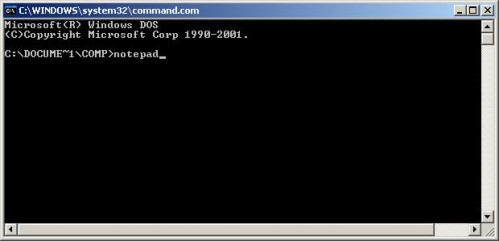

Command console

Press Enter. Notepad opens. Copy all the text below into Notepad.

Windows Registry Editor Version 5.00

[-HKEY_CURRENT_USER\Software\Classes\.exe]
[-HKEY_CURRENT_USER\Software\Classes\secfile]
[-HKEY_CLASSES_ROOT\secfile]
[-HKEY_CLASSES_ROOT\.exe\shell\open\command]

[HKEY_CLASSES_ROOT\exefile\shell\open\command]
@="\"%1\" %*"

[HKEY_CLASSES_ROOT\.exe]
@="exefile"
"Content Type"="application/x-msdownload"

You will see window similar to the one below.
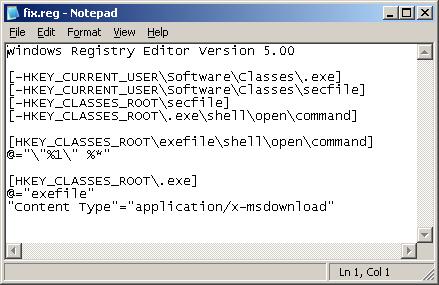

Notepad

Save this as fix.reg to your Desktop (remember to select Save as file type: All files in Notepad.) Double Click fix.reg and click YES for confirm.

If you can`t create fix.reg, then download fix.zip from here, unzip it. Double Click fix.reg and click YES for confirm.

Step 2. Remove core components of Defense center

Please download OTM by OldTimer from here and save it to your desktop.

Run OTM. Copy,then paste the following text in “Paste Instructions for Items to be Moved” window (under the yellow bar):

:reg
[HKEY_CURRENT_USER\Software\Microsoft\Windows\CurrentVersion\Run]
"Defense Center"=-


:files
C:\Program Files\Defense Center

You will see window similar to the one below.
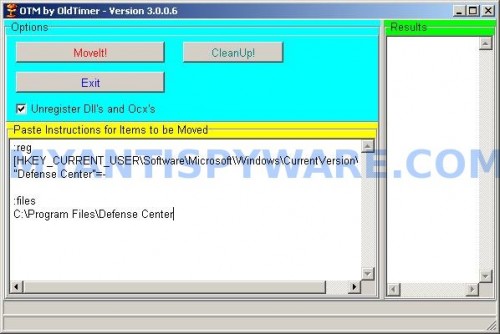
Click the red Moveit! button. Once finished, close OTM.

Step 3. Remove TDSS trojan-rootkit

Download TDSSKiller from here and unzip to your desktop.

Open TDSSKiller folder. Right click to tdsskiller and select rename. Type a new name (123myapp, for example). Press Enter. Double click the TDSSKiller icon to start scanning Windows registry for TDSS trojan. If it is found, the you will see a screen similar to the one below.
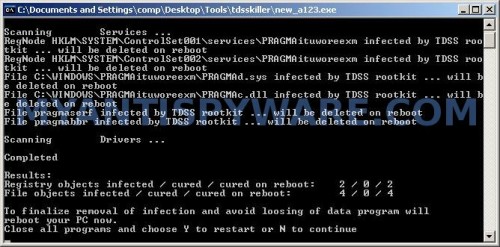

TDSSKiller

When TDSSKiller will prompt you to press “Y”, type Y and press Enter. Your computer will be rebooted.

Step 4. Remove Defense Center associated malware.

Download MalwareBytes Anti-malware (MBAM). Once downloaded, close all programs and windows on your computer.

Double-click on the icon on your desktop named mbam-setup.exe. This will start the installation of MalwareBytes Anti-malware onto your computer. When the installation begins, keep following the prompts in order to continue with the installation process. Do not make any changes to default settings and when the program has finished installing, make sure a checkmark is placed next to “Update Malwarebytes’ Anti-Malware” and Launch “Malwarebytes’ Anti-Malware”. Then click Finish.

MalwareBytes Anti-malware will now automatically start and you will see a message stating that you should update the program before performing a scan. If an update is found, it will download and install the latest version.

As MalwareBytes Anti-malware will automatically update itself after the install, you can press the OK button to close that box and you will now be at the main menu. You will see window similar to the one below.

malwarebytes-antimalware1
Malwarebytes Anti-Malware Window

Make sure the “Perform quick scan” option is selected and then click on the Scan button to start scanning your computer for Defense Center infection. This procedure can take some time, so please be patient.

When the scan is finished a message box will appear that it has completed scanning successfully. Click OK. Now click “Show Results”. You will see a list of infected items similar as shown below.
Note: list of infected items may be different than what is shown in the image below.
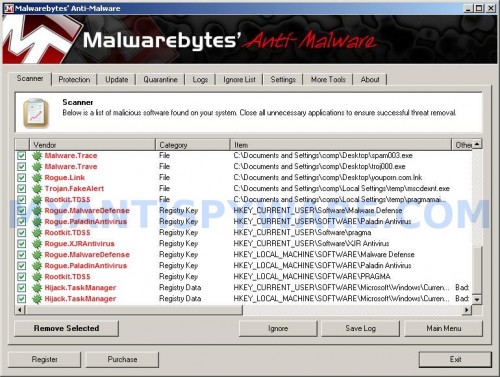

Malwarebytes Anti-malware, list of infected items

Make sure all entries have a checkmark at their far left and click “Remove Selected” button to remove Defense Center. MalwareBytes Anti-malware will now remove all of associated Defense Center files and registry keys and add them to the programs’ quarantine. When MalwareBytes Anti-malware has finished removing the infection, a log will open in Notepad and you may be prompted to Restart.

Note 1: if you can not download, install, run or update Malwarebytes Anti-malware, then follow the steps: Malwarebytes won`t install, run or update – How to fix it.

Note 2: if you need help with the instructions, then post your questions in our Spyware Removal forum.

Note 3: your current antispyware and antivirus software let the infection through ? Then you may want to consider purchasing the FULL version of MalwareBytes Anti-malware to protect your computer in the future.

Defense Center creates the following files and folders

C:\Program Files\Defense Center
%UserProfile%\Start Menu\Programs\Defense Center
C:\Program Files\Defense Center\defhook.dll
C:\Program Files\Defense Center\defcnt.exe
C:\Program Files\Defense Center\about.ico
C:\Program Files\Defense Center\activate.ico
C:\Program Files\Defense Center\buy.ico
C:\Program Files\Defense Center\help.ico
C:\Program Files\Defense Center\scan.ico
C:\Program Files\Defense Center\settings.ico
C:\Program Files\Defense Center\splash.mp3
C:\Program Files\Defense Center\uninstall.exe
C:\Program Files\Defense Center\update.ico
C:\Program Files\Defense Center\def.db
C:\Program Files\Defense Center\defext.dll
C:\Program Files\Defense Center\virus.mp3
%UserProfile%\Start Menu\Programs\Defense Center\About.lnk
%UserProfile%\Start Menu\Programs\Defense Center\Activate.lnk
%UserProfile%\Start Menu\Programs\Defense Center\Buy.lnk
%UserProfile%\Start Menu\Programs\Defense Center\Scan.lnk
%UserProfile%\Start Menu\Programs\Defense Center\Settings.lnk
%UserProfile%\Start Menu\Programs\Defense Center\Update.lnk
%UserProfile%\Start Menu\Programs\Defense Center\Defense Center Support.lnk
%UserProfile%\Start Menu\Programs\Defense Center\Defense Center.lnk
%UserProfile%\Application Data\Microsoft\Internet Explorer\Quick Launch\Defense Center.lnk
%UserProfile%\Desktop\Defense Center Support.lnk
%UserProfile%\Desktop\Defense Center.lnk

Defense Center creates the following registry keys and values

HKEY_CURRENT_USER\SOFTWARE\Microsoft\Windows\CurrentVersion\Run\Defense Center
HKEY_CURRENT_USER\SOFTWARE\Microsoft\Windows\CurrentVersion\Policies \System\DisableTaskMgr
HKEY_LOCAL_MACHINE\SOFTWARE\Microsoft\Windows\CurrentVersion\Policies \System\DisableTaskMgr

How to remove Defense Center – Video instructions

Share and Enjoy:

  • Print
  • Digg
  • Sphinn
  • del.icio.us
  • Facebook
  • Mixx
  • Google Bookmarks
  • Slashdot
  • Twitter
June 12, 2010 on 4:29 am | In Malware removal, Rogue Anti Spyware | 65 Comments |


65 Comments »

RSS feed for comments on this post.

  1. Terrible infection Devense Center … can we make legal act to this people ? Thank you for your Job you safe my data ..

    Comment by Alessandro — June 13, 2010 #

  2. This process doesn’t work for me. TDSS does n’t support 64 bit OS, and I run WIndows Vista’s 64 bit version.

    Comment by MerCuryKnight — June 13, 2010 #

  3. MerCuryKnight, skip “TDSS” step.

    Comment by Patrik — June 13, 2010 #

  4. nice and very important info txs..

    Comment by klipang — June 13, 2010 #

  5. Thanks This really works It clear all that bad stuff

    Comment by Jose — June 13, 2010 #

  6. Thank you!! You’re a genius! I am so glad I didn’t have to reformat my drive to get rid of that nasty infection.

    Comment by Janice — June 15, 2010 #

  7. Thank you so much for posting this, the Defense Center was really a nasty piece of malware.

    Comment by Tom — June 15, 2010 #

  8. Thank you so much. I have only had my laptop 4 months and I was so worried that this malware may have done me in. I didn’t want to pay a lot of money to have my computer cleaned out. This article really came to my rescue. Thanks a million!

    Comment by Daphne — June 15, 2010 #

  9. Hi i’ve followed your instruction. however, when i use the Malwarebytes anti-malware it finds the defence center, but defense center is able to get around it by saying malwarebytes is a virus that needs to be uninstalled.
    Please help.. thank you

    Comment by Joe — June 15, 2010 #

  10. WELL DONE.

    A great fix for a nasty bug! Easy instructions for a novice like me.

    THANKS!!!!

    Comment by Andrew — June 16, 2010 #

  11. it by saying malwarebytes is a virus

    Joe, ignore the fake alert. If you need a help, please start a new topic in our Spyware removal forum.

    Comment by Patrik — June 16, 2010 #

  12. My laptop got affect with Defence centre malware. It kept bright fake security notices.

    Followed the above steps and to my pleasant surprise it is all clear. THANK U VERY MUCH …great fix.

    Comment by Andy — June 16, 2010 #

  13. i cant open any programs or download a removel prog for defence center, esentutl64.exe has stoped working come up on the screen, what do i do? Please help

    Comment by Andrew — June 16, 2010 #

  14. What happened? I got as far as the notepad part and now none of my executables will work. I get an error message saying that nothing is associated with the extention. I can’t even create a new exe extention because what ever happened wipes it immediately.

    Comment by Frank — June 16, 2010 #

  15. Thank you,
    Simple clear instructions. Worked first time. Great site.

    Comment by Ant — June 16, 2010 #

  16. When I try to do step 1 it says that registry editing isn’t allowed. I tried the gpedit.msc way to turn it back on but it doesn’t seem to work.

    Comment by Bob — June 16, 2010 #

  17. Hi, thanks for the great steps on removing this. Just a quick question though, I run a 64 bit OS too, does the trojan get removed by malwarebytes? Once again, many thanks.

    Comment by Oliver — June 17, 2010 #

  18. thank you so much, this thing was doing my head in!!!

    Comment by kate — June 17, 2010 #

  19. Andrew, use the first step above to disable “esentutl64.exe” malware.

    Comment by Patrik — June 17, 2010 #

  20. Frank, repeat the first step above. Also you can use exeHelper (link) to fix this problem.

    Comment by Patrik — June 17, 2010 #

  21. Bob, download fix1.zip from here, unzip it. Right click fix.inf and select Install. Then go to step 2.

    Comment by Patrik — June 17, 2010 #

  22. Oliver, if you using 64bit OS, then you need to skip the step 3.

    Comment by Patrik — June 17, 2010 #

  23. Works perfecty fine

    Comment by Jorge — June 17, 2010 #

  24. When I try to run registry editor file, fix.reg, I’m getting an error \Not all registries were modified because some are being used by other processes\. The user has Admin rights, so what is the problem? How do I get around this?

    Comment by Frustrated — June 18, 2010 #

  25. Thank you so MUCH !!!
    I got so frustrated with this **** virus that I almost throw my comp. in the trash. THANK YOU SO MUCH.

    Comment by Tyler — June 19, 2010 #

  26. Frustrated, try use fix.inf. Read my answer to Bob (Comment by Patrik — June 17, 2010).

    Comment by Patrik — June 19, 2010 #

  27. Thanks Patrik, that worked great.

    Frank

    Comment by Frank — June 20, 2010 #

  28. Nice work. Had this virus with 4 users now and this was the easiest and most effective route to getting rid of it. Much thanks.
    Paul

    Comment by Paul — June 24, 2010 #

  29. When I try to run OTM, I get the message, “OTM.exe is not a valid Win32 application.

    Please help!

    Comment by James — June 26, 2010 #

  30. James, try redownload OTM.

    Comment by Patrik — June 27, 2010 #

  31. When I click on OTM it ask me to choose a program to run it. Which program do I use to run OTM?

    Comment by andrew — June 29, 2010 #

  32. andrew, looks like reg patch (step 1) was not applied. Repeat the first step.

    Comment by Patrik — June 29, 2010 #

  33. Thank u very much u save my life ;)

    Comment by cbounet — June 29, 2010 #

  34. wow. Have I just found the best site for Malware removal? I’ve tried everything and was about to format my computer after storing all my data to an external HD.
    This is the nastiest Malmare I’ve ever gotten!
    The virus maker should get his ball chopped to pieces

    Comment by MrCoolMan — June 29, 2010 #

  35. This stuff has to be illegal. Have any law enforcement types looked into prosecuting the perpetrators? Should be easy enough to find if you buy their product.

    Comment by Bill — July 6, 2010 #

  36. thank you very much for the info. i was a little scared that something happened to my laptop but once again thank you for posting this for everyone that comes with this virus !!!

    Comment by Mehdi — July 7, 2010 #

  37. Excellent instructions on how to remove another one of these stupid programs. NICE ONE

    Comment by Tom — July 10, 2010 #

  38. I followed all the steps, and it seemed to be working- but once I used Malwarebytes, and it finished the scan, it tells me to click “ok” then “show results”.
    I click “ok” in order to then click “show results”, but when I click “ok” malwarebytes closes. What am I missing??

    Comment by Abbey — July 11, 2010 #

  39. Abbey, try re-run TDSSKiller.

    Comment by Patrik — July 12, 2010 #

  40. I ran it again, but it didn’t find anything the second time D:

    Comment by Abbey — July 12, 2010 #

  41. Abbey, open a new topic in our Spyware removal forum. I will check your PC.

    Comment by Patrik — July 12, 2010 #

  42. thanks a lot. i was so freaked out when i got the trojan. this was a great help and the only method that worked.

    Comment by stella — July 13, 2010 #

  43. My fix.reg did not work so i tried fix.inf but i have no option to install?

    Comment by Danielle Sherlock — July 14, 2010 #

  44. nice

    Comment by ed — July 14, 2010 #

  45. Thanks. Worked great but I still can access my task manager & whenever I try to open a file or program, it says what would you like to open program with. I can run regedit or msconfig because it keeps asking me what to open them with. Any help would be great. All in all, great program though. Worst virus I ever had.

    Comment by Greg — July 14, 2010 #

  46. I mean I can’t access my task manager.

    Comment by Greg — July 14, 2010 #

  47. Got it working now. I had to manually enable a few things & manually enable the task manager after I downloaded broken .exe files for windows xp. Great site!! You saved us all.

    Comment by Greg — July 14, 2010 #

  48. Danielle, no “Install” option in right button menu ?

    Comment by Patrik — July 16, 2010 #

  49. This surely works. Thanks a lot. Hats off to you.

    Comment by Kroger — July 16, 2010 #

  50. For some reason i can’t start my task Manager, it keeps saying that admin disabled it ;S, how can i fix that?

    Also my Internet explorer wont work, at this moment i got mozilla.

    Comment by Taskmanager — July 17, 2010 #

  51. I am unable to open internet explorer or firefox due to this “Defense Center” trojan. (I am currently on another computer)

    As such, I cannot download the programs this guide calls for. Any suggestions?

    Comment by Dan — July 17, 2010 #

  52. Taskmanager, perform a scan with Malwarebytes.

    Comment by Patrik — July 18, 2010 #

  53. Dan, follow the first step instructions above, then move the suggested application to your PC using a flash or cd disk, after that follow 2-4 steps.

    Comment by Patrik — July 18, 2010 #

  54. Thank you very much!

    Comment by Nathan — July 18, 2010 #

  55. Thank you!!!!! I got it all cleaned up before my dad got home!!! Thanks!!!

    Comment by Tyler — July 18, 2010 #

  56. WHo are these criminals? I have been robbed of $60 because I did not know of the scam.

    Comment by NIck — July 19, 2010 #

  57. Thank you soooooo much! worked so well!

    Comment by Taryn — July 19, 2010 #

  58. thanks for your help. this crap got on my laptop and your instructions got rid of it – youre heroes !

    thanks again.

    N

    Comment by nick — July 22, 2010 #

  59. thank you genius, you are the great master.

    Comment by mohd — July 23, 2010 #

  60. i’ve cleared the symptoms of the defeense center malware but still shows up on my security center. I cant connect thru wifi and its telling me defense center antivirus is out of date

    Comment by emmanuel — July 23, 2010 #

  61. Click Start, Run.
    Type wbemtest and press Enter.
    Windows Management Instrumentation Tester opens.
    Click Connect… button.
    Type root\SecurityCenter and press Enter.
    Click to Query button.
    Type SELECT * FROM AntiVirusProduct and click on Apply button.
    If there is more than one result, it means there is more than one Antivirus program installed. Double click on each result to view the properties for that Antivirus product.
    Identify the product(s) installed and DELETE any records for an Antivirus software (or rogue security program) that is no longer installed.

    Comment by Patrik — July 24, 2010 #

  62. I have the same problem as emmanuel. I have followed all the steps listed above (as well as Patrik’s response) and I still have no access to the internet. No messages from Defense Center are popping up anymore but my internet is still down.

    Comment by David — August 9, 2010 #

  63. David, what shows your browser when you trying to open any site ?

    Comment by Patrik — August 10, 2010 #

  64. Couldn’t you have made it a little more complicated???
    Can’t believe I have to go thru all this crap to remove this program.
    Must be an easier way.

    Comment by lmaccartu — August 17, 2010 #

  65. lmaccartu, is easy way :)
    Complete 1 and 3 step only.

    Comment by Patrik — August 22, 2010 #

Leave a comment

XHTML: <a href="" title=""> <abbr title=""> <acronym title=""> <b> <blockquote cite=""> <cite> <code> <del datetime=""> <em> <i> <q cite=""> <strike> <strong>


My Anti Spyware - Free antispyware programs and Spyware Removal Instructions.
