![]() | Do you have pop-ups or your computer infected with trojan or spyware ? Learn how to ask us for help, click here! |
How to remove Security Master AV (Uninstall instructions)
Security Master AV is not a legitimate security tool, it is a malicious program that classified as rogue antispyware because it detects false infections and displays a lot of fake security alerts in order to trick your into purchasing the software. Security Master AV from the same series of malware as early appeared My Security Engine and Security Guard. The difference between this new rogue of others very slightly. Firstly, changed the name of the program and secondly, have been partially modified the core component of the program in order to protect it from detection by the legitimate antivirus and antispyware tools. Otherwise, everything remained as before.
Security Master AV distributed usually through fake online malware scanners. The web scanner imitates a system scan and once finished will claim to have found trojans, viruses and malware. It will advise you to download and install an “antivirus”. This “antivirus” is a trojan, that once started, will download and install Security Master AV onto your computer.
During installation, Security Master AV first step will register itself in the Windows registry to run automatically when Windows starts, then add a few entries into HOSTS file so that when you open Google, Yahoo or Bing, you will be redirected to various misleading websites.
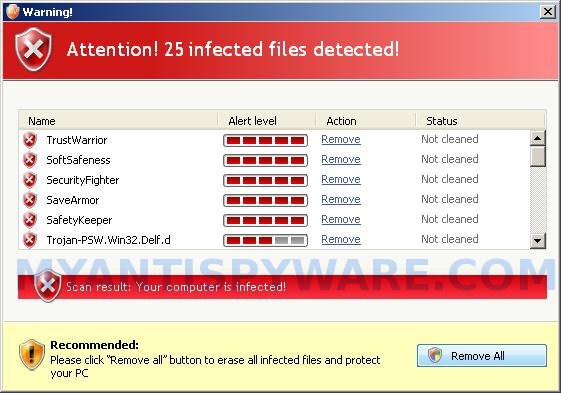
The same trojan that installs the rogue will also create several fake malware files, that absolute harmless, but later during the scan, Security Master AV will report them as worms, trojans and viruses. Of course, this is a scam. Like other rogue antispyware applications, the rogue want to force you to believe that your computer is infected. Important to know, Security Master AV is unable to detect or remove any infections and nor will be protect you from legitimate future threats. So you can safely ignore the false scan results.
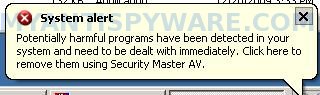
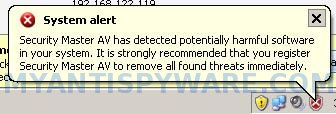
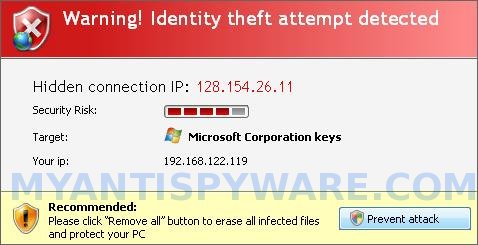
While Security Master AV is running, it can block the Windows Task Manager and most antivirus and antispyware tools, as well as show a variety of fake security warnings and alerts. Some of the alerts:
System alert
Security Master AV has detected potentially harmful software
in your system. It is strongly recommended that you register
Security Master AV to remove all found threats immediately.
System alert
Potentially harmful programs have been detected in your
system and need to be dealt with immediately. Click here to
remove them using Security Master AV.
Warning! Identity theft attempt detected
Hidden connection IP: 128.154.26.11
Target: Microsoft Corporation keys
Warning
Warning! Virus detected
System alert
Click here to remove all potentially harmful programs found
immediately using Security Master AV.
However, like false scan results, all of these warnings and alerts are a fake and should be ignored
From the above, obviously, Security Master AV is a scam, that created with one purpose to scare your into purchasing so-called “full” version of the program. Most importantly, do not purchase it! Instead, use the removal instructions below to remove Security Master AV and any associated malware from your computer for free.
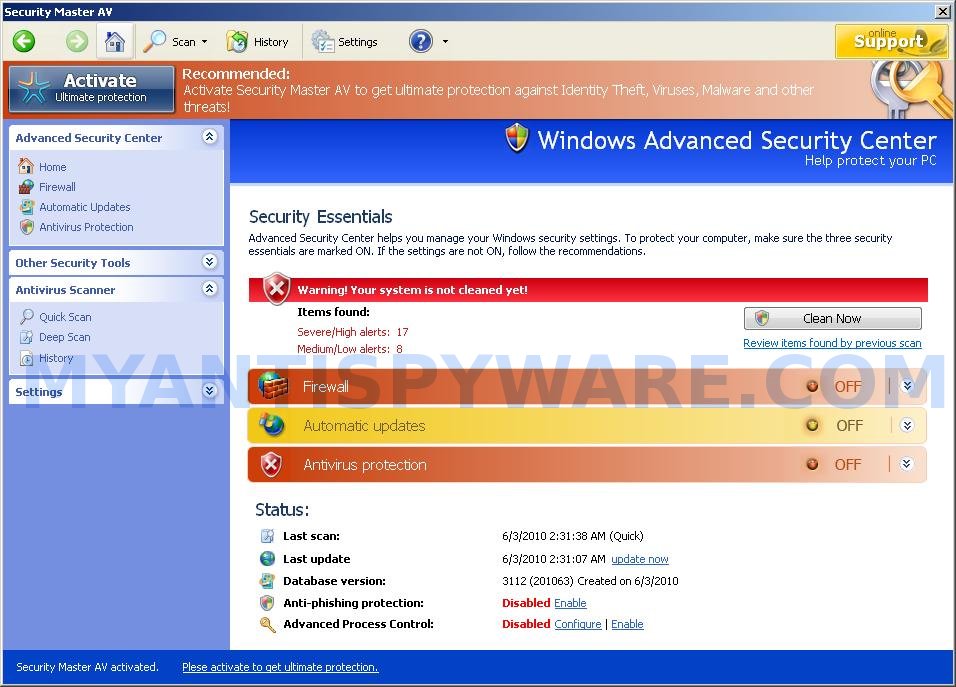
More screen shoots of Security Master AV
Symptoms in a HijackThis Log
O4 – HKCU\..\Run: [Security Master AV] “C:\Documents and Settings\All Users\Application Data\1ac31\SM115.exe” /s /d
Use the following instructions to remove Security Master AV (Uninstall instructions)
Step 1. Remove Security Master AV and any associated malware.
Download MalwareBytes Anti-malware (MBAM). Once downloaded, close all programs and windows on your computer.
Double-click on the icon on your desktop named mbam-setup.exe. This will start the installation of MalwareBytes Anti-malware onto your computer. When the installation begins, keep following the prompts in order to continue with the installation process. Do not make any changes to default settings and when the program has finished installing, make sure a checkmark is placed next to “Update Malwarebytes’ Anti-Malware” and Launch “Malwarebytes’ Anti-Malware”. Then click Finish.
MalwareBytes Anti-malware will now automatically start and you will see a message stating that you should update the program before performing a scan. If an update is found, it will download and install the latest version.
As MalwareBytes Anti-malware will automatically update itself after the install, you can press the OK button to close that box and you will now be at the main menu. You will see window similar to the one below.

Malwarebytes Anti-Malware Window
Make sure the “Perform quick scan” option is selected and then click on the Scan button to start scanning your computer for Security Master AV infection. This procedure can take some time, so please be patient.
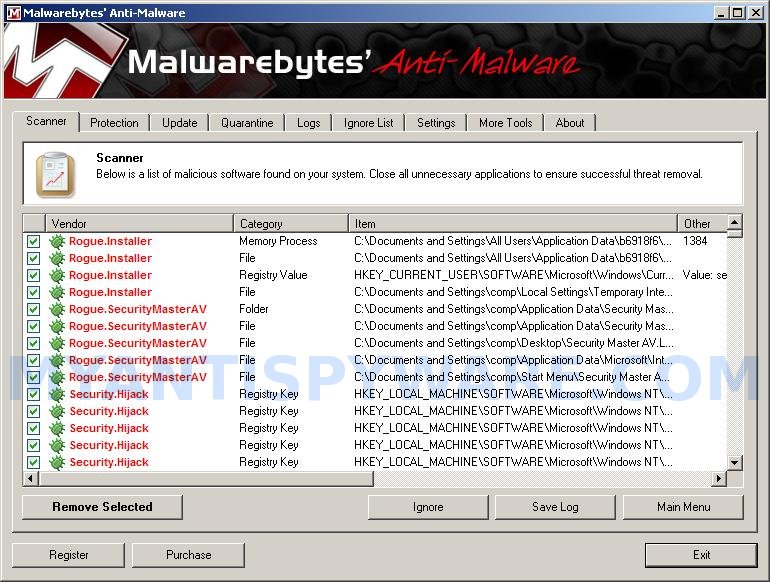
When the scan is finished a message box will appear that it has completed scanning successfully. Click OK. Now click “Show Results”. You will see a list of infected items similar as shown below.
Note: list of infected items may be different than what is shown in the image below.
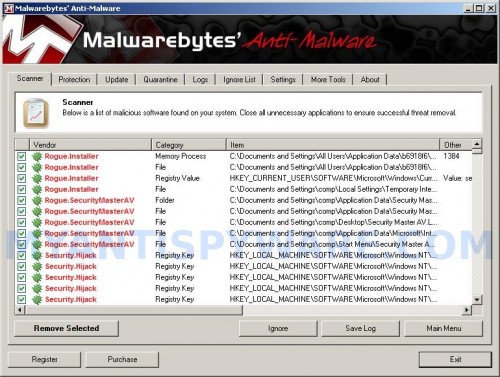
Malwarebytes Anti-malware, list of infected items
Make sure all entries have a checkmark at their far left and click “Remove Selected” button to remove Security Master AV. MalwareBytes Anti-malware will now remove all of associated Security Master AV files and registry keys and add them to the programs’ quarantine. When MalwareBytes Anti-malware has finished removing the infection, a log will open in Notepad and you may be prompted to Restart.
Step 2. Reset HOSTS file.
Please download OTM by OldTimer from here and save it to desktop. Run OTM, copy, then paste the following text in “Paste Instructions for Items to be Moved” textarea (under the yellow bar):
:Commands
[resethosts]
Close OTM.
Note 1: if you can not download, install, run or update Malwarebytes Anti-malware, then follow the steps: Malwarebytes won`t install, run or update – How to fix it.
Note 2: if you need help with the instructions, then post your questions in our Spyware Removal forum.
Note 3: your current antispyware and antivirus software let the infection through ? Then you may want to consider purchasing the FULL version of MalwareBytes Anti-malware to protect your computer in the future.
Security Master AV creates the following files and folders
%UserProfile%\Application Data\Security Master AV
%UserProfile%\Application Data\Security Master AV\cookies.sqlite
%UserProfile%\Desktop\Security Master AV.lnk
%UserProfile%\Start Menu\Security Master AV.lnk
%UserProfile%\Application Data\Security Master AV\Instructions.ini
%UserProfile%\Start Menu\Programs\Security Master AV.lnk
%UserProfile%\Application Data\Microsoft\Internet Explorer\Quick Launch\Security Master AV.lnk
C:\Documents and Settings\All Users\Application Data\1ac31\SM115.exe
Security Master AV creates the following registry keys and values
HKEY_CURRENT_USER\SOFTWARE\Microsoft\Windows\CurrentVersion\Run | Security Master AV
HKEY_USERS\.DEFAULT\Software\Microsoft\Internet Explorer\SearchScopes | URL = “http://findgala.com/?&uid=1002&q={searchTerms}”
HKEY_CURRENT_USER\Software\Classes\Software\Microsoft\Internet Explorer\SearchScopes | URL = “http://findgala.com/?&uid=1002&q={searchTerms}”
HKEY_CURRENT_USER\Software\Microsoft\Internet Explorer\Download | RunInvalidSignatures = “1″
HKEY_CLASSES_ROOT\Software\Microsoft\Internet Explorer\SearchScopes | URL = “http://findgala.com/?&uid=1002&q={searchTerms}”
How to remove Security Master AV – Video instructions
May 26, 2010 on 9:37 am | In Malware removal, Rogue Anti Spyware | 63 Comments |63 Comments »
RSS feed for comments on this post.
Leave a comment
My Anti Spyware - Free antispyware programs and Spyware Removal Instructions.


Ele enganou-me mesmo,esse security master também apareceu no meu PC,mas graças á reparação de arranque consegui retirá-lo do meu PC,voltando para um ponto onde o sistema ainda funcionava correctamente
Comment by s54874 — June 3, 2010 #
Thank you soo much for this guide. From what I can tell, the virus has been removed from my computer. You really saved me a lot of time and trouble with this guide!
Comment by Nick — June 4, 2010 #
Thank you soo much for this guide. From what I can tell the virus has been removed from my computer. You really saved me a lot of time and trouble with this step by step walk through. Thanks!
Comment by Nick — June 4, 2010 #
Thank you so much for this guide………I successfully removed those nuisances
Comment by SABARISH — June 5, 2010 #
Thanx alot for ur guide . I successfully removed that nonsence Security Master Av Virus ……..
- Shreenath G … Mangalore – 9686143176
Comment by Shrinath — June 7, 2010 #
It worked, thank you very much
Comment by Benuk — June 17, 2010 #
help! i successfully (or so i thought) removed Security Master AV from my pc, but my firewall was left turned on by it!so security center says “Security Master Av is currently ON”. What will i do to fix this? help please!
Comment by oliver — June 17, 2010 #
Oliver, try the following:
Click Start, Run.
Type wbemtest and press Enter.
Windows Management Instrumentation Tester opens.
Click Connect… button.
Type root\SecurityCenter and press Enter.
Click to Query button.
Type SELECT * FROM AntiVirusProduct and click on Apply button.
If there is more than one result, it means there is more than one Antivirus program installed. Double click on each result to view the properties for that Antivirus product.
Identify the product(s) installed and DELETE any records for an Antivirus software (or rogue security program) that is no longer installed.
Comment by Patrik — June 17, 2010 #
Thank You sooooo much, this is some incredible skill and inspiration to people who are interested in compuer techniqtions. Thanks again (Y)keep up the justice against these demons!
Comment by K — June 25, 2010 #
Security Master AV has disabled my Task Manager and any anitspyware program on my computer or downloading to the computer. This Spydoctor will not launch. How do I get around this??
Comment by DK — June 26, 2010 #
DK, use Malwarebytes Anti-malware – free malware remover. If it does not help you, then begin a new topic in our Spyware removal forum. I will help you.
Comment by Patrik — June 26, 2010 #
Help! Performed the Security Master AV removal. Now, trying to install AVG free version and comes up with “Potential incompatible File” for Security Master AV. I’m prompted to remove it from add/remove files but it’s not on the list. Am I doing something wrong? Thanks.
Also, Thank you very much for this instructions.
Comment by IM — June 30, 2010 #
IM, read my comment above (Comment by Patrik — June 17, 2010).
Comment by Patrik — June 30, 2010 #
Patrik, It worked. Thanks a lot!
Comment by IM — June 30, 2010 #
I also tried what you suggested on June 17th, and nothing comes up to “delete.”
I’m so frustrated with this, and was wondering if you could maybe take it from the start….because I’m sure it’s still on my computer.
Thanks
Comment by Ashley — July 6, 2010 #
Ashley, begin a new topic in our Spyware removal forum. I will check your PC.
Comment by Patrik — July 7, 2010 #
i cant update the malwarebytes it keeps saying “an error has occured, pelase contact the error code to our spport team”
Comment by Abc — July 12, 2010 #
Hi there
I am having trouble getting Security Master AV totally off my computer. I have run malaware twice and both times it has removed over 700 files. Then followed through with step 2.
Its helped as my McAffee wasnt working and now its back on though.. but it stil appears as a program on my program list.
Ok Ive just run a third malaware scan and nothing came up but it still appears on my program list.
How can I get it off there completely?
Comment by Pez — July 13, 2010 #
Abc, ask for help in our Spyware removal forum.
Comment by Patrik — July 14, 2010 #
Pez, looks like your computer also infected with a hidden trojan that reinstalls the rogue. Please begin a new topic in our Spyware removal forum. I will help you.
Comment by Patrik — July 14, 2010 #
Patrik,
I have similar experience as Pez, I ran the MalwareBytes Anti-malware three times, still could not get rid of the Security Master AV. I also accidently downloaded Stopzilla before seeing your website here. Could not follow through step 2 above, after I saved the OTM to my desktop, run, do not have an option to copy. Please help!!!! Thanks.
shocked Liz
Comment by shocked Liz — July 15, 2010 #
THANK YOU SO MUCH!!!!!
Now Security Master av is uninstalled and my taskmanager is running again.All those screamings from the Security master were horrible.
But I still have a PROBLEM,I use NOD32 as antivirus program and i guess Security master turned my AMON off and I cant turn it back on,please help me if you can. and thanks again,it worked!
Comment by JOhanna — July 15, 2010 #
Hi Patrik,
After following through your instructions above (including step 2) religiously, I think I finally have got rid of the Security Master AV. I ran Malwarebyt tonight and it came out clean. BIG THANK YOU to your instruction and help on this.
Shocked Liz
Comment by shocked liz — July 16, 2010 #
Also, I uninstalled Stopzella as well. Wow, what an achievement tonight. Thanks again.
Shocked Liz
Comment by shocked liz — July 16, 2010 #
JOhanna, what you see when you trying to enable NOD 32 auto protection ?
Comment by Patrik — July 16, 2010 #
patrick i follow all the steps above, but when i go to the security center under control panel i still cant turn my firewall on or off. Security Master av is still there!. I went thru the steps again and i only get one result, i double click on it to see its properties and there is one with that had security master av name on it and 2 or 3 more that only say antivirus product, when i try to delete those too, it wont let me it says: cannot edit this property, probably read only! am I doing something wrong? please help
thanks
Comment by jacky — July 16, 2010 #
malwarebytes is already downloaded. we followed the step double click the icon but we cannot open it….please help…
Comment by andrew — July 16, 2010 #
jacky, you used the wbemtest command ?
Comment by Patrik — July 17, 2010 #
andrew, probably a trojan blocks it. Please start a new topic in our Spyware removal forum. I will help you.
Comment by Patrik — July 17, 2010 #
I didnt do step 2 but did do step 1, and I think it worked. When I tried downloading the thing for step 2, my computer reported it as an unsafe download.
Anyways, thanks!
Comment by Jason — July 18, 2010 #
HELP! I have Security Master AV on my computer. I can’t do anything unless I am in safe mode. I logged in under safe mode, ran the rkill then the Malwarebytes and removed the virus. I don’t understand what to do next. I know I have to delete or repair the c:\windows\system32\drivers\etchost file get this off my computer but I don’t know how to do this.
Comment by Teresa — July 19, 2010 #
Teresa, you need to reset your HOSTS file. Follow the second step above.
Comment by Patrik — July 19, 2010 #
Patrik-
Thanks for your response. Am I pasting the :command [resethost] into the “paste instructions for items to be removed? Then do you hit clean up? If so, I did that and it didn’t work. I’m sure this is such a stupid question but I really no nothing about computers. I’m amazed that I got this far. Thanks for your help.
Comment by Teresa — July 19, 2010 #
Teresa, please begin a new topic in our Spyware removal forum. I will help you.
Comment by Patrik — July 19, 2010 #
Hi I have completely removed Security Master AV with the malwarebytes but the Security master AV Firewall is still on and is preventing me from getting access to the internet. How do i turn it off?
Comment by Rob — July 22, 2010 #
Security Master AV Removed.. No Firewalls On and still I can only get Local Only Access Connection. Changed IP and DNS to ISP. Still Nothing. Unistalled and Reinstalled NIC. The light on the back only flashed yellow and has an orange light but no green? its not the ethernet cable. What else can I do?
Comment by Rob — July 22, 2010 #
Rob, you have tried to ping any site ? Whats result ?
Comment by Patrik — July 22, 2010 #
how do i do that?
Comment by Rob — July 23, 2010 #
Open command console (Start, Run, type cmd and press Enter). Type
ping google.comand press Enter.Comment by Patrik — July 23, 2010 #
i want to remove security av antivirus from my computer because it is telling that virus found there is a option remove all but if we will click on that button one webpage is opening on the computer that one year subscription $89.95
down there is a option called click here if you have a product key if we click on it there is a option called enter product key
down there is a option called get product key but if we click on the option nothing is coming how can i remove this anti vrus software ? please help me
Comment by parjan — July 24, 2010 #
Patrick, thank you for the “wbemtest” tip… omg thank you… I would have never thought of it. Windows settings are so scattered about, it really drives me crazy!
Comment by thanker — July 24, 2010 #
parjan, you have tried the instructions above ?
Comment by Patrik — July 24, 2010 #
i installed and ran mbam and it found the infected files and deleted them so security master av is not listed on my computer but now my computer will not let me open any programs or even my control panel….any suggetions
Comment by josh — July 25, 2010 #
josh, open a new topic in our Spyware removal forum. I will help you.
Comment by Patrik — July 26, 2010 #
i’ve done with all the procedures but secyrity master av is stil in my computer! how to get it out? pls help me
Comment by mark — July 29, 2010 #
mark, probably your computer is infected with a new/updated version of the rogue. Begin a new topic in our Spyware removal forum. I will help you.
Comment by Patrik — July 29, 2010 #
thank a lot patrik
when i restart my computer it suddenly appears again, the security master av, what will i do know? or i’ll just reboot my computer!?
Comment by mark — July 29, 2010 #
patrik i downloaded hijack and i think its gone! whoa! it really did work!
Comment by mark — July 29, 2010 #
plz somebody help me?
i ran Malwarebytes then it’s found over 700 infected files so i made removed it but when i installing AVG program he told me you should to uninstall Security Master AV but it doesn’t appear in my program list !!!!!! so what i should to do with this fu***** problem ???? my Laptop without any Antivirus program……..:(
Comment by Mohammad — August 3, 2010 #
Mohammad, use the following instructions:
Click Start, Run.
Type wbemtest and press Enter.
Windows Management Instrumentation Tester opens.
Click Connect… button.
Type root\SecurityCenter and press Enter.
Click to Query button.
Type SELECT * FROM AntiVirusProduct and click on Apply button.
If there is more than one result, it means there is more than one Antivirus program installed. Double click on each result to view the properties for that Antivirus product.
Identify the product(s) installed and DELETE any records that associated with Security Master AV.
Comment by Patrik — August 4, 2010 #
Hello,
I spent about 3-4 hours early this morning trying to remove this I followed the steps and restarted my computer and the virus was reinstalled at bootup. I would appreciate any helps thank you
Comment by Not happy at all — August 4, 2010 #
Thank you I rebooted my computer and it seems to have left!
Comment by Not happy at all — August 4, 2010 #
thx alot Patrik you helped me but after that my Windows halting and slow response so may Security master AV still effecting on my system bcoz when i made scan from malware it found always 3 infected files from registry same Security Master AV ?????????????
Comment by Mohammad — August 5, 2010 #
Can some body please help! I thought I got rid of it now my computer is running constantly all the time I can tell by how the fan has been on non stop and I do control alt delete and there are so many svc hosts as well as yahooua and blk some thing and a bunch of weird stuff when the only thing I have running is firefox. I have it in safe mode and ran malware and every time it finds two or so infected trojans in my H key files can you help please! Earlier I think the virus disabled my internet until I put it in safe mode. The virus is not returning upon reboot any more but my computer has a lot of things “running” supposedly I know its a virus. The virus I thought I got rid of was security master if that info is needed thank you!
Comment by Not happy at all — August 5, 2010 #
Mohammad and “Not happy at all “, please start a new topic in our Spyware removal forum. I will check your PC and help you to remove this malware.
Comment by Patrik — August 6, 2010 #
Patrik, I tried using the wbemtest utility. When attempting to delete the record for SecurityMasterAV after typing in “SELECT * FROM AntiVirusProduct” I get the error message: “Number: 0×80041003
Facility: WMI
Description: Access denied.” I am running wbemtest as administrator, so I’m not sure what I’m doing wrong. Thanks for your help
Comment by Brent — August 6, 2010 #
Run command prompt as administrator.
Type
winmgmt /salvagerepositoryThe first time you run this it will fail. It will issue stop commands to the services causing it to fail. It might take a couple minutes for the services to shut down. Run the command again. Sometimes it takes up to 5 times before it finally completes on its own. Reboot your system, and you should be OK. Once completed, repeat wbemtest steps.
Comment by Patrik — August 8, 2010 #
I used the wbemtest utility, got one result from SELECT * From AntiVirusProduct, double clicked it, deleted the only property titled displayName CIM_STRING Security Master AV then closed out of the Windows Management Instrumentation Tester. I opened my Control Panel, Security Center, Security Master AV remains. No other properties were associated with the name itself Security Master AV, is there another property connected to SMAV that does not specifically have the name in it?
Comment by Rachel — August 9, 2010 #
Rachel, use also “SELECT * From FirewallProduct”.
Comment by Patrik — August 10, 2010 #
Hi, i found this site after finding i stil have security master av in windows security center , it is running a firewall and antivirus and as it is not showing in add remove progs or anywhere else on pc , i cant get rid of it, i have been through all the other ways to get rid, i have tried the remedy you have on here using the windows management instrumentation tester, followed the instructions for firewall and antivirus , could only see one item with SMAV in the name on each one so i deleted those buti STILL have SMAV in windows security center , still hogging the firewall and antivirus, can you help
Comment by rubyg — September 12, 2010 #
Hey Patrik. Same problem, I applied both SELECT * From FirewallProduct and SELECT * From AntiVirusProduct this time, clicked Delete Property for displayName CIM_STRING Security Master AV then closed out of the Windows Management Instrumentation Tester. I opened my Control Panel, Security Center, Security Master AV remains still. Are there other properties associated with Security Master AV that do not specifically have the name, Security Master AV, in it? Did I exit the Windows Management Instrumentation Tester incorrectly?
Comment by Rachel — September 13, 2010 #
Looks like rubyg and I are dealing with the same issue.
Comment by Rachel — September 13, 2010 #
Rachel, probably your PC is still infected. Open a new topic in our Spyware rempoval forum. I will check your PC.
Comment by Patrik — September 15, 2010 #