 My Security Engine is a rogue antispyware program from the same series of rogues as early appeared Security Guard and Cleanup Antivirus. The difference between this new fake antispyware of others very slightly. Firstly, changed the name of the program and secondly, have been partially modified the core component of the program in order to protect it from detection by the legitimate antivirus and antispyware tools. Otherwise, everything remained as before.
My Security Engine distributed usually through fake online malware scanners. When you opens a page with this scanner, it simulates a system scan and once finished, tells you that your computer is infected with a lot of infections. Then offers to install an “antivirus”. This “antivirus” is a trojan, that once started, will download and install My Security Engine onto your PC.
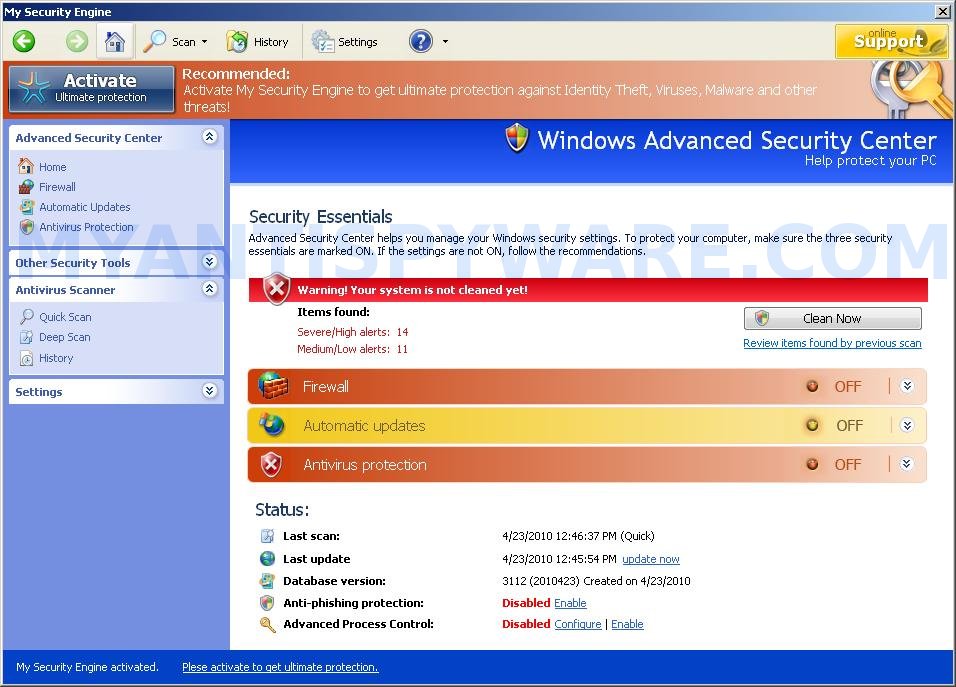
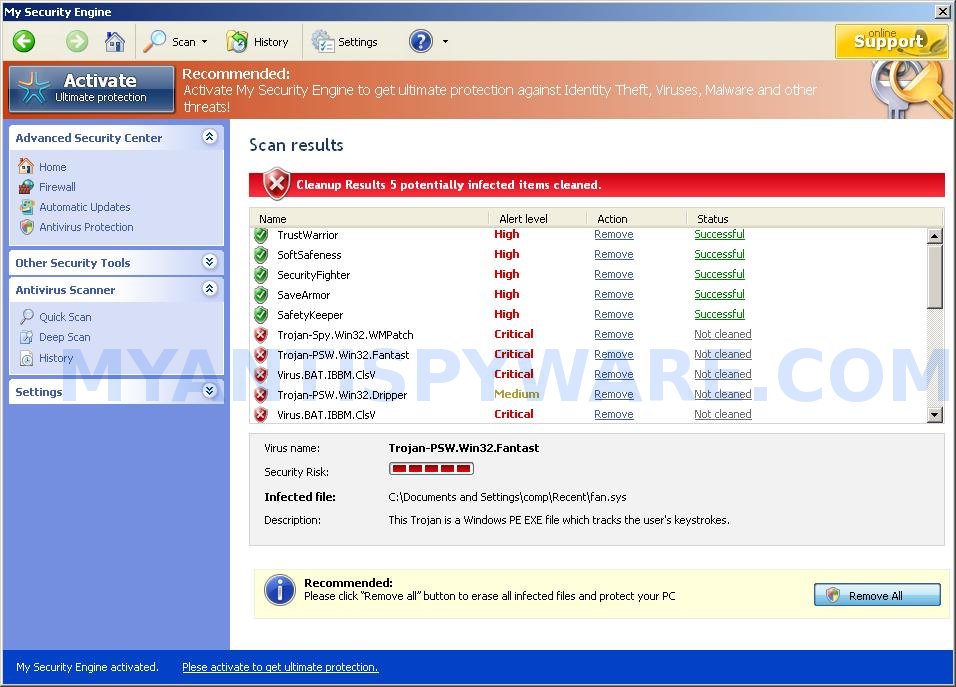
After breaking into your computer, My Security Engine first step will configure itself to run automatically when Windows starts, then add several lines into HOSTS file so that when you open Google, Yahoo or Bing, you will be redirected to a malicious website and create a lot of fake malware files with random names, that absolute harmless, but later during the scan will be reported as worms, trojans and viruses. Of course, the scan results are false, because the fake antispyware tool identifies harmless files as dangerous infections. Important, do not trust the result of the scan, simply ignore them! My Security Engine want to force you to believe that your computer is infected.
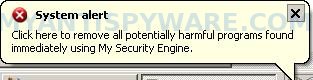
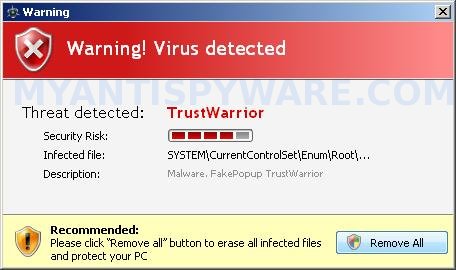
For a more complete picture of what your computer is infected with dangerous viruses, My Security Engine will display numerous warnings, fake security alert and notifications from Windows task bar. Some of the alerts:
Warning
Warning! Virus detected
System alert
Click here to remove all potentially harmful programs found
immediately using My Security Engine.
What is more, My Security Engine may block Task Manager and legitimate antivirus and antispyware programs and hijack Internet Explorer so that it randomly shows a warning page when you browsing the Internet. The title of the page is “There is a problem with this websites`s secuirty. Possible spyware threat detected”. However, all of these alerts and warnings are fake and like scan false results should be ignored!
From the above, obviously, this program is an unwanted guest on your computer, which should be removed from the system upon detection. Please follow the instructions below to remove My Security Engine and any associated malware from your computer for free.
More screen shoots of My Security Engine
Symptoms in a HijackThis Log
O4 – HKCU\..\Run: [My Security Engine] “C:\Documents and Settings\All Users\Application Data\9be96\MS515.exe” /s /d
Use the following instructions to remove My Security Engine (Uninstall instructions)
Step 1. Remove My Security Engine and any associated malware.
Download MalwareBytes Anti-malware (MBAM). Once downloaded, close all programs and windows on your computer.
Double-click on the icon on your desktop named mbam-setup.exe. This will start the installation of MalwareBytes Anti-malware onto your computer. When the installation begins, keep following the prompts in order to continue with the installation process. Do not make any changes to default settings and when the program has finished installing, make sure a checkmark is placed next to “Update Malwarebytes’ Anti-Malware” and Launch “Malwarebytes’ Anti-Malware”. Then click Finish.
MalwareBytes Anti-malware will now automatically start and you will see a message stating that you should update the program before performing a scan. If an update is found, it will download and install the latest version.
As MalwareBytes Anti-malware will automatically update itself after the install, you can press the OK button to close that box and you will now be at the main menu. You will see window similar to the one below.

Malwarebytes Anti-Malware Window
Make sure the “Perform quick scan” option is selected and then click on the Scan button to start scanning your computer for My Security Engine infection. This procedure can take some time, so please be patient.
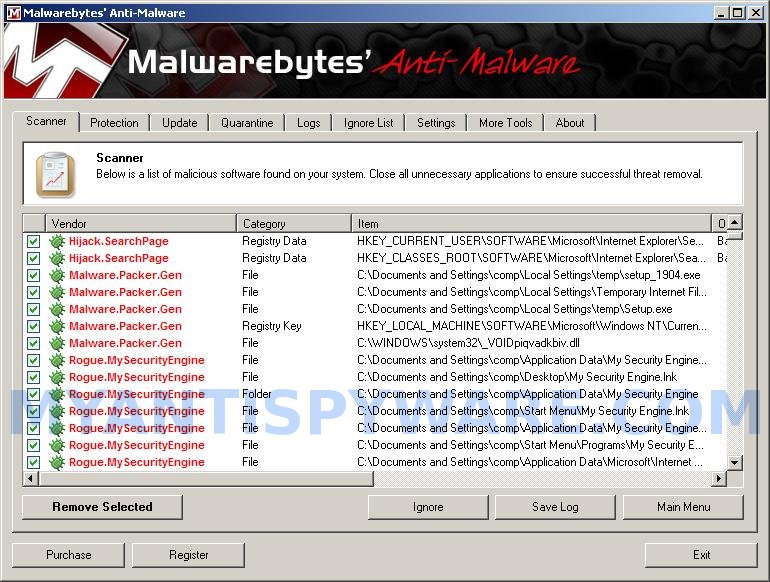
When the scan is finished a message box will appear that it has completed scanning successfully. Click OK. Now click “Show Results”. You will see a list of infected items similar as shown below.
Note: list of infected items may be different than what is shown in the image below.
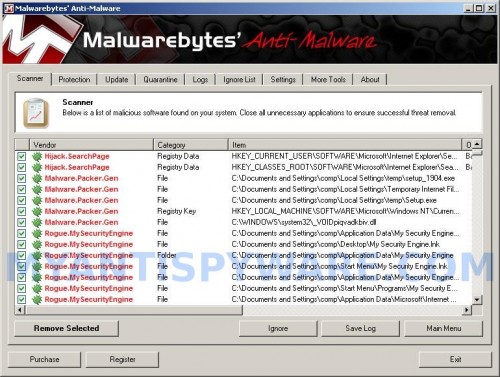
Malwarebytes Anti-malware, list of infected items
Make sure all entries have a checkmark at their far left and click “Remove Selected” button to remove My Security Engine. MalwareBytes Anti-malware will now remove all of associated My Security Engine files and registry keys and add them to the programs’ quarantine. When MalwareBytes Anti-malware has finished removing the infection, a log will open in Notepad and you may be prompted to Restart.
Step 2. Reset HOSTS file.
Run Malwarebytes Anti-malware. Open Tools tab. Under FileASSASSIN label click to Run Tool button. In the open window navigate to C->Windows->System32->Drivers->etc and select HOSTS file. Click Open button. Click YES to confirm. Close Malwarebytes Anti-malware.
Click Start, Run. Type notepad and press Enter. Notepad opens. Copy all the text below into Notepad.
127.0.0.1 localhost
Save this as HOSTS to your C->Windows->System32->Drivers->etc. (Remember to select Save as file type: All files in Notepad). Close Notepad.
Note 1: if you can not download, install, run or update Malwarebytes Anti-malware, then follow the steps: Malwarebytes won`t install, run or update – How to fix it.
Note 2: if you need help with the instructions, then post your questions in our Spyware Removal forum.
Note 3: your current antispyware and antivirus software let the infection through ? Then you may want to consider purchasing the FULL version of MalwareBytes Anti-malware to protect your computer in the future.
My Security Engine creates the following files and folders
%UserProfile%\Application Data\My Security Engine
%UserProfile%\Application Data\My Security Engine\cookies.sqlite
%UserProfile%\Desktop\My Security Engine.lnk
%UserProfile%\Start Menu\My Security Engine.lnk
%UserProfile%\Application Data\My Security Engine\Instructions.ini
%UserProfile%\Start Menu\Programs\My Security Engine.lnk
%UserProfile%\Application Data\Microsoft\Internet Explorer\Quick Launch\My Security Engine.lnk
C:\Documents and Settings\All Users\Application Data\9be96\MS515.exe
My Security Engine creates the following registry keys and values
HKEY_CURRENT_USER\SOFTWARE\Microsoft\Windows\CurrentVersion\Run | my security engine
HKEY_USERS\.DEFAULT\Software\Microsoft\Internet Explorer\SearchScopes | URL = “http://findgala.com/?&uid=1002&q={searchTerms}”
HKEY_CURRENT_USER\Software\Classes\Software\Microsoft\Internet Explorer\SearchScopes | URL = “http://findgala.com/?&uid=1002&q={searchTerms}”
HKEY_CURRENT_USER\Software\Microsoft\Internet Explorer\Download | RunInvalidSignatures = “1″
HKEY_CLASSES_ROOT\Software\Microsoft\Internet Explorer\SearchScopes | URL = “http://findgala.com/?&uid=1002&q={searchTerms}”





thanks Patrick i think i figured it out. I deleted the lmhost file and resaved the right file through notepad. Ive ran mcafee, avast, and iola system mechanics and it fixed a bunch of stuff. All scans come back clean now. Thanks!!
Ermm, try steps from my previous comment.
thank you so much ! it worked for me. im so close to reformat my computer.then i found u ! THANKS !
thanks patrik for helping me removing my security engine. I was afraid of the virus detection and for that reason I even downloaded Norton Antivirus to save my Window 7. Is it necessary to do step2 of gost file?
thanks man u saved my computer worth 1 g really appreciate it spending your time for others. i’m a 13 yr old, it wasn’t that hard.
i have try this >Download HostsXpert. Unzip file and run it. But before displaying the main menu, it display this warning (“Your HOSTS file is marked as a system file and cannot be manipulated, press OK to remove the system file attribute, CANCEL to quit. ***HOSTS will NOT reset these attributes***) and then i press OK button. and it still show this warning but for different reason, it because Your HOST file is a Hidden File. So, i press OK button and the main menu is displayed. In the main menu i click to “Restore MS Hosts file” button and need confirmation from me, so press ok button but it cannot be restore the HOSTS File. and it shows this error (ERROR: Cannot create file c:/windows/system32/DRIVERS/ETC/hosts)
My very grateful to you if can help me…..
Hi,
My computer had the “My Security Engine” Malware/Virus…this is how I got rid of it, plus solved my browser Hijack.
1. First I Ran Malwarebytes Anti-Malware (twice)!
1st a quick scan then a full scan…781 files came back as infected.
2. After that Malwarebytes came back clean I scanned with my Anti-virus, then I scanned with my Anti-spyware program. Once those were clean I opened Internet Explorer…my browser was still hijacked going to “Gala.com, Findgala, scour…etc”
I went into Tools > Manage Add-ons > Search Providers > I deleted the search providers that were hijacked to go to findgala.com (the default can’t be deleted). Google was still pointing to google, so I selected “prevent programs from suggesting changes to my search provider…” Then I went to internet options and configured my security settings to prevent Active X controls from running automatically, but have to ask permission instead.
3. I went to C:\Windows\System32\Drivers\Etc …but surprise surprise no Hosts file.
so then I went to tools > folder options > view > selected “show hidden files and folders… > then unchecked “hide protected operating system files…” Now the hosts file was shown! Of course I was not able to change anything with notepad, because the permissions were changed, but I was determined.
I right-clicked on the hosts file > selected “properties” > selected “Security” Tab > then clicked “Edit” to change permissions > I checked “write”. Then I went back to notepad (run as administrator for Vista and 7) opened the hosts file and deleted the entries by the Malware…then I selected saved…Problem fixed.
Remember to go back and hide the files again.
Thanx a lot guys. I finally got rid of 700+ viruses(all belongs to my security engine). I was nervous when I read some of the comments above but I just followed the steps mentioned and I had no problem. Thank you very much
baseer, yes you need reset your HOSTS file.
balkis, remove the infected HOSTS file using Malwarebytes, then make a new one manually how i posted above or using HostXpert.
thanks to patrik and jaymeeGirl… it worked for me…
It worked perfectly. However the file name was lmhost and not host. I removed lmhost file and created HOST file as per your instructions. Please Advise it is ok to do like that.
Thanks!!
Naved
Naved, its ok. Safe surfing.
I am trying use Malwarebytes. some antivir cant be instaled, but Malwarebytes can.
im not able to run malwarebytes anti-malware after installing it…
and there is no msg shown or neither its starting automatically..
n no other software is running bcoz of d my security engine..even after installing d malwarebytes anti-malware nt able to do anythng…need help..!! any help!! wat do i do..???
malvika, open a new topic in our Spyware removal forum. I will help you.
it worked …thank u n now d stupid my security engine has vanished..
but am not able to find folder named etc.. 🙁
wat do i do???
plzz help me..!!
Malvika, try the following instructions to reset HOSTS file:
download OTM by OldTimer from here and save it to desktop. Run OTM, copy, then paste the following text in “Paste Instructions for Items to be Moved” textarea (under the yellow bar):
:Commands

[resethosts]
Close OTM.
thank you man 4 your help. it really worked 4 me thanks