![]() | Do you have pop-ups or your computer infected with trojan or spyware ? Learn how to ask us for help, click here! |
How to remove Vista Smart Security 2010 (Removal guide)
Vista Smart Security 2010 also known as Vista Smart Security is a rogue antispyware program, which distributed with the help of trojans, detects fake infections and shows fake security alerts informing that your computer is infected in order to trick you into purchasing the full licensed version. The fake security program is a new clone of early appeared Vista Antispyware 2010. Nothing new here, both applications are identical except for their names and partially modified executable files, which is necessary in order to remain undetected by legitimate antispyware and antivirus applications.
After breaking into your PC, Vista Smart Security 2010 first step registers itself in the Windows registry to run automatically every time when you start an application (files with “exe” extension). The rogue also uses this method of running to block the ability to run any programs, including security applications.
Once installed, Vista Smart Security 2010e will simulate a scan of your computer and reports a variety of infections that can not be removed unless you pay for a paid version of the rogue. However, this is a scam, because Smart Security is unable to detect or remove any infections. So you can safely ignore the false scan results. What is more, while the rogue is running, it will display fake security alerts and notifications with “Spyware infection has been found” or “Tracking software found” header. Obviously, such results are a fraud, Vista Smart Security 2010 want to force you to believe that your computer is infected. Last but not least, the rogue will also hijack Internet Explorer and Firefox and display fake warnings when you opening a web site.
As stated above, Vista Smart Security 2010 is scam, which designed with one purpose to scare you into thinking that your computer in danger as a method to trick you into purchasing the full version of the program. If your computer is infected with this malware, then most importantly, do not purchase it! Instead of doing so, follow the Vista Smart Security 2010 removal guide below in order to remove this malware for free.
Use the following instructions to remove Vista Smart Security 2010
Step 1. Repair “running of .exe files”.
Method 1
Click Start, Run. Type command and press Enter. Type notepad and press Enter.
Notepad opens. Copy all the text below into Notepad.
Windows Registry Editor Version 5.00
[-HKEY_CURRENT_USER\Software\Classes\.exe]
[-HKEY_CURRENT_USER\Software\Classes\secfile]
[-HKEY_CLASSES_ROOT\secfile]
[-HKEY_CLASSES_ROOT\.exe\shell\open\command]
[HKEY_CLASSES_ROOT\exefile\shell\open\command]
@="\"%1\" %*"
[HKEY_CLASSES_ROOT\.exe]
@="exefile"
"Content Type"="application/x-msdownload"
Save this as fix.reg to your Desktop (remember to select Save as file type: All files in Notepad.)
Double Click fix.reg and click YES for confirm.
Reboot your computer.
Method 2
Click Start, Run. Type command and press Enter. Type notepad and press Enter.
Notepad opens. Copy all the text below into Notepad.
[Version]
Signature="$Chicago$"
Provider=Myantispyware.com
[DefaultInstall]
DelReg=regsec
AddReg=regsec1
[regsec]
HKCU, Software\Classes\.exe
HKCU, Software\Classes\secfile
HKCR, secfile
HKCR, .exe\shell\open\command
[regsec1]
HKCR, exefile\shell\open\command,,,"""%1"" %*"
HKCR, .exe,,,"exefile"
HKCR, .exe,"Content Type",,"application/x-msdownload"
Save this as fix.inf to your Desktop (remember to select Save as file type: All files in Notepad.)
Right click to fix.inf and select Install. Reboot your computer.
Step 2. Remove Vista Smart Security 2010 associated malware.
Download MalwareBytes Anti-malware (MBAM). Once downloaded, close all programs and windows on your computer.
Double Click mbam-setup.exe to install the application. When the installation begins, keep following the prompts in order to continue with the installation process. Do not make any changes to default settings and when the program has finished installing, make sure a checkmark is placed next to Update Malwarebytes’ Anti-Malware and Launch Malwarebytes’ Anti-Malware, then click Finish.
MalwareBytes Anti-malware will now automatically start and you will see a message stating that you should update the program before performing a scan. If an update is found, it will download and install the latest version.
As MalwareBytes Anti-malware will automatically update itself after the install, you can press the OK button to close that box and you will now be at the main menu. You will see window similar to the one below.

Malwarebytes Anti-Malware Window
Make sure the “Perform quick scan” option is selected and then click on the Scan button to start scanning your computer for Vista Smart Security 2010 infection. This procedure can take some time, so please be patient.
When the scan is complete, click OK, then click “Show Results” to view the results.. You will see a list of infected items similar as shown below.
Note: list of infected items may be different than what is shown in the image below.
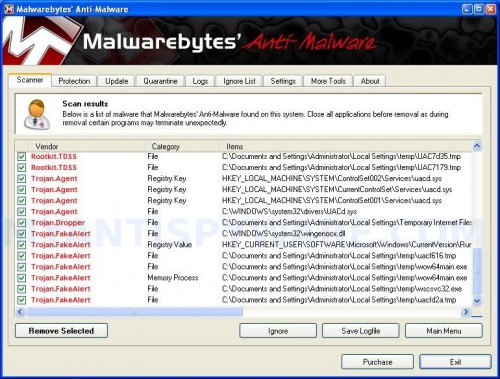
Malwarebytes Anti-malware, list of infected items
Make sure all entries have a checkmark at their far left and click “Remove Selected” button to remove Vista Smart Security 2010. MalwareBytes Anti-malware will now remove all of associated Vista Smart Security 2010 files and registry keys and add them to the programs’ quarantine. When MalwareBytes Anti-malware has finished removing the infection, a log will open in Notepad and you may be prompted to Restart.
Note 1: if you can not download, install, run or update Malwarebytes Anti-malware, then follow the steps: Malwarebytes won`t install, run or update – How to fix it.
Note 2: if you need help with the instructions, then post your questions in our Spyware Removal forum.
Vista Smart Security 2010 creates the following files and folders
%AppData%\ave.exe
Vista Smart Security 2010 creates the following registry keys and values
HKEY_CURRENT_USER\Software\Classes\.exe
HKEY_CURRENT_USER\Software\Classes\.exe\shell
HKEY_CURRENT_USER\Software\Classes\.exe\shell\open
HKEY_CURRENT_USER\Software\Classes\.exe\shell\open\command
HKEY_CURRENT_USER\Software\Classes\.exe\shell\start
HKEY_CURRENT_USER\Software\Classes\.exe\shell\start\command
HKEY_CURRENT_USER\Software\Classes\secfile
HKEY_CURRENT_USER\Software\Classes\secfile\shell
HKEY_CURRENT_USER\Software\Classes\secfile\shell\open
HKEY_CURRENT_USER\Software\Classes\secfile\shell\open\command
HKEY_CURRENT_USER\Software\Classes\secfile\shell\start
HKEY_CURRENT_USER\Software\Classes\secfile\shell\start\command
HKEY_CURRENT_USER\Software\Classes\.exe\shell\open\command | @ = “”%AppData%\ave.exe” /START “%1″ %*”
HKEY_CURRENT_USER\Software\Classes\.exe\shell\open\command | IsolatedCommand = “”%1″ %*”
HKEY_CURRENT_USER\Software\Classes\.exe | @ = “secfile”
HKEY_CURRENT_USER\Software\Classes\.exe | Content Type = “application/x-msdownload”
HKEY_CURRENT_USER\Software\Classes\secfile\shell\open\command | @ = “”%AppData%\ave.exe” /START “%1″ %*”
HKEY_CURRENT_USER\Software\Classes\secfile\shell\open\command | IsolatedCommand = “”%1″ %*”
89 Comments »
RSS feed for comments on this post.
Leave a comment
My Anti Spyware - Free antispyware programs and Spyware Removal Instructions.


hey
thanks a lot dude ..
mine worked just fine ..
cool methods (1 worked for me) !!
Comment by putz — March 19, 2010 #
very much appreciated, thanks for the help!
Comment by jack — March 19, 2010 #
I stupidly did both methods not realising
but it turned out fine. Appreciate the help. I’ve been plagued with different versions of this Vista rogue antispyware program. Just hope it doesn’t come back in another form :S Thanks again!:)
Comment by stupid — March 20, 2010 #
How am I supposed to download the Malware if I cannot get onto the internet?
Comment by James — March 22, 2010 #
James, you can`t run your browser ? or open any sites ?
Comment by Patrik — March 22, 2010 #
UGH! I can’t get any of these to work! And that stupid virus is driving me nuts. The fake security alerts keep popping up and I think I’m gonna lose my mind. I already have Malwarebytes’ Anti-Spyware but it can’t seem to find the Vista Smart Security 2010. I don’t know what’s going on, but this stupid rogue program has to GO!
Comment by Katie — March 22, 2010 #
thanks,to all who helped me to solve this issue,many thanks to all of you.vista smart security is an headeche,realy!!!!!
i mean it!!!!
Comment by Abhishek — March 24, 2010 #
You can temporarily disable this virus/malware/whatever by opening task manager(control alt delete) and going to processes and ending the process “ave.exe”
Comment by Sam — March 29, 2010 #
Hey, I can’t get passed step one. I tried both methods and made sure each line was taken. I know that the Windows Registry Editor Version 5.00 is the first line in fix.reg, but I still get the “Error accessing registry” message =/
Comment by Justin — April 1, 2010 #
Justin, open a new topic in our Spyware removal forum. I will help you.
Comment by Patrik — April 2, 2010 #
Sam,
Thanks so much for your post on how to temporarily disable. It worked. How long will \temporary change\ last? My IT person is out of town for a week.
Comment by Fred — April 2, 2010 #
Fred, once you ending “ave.exe”, you need follow the steps above to repair your registry and remove all associated malware.
Comment by Patrik — April 3, 2010 #
Thanks, Patrik.
Comment by Fred — April 3, 2010 #
Thank you so much!! So far the fix has worked-It even shut down my media player..What a nasty one,but pretty easy fix(keeps fingers crossed so it won’t pop up in a replicated file)
Comment by Donny — April 5, 2010 #
Please help guys,
it shut down all my browsers and it destroyed my already existing Trend Micro Pc-Cillin Internet Security. I had to find this guide on another computer and transfer the fix files mbam-setup over. I installed fix.inf (I THINK) but my screen was full of pop ups and false security alerts so I’m not sure.
I rebooted and am trying to run mbam-setup now but nothing is happening. I tried to install fix again but now it comes up with a list of programs to run it with. I am way out of my depth here and would really like some help. (Also I had to use the second method because the first would not work because run could not find the destination.)
Comment by Nick — April 5, 2010 #
Also, I can not open task manager as Vista Security is somehow blocking it. This is seriously a WTF virus.
Comment by Nick — April 5, 2010 #
Is there some sort of a last ditch effort that I can do, like resetting my computer to factory standards or something like that?
Comment by Nick — April 5, 2010 #
Nick, you have tried both methods from first step ?
Comment by Patrik — April 5, 2010 #
Nick, boot your computer from Windows installation disk, then select Repair option.
Comment by Patrik — April 5, 2010 #
wow……… thank you very much for your help… one of my former computers were infected by Anti-virus XP malware…and it cost me $90 at Best Buy to remove it …. and after that day I never click ok to unknown internet messages…..but this time i had no option… it infected the computer without a false message….guess the hackers are getting smarter by the day…… thanks again
Comment by Usitha — April 6, 2010 #
Patrik i am not sure if I am allowed to ask this question here….and I sorry if I not……..would you recommend purchasing malwarebytes full version for future protection…..and will it function right with my current anti-virus program. coz my anti virus hardly did anything to prevent the infection.
Thanks
Comment by Usitha — April 6, 2010 #
worked for me, thank you so much
Comment by matt — April 6, 2010 #
Usitha, yes i can recommend Malwarebytes Anti-malwate. It`s really good program. But anyway, you also should have an antivirus.
Comment by Patrik — April 7, 2010 #
Can I ask why you need to do a quick scan not a full scan?
Comment by jason — April 7, 2010 #
i have taken step 1 but the vista security box is still at the bottom right of my screen. i can however acess the internet. how do i remove this box that keeps appearing.
Comment by kev — April 7, 2010 #
Patrik i really wish this worked for me because this stupid thing is driving me crazy, it keeps on popping up. I’m not sure though…maybe I’m doing something wrong?
i tried downloading the MalwareBytes Anti-melware, and it downloaded but than when i try to begin the setup nothing pops up. i have no idea what else to doo…
Comment by Caroline — April 7, 2010 #
Jason, quick scan more fast
But you can also use Full scan.
Comment by Patrik — April 8, 2010 #
Kev, open a new topic in our Spyware removal forum and follow the steps. I will help you.
Comment by Patrik — April 8, 2010 #
Caroline, probably your computer also infected with a trojan that blocks Malwarebytes. Ask for help in our Spyware removal forum.
Comment by Patrik — April 8, 2010 #
Thanks for the advise. Method 1 worked great for me.
Comment by Kelsie — April 11, 2010 #
Ok, first I had the vista deffender, I ussed method one and it worked and then downloaded the malewarebytes anti-virus scanned and removed and it worked, but now a few days later I have vista smart security 2010, how do I keep this virus from coming back again and again uunder different names? PLEASE HELP!!!!!!!!!
Comment by michelle — April 14, 2010 #
michelle, looks like your computer is infected with a hidden trojan that reinstalls the rogue. Open a new topic in our Spyware removal forum. I will check your PC.
Comment by Patrik — April 15, 2010 #
HELP!! im trying to get rid of this stupid virus but am having difficulty. Step one worked perfectly but im having trouble downloading Malwarebytes Anti-Malware. i tried both methods. the first one didnt work because it wont let me rename the files. it just asks to save and i cant click on anything to rename it or change where its saved to. and the second method wont work because i dont have a My Computer icon! so i cant find tools or folder options. PLEASE HELP. also if i shut down my computer without getting rid of it what will happen??
Comment by kristi — April 15, 2010 #
kristi, you don`t need rename Malwarebytes before saving. If your My computer icon is missed, you can open a disk through click Start, Run. Type C:\ and press Enter. You will see a Windows Explorer windows, now you can open any folder.
Comment by Patrik — April 15, 2010 #
Wow! Thank you so much for posting. The Vista Smart Security 2010 came out of nowhere. After a brief freak-out and then a search I came across your instructions. I am so thankful that you posted this.
Comment by Keesha — April 15, 2010 #
Sorry. Forgot to mention, with your instructions something potentially extremely malicious was removed from my laptop in a matter of minutes. It’s legit folks.
Comment by Keesha — April 15, 2010 #
thanks alot method2 works gud..
Comment by abdul — April 15, 2010 #
yo i appreciate this posting. the anti virus stuff was annoying when i didn’t really have any virus.it is helpful knowledge like this that is need in the web more often. next thing i have to google is how to get a free virus protection that works and i can have faith on just like i did the above message when i really didn’t know it was going to work. thank very much.
Comment by pinkywaggon — April 15, 2010 #
how do i undo step one if i did it??
Comment by Terry — April 15, 2010 #
Thanks for the tips, I had to get a friend to send me the notepad text in the end because I could not access the Internet :/ how common Is this malware and how easily can it evade the main security Programs?
Thanks again, I’ll consider buying your protection
Comment by Adam — April 15, 2010 #
Also just a quick hint, you didn’t mention the fact that the notepad had to be saved as Unicode
Comment by Adam — April 15, 2010 #
Thank you soo very much one of my user accounts have been infected with this and i was panicking until i found this, so god bless.
Comment by Audrey — April 15, 2010 #
I did method one, it didn’t work. So I then tried to open a icon on my desktop and it said:
Windows cannot access the specified device, path or file. You may not have the appropriate permissions to access this item.
PLEASE HELP ME!
Comment by Stephanie — April 16, 2010 #
Patrik !!! …i removed this vista smart security 2010 from my computer. its back again just like michelle….. is there any forum ??? if yes please give me provide a link…. this thing is driving me nuts !!! please help !!
THANKS !!
Comment by HS — April 16, 2010 #
Terry, the first step only restores defaults values, you don`t need undo it.
Comment by Patrik — April 16, 2010 #
Stephanie, open a new topic in our Spyware removal forum.
Comment by Patrik — April 16, 2010 #
HS, use the Spyware removal forum.
Comment by Patrik — April 16, 2010 #
Hi i cant get through by both methods…i got problem of vista smart security and i got ad adware but and this software…but both files are run on my laptop…
Plz help me on that
Comment by hash — April 16, 2010 #
but if i dont undo step one i cant open any applications except internet for example, i cant play games or go to aim, yahoo messenger. it said “the file does not have a program associated with it to perform this action, create an association in the Set Associations control panel.
Comment by Terry — April 16, 2010 #
I got the virus just out of the blue, I didn’t click on anything and I’m really worried about shutting my computer down because my Dad isn’t going to be back til Monday (I really would rather him clear the virus off because I’d probably screw it up) and I want to know if it’s safe to shut my computer down and leave it until he comes home?
.:Sarah:.
Comment by Sarah — April 16, 2010 #
hash,
Why ?
Comment by Patrik — April 17, 2010 #
Terry, try repeat first step (method 1 and method 2). If does not help, try run exeHelper (download it from here).
Comment by Patrik — April 17, 2010 #
Sarah, don`t worry. You can shutdown it.
Comment by Patrik — April 17, 2010 #
Having major issues with removing this, have tried to go to command and type in, it will not let me beyond the first few lines. I also registered over on the forum and can’t post a topic there. I’m using another computer right now so posting a hijack log won’t help me. Help please!!
Comment by Helena — April 17, 2010 #
thk you for this… i guess when u download stuff online, you get viruses like this.. step 1 worked fine for me..
Comment by staci — April 18, 2010 #
thanks very much for these instructions only thing is at the end you say d/l anti malware but it comes up as spyware doctor
Comment by steve — April 18, 2010 #
Helena, anyway start a new topic (using your current PC).
Comment by Patrik — April 18, 2010 #
steve, probably your have clicked to Google ad. Scroll down to malwarebytes download link.
Comment by Patrik — April 18, 2010 #
thanks soooooo much !!!
Comment by imforeverr1992 — April 18, 2010 #
Cherz mate did both methods 1 and 2 and restarted the comp….. most easiest thing i have ever had to do cherz once again !!!!!!!!!
Comment by NAS1F — April 18, 2010 #
This is the second time Malwarebytes Anti-Malware has been just what i need to defeat the malware.
thanks.
It really kicks ass and takes names! This may be all i need to keep my laptop from getting infected with malicious spyware.
It’s my sword, and R-Kill is my shield.
Comment by Djinnfest — April 18, 2010 #
uhh… donny? you might not want to say that in a message. for the sake of your natural luck, knock on wood three times to keep the evil spirits away.
Comment by Djinnfest — April 18, 2010 #
“the file does not have a program associated with it to perform this action, create an association in the Set Associations control panel”.
This issue is not retlated to virus or malware it the issue is File Associates related with OS, need to contact your computer manufacturer
Comment by Ashish — April 19, 2010 #
Thanks for posting this! Method 1 worked for me on the first try! I hadn’t even clicked on anything, but I had ignored a message that an update was available for my anti-virus (never again!) and this just downloaded automatically.
Comment by Cheryl Bradley — April 19, 2010 #
I’ve done step one and I have downloaded malwarebytes, but it wont launch! I double click on it but nothing happens. What should I do?
Comment by Maria — April 20, 2010 #
Maria, looks like your computer is infected with TDSS trojan. Follow the instructions.
Comment by Patrik — April 20, 2010 #
i got through the whole thing, but it’s not being removed?
Comment by alexis — April 20, 2010 #
thanks it doesnt work i have to pay for this fucki** program lol thought its free this doesnt make sense better do a format -.-
Comment by kosa234 — April 21, 2010 #
Used Method 1 and Malwarebytes Anti-Malware. So far so good. Hope it doesn’t come back. Thanks for the procedures.
Comment by Mark — April 22, 2010 #
Thank you so much method 2 worked for me and i hope it doesnt come back. those who dnt trust this , mark my words it actually works!!!
Comment by itworks — April 23, 2010 #
Or you could just do a system restore to a couple of days earlier…..worked for me!
Comment by Ben — April 23, 2010 #
Thanks for this. Got rid of it straight away
Comment by Mark — April 23, 2010 #
i did the step one and i quick scan and everything went fine then notepad open up and it asked me to reboot when i did the reboot now my computer turns on but my screen does not turn on if u know anything about this problem please let me know thank u
Comment by vinnie — April 23, 2010 #
Thanks so much. I was sceptical at first but gave it a go seeing as the dratted thing was driving me insane. Method 2 worked for me!
Comment by Ray — April 23, 2010 #
Worked like a charm! Thanks so much for a great (and more importantly, free) program that gets rid of that piece of sh*t malware!
Comment by M — April 23, 2010 #
vinnie, you can`t boot your computer in all modes ?
Comment by Patrik — April 23, 2010 #
Thank you so much! It worked fine, I used method one. The temporary deletion of the malware (Sam’s comment below) was also helpful.
Comment by Karl — April 24, 2010 #
Thanks
This helped a lot, no more annyoing pop ups. Great site and very easy to follow.
Comment by Brad — April 25, 2010 #
wernt sure if the code would muck up me comp but i tell ya wot, ur a lifesaver!!!! this things been pi**in me off for ages!!! thankyou so much1!!!
Comment by dan — April 26, 2010 #
thanks it worked i hope that who ever mad that dies a slow and pain full death
Comment by Alexander — April 26, 2010 #
thank you the first method was easy and worked like a charm.
Comment by dan — April 26, 2010 #
Thanks for the help, just when i thought that i had an excuse for not doing coursework lol!
Did method 1 and worked perfectly cheers.
Comment by JT — April 27, 2010 #
can’t save the code in step one. keep hitting save as but nothing happens. any ideas?
Comment by alex — April 27, 2010 #
Alex, try make fix.reg through wordpad.
Comment by Patrik — April 28, 2010 #
I have vista smart security 2010 on my windows vista. I have tried to follow these instructions but I don’t think they’re designed for vista. Can anyone help please?
Comment by Kitturn — April 28, 2010 #
Kitturn, read comments above.
Comment by Patrik — April 29, 2010 #
I’ve tried all the steps listed above but nothing seems to work. Here is what I’m experiencing:
-I can’t open absolutely any programs at all including \run\
-I downloaded the malwarebytes software on another computer and transferee to my own computer and it still won’t open
- I use to have a bunch of pop ups and vista smart security use to be in the toolbar sending me mags but when I restarted my computer it’s not there anymore but I know it’s still infecting my computer.
Help me! Do I need to give my laptop to a professional to get it fixed or can I do it? Nothing is working!
Comment by Tran — April 29, 2010 #
It is not a program. It is an option in the Start menu.
Comment by Patrik — April 30, 2010 #
After 12 hours of trying to delete program and others that came with it I just ended up doing a factory restore…sucks having to reinstall everything but saved me $100.
Comment by Shanna — May 15, 2010 #
