Do you have pop-ups or your computer infected with trojan or spyware ? Learn how to ask us for help, click here!

How to remove XP Defender Pro (Removal guide)

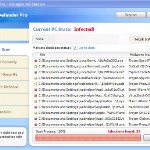
XP Defender Pro is new clone of XP Internet Security 2010, which is a rogue antispyware program. The fake security program only looks like a real antispyware application, but unlike it, can not remove viruses and trojans, as well as protect your computer from possible infections.

XP Defender Pro is installed onto your computer through the use of trojans completely invisible, it does not output any warnings and requests to install. During installation, the rogue configures itself to run every time when you run any program (files with .exe extension) on your computer. Once started, it begins to scan your computer and in the process finds a lot of infected files, trojans, viruses, and so on. These results are nothing but deception, XP Defender Pro uses the results of scanning as a method designed to scare you into thinking that your computer in danger.

In order to create the fully simulation that you computer is infected, XP Defender Pro will display various fake security warnings and hijack Internet Explorer and Firefox, so it will display fake warnings when you opening a web site. However, all of these alerts and warnings are a fake and like false scan results should be ignored!

If you get infected with XP Defender Pro, please do not be fooled into buying it. Instead of doing so, follow the XP Defender Pro removal guide below in order to remove this malware, and any other clones of XP Internet Security 2010.

Use the following instructions to remove XP Defender Pro (Uninstall instructions)

Step 1. Repair “running of .exe files”.

Method 1

Click Start, Run. Type command and press Enter. Type notepad and press Enter.
Notepad opens. Copy all the text below into Notepad.

Windows Registry Editor Version 5.00

[-HKEY_CURRENT_USER\Software\Classes\.exe]
[-HKEY_CURRENT_USER\Software\Classes\secfile]
[-HKEY_CLASSES_ROOT\secfile]
[-HKEY_CLASSES_ROOT\.exe\shell\open\command]

[HKEY_CLASSES_ROOT\exefile\shell\open\command]
@="\"%1\" %*"

[HKEY_CLASSES_ROOT\.exe]
@="exefile"
"Content Type"="application/x-msdownload"

Save this as fix.reg to your Desktop (remember to select Save as file type: All files in Notepad.)
Double Click fix.reg and click YES for confirm.
Reboot your computer.

Method 2

Click Start, Run. Type command and press Enter. Type notepad and press Enter.
Notepad opens. Copy all the text below into Notepad.

[Version]
Signature="$Chicago$"
Provider=Myantispyware.com

[DefaultInstall]
DelReg=regsec
AddReg=regsec1

[regsec]
HKCU, Software\Classes\.exe
HKCU, Software\Classes\secfile
HKCR, secfile
HKCR, .exe\shell\open\command

[regsec1]
HKCR, exefile\shell\open\command,,,"""%1"" %*"
HKCR, .exe,,,"exefile"
HKCR, .exe,"Content Type",,"application/x-msdownload"

Save this as fix.inf to your Desktop (remember to select Save as file type: All files in Notepad.)
Right click to fix.inf and select Install. Reboot your computer.

Step 2. Remove XP Defender Pro associated malware.

Download MalwareBytes Anti-malware (MBAM). Once downloaded, close all programs and windows on your computer.

Double-click on the icon on your desktop named mbam-setup.exe. This will start the installation of MalwareBytes Anti-malware onto your computer. When the installation begins, keep following the prompts in order to continue with the installation process. Do not make any changes to default settings and when the program has finished installing, make sure a checkmark is placed next to “Update Malwarebytes’ Anti-Malware” and Launch “Malwarebytes’ Anti-Malware”. Then click Finish.

MalwareBytes Anti-malware will now automatically start and you will see a message stating that you should update the program before performing a scan. If an update is found, it will download and install the latest version.

As MalwareBytes Anti-malware will automatically update itself after the install, you can press the OK button to close that box and you will now be at the main menu. You will see window similar to the one below.

malwarebytes-antimalware1
Malwarebytes Anti-Malware Window

Make sure the “Perform quick scan” option is selected and then click on the Scan button to start scanning your computer for XP Defender Pro infection. This procedure can take some time, so please be patient.

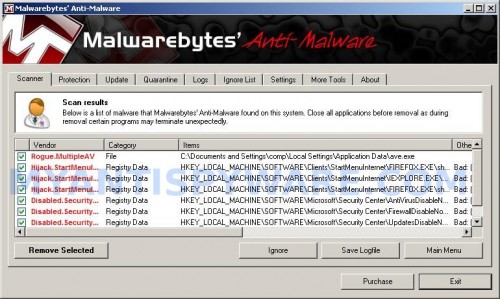
When the scan is finished a message box will appear that it has completed scanning successfully. Click OK. Now click “Show Results”. You will see a list of infected items similar as shown below.
Note: list of infected items may be different than what is shown in the image below.
XP Smart Security 2010 remover
Malwarebytes Anti-malware, list of infected items

Make sure all entries have a checkmark at their far left and click “Remove Selected” button to remove XP Defender Pro. MalwareBytes Anti-malware will now remove all of associated XP Defender Pro files and registry keys and add them to the programs’ quarantine. When MalwareBytes Anti-malware has finished removing the infection, a log will open in Notepad and you may be prompted to Restart.

Note 1: if you can not download, install, run or update Malwarebytes Anti-malware, then follow the steps: Malwarebytes won`t install, run or update – How to fix it.

Note 2: if you need help with the instructions, then post your questions in our Spyware Removal forum.

XP Defender Pro creates the following files and folders

%AppData%\ave.exe

XP Defender Pro creates the following registry keys and values

HKEY_CURRENT_USER\Software\Classes\.exe
HKEY_CURRENT_USER\Software\Classes\.exe\DefaultIcon
HKEY_CURRENT_USER\Software\Classes\.exe\shell
HKEY_CURRENT_USER\Software\Classes\.exe\shell\open
HKEY_CURRENT_USER\Software\Classes\.exe\shell\open\command
HKEY_CURRENT_USER\Software\Classes\.exe\shell\runas
HKEY_CURRENT_USER\Software\Classes\.exe\shell\runas\command
HKEY_CURRENT_USER\Software\Classes\.exe\shell\start
HKEY_CURRENT_USER\Software\Classes\.exe\shell\start\command
HKEY_CURRENT_USER\Software\Classes\secfile
HKEY_CURRENT_USER\Software\Classes\secfile\DefaultIcon
HKEY_CURRENT_USER\Software\Classes\secfile\shell
HKEY_CURRENT_USER\Software\Classes\secfile\shell\open
HKEY_CURRENT_USER\Software\Classes\secfile\shell\open\command
HKEY_CURRENT_USER\Software\Classes\secfile\shell\runas
HKEY_CURRENT_USER\Software\Classes\secfile\shell\runas\command
HKEY_CURRENT_USER\Software\Classes\secfile\shell\start
HKEY_CURRENT_USER\Software\Classes\secfile\shell\start\command
HKEY_CURRENT_USER\Software\Classes\.exe\shell\open\command | @ = “”%AppData%\ave.exe” /START “%1″ %*”
HKEY_CURRENT_USER\Software\Classes\.exe\shell\open\command | IsolatedCommand = “”%1″ %*”
HKEY_CURRENT_USER\Software\Classes\.exe | @ = “secfile”
HKEY_CURRENT_USER\Software\Classes\.exe | Content Type = “application/x-msdownload”
HKEY_CURRENT_USER\Software\Classes\secfile\shell\open\command | @ = “”%AppData%\ave.exe” /START “%1″ %*”
HKEY_CURRENT_USER\Software\Classes\secfile\shell\open\command | IsolatedCommand = “”%1″ %*”

Share and Enjoy:

  • Print
  • Digg
  • Sphinn
  • del.icio.us
  • Facebook
  • Mixx
  • Google Bookmarks
  • Slashdot
  • Twitter
March 17, 2010 on 9:08 am | In Malware removal, Rogue Anti Spyware | 133 Comments |


133 Comments »

RSS feed for comments on this post.

  1. thats not free you have to pay just to remove the fucking virus

    Comment by anonymous — March 22, 2010 #

  2. Read comments here. It is really free method to remove this malware.

    Comment by Patrik — March 24, 2010 #

  3. Click on the link to remove XP Defender instructions within the text above “XP Defender Pro removal”. READ next time!

    Comment by Nat — March 30, 2010 #

  4. It’s not free you f*ckers you have to register and pay for it to remove XP defender – lies don’t waster your time!

    Comment by Dave — April 2, 2010 #

  5. Dave, read comment by Nat above.

    Comment by Patrik — April 3, 2010 #

  6. Just have updated the instructions above.

    Comment by Patrik — April 3, 2010 #

  7. People that invent viruses should be made to die by them…

    Comment by Gax — April 3, 2010 #

  8. Worked like a charm. Thanks!

    Comment by Brian — April 4, 2010 #

  9. After a week of dealing with this pain in the ass and trying to find a way without giving $89.00 to McAfee I tried #2 (#1 didn’t work) and rebooted. Icon for the virus are gone and I can do all the things that were locked up. THANKS!

    Comment by Doug — April 4, 2010 #

  10. Thank you so much. It is working so far. I am so thankful to your site for helping people get rid of these fake programs that take over computers!!
    Thanks again. Worked the first time and hopefully it won’t come back.

    Comment by Marjorie Duger — April 4, 2010 #

  11. Worked great so far. Thanks so much!

    Comment by Michelle — April 4, 2010 #

  12. I’m unable to complete the Method 1 or 2 from Step 1. I get this error “Cannot import c:\Documents and Settings\Grippostadt\Desktop\fix.reg: The file is not a registry script. You can only import binary registry files from within the registry editor.”

    I skiped step one and was able to finally get Malwarebytes installed and it found some things- when I removed them adn went to reboot I got the blue screen once I started up again. I was able to close “ave.exe” in task manager and get windows to open up but I’m still having pop-ups. Any idea of what I could have done wrong?

    Thanks!

    Comment by Taryn — April 5, 2010 #

  13. oh my god i literally can’t believe this worked. so far i’ve only rebooted but it seems to be fine (i was able to open firefox no problem). used method 2. really hoping this is a permanent fix and it’s not hiding somewhere. thanks again!!!

    Comment by adrienne — April 5, 2010 #

  14. Taryn, try method 2.

    Comment by Patrik — April 5, 2010 #

  15. First, I am okay with computers but I am not a computer savvy guy when it comes to “fixing” things. I followed your instructions regarding method #2 and it worked the first time; then I downloaded the MalwareBytes antimalware software. It found three infected files and they were removed quickly. Thank you, thank you, thank you. Oh, by the way, the problem was on my wife’s computer so my fixing this scores BIG points.

    Comment by Andy — April 6, 2010 #

  16. I have tried methods 1 2 and 3. nothing is working and xp denfender takes over my computer even in safe mode. I already had malwarebytes anti malware installed, should I delete this and start from beginning. I have also tried re naming file. Suggestions? thanks fro the help.

    Comment by Kim — April 6, 2010 #

  17. Tried method 1. Worked like a charm. Thanks!
    Hopefully it is not hiding some where :)

    Comment by Seku — April 6, 2010 #

  18. I GOT THIS AFTER DOING WINDOWS UPDATE DOWNLOAD. AFTER MANY ATTEMPTS TO REMOVE, I FINALLY FOUND YOU GUYS, METHOD #1 DID NOT WORK FOR ME, BUT METHOD 2 DID. THANKS , SO FAR SO GOOD.

    Comment by amanda — April 6, 2010 #

  19. thank you thank you thank you!!!! at this point i didn’t even have to run the mbam, just the registry fix and it worked like a charm… i still have it just in case this bs shows up again… but at least my hubby thinks im a genius!! lol

    Comment by kerri land — April 6, 2010 #

  20. Hey I tryied step 1 didnt do @#$% and when I hit install for step 2 nothing happens what the #@$ are you all thinking this crap dosnt work go somewhere else for the answer!!!!

    Comment by Kyle — April 6, 2010 #

  21. My sincere thanks to whoever posted this fix. I somehow got this virus while surfing the web for myspace editing tutorials.

    I ran Ad-Aware, which quarantined the virus but also knocked-out my ability to open programs directly from the start menu or desktop. A “what program should we open this with” prompt window would appear instead.

    Method 1 worked for me, I just rebooted and everything is opening as it should again.

    Comment by canuck — April 6, 2010 #

  22. I did method 1, but after rebooting, my system will not start. After the Windows XP logo loads, the screen stays black, with only the mouse cursor. How do I get around this?

    Comment by Eddie — April 6, 2010 #

  23. Kim, try update malwarebytes and perform a scan.

    Comment by Patrik — April 7, 2010 #

  24. Kyle, if the instructions above does not help you, then ask for help in our Spyware removal forum.

    Comment by Patrik — April 7, 2010 #

  25. Eddie, read the instructions and try boot your PC in Last good configuration.

    Comment by Patrik — April 7, 2010 #

  26. Thank you so much for this fix, worked perfectely on serveral of my clients machines. very interesting stuff. i would reccommend performing the INF install as the REG mod didnt work for me. And for any loser who states this article is bullshit and you just need to pay to remove, you seriously need to grow a brain. and some manners for matter. Thanks again.

    Comment by Jamesey - IT Technician — April 7, 2010 #

  27. Thanks, method 1 worked and wow that was almost too easy after all the other stuff I had tried. It’s pretty sad that I paid 50 bucks for mcafee and somehow I still got that stinking virus. Anyway thanks again.

    Comment by bud — April 7, 2010 #

  28. I found your article a little too late. I ran Malwarebytes’ Anti-Malware first in safe mode, but now the registry is messed up and my PC doesn’t know what to do with .exe files.

    Can I fix the registry after the fact as described here in this article?

    Thanks!

    Comment by Eric — April 7, 2010 #

  29. A great fix! It’s finally gone, PTL!!! thank you so much for the info. I’ve needed this for weeks. I’ve purchased and ran multiple anti-virus/malware packages and this package along with your instructions beat out MS solutions, AVG, Bit Defender, and many others. I’m gonna buy it just ’cause. Great work!!!

    Jeff

    PS…it was option #2 that worked.

    jas

    Comment by Jeff — April 7, 2010 #

  30. Eric, yes, use the first step above to fix your problem.

    Comment by Patrik — April 8, 2010 #

  31. I’m posting this because i felt i owed it to the people of previous posts. #2 seems to have worked so far. Just make sure you follow the instructions to the TEE for example, “make sure you save as ‘fix.inf’, and not ‘fix.info’”. Thanks so much from the previous posters.

    Comment by Thomas — April 8, 2010 #

  32. Thank you very much for the fix! To those having issues with the Method 1 fix.reg file, make sure you include the “Windows Registry Editor Version 5.00″ line at the top of the file. Leaving it off will cause the “The file is not a registry script…” error.

    Comment by Dave C. — April 8, 2010 #

  33. Thank you so much. 1st I went through step 1 and it did work, but after rebooting some icons were missing and some apps were not working like outlook, IE,… After rebooting several times without any success, I went through step 2 and everything is cool now. Going to bed, no nightmares expected :)

    Comment by gneslo — April 8, 2010 #

  34. when i open the nptepad to do either #1 and #2 the virus shuts down notepad help?!

    Comment by jordan — April 9, 2010 #

  35. jordan, you need run notepad through the use command (command console).

    Comment by Patrik — April 9, 2010 #

  36. Tried #1 and #2 and malwarebytes each time I think I have it it ends up coming back as bad as ever what can I do????

    Comment by NYTREEMAN — April 9, 2010 #

  37. NYTREEMAN, open a new topic in our Spyware removal forum. I will help you.

    Comment by Patrik — April 10, 2010 #

  38. I did steps #1 and #2 and Malwarebytes seems to have removed XP defender (thank you!!), but I still cannot get on the internet with firefox, chrome, etc.

    I did try a “manual fix” of the registry at one point – could I have prevented these programs from accessing the internet myself?

    Thank you!

    Comment by Turner — April 10, 2010 #

  39. Thanks for posting this topic, I also has same issue, with method 2 , I deleted the virus and now its workign fine, i rebooted my system
    Thanks once again..hats off!!!!!

    Comment by zamq — April 10, 2010 #

  40. normally i wouldn’t comment on stuff like this, but this seriously saved me. i used method 1. i don’t understand what it did, but you spelled out the steps so clearly that i couldn’t mess up. thank you so much!

    Comment by gavin — April 11, 2010 #

  41. Thanks for the help.

    Comment by Abhishek — April 11, 2010 #

  42. Turner, what shows your browser when you trying open any site ?

    Comment by Patrik — April 11, 2010 #

  43. Brilliant!

    Step 1, method 2 did it (fix.inf) followed by Step 2.

    Thanks a million.

    Comment by Russell — April 12, 2010 #

  44. I completed step 1 of method two with no problem. Downloaded the malware but after i click run, nothing happens. the setup does not open. Help!

    Comment by lauren — April 12, 2010 #

  45. Hi, i have a problem.
    I’ve run out of options and need to ask for help.
    This thing has stopped me from using safe mode, I just get the blue screen, i can’t system restore because it has changed group policy settings,
    No Folder Options anymore, also no task manager.

    Step 1 Method 2 seemed to do something, it calmed the fan noise and sedated the constant popups, I’m still getting the warning messages in the lower right.

    Malwarebytes installs, it runs, it found about 300 infections, ¬_¬
    When it completes there is a popup box,
    “scan complete click show results”

    I click OK on that, Malwarebytes closes.
    I’ve tried renaming the download, and like i said no folder options, so showing file extensions is out at the mo.

    I’ve even been on a manual hunt through system folders, but it would help to have safe mode and be able to see hidden folders…

    Just occured to me to try a new user, i will update, but im not retyping this :P

    Supposing users doesn’t work, any help is appreciated

    thanks

    Comment by Cal — April 12, 2010 #

  46. New user, i’ve pretty much got this new one set up exactly how it was on the other now, and no immediate problems.
    i’ve still got that infected user lurking though.
    Still, i can be patient.

    Comment by Cal — April 12, 2010 #

  47. Lauren, try run Malwarebytes from Safe mode. If it does not help, try the instructions. Also you ask us for help in our Spyware removal forum.

    Comment by Patrik — April 12, 2010 #

  48. Cal, reboot your computer in safe mode and perform a scan once again.

    Comment by Patrik — April 12, 2010 #

  49. Cal, follow the first step instructions above, reboot your PC.
    Click Start, Run, type regedit and press Enter.
    Registry editor opens.
    Navigate in the left panel to HKEY_LOCAL_MACHINE \ SOFTWARE \ Clients \ StartMenuInternet \ IEXPLORE.EXE \ shell \ open \ command

    I the right part of window click twice to “@”. You will see a screen with the contents like below: “C:\Documents and Settings\user\Local Settings\Application Data\av.exe” /START “C:\Program Files\Internet Explorer\iexplore.exe”
    Remove left part, leave only “C:\Program Files\Internet Explorer\iexplore.exe”.

    Now, try download and run Malwarebytes.

    Comment by Patrik — April 12, 2010 #

  50. I couldn’t rid it of The first time appear in my daughter’s computer so I’ve format the HD. This time I google it and found you guys then I tried step 1 method 1 and didn’t work. Tried step 1, method 2, reboot the computer and the annoying pop up disappear like magic, I’m hoping forever.
    Thank u very much

    Comment by Jorge — April 13, 2010 #

  51. Thank you so much!! It worked! I just want to check whether or not I have to delete the bugs once they are in the quarantine section. Thanks again

    Comment by Kelly — April 13, 2010 #

  52. hey thanks a lot

    Comment by Laurie — April 13, 2010 #

  53. I tried method 2 and the after rebooting the computer gets stuck on the blue welcome screen. Any suggestions?

    Comment by Aaron — April 13, 2010 #

  54. Hey thanks for that advice, unfortunately the moment i started reading it hours ago the computer died and i couldn’t even boot it.
    No safe, no normal, no last known working, all gave a different blue screen.
    After playing with the Ram inside, (worth a try i thought) without success, I ended up doing a full system recovery with a backup folder and am now setting everything back to how it was.

    Stay away from watchathf.com !!
    Thnx again.

    Comment by Cal — April 13, 2010 #

  55. I successfully removed the malware following method #2. Mozzilla works fine but Internet Explorer and Chrome still do not work.

    Comment by Andrew — April 13, 2010 #

  56. I removed the malware using method #2. Mozzilla is back to normal but Chrome still doesn’t work.

    Comment by Andrew — April 13, 2010 #

  57. Patrik, my browser gives the following message:

    This webpage is not available.

    The webpage at microsoft.com/isapi/redir.dll?prd=ie&pver=6&ar=msnhome might be temporarily down or it may have moved permanently to a new web address.

    More information on this error

    Comment by Andrew — April 13, 2010 #

  58. Thank You!Thank You!Thank You!Thank You!Thank You!Thank You!Thank You!Thank You!Thank You!Thank You!Thank You!Thank You!Thank You!Thank You!Thank You!Thank You!Thank You!Thank You!Thank You!Thank You!Thank You!Thank You!Thank You!Thank You!Thank You!Thank You!Thank You!Thank You!Thank You!Thank You!Thank You!Thank You!Thank You!Thank You!Thank You!Thank You! D. x

    Comment by Dave — April 13, 2010 #

  59. This virus is giving me hell, i have a major assesment due in 2 days and im suffering, nothing is working for me, but i am performing an A squared free scan as we speak, does anyone know if this program is succedful for removing this virus?

    Comment by chris — April 14, 2010 #

  60. Aaron, try boot your PC in last good configuration.

    Comment by Patrik — April 14, 2010 #

  61. Andrew, the message shows Chrome when you trying open any site ?

    Comment by Patrik — April 14, 2010 #

  62. chris, ask for help in our Spyware removal forum.

    Comment by Patrik — April 14, 2010 #

  63. Patrik, yes, that message comes up in chrome no matter which site I try. It is the same message I got when Xp Defender was blocking internet acess, but now that I used your method #2 I can use Mozzilla, Skype, and anything else that needs internet. Could I have messed up something in the system registry?

    Comment by Andrew — April 14, 2010 #

  64. I opened an apparently rogue website and got this virus. I could only close the XP Defender window using task manager. However, I was unable to run any programs. I rebooted in Safe Mode and did a system restore to a previous day.

    Apparently everything is now OK. None of the registry entries are there, and search for ave.exe turns up nothing.

    Comment by Gary — April 14, 2010 #

  65. cheers guys 5* help :D

    Comment by walters — April 14, 2010 #

  66. Malwarebytes is a great piece of free software. I manage 40+ pc’s and have a few of these virus’s…..Works everytime. I do need to clean registries every now and then but Malwarebytes works like a charm…

    Peace!

    Comment by Maria — April 14, 2010 #

  67. brill – option 1 worked a treat – so good to reboot and have the rubbish gone! all worked exactly as it should – if ever there was a case for having a computer and a laptop so one can go online and find this solution while the other is down then this was it – thanks again

    Comment by jon — April 14, 2010 #

  68. Hey thx a lot for the fix problem 85% solved, rents went to mexico i was watching american dad when i picked up the virus this is day three and i finally figured out what i was doing. so virus is gone used 3 different programs to find problems all clear now but two things are still messed up and seeing as how your really good with computers i figured u could help me out. i can’t use task manager on my mother account which is secondary already made sure she wasn’t a limited user, also i cannot connect or use the internet at all… i got till Saturday morning hopefully u can help me out by tomorrow so i can have this fixed after work THX a lot Patrik. i have xp home edition just in case it matters but yea hopefully u can help me out i don’t feel like spending another couple of hours trying to get this to work.

    Comment by Ryan — April 14, 2010 #

  69. also just read Andrews comment chrome IE explorer and any form of update program all non working thx again :)

    Comment by Ryan — April 14, 2010 #

  70. also did step one and 2 several times in between scans and reboots ect.

    Comment by Ryan — April 14, 2010 #

  71. Thank you … the second one worked for me. I was a bit wary as I have had one of these before and the help was no help at all, but having feedback from people really helped my decision to try it.

    Thanking you once again xxx

    Comment by Michelle — April 15, 2010 #

  72. but it didn’t stop the pop-ups … think that must be from another virus … grrrr

    Comment by Michelle — April 15, 2010 #

  73. this worked perfectly on method 2.. i love that this information was available to save the day i was about to blow a head gasket realizing some retard made this phony bs to put onto a computer in the first place. many thanks to helping me out

    Comment by sean — April 15, 2010 #

  74. Andrew, try reinstall Chrome.

    Comment by Patrik — April 15, 2010 #

  75. Ryan, if updates are blocked, then probably your computer is infected with TDSS/DNSChnager trojan. Ask for help in our Spyware removal forum.

    Comment by Patrik — April 15, 2010 #

  76. Michelle, open a new topic in or Spyware removal forum. I will check your PC.

    Comment by Patrik — April 15, 2010 #

  77. Patrik, I reinstalled Chrome, still no luck. Itunes no access to net either for some reason.

    Comment by Andrew — April 15, 2010 #

  78. Thank you soo much!! it works!!!!

    Comment by Chloe — April 15, 2010 #

  79. Andrew, looks like your computer is infected with TDSS trojan. Try the instructions.

    Comment by Patrik — April 15, 2010 #

  80. I just got this XP Defender Pro on my computer last night out of no where and I freaked out and restored my computer to an earlier date. Does this mean my computer still has this program and is infected? I did a full virus scan after I restored it, but I’m still worried to use my computer.

    Comment by Necy — April 15, 2010 #

  81. I used method 1 and it worked for me! Thank you so much!

    Comment by Grace — April 15, 2010 #

  82. No luck.

    Another set of instructions I found for Xp Defendero removal involved altering the registry. Could this be the problem?

    Comment by Andrew — April 15, 2010 #

  83. THANK YOU SO MUCH! IT IS FREE IDIOTS!!!

    WORKED PERFECTCALLY TAHANK YOU THANK YOU THANK YOU!!!!!

    Comment by TK — April 16, 2010 #

  84. omfg thankyou the second method worked!!!!!!!!!
    no more fucking defender xp shit im free :)
    -_-_-_-_-_-_-_-_-_-_-_-_-_-_-_-_-_-_-_-_-_-_-_-_

    Comment by alex — April 16, 2010 #

  85. Necy, anyway you need scan your PC with Malwarebytes.

    Comment by Patrik — April 16, 2010 #

  86. Dear Sir, thank you so much for your problem solution. My computer was infected 2 days ago. I stumble upon many websites and had downloaded 2 spyware software whereby after scanning I found out it wasn’t free. My computer had registry problem yesterday and I spent whole day finding free registry cleaner and fortunately I found AML registry cleaner which was free, worked like a charmed. Today I found your website, the reason was I still had several problems like some icon would not appear. I don’t know how I found your website, am thankful I found it. I’ve followed your instruction carefully and it works oh so well. You’re an angel. You made my day. Thank you again!!!

    Comment by Elysha — April 16, 2010 #

  87. Thank you so much. I used the first method under Step 1 and it worked brilliantly. Thank God there are good people willing to share their expertise. You are a knight.

    Comment by Inigo — April 16, 2010 #

  88. Absolutly fantastic this worked and it is totally free, well done Guy’s

    Comment by Lew — April 16, 2010 #

  89. Thank you very much whoever posted this! My computer is running great now. :D

    Comment by Tiffany — April 17, 2010 #

  90. Method 1 using “fix.reg” copied into notepad worked perfectly. I’m going to look for your tip jar now if you have one. I am very grateful for your knowledge and the time you took to post this remedy. Xp Defender is one annoying piece of malware.

    Comment by Doug — April 17, 2010 #

  91. Thanks so much. I thought this was another fake site asking people to do this and that and leading to purchasing of a product.
    However I have the notepad method a try and it worked.
    Again, thanks for taking the time to make this– Bookmarked!:)

    Comment by Syed — April 17, 2010 #

  92. Another success story here. Method 1 and the subsequent steps worked flawlessly.

    The scan took 40 minutes, most of which was spent looking through my “Temporary Internet Files” folder. I would recommend thinking about cleaning this folder out before the scan, if you want to resume browsing as quickly as possible.

    Patrik and everyone who put this together are a tremendous resource. Let me add my sincere thanks to the pile.

    XP Defender Pro, RIP.

    Comment by Wes — April 17, 2010 #

  93. some things i noticed that were effected by xp defender pro was when u go to start>run> services.msi i believe it had all my services disabled i didn’t know which ones were important but i turned them all back on my stuff seems to be running a lot better, but maybe you could look into things more and find out which ones are core system services might help people in the future thanks for all your help xp defender pro is 100% gone now just making sure i got no dns changers or tdss

    thx again for all the help saved my @$$

    Comment by Ryan — April 17, 2010 #

  94. Your solution worked great for a few days, until it came back once again! I also noticed while doing a google search on firefox, some sites would be redirected to a spam site. I’m sure it was caused by XP defender or whatever alias. I thought that maybe my firefox browser was bringing the virus back everytime I opened it, so I downloaded Google Chrome. Sadly, Chrome doesn’t want to load any pages, not even the home page! This thing is ruining my life slowly. Please help!

    Comment by Phil — April 17, 2010 #

  95. method 1 worked in seconds! I had to look this up on my blackberry and email to myself to read in Outlook as the XP virus would not let me connect to the internet. thank you, thank you!

    Comment by CP — April 18, 2010 #

  96. Phil, probably your PC is infected with TDSS trojan. Try the instructions.

    Comment by Patrik — April 18, 2010 #

  97. Ok! So it seems that the XP virus is gone (for now), and Malwarebytes found the TDSS trojan, however Firefox still has the same problems of redirecting to other sites. Should I run a full scan on Malwarebytes this time? Would that make a difference? I even ran it in Safemode with networking. I uninstalled Firefox and still have the same problems. Also Chrome will still not load any pages at all. Your solutions have been great so far, so do you have anything else up your sleeve? Thanks.

    Comment by Phil — April 18, 2010 #

  98. Phil, open a new topic in our Spyware removal forum. I will help you.

    Comment by Patrik — April 19, 2010 #

  99. Absolutely brilliant. I used #2 and it worked a treat. thanks guys.

    Comment by James — April 19, 2010 #

  100. Thanks very much for this fix, the defender pro bug has been driving me mad today. Method 1 seems to have done the trick (touch wood)

    Again, the fix is much appreciated.

    Comment by Simon — April 19, 2010 #

  101. Worked great on my first try. Used Method 1.

    BIG THANKS!!!!!

    Comment by Chris — April 19, 2010 #

  102. Method 1 worked fine for me. Rebooted the system and things look good now.I scanned the system with Norton Anti virus but it didn’t help, your method worked though. Thanks a lot :-)

    Comment by Vamsi — April 20, 2010 #

  103. I think I finally got it fixed but I cant access internet now. no browser I am using works. Any thoughts?

    Comment by ken — April 21, 2010 #

  104. Thanks guys, got rid of the damn virus in 10mn.

    Comment by Seb — April 21, 2010 #

  105. Cheers lads step two worked for me straight after reboot,much appreciated

    Comment by paddystyle — April 21, 2010 #

  106. Used method one…seeem to have worked… THANKS!!!!

    Comment by bob gordon — April 21, 2010 #

  107. Hey everyone, I just got rid of this virus. Ran into a few bugs along the way that you might be having trouble with.

    1- step 1 of the first method worked like a charm. After this I was able to start programs and such normally, even though XP defender was still hijacking most of the actual things I could do with them.

    2- because Defender still had my browser by the balls, I downloaded the suggested anti-malware program (MBAM) suggested onto a flash drive on another computer (tip: don’t use a drive that has been in your computer just in case. I had just bought a new one, but any drive you don’t mind formatting after and which you have not used with the infected computer is ok). I then copied MBAM onto my infected computer and had to run fix.inf again (XP Defender was still not dead and had taken over .exe files again) and reboot.

    3- I installed the MBAM from my desktop. It required an update to work and was clashing with my antivirus (AVG), so I turned AVG off while updating.

    4- this is where it gets tricky. The virus was still interrupting MBAM. I used the task manager to kill all processes that made CPU usage go up during suspicious behaviour. It took some guesswork but I found I could kill a few processes and buy myself a few minutes of time beore it came back (ave.exe seemed to be the main exe file, but maybe not). I did crash my computer once doing this, and it takes some guesswork, but it was the only way I could get MBAM working.

    5- MBAM took about 1 hour to scan my computer. During this time AVG was running but wifi was off. I had to close AVG to quarantine all malware, and it worked perfectly. An AVG scan right after turned up 3 more Trojans, got rid of them, and now all seems good.

    I hope that was clear, I know very little about computers and I’m sure there are more efficient ways to do things. I tried to convey 48 hours of trial and error as best I could. Good luck.

    -Nick

    Comment by Nick — April 22, 2010 #

  108. ken, try the following steps:
    Click Start, Run, type regedit and press Enter.
    Registry editor opens.
    Navigate in the left panel to HKEY_LOCAL_MACHINE \ SOFTWARE \ Clients \ StartMenuInternet \ IEXPLORE.EXE \ shell \ open \ command

    I the right part of window click twice to “@”. You will see a screen with the contents like below: “C:\Documents and Settings\user\Local Settings\Application Data\ave.exe” /START “C:\Program Files\Internet Explorer\iexplore.exe”
    Remove left part, leave only “C:\Program Files\Internet Explorer\iexplore.exe”.
    Reboot your PC and try Internet Explorer to open any site.

    Comment by Patrik — April 22, 2010 #

  109. ooppps…number one did not work… our friend came back…used spybot search and destroy… lrts see what happens

    Comment by bob gordon — April 22, 2010 #

  110. Oh my gosh. Method #2 worked perfectly! I’m in shock that it was really that easy! Thank you!

    Comment by Lauren — April 22, 2010 #

  111. legend!!!!!!!!!!!!! Method 1 worked for me………….

    Comment by Nick — April 22, 2010 #

  112. Ok so I tried this and it seems to have worked but the next day I have a nearly identical program installed called “Antispyware Soft”. It seems to be even meaner becuase I cannot open a command prompt or install an inf file. Everything seems to be blocked. Any ideas.

    Comment by Derek Christiab — April 23, 2010 #

  113. Derek, try the instructions.

    Comment by Patrik — April 23, 2010 #

  114. I’ve gotten this virus once before, and it was a pain to get rid of. This is my second time getting it….really annoying. Does anyone know of any good software that can prevent me from getting this again?

    Comment by Shayna — April 24, 2010 #

  115. Shayna, you should have:
    1. good antivirus
    2. good antispyware with autoprotection module

    Many of the exploits are directed to users of Internet Explorer. Use only an alternate browser – Firefox or Opera.

    Update Java, Windows, Adobe Flash Player and Adobe Acrobat Reader

    Comment by Patrik — April 24, 2010 #

  116. You guys rock!!! Let me add my name to the long list of thankful people. I couldn’t get my browser to work but was able to access your site with my iphone. I used Wordpad (notepad issues) and typed in Step 1 Method 2. I was able to install and it worked perfectly. I was then able to get online and download MBAM. Wonderful! I even ran the full scan just to be safe(r). Your services are very much appreciated!!!

    Comment by Carol — April 24, 2010 #

  117. Tried method 1, seemed to have worked. Restarted teh computer and needed to do it again. I hope this doesn’t continue…Trying to find the .exe now. This website has been the most help by far. Thanks.

    Comment by John — April 25, 2010 #

  118. The registry fix and config.sys file worked wonders on the computer that I was removing this infection from. It had blocked access to both the system folder in control panel as well as hijacked windows security center installing itself onto the list alongside the firewall and giving fake warnings that both the firewall and the antivirus was not on.
    The PC was also infected with Your PC Protector. Once it was disabled, then XP Defendor appeared. I spent hours attempting to install Malwarebytes in which the rogue software blocked every attempt to do so. After running the fix to the registry it was disabled and I was able to continue with the installations.

    Thanks for the great assistance.

    Comment by Lchmst — April 25, 2010 #

  119. hi
    thanks you saved me from buying that software called XP Defender
    the no 1 option worked first time once again many thanks
    Barry
    ps will keep an eye on your sight cheers

    Comment by barry m — April 25, 2010 #

  120. Method 1 worked for me. I don’t see those annoying popups anymore. None of the other websites I went to worked, so I’m really happy. Thanks so much!

    Comment by Taylor — April 25, 2010 #

  121. Same as Lchmast, I was locked out my security center, internet and basically all of control panel. Method 2 did the trick. Many thanks.

    Comment by Deta — April 26, 2010 #

  122. thanks you saved me from buying that software called XP Defender. I really want to thank you, thank you, thank you……wow it worked. Thanks for the great assistance.

    Comment by Raj — April 27, 2010 #

  123. Thanks for fix I use #1. It removed the Trojan XP Defender, which took me unaware. My you have got to hand it to these guys; this is smart but very nasty software.
    This is the only PC that I don’t run \No Script\ addin on Firefox, which once set up (a bit of a pain) provides all the protection you need against this stuff.
    After removal my PC would not reboot BTW and got stuck in a loop by the Daemon driver \SPTD.SYS\ – I don’t use Daemon tools. I managed to get into Safe mode, remove the driver (rename to a .Poo file lol) and then run MBAM. My Trojan file was called a.exe FYI.
    Many thanks
    Phil

    Comment by Phil — April 27, 2010 #

  124. SO I tried method 1 and then did method 2 after without restarting….then restarted my computer and got a screen saying launch in Safe Mode, a couple other options, or just boot normally. Any option I choose it just gos to the blue welcome screen and restarts the computer…keeps doing this. I tried booting with my windows CD and doing the chkdsk /r along with fixboot….to no avail…still keeps restarting…any idea what i should do? thanks

    Comment by DJ — April 27, 2010 #

  125. DJ, you have tried boot your PC in the last good configuration ?

    Comment by Patrik — April 28, 2010 #

  126. Yeah, any of the options I choose the computer just restarts. I took it to Geeksquad and I guess theyre convinced its the XP Defender virus doing it, but a diagnostic+repair will cost me 199 :S

    teknostuff.blogspot.com/2009/09/windows-xp-crash-recovery-when-all-else.html
    ^I was considering doing this but still am not set on what to do..thanks

    Comment by DJ — April 28, 2010 #

  127. How can you remove it permanently? I have removed this annoying thing about 10 times now. How can I get to the point that I don’t have to worry about it?

    Comment by Jamie — April 28, 2010 #

  128. DJ, you can try it.

    Comment by Patrik — April 29, 2010 #

  129. Jamie, probably your computer infected with a trojan that reinstalls this malware. Start a new topic in our Spyware removal forum, I will check your PC.

    Comment by Patrik — April 29, 2010 #

  130. Hi, please help me. All programs in my laptop are locked. What should I do to remove it? Even to browse or listen to music or look pictures. PLEASE help me.

    Comment by Olive — April 30, 2010 #

  131. Olive, try the steps above.

    Comment by Patrik — April 30, 2010 #

  132. OK so i tried both 1 and 2 and neither work
    THe run command has been disabled in option 1
    In option 2 the * function is not recognised……aaargh !!!

    Comment by Martin — May 2, 2010 #

  133. Çok Teşekkürler. Sizin gibi insanlar oldukça sanal alem çok daha güzel…

    Comment by Ferhat YILDIZ — May 4, 2010 #

Leave a comment

XHTML: <a href="" title=""> <abbr title=""> <acronym title=""> <b> <blockquote cite=""> <cite> <code> <del datetime=""> <em> <i> <q cite=""> <strike> <strong>


My Anti Spyware - Free antispyware programs and Spyware Removal Instructions.
