Do you have pop-ups or your computer infected with trojan or spyware ? Learn how to ask us for help, click here!

How to remove Your PC Protector (Uninstall instructions)

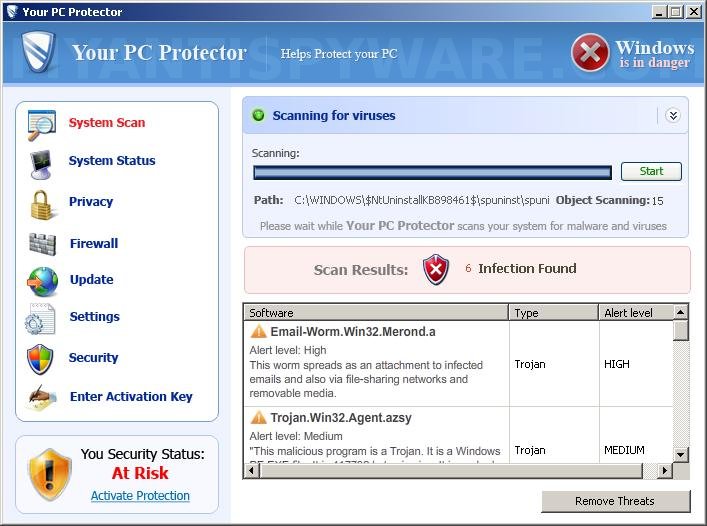
Your PC Protector is a new rogue antispyware program from the same family of malware as Windows Antivirus Pro and Windows Police Pro. It usually installed itself onto your computer without your permission and knowledge, through the use trojans. When the trojan is started, it will install Your PC Protector onto your computer.

During installation, Your PC Protector will register itself in the Windows registry to run automatically every time when you start an application (files with “exe” extension). The rogue also uses this method of running to block the ability to run any programs, including security applications. The following alert will be shown when you try to run Notepad (and any program with “exe” extension):

Warning
Running of application is impossible.
The file C:\Windows\System32\notepad.exe is infected.

Please activate your antivirus program.

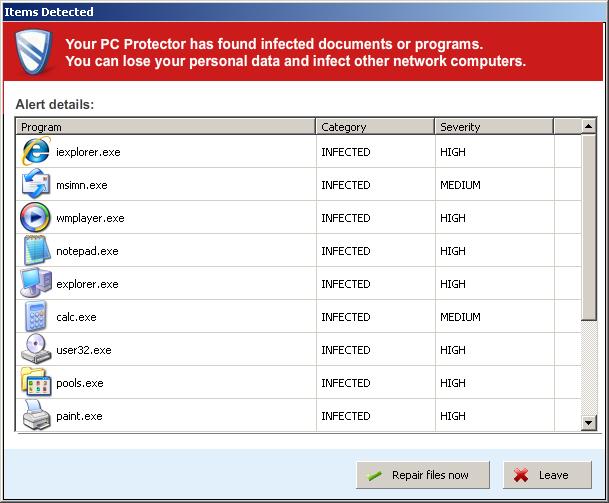
Once running, Your PC Protector will begin to scan your computer and list a large amount of infections. All of these infections are fake, so you can safely ignore them.

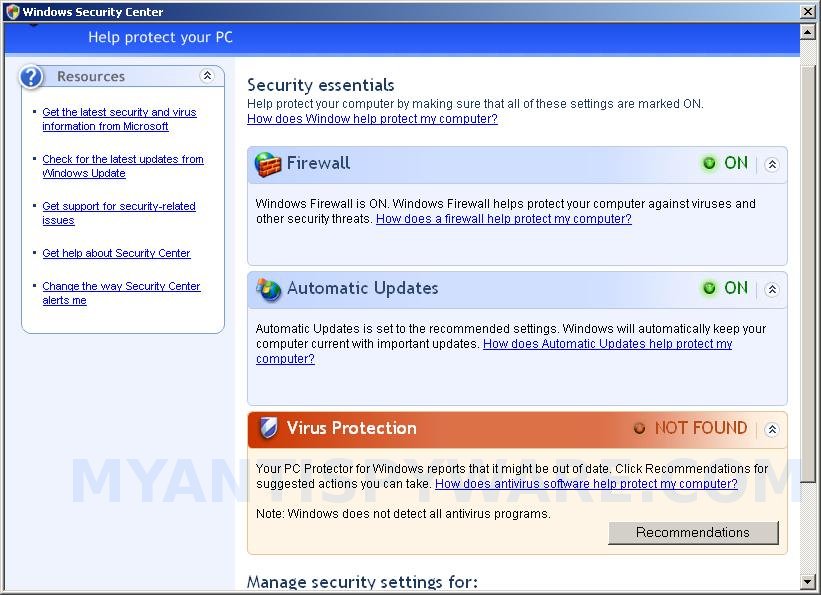
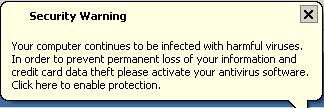
While Your PC Protector is running, it will display fake Windows Security Center, a lot of nag screens, numerous fake security alerts and notifications from Windows task bar that stats:

Security Warning
Your computer continues to be infected with harmful viruses.
In order to prevent permanent loss your information and
credit card data theft please activate your antivirus software.
Click here to enable protection.

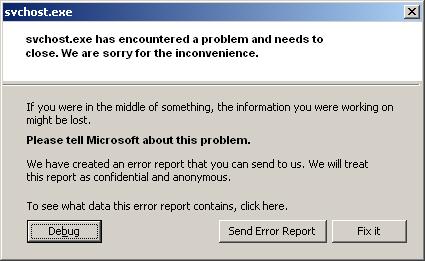
svchost.exe
svchost.exe has encountered a problem and needs to
close. We are sorry for inconvenience.

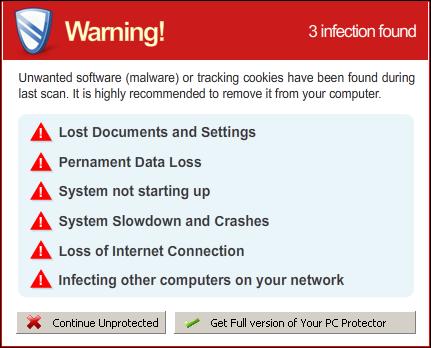
Warning
Unwanted software (malware) or tracking cookies have been found during
last scan. It is highly recommended to remove it from your computer.

Your PC Protector Alert
Infiltration Alert
Your computer is being attacked by an
Internet Virus. It could be a password-
stealing attack, a trojan-dropper or simular.
Details
Attack from: 239.80.11.105, port 58962
Attacked port: 41567
Threat: HalfLemon

Warning: Infection is Detected
Windows has found spyware infection on your computer!
Click here to update your Windows antivirus software…

Internet attack attempt detected:
Somebody is trying to attack your PC:
This can result in loss of your personal information and
infection other computers connected to your network.
Click here to prevent attack

However, all of these alerts, screens and pop-ups are fake and like false scan results should be ignored! As you can see, Your PC Protector is scam and designed with one purpose to scare you into purchasing so-called “full” version of the program. Do not be fooled into buying the program!

If you are infected with this malware, then use these removal instructions below, which will remove Your PC Protector and any other infections you may have on your computer for free.

More screen shoots of Your PC Protector
Symptoms in a HijackThis Log

O2 – BHO: ICQSys (ADC PlugIn) – {77DC0Baa-3235-4ba9-8BE8-aa9EB678FA02} – C:\Program Files\adc32.dll
O23 – Service: Adobe Update Service (AdbUpd) – Unknown owner – C:\Program Files\svchost.exe

Use the following instructions to remove Your PC Protector (Uninstall instructions)

Step 1. Repair “running of .exe files”.

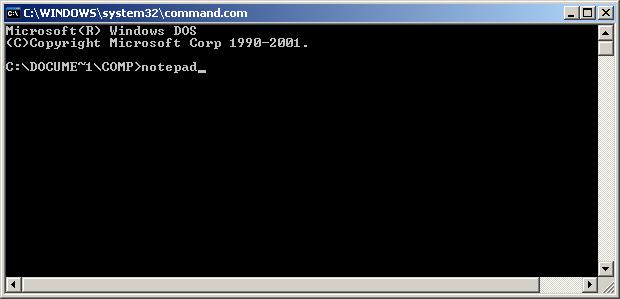
Click Start, Run. Type command and press Enter. Command console “black window” opens. Type notepad as shown below
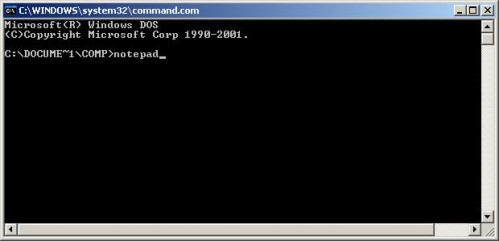

Command console

Press Enter. Notepad opens. Copy all the text below into Notepad.

Windows Registry Editor Version 5.00
[HKEY_CLASSES_ROOT\exefile\shell\open\command]
@="\"%1\" %*"

You will see window similar to the one below.
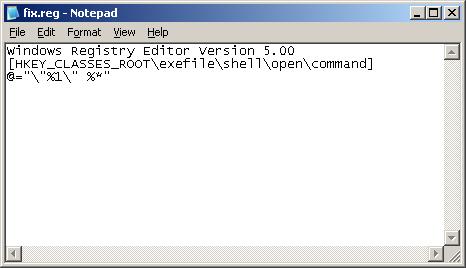

Notepad

Save this as fix.reg to your Desktop (remember to select Save as file type: All files in Notepad.) Double Click fix.reg and click YES for confirm.
Reboot your computer.

Step 2. Remove Rootkit/Trojan TDSS
Your PC Protector may be installed with a TDSS trojan-rootkit that may redirect search results in Google, Yahoo, MSN, block an access to security websites and much more.

Download TDSSKiller from here and unzip to your desktop.

Open TDSSKiller folder and double click the TDSSKiller icon. When the scan is finished, you will see window similar to the one below.
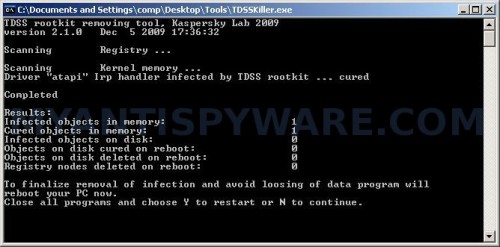

TDSS trojan remover

Close all programs and press Y key.

Step 3. Remove Your PC Protector associated malware.

Download MalwareBytes Anti-malware (MBAM). Once downloaded, close all programs and windows on your computer.

Double-click on the icon on your desktop named mbam-setup.exe. This will start the installation of MalwareBytes Anti-malware onto your computer. When the installation begins, keep following the prompts in order to continue with the installation process. Do not make any changes to default settings and when the program has finished installing, make sure a checkmark is placed next to “Update Malwarebytes’ Anti-Malware” and Launch “Malwarebytes’ Anti-Malware”. Then click Finish.

MalwareBytes Anti-malware will now automatically start and you will see a message stating that you should update the program before performing a scan. If an update is found, it will download and install the latest version.

As MalwareBytes Anti-malware will automatically update itself after the install, you can press the OK button to close that box and you will now be at the main menu. You will see window similar to the one below.

malwarebytes-antimalware1
Malwarebytes Anti-Malware Window

Make sure the “Perform quick scan” option is selected and then click on the Scan button to start scanning your computer for Your PC Protector infection. This procedure can take some time, so please be patient.

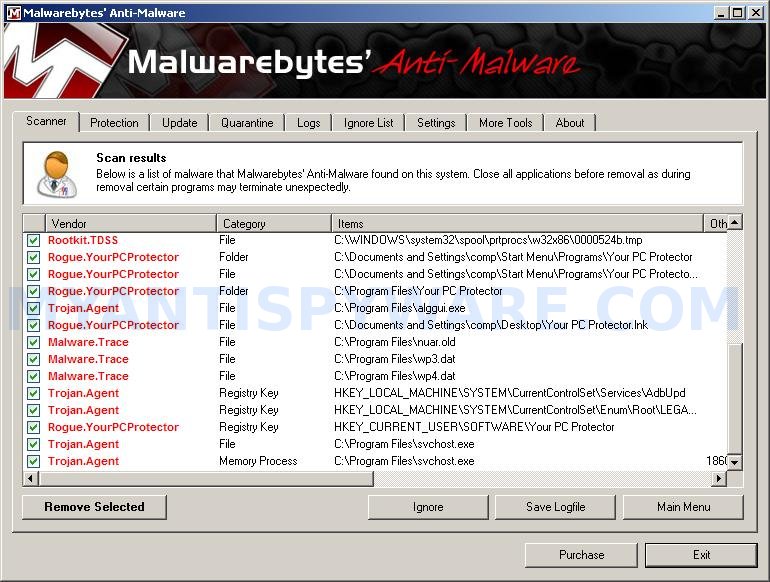
When the scan is finished a message box will appear that it has completed scanning successfully. Click OK. Now click “Show Results”. You will see a list of infected items similar as shown below.
Note: list of infected items may be different than what is shown in the image below.
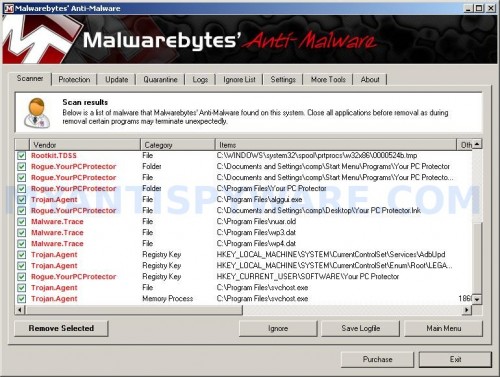

Malwarebytes Anti-malware, list of infected items

Make sure all entries have a checkmark at their far left and click “Remove Selected” button to remove Your PC Protector. MalwareBytes Anti-malware will now remove all of associated Your PC Protector files and registry keys and add them to the programs’ quarantine. When MalwareBytes Anti-malware has finished removing the infection, a log will open in Notepad and you may be prompted to Restart.

Note: if you need help with the instructions, then post your questions in our Spyware Removal forum.

Your PC Protector creates the following files and folders

%userProfile%\Start Menu\Programs\Your PC Protector
C:\Program Files\Your PC Protector
C:\Program Files\Your PC Protector\Your PC Protector.exe
C:\Program Files\adc32.dll
%userProfile%\Start Menu\Programs\Your PC Protector\Your PC Protector.lnk
C:\Program Files\alggui.exe
%userProfile%\Desktop\Your PC Protector.lnk
C:\Program Files\nuar.old
C:\Program Files\wp3.dat
C:\Program Files\wp4.dat
C:\Program Files\svchost.exe

Your PC Protector creates the following registry keys and values

HKEY_CLASSES_ROOT\CLSID\{77dc0baa-3235-4ba9-8be8-aa9eb678fa02}
HKEY_CURRENT_USER\SOFTWARE\Microsoft\Windows\CurrentVersion\Ext\Stats\{77dc0baa-3235-4ba9-8be8-aa9eb678fa02}
HKEY_LOCAL_MACHINE\SOFTWARE\Microsoft\Windows\CurrentVersion\Explorer\Browser Helper Objects\{77dc0baa-3235-4ba9-8be8-aa9eb678fa02}
HKEY_LOCAL_MACHINE\SYSTEM\CurrentControlSet\Services\AdbUpd
HKEY_LOCAL_MACHINE\SYSTEM\CurrentControlSet\Enum\Root\LEGACY_ADBUPD
HKEY_CURRENT_USER\SOFTWARE\Your PC Protector

Share and Enjoy:

  • Print
  • Digg
  • Sphinn
  • del.icio.us
  • Facebook
  • Mixx
  • Google Bookmarks
  • Slashdot
  • Twitter
February 3, 2010 on 11:52 am | In Rogue Anti Spyware, Tutorials - HowTo | 68 Comments |


68 Comments »

RSS feed for comments on this post.

  1. Great article. I had this Virus and no one seemed to know the ins and outs about it. Thanks for the in-depth and detailed outline for solving this issue.

    Comment by DC — February 3, 2010 #

  2. Thank you so much. I’ve had this problem and this is the only website which prescribed each step to help me. I was nervous about the registry step, but it was fine.

    Comment by D Katz — February 7, 2010 #

  3. Thank you, this article has been a great help. I’m glad to see that there’s still helpful sites like this.

    Comment by Xue — February 7, 2010 #

  4. hey its blocking notepad what should i do?

    Comment by greg — February 7, 2010 #

  5. Thank you thank you thank you! While reading this article to try to get rid of it, it took over both Firefox and IE. I was somehow able to open up my anti-spyware program and it got rid of it for me. This thing is NASTY!

    Comment by Jessica — February 7, 2010 #

  6. I made it step 2, but when I try to run the TDSSKiller, I can’t because I get the following error ” Warning
    Running of application is impossible.
    The file (location here) is infected.

    Please activate your antivirus program.”

    Any idea what to do now?

    Comment by PJ — February 8, 2010 #

  7. Hey, thank you for posting this. However, I’m running into a problem when I try to open the TDSSKiller program. When I try to open it (after it is unzipped and installed) the fake PC Protector bubble pops up and says that it cannot be opened by it is “infected.” What should I do? In the step before I went to reboot my computer after adding the fix.reg file but the command window would not close without me having to click the “End Now” button – could this have something to do with it?

    Thanks for all the help.

    Comment by Nate — February 8, 2010 #

  8. Greg you need run command console (command.com) and then notepad.

    Comment by Patrik — February 8, 2010 #

  9. PJ, try repeat first step once again.

    Comment by Patrik — February 8, 2010 #

  10. Um I have downloaded it and it seems that my laptop cant load the file. i downloaded it onto my home computerp ut it on a flash and switched it over now it wont run the program.. Help>

    Comment by Jamie — February 8, 2010 #

  11. Should fix.reg be saving over an existing file on my desktop? I was able to open Notepad, but nothing improved after restart.

    For step 2, I can run the program, but with the following result:

    TDSS rootkit removing tool, Kaspersky Lab, 2010
    version 2.2.3 Feb 4 2010 14:34:00

    Scanning Services …

    Scanning Kernel memory …

    Completed

    Results:
    Memory objects infected / cured / cured on reboot: 0 / 0 / 0
    Registry objects infected / cured / cured on reboot: 0 / 0 / 0
    File objects infected / cured / cured on reboot: 0 / 0 / 0

    Press any key to continue . . .

    Pressing a key exits the program.

    Thank you for providing this information!

    Comment by mts — February 8, 2010 #

  12. thank man…it worked good…thank u again

    Comment by ricky — February 8, 2010 #

  13. thank you ..it worked good..thank you again

    Comment by ricky — February 8, 2010 #

  14. I get the same thing as PJ. I have tried the first step multiple times. Not sure what I am doing wrong.

    Comment by Nick — February 8, 2010 #

  15. I try running TDSSKiller and it doesn’t find any infected files. Does anyone know what I could be doing wrong?

    Comment by Richie — February 8, 2010 #

  16. Excellent description and instructions. Thank YOU!

    The virus would not allow me to download the malwarbytes programs onto my desktop. Using my laptop I had to first save them to a thumb drive, and then install onto my infected computer to follow the procedure. what a nightmare!

    Comment by Pete — February 8, 2010 #

  17. I did the first step correctly
    second step correctly but on the third step i downloaded malawarebytes and every time i open the shortcut, or the .exe file, there will be no process in the Task Manager of Malawarebytes, Please help me!!!

    Comment by Spencer — February 8, 2010 #

  18. I got to step 2. Downloaded the zipped file. Doubleclicked the TDSSkiller icon. Got an hour glass for about 10 seconds. Never got the dos SPYWARE.com window. Help! Can’t open window apps (excel, word).

    Comment by Fred Wilkinson — February 8, 2010 #

  19. the registry part worked and I can now run .exe’s but when I run TDSSKiller it finds no infected files and when I run malwareBytes I see the screen that has the scan button, but the application goes away before I could start the scan? Any suggestion? Thanks much so far!-Jon

    Comment by Jon — February 9, 2010 #

  20. TDSS Killer gives me a “Driver load error!” when I run it.

    I’m having to do it in safe mode, since the virus won’t even let me use my command prompt in regular mode.

    very frustrating.

    Comment by Nate — February 9, 2010 #

  21. Today (Feb 10) I opened what I thought was a legit email today and “Your PC Protector” suddenly jumped onto my PC. I have tried the methods above to eliminate it, and it appeared to run the tdsskiller and I have some log files from it. But attempts to run the Malwarebytes’ Anti-malware have been thwarted. I can install it, but when it starts to run, it suddenly disappears after a second or two. Repeated attempts to start it result in a message saying mbam.exe cannot be found.

    Also a question regarding the first step: in the fix.reg notepad file command line you appear to have a space between the third quote mark and the last percent sign. Is that correct or does it matter?
    @=”\”%1\” %*”

    Finally should I be doing this in safe mode? Or parts of it? So far its not working and “Your PC Protector” is still running the show.

    Thanks, I am dead in the water until I can get this awful malware removed. All your help is most appreciated.

    Comment by Gary — February 9, 2010 #

  22. it will not let me import fix.reg. after i click ‘yes’ i get: Cannot import …fix.reg: The specified file is not a registry file. You can only import registry files.

    any suggestions?

    thanks

    Comment by robert — February 9, 2010 #

  23. Open TDSSKiller folder and double click the TDSSKiller icon. When the scan is finished, you will see window similar to the one below.

    I don’t see the window…have tried several times…can’t get beyond this step HELP!

    Comment by Sara — February 9, 2010 #

  24. Unfortunately, its not letting me fully download the Malwarebites stuff – it fails to download mbam.exe at the very end, making it unable to run the program. Every time it tries to block a program – or even come up for that matter – I just go to the Windows Task Manager and bat it back down. It seems to work for the most part…

    Comment by Chris — February 9, 2010 #

  25. Yeah – it says:

    Unable to execute file:
    C:\Program Files\Malwarebytes’ Anti-Malware\mbam.exe

    CreateProcess failed; code 2.
    The system cannot find the file specified.

    Comment by Chris — February 9, 2010 #

  26. I can’t get command to open, help anyone ?!?! I can’t get rid of this thing

    Comment by Brianna — February 9, 2010 #

  27. I cannot do step 2 because it’s taken over my ability to access the internet. (I’m accessing this website from my laptop.) What do I do now?

    Comment by Eileen — February 10, 2010 #

  28. Nate, goto first step once again, don`t reboot your PC, run TDSSKiller, then MBAM.

    Comment by Patrik — February 10, 2010 #

  29. Richie, probably your PC is infected with another version of the rogue that has not bundled with a TDSS trojan.

    Comment by Patrik — February 10, 2010 #

  30. Spencer, looks like your PC also infected with a trojan (probably Vundo), which removed the mbam.exe – core component of Malwarebytes. Download the file and save it to home folder of Malwarebytes. Run it.

    Comment by Patrik — February 10, 2010 #

  31. Fred, you have unzipped TDSSKiller before running ?

    Comment by Patrik — February 10, 2010 #

  32. Jon, try run Malwarebytes in Safe mode.

    Comment by Patrik — February 10, 2010 #

  33. Nate, you need run TDSSKiller in normal mode. Do 1 and 3 steps in safe mode, then reboot and try second step.

    Comment by Patrik — February 10, 2010 #

  34. Gary, the above .reg script is ok.
    Looks like your PC also infected with a trojan Vundo. Ask for help in our Spyware removal forum.

    Comment by Patrik — February 10, 2010 #

  35. Robert, check twice a text in Notepad. It should have “Windows Registry Editor Version 5.00″ as first line.

    Comment by Patrik — February 10, 2010 #

  36. Eileen, write Malwarebytes and TDSSKiller to a flash or cd disk and move both files to infected PC.

    Comment by Patrik — February 10, 2010 #

  37. Good answers, I was able to get only to install malwarebytes, but it wouldn’t run. I found that the malware was deleting the mbam.exe file as soon as install finished. I then downloaded malwarebytes and installed on a clean PC. I then renamed mabm.exe to a.exe (thanks to a tip on another web site), and copied the entire directory onto the infected PC. I then ran a.exe, which was then able to clean the PC. You do have to go through the install process on the infected PC before you copy the directory over.

    Comment by Joe — February 10, 2010 #

  38. I’m running TDSSKiller (at least my Task Manager says it’s running), but it’s taking a long time. (It’s been running for at least 20 minutes, maybe more like 30.) How long is it supposed to take before I get the trojan remover window?

    Also, when I first turned my computer on today, I was told I had trojan.vundo, but I don’t know whether to believe it since I think that notice came from the PC Protector virus to begin with. Any idea if that’s real?

    Thanks!

    Comment by Zannah — February 10, 2010 #

  39. Please disregard my comment above. TDSSKiller finally told me I didn’t have any infected files. I’m having trouble fully installing the malware software, so I can’t get it to run.

    Comment by Zannah — February 10, 2010 #

  40. Thanks for providing us a great 1-2-3 STEP direction solving this problem. I don’t know anything about fixing those kind of issues but I guess I could fixed it by myself just following your instruction.
    You are genius!!

    Comment by lina-chan! — February 10, 2010 #

  41. Patrik,

    I want to thank you and all the good people at myantispyware.com for helping me and all these other folks solve their malware problems. I would like to support your operation with a modest donation as a sign of my gratitiude. I am sure it costs a lot of money to keep this site up and maintained as you do. If everyone that is helped gives a little bit back, it would make it easier for you to carry on your mission.

    It took several attempts but finally I got the MBAM.exe to work. The trick is to make sure it is available to the ABAM folder on the C:\program files. I am not sure what was the turning point for me, but I did a lot of work in Safe mode and then today launched the final attempt with ABAM.exe in normal mode and it worked, first with the quick scan and then following up with a full scan.

    Again, thanks and God bless you all!

    Comment by Gary — February 10, 2010 #

  42. Zannah, new variants of the rogue also bundled with Vundo trojan. If you can`t run Malwarebytes (got error code 2), then read and follow “Comment by Patrik — February 10, 2010 to Spencer”.

    Comment by Patrik — February 11, 2010 #

  43. A friend of mine was receiving these messages on his computer and he bought the software. Do you know if there is any action that can be taken? Or is he out the money he paid? Any help or suggestions would be appreciated and passed along.
    Thanks!

    Comment by Denise — February 11, 2010 #

  44. Completed step 1 but after download of TDSSkiller i am asked what program I want to use to open it.

    Comment by Tina — February 11, 2010 #

  45. fix.reg won’t run as this crap keeps telling me that it is infected.

    Comment by Eric — February 11, 2010 #

  46. Hey Patrik is it ok if i uninstall all the stuff after i get rid of the your pc thing? I’m a little afraid it might come back to bite me again o.o;

    Comment by Kim — February 11, 2010 #

  47. Denise, he should contact his credit card company and tell them what has happened.

    Comment by Patrik — February 11, 2010 #

  48. Tina, repeat fist step.

    Comment by Patrik — February 11, 2010 #

  49. Eric, right click to fix.reg and select Merge.

    Comment by Patrik — February 12, 2010 #

  50. Tried to remove via instructions – - no luck. Now the computer keeps restarting over and over,but not starting.

    Comment by mark — February 12, 2010 #

  51. Mark, try boot your PC in Last good configuration.

    Comment by Patrik — February 13, 2010 #

  52. when i get to command box i cannot type notepad.
    it gives me C:\DOCUME`1\owners name\

    Comment by donovan — February 15, 2010 #

  53. donovan,
    Open My Computer,click the Tools menu and click Folder Options.Select the View tab. Scroll down. Uncheck the “Hide file extensions for known types” option. Click OK.
    Open C:\Windows\System32 folder and look for notepad.exe. Copy this file to your desktop. Then rename it to notepad.com. Run it and follow above steps.

    Comment by Patrik — February 16, 2010 #

  54. Thanks for your help, Patrik, but I am still having problems. I ran step 1,2 without a problem–step 2 showed no infections. When I try to install malware bytes I get an error during the install of create process failed code 2 cannot find file specified\n
    I have tried everything mentioned from renaming the EXE install to the patch that you install to the same dir that the install goes to….

    Thanks in advance

    Comment by DOug — February 17, 2010 #

  55. Also worth mentioning, I tried deleting the “pc protector” manually by deleting certain registry keys and values. Some were there and I deleted them and others did not show. I wacked all the program files/directories and the virus doesn’t seem to be surfacing anymore. Not getting any pop ups but I have to test it some more. I just wanted to install and scan with the malware bytes and not being able to install the exe concerns me.

    Comment by DOug — February 17, 2010 #

  56. DOug, looks like your computer is infected with a trojan Vundo. Save the file to home dir of Malwarebytes (c:\Program Files\Malwarebytes` Anti-malware by default) and run it.
    If above instruction does not help you, then ask for help in our Spyware removal forum.

    Comment by Patrik — February 17, 2010 #

  57. Hi, I have a friend with this virus. I couldn’t get any safe modes to open, the laptop would just resart and load windows normally. I then found this page social.answers.microsoft.com/Forums/en-US/vistasecurity/thread/9f069595-7217-4f8b-a6cc-0062f100a5d1 and saw some instructions that I hadn’t read and so gave them a go (the message from smithers1983) and things seemed to be working, until I restarted the laptop after changing some stuff in msconfig….now the laptop is trying to boot into safe mode automatically and VP is thus making it restart over and over again. I can’t even get to the windows log in page. Does anyone have any ideas?

    thanks in advance

    Comment by gareth — March 11, 2010 #

  58. gareth, you need use msconfig once again to change boot method to Normal mode. Read and follow the steps to remove Virus Protector.

    Comment by Patrik — March 12, 2010 #

  59. This information looks great but I have a slight problem. This program “Your PC Protector” is not only doing everything you stated, but, for me, is also keeping my desktop from loading. None of my desktop icons, my taskbar or start menu can load before the program pops up and starts doing its scan. Now.. I didn’t have the patience but if I let the scan complete does the desktop finish loading? I just want to know in case I run into this again. Thank you for you time! =)

    Comment by Scott — March 24, 2010 #

  60. Scott, Malwarebytes should fix this problem. If you can`t run Malwarebytes, then open a new topic in our Spyware removal forum and i will suggest your another ways.

    Comment by Patrik — March 24, 2010 #

  61. Hi, all sounds good, but when i start my machine there is no start or task bar PC PROTECTOR SCAN PAGE OPEN’S and i can’t do anything?

    Comment by John Stoyko — April 3, 2010 #

  62. John, try the instructions.

    Comment by Patrik — April 4, 2010 #

  63. try opening windows task manager, if you can, go to processes and look for your pc protector I found it and disabled it giving me some time. Be quick though as it will start up again.

    Comment by Daniel — April 20, 2010 #

  64. I am having serious problems with “Your PC Protector” running and destroying my computer. Please help!!

    Comment by Johnny — April 22, 2010 #

  65. Johnny, if the instructions above does not help you, then ask for help in our Spyware removal forum.

    Comment by Patrik — April 23, 2010 #

  66. When i turn my computer on Your PC Protector pops up, then my desktop disappears and then i have approx 1min before it goes to a blue screen with a countdown and my computer restarts. I cant get on the internet or have enough time to try and delete the virus off. What should i do?

    Comment by Stephanie — May 17, 2010 #

  67. Stephanie, try boot your PC in Safe mode with networking and follow the steps above once again.

    Comment by Patrik — May 17, 2010 #

  68. Thank you! Great help.

    Could use some updates to x64 on step 2, but it worked without it.

    Comment by Ian — July 1, 2010 #

Leave a comment

XHTML: <a href="" title=""> <abbr title=""> <acronym title=""> <b> <blockquote cite=""> <cite> <code> <del datetime=""> <em> <i> <q cite=""> <strike> <strong>


My Anti Spyware - Free antispyware programs and Spyware Removal Instructions.