![]() | Do you have pop-ups or your computer infected with trojan or spyware ? Learn how to ask us for help, click here! |
How to remove Vista Antispyware 2010, Vista Antivirus 2010, Vista Guardian, Vista Internet Security
Vista Antispyware 2010 also known as Vista Antivirus 2010, Vista Guardian, Vista Antivirus Pro and Vista Internet Security 2010 is a rogue antispyware program that reports false infections and shows numerous fake security alerts as an attempt to trick you into buying the software. This program is installed through the use of trojans. When the trojan is started, it will download and install Vista Antispyware 2010 (Vista Antivirus 2010 or Vista Guardian) onto your computer.
During installation, Vista Antispyware 2010 (Vista Antivirus 2010 or Vista Guardian) will register itself in the Windows registry to run automatically every time when you start an application (files with “exe” extension). The rogue also uses this method of running to block the ability to run any programs, including security applications.
Once running, Vista Antispyware 2010 (Vista Antivirus 2010 or Vista Guardian) will start a system scan and list a large amount of infections. All of these infections are fake, so you can safely ignore them. What is more, while the rogue is running, it will display fake security alerts and notifications with “Spyware infection has been found” or “Tracking software found” header. However, all of these alerts are fake.
Last but not least, Vista Antispyware 2010 (Vista Antivirus 2010 or Vista Guardian) will hijack Internet Explorer and Firefox and display fake warnings when you opening a web site.
As you can see, Vista Antispyware 2010 (Vista Antivirus 2010 or Vista Guardian) is scam, it is designed with one purpose to scare you into thinking that your computer in danger as a method to trick you into purchasing the full version of the program. If your computer is infected with this malware, then most importantly, do not purchase it! Uninstall the rogue from your PC as soon as possible. Use the removal guide below to remove Vista Antispyware 2010 (Vista Antivirus 2010 or Vista Guardian) from your computer for free.
Use the following instructions to remove Vista Antispyware 2010 (Vista Antivirus 2010, Vista Guardian, Vista Antivirus Pro or Vista Internet Security 2010)
Step 1. Repair “running of .exe files”.
Method 1
Click Start, Run. Type command and press Enter. Type notepad and press Enter.
Notepad opens. Copy all the text below into Notepad.
Windows Registry Editor Version 5.00
[-HKEY_CURRENT_USER\Software\Classes\.exe]
[-HKEY_CURRENT_USER\Software\Classes\secfile]
[-HKEY_CLASSES_ROOT\secfile]
[-HKEY_CLASSES_ROOT\.exe\shell\open\command]
[HKEY_CLASSES_ROOT\exefile\shell\open\command]
@="\"%1\" %*"
[HKEY_CLASSES_ROOT\.exe]
@="exefile"
"Content Type"="application/x-msdownload"
Save this as fix.reg to your Desktop (remember to select Save as file type: All files in Notepad.)
Double Click fix.reg and click YES for confirm.
Reboot your computer.
Method 2
Click Start, Run. Type command and press Enter. Type notepad and press Enter.
Notepad opens. Copy all the text below into Notepad.
[Version]
Signature="$Chicago$"
Provider=Myantispyware.com
[DefaultInstall]
DelReg=regsec
AddReg=regsec1
[regsec]
HKCU, Software\Classes\.exe
HKCU, Software\Classes\secfile
HKCR, secfile
HKCR, .exe\shell\open\command
[regsec1]
HKCR, exefile\shell\open\command,,,"""%1"" %*"
HKCR, .exe,,,"exefile"
HKCR, .exe,"Content Type",,"application/x-msdownload"
Save this as fix.inf to your Desktop (remember to select Save as file type: All files in Notepad.)
Right click to fix.inf and select Install. Reboot your computer.
Step 2. Remove Vista Antispyware 2010 (Vista Antivirus 2010 or Vista Guardian) associated malware.
Download MalwareBytes Anti-malware (MBAM). Once downloaded, close all programs and windows on your computer.
Double-click on the icon on your desktop named mbam-setup.exe. This will start the installation of MalwareBytes Anti-malware onto your computer. When the installation begins, keep following the prompts in order to continue with the installation process. Do not make any changes to default settings and when the program has finished installing, make sure a checkmark is placed next to “Update Malwarebytes’ Anti-Malware” and Launch “Malwarebytes’ Anti-Malware”. Then click Finish.
MalwareBytes Anti-malware will now automatically start and you will see a message stating that you should update the program before performing a scan. If an update is found, it will download and install the latest version.
As MalwareBytes Anti-malware will automatically update itself after the install, you can press the OK button to close that box and you will now be at the main menu. You will see window similar to the one below.

Malwarebytes Anti-Malware Window
Make sure the “Perform quick scan” option is selected and then click on the Scan button to start scanning your computer for Vista Antispyware 2010 (Vista Antivirus 2010 or Vista Guardian) infection. This procedure can take some time, so please be patient.
When the scan is finished a message box will appear that it has completed scanning successfully. Click OK. Now click “Show Results”. You will see a list of infected items similar as shown below.
Note: list of infected items may be different than what is shown in the image below.
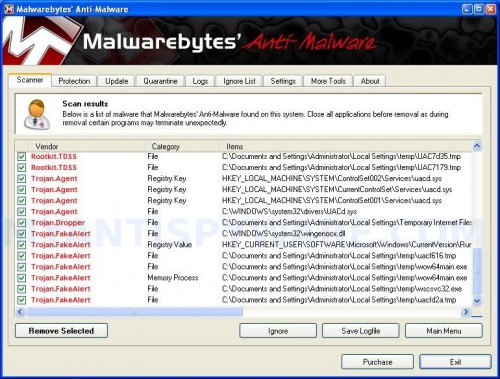
Malwarebytes Anti-malware, list of infected items
Make sure all entries have a checkmark at their far left and click “Remove Selected” button to remove Vista Antispyware 2010 (Vista Antivirus 2010 or Vista Guardian). MalwareBytes Anti-malware will now remove all of associated Vista Antispyware 2010 (Vista Antivirus 2010 or Vista Guardian) files and registry keys and add them to the programs’ quarantine. When MalwareBytes Anti-malware has finished removing the infection, a log will open in Notepad and you may be prompted to Restart.
Note: if you need help with the instructions, then post your questions in our Spyware Removal forum.
Vista Antispyware 2010 (Vista Antivirus 2010 or Vista Guardian) creates the following files and folders
%AppData%\av.exe
%AppData%\WRblt8464P
Vista Antispyware 2010 (Vista Antivirus 2010 or Vista Guardian) creates the following registry keys and values
HKEY_CURRENT_USER\Software\Classes\.exe
HKEY_CURRENT_USER\Software\Classes\.exe\shell
HKEY_CURRENT_USER\Software\Classes\.exe\shell\open
HKEY_CURRENT_USER\Software\Classes\.exe\shell\open\command
HKEY_CURRENT_USER\Software\Classes\.exe\shell\start
HKEY_CURRENT_USER\Software\Classes\.exe\shell\start\command
HKEY_CURRENT_USER\Software\Classes\secfile
HKEY_CURRENT_USER\Software\Classes\secfile\shell
HKEY_CURRENT_USER\Software\Classes\secfile\shell\open
HKEY_CURRENT_USER\Software\Classes\secfile\shell\open\command
HKEY_CURRENT_USER\Software\Classes\secfile\shell\start
HKEY_CURRENT_USER\Software\Classes\secfile\shell\start\command
HKEY_CURRENT_USER\Software\Classes\.exe\shell\open\command | @ = “”%AppData%\av.exe” /START “%1″ %*”
HKEY_CURRENT_USER\Software\Classes\.exe\shell\open\command | IsolatedCommand = “”%1″ %*”
HKEY_CURRENT_USER\Software\Classes\.exe | @ = “secfile”
HKEY_CURRENT_USER\Software\Classes\.exe | Content Type = “application/x-msdownload”
HKEY_CURRENT_USER\Software\Classes\secfile\shell\open\command | @ = “”%AppData%\av.exe” /START “%1″ %*”
HKEY_CURRENT_USER\Software\Classes\secfile\shell\open\command | IsolatedCommand = “”%1″ %*”
426 Comments »
RSS feed for comments on this post.
Leave a comment
My Anti Spyware - Free antispyware programs and Spyware Removal Instructions.


Thank you sooooo much! This has saved me (and my laptop)!
4ever gr8ful!
Comment by Daniela Deja — January 30, 2010 #
This worked great! You are awesome!
FYI – I tried another program and could not remove this trojan. Followed your method here along with the software and it worked!
Comment by David — January 31, 2010 #
This the best program ever!! Everybody can do it and get rid of the stupid Vista guardian crap program!!
recommended by 100%
Thx for your help!!
Comment by Andrea — January 31, 2010 #
Thank You! Thank You! Thank You….a million Thanks Yous! You just saved me $130. I’ve been on the phone with Norton for what seems hours. They wanted to charge me way too much money to remove this nasty virus. Did I mention how thankful I am?
Comment by Tammy — January 31, 2010 #
tnx very much!!!! this is the best.
100% guaranteed, i recommend every one to get rid of the stupid vista guardian program!!!
Comment by kish — January 31, 2010 #
Thank YOU…..WORKED PERFECT
Comment by Brian mitchell — January 31, 2010 #
oh my god is working …
i goggle every single word to look for an answer and you the only one ho is rely helpfully
thanks man and i love
Comment by ramsey — February 1, 2010 #
Success!!!
Comment by Roy — February 2, 2010 #
IT WORKS! YIPPEE!! I’m SOOOO relieved. Especially the tip how to get the exe files running again was just what I needed. THANKS SOOO MUCH!!!
Comment by steve — February 2, 2010 #
i tried malwarebytes but no succes;even tried on normal and safe mode. did try spyware doctor still no joy. please help
Comment by Bryan — February 2, 2010 #
Bryan, then ask for help in our Spyware removal forum.
Comment by Patrik — February 3, 2010 #
THANK YOU! IT WORKED! TY SO MUCH!!
Comment by Cross — February 3, 2010 #
Very nice, this works wonders.
Comment by Michael — February 3, 2010 #
Thanks! worked just fine!
Comment by Floyd — February 4, 2010 #
im on a friends laptop here, i just got this vista guardian crap popping up on my laptop and it wont let me even access the internet. is there anything that can be done for me? obviousli i’d try this method but cant download on my laptop as i cant acess a web page.
please let me know – would be very appreciative
Comment by sara — February 4, 2010 #
sara, go to step 1. Once done, try download MBAM, if it is blocked, then download it to another PC, then move the file to infected computer using flash disk or cd disk.
Comment by Patrik — February 5, 2010 #
Are these registry entries safe to delete? Or do I need a tool to properly handle them? (btw, thank you very much for the recourse! All other entries I’ve found for this virus seem oudated with references to other executables and registry values)
Comment by Max — February 5, 2010 #
Remove these keys:
[HKEY_CURRENT_USER\Software\Classes\.exe]
[HKEY_CURRENT_USER\Software\Classes\secfile]
[HKEY_CLASSES_ROOT\secfile]
[HKEY_CLASSES_ROOT\.exe\shell\open\command]
And restore to defaults:
[HKEY_CLASSES_ROOT\.exe]
@=”exefile”
“Content Type”=”application/x-msdownload”
Comment by Patrik — February 5, 2010 #
Hmmm, I was only able to locate the first two registry keys, and I removed them. This appears to have fixed the problem though!
[HKEY_CLASSES_ROOT\secfile]
and
[HKEY_CLASSES_ROOT\.exe\shell\open\command]
did not appear to exist on my machine, and
[HKEY_CLASSES_ROOT\.exe] was still set to the default.
This strain has been a pain, but it looks like it’s taken care of now. Thanks for the help! I had a hell of a time located anything that would help me sort this thing out, you guys are awesome!
Comment by Max — February 5, 2010 #
Words cannot describe how much I love you for the help these instructions gave me!
Comment by Joe — February 5, 2010 #
@Sara;
Do you have a flash drive? If you do, why not just do step 1 *just don’t open it* on your friends computer and put it on the flash drive? or burn it to a CD for that matter. Save MBAM and put it on it as well.
Comment by Rachael — February 6, 2010 #
Didn’t help at all, I’v still got the same problem.
Comment by sarah — February 6, 2010 #
sooooooooo awesome thank u sooooo much it worked perfect
Comment by steve — February 6, 2010 #
I ran what you stated here and the results after the first time, the malware popped back up again. Ran the step a second time and documented what was going on. Again it was confirmed that the files checked were deleted. Here is the info:
Error: C:\Users\Owner\AppData\Roaming\Malwarebytes’\Anti-Malware\Logs\mbam-log-2010-02-06 (15-38-23).txt is not a valid Win32 application.
Vendor Category Items
Malware.Packer.Gen Memory Process C:\User\Owner\AppData\Local\av.exe
Malware.Packer.Gen File C:\User\Owner\AppData\Local\av.exe
Spyware.OnlineGames File C:\Windows\Setup\SCRIPTS\START.EXE
Trojan.Fakealert Registry Key HKEY_CLASSES_ROOT\secfile
Hijacked.exeFile Registry Data HKEY_CLASSES_ROOT\.exe\(default)
After I receive Error and Click OK, Confirmation box appears and states that all checked items were successfully deleted.
Widows box appears stating that Malwarebytes had stopped working.
Hit Close Program.
Restart Computer.
Ok desktop is now back up and the malware seems to be gone. My explorer seem to have moved, but I was able to access the internet and to my home page.
My suggestion for those who tried the first time to go back and repeat the steps again. Because I had confirmation of the malware that was deleted the first time and ran the steps again a second time and it seems to be working now.
P.S. Someone should notify Microsoft of their own malware and the profit their making off of their own product and SUE their butt’s off.
I have Norton Anti-virus 2009 and I used Webroot Spy Sweeper both claimed that my notebook was secure. Norton found cookie tracker and deleted it but did not remove the malware. Spy Sweeper found nothing. The security setting on my notebook also stated that I was secure.
Comment by ELLE — February 6, 2010 #
Try repeating the steps again. It worked for me.
Comment by edlee — February 6, 2010 #
I owe you a big pint!!!!
Deleting av.exe kept explorer.exe from functioning properly but your reg file sorted it and allowed me to delete av.exe and then carry on with mbam.
Thank you
Comment by daryl — February 7, 2010 #
Why does this not automatically delete future attacks on my notebook from the same malware?
What I mean is that when I went back to surf the net the stupid malware leeched onto a different site I was going too and were back to square one again.
Is there a program that will stop this malware before I go to any other site?
Comment by ELLE — February 7, 2010 #
I tried to do step 1. Repair running of .exe files and it won’t let me open up notepad…can’t copy text into…what next. My other computer is an old window and doesn’t know vista for flashdrive transfer. Help..I am not the brightest in computers.
Comment by Jo — February 8, 2010 #
ELLE, you should have:
good antivirus
an antispyware (SpyBot is free and good, or full version of Malwarebytes, …)
alternate browser (Firefox, Opera)
firewall (Zone Alarm, Comodo, …)
be careful when opening attachments and downloading files
Comment by Patrik — February 8, 2010 #
Jo, go to c:\windows\system32, look for notepad.exe and rename it to notepad.com. Run it and follow the steps above.
Note: you need uncheck the “Hide file extensions for known types” option before doing it.
Comment by Patrik — February 10, 2010 #
hmmmmm i did the regedit fix and it worked, there seems to be no trace of that bastard anymore, is that normal? or should it still show up on the MBAM scan?…… it doesnt feel right :p
Comment by Charlie — February 10, 2010 #
Thank you,it worked for me
Comment by irene — February 10, 2010 #
why i have to pay ???????????? :S:S
Comment by izzy — February 10, 2010 #
You have no idea how efficient and helpful this was. I’m a student with many valuable reports on my drive, up at £:am fixing a virus, and your instructions managed to help me so much.
thank you
Comment by James — February 10, 2010 #
hello thank you soo much for this VERY excellent info. I had completed the first part of the instructions and saw that the pop ups were completely gone
i was wondering if i should still download the program as directed in the second part of the instructions seeing that i do not have vista anti-spywear on my laptop and the pop ups have stopped. i would rather not have to download anything else to my computer unless needed. thanks again!!
Comment by trudy — February 10, 2010 #
Charlie, if MBAM did not display any infections, then you are clean. You can also scan your PC with an online scanner.
Comment by Patrik — February 11, 2010 #
millions of kisses to you….thank god for your help in saving my laptop……I love you xxxx
this is the best info i have found on the net and the simplest
Comment by shana — February 11, 2010 #
i tried to do step 1 but when i try to click yes to confirm fix.reg it says “Cannot import C:\Users\User\Desktop\fix.reg: The specified file is not a registry script. You can only import binary registry files from within the registry editor.” im stuck. what should i do?
Comment by chris — February 11, 2010 #
Thanks everyone! This site really helped me! This thing showed up on my computer today – I have no idea where it came from. Anyway, the instructions here helped me get rid of it this evening.
One thing worth noting – I was unable to use the registry fix file. I ran another antivirus program first, and it found the av.exe and another file. Then I rebooted, and was unable to run programs. Then I found this site, and tried the .reg file using notepad. I was able to get the file onto my computer, but it told me it had to be in binary. So I skipped that step, and ran Malwarebytes. It found another file, and I got rid of it, rebooted, and here I am. I shouldn’t have to do that step with the .reg file, right?
Thanks everyone! This site is great.
Comment by iPaul — February 11, 2010 #
Chris, check twice the inserted script.
Comment by Patrik — February 12, 2010 #
Oh my god this was the best help I’ve had it worked perfectly thank you so much. I thought that I wouldn’t be able to sort this out but it was explained so well that even I could follow these instructions. Good job and thanks once again.
Comment by Paul — February 12, 2010 #
Followed all the instructions to the letter and glad to say my pc is all back to normal again, don’t have the rogue ‘vista internet security’ quick launch in the system tray anymore and the annoying pop ups have now gone. Tried removing this b*****d with spybot and adaware first but with no success. Many thanks for this advice, you saved me from a lot of frustration not to mention money.
Comment by Paul — February 13, 2010 #
“Note: you need uncheck the “Hide file extensions for known types” option before doing it.”
Yeah thanks for the help. How does one do this? Where is this option?
Comment by alex — February 13, 2010 #
that was great!! stoped it i can go back onto the internet!!! mbam didnt find anything though so will try it again tomorrow thanks guys!!!
Comment by Lewis — February 13, 2010 #
thanks for massive help (:
Comment by andrej — February 13, 2010 #
Hey i am currently trying this on my pc as i got vista guardian on there, one question is the anti malware programme free? or do i have to pay like all the others?
Comment by Sam — February 13, 2010 #
Ok notepad opened with R click- start. Couldn’t see that before.. d’oh.
Sorted now. Cheers.
Comment by alex — February 13, 2010 #
i was just about to smash my computer up….but it seems to have worked…..you’re a genius.
Comment by tom — February 14, 2010 #
Alex, click My computer, Tools, Folders Options, open View tab.
Comment by Patrik — February 14, 2010 #
Sam, Malwarebytes Anti-malware is free for use. Read more and comments here (scroll down).
Comment by Patrik — February 14, 2010 #
Cheers, I had av.exe blocked with Zone Alarm and deleted all references to it through regedit, jus right clicked and run as administrator as all .exe files wouldn’t open! All I had to do after that was delete hkcr_.exe folder and it lives!!! Thanks, Kev
Comment by Kev — February 14, 2010 #
Hi, thanks so much. You’ve saved me. I’ve been struggling with this virus for 3 days and finally found your website. After following your instruction, I got my laptop screen back (in normal mode) and am able to use my programs except for Internet explore. (computer seems to run very slow though) The internet explored is still blocked!!! Please help! What is next that I should try? Thanks again in advance. Tina.
Comment by Tina — February 14, 2010 #
Sorry for the typo. I meant the Internet Explorer.
Comment by Tina — February 14, 2010 #
I’ve done the first part of the process up until the rebooting of my laptop. And I can’t go on the internet to download the malwarebytes Anti-malware because the pop ups are still here. Please help me, what am I doing wrong?
Comment by ty — February 15, 2010 #
Tina, try the following:
Run Internet Explorer, Click Tools -> Internet Options. Select Connections Tab and click to Lan Settings button. Uncheck “Use a proxy server” box. Click OK. Click Apply. Click OK.
Comment by Patrik — February 15, 2010 #
ty, reboot your PC in Safe mode with networking.
In this mode try download Malwarebytes.
Comment by Patrik — February 15, 2010 #
How do I make it “safe mode with networking” ?
Comment by ty — February 15, 2010 #
Nevermind I figured it out, thankyou so much!
Comment by ty — February 15, 2010 #
I turned my laptop off and it won’t start up now please help not in safe mode either
Comment by Jb — February 15, 2010 #
just cleaned up my laptop .. thanks a lot
Comment by deepak — February 15, 2010 #
one question i already had the malwarebyte on my comp.. before the 1st step
just updated it… will it make any differance????
Comment by deepak — February 15, 2010 #
This was the best help I’ve ever had, thank you so much !
Comment by Paula — February 15, 2010 #
Many thanks for all the guidelines, I spent approx 3 hours dowloading the free anti-malware but nothing worked.. at the last tried Step 1. Repair “running of .exe files” and that worked fantastic..
Thanks a lot for making my system work again as normal..
Well Done …..
Comment by Jyoti — February 15, 2010 #
My sister’s laptop just got the dreaded Vista Guardian. One major issue is that I can’t access ANYTHING on her user. When her profile boots up, there are about 3-4 windows for VG and a black screen. You can move the mouse around, but there isn’ anything to click. Opening up task manager, there aren’t any programs running either.
Any advice/help that I could use? She isn’t too happy, as one can guess, and any way to get around this is appreciated.
Comment by William — February 15, 2010 #
hello, i seemed to have removed the malware using MWB but it messed up my laptop’s registry badly. i can’t login to vista normally (must be in safe mode). also, i can’t run .exe applications anymore. any ideas on how to fix it? thanks!
Comment by jorem — February 15, 2010 #
fixed the exe file association problem by editing the registry but i cant still login to windows normally. help pls!
Comment by jorem — February 16, 2010 #
Jb, what shows your PC when you trying to start ?
Comment by Patrik — February 16, 2010 #
deepak, no different. Is ok.
Comment by Patrik — February 16, 2010 #
William, you can open Task Manager ?
Comment by Patrik — February 16, 2010 #
Jorem, now you can`t boot your PC in normal mode ?
Comment by Patrik — February 16, 2010 #
Just vista spyware shows aswell I’ve got it to work now but malware is not picking up the virus
Comment by Jb — February 16, 2010 #
what do i do with the fix.reg file after virus is removed? do i delete that file?
Comment by bob — February 17, 2010 #
Bob, manually remove the files.
Comment by Patrik — February 17, 2010 #
Jb, ask for help in our Spyware removal forum.
Comment by Patrik — February 17, 2010 #
Thankyou for this guide – completely solved the problem for me. The ‘Malwarebytes Anti-Malware’ software is free (unlike others I found) and effective. Great work – much appreciated!
Comment by Toby — February 17, 2010 #
I did what you said and i think it worked but it only said 4 items infected. Did it still work?
Comment by Matt — February 17, 2010 #
hah, just by the ”buy to get rid of the infections (or something like that)”, I figured it was rogue.
Thanks for the info! Quick and efficient.
Comment by Dragonfyre — February 18, 2010 #
I did all the steps and I removed a big list of crap after the scan. But after I rebooted my computer it was still there. Can somebody please help me out? I really need my computer to do homework!
Comment by Bryce — February 18, 2010 #
Please help i did the fix.reg and i did it but then it said something about binary
then i ignored it and did the malware program it deleted everything and i rebooted and i still have it on my computer please help me thanks
Comment by Andres — February 18, 2010 #
I still cant see what i said it removed it
Comment by Andres — February 18, 2010 #
I did this, PC won’t even boot in safe mode now. I had to physically unplug it to stop the cycle of it trying to boot and failing.
Comment by Tracy — February 19, 2010 #
Bryce, probably your PC is infected with a new variant of the rogue. Ask for help in our Spyware removal forum.
Comment by Patrik — February 19, 2010 #
Andres, check what you have inserted into notepad. The fix should have “Windows Registry Editor Version 5.00″ as first line.
Comment by Patrik — February 19, 2010 #
Tracy, what shows your pc, when trying to boot it?
Comment by Patrik — February 19, 2010 #
I downloaded and clicked Finish. A window appeared and instantly disappeared. Now I have no window. I have a desktop icon, but the program will not open. Help greatly desired.
Comment by Eric — February 19, 2010 #
I opened it up in notepad but it just says this as first line,[-HKEY_CURRENT_USER\Software\Classes\.exe]
Comment by Andres — February 19, 2010 #
I believe I might be well and truly stuffed. I rebooted and now I’m getting it at startup. Thing is, the background is all black and I have no damn start menu or system tray or whatnot and now I can only access the internet by clicking ‘purchase full version’ to load the browser and rightclicking and choosing ‘open in new browser’. Is there an online removal tool? One that doesnt require downloading? I don’t think I’ll be able to access a downloaded file as I my windows key wont load the start menu either >_<
Comment by tony — February 19, 2010 #
Thank you very-very much!!! That worked just fine.
Comment by Yiannis — February 20, 2010 #
Try run fix.reg once again. If it does not help, then open a new topic in our Spyware removal forum.
Comment by Patrik — February 20, 2010 #
Andres, you have missed first line. Look above (first step) and make a new fix.reg,
Comment by Patrik — February 20, 2010 #
Tony, once windows loaded, press CTRl + ALT + DEL, Task manager opens. Type explorer.exe and click Enter.
Now run Malwarebytes.
Comment by Patrik — February 20, 2010 #
Ok i did that now what? Also thanks your smart
Comment by Andres — February 21, 2010 #
I tried the first step but it comes up with an error
Cannot import C:\Users\Keith\Documents\fix.reg: The specified file is not a registry script. You can only import binary registry files from within the registry editor.
I should mention that spydoctor removed the infected files before i got a chance to come across this website so i can’t access any exe. files at the moment.
Comment by Keith — February 21, 2010 #
Keith, check twice contents of fix.reg. It should have “Windows Registry Editor Version 5.00″ as first line.
Comment by Patrik — February 22, 2010 #
Frick. I completely removed the virus from my computer, but it has left my computer in a trail of destruction. It made it so all my traditional startup programs (Avast, Adobe, Aim, even the windows sidebar) now require a password so they don’t start automatically. Any way I can change this?
Comment by Shannon — February 22, 2010 #
Just wanted to say thank you for the relatively quick fix on this malware! easy to follow steps cleaned up my laptop. thanks again.
Comment by Amanda — February 22, 2010 #
I did the fix.reg thing, then ran malwarebytes as stated. It said there was no maliscious software but yet i still have the virus on my pc. HELP PLease
Comment by Josh — February 22, 2010 #
You have just saved my laptop I can’t thank you enough
Comment by Nicole — February 22, 2010 #
Hi Patrik,
it just tried to boot as usual, go black and go back to the fail page where it asks if you want to start in safemode, last known config or normal etc. Whichever you chose it failed and sent you back to that page. I ended up getting it seen to, the computer shop said that removing the spyware it made it deauthorise my windows! It was behaving as if it was hardware failure when it wasn’t.
Comment by Tracy — February 22, 2010 #
It fixed my problem. Thank you very much!!!
Comment by Piotr — February 22, 2010 #
Worked GREAT! THANK YOU THANK YOU THANK YOU
Comment by G — February 22, 2010 #
Hi everyone. I tried doing this but I get the same issue as Keith. How do I do it so I can get it right?
Comment by Antonio — February 22, 2010 #
Thanks! Everything’s working fine now although i do have a considerable amount of lag now that wasn’t present before i got the virus…
Comment by Keith — February 23, 2010 #
Shannon, hmm, post here full message of password request.
Comment by Patrik — February 23, 2010 #
Josh, if above guide does not help you, then ask for help in our Spyware removal forum.
Comment by Patrik — February 23, 2010 #
Tracy, if you can Windows installation or recovery disk, then you can manually repair your Windows installation.
Comment by Patrik — February 23, 2010 #
Antonio, open a new topic in our Spyware removal forum.
Comment by Patrik — February 23, 2010 #
It looks like its gone but now I have to choose for every program what things i want to use what exe also it only works if i right click it and do start how do i get rid of this to just click on it to work?
Comment by Andres — February 23, 2010 #
man i am forever grateful if you were here right now i’d kiss you..just kidding but thank you sooooo much
Comment by Rico — February 24, 2010 #
Andres, i have updated the fix.reg. Please do first step once again.
Comment by Patrik — February 24, 2010 #
Hi — I have performed these steps and after step 1 and the reboot the program was no longer active. When I run the MWB quick scan it detects no viruses. Should I be concerned with these programs still lurking? Also could the lack of the detection be from conflicts with my other spyware/anti-virus programs?
I have avira antivir personal deactivated when I scan. I closed SUPERAntiSpyware free edition as well as Spyware Terminator. Thank you for your help with these steps so far!
Comment by Matthew — February 24, 2010 #
i got hit with vista guardian. thank you malwarebytes and the info on this site (ty author/posters on http://www.myantispyware.com!) for the easiest and simplest way to get rid of vista guardian! tytyty. i was reading the spybot forum and growing annoyed for what they wanted me to do. granted, it would be a more 1:1 method of doing it but i wanted instant gratification after staring at vista guardian for a few hours and waiting for a response. i was beginning to feel dumb and dumber esp when i have malwarebytes and spybot on my laptop.
Comment by J — February 24, 2010 #
I followed all instructions. when the malware program finished scanning it didn’t show anything. How can I be sure the virus is gone/
Comment by Susan A. — February 24, 2010 #
Matthew, you can scan you computer using an online virus scanner or open a new topic in our Spyware removal forum (i will check you PC).
Comment by Patrik — February 24, 2010 #
Susan, read my previous comment.
Comment by Patrik — February 24, 2010 #
It is amazing that NOT a single person has reported the VISTA \anti-virus\ and their depective behavior either to the BBC or the Federal Trade Commission. Keeping in mind that the Internet is UNREGULATED.
A Class Action it’s in ORDER
Comment by Frank — February 24, 2010 #
This works SOOOO well. I’m a little perturbed that I had to download yet another malware removal program, but you can’t argue with results.
Comment by Matt — February 24, 2010 #
the code won’t work on my computer it says its not a registry script :S and I REALLY need my internet back
Comment by chaz — February 24, 2010 #
I completely agree.
I have now spent 4 hours of my time this evening trying to help my college daughter remove this darn thing from her computer.
HOW DO WE SUE THESE PEOPLE ?
I don’t want to try to go to that website, because the last thing I want to do is infect my own computer….
What is the name of the company who created this monstrosity and their address ? I know a few attorneys.
Comment by Theresa Rickman — February 24, 2010 #
Thankyou
Comment by James — February 24, 2010 #
Chaz, check twice fix.reg. It should have “Windows Registry Editor Version 5.00″ as first line.
Comment by Patrik — February 25, 2010 #
Thank you! I’m so glad this was able to be fixed so easily!
Comment by Whitney — February 25, 2010 #
had to use another laptop and then usb’d the notepad and software over to main computer.
was able to use fix.reg whilst command was open
was able to install malware but it will not open still. please help
Comment by richard — February 25, 2010 #
I removed the virus, but I can’t connect to my wireless network now. Please help.
Comment by brad — February 25, 2010 #
I did Step 1 and it updated the registry.
Got malwarebytes downloaded (though I constantly had to shut down the av.exe).
But, everytime I try to run malwarebytes, av.exe shuts it down and runs its fake scans. Any ideas?
Comment by Dan — February 25, 2010 #
Heh. Got it together. Ran the fix.reg twice and “bingo bango” I am in business.
Got that nasty malware off. Thanks alot… saved me a ton of time and money.
Comment by Dan — February 25, 2010 #
Will this work while in safe mode because i am unable to access the comp while in normal mode
Comment by Justin — February 25, 2010 #
THANKYOU! Seriously, I was freaking out over this stupid thing ALL morning. It just randomly popped up as Vista Antispyware 2010. Every time I tried to open firefox, it appeared. Same goes with spybot, AVG, and Malware Bytes.
I finally got them to work by running as administrator. I didn’t use Step one though. I only used MalwareBytes. It seems to be gone though.
Comment by Kayla — February 25, 2010 #
The problem with my computer is that antispyware has completely blocked off everything. I can’t even get past start and run because it won’t let me access anything. Nor can I download anything to get rid of the virus. Is my only option left to just rebooting my computer entirely? Because I’ve read in many places that antispyware can still sneak back on my computer after it’s rebooted.
Comment by Patricia — February 25, 2010 #
Cheers! Has worked perfectly! But, can I now safely delete the ‘Registration Entries’ file that was saved to my desktop? The Fix.reg?
Comment by Iain — February 25, 2010 #
This worked extremely well! Thank you very very much!
TO THOSE WHO USE IT: MAKE SURE TO COPY Windows Registry Editor Version 5.00 INTO THE FIX.REG
Comment by Andrew — February 25, 2010 #
When I try to open any programs or files it ask me what program i want to open with. How can I fix this
Comment by bradley — February 25, 2010 #
I got through all of the steps except when I ran Malwarebytes nothing showed up in the scan. I know the virus is there, suggestions?
Comment by Jay — February 25, 2010 #
Richard, you can`t run only Malwarebytes (and other antispyware programs) or all programs, including notepad, mspaint, etc ?
Comment by Patrik — February 26, 2010 #
Brad, you can`t “connect” to the wireless network, or your browser won`t open any sites ?
You have tried to ping google.com, etc ?
Comment by Patrik — February 26, 2010 #
Dan, looks like fix.reg is not merged with registry, try first step once again, and do second step without a reboot.
Comment by Patrik — February 26, 2010 #
Justin, yes. You can follow these steps above in safe mode too.
Comment by Patrik — February 26, 2010 #
Patricia, you need make the first step above before running everything.
Comment by Patrik — February 26, 2010 #
Iain, yes of course
Comment by Patrik — February 26, 2010 #
Bradley, do the fisrt step above once again.
Comment by Patrik — February 26, 2010 #
Jay, open a new topic in our Spyware removal forum. I will check your PC.
Comment by Patrik — February 26, 2010 #
Greatt this is the 2nd time ive had this. and MBAM isnt picing up any viruses and im scanning it ryt now scanned 4k and found nothing :S
Comment by Leo — February 26, 2010 #
2ND TYM HAD THIS VIRUS. ANNOYING!
MBAM AINT PICKING ANYTHING UP. ALTHOUGH THE 1ST TYM IT DELEED THIS VIRUSS!!!
Comment by Leo — February 26, 2010 #
Does anything actually happen if you do click buy?
Comment by Josh — February 26, 2010 #
hey guyz, do i have to buy the full version of MBAM or the free version will be enough to fix this problem?
Comment by Romy — February 27, 2010 #
Romy, use free version. Full version have one main different, it have a realtime protection module.
Comment by Patrik — February 27, 2010 #
I copied the text into notepad, saved it as fix.reg and ran it. On rebooting, however, I have no internet access – although ‘Vista Antispyware Pro’ appears to have gone. I had downloaded ‘Spyware Doctor’ but this wil not run as it cannot connect to the internet. I also have other issues such as not being able to log off or run the control panel.
Comment by Ian — February 27, 2010 #
Hey, i did all the steps and it seamed to have removed the virus!
but when i clicked on internet explorer
or firefox its back again?
how can i get rid of it for good?
Comment by Matthew — February 27, 2010 #
Also when i go to re do it all again and scan, it dosent pick up any virus, but its still there?
Comment by Matthew — February 27, 2010 #
i cant copy and paste the 1st part in to start- run- command window. How can I do this?
Comment by sushrut — February 27, 2010 #
Thankyou thankyou thankyou!!!!!!
Comment by Alana — February 27, 2010 #
Ian,
1. check twice fix.reg
2. run it once again
Comment by Patrik — February 28, 2010 #
Matthew, click Start, Run, type regedit and press Enter.
Registry editor opens.
Navigate in the left panel to HKEY_LOCAL_MACHINE \ SOFTWARE \ Clients \ StartMenuInternet \ IEXPLORE.EXE \ shell \ open \ command
I the right part of window click twice to “@”. You will see a screen with the contents like below: “C:\Documents and Settings\user\Local Settings\Application Data\av.exe” /START “C:\Program Files\Internet Explorer\iexplore.exe”
Remove left part, leave only “C:\Program Files\Internet Explorer\iexplore.exe”.
Repeat the previous steps for Firefox, HKEY_LOCAL_MACHINE \ SOFTWARE \ Clients \ StartMenuInternet \ FIREFOX.EXE
Comment by Patrik — February 28, 2010 #
Worked like a charm! Thank god for my iPhone to google and find this. I cudnt copy and paste but I typed on the notepad EXACTLY to each character and caps like u posted and this worked perfect!
I was waiting on norton support to help me after I paid 100 bucks! Now, they will be refunding my money cuz this worked PERFECT!
thanks alot! Google is great!
Comment by Phillip — February 28, 2010 #
Thanks m8 just what i was looking for : )
Comment by Graham — February 28, 2010 #
sushrut, what you can`t paste ?
In the command prompt, you need type notepad and press Enter.
Comment by Patrik — February 28, 2010 #
HOW DO I GET THE EXE FILES TO RUN AGAIN!!!
Comment by Ajay — February 28, 2010 #
Great!!!It Worked. Thanks!Thanks!Thanks!
I called Mcafee and they didn’t help.
Comment by Thomas Samuel — March 1, 2010 #
Ajay, repeat first step, check it twice before saving, save and run it.
Comment by Patrik — March 1, 2010 #
THANKS A TON….You’ve made my day.
You guyz are AWESOME… HATS OFF
Comment by TomC-HP User — March 1, 2010 #
Tried step one and now all my programs won’t open it says ” this file does not have a program associated with it fir performing this action creatE an association in the set assocations control panel” what do I do
Comment by Ahhh — March 1, 2010 #
HI, PLEASE HELP… THIS THING HAS AGAIN GOT INTO MY LAPTOP…. HOW DO I GET RID OF IT AGAIN… DO I REPEAT ALL THE STEPS AGAIN ie STEP 1…the exe fix ect….. please advise
Thanks
Comment by deepak — March 1, 2010 #
the second time MBAM is not detecting the malware
how do i do the process again please guide
Comment by deepak — March 1, 2010 #
Ahhh, right click to fix.reg ans select Merge.
Comment by Patrik — March 1, 2010 #
Deepak, please open a new topic in our Spyware removal forum. I will check your PC.
Comment by Patrik — March 1, 2010 #
thanks god knows what id do without google…
spent 20 minutes playing with permissions and getting access to the hidden folder only to stop there threw it in a dump file and partitioned and encrypted my drive still had the same problems…
then i found you
thanks,
chris
Comment by chris — March 1, 2010 #
I Run The Scan, But It Find No Vista Anti-Spyware Files?!?!
Only Did The Quick Scan Tho.
Running The Full Scan Later Today To See If That Helps.
Comment by Armando — March 1, 2010 #
I have done the steps you set out, and when I run MBAM it finds the problems, says it has deleted them and it all looks as if it has worked. But when I reboot my laptop and run the scan again to check its all gone, there are still objects found, ones that it previously said were deleted.
I don’t know if I am doing something wrong, but I am fairly certain I have followed exactly the steps for removing the program?
Any help would be greatly appreciated!
Comment by Jonathan — March 1, 2010 #
Thank you so so so much!
you saved me about $200!
Comment by Britt — March 1, 2010 #
THE STEPS SEEMED TO WORK the first time a couple of days ago now it’s back and now malware bytes is not detecting anything…..HELP!!!
Comment by jeremiah — March 1, 2010 #
Could someone plesae help. I did the guide for revoming the Vista Anti-Spyware and it worked but the problem is that after i rebooted my computer, i can’t open any of my programs ending with “exe” such as Firefox or Internet Explorer. When i try it says this ” This file does not have a program associated with it for performing this action. Create an association in the Set Associations Control Panel.” Without the ability, i can’t scan my system to find the malware. Could someone please help. Thanks
Comment by Mark — March 2, 2010 #
It appears my system is no longer hi-jacked, but all my .exe files still have the Vista Antispyware 2010 logo (the shield with red, blue, green & yellow quadrants)in front of the .exe icon. How do I remove this logo from my icons?
Comment by Jessie — March 2, 2010 #
i did all the steps multiple times and this is not working at all, i deleted the files the software found, i rebooted my computer
Comment by Jeff — March 2, 2010 #
Jonathan and Jeremiah, please open a new topic in our Spyware removal forum. I will check your PC.
Comment by Patrik — March 2, 2010 #
i did everything please help me i can’t spend 30 seconds without the stupid vista antispyware 2010 popping up, i know a solution, smash my computer into 63 different pieces then burn it
Comment by Jeff — March 2, 2010 #
Mark, your need repeat the first step.
Comment by Patrik — March 2, 2010 #
Jessie, ask for help in our Spyware removal forum.
Comment by Patrik — March 2, 2010 #
If the steps above does not help you, then ask for help in our Spyware removal forum.
Comment by Patrik — March 2, 2010 #
Patrik, i would like to thank you for your help because i got back my computer to normal away from the malware. I would like to donate to your site for your help but you don’t have a donation page.
Comment by Mark — March 2, 2010 #
YOU ARE THE MAN THANKS VERY MUCH
YOU ARE THE ICT TECHNICANS GURU \ SAVOUR
WORKED A TREAT RUN THE REG FIX SCANNED USING MALWAREGYTES NO ERRORS
THANKS AGAIN SORRY FOR SHOUTING BUT IM SO HAPPY
Comment by Nory — March 2, 2010 #
Thank u very much ! Worked like a charm.
Comment by Deepak — March 2, 2010 #
I followed all the instructions, downloaded the Malwarebytes’ and did the quick scan, but after it finished it said there was nothing found. Vista antispyware 2010 is still on and is still messing up the computer. How do I get rid of it?
Comment by Shawn — March 2, 2010 #
I performed Step 1 Repair “running of .exe files”. Then downoaded and ran MalwareBytes and it didn’t find anything. Am I good to go? Also, is it normal for my MalwareBytes icon to have a Windows shield on it?
Comment by M — March 3, 2010 #
Mark, glad to help you
Comment by Patrik — March 3, 2010 #
Shawn, if the instructions above does not help you, then ask for help in our Spyware removal forum.
Comment by Patrik — March 3, 2010 #
M, you have updated Malwarebytes before scanning ? If yes, then probably your computer is infected with an updated version of the rogue. Ask for help in our Spyware removal forum.
Comment by Patrik — March 3, 2010 #
Yes I think I updated Malware Bytes beforehand. The virus appears to be gone and I’ve regained my Security Center back to normal. Just have that shield on the icon. Spyware Doctor however, is finding a few Trojans with over 200 instances. Should I pay to remove?
Comment by M — March 3, 2010 #
M, at your choice. You can also open a new topic in our Spyware removal forum. I will check your computer.
Comment by Patrik — March 3, 2010 #
I just found out I have this virus today and so I did a system restore which was saved yesterday. So far it hasnt popped back up, do you think it deleted it from my system or could it still be on my computer?
Comment by Kelsey — March 3, 2010 #
OH thank you thank you!!
I was about to go crazy with this bs. I knew it was fake but i didn’t know how i managed to get this. i mean i just made my new pc and installed a spyware program (uniblue). even have nortan atm.
thank u again!!
Comment by phil — March 3, 2010 #
This virus just popped up on my computer today, I tried your steps and for some reason it wouldnt let me open the fix.reg file. It told me not all data was saved to registry and that some keys were still open by either the system or other processes. I have no clue about computers so I didnt know what to do. I did use system restore though and restored the computer from a point that was saved yesterday. So far the virus hasnt popped back up. Do you think that worked to get rid of it or could it still be on my computer?
Comment by Kelsey — March 3, 2010 #
Since I cannot connect to the internet explorer (this stupid Vista Antispyware 2010 virus stops me from accessing internet)… my Download of the Malwarebytes is trying to update and just times out after 25 min. How do I get past this step.
??? help?
Comment by HH — March 3, 2010 #
Do you think my data files are infected? I just bought a new computer and wanted to backup and copy to the new computer before I went through this process. Good idea or not?
Comment by Danielle — March 3, 2010 #
hey guys, im suck at this type of stuff so i need someone to help me out! It’s not letting me get to notepad, everytime i click it it gives me an Open With: box and a list of files.
someone said you have to change notepad from .exe to .com but i dont know how.
in general, I’m confused!
Comment by Emma — March 3, 2010 #
Hey thanks it worked!
Comment by bradley — March 3, 2010 #
any help?? I have tried 3x and rebooted, it still gets stuck on the update part of the Malwarebytes.
Comment by HH — March 3, 2010 #
What do the registry edits do on a vista machine? I got an error when running the file, now nothing runs. I didn’t reboot yet because of the error.
Comment by Dawn — March 3, 2010 #
Sorry, I accidently removed the first line from that fix.reg file. I added it back (the “Windows Registry Editor Version 5.00″ part) and ran again and it was successful. Thank you so much!
Comment by Dawn — March 3, 2010 #
Thank you guys; this thing was driving me crazy and OneCare wasn’t picking it up. I owe you one.
Comment by Cassie — March 4, 2010 #
The MalwareBytes did not work for me, even though I updated it prior to running it. However, I did a full scan with Microsoft Security Essentials (also a free program) and it was found and cleaned right away. Thanks for your help.
Comment by Harold — March 4, 2010 #
thank you. with all the people wasting their time creating these malware programs, finally someone cares about people and offers a free fix
Comment by rich — March 4, 2010 #
Kelsey, anyway you need scan your PC with an antispyware (Malwarebytes or SuperAntispyware).
Comment by Patrik — March 4, 2010 #
HH, probably your computer is infected with TDSS trojan. Download TDSSKiller from here and unzip to your desktop.
Open TDSSKiller folder. Double click the TDSSKiller.
Follow the prompts.
Once finished, try run and update Malwarebytes.
Comment by Patrik — March 4, 2010 #
Danielle, i think all your data is ok. You can check it using an online virus scanner.
Comment by Patrik — March 4, 2010 #
as a note, you can right click a program and pick RUN AS ADMIN and it will run that way as well (instead of step 1)
Comment by Me Here — March 4, 2010 #
Emma, Click My computer.
Turn on “show file extensions for known file types” by doing:
* Click the Tools menu and click Folder Options.
* After the new window appears select the View tab.
* Put a checkmark in the checkbox labeled Display the contents of system folders.
* Remove the checkmark from the checkbox labeled Hide file extensions for known file types.
* Press the Apply button and then the OK button.
* Now your computer is configured to show file extensions for known file types.
Navigate to C:\ Windows \ System32 folder.
Copy notepad.exe to your desktop.
Right click to it, select rename and type the new name (notepad.com). Run it.
Comment by Patrik — March 4, 2010 #
I wanted to share my experience. Apparently I was also infected with this virus. Something popped up and told me I neded to update/purchase the program, run a scan, found some threats, etc. But I never acceded to nothing. Nevertheless, the program still appeared.
So I tried your “fix.reg”, but it said it could not load/import the data, something like it. Then I looked manually for the registry entries listed on here, but there was none. Then I used the Task Manager, where I could see the “av.exe” running. I looked at the Properties tab to find its location. It was on a temporary (sp?) folder. There were not proper folder installed on the PC.
I figured out that program somehow did not install, and I rebooted my PC. Now, it vanished. It does not longer appear on Task Manager nor has popped up again. I don’t know what happened, I assume the trick is to never accede to anything in the first place.
My advice, before trying to do ANYTHING is to be sure your computer is really infected, looking for installed folder or the provided registry entries, and THEN procceed to whatever solution may suit you. I downloaded, but did not run, the Malwarebyte, though. I don’t like installing/running programas until is really necessary, and so far I haven’t had any problems again.
Comment by Alfredo — March 4, 2010 #
YOU MUST CHECK THE REG LIKE MATTHEW SAID SEE BELOW
Matthew, click Start, Run, type regedit and press Enter.
Registry editor opens.
Navigate in the left panel to HKEY_LOCAL_MACHINE \ SOFTWARE \ Clients \ StartMenuInternet \ IEXPLORE.EXE \ shell \ open \ command
I the right part of window click twice to “@”. You will see a screen with the contents like below: “C:\Documents and Settings\user\Local Settings\Application Data\av.exe” /START “C:\Program Files\Internet Explorer\iexplore.exe”
Remove left part, leave only “C:\Program Files\Internet Explorer\iexplore.exe”.
Repeat the previous steps for Firefox, HKEY_LOCAL_MACHINE \ SOFTWARE \ Clients \ StartMenuInternet \ FIREFOX.EXE
Comment by Nory — March 4, 2010 #
thanx u really helped
finally got rid of the dumb crap vista guardian!!!!
Comment by fanofurs — March 4, 2010 #
this 2010 was a tough one. I was determined to get rid of it using free programs. Malwarebytes was my first choice but 2010 would not let me install the program. Smart. I looked for a solution to that problem online. Older post said rename the the bam File (that’s the start up file for malwarebytes) that did not work. So needed another FREE program 2010 did not know about. Went to download.com and used ” a-squared free” malware removal program.
It loaded and updated so I ran it . It found lots of problems on the PC. It found the 2010 malware and labeled as a high threat. It got rid of the 2010 malware. Great.
but after reboot the laptop no longer open any EXE files. That means no program would open since every program starts with a EXE file to open. Made the laptop useless. Now I have no idea if a-square free messed with my registry or if 2010 took a finale parting shot and disabled open EXE files.
There are lots of payed programs saying they can fix this. But I’m cheap so I decided to restore the laptop to the latest know working condition in the restore menu.
That worked and the 2010 did not come back with the restore.
problem solved and NO money changed hands.
Malwarebytes loaded after that and would recommend to any one to load the free version and run it often.
ken mol
march 4 2010
Posting the fix that worked for me. might not work for you. But all steps are free nothing im selling and nothing to buy
Comment by ken mol — March 4, 2010 #
Thank you very much for sharing this solution.
Comment by J Cayao — March 4, 2010 #
Thanks, it really worked!!!!!
Comment by Richard — March 4, 2010 #
This didn’t work. I tried it, but two days later the virus reappeared. Now it is also trying to upload “Dr. Guard” as well.
Comment by Mike — March 4, 2010 #
Thank you so much! Even though this random virus bombed my morning I’m very grateful for instructions like these. Much appreciated.
Also, as a random note, it seems as though the virus removed Mozilla Firefox as my default browser somehow. Not sure what the purpose of that would be but I thought I would put that out there.
Thank you again.
Comment by Zach — March 5, 2010 #
So far so good! Norton wanted me to pay $139.00 for what this site helped me do for free! Norton sucks!
Thanx
Comment by Amy — March 5, 2010 #
Mike, open a new topic in our Spyware removal forum. I will check your computer.
Comment by Patrik — March 5, 2010 #
Hi I did all the steps but when i restarted my pc it came back.before i restared there was an invoice for an error .now im repeating the second step but at the moment it says 0 infected during the scan.what should i do?i dont have any access to firewall or internet explorer.please help me
Comment by LIA — March 5, 2010 #
Thank you very much…
Comment by E — March 5, 2010 #
Hi,
Will the same steps apply if I had purchased Vista Antispyware 2010?
The software hijacked my internet connection. The message plug a cable to network adapters “Local Area Connection” eventhough I am using Mobile Broadband. Thus resulted in limited connectivity and I could not connect to internet. Is there a solution for this?
Comment by Bridget — March 5, 2010 #
Hi,
Use the steps as stated to remove Vista Antispyware 2010 and then installed spyware doctor. I could not perform on demand scan as dat file is missing or corrupted. What does that mean? Any solution for this?
Comment by Bridget — March 5, 2010 #
Worked Great Thank you very much you saved my day
Comment by Munshi — March 5, 2010 #
okay..i did the first step..but i really cannot move on to the next one…guardian i think overrides the page or something, ‘cuz the address is there its just the page that is messed up? do i try from another computer or something?
Comment by Singh — March 5, 2010 #
okay…so i jus finished scan n it says nuthin was found?!?!?!
Comment by Singh — March 6, 2010 #
so i guess i am running the full scan
Comment by Singh — March 6, 2010 #
OMG! Thank you so much! If it wasnt for this i would still be fighting with it. I was trying to figure it out for 4 hours before i saw this.. It worked! Yay! =)
Comment by Heather — March 6, 2010 #
Hi Patrik.
‘Vista Guard’ randomly popped up when I opened this website today and instantly, I was suspicious of it so I close it immediately. However, a few minutes later on, pop ups suddenly started to appear every 5 minutes or so?
Stating that a file was infected and the pretend scan also comes up.
Also, my laptop stated that ‘Vista Guard’ firewall was off so I’m guessing that it wanted me to ‘turn it on’ to cause more problems so I ignored it and closed the window.
I haven’t downloaded or ‘registered’ the virus and my web seems to be working fine when I click on the icon so I didn’t think of doing the 1st step.
I’ve also followed your suggestion of running a ‘quick scan’ on malwarebytes anti-malware but it says that ‘no malicious items were detected.
Could you please help me immediately because I have a school project that needs to be done.
It’ll be really appreciated.
Comment by Ruby — March 6, 2010 #
Bridget, open the page, scroll down and download Malwarebytes Anti-malware. Run it and perform a scan.
Comment by Patrik — March 6, 2010 #
Singh, repeat first step, then click Start, Run, type regedit and press Enter.
Registry editor opens.
Navigate in the left panel to HKEY_LOCAL_MACHINE \ SOFTWARE \ Clients \ StartMenuInternet \ IEXPLORE.EXE \ shell \ open \ command
I the right part of window click twice to “@”. You will see a screen with the contents like below: “C:\Documents and Settings\user\Local Settings\Application Data\av.exe” /START “C:\Program Files\Internet Explorer\iexplore.exe”
Remove left part, leave only “C:\Program Files\Internet Explorer\iexplore.exe”.
Reboot your computer and go to step 2.
Comment by Patrik — March 6, 2010 #
Ruby, goto first step, then run Malwarebytes, update it and perform a scan.
Comment by Patrik — March 6, 2010 #
From the 1st step, I’ve saved the information on my desktop and when I double click on it, it states that ‘Adding information can unintentionally change or delete values and cause components to stop working correctly.’
What does this mean?
If I click continue, would this cause my laptop to become unresponsive?
Comment by Ruby — March 6, 2010 #
Ruby, click OK.
Comment by Patrik — March 6, 2010 #
I’m sorry if I’m causing any problems but I looked through all the comments and I found this comment which in some way I can relate to since I haven’t downloaded or registered the ‘vista guard’
—-
I wanted to share my experience. Apparently I was also infected with this virus. Something popped up and told me I neded to update/purchase the program, run a scan, found some threats, etc. But I never acceded to nothing. Nevertheless, the program still appeared.
So I tried your “fix.reg”, but it said it could not load/import the data, something like it. Then I looked manually for the registry entries listed on here, but there was none. Then I used the Task Manager, where I could see the “av.exe” running. I looked at the Properties tab to find its location. It was on a temporary (sp?) folder. There were not proper folder installed on the PC.
I figured out that program somehow did not install, and I rebooted my PC. Now, it vanished. It does not longer appear on Task Manager nor has popped up again. I don’t know what happened, I assume the trick is to never accede to anything in the first place.
My advice, before trying to do ANYTHING is to be sure your computer is really infected, looking for installed folder or the provided registry entries, and THEN procceed to whatever solution may suit you. I downloaded, but did not run, the Malwarebyte, though. I don’t like installing/running programas until is really necessary, and so far I haven’t had any problems again.
—-
After reading this, I’ve tried looking for the folders and the registry entries, and basically doing what he did by rebooting.
When I looked in the task manager, the av.exe is gone and things seems to be working as normal.
Have yet to see a pop-up. Either way, Thanks Patrick for answering my questions.
Cross fingers that nothing happens anymore!
Will comment to see how it goes in a few days.
Comment by Ruby — March 6, 2010 #
Ok… I’m so confused and frustrated!
I just decided to run a quick scan on malwarebytes anti-malware and during when it was scanning, I’ve noticed that it was scanning things with files of folders with titles beginning with -
HKEY_CURRENT_USER\
HKEY_CLASSES_ROOT\
Are this warnings that the virus is in my laptop?
or is there a possiblity that these are some of the normal files found in computers?
Comment by Ruby — March 6, 2010 #
the scan just finished. ‘no malicious items were detected’ apparently.
Comment by Ruby — March 6, 2010 #
Great, It worked, Thanks a lot.
Comment by Rajesh — March 6, 2010 #
Gonna try this right away thanks
Comment by Sam — March 6, 2010 #
OMFingG! Thank you so much! Worked like a charm, and it took no time at all to do. I got worried when my other programs didn’t pick it up, and I was getting blocked from doing anything on my PC, but thanks to this, my flash drive, and about 15 minutes of my day, my worries are no more. =]
Comment by Kayla — March 6, 2010 #
For those of you who cannot run Malwarebytes or another cleaner it may be because the malware has disabled .exe files; you can try looking for ‘exefix’ program that will fix the registry to get executables working again ( that’s what the registry repair ( step 1 ) on this site is about.
Comment by R W — March 6, 2010 #
Thank you very much for this information! It is much appreciated!
Comment by John Michael — March 6, 2010 #
what absaloute twat does this? like to ruin everyones pc, its a complete joke like, i have Avira Antivir Personal will i be able to use this to get rid of this anti spyware or do i have to download that other one thats been recomended?
Comment by Shane — March 6, 2010 #
thanks!!! great! it works.
Comment by Amezcuaro — March 6, 2010 #
Thanks, this information helped a lot. : )
Comment by Bruce-Bruce — March 7, 2010 #
I already had Malwarebytes installed on my computer so I updated it and ran both a full scan and a quick scan. Both scans did not detect the Vista Antivirus. Why isn’t Malwarebytes detecting anything? Should I reinstall it?
Comment by Caroline — March 7, 2010 #
when i type command it says windows can not find command what can i do?
Comment by Big Mark — March 7, 2010 #
I spent 4 hrs on this last night trying to fix my kids PC. I’ve tried manually editing the registry per the notes here and it seems/boots OK. I’ve deleted the av.exe and it no longer appears in the task mgr. There was a version of Malwarebytes already loaded but when I try to run it I get a blue screen. I also can’t get networkng to work, I can’t even ping the router. Has anyone seen this thing affect basic networking?
Comment by Richard — March 7, 2010 #
I discovered this virus a month ago and I removed it with Malwarebytes, but today it started popping up again when I turned my computer on. I’m running a full scan on malwarebytes again right now, should I do something else?
Comment by Alice — March 7, 2010 #
Thank you SO MUCH!! It worked. I am so grateful to you.
Comment by tiredmom02 — March 7, 2010 #
Thanks a ton!!! Worked like Magic..
cheerio
T!
Comment by Tony M — March 7, 2010 #
omggggg,
you saved my life. and my laptop.
thank you so much.
but. i only used the first step because i couldnt download malware. but i used spyware doctor, the version that was included in the google pack. is that okay?
Comment by cathy — March 7, 2010 #
Worked perfectly!!!!
Comment by Scott — March 7, 2010 #
Many thanks I just rescued my daughter’s lap top which was protected by Norton Internet Security. I looked on the Norton website – useless. I web chatted with their support line – they wanted £49 to fix the virus!!! Robbery. While I was chatting I followed the instructions above and it resolved the issue. Guess who won’t be renewing with Norton!
Many thanks again.
Comment by TM UK — March 7, 2010 #
I definately have this virus, but mbam isn’t picking anything up. What should I do?
Comment by Sai — March 7, 2010 #
little tip not sure how to tell anyone… if they cant get to the internet second time this thing showed up… well its my fault or the pirate bays lol but ironically i hadnt downloaded anything new yet… heres the deal went to thepiratebay.com and bam there it is so i couldnt get firefox to open right? no problem just open it as an admistrator works fine and then ill go through this again
thanks,
chris
Comment by chris — March 8, 2010 #
Amazing, thanks for the assistance guys. You turned a 4 hour job into a 30 minute job.
Comment by Eric Kellermeyer — March 8, 2010 #
I right clicked on the AV2010.exe in the task manager and selected open file location after that i could use shift+del to get rid of the file, this then stoped it restarting its self. Now i can run all my usual scans to get rid of anyother crap it broght with it
Comment by angelo — March 8, 2010 #
i cant get Vista Antispyware 2010 off and ive done all the things listed
Comment by chris — March 8, 2010 #
May be stupid question, but how do you download the MalwareBytes if you can’t get on the internet b/c of the malware itself? Can you download on admin account (uninfected) and run it from there? Will that work?
Comment by Tom — March 9, 2010 #
Tom, anyway you need perform the first step above, then logon into admin account and perform a full scan with Malwarebytes Anti-malware.
Comment by Patrik — March 9, 2010 #
thankssssss! awesome
Comment by mike — March 9, 2010 #
Patrik:
A few weeks ago my computer becme infected with Internet Security 2010. I followed your instructions and got rid of it. Then a week or so ago it became infected with the smss32 trojan. followed your instructions in the Remove smss32, etc page and in the process, Internet Security 2010 popped up again. Anyway did all the things your instructions say to do and the machine seems to be clean. However, I can’t boot up. It stops at the WELCOME screen. completely locked up. Have to turn the machine off. I does work in safe more – which is where I am now. Any suggestions as to how to get it to boot up properly?
Thanks again.
ChuckB
Comment by ChuckB — March 10, 2010 #
WHOO HOO! a pain in the butt and it worked wonderfully!! THANKS!!
Comment by Jennifer — March 10, 2010 #
Patrick:
It gets worse! While waiting fo9r your response, I ran AVTG – from Safe Mode – and it found two trojans: MSASCui.exe and myg.exe. It quarantined them. Thinking maybe that fixed the problem, rebooted in normal mode and it locked up before showing the Welcome screen. Went back to Safe Mode, and found that I couldn’t get on line and Antispyware 2010 popped up – in Safe Mode! So ran fix.reg and mbam again. It found av.exe and some associated files and we cleaned them out. Also had to go back to regedit and delete the line calling for av.exe as you have explained so many times. I hope it is clean again, but still no luck in booting up normally.
ChuckB
Comment by ChuckB — March 10, 2010 #
Hi Patrik,
I ran MalwareBytes as per guide and managed to quarantine & delete objects infected successfully. TQ.
Comment by Bridget — March 10, 2010 #
I ran fix.reg too to repair the reg (previously performed by my friend).Just want these were what I should be getting. When I clicked on fix.reg, a message “Adding info can unintentionally … Are you sure you want to continue”. I clicked Yes. Then message “The keys and values … have been successfully added to the registry”. However, when I ran PC Tools Registry Mechanics, I still have 1 file ext problem HKEY_CURRENT_USER\Software\Microsoft\Windows\CurrentVersion\Explorer/FileExts\Open\Withlist and 2 deep scan problems with HKEY_LOCAL_MACHINE\SOFTWARE\Microsoft\Windows Search\Gather\Windows\System Index. Did I not perform correctly? I still have problem with my 3 mobile broadband connection. The same problem local only but not local and internet. The same message’Plug a cable into your network adapter Local Area Connection’ appeared. Is there anything else I could do?
Comment by Bridget — March 10, 2010 #
Hi
Ive got very confused with this virus! I ran malwarebyts and removed the viruses (it now says it is in quarentine), but my computer is now rediculously slow and and wont connect to the internet unles in safe mode. I havnt done the other 2 steps as i dont understand what i need to do! please help! thanks
Jo
Comment by Jo — March 11, 2010 #
what do you do with the fix.reg file once this has been done (did all this worked great for me ..thanks!!)
Comment by richard — March 11, 2010 #
Thanks a ton, it did work!! i had tried the same program before the fix.reg but it didn’t work then, and after registry entry it did work, thanks a lot, you saved my day, I was thinkin to format and stuff
Comment by Dru — March 13, 2010 #
i tried step one but it says:
Cannot register. the specified file is not a registry script. You can only import binary registry files from within the registry editor.
i don’t know what to do. need help!
Comment by heidi — March 13, 2010 #
Running the program right now to get rid of this annoying virus… we’ll see
Comment by David — March 13, 2010 #
I was going crazy and this program returned my sanity. It removed the crazy Vista Antispyware 2010 from my computer. I don’t mind paying for the program. It was a lot cheaper than taking it to a computer shop. But I do think the website should tell you up-front how much it will cost before you do the scan. Also, don’t be surprised if your computer slows down for a few hours after installing Spyware Doctor. All the scanning and fixing takes a long time even after the “fix” is finished, and the whole computer slows down. But it is definitely worth it.
Comment by Judith — March 13, 2010 #
Thank you
My sys got infected when i opened ***-movies.net.in/ site
It got fixed with step 1
Comment by Naveen — March 13, 2010 #
“Save this as fix.reg to your Desktop (remember to select Save as file type: All files in Notepad.)
Double Click fix.reg and click YES for confirm.
Reboot your computer.”
Okay, i saved it was fix.reg.txt document….to my desktop
and i double clicked it, but there was no place for me to click “yes” o-o i dont get this….help please??
Comment by jacqueline — March 13, 2010 #
jacqueline, recreate fix.reg. Most important, in Save dialog you should select “All files” as file type!
Comment by Patrik — March 13, 2010 #
Heidi, check your fix.reg, it should have “Windows Registry Editor Version 5.00″ as first line.
Comment by Patrik — March 13, 2010 #
This happened to me tonight! Cue my panic, which quickly went away with these instructions! Everything is all back to normal, which is such a relief. Thank you so much – you’re a lifesaver!
Comment by Jamie — March 13, 2010 #
Thanks as this worked perfectly. . . . . .
Comment by troy — March 14, 2010 #
Hi Patrik,
Hope you get a chance to look at my post on 10Mar2010 and advise on next steps.
Thanks
Comment by Bridget — March 14, 2010 #
I used the fix.reg , but now, when I try to download .exe files off the internet, they are not recognized as a file type… The solution you recomended worked perfectly, but now, I think maybe fix.reg is interfering with the .exe files I am trying to use off the internet. How do I restore the original registry?
Comment by Chris — March 15, 2010 #
Bridget, please open a new topic in our Spyware removal forum.
Comment by Patrik — March 15, 2010 #
Patrick:
Any chance you could respond to my query of 3/10? Still can’t boot up normally after clearing the trojans out.
Thanks.
ChuckB
Comment by ChuckB — March 15, 2010 #
ChuckB, please open a new topic in our Spyware removal forum.
Comment by Patrik — March 15, 2010 #
the first part of it didn’t work for me, for some reason it said \Cannot import. Error accessing the registry.\
but i can open .exe files just fine, i can just click on Notepad on my desktop and it opens. is that different from everyone else’s problem?
Comment by Avery — March 15, 2010 #
Wow! How relieved am I to find a simple, straightforward solution to this pig of a problem! I am sick to death of having to clear viruses that my daughter has managed to inadvertently invite onto her laptop!! This appears to have worked an absolute treat and I am so grateful. People who create these viruses ought to have their eyeballs poked out with a pencil!! Thanks again, I am eternally grateful.
Comment by Vikki — March 15, 2010 #
Hi Guys, thank you for all your kind effort. I am having the same problem a few others are having i.e. when I try to open the fix.reg it says ‘Canot import C;\….error accessing registry’
I read each line carefully on the notepad before saving it as a fix.reg under ‘all files’ in the dialogue box. I made sure that the first line ‘Windows Registry Editor Version 5.00′ was included.
Please help….
Comment by SeanK — March 16, 2010 #
The Vista Antispyware program popped up on my computer one day, and although I am not good with computers or anything like that, I noticed mistakes in spelling and the words used were not professional which led me to think it was a fake. I scrounged around for a while in Processes and removed the ave (I think it was) and the Vista Antispyware disappeared. However, whenever I log on now to continue the removal (like in run like you mentioned..) I cannot even access command or anything it says the following: Windows cannot access the specified device, etc. You may not have the appropriate permissions to access the item. Actually… this pop up message appears on everything I have attempted to access. Please help, I have two assignments due. Thanks!
Comment by Jasmine — March 17, 2010 #
I also attempted to download the suggested software for the removal of spyware, but it tells me the same thing I mentioned on the previous post.. I don’t know what to do.. It also sometimes comes up with the message, Set Assocations in the Control Panel?
Comment by Jasmine — March 17, 2010 #
Jasmine, please open a new topic in our Spyware removal forum. I will check your PC.
Comment by Patrik — March 17, 2010 #
SeanK, i have updated the above instructions. Try method 2 of the first step.
Comment by Patrik — March 17, 2010 #
Patrick, I opened up the forum topic ‘Problems Removing Antispyware Vista 2010′ under the Spyware removal forum. Thanks for your help.
Comment by Jasmine — March 17, 2010 #
Thank you so much! Method 2 worked perfectly. I am in your debt this morning.
Comment by Nick — March 18, 2010 #
Idea! Lets locate and beat into submission the creators of these moronic pieces of software. Thank you so much for your fix. Computer works great again.
Comment by Deano — March 18, 2010 #
i have done the first step however once rebooting! none of my programs would load up! Somehow internet explorer now works but nothing else! I tried downloading the second software to scan it but that wont open either!! i Really am unsure what i shud do now! any ideas?
Comment by playerrr — March 18, 2010 #
Success!!!
Thanks friend. All the best.
Comment by Shahid Mehmood — March 18, 2010 #
playerrr, repeat first step. Try method 2.
Comment by Patrik — March 19, 2010 #
can any1 please help me. when i type command at Run, a message pops up that says:
16 bit MS-DOS Subsystem
C:\windows\system32\command.com
……you do not have sufficient priviliage to access this file. see your system administrator…
what should i do now??
thanks
Comment by irene — March 19, 2010 #
Hey Guys Do not be Scared of this little PUNK ASS VIRUS! It took me 17 hrs to figure it out and it’s quite simple! once the attack is over which last for about 45-90m min turn off your computer and restart striking the F8 key! Go into DIRECTORY SERVICES SYSTEM RESTORE MODE and let your system boot up in SAFE-MODE. do not touch anything until the system has booted up at this point! since your system is owned initially by this Punk Ass Virus it will not allow you to access your programs! right click over your anti-virus program “I use Norton” and you should see run as PROGRAM ADMINISTRATOR and this will allow you to do a virus scan! once the scan is 100% complete you have to quickly do a system restore immediately after! Set your computer back about 3 DAYS cause this little PUNK ASS VIRUS has probably been on there for 2 DAYS without you knowing it! once its finished your system will auto reboot and after it does, do another Virus Scan and should capture his little Punk Ass From dos Command in the exe. files! the most important thing is to have a good Anti-virus program yourself and you should be okay! I use norton and I only trust norton since it gives 360 protection and live updates! ONCE AGAIN DO NOT COMPLY WITH THIS LITTLE PUNK ASS VIRUS wait until it’s finished taking over and go to work on repairing your personal property! if you need some help hit me on my email address! uofmsafety26 |at| yahoo.com
Comment by Safety 21 — March 20, 2010 #
Irene, try copy fix.reg from another computer using a flash or cd disk.
Comment by Patrik — March 20, 2010 #
Amazing. I was frustrated and irritated by this virus and spent hours together to clean this. Finally I got your program. Wow it worked. Thanks a ton. I usually dont write in the forums, but I wanted to honestly thank you. So thanks and keep the good work.
Comment by Sreekanth NS — March 20, 2010 #
I used method #1 and it worked great. Thanks for the help…very much appreciated.
Comment by Rob U... — March 21, 2010 #
great!
Comment by bill — March 22, 2010 #
I recently removed the virus but it messed up my laptop and its programs. I cannot open ANY programs anymore. Is there a way to fix this problem?
Comment by alisha — March 23, 2010 #
I got MWB downloaded but it says nothing found. and the desktop icon has the little windows shield in the corner. help!!
Comment by George — March 23, 2010 #
I don’t want to pay for spydoctor how do i get that off?
Comment by Brittany — March 23, 2010 #
My Computer was infected with Vista Guardian 2010. I have just used Avira Antivir FREE version and it has removed the infection successfully.
Comment by Sandeep Chavarkar — March 24, 2010 #
Alisha, use first step above.
Comment by Patrik — March 24, 2010 #
George, try disable and then enable UAC.
Comment by Patrik — March 24, 2010 #
Brittany, open the page, scroll down and click to Malwarebytes direct download link. Once downloaded, run it.
Comment by Patrik — March 24, 2010 #
I tried this method but the dang virus wouldn’t let me do anything! It shut me out of everything! And now on top of all that I can’t boot it up at all. Not normally and not in safe mode… is this another of the virus’ scare tactics and if it is how do I get around it? I REALLY don’t wanna give best buy 200$ to fix this…
Comment by Reese — March 25, 2010 #
Reese, if you can`t boot your computer in all modes, including Normal mode and Safe modes, then try Last good configuration.
Comment by Patrik — March 26, 2010 #
Thank you so much! Method one didn’t work, but the second one did. I used a flash drive and a second computer to get the malwarebytes. Thank you, thank you!
Comment by Kasey — March 26, 2010 #
omg.. i think it worked.. one complete week of trying to get rid of this damn thing and I finally think it’s ok.. thank you, thank you so much.. perfect information.. and i am illiterate. If I can do it, anyone can.. what a lifesaver..
Comment by karen — March 26, 2010 #
oh yea and one more thank you.. to patrick.. your added info reeeaaallly helped…
Comment by karen — March 26, 2010 #
Thank you very much Sir. Your Method 1 worked and the anti spyware vista has been removed. Thank you very so much. I did-not have to do the Method 2 since the method 1 took care of all the problem. Thank you again. Please try to teach these people who cause such nuisance a lesson.
Comment by Raj Kumar — March 27, 2010 #
Just to say thanks for this, I have no idea how I managed to get Virus Antispyware on my PC, but this got rid of it quickly and efficiently.
Comment by Sam Thompson — March 29, 2010 #
Thanks a bunch, method 1 worked great and very quick. Big lifesaver, thought I was in some deep stuff there for a bit. This has encouraged me to back up all my personal stuff again. Thank you very much again
Comment by Chris — March 31, 2010 #
thank you so much that stuff pops up and the most annoying of times.
Comment by Andy — March 31, 2010 #
this virus is evil thanks for the advise
method 1 is kickass
Comment by nav — March 31, 2010 #
THANK YOU SO MUCH PATRIK!! It worked absolutely fine! I almost lost my cancer research data and projects due to this $#%$#%#% virus/malware/GodknowsWhat…. But thanks so much for this great forum!!! Cheers!!!
Comment by Shuman — April 2, 2010 #
this damn thing was not allowing me to open any of the web browsers so I used my girlfriend’s laptop to download the set up file and copy to my laptop.
First I tried SpyDoctor and it detected some 52 infections!!!!
@Patrik: Malwarebytes showed only 10 infections, so does that mean Spy Doctor is also a fake antivirus?
Comment by Shuman — April 2, 2010 #
hi, i insalled this program, when im starting computer, just at the beginig when desktop shows up its working but when “my protection” crap is turning on MalwareBytes turns off. i have”my protection” and “vista anitvirus” -.- help pls
sorry for my english
Comment by Wiktor — April 2, 2010 #
Wiktor, open a new topic in our Spyware removal forum. I will help your.
Comment by Patrik — April 3, 2010 #
Thanks alot! I was worried because Malware wouldnt open up and method 1 didnt work but when i tried method 2 it did. So glad. Thanks ^^
Comment by Wing — April 3, 2010 #
Thank you sooo much buddy, your first method worked perfectly, by the way guys, i found a way to access internet explorer temporairily while you got that antivirus piece of shit on your computer.
When you open explorer the thing pops up saying Allow / Deny or something, pop open task manager and remove “Ave” from Processes, then so deny and you got the web too yourself for a good 1-5 minutes.
I’m not sure how it helped but i felt like i had to say something, THANKS AGAIN!
Comment by Joel — April 3, 2010 #
Thank you !!! yipieeeee
Comment by Abhinav — April 3, 2010 #
Used method 2 worked gr8! Thanks a lot
Comment by Arun — April 4, 2010 #
Hi,
I got hit by the Vista virus 2 days ago and ran the steps you recommended. It seemed to eliminate the virus, however, it came back. I repeated the steps several times and it seemed to work again.
However, the next time I went online I got hit by multiple hijack attempts of my browser, and now things are even worse. The virus seemed to have changed my ability to properly use my keyboard, ie. when I type the letter “o” it comes out as the numeral “6″. Multiple keys are effected so I cant really go to any websites (you cant type .com when you can’t type the letter “o”)
and just opening explorer invites more hijack attempts. I ran malwarebytes again, along with several other programs (webroot, ad-aware, threatfire) and they all show no viruses or malware, but my system is crashing. Can you help???
Thanks!
Comment by Dave — April 4, 2010 #
Dave, try scan you computer with DrWeb CureIt and Kaspersky Virus Removal tool.
Comment by Patrik — April 4, 2010 #
If you guys aren’t just THE BEST! Thank you! Your manual instructions worked like a charm. Got it on the first try. Awesome! Thanks again! Made me enjoy my EASTER a whole lot more!
Comment by Paulette — April 5, 2010 #
This worked perfectly, I will recommend to all who have this virus! EASY AND WORKS PERFECT! THANKS VERY MUCH!”!!!
Comment by Felix — April 5, 2010 #
it wont let me open the malwarebtyes program, it just keeps saying windows microsoft has stopped working everytime i try????? please help me!!
Comment by amy — April 7, 2010 #
I tried the fix.inf and fix.reg. Now, all my programs open in notepad and are basically hieroglyphics. I tried Malwarebytes and cant download it. I tried hijack this and when I try to install it, it opens in notepad. Im lost. Help!
Comment by statesborochick — April 7, 2010 #
Amy, follow the first step above.
Comment by Patrik — April 8, 2010 #
thanks so much! i have got rid of the Vista anti spyware pop-ups. however, now i keep getting pop ups from different webpages. it allows me to connect to google but when i tyoe anything in, i get redirected to these popup wesites!! one of them that keeps coming up is advancewaurd.org and showhold.org. is there anything i can do to get rid of these?
Comment by amy — April 9, 2010 #
amy, probably your computer is infected with a trojan. Ask for help in our Spyware removal forum.
Comment by Patrik — April 9, 2010 #
Hi Patrik,
Hi,
I was hit by a virus and/or malware about 10 days ago. I used programs like Malwarebytes, Ad-Aware and Webroot to temporarily remove them, however, upon rebooting the same malicious programs would attempt to hijack my web browser and otherwise cause problems with my system.
I visited this site and you suggested Kapersky. I downloaded it and it identified 4 main problems:
1) Net-Worm.Win32.Nimda. It located this virus on a file:
F:\DocumentsandSettings\Allusers……
This occurred when I was using a backup disc from an old laptop, and since it referenced a file on the F Drive,
I think the virus was on that disc. The Kapersky program said it could not disinfect this virus. I don’t know
if the virus went into other parts of my system. I took out the disc I was using with the corrupted file on it.
2) Rootkit.win.32.TDSS.d
3) Rootkit.Win32.Tdss.ai
4) Mal/TDSSRT-A
A Kapersky pop-up warning came up warning about the 3rd item I mentioned: Rootkit.Win32.Tdss.ai and asked if I would like to neutralize the threat. I clicked “Yes, Perform Recommended Action” and at the end of the action it automatically reboots the computer, however, this time my computer would not reboot.
Instead, I now get a blue error message screen that says:
A problem has been detected and Windows has been shut down to prevent damage to your computer. If this is the first time you’ve seen this stop error screen, restart your computer. If this screen appears again, follow these steps:
Check for viruses on your computer. Remove any newly installed hard drives or hard drive controllers. Check your hard drive to make sure it is properly configured and terminated. Run CHKDSK/F to check for hard drive corruption, and then restart your computer.
Technical information:
***STOP: 0x0000007B (0x80399BB0, 0xC0000034, 0×00000000, 0×00000000)
I cannot reboot in safe mode or any other mode without this error message stopping me.
I don’t know how to run CHKDSK/F if I cant reboot first. I have not attached any new hardware to this system (SONY VAIO) since I purchased it a year ago, but find this message interesting because it seems to reference the F Drive again. Can anyone please help me straighten this mess out??? Thanks!
Comment by Dave — April 10, 2010 #
This is amazing!!! IT works so well! Thank you sooo much for these tips!!!
Do you know anymore antivirus, anti malware programs like malwarebytes to prevent future trojans?
thank you,
chelsea
Comment by Chelsea — April 11, 2010 #
Dave, you have a Windows installation disk ? you can use it to back to a latest restore point.
Comment by Patrik — April 11, 2010 #
Chelsea, you can try SpyBot and AdAware.
Comment by Patrik — April 11, 2010 #
thank you! it works!:D
Comment by anna — April 11, 2010 #
I have performed the first step, but does the second step require purchasing anything?
Comment by Rose — April 11, 2010 #
Rose, no, you can use Malwarebytes Anti-malware to remove any malware for free.
Comment by Patrik — April 12, 2010 #
Thanks a lot. I followed Method 1 of Step 1 and Step2. It worked.
Comment by Murali — April 13, 2010 #
Thanks so much! Words can’t express! But one question. Is it ok to delete that notepad info I had to copy paste and save on my desktop?
Comment by Cornelius — April 13, 2010 #
Hi. I tried the 2nd method of step 1 and after rebooting, the programs seem to be working perfectly now – even windows defender and task manager. Is it necessary for me to complete step 2? Tahnk you ever so much!
Comment by mic — April 14, 2010 #
Can`t thank you enough only had the virus for 11\2 hours but was really irritating.Got rid first attempt.I now keep getting a message from Windows script host telling me there is no file extension in C\windows\system32\180000. Could you please advise
Comment by Phil — April 14, 2010 #
mic, yes, scan your computer with Malwarebytes or another good spyware remover to remove any related malware files.
Comment by Patrik — April 14, 2010 #
Phil, open a new topic in our Spyware removal forum. I will check your PC.
Comment by Patrik — April 14, 2010 #
Once again, thank you so much for taking the time to help. Another question – can the fix.reg file be deleted now or do i still need to keep it?
Comment by mic — April 14, 2010 #
I’m glad I found this website. On my computer doing the notepad step 1 and 2 couldn’t be done. All I could do was just open the notepad but then that was it. I didn’t know what to do with the instructions. The web wasn’t working on my comp b/c of the virus so I had to download the antispyware to a cd from another comp and install it on my laptop. However afther the program finished scanning and found the virus it was asking for me to buy the program in order to get rid of the virus. I didn’t buy it so I figured I’d just restart the comp to see what would happen. Thank God that when I reboot it that the virus wasn’t there anymore. However the web shortcut on the desktop wasn’t working so I use the one from the start menu and that one worked. Hope this will help someone and I hope that nasty virus don’t bother my comp no more.
Comment by tis — April 14, 2010 #
Hi
Ran both method one and method 2. The second I try and run either IE or Firefox the stupid file comes up.
Any other suggestions. I will open a file in spyware removal as well.
Kind Regards
ShenLun
Comment by Scott — April 15, 2010 #
mic, of course you can remove fix.reg
Comment by Patrik — April 15, 2010 #
Scott, repeat first step (before “reboot your PC”), then follow the steps below:
Click Start, Run, type regedit and press Enter.
Registry editor opens.
Navigate in the left panel to HKEY_LOCAL_MACHINE \ SOFTWARE \ Clients \ StartMenuInternet \ IEXPLORE.EXE \ shell \ open \ command
I the right part of window click twice to “@”. You will see a screen with the contents like below: “C:\Documents and Settings\user\Local Settings\Application Data\av.exe” /START “C:\Program Files\Internet Explorer\iexplore.exe”
Remove left part, leave only “C:\Program Files\Internet Explorer\iexplore.exe”.
Reboot your PC.
Run Internet Explorer and download Malwarebytes.
Comment by Patrik — April 15, 2010 #
This actually works!!!!! I had issues running notepad though. If you cant open it through run you have to go to C:WindowsSystem32 and look for notepad.exe (it has the notepad icon) if the computer doesnt know what program to use click browse and find notepad (use search bar for C: if needed). I also mispelt registry in the title line for step 1 “Windows Registry Editor Version 5.00″ I spelt it registery (with an “e”). Don’t make the same mistake!!! When saving don’t forget to save under All files. Hope this helps
Comment by Henry — April 15, 2010 #
Completed both steps and everything working again so thanks for that but when I run Malaware (which I already had) no infections or problems are found. Any ideas why? and what can I do now to remove the virus?
Comment by Steve — April 15, 2010 #
Thank You, Thank You, Thank You! I deleted Vista Antispyware 2010 myself with a different virus scanner, but when I couldn’t open any of my programs I thought all hope was lost. Then, just as I was about to give up, I found this site!!! It solved the problem in under 5 minutes!!! So onece again Thank You to this site, it saved my computer!!!
Comment by Ed — April 16, 2010 #
Steve, you need update Malwarebytes before scanning.
Comment by Patrik — April 16, 2010 #
please help!!!
i completed step 1 and 2 yesterday and it worked when i came back on today and went on the internet it had come back so i tried doing step 1 again and when i rebooted to do step 2 some programs have gone missing from the taskbar and when i try to run malwarebytes it says :[ this file does not have a program associated with it for performing this action. create an association in the set associations control panel]
so i thought maybe i had done the first step wrong , so when i tried to type command in the start run it says the same thing
please help me what should i do now
Comment by dillinja — April 16, 2010 #
its me again i have managed to do step1 and 2
and it worked for now but is it going to keep following me when i surf the net is there a way to stop it from doing this as im to worried to go on the net now. i have avg free but this doesnt seem to be catching anything is there anything i can download to help me. thankyou for your help
Comment by dillinja — April 16, 2010 #
This site is made of EPIC WIN. That was probably the most annoying rogue ever. Thank you so much for the instructions! *hands you a huge plate of cookies and brownies*
Comment by Bri — April 17, 2010 #
dillinja,
1. install an antispyware program with autoprotection (SpyBot, AdAware are free).
2. Many of the exploits are directed to users of Internet Explorer, use only an alternate browser – Firefox or Opera.
3. Be careful when opening attachments and downloading files.
Comment by Patrik — April 17, 2010 #
DAMN YOU’RE A GENIUS….I’ve Been Tryin’ To Get Rid Of This Annoyin’ Ass Virus For Bout A Week And A Half Now….& This Is The Only Method That’s Worked Or Even Been Remotely Close To Workin’…….
THANK YOU VERY MUCH!!!!
Comment by Monday — April 17, 2010 #
Method 1 worked fast and easy! thanks so much!!!
Comment by chris — April 17, 2010 #
Alright, so I had this problem once, and I followed the steps, and used Malwarebytes to get rid of the infection.
The problem is that no matter how many times I do this, the problme comes back. Or, I should say, Vista Guardian itself doesn’t come back, but I end up with the problem where .exe files don’t open, and I have to fix the registry. Then I can open the .exe files, and scans, including Malware bytes’ scan indictates that the computer is clean, and even so, after a while, I try to open a new program, and it seems that .exe files don’t open and malwarebytes’ scans show the same 3 infected files screwing with my registry again. What can I do???
Comment by Mark — April 17, 2010 #
Just want to say thank you Patrik whoever you are. You are the MAN!!
Comment by ColorBee — April 18, 2010 #
Mark, open a new topic in our Spyware removal forum. I will check your PC.
Comment by Patrik — April 18, 2010 #
Hi I did step 1 but cant download the 2nd step thing because it wont let me on the internet. What can I do now?
Comment by GH — April 18, 2010 #
I have done step 1 and the vista antimalware no longer runs on startup, however when I downloaded antimalware pro my avg said it contained Trojans and I do not know whether this is correct or not because of everything else that has happened. Will every software I try to download contain viruses if downloaded from this laptop because the vista antimalware is still lurking? I can’t download from another computer at the moment as I don’t have one and I’m worried about these things being left on my laptop. Thank you.
Comment by Kat — April 18, 2010 #
THANK YOU SO MUCH!!! Your instructions were so easy to follow. My antivirus program couldn’t remove the threat. Your help is GREATLY APPRECIATED! You save my sanity & my computer!
THANK YOU SO MUCH!
Comment by Daniel P — April 18, 2010 #
GH, what your computer shows when you trying open any site ?
Comment by Patrik — April 19, 2010 #
Kat, open a new topic in our Spyware removal forum. I will check your computer.
Comment by Patrik — April 19, 2010 #
your fix totally rocked. thanks for doing the leg work!
Comment by darkurthe — April 22, 2010 #
OMG!! Thank you soooooooooo much I had idea what this was when it popped up and all I could think was how much is it going to cost this time but thank god I googled it and found you!!! It worked brilliantly I’m so grateful for you posting this so again thank you so much
Comment by Ellie — April 22, 2010 #
This is aweseome!!! I had no idea that this was a virus. I was told to look up this website and I’m sooooo glad I did. I am so grateful and I will let everyone know that they need to come to this website for help.
Comment by Tiffany — April 23, 2010 #
Omg omg I’m in deep trouble haha
I had this virus and managed to get rid of it by putting my pc into safe mode and running mbam and it went, but it came back, but was way worse. The keys are now permanently in the system and I tried the same thing again but the virus shut off access to the internet. We took it to the repair guy and he supposedly found the virus but it came up again. We worked out it was a file on my user accountan so he went through the pc again and said he found something on my account and had defo got rid of a virus
HOWEVER. We got it back today and I had a look at the regeit just to be sure and there it was, sitting in my registry, the damn virus. I tried the registry repair methods at the top, the first one (fix.reg) did not work and the second (fix.inf) made all of my exe not work
…Wth!!
All my exe files and basically applications would NOT open
Ran mbam as an administrator and found a “broken command” root key
Got rid of the suspected infection, rebooted the pc to complete removal, and surprise surprise the virus is STILL in the registry! All my exe and applications work again but its like what else can I do?! Please help!
Comment by eilish — April 23, 2010 #
Thanks a million. Saved my life, my uni life and dads wallet haha god u people are smart lol
Comment by Dean — April 23, 2010 #
eilish, open a new topic in our Spyware removal forum. I will check your PC.
Comment by Patrik — April 23, 2010 #
Ohhhhh my god……..you saved my life. Thank you so muchfor your help…..
Comment by Victoria — April 25, 2010 #
Thank you so much, never clicking on Swedish links again. Eat it, An7hrax.
Comment by neabPonch — April 26, 2010 #
hi
so i have this virus and it’s blocking off my access to the internet. so i’ve used this computer to download both spyware doctor and malwarebytes anti-malware and copied the files onto my infected computer, but i can’t seem to get the programs to run on the computer. there isn’t an install file in the program files … and i cant directly download it on this computer because i dont have access to the net .
i also tried the fix.reg thing on my computer, wouldnt open, something abuot binary code …
Comment by Remy — April 27, 2010 #
Great used method 2 and malwarebytes worked a treat thanks a lot will spread the word for this site
Comment by will — April 27, 2010 #
Great worked a treat used method 2 and malwarebytes, will spread the word for this site
thanks a lot
Comment by will — April 27, 2010 #
Whenever I try to open the command menu or notepad for method one, the virus tells won’t let me open either of them. Same with the MalwareBytes program–it’s installed, but the virus won’t let it run. Can anyone help?
Comment by Nathan — April 27, 2010 #
Remy, try method 2 (fix.inf).
Comment by Patrik — April 28, 2010 #
Nathan, you have typed “command” (w/o quotes) ?
Comment by Patrik — April 28, 2010 #
very best worked………………..
Comment by bill — April 28, 2010 #
fantastic solution! worked instantly while other ides failed! thank you very much! good luck for the future!
Comment by Kamil — April 28, 2010 #
after scanning and clicking on remove selected on malwarebytes then restarting computer, do i need to go to quarantine to delete all? thanks in advance.
Comment by Iss — May 2, 2010 #
Iss, yes you can remove all “infected” entries.
Comment by Patrik — May 2, 2010 #
I type Command and a black box open. but it is close before i can type notepad. What should I do now ? Please help
Comment by hieu — May 3, 2010 #
Hi there. I had this virus pop up while I was surfing the web, and knew something was off. I got rid of the virus using AdAware (I hope), and also used CCLeaner.
Somewhere along the way, I must have done something wrong. I can no longer access the internet, although my network seems to be connected and everything looks to be in order. I can run other programs on my computer (Adobe Photoshop, AdAware, etc etc), but internet explorer simply does not connect to the internet. Any ideas?
Comment by Jared — May 4, 2010 #
hieu, try the following:
* Click My computer.
* Click the Tools menu and click Folder Options.
* After the new window appears select the View tab.
* Put a checkmark in the checkbox labeled Display the contents of system folders.
* Remove the checkmark from the checkbox labeled Hide file extensions for known file types.
* Press the Apply button and then the OK button.
* Now your computer is configured to show file extensions for known file types.
Navigate to C:\ Windows \ System32 folder.
Copy notepad.exe to your desktop.
Right click to it, select rename and type notepad.com
Run it.
Comment by Patrik — May 5, 2010 #
Jared, anyway try scan your PC with Malwarebytes.
You have tried ping any site ?
Comment by Patrik — May 5, 2010 #
thanks, it worked well, but my laptop doesn’t connect to the internet after I fixed it
Comment by Jeff — May 5, 2010 #
need some help here! iam having the same problem as hieu and i listend to patrik but when i go to the C: Windows System32 folder i dont have a notepad.exe in there so what do i do?
Comment by rick — May 8, 2010 #
what these guys are telling is 100% right.
The only problem many of us facing or faced (like me)is you cant open ANY program! In order to carry out these methods is by entering in Safe Mode(With Networking) because normal mode wont let u do shit basically! Just follow Method 1 and 2 in Safe Mode once you done that enter START WINDOWS NORMALLY which will appear after restarting your laptop/pc and your are sorted.
Comment by OZZY — May 8, 2010 #
rick, you can also to use a wordpad (only save file in txt format). And try search notepad and wordpad in C:\Windows folder.
Comment by Patrik — May 9, 2010 #
so i what i did was turn my laptop off with the on/off button, started it up n picked safe mode with networking. i could get to the notepad n everything else but i didnt do anything all i did was restart the laptop the right way n the virus was gone. i had no problem opening anything, so i ran my malwarebytes program n it took care of everything. i dont know how that happened……MAGIC!!!
Comment by rick — May 9, 2010 #
when i try to run command, it doesn’t let me.
it says \application cannot be executed. the file ntvdm.exe is infected. do you want to activate your antivirus software now?\
please help! i can’t open Malwarebytes because i get a similar message (instead of ntvdm.exe, it says mbam.exe) =(
i’ve tried restarting the computer in safe mode with networking and unchecking the proxy but that doesn’t help me and i still can’t connect to the internet….what do i do?
please tell me any free antivirus programs that will actually get the job done
Comment by ash — May 11, 2010 #
ash, you can run notepad w/o using command. Try the following steps:
* Click My computer.
* Click the Tools menu and click Folder Options.
* After the new window appears select the View tab.
* Put a checkmark in the checkbox labeled Display the contents of system folders.
* Remove the checkmark from the checkbox labeled Hide file extensions for known file types.
* Press the Apply button and then the OK button.
* Now your computer is configured to show file extensions for known file types.
Navigate to C:\ Windows \ System32 folder.
Copy notepad.exe to your desktop.
Right click to it, select rename and type notepad.com
Run it.
Notepad opens, then follow the steps above.
Comment by Patrik — May 12, 2010 #
i tried this. turned off the proxy server, still cant get on. help please!
Comment by ryan canete — May 14, 2010 #
Wont let me Open internet explorer or wont run when i put the command into “Run”. Each time it says cant open due to virus – help !!!!
Fiona x
Comment by Fiona mc G — May 14, 2010 #
I found by booting into safe mode and running spybot search and destroy, It worked a charm
Comment by robbie — May 14, 2010 #
ryan, you have completed the first step above ?
Comment by Patrik — May 15, 2010 #
Fiona, follow the steps from my answer to ash (Comment by Patrik — May 12, 2010).
Comment by Patrik — May 15, 2010 #
Where do i find the windows system 32 folder ?? I dont know how to navigate !! Sorry for being daft – im jst not very good with computers as you can prob tell !!
Comment by Fiona mc G — May 15, 2010 #
Fiona, open a system disk (C by defaults), open Windows folder, then open System32 folder.
Comment by Patrik — May 16, 2010 #
I was able to get the fix.reg installed, and got my internet explorer back running. Then i hit the big “downloaded” button and “spyware doctor with antivirus” has been installed – I have never seen this mentioned on this site before. The spyware doctor checked my computer and found threats that need to be removed but its asking me to purchase it as my free trial only detects the treats but I need to pay to have them removed. is this correct ?
Comment by Fiona mc G — May 16, 2010 #
Fiona, click to the Malwarebytes Anti-malware link in the step 2 above once again. Scroll down to a download link.
Comment by Patrik — May 16, 2010 #
Thank you so much for this! This has helped me so many times. This damn virus! Seriously, thank you.
Comment by Aimee — May 17, 2010 #
Hi Patrik
I tried using the suggestions you gave Ash but I’m having trouble finding the tools menu under My Computer? I have windows vista. Thank you.
Comment by John — May 19, 2010 #
Nevermind, I found the “tools” menu and I followed the steps. Even after renaming to notepad.com, the popups won’t let me run it. What should I do?
Comment by John — May 19, 2010 #
John, try rename to 123.scr or 123.bat
Comment by Patrik — May 20, 2010 #
umm this sucks…9 (no the website or the method)i tried runnign run and typed in command, but my thingy the bullshizz crap wont let me even press enter after typing in command!!!! =( i am so sad rgiht now =(!!!
Comment by Omi — May 22, 2010 #
some one plz help mua T.T me loves me computar, plz help mua T.T
Comment by Omi — May 22, 2010 #
please help! I had the vista virus , and I didn’t know it said method 1, and method 2. I read it as step one and step 2. So I did them both then restarted my computer on accident. When it came back one everything was gone, I finally got back my internet. I can play music but only when I go the file and click play with Itunes. if I simply chick on the itunes icon, a internet box wil pop up and it is non-stop, then CPU hits 100, and I have to try my best and get the Task manager to close them all. I sitll do not have any programs though, the calculator that comes with computer, I can’t get to the system restore, every program I have is gone and when I try to click on them, all the pop-ups come up. And i still have the fix.reg and the fix.inf files on my desktop.
Help me.
Comment by Jada Henderson — May 23, 2010 #
Download fix1.zip from here, unzip it. Right click fix.inf and select Install.
Comment by Patrik — May 25, 2010 #
Jada, please begin a new topic in our Spyware removal forum. I will check your PC.
Comment by Patrik — May 25, 2010 #
I tried to do the new topic thing, but I was unable to download the Hijack this. Its like I did both of method 1 and 2, the virus was removed along with everything else in my computer. Certain programs such as skype (Webcam chat) got removed, and I am unalbe to download for some reason. I can still download files, but it seems to not let me download programs.
Comment by Jada Henderson — May 26, 2010 #
Jada, use another PC to download the suggested apps above.
Comment by Patrik — May 28, 2010 #
it doesn`t work on my pc
if i want to open notepad or command prompt it closes automaticly.What should i do now ?
please help
Comment by drig — June 3, 2010 #
drig, if you can`t create fix.inf or fix.reg, then download fix1.zip from here, unzip it. This archive contains both fxes.
Comment by Patrik — June 4, 2010 #
hi, 2 days ago I scanned my infected pc with avira antivirus and erased all the threats it found. now i can’t connect to the network. how can I fix if?
please help me
Comment by talie — June 21, 2010 #
Talie, what shows your browser when you trying open any site ?
Comment by Patrik — June 23, 2010 #
Absolutely perfect !!! thanks a lot !
Comment by MJ — July 15, 2010 #
I’ve tried steps 1 & 2. But the Virus is still there. I can’t finish run the malwarebytes because the virus shuts it down after 15 minutes.
My computer cannot boot in safe mode either. I get the blue screen of death when I try.
Comment by Liz — August 24, 2010 #
Liz, start a new topic in our Spyware removal forum. I will help you.
Comment by Patrik — August 27, 2010 #
