Do you have pop-ups or your computer infected with trojan or spyware ? Learn how to ask us for help, click here!

How to remove Security Tool or SecurityTool (Uninstall instructions)

Security Tool also known as SecurityTool is a rogue antispyware program. It is a clone of widely spread rogue antispyware application called Total Security 2009. Security Tool is distributed through the use of malware and trojans that masquerade as an Adobe Flash Player update.

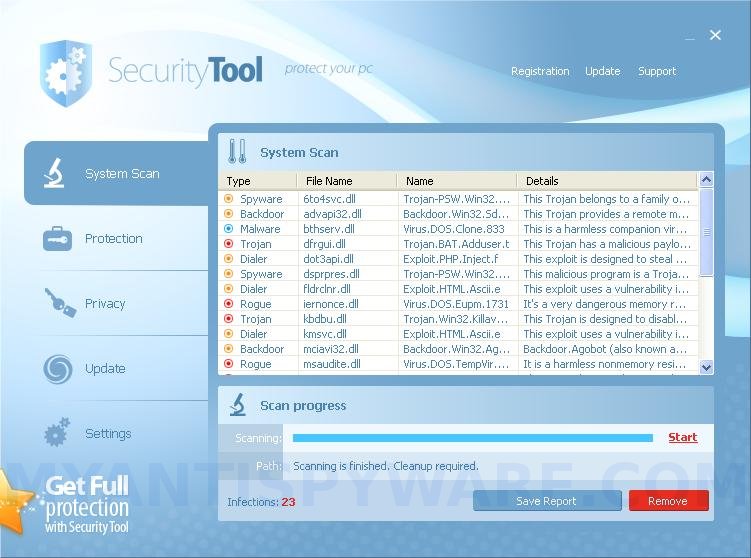
Once installed, Security Tool configures itself to run automatically every time, when you start your computer. Once running, the software starts scanning the computer and found a lot of adware, trojans and spyware. All these infections are fake, so you can safely ignore them.

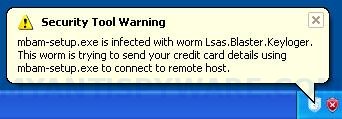
Security Tool blocks the ability to run any programs, including Malwarebytes Anti-Malware. The following warning will be shown when you try to run any program:

Security Tool Warning
mbam-setup.exe is infected with worm Lsas.Blaster.Keyloger.
This worm is trying to send your credit card details using
mbam-setup.exe to connect to remote hosts.

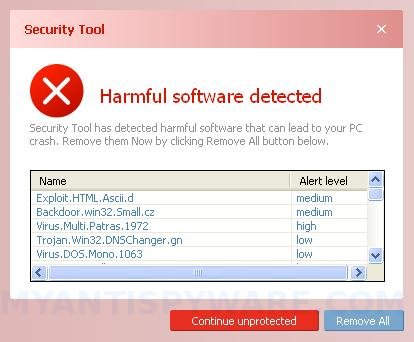
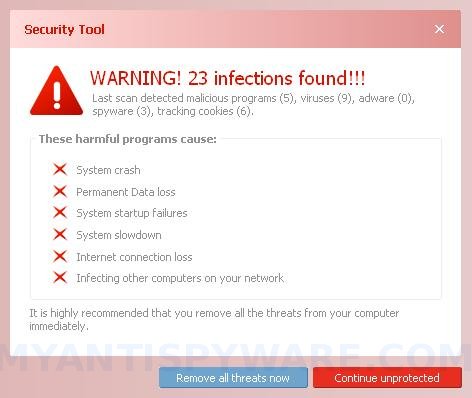
While Security Tool is running your computer will display a lot of false security alerts and nag screens. Some of the alerts:

Security Tool Warning
Intercepting program that may compromise your privacy and
harm your system have been detected on your PC.
Click here to remove them immediately with Security Tool

Security Tool
WARNING 23 infections found!!!

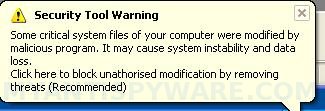
Security Tool Warning
Some critical system files of your computer were modified by
malicious program. It may cause system instability and data
loss.
Click here to block unauthorized modification by removing
threats (Recommended)

All of these warnings are a fake and like scan false results should be ignored! Use the following Security Tool removal instructions below in order to remove this infection and any associated malware from your computer for free.

More screen shoots of Security Tool
Symptoms in a HijackThis Log

O4 – HKLM\..\Run: [96015930] C:\Documents and Settings\All Users\Application Data\96015930\96015930.exe
O4 – HKLM\..\Run: [{RANDOM}] C:\Documents and Settings\All Users\Application Data\{RANDOM}\{RANDOM}.exe

Use the following instructions to remove Security Tool (Uninstall instructions)

Step 1

Download HijackThis from here, but before saving HijackThis.exe, rename it first to explorer.exe and click Save button to save it to desktop.

Doubleclick on the explorer.exe icon on your desktop for run HijackThis. If Security Tool hides your desktop icons, then right click to Windows task bar, then click Show Desktop.

HijackThis main menu opens.

Click “Do a system scan only” button. Look for lines that looks like:

O4 – HKLM\..\Run: [96015930] C:\Documents and Settings\All Users\Application Data\96015930\96015930.exe

Place a checkmark against each of them. Once you have selected all entries, close all running programs then click once on the “fix checked” button. Close HijackThis.

Note: list of infected items may be different. Template of the malicious entry: O4 – HKLM\..\Run: [{RANDOM}] C:\Documents and Settings\All Users\Application Data\{RANDOM}\{RANDOM}.exe. Please be very careful, do NOT check any other boxes!

Step 2

Download MalwareBytes Anti-malware (MBAM). Close all programs and Windows on your computer.

Double Click mbam-setup.exe to install the application. When the installation begins, keep following the prompts in order to continue with the installation process. Do not make any changes to default settings and when the program has finished installing, make sure a checkmark is placed next to Update Malwarebytes’ Anti-Malware and Launch Malwarebytes’ Anti-Malware, then click Finish.

If an update is found, it will download and install the latest version.

Once the program has loaded you will see window similar to the one below.

malwarebytes-antimalware
Malwarebytes Anti-Malware Window

Select Perform Quick Scan, then click Scan, it will start scanning your computer for Security Tool infection. This procedure can take some time, so please be patient.

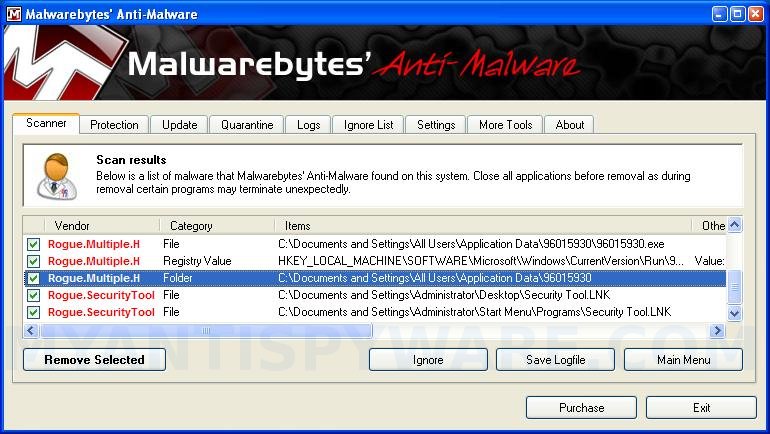
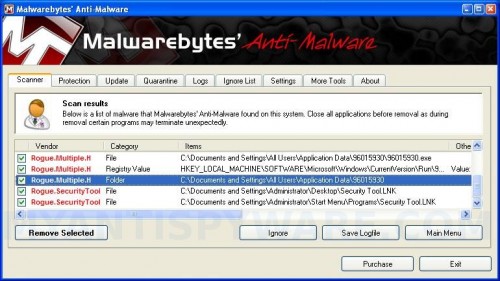
When the scan is complete, click OK, then Show Results to view the results. You will see a list of infected items similar as shown below. Note: list of infected items may be different than what is shown in the image below.
SecurityTool_mbam
Malwarebytes Anti-malware, list of infected items

Make sure that everything is checked, and click Remove Selected for start Security Tool removal process. When disinfection is completed, a log will open in Notepad and you may be prompted to Restart.

Note 1: if you can not download, install, run or update Malwarebytes Anti-malware, then follow the steps: Malwarebytes won`t install, run or update – How to fix it.

Note 2: if you need help with the instructions, then post your questions in our Spyware Removal forum.

Note 3: your current antispyware and antivirus software let the infection through ? Then you may want to consider purchasing the FULL version of MalwareBytes Anti-malware to protect your computer in the future.

Security Tool creates the following files and folders

C:\Documents and Settings\All Users\Application Data\{RANDOM}
C:\Documents and Settings\All Users\Application Data\{RANDOM}\{RANDOM}.exe.
C:\Documents and Settings\Administrator\Desktop\Security Tool.LNK
C:\Documents and Settings\Administrator\Start Menu\Programs\Security Tool.LNK

Security Tool creates the following registry keys and values

HKEY_LOCAL_MACHINE\SOFTWARE\Microsoft\Windows\CurrentVersion\Run\{RANDOM}

Share and Enjoy:

  • Print
  • Digg
  • Sphinn
  • del.icio.us
  • Facebook
  • Mixx
  • Google Bookmarks
  • Slashdot
  • Twitter
October 13, 2009 on 9:32 am | In Malware removal, Rogue Anti Spyware | 73 Comments |


73 Comments »

RSS feed for comments on this post. TrackBack URI

  1. Hello,

    I’ve been reading some of the help notes on this application (PC infected, and it keeps coming back). I did run Malwarebytes and it found some items, but it seems still to be embedded in my PC.

    I was looking in the registry and found a TEN-digit number there in a few places (the RUN area, Software, etc), when all of the times I’ve killed Security Tool (or wounded it), it was an EIGHT digit number.

    Since I didn’t know how to stop it originally, and booting in Safe Mode only made my PC crash, could these be remnants that are letting it come back?

    Thanks for any advice you can offer.

    Comment by Earl — October 14, 2009 #

  2. This is how I removed Security tool from a laptop,
    First of all its important to know where its installed in your computer, you can do this by right clicking the shortcut and choosing the properties, it usually shows the folder and subfolders such as C:\programdata\securitytool… etc. this is just an example, in the laptop it was installed in the program data folder and not the programs, the other thing is it was using a different name, and the most annoying of all is that it uses numbers rather than letters e.g. 1337722, and it hides the program data folder so you can not go into C: and the program data, you have to type it in the explorer address bar.
    To remove it start windows in a safe mode, and assuming you know where its installed go to the folder by typing it, and just delete the whole folder, that is the one that contains the security tool usually numbered. that is all you need to do.

    Comment by Ashuun — October 14, 2009 #

  3. I think, knock on wood (because it has seemingly been dead before) it might be gone. I did remove the 10-digit number from everywhere in the Registry except the search area (where it must keep records of things you looked for).

    Booting in about 3 minutes instead of 5, and no problems so far!

    Thanks!

    Comment by Earl — October 14, 2009 #

  4. Don’t listen to the short sighted, greedy, misinformed, uneducated, ignormaus, terorist name sounding, douche, named Ashuun! If you have seen references to one of those 10 digit file name files, then you have a trojan virus. Which means that deleting the folder will resolve the issue temporarily but hte problem WILL come back. You HAVE to run a full malware bytes scan in safe mode to ensure the removal of the virus/malware.

    Comment by TheRock — October 22, 2009 #

  5. Hi, I recently downloaded hijackthis.exe. My computer has the SecurityTool virus.the scan results did not present any numbers 96015930 anyplace. any comments?

    Comment by Tammy — October 25, 2009 #

  6. Tammy, “96015930″ is example. The virus uses random numbers to hide itself.

    Comment by Patrik — October 25, 2009 #

  7. hello i just fixed it yes it done my head in lol. Thanx allot !!! by the way tammy just check the ones saying [hmtl] hope this helps…

    Comment by Martin Ellis — November 2, 2009 #

  8. LEGENDS!!!!!!!!!!!!!!!!!!

    Comment by Martin Ellis — November 2, 2009 #

  9. Thanks a lot!!!!!i cud remove that bugger security tool from my laptop by following the steps u mentioned above….CHEERS!!!!

    Comment by Geeta — November 5, 2009 #

  10. Ok how do i get this security tool off my computer when it wont even let me go to a web sight to download anything..

    Comment by tutman — November 7, 2009 #

  11. I encountered security tool 59723026. I got rid of it within a few hours by restarting my computer and while it was reloading i quickly jumped into the task manager and stopped the process by clicking on the number. I also stopped any process associated with the name or number above. Then I found the program and deleted it using Programs from the start menu.

    good luck. this could bring a grown man to tears

    Comment by Tanya — November 8, 2009 #

  12. tutman, Please read the article: How to reboot computer in Safe mode, but reboot your computer in the Safe mode with networking (Select second option in the Advanced Options Menu).
    In the mode try download and use HijackThis.

    Comment by Patrik — November 8, 2009 #

  13. Hey all I just finally dealt with Security Tools, which I think came up while watching a movie online. My anti-virus and firewall were off to test other things.

    Well I noticed all these links to downloading SpyDoctor, and with all the amazing comments, I was about to pay for it (even though a cost was not advertised).

    SpyDoctor also seemed to know lots about this Security Tools ;S
    It even showed the name SecurityTools as a problem found!

    Well I kept looking and found SpyBot Search and Destroy, a very civilized program that asked you to donate what you thought the program was worth. It did find errors, but it did not work for removing SecurityTools.

    I checked around my computer and found that I also had MalwareByte’s Anti-Malware and THAT WORKED! Boom a quick scan and ST is gone. THAT is the one to get. Its free.

    Comment by Andrew C — November 8, 2009 #

  14. Wow it really does work!! Its so much of a relief.

    Thank you sooooooooo much

    Comment by luke — November 14, 2009 #

  15. i cnt get rid of the security tool help these instructions dont work is there some thing i can pay to get it done

    Comment by carol — November 16, 2009 #

  16. carol, ask for help in our Spyware removal forum. I will help you.

    Comment by Patrik — November 17, 2009 #

  17. This is what I did…took it from one of the comments here..it worked great!! THANK YOU!
    This is how I removed Security tool from a laptop,
    First of all its important to know where its installed in your computer, you can do this by right clicking the shortcut and choosing the properties, it usually shows the folder and subfolders such as C:\programdata\securitytool… etc. this is just an example, in the laptop it was installed in the program data folder and not the programs, the other thing is it was using a different name, and the most annoying of all is that it uses numbers rather than letters e.g. 1337722, and it hides the program data folder so you can not go into C: and the program data, you have to type it in the explorer address bar.
    To remove it start windows in a safe mode, and assuming you know where its installed go to the folder by typing it, and just delete the whole folder, that is the one that contains the security tool usually numbered. that is all you need to do.

    Comment by Ashuun — October 14, 2009

    Comment by mj — November 17, 2009 #

  18. WOW that was some slick!!!!!! shit man.
    thanks a zillion it really helped a bunch

    Comment by slicko911 — November 18, 2009 #

  19. i was infected too, did all of the above and it got rid of the virus. problem now is that i dont have anywhere near the performance as before…very slow and frustrating. i assumed it was still hanging around somewhere, but i have scanned multiple times by different spywares, incl malware, and it finds nothing. Anyone have any ideas

    Comment by larry — November 20, 2009 #

  20. larry, probably your are sill infected with unknown hidden trojan/rootkit. Make a new topic in our Spyware Removal forum.

    Comment by Patrik — November 20, 2009 #

  21. man thanks my computer was almost dumbed by that fucking security tool thanks alot u saved money thanks alot

    Comment by uzair — November 21, 2009 #

  22. i got caught up in this before searching and paid the $50. Then found out what it was and got rid of it from malwarebytes. My question is is anything known from this person(s). Any one had excessive unauthorized charges from this or just the fifty bucks. Want to see if anyone knows what they are doing for getting a new cred card

    Comment by jjo_rocker — November 23, 2009 #

  23. jjo_rocker, if you have already purchase the program, contact your credit card company and tell them what has happened.

    Comment by Patrik — November 24, 2009 #

  24. Appreciate the help in removing Security Tool f…k
    Kudos to Malware Bytes.

    Comment by Norman — November 24, 2009 #

  25. this security tool sh it is a set up

    Comment by carlisa — November 25, 2009 #

  26. i cant get malware

    Comment by carlisa — November 25, 2009 #

  27. Can anyone help me? I’ve downloaded MBAM.exe, Spydoc, and God only knows what else. This security tools crap won’t allow any program to run or open… I barely get IE up & running! What do I do if I can’t run MBAM or SpyDoc? PLEASE HELP!!!!!

    Comment by Myles — November 25, 2009 #

  28. Myles, you need use HijackThis before Malwarebytes. Also you can ask us for help in our Spyware removal forum.

    Comment by Patrik — November 26, 2009 #

  29. Thanks So Much now them fuckers is dealt with.
    I tought my computer was gonna get destroyed so i googled “how to delete Sercuirty tools” and found this.
    Much Love for those who made this site..
    Cheers!

    Comment by Mak — November 27, 2009 #

  30. Thank you so much! This really helped and worked perfectly! That stupid tool (pun intended) was ruining everything! Keep up the good work!

    Comment by Rob — November 28, 2009 #

  31. Will McAfee antivirus remove this Security Tool nonsense?

    Comment by Eric — December 2, 2009 #

  32. Very helpful guide on removing Security Tool. One thing worth mentioning is the “96015930.exe” executable file will be unique to each infection. So you are looking for a 10 digit numbered .exe file. Once you stop and delete this file it is not that hard to fully remove the rest of this thing.

    Comment by Security Tool Sucks — December 2, 2009 #

  33. I NEED HELP PLEASE THIS SECURITY TOOL WONT COME OFF MY LAPTOP!!

    Comment by Ava — December 20, 2009 #

  34. Ava, if the instruction above does not help you, then ask for help in our Spyware removal forum.

    Comment by Patrik — December 21, 2009 #

  35. hurray …. thanks dear .. it helped me solve my problem

    Comment by sukhdev singh — December 22, 2009 #

  36. My vista PC had this. the hijacker works good to allow a scan to be run. my process was 27690529.exe . this thing was a pain. thanks for posting the above directions.

    Comment by Brendan — December 24, 2009 #

  37. thank you

    Comment by luke — December 26, 2009 #

  38. i download hijakthis but i can’t scan because every time i double click the icon in the desktop security tool interferes then appears on screen “explorer.exe.exe is enfected w/ wormLsas.blaster.keyloger…can you help me pls!

    Comment by bill — December 30, 2009 #

  39. bill, download it again, but in save dialog rename Hijackthis.exe to explorer.exe. This is important!

    Comment by Patrik — December 30, 2009 #

  40. Thank you very much! God bless you for posting this. It helped me solve the problem.

    Comment by Amy — January 5, 2010 #

  41. Thank You sooo much!! The Security Tool has gone!!

    Comment by Shereen — January 6, 2010 #

  42. We just got hit with “Security Tool” on a Vista Home Premium Rig w/ SP2. The hit came in on a pdf through Adobe Reader 9.1.3. It appeared only hit the affected user. So I was able to login with another user acct okay. But the suggested scan there yielded no info. Which is not unexpected in Vista.

    I had to boot in Safe Mode and login with the affected user to kill the trojan startup. On first reboot, I found _ex-08.exe running and siszyd32.exe in my startup. I killed these from running and the MSconfig startup. On the next reboot Windows Defender found and cleaned “Trojan:Win32/Hiloti.gen!C”

    I think I am clean now but I will be ditching McAfee and will be reloading with TrendMicro before the night is out. Thanks for the assist guys. Mucho Gracias!

    Comment by TheBitHunter — January 16, 2010 #

  43. UPDATE: windows Defender did not Kill this for good. On my third reboot after thinking this was clean, _ex8.exe was back. I am going to run the MalwareBytes AM s/w and we’ll see after that.

    Comment by TheBitHunter — January 16, 2010 #

  44. Thank you so much for the instructions. My husband’s computer was hit today with this and we have no idea how he got it. This fix worked wonderfully – we’re back in business with just a small amount of frustration towards our antivirus-antispyware program. We think we’re paying for the best, but somehow this skated through.

    Comment by Debby — January 19, 2010 #

  45. will mcafee help remove security tool ?!?

    Comment by geraldine — January 22, 2010 #

  46. geraldine, probably yes.

    Comment by Patrik — January 23, 2010 #

  47. i really want to thank you its so powerfull and simple.its really wooooow. i advice all of you to do the instruction as above and its will work, dont try another websites.this is the best,thanks again

    Comment by islam alqaryouti — January 24, 2010 #

  48. This has worked for me so far for Windows Vista, because Security Tool would not let me install regcure or Spyware Doctor. I rebooted in Safe Mode –might have to hit F8. I first took the ST icon off my desktop then went into the Control Panel and into Folder Options. Clicked on View, then Show Hidden Files and Folders. I then right clicked on the Start button and then clicked on Explore went to Programs which brought up a list with Security Tools on it. I right clicked on it and deleted it. Then I emptied my Recycle Bin – you may have to empty each item manually. Then I went into Accessories and down to System Restore and picked an earlier restore point. When it restarted my desktop was back to normal and the ST icon was gone from my startup. I think if the person who started this pain in the a*& spyware is ever found, they need to be put in front of a firing squad and I get first shot. Hope this might help you. I was about ready to puke. I just hope this did it , but so far so good.

    Comment by Amy — February 7, 2010 #

  49. my god that security thing is driving me nuts. finally doing what this website says and with malwarebytes. i hope i get rid of it. its icons are still on my bar at the bottom and still dont know how to get the sob off.

    Comment by kimberly — February 11, 2010 #

  50. kimberly, probably this is only icon. Right click to it and select Delete.

    Comment by Patrik — February 12, 2010 #

  51. i appreciate all the help from every site i have gone to but none of them worked at all.security tool wouldnt even let me run any kind of virus scan and such.I dont know why this worked for me but i went into safe mode and restored my laptop to a previouse date so maybe others could try that . it worked for me:) shrugs and such a simple solution to a big problem ,i dont know maybe i was just lucky.

    Comment by greg — February 15, 2010 #

  52. I have no computer experience. I got this Security Tool virus on my laptop today and I want to use the Malware Byte Anti-Malware, but don’t know how to do it. Is there a website on which I can find this? What is the process. Please help. Thank you!

    Comment by JACT — February 15, 2010 #

  53. JACT, follow above instructions.

    Comment by Patrik — February 16, 2010 #

  54. When I scanned with Hijack this, I did not see the O4 – HKLM\..\Run: [xxxxxxxx] C:\Documents and Settings\All Users\Application Data\xxxxxxxx\xxxxxxxx.exe

    I’ve dealt with this virus before and last time I was able to see it.

    Comment by Jake — February 18, 2010 #

  55. Jake, ask for help in our Spyware removal forum.

    Comment by Patrik — February 19, 2010 #

  56. what is security tools phone number? i’m going to call and give them a peas of my mind

    Comment by rebecca — February 23, 2010 #

  57. THANK YOU SOOOOOO MUCH!! I was very fustrated when i thought i couldnt get rid of it and therefore had to pay someone else to fix my computer. But these instructions worked well, its gone. Get the HIJACTHIS first then download malwarebytes. After downloading hijackthis, suddenly my windows defender ‘woke up’ and the pop up stopped and the malware removed the nasty piece of work!

    But how can i be sure that IT IS REALLY gone and won’t come back again. Is is safe to start logging on into my emails and online banking? I thank you sooo Much!

    Comment by flora — February 23, 2010 #

  58. ALSO MINE WAS A 8 NUMBER DIGIT (93999241), so i guess it can range from 8 to 10

    Comment by flora — February 23, 2010 #

  59. flora, you can also check your PC using an virus online scanner.

    Comment by Patrik — February 24, 2010 #

  60. Unbelievable. It worked, I do not believe it.
    I just devirusat laptop a very dangerous virus blocking all executable files (. Exe) (Security Tool)
    Thank you all for your help.

    Comment by Shumy — February 26, 2010 #

  61. i hope you will help me

    Comment by zee — February 27, 2010 #

  62. This is the first time I’ve been able to remove a spyware program so easily. Thanks for all the info!!

    Comment by janet — February 27, 2010 #

  63. zee, if the steps above does not help you, then ask for help in our Spyware removal forum.

    Comment by Patrik — February 28, 2010 #

  64. Just a heads up: McAfee does NOT detect his. Bought my teen son a new Windows 7 laptop a week ago. McAfee came with it and was factory installed. I checked after he did the initial set-up, and McAfee was running. But the Security Tool bullshit showed up last night, took me a while to (hopefully) get rid of it. My daughter TWICE had a similar nightmare a coupole of months ago with the very simlar “Internet Security 2009″ malware – also while running McAfee. We can get Norton free through our ISP so I changed hers to Norton, as well as my own PC. No problems since, and twice I have been notified by Norton that they were able to block this crap from infecting me. So it appears that Norton is ahead of the curve on this one – better to prevent the infection than to fix it later – and McAfee behind. Needless to say I will be switching my son to Norton asap.

    Comment by Beanman — March 1, 2010 #

  65. Awesome!!! Instructions worked like a charm. My system is Security Tool free. Thanks for the great solution.

    Comment by Donna — March 2, 2010 #

  66. Absolutely brilliant thanks so much it worked a treat for my lap top. The people who make these nasty viruses should be shot at dawn !!!! Thanks for all your help on here :)

    Comment by Gilly — March 19, 2010 #

  67. Thankyou So fricken much!!!!I thought i was going to have to get a new computer =]]]]]]]]]]]

    im so happy….as you can tell..lol

    Comment by Caitlin — March 21, 2010 #

  68. I was once victim of this evil tool, but I had a quick and easy way of uninstalling Security Tool.

    1. If you are in despair, FORCE SHUT DOWN YOUR COMPUTER.
    2. Turn it back on and if running Vista or higher(Cause I did this on vista 64 bit), you will see a screen that is black, and asks you if you want to run PC in Safe Mode. Click the “Safe Mode with Networking” button.
    3. Log in, and don’t worry about the large icons.
    (Note: you will be able to use your PC safely in this mode, without the interference of security Tool, but why stay in safe mode?)
    4. A window will pop up and tell you about Safe Mode. If you scroll down, you will see a button that requires you to give permission to use System Restore.
    5. Allow it to. It will take a while, but be patient. Why don’t you have some coffee or something while you wait?
    6. When it loads(can take up to 5 min), it will give you a set of restore points. Then, pick the one right before you downloaded Security Tool. (Note: Windows makes restore points every day and everytime you change your computer.)
    7. WAIT for it to restore your computer. When it does, log in. It will take a long time for your computer to load. It may seem extremely slow, but think of it as your PC being born again.
    8. Restart your computer to get it back to normal speed.
    9. Skip around, laugh, and cry in joy. YOUR COMPUTER IS SAFE!

    Comment by Jason — March 28, 2010 #

  69. Jason your a star.Had this virus on pc this morning.Checked loads of forums no body and i mean nobody said to try this .took 10 mins. Cheers

    Comment by Wayne — April 6, 2010 #

  70. very frustrating virus..to be honest, a proper bastard,but thanks cos the ‘bastard’ is gone and forgotten i coudnt o done it without you, thanks for being my saviour,simple instructions to a ‘bastard’ of a problem … nice one !

    Comment by matthew — April 19, 2010 #

  71. Jason, thanks very much. Your way is quick and simple. I was very upset b/c 5 hours cant find out the way to fix.

    Comment by rosa — April 22, 2010 #

  72. Andrew C., I had your problem last night [April 29-30, 2010, but replace your case of MalwareMalBytes with my Windows LiveOneCare and you have my story.:)

    Comment by Steve Carras — May 1, 2010 #

  73. Did not get the Safe Mode screen(using XP). Armed with monumental frustration, called up task menu. Only one item was identified by number. Selected it and hit End Process. Problem solved. Was at the point that I was bound for a shop visit so what did I have to lose !!!

    Comment by John Willis — July 31, 2010 #

Leave a comment

XHTML: <a href="" title=""> <abbr title=""> <acronym title=""> <b> <blockquote cite=""> <cite> <code> <del datetime=""> <em> <i> <q cite=""> <strike> <strong>


My Anti Spyware - Free antispyware programs and Spyware Removal Instructions.