Windows Security Suite is a rogue antispyware program from Virus Doctor rogue family (Malware Destructor 2009, Fast Antivirus 2009 … ). Like other fake antispyware software, it`s distributed through the use of malware and does not offer any protection to computer. Windows Security Suite uses fake alerts and false positives to trick you into buying the program.
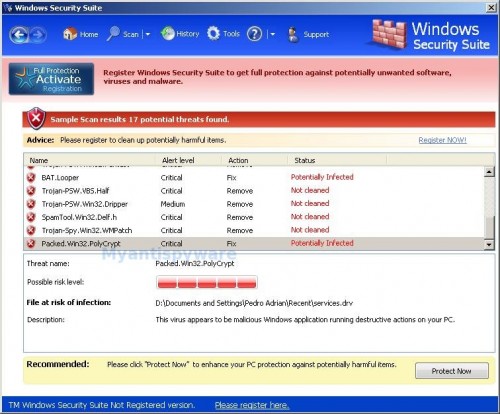
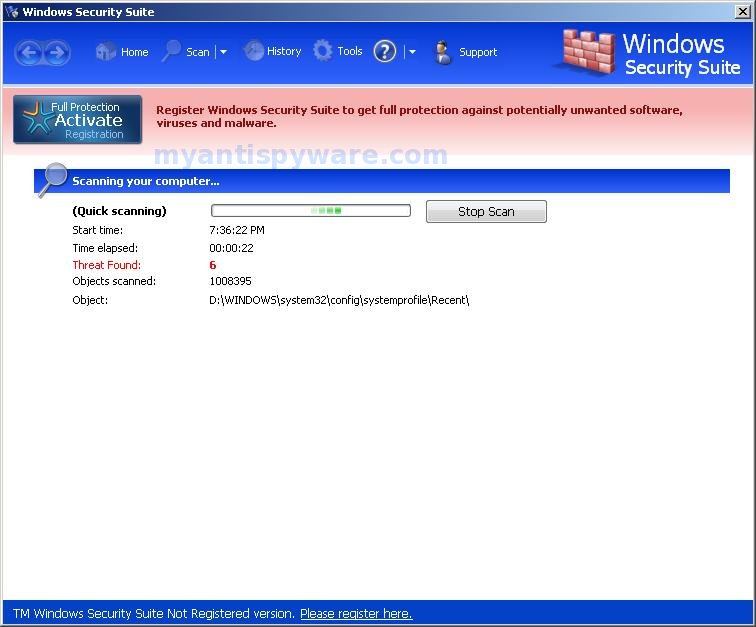
Once Windows Security Suite is installed, it configures itself to run automatically every time, when you start your computer. In addition the program drops a few files. These files are actually harmless, but during the scan will determine as threats (spyware, malware and trojans). Once running, Windows Security Suite starts scanning the computer and list previously created files as threats to trick you to buy the software, in order to remove these reported infections. You can safely ignore them.
While Windows Security Suite is running, it blocks legitimate antivirus and antispyware programs (Kaspersky Antivirus, DrWeb, AdAware, McAfee, Norton AV, …). Your computer will display fake warning and fake security alerts from your windows taskbar. A few examples of the security alerts:
System alert
malicious applications, which contain trojans, were found
on your PC and need to be immediately removed. Click here to
remove these potentially harmful items using Windows Security Suite.
System alert
Windows Security Suite has detected potentially harmful
software in your system. It is strongly recommended that you
register Windows Security Suite to remove these threats
immediately.
Windows Security Suite can be safely removed from your computer along with any other malware if the proper steps are taken. If you are a non-techie computer user then this method of removing the rogue is for you.
Symptoms in a HijackThis Log
O1 – Hosts: 74.125.45.100 test1111.com
O1 – Hosts: 74.125.45.100 test1112.com
O1 – Hosts: 74.125.45.100 4-open-davinci.com
O1 – Hosts: 74.125.45.100 securitysoftwarepayments.com
O1 – Hosts: 74.125.45.100 privatesecuredpayments.com
O1 – Hosts: 74.125.45.100 secure.privatesecuredpayments.com
O1 – Hosts: 74.125.45.100 getantivirusplusnow.com
O1 – Hosts: 74.125.45.100 secure-plus-payments.com
O1 – Hosts: 74.125.45.100 www.getantivirusplusnow.com
O1 – Hosts: 74.125.45.100 www.secure-plus-payments.com
O1 – Hosts: 74.125.45.100 www.getavplusnow.com
O1 – Hosts: 74.125.45.100 www.securesoftwarebill.com
O4 – HKCU\..\Run: [Windows Security Suite] “C:\Documents and Settings\All Users\Application Data\f5bc4e8\WIf5bc.exe” /s /d
Use the following instructions to remove Windows Security Suite (Uninstall instructions)
Download OTM by OldTimer from here.
Run OTM, copy,then paste the following text in “Paste Instructions for Items to be Moved” window (under the yellow bar):
:reg

[HKEY_CURRENT_USER\Software\Microsoft\Windows\CurrentVersion\Run]

"Windows Security Suite"=-
:files

%appdata%\Windows Security Suite

%appdata%\WINSSSys
:Commands

[Reboot]
Click the red Moveit! button. When the tool is finished, you may be prompted to Restart.
Download MalwareBytes Anti-malware (MBAM). Close all programs and Windows on your computer.
Double Click mbam-setup.exe to install the application. When the installation begins, keep following the prompts in order to continue with the installation process. Do not make any changes to default settings and when the program has finished installing, make sure a checkmark is placed next to Update Malwarebytes’ Anti-Malware and Launch Malwarebytes’ Anti-Malware, then click Finish.
If an update is found, it will download and install the latest version.
Once the program has loaded you will see window similar to the one below.

Malwarebytes Anti-Malware Window
Select Perform Quick Scan, then click Scan, it will start scanning your computer for Windows Security Suite infection. This procedure can take some time, so please be patient.
When the scan is complete, click OK, then Show Results to view the results. You will see a list of infected items similar as shown below. Note: list of infected items may be different than what is shown in the image below.
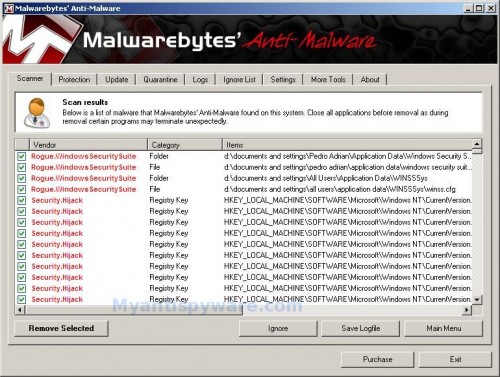
Malwarebytes Anti-malware, list of infected items
Make sure that everything is checked, and click Remove Selected for start Windows Security Suite removal process. When disinfection is completed, a log will open in Notepad and you may be prompted to Restart.
Note: if you need help with the instructions, then post your questions in our Spyware Removal forum.
Windows Security Suite creates the following files and folders
%appdata%\Windows Security Suite
%appdata%\WINSSSys
%appdata%\f5bc4e8
c:\documents and settings\all users\application data\WINSSSys\winss.cfg
%userprofile%\Desktop\Windows Security Suite.lnk
%userprofile%\Start Menu\Windows Security Suite.lnk
%userprofile%\Start Menu\Programs\Windows Security Suite.lnk
%userprofile%\Application Data\Microsoft\Internet Explorer\Quick Launch\Windows Security Suite.lnk
Windows Security Suite creates the following registry keys and values
HKEY_CURRENT_USER\Software\Microsoft\Windows\CurrentVersion\Run “Windows Security Suite”






I don’t know how I got it but knew it was a rogue virus and never accepted any of the bogus prompts that came on. I want to thank you, Patrik. I finally got rid of all that nonsense.
My anti virus cannot remove spyware. I’m lucky I read this information. I hope this would help a lot.
Hey guys, I’ve tried Malware and the OTM and when I run HiJack This, it still says that I still have Hijacked hosts. When I run all the scans from SuperAntiSpyware to MalwareBytes, it doesn’t find anything. I’ve been trying to figure this out for a month now and nothing seems to work.
Any help and info would be truly appreciated. Let me know what info you need me to provide. Thank you.
Stephen, follow the steps below to reset HOSTS file:
Run OTM, copy,then paste the following text in “Paste Instructions for Items to be Moved” window (under the yellow bar):
:Commands

[resethosts]
Click the red Moveit! button.
OHMYDAYS! I have been trying all day to get this to work! Saved my lifee! I thought my dad would find out i had practacly broken my laptop and would kill me! Thanks soooooo much!
Was I supposed to download the OTM on the account that has the virus because on that account I can’t go on the internet.
Jessica, try download the suggested programs above in Safe mode with networking.
Thanks the virus is official deleted from my computer, but my internet is not working.
Thank you so much. The virus is official gone from my computer. I am so happy!!!
I have the same issue as Jessica, although I cant get on the internet at all, even in safe mode. I dont know how to get on there and it is getting frustrating. Basically I cant run anything. Once I try, it brings up those system alerts. How can I get Malawarebytes if I cant get to the internet to download it. Please please, if anyone can help, in the easiest way possible, explain to me how to do it. Thank you so much if you can help.
Derek, what shows your browser when you trying to download Malwarebytes ?
Well, when I try to open anything, from Int Explorer to My Computer Folder, it pops up with an alert saying it cant open and asks if i want to run the fake Virus protection program. I downloaded Malwarebytes on another PC and put it on a geek stick and put it on the messed up PC, but it wont let me open it
Derek,
1. try run Malwarebytes in Safe mode
2. try rename Malwarebytes installer to 123.com or 123.scr or iexplore.exe, then run it.
yeah, seems to have worked – thx!