Do you have pop-ups or your computer infected with trojan or spyware ? Learn how to ask us for help, click here!

How to reboot computer in Safe mode

Safe mode is a special Windows mode that can be used to help fix problems with spyware, malware and trojans. The mode load a minimal set of drivers. You can use Safe mode to start Windows so that you can modify the registry, remove files, load or remove drivers.

Use the following instructions to reboot your computer in Safe mode.

Restart your computer.

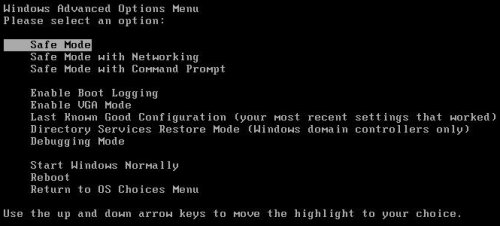
After hearing your computer beep once during startup, start pressing the F8 key on your keyboard. On a computer that is configured for booting to multiple operating systems, you can press the F8 key when the Boot Menu appears.

Instead of Windows loading as normal, Windows Advanced Options menu appears similar to the one below.
safe-mode-how-to

Select Safe mode when the Windows Advanced Options menu appears, and then press ENTER.
Windows will start loading.

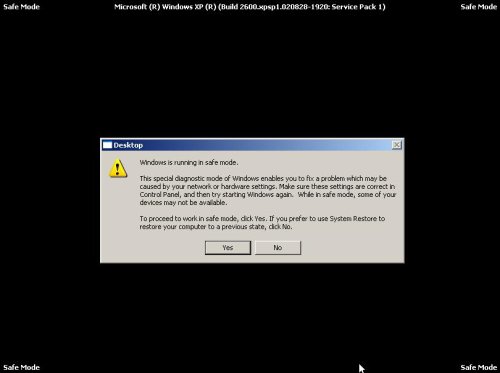
When Windows has finished loading, you will see a screen as shown below.
windows-is-running-in-safe-mode

Click Yes.
Now you can start using Windows in Safe mode.

Share and Enjoy:
  • Print
  • Digg
  • Sphinn
  • del.icio.us
  • Facebook
  • Mixx
  • Google Bookmarks
  • Slashdot
  • Twitter
March 1, 2009 on 9:48 am | In Tutorials - HowTo | 17 Comments |


17 Comments »

RSS feed for comments on this post. TrackBack URI

  1. having a hard time here trying to get rid of total secuirty of my computer here i did everything so far till teh reboot, and then press F8 and nothing happen here so i dont know why it wont remove the program here can u help me out thanks and god bless

    Comment by Pat — July 31, 2009 #

  2. Pat, probably Safe mode blocked by malware. You can ask for help at our spyware removal forum.

    Comment by Patrik — July 31, 2009 #

  3. Argh! I’m trying to manually remove the files using Control alt delete to get into Windows task manager, but it doesn’t work! Everyone keeps telling me that it will work in safe mode, but every time I try to get into safe mode, I get the blue screen of death. Help?

    Comment by Carie — August 25, 2009 #

  4. Carie, probably a malware blocks Safe Mode. Ask for help at our Spyware removal forum.

    Comment by Patrik — August 25, 2009 #

  5. wont let me hit the next button get all the way to the end and it wont let me hit next

    Comment by bobby — August 27, 2009 #

  6. hi,

    I am unable to boot system in safemode, when I chose safe mode option it is loading all dll and sys file then system is restarting again. plz help me

    Comment by Gudachari — September 14, 2009 #

  7. Gudachari, probably a virus has damaged Windows registry or removed a few system files. Try to repair Safe mode using free program SafeBootKeyRepair. Download it from here.

    Comment by Patrik — September 14, 2009 #

  8. thanks for the ideas, but i press the F* key and it doesn’t help i can’t get into the windows advanced options
    help!!!

    Comment by tirzah — September 24, 2009 #

  9. i cant get into the windows advancaed options menu tho i pressed F8
    help

    Comment by tirzah — September 24, 2009 #

  10. tirzah, if your computer works in Normal mode, then you can run msconfig and to select Safe mode.

    Comment by Patrik — September 24, 2009 #

  11. cannot get rid of police pro

    Comment by hugo — October 6, 2009 #

  12. Aaaarrrghh we have a p bell laptop here thats gone weird! Its gone into bios stuff and gets stuck at re boot set up pages and wont budge. Weve tried the f8 key start up thing, etc etc have no cd’s help….anybody??? we arnt very puter literate either x

    Comment by Rachyrach — November 16, 2009 #

  13. Probably it`s problem with hardware. You need call to local service company.

    Comment by Patrik — November 17, 2009 #

  14. My computer seems to be on a loop – try to restart in safe mode, and it just restarts itself, and takes me back to the same page. Any suggestions?

    Comment by Todd — November 27, 2009 #

  15. Todd, what is “same page” ? You can`t boot your PC in Normal mode too ?

    Comment by Patrik — November 27, 2009 #

  16. I am so thankful for everyones help.
    safe mode allowed me to get to it. There was more than one item.
    All finally seems well now.
    Those using fowl language here, cut us some slack that are chtistian and dont use the f word like a verb. :-) It is not necessary to cuss to communicate your frustrations.

    Comment by Susan — December 6, 2009 #

  17. How do I change the size of the safe mode screens I can’t access the next step?

    Comment by troubled — February 4, 2010 #

Leave a comment

XHTML: <a href="" title=""> <abbr title=""> <acronym title=""> <b> <blockquote cite=""> <cite> <code> <del datetime=""> <em> <i> <q cite=""> <strike> <strong>


My Anti Spyware - Free antispyware programs and Spyware Removal Instructions.
