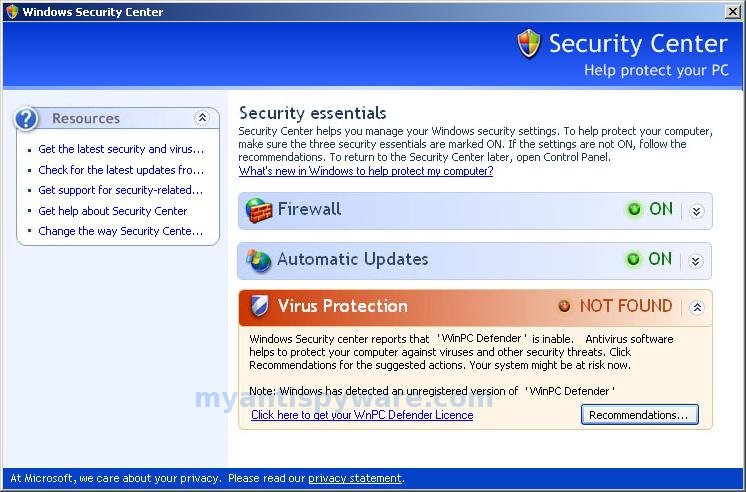
WinPC Defender is a rogue antispyware program, brother of the rogue named XP Police Antivirus . Like other rogue antispyware programs, it is distributed through the use trojans. Once infected with these trojans your computer will display large amount of security alerts that tells you that your computer is infected and you should download and install WinPC Defender in order to protect your computer.
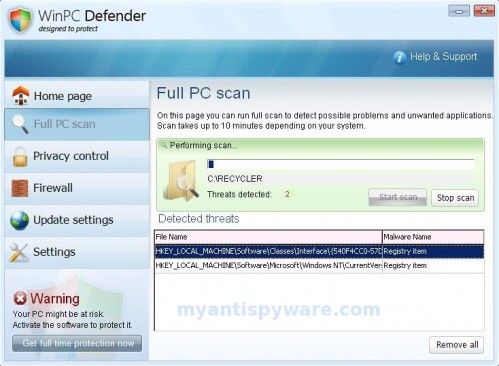
During installation, WinPC Defender configures itself to run automatically every time, when you start your computer. Once running, WinPC Defender will scan your computer and reports false or exaggerated system security threats on the PC to trick you to buy the paid version of the rogue, in order to remove the potential and reported threats.
While the Win PC Defender is running you may see false security alerts such as the following.
Trojan Detected!
A piece of malicious code was found in your system which can replicate itself if no action is taken. Click here to have your system cleaned by Win PC Defender.
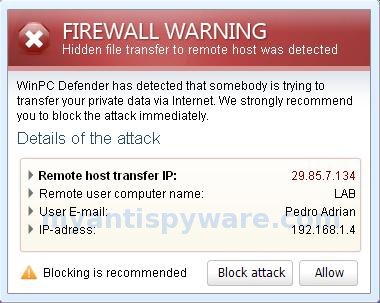
Firewall Warning
Hidden file transfer to remote host was detected.
Also WinPC Defender will hijack Internet Explorer and randomly shows a “Insecure Internet Activity” warning page, instead of the site you are trying to browse to. These alerts and warnings are a fake and should be ignored! Use the free instructions below to remove WinPC Defender and any associated malware from your computer.
Symptoms in a HijackThis Log
O2 – BHO: IEocx Class – {96ad72e4-2e2b-4ffc-a5bb-279c2714af12} – C:\WINDOWS\ieocx.dll
O4 – HKCU\..\Run: [sysav] %UserProfile%\Application Data\pcdefender.exe
Use the following instructions to remove WinPC Defender
1. Remove WinPC Defender registry entries and files.
- Download Avenger from here and unzip to your desktop.
- Run Avenger, copy,then paste the following text in Input script Box:
Registry keys to delete:

HKEY_LOCAL_MACHINE\SOFTWARE\Microsoft\Windows\CurrentVersion\Explorer\Browser Helper Objects\{96ad72e4-2e2b-4ffc-a5bb-279c2714af12}
Registry values to delete:
HKEY_LOCAL_MACHINE\Software\Microsoft\Windows\CurrentVersion\Run | ContentFiles to delete:
%windir%\ieocx.dll
%UserProfile%\Application Data\pcdefender.exeThen click on ‘Execute’.
- You will be asked Are you sure you want to execute the current script?. Click Yes.
- You will now be asked First step completed — The Avenger has been successfully set up to run on next boot. Reboot now?. Click Yes.
- Your PC will now be rebooted.
2. Remove WinPC Defender associated malware.
Download MalwareBytes Anti-malware (MBAM). Close all programs and Windows on your computer.
Double Click mbam-setup.exe to install the application. When the installation begins, keep following the prompts in order to continue with the installation process. Do not make any changes to default settings and when the program has finished installing, make sure a checkmark is placed next to Update Malwarebytes’ Anti-Malware and Launch Malwarebytes’ Anti-Malware, then click Finish.
If an update is found, it will download and install the latest version.
Once the program has loaded you will see window similar to the one below.
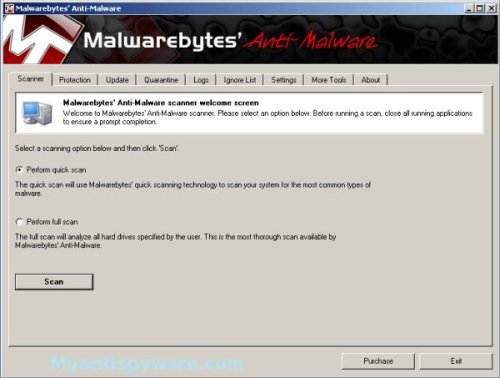
Malwarebytes Anti-Malware Window
Select “Perform Quick Scan”, then click Scan. The scan may take some time to finish,so please be patient.
When the scan is complete, click OK, then Show Results to view the results. You will see a list of infected items similar as shown below.
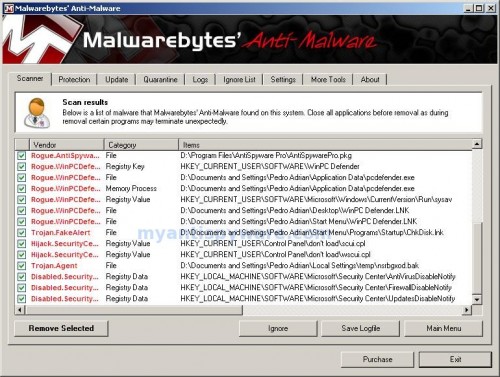
Malwarebytes Anti-malware, list of infected items
Make sure that everything is checked, and click Remove Selected. When disinfection is completed, a log will open in Notepad and you may be prompted to Restart.
Note: If you need help with the instructions, then post your questions in our Spyware Removal forum.
WinPC Defender creates the following files and folders.
%UserProfile%\Application Data\pcdefender.exe
%UserProfile%\Desktop\WinPC Defender.LNK
%UserProfile%\Start Menu\WinPC Defender.LNK
c:\WINDOWS\ieocx.dll





Hello, When I clicked on Execute I got the following error message: “Error: could not set driver ImagePath, Aborting execution! (error 0: The operation completed successfully.)”
I tried to execute the script several times and got this error every time. What can I do?
Ray
Ray, please follow these steps. I will help you.
I ran Avenger and rebooted this is what I got on notepad.
Logfile of The Avenger Version 2.0, (c) by Swandog46
http://swandog46.geekstogo.com
Platform: Windows XP
*******************
Script file opened successfully.
Script file read successfully.
Backups directory opened successfully at C:\\Avenger
*******************
Beginning to process script file:
Rootkit scan active.
Hidden driver \
drew, please post the log at our forum. I will help you.
The Script didn’t work on My vista. Help!!!
Sam, please ask help at our forum. I will help you.
i think u 4 the help
Thanks for the help, it worked perfectly.
I love you people!
pls help me!!!This win pc really affect my works!!!
How do you unzip the avenger to the desktop?and which one is the input scprit box?sorry im not good with com…pls help me..thanks..
I have got rid of win pc at last I think, but when I try to open IE it starts and then vanishes straight away. Safari will work but worried the computer is still infected in some way
please help!
Rachael, please follow these steps. I will help you at our forum.
Merci Beaucoup mon ami!!! merci…it worked just fine!
The easiest way in XP without installing anything:
– shut down pcdefender.exe in tasklist when it appears
– delete it in Documents and from the start list (e.g. in CCleaner)
– clean the comp with CCleaner
– after restart it’s gone
Hari Hari
I had the same probem for the past 5 days. Today I found the answer: “Spybot”. This is a FREE & SAFE anti spyware. It’s great. It found all the files and deleted them all. Try it. It can be downloaded from:
http://www.safer-networking.org
Cheers
I cant open the malwarebytes thing i have tried all this already and i cant open it . no matter what i do !
I cant even system restore its so annoying
Ashley, probably your PC infected with a new version of the rogue. Ask help at our Spyware removal forum.
the Malwarebytes worked beautifully and have no more
pcdefender on my computer. who ever is responsible
for that should be castrated. thanks
i ran avenger and all i got was
Beginning to process script file:
Rootkit scan active.
No rootkits found!
Error: file “C:\WINDOWS\ieocx.dll” not found!
Deletion of file “C:\WINDOWS\ieocx.dll” failed!
Status: 0xc0000034 (STATUS_OBJECT_NAME_NOT_FOUND)
–> the object does not exist
Error: file “C:\Documents and Settings\Manjit\Application Data\pcdefender.exe” not found!
Deletion of file “C:\Documents and Settings\Manjit\Application Data\pcdefender.exe” failed!
Status: 0xc0000034 (STATUS_OBJECT_NAME_NOT_FOUND)
–> the object does not exist
still canno run malwarebytes. help
jay, probably your PC is infected with a new version of the rogue. Ask for help in our Spyware removal forum.
My laptop was infected and I couldn’t open or download anything, including spyware to get rid of PC Defender, until I used the avenger program above. I was then able to download malware and get rid of pcdefender – thanks very much.