Antivirus Pro 2009 is a fake (rogue) antispyware/antivirus program. It is from the Antivirus XP family. The program is usually found on fake online-scanner websites or pages that are infected with the braviax trojan. In both cases, your computer will display popups with a message stating that your computer is infected with spyware and that you must download and install the program to clean your computer. During installation, Antivirus Pro 2009 configures itself to run automatically every time, when you start your computer. In addition the program creates some files with random names:
C:\Documents and Settings\user\Application Data\isuxih.bat
C:\WINDOWS\izewoh.dl
C:\Documents and Settings\All Users\Application Data\inurev.lib
C:\WINDOWS\qesuriqu.bat
C:\WINDOWS\supicane.bin
C:\WINDOWS\system32\afuny.reg
C:\Program Files\Common Files\yfila.dat
C:\Documents and Settings\user\Local Settings\Application Data\towyvo.pif
C:\Program Files\Common Files\nixef._sy
C:\Documents and Settings\user\Cookies\omevi.lib
C:\WINDOWS\xynexi.sys
C:\Documents and Settings\user\Local Settings\Application Data\rihibevad.com
C:\Documents and Settings\user\Cookies\ifem.db
C:\Documents and Settings\All Users\Application Data\oqacywudyd._dl
C:\Documents and Settings\user\Local Settings\Temporary Internet Files\ufylyz.bat
C:\Documents and Settings\user\Application Data\ikijosycy.dat
C:\WINDOWS\system32\lumihedym.dll
C:\WINDOWS\ytygi._dl
C:\Documents and Settings\user\Local Settings\Application Data\vake.ban
C:\WINDOWS\system32\rube.reg
C:\Documents and Settings\All Users\Application Data\lorasa.inf
C:\Documents and Settings\user\Cookies\bejuzef.exe
C:\Program Files\Common Files\ajilimagy._dl
C:\Documents and Settings\All Users\Application Data\gapevep.dat
These files during the scan will determine as trojans and spyware.
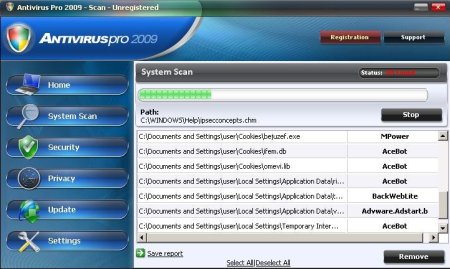
Immediately after launch, the program starts scanning the computer and found a lot of trojans and spyware. Then, it said that you should purchase Antivirus Pro 2009 in order to remove them and protect your PC. Computer users are urged to avoid purchasing this bogus program!
Antivirus Pro 2009 generates false security alerts such as the following:
Trojan detected!
A piece of malicious code was found on your system which can
replicate itself if no action is taken. Click here to have your
system cleaned by Antivirus Pro 2009.
These fake popups may drastically slow the performance of your computer.
Symptoms in a HijackThis Log:
O4 – HKLM\..\Run: [Antivirus Pro 2009] “C:\Program Files\AntivirusPro2009\AntivirusPro2009.exe” /hide
AntivirusPro2009 can be safely removed from your computer along with any other trojan infections if the proper steps are taken. If you are a non-techie computer user then this method of removing spyware is for you.
Use the following instructions to remove Antivirus Pro 2009.
- Download Avenger from here and unzip to your desktop.
- Run Avenger, copy,then paste the following text in Input script Box:
Drivers to delete:
TDSSserv.sysRegistry values to delete:
HKEY_LOCAL_MACHINE\Software\Microsoft\Windows\CurrentVersion\Run | Antivirus Pro 2009
HKEY_LOCAL_MACHINE\Software\Microsoft\Windows\CurrentVersion\Run | brastkFiles to delete:
C:\WINDOWS\system32\wini10894.exe
C:\WINDOWS\brastk.exe
C:\WINDOWS\system32\brastk.exe
C:\WINDOWS\scvhost.exe
C:\WINDOWS\system32\drivers\svchost.exe
C:\WINDOWS\karna.dat
C:\WINDOWS\system32\karna.datFolders to delete:
C:\Program Files\AntivirusPro2009Then click on ‘Execute’.
- You will be asked Are you sure you want to execute the current script?. Click Yes.
- You will now be asked First step completed — The Avenger has been successfully set up to run on next boot. Reboot now?. Click Yes.
- Your PC will now be rebooted.
- Download MalwareBytes Anti-malware (MBAM). Close all programs and Windows on your computer.
- Double Click mbam-setup.exe to install the application. When the installation begins, keep following the prompts in order to continue with the installation process. Do not make any changes to default settings and when the program has finished installing, make sure a checkmark is placed next to Update Malwarebytes’ Anti-Malware and Launch Malwarebytes’ Anti-Malware, then click Finish.
- If an update is found, it will download and install the latest version.
- Once the program has loaded, select “Perform Quick Scan”, then click Scan.
- The scan may take some time to finish,so please be patient.
- When the scan is complete, click OK, then Show Results to view the results.
- Make sure that everything is checked, and click Remove Selected.
- When disinfection is completed, a log will open in Notepad and you may be prompted to Restart.
Antivirus Pro 2009 creates the following files and folders:
C:\Program Files\AntivirusPro2009\AntivirusPro2009.cfg
C:\Program Files\AntivirusPro2009\AntivirusPro2009.exe
C:\Program Files\AntivirusPro2009\AVEngn.dll
C:\Program Files\AntivirusPro2009\htmlayout.dll
C:\Program Files\AntivirusPro2009\pthreadVC2.dll
C:\Program Files\AntivirusPro2009\Uninstall.exe
C:\Program Files\AntivirusPro2009\wscui.cpl
C:\Program Files\AntivirusPro2009\data\daily.cvd
C:\Program Files\AntivirusPro2009\Microsoft.VC80.CRT\Microsoft.VC80.CRT.manifest
C:\Program Files\AntivirusPro2009\Microsoft.VC80.CRT\msvcm80.dll
C:\Program Files\AntivirusPro2009\Microsoft.VC80.CRT\msvcp80.dll
C:\Program Files\AntivirusPro2009\Microsoft.VC80.CRT\msvcr80.dll
C:\Program Files\AntivirusPro2009
C:\Program Files\AntivirusPro2009\data
C:\Program Files\AntivirusPro2009\Microsoft.VC80.CRT
C:\Program Files\AntivirusPro2009\AVEngn.dll
C:\Program Files\AntivirusPro2009\htmlayout.dll
C:\Program Files\AntivirusPro2009\pthreadVC2.dll
C:\Program Files\AntivirusPro2009\Microsoft.VC80.CRT\msvcr80.dll
Questions and answers.
Antivirus pro 2009 prevents downloading of malwarebyte anti-malware.
Method 1:
- Restart your computer.
- After hearing your computer beep once during startup, but before the Windows icon appears, press F8.
- Instead of Windows loading as normal, a menu should appear.
- Select the “Safe mode with networking”, to run Windows in Safe Mode with networking.
- Once Windows loaded, try download Malwarebytes Anti-malware again.
Method 2:
- Download installation file of Malwarebytes Anti-malware (mbam-setup.exe) to another computer.
- Transfer the file to infected computer using pendrive (USB flash drive).
Antivirus pro 2009 prevents installation of Malwarebyte Anti-malware.
Rename mbam-setup.exe with a series of random numbers and symbols.
If you need help with the instructions, then post your questions in our Spyware Removal forum.





Program worked great in removing AntiVirus2009 and other junk from my computer. Thanks!
I am trying to get rid of Antivirus pro 2009, but it won\’t let me install the anti malware program you suggested. Have tried to do so in safe mode as well, not working.
I tried to use this but that program would go 4 seconds and stall out…please help
Aimee and Tammy, please read the instruction.
Program worked Great !!!!!!!!Thanks
I put the antimalware program on my infected computer via pendrive… I re-named the file so it would install… however, once installed, it won’t OPEN so I can use it! Help! I’m going to cry! =(
Carleen, please read the instruction.
We followed your instructions and got rid of the anitvirus pro but our computer is still not working properly. When we try to pull up our e-mail or have to log onto any site, it will not allow us to?? Any suggestions
Shannon, please read the instruction.
My problem is similar to Carleen’s. I tried installing the hjtinstall.exe on my infected computer but it won’t open. What do i do next. Help!
Helen, make a new topic at our spyware removal forum. I will help you.
The program is great, it successfully remove AntivirusPro 2009 from my infected machine.
I’ve removed this virus from a few dozen computers, it gets meaner and nastier every time. This time, I couldn’t get any of my usual tools to install (ie Super Anti-spyware, Malwarebytes). Your avenger + your script got the system clean enough to get Windows Installer working again. Thank you, thank you, thank you for taking the time to post this. I will DEFINATELY pass the information along. Anyplace we can donate to thank you?
JCMIT, glad to help you 🙂
Thank you. It feels like I’ve been trying to fix this for ages and while I don’t know if it’s all gone yet, this is the most progress I’ve made.
I was worried about downloading an antimalware program that offers better protection if you upgrade,(pay), to get rid of one that offered protection if you paid. But Anti Pro 2009 got on my nerves so bad that I uploaded Malwarebyte. AV 2009 seems to be gone, so that’s good—but I cannot say I feel clean. If I delete Malwarebyte, will AV 2009 come back?
Plus, Windows isn’t working now.
Acurrell, please follow these instructions.
I will check your computer.
I was tryiny to getrid of Antivirus Pro2009, try to download was not working.so they wont leave me alone,keep pop,pop up over and over again..I dont trust them, I dont wanted to see my computer problems xp windows.I dont wanted that crap Antivirus Pro 2009..it is still there ..I try uninstall Antivirus Pro 2009 wont work. they didnot asking me with out my permission about Antivirus Pro 2009 download..they start pop up Antivirus Pro2009 last Nov 14,2008 until now today.. I try to removed but wont work.. I need help..Thank you!
thanks alot!
Your instructions helped me fix my friend’s pc that had him losing what little hair he has left – Thanks, Mick.
THANKS for everything
You can also use Spybot S&D, it works like a charm! Removed “Antivirus Software Pro” flawlessly. You can bypass most of the above steps by using this tool alone. I would also recommend using OpenDNS for your DNS service and block the domains associated with it. Last, install the ADB plug-in for Firefox, so popup ads won’t get the best of your browser. Good luck.
Thanks a ton. I was so scared of losing my work because of this virus. It worked like charm. Found 20 infections on complete scan and removed all of them.
thanks a ton. I was so scared of losing my work because of this crappy virus. This worked like a charm after i had tried all avast, AVG, McFe, Norton, Windows to remove this.
Thanks again.
it’s hidden as SYSGUARD.
watch: 1) hit ctrl+alt+del , 2) highlight sysguard.exe and 3) click ‘end process’…
the pop-ups quit
the malewarebytes program keeps shutting down and disapearing before the scan is done…
SARAH, ask help at our Spyware removal forum.