Do you have pop-ups or your computer infected with trojan or spyware ? Learn how to ask us for help, click here!

How to remove Total Secure 2009

Total Secure 2009 is a rogue antispyware. Usuallly, rogue antispyware infects systems via misleading advertising on free download, warez and porn websites, trojans and browser security holes. Total Secure 2009 reports false or exaggerated system security threats on the computer. The user is then prompted to pay for a full license of the application in order to remove the errors.

rogue antispyware

Total Secure 2009 looks like IEAntivirus.

HijackThis shows infection:

O4 – HKCU\..\Run: [TotalSecure2009] C:\Program Files\TotalSecure2009\scan.exe

Continue reading How to remove Total Secure 2009…

August 31, 2008 on 7:56 am | In Rogue Anti Spyware, Tutorials - HowTo | 2 Comments |


MalwareBytes Anti-malware – free spyware, malware, trojan remover.

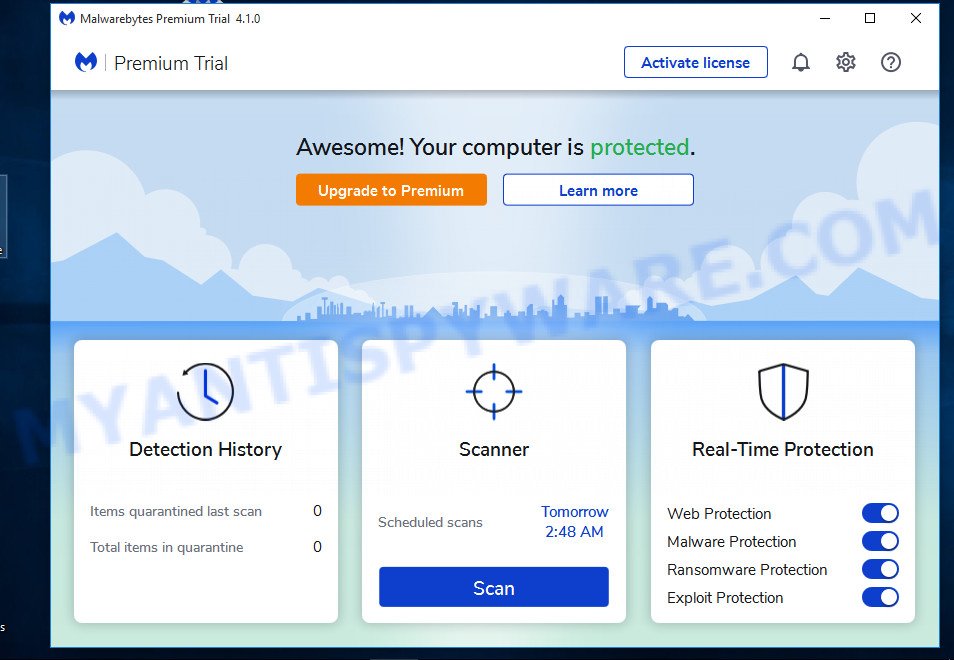
Malwarebytes’ Anti-Malware is designed to quickly detect, destroy, and prevent malware, spyware, trojans. Can detect and remove malware that even the most well-known Anti-Virus and Anti-Malware applications on the market today cannot.

free spyware malware remover

The interface is plain and simple to use. Malwarebytes’ Anti-Malware scan system allows performing a quick scan or a full scan, depending on your needs.
Continue reading MalwareBytes Anti-malware – free spyware, malware, trojan remover….

August 28, 2008 on 12:53 am | In Best Programs, Free Software, Malware removal | 465 Comments |


How to remove Antivirus XP 2008 and tdssserv.sys trojan

Antivirus XP 2008 is a rogue antispyware application that is starting to infect a lot of users. This particular infection is harder to remove. Also Antivirus XP 2008 installed in your Internet Explorer browser that hijacks searches you input into the Google search engine. This program usually installed itself onto your PC without your permission, through trojans (trojan.tdsserv, trojan.agent, trojan.fakealert) and browser security holes.

rogue antispyware

HijackThis shows infection:

F2 – REG:system.ini: UserInit=C:\WINDOWS\SYSTEM32\Userinit.exe,C:\WINDOWS\system32\oembios.exe,
O4 – HKLM\..\Run: [lphc31tj0ev99] C:\WINDOWS\system32\lphc31tj0ev99.exe

Continue reading How to remove Antivirus XP 2008 and tdssserv.sys trojan…

August 27, 2008 on 7:14 am | In Rogue Anti Spyware, Trojan, Tutorials - HowTo | 33 Comments |


How to remove rogue antispyware: XP Guard, AntiVir64, MSAntivirus, Power Antivirus, SpywarePrevent, XpertAntivirus

Found new rogue antispyware applications: XP Guard, AntiVir64, MSAntivirus, Power Antivirus, SpywarePrevent, XpertAntivirus. These programs uses scare tactics (such as pop-ups and fake system notifications), infects systems via misleading advertising on free download, warez and porn websites, outdated versions of the Sun Java platform, trojans and browser security holes. Rogue antispyware reports false or exaggerated system security threats on the computer. The user is then prompted to pay for a full license of the application in order to remove the errors.

SpywarePrevent

rogue antispyware
SpywarePrevent spreads from spywarePreventer.com : 216.255.186.253.
HijackThis shows infection:

O4 – HKLM\..\Run: [Antivirus] C\Program Files\SPP\SPP.exe
O4 – HKCU\..\Run: [Antivirus] C\Program Files\SPP\SPP.exe

XP Guard

rogue antispyware
Homesite: XP-Guard.com; IP Address: 92.62.101.35

AntiVir64

rogue antispyware
Homesite: Site Name: Antivir64.com; IP Address: 78.157.142.7

MSAntivirus

rogue antispyware
MSAntivirus spreads from msantivirusxp.com : 91.208.0.229; msscanner.com : 91.208.0.228.
HijackThis shows infection:

O4 – HKLM\..\Run: [Antivirus] C:\Program Files\MSA\MSA.exe
O4 – HKCU\..\Run: [Antivirus] C:\Program Files\MSA\MSA.exe

Power Antivirus

rogue antispyware
Power Antivirus spreads from pwrantivirus.com : 91.208.0.231, scanner-pwrantivirus.com : 91.208.0.246.

XpertAntivirus

rogue antispyware
XpertAntivirus spreads from xpertantivirus.com : 91.208.0.230, scanner-xpertantivirus.com : 91.208.0.246.
Continue reading How to remove rogue antispyware: XP Guard, AntiVir64, MSAntivirus, Power Antivirus, SpywarePrevent, XpertAntivirus…

August 27, 2008 on 3:11 am | In Rogue Anti Spyware, Tutorials - HowTo | No Comments |


How to remove cnn.com and msnbc.com fake breaking news spam-virus and joke-bluescreen malware

Joke-bluescreen malware is a malware that also installs rogue security applications (Antivirus XP, IE Defender) and display false alert on compromised computer, infects systems via spam emails with header “cnn.com breaking news” or “msnbc.com breaking news”. If your computer infected, then you have:

  • background turned blue and a box came up that says that you computer has been infected with spyware and you need to download some kind of software to clean PC
  • McAfee keeps telling you that the virus is called joke-bluescreen
  • system is running slow

Download HijackThis and Combofix.
Run HijackThis. Click “Do a system scan only.” and put a checkmark next to the following items (if exists):

O4 – HKLM\..\Run: [DLI32] C:\WINDOWS\dli32.exe
O4 – HKLM\..\Run: [sysrest32.exe] C:\WINDOWS\system32\sysrest32.exe
O4 – HKCU\..\Run: [CDriver] c:\microsoft\svchost.exe
O4 – HKCU\..\Run: [DDriver] c:\microsoft\svchost.exe
O4 – HKCU\..\Run: [alpha] c:\microsoft\svchost.exe
O4 – HKCU\..\Run: [beta] c:\microsoft\svchost.exe
O4 – HKCU\..\Run: [gamma] c:\microsoft\svchost.exe
O4 – HKLM\..\Run: [SMrhcjlaj0ee91] C:\Program Files\rhcjlaj0ee91\rhcjlaj0ee91.exe
O4 – HKLM\..\Policies\Explorer\Run: [CDriver] c:\microsoft\svchost.exe
O4 – HKLM\..\Policies\Explorer\Run: [DDriver] c:\microsoft\svchost.exe
O4 – HKLM\..\Policies\Explorer\Run: [alpha] c:\microsoft\svchost.exe
O4 – HKLM\..\Policies\Explorer\Run: [beta] c:\microsoft\svchost.exe
O4 – HKLM\..\Policies\Explorer\Run: [gamma] c:\microsoft\svchost.exe
O9 – Extra button: (no name) – {9034A523-D068-4BE8-A284-9DF278BE776E} – http://www.securesoftwarefeed.com/redirect.php (file missing)
O9 – Extra ‘Tools’ menuitem: IE Anti-Spyware – {9034A523-D068-4BE8-A284-9DF278BE776E} – http://www.securesoftwarefeed.com/redirect.php (file missing)
O22 – SharedTaskScheduler: cariniana – {5c770fbc-cc2f-4acd-93e8-e6f0594307fd} – C:\WINDOWS\system32\gnjsjc.dll (file missing)

Note: Where is c:\microsoft\svchost.exe can be c:\google.com\svchost.exe
Now close all browser and other windows except for HijackThis, and click “Fix Checked” to have HijackThis fix the entries you checked.

Close HijackThis. Double click on combofix.exe and follow the prompts.

If you are still having problems, then I would recommend you follow these instructions and post your logs in the spyware removal forum. I will check your logs and advise you on joke-bluescreen removal.

August 21, 2008 on 9:28 am | In Malware removal, Rogue Anti Spyware, Trojan, Tutorials - HowTo, Virus | 4 Comments |


My Anti Spyware - Free antispyware programs and Spyware Removal Instructions.