Smitfraudfix is a free program written by S!Ri, that removes desktop hijack malware and rogue antispyware programs:
AdwarePunisher, AdwareSheriff, AlphaCleaner, Antispyware Soldier, AntiVermeans, AntiVermins, AntiVerminser, AntivirusGolden, AVGold, BraveSentry, MalwareWipe, MalwareWiped, MalwaresWipeds, MalwareWipePro, MalwareWiper, PestCapture, PestTrap, PSGuard, quicknavigate.com, Registry Cleaner, Security iGuard, Smitfraud, SpyAxe, SpyCrush, SpyDown, SpyFalcon, SpyGuard, SpyHeal, SpyHeals, SpyLocked, SpyMarshal, SpySheriff, SpySoldier, Spyware Vanisher, Spyware Soft Stop, SpywareLocked, SpywareQuake, SpywareKnight, SpywareSheriff, SpywareStrike, Startsearches.net, TitanShield Antispyware, Trust Cleaner, UpdateSearches.com, Virtual Maid, VirusBlast, VirusBurst, Win32.puper, WinHound, Brain Codec, DirectVideo, EliteCodec, eMedia Codec, FreeVideo, Gold Codec, HQ Codec, iCodecPack, iMediaCodec, Image ActiveX Object, IntCodec, iVideoCodec, JPEG Encoder, Key Generator, Media-Codec, MediaCodec, MMediaCodec, MovieCommander, MPCODEC, My Pass Generator, PCODEC, Perfect Codec, PowerCodec, PornPass Manager, PornMag Pass, PrivateVideo, QualityCodec, Silver Codec, SiteEntry, SiteTicket, SoftCodec, strCodec, Super Codec, TrueCodec, VideoAccess, VideoBox, VidCodecs, Video Access ActiveX Object, Video ActiveX Object, VideoCompressionCodec, VideoKeyCodec, VideosCodec, WinAntiSpyPro, WinMediaCodec, X Password Generator, X Password Manager, ZipCodec
How to use Smitfraudfix:
Unfortunately at the moment Smitfraudfix is unavailable for download, as the author no longer support it, and removed from the Internet. I suggest you use the following two free programs:
1. AdwCleaner – free adware, PUP, toolbars and hijackers remover.
2. MalwareBytes Anti-malware – free spyware, malware, trojan remover.
Download Smitfraudfix from here and save it to your desktop. When file has finished downloading you will now see SmitfraudFix icon on your desktop similar to the one below.

SmitfraudFix Icon
Reboot your computer in Safe Mode by doing the following steps:
- Restart your computer
- After hearing your computer beep once during startup, but before the Windows icon appears, press F8.
- Instead of Windows loading as normal, a menu should appear similar to shown below.
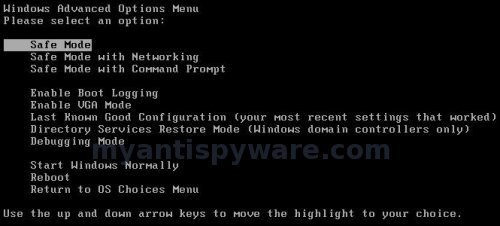

Windows Advanced Options Menu – Select Safe Mode - Select the first option, to run Windows in Safe Mode.

Now you can start using Windows in Safe mode.
Double-click SmitfraudFix icon that is residing on your desktop. You may see a screen similar to the one below.
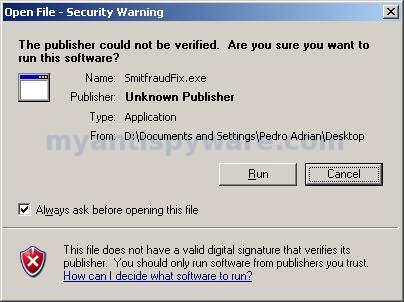
Security Warning
Windows is issuing “Security Warning” prompt, this is normal and safe. Cick on the Run button to continue. If you are using Windows Vista, and receive UAC prompt asking if you would like to continue running the program, you should press the Continue button.
When SmitfraudFix first starts you will see a credits screen. Press Enter and you will now see a menu as shown in the screen below.
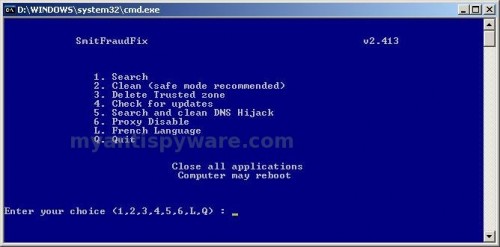
SmitfraudFix Menu
Select 2 and hit Enter. SmitfraudFix will now start cleaning your computer. This procedure can take some time, so please be patient.
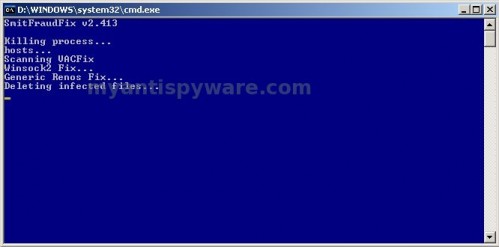
SmitfraudFix Cleaning Process
When Smitfraudfix has finished cleaning process, it will automatically start the Disk Cleanup program and you will see a screen as shown below.
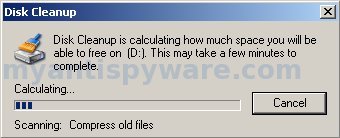
Disk Cleanup
You will be prompted: Do you want to clean the registry ? Answer Y (yes) and hit Enter in order to clean registry keys associated with malware.
When the Disk Cleanup step is done, you will see a red screen stating Computer will reboot now. Close all applications. Press Enter.
When reboot is completed, a log will open in Notepad.
Note: if you are still having problems, then I would recommend that you follow the instructions and post your logs in the spyware removal forum. Myantispyware team will help you.





thank dud………..
Malwarebytes reports that I have Hijack.Desktop
HKEY_CURRENT_USER\SOFTWARE\Microsoft\Windows\CurrentVersion\Policies\Explorer\ForceActiveDesktopOn (Hijack.Desktop)
Cleans it but comes back on reboot….help!!!!
I had the bad smit with tool at the end and this removed it and cleaned al the system.
Sri, probably your PC is infected with hidden trojan. Ask for help in our Spyware removal forum.
I can’t say enough! Thanks heaps! Simple even I could clean those damn things! You’ve saved me a lot! THANKS!! bookmark this site !Geoff
Hi, i couldn’t open my system in safemood pls help.I have same problem
harish, what is “same” problem ?
Hi!
After utilizing smithfraudfix, how do I remove it from my PC?
(I am not very pc savvy.)
Thanks beforehand.
Lode
Lode, the program don`t have an uninstall procedure. You need manually remove smitfraudfix.exe.
Thank you.
Hi Patrik,
I’m very excited to find this tool. I think i’ve got a new version of this hijack program that tried to mimic windows defender.
I’ve managed to kill the process by bringing up task manager very quickly and ctrl-e’ing on one of the processes that looked suspicious. This allowed me to regain control enough to run smitfraudfix option 1 from a USB stick.
I then enter safemode and run it again from the usb stick and select option two but then it just seems to show the background screen of safe mode, no buttons and nothing else. I’ve waited 30 minutes and very occasionally i hear the hard drive tick over but nothing else. It doesn’t seem ot be a machine lock up as the screensaver keeps trying to run.
Should it take this long?
Many thanks for your help in advance, I’m hoping this does save me.
Ben, try scan your computer with Malwarebytes Anti-malware.