Beware of Fake Tax Form Alerts! A new phishing scam is targeting taxpayers with urgent emails claiming their 2025 tax forms are ready for download. Sent under the guise of “Victory Creek Accounting,” these messages pressure you to click a “View completed document” link that actually leads to a malicious phishing site designed to steal your personal information.
At its core, this scam exploits familiar tactics: creating a sense of urgency, mimicking legitimate accounting firms, and using secure-sounding language (“eSign,” “Client Portal app”) to lower your guard. Despite the professional veneer, the email’s “secure link” is a trap, and responding or clicking can compromise your data.
Don’t fall for it. Always verify with your accounting provider directly before clicking any links in unexpected emails about tax documents. Remember, real firms won’t rush you or threaten link expirations in 24 hours without prior notice. Stay vigilant and protect your sensitive info by ignoring such deceptive emails.
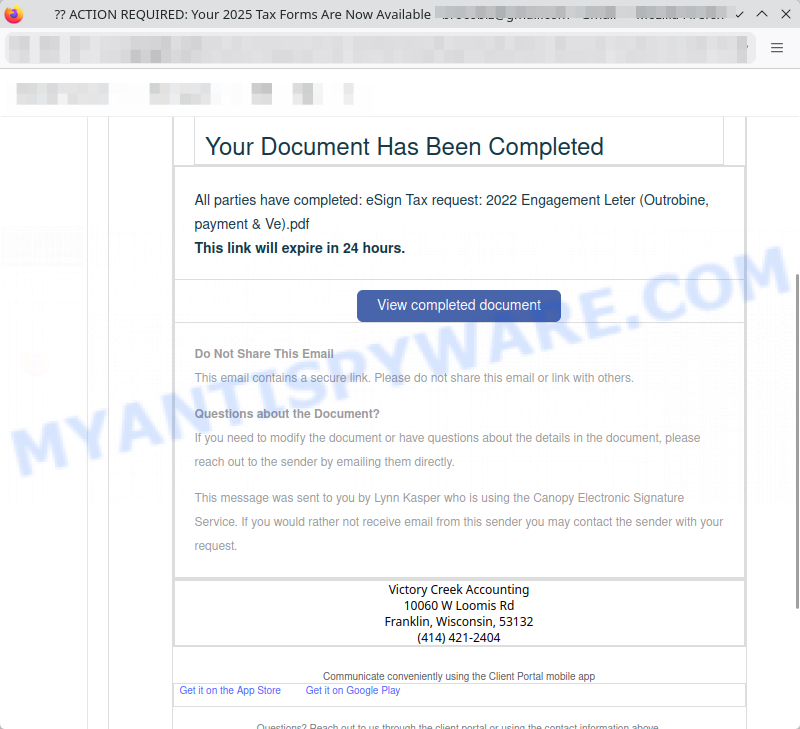
A typical “Your 2025 Tax Forms Are Now Available” scam email reads as follows:
ACTION REQUIRED: Your 2025 Tax Forms Are Now Available
From: Victory Creek Accounting
Victory Creek Accounting
Your Document Has Been CompletedAll parties have completed: eSign Tax request: 2022 Engagement Leter (Outrobine, payment & Ve).pdf
This link will expire in 24 hours.
View completed documentDo Not Share This Email
This email contains a secure link. Please do not share this email or link with others.Questions about the Document?
If you need to modify the document or have questions about the details in the document, please reach out to the sender by emailing them directly.This message was sent to you by Lynn Kasper who is using the Canopy Electronic Signature Service. If you would rather not receive email from this sender you may contact the sender with your request.
Victory Creek Accounting
10060 W Loomis Rd
Franklin, Wisconsin, 53132
(414) 421-2404
Communicate conveniently using the Client Portal mobile app
Get it on the App Store Get it on Google Play
Questions? Reach out to us through the client portal or using the contact information above.
This inbox is unmonitored and replies may not be seen or responded to.
🕵️♂️ How the “2025 Tax Forms Available” Email Scam Operates
The “2025 Tax Forms Are Now Available” email scam is a deceptive phishing scheme designed to trick recipients into clicking malicious links. 🚨 It impersonates legitimate accounting firms to steal personal information or install malware. 🔗 Step-by-Step Breakdown of the Scam:
📧 Sending Fake Emails
Scammers send emails that appear to come from trusted accounting firms like Victory Creek Accounting. The messages claim that your 2025 tax forms or important tax documents are ready for review, creating urgency by stating links expire quickly.
🕸️ Creating Fraudulent Websites
The email includes links labeled “View completed document” that direct you to phishing websites. These look professional and mimic legitimate portals but are designed to capture your login credentials, personal data, or infect your device.
⚠️ Using Urgent Language
The emails pressure recipients with phrases like “ACTION REQUIRED” and warnings not to share the email. This tactic preys on fear to encourage quick clicks without verifying authenticity.
💼 Impersonating Legitimate Services
The message references real services such as “Canopy Electronic Signature Service,” uses legitimate-looking sender names like Lynn Kasper, and includes official-looking contact information to build trust.
🔒 False Security Claims
The email assures recipients that the link is secure and meant only for them, discouraging forwarding or sharing, which can lower suspicion and isolate the target.
🛑 Unmonitored Inbox Notice
Including a note that replies to the email aren’t monitored prevents victims from verifying the message’s legitimacy through direct response.
📵 What Happens if You Click?
Clicking the link can lead to phishing pages that steal sensitive information such as Social Security numbers, bank details, or login credentials, or prompt downloads of malware or ransomware.
In summary, the “2025 Tax Forms Are Now Available” email scam tricks people by impersonating trustworthy tax or accounting firms using fake emails and phishing links. It exploits urgency and trust to steal personal data or infect devices. Never click unsolicited email links for tax documents; always verify by contacting your accountant directly through known official channels.
📧 What to Do When You Receive the “Your 2025 Tax Forms Are Now Available” Scam Email
We advise everyone who receives this email to follow the simple steps below to protect yourself from potential scams:
- ❌ Do not believe this email.
- 🔒 NEVER share your personal information and login credentials.
- 📎 Do not open unverified email attachments.
- 🚫 If there’s a link in the scam email, do not click it.
- 🔍 Do not enter your login credentials before examining the URL.
- 📣 Report the scam email to the FTC at www.ftc.gov.
If you accidentally click a phishing link or button in the “Your 2025 Tax Forms Are Now Available” Email, suspect that your computer is infected with malware, or simply want to scan your computer for threats, use one of the free malware removal tools. Additionally, consider taking the following steps:
- 🔑 Change your passwords: Update passwords for your email, banking, and other important accounts.
- 🛡️ Enable two-factor authentication (2FA): Add an extra layer of security to your accounts.
- 📞 Contact your financial institutions: Inform them of any suspicious activity.
- 🔄 Monitor your accounts: Keep an eye on your bank statements and credit reports for any unusual activity.
🔍 How to Spot a Phishing Email
Phishing emails often share common characteristics; they are designed to trick victims into clicking on a phishing link or opening a malicious attachment. By recognizing these signs, you can detect phishing emails and prevent identity theft:
💡 Here Are Some Ways to Recognize a Phishing Email
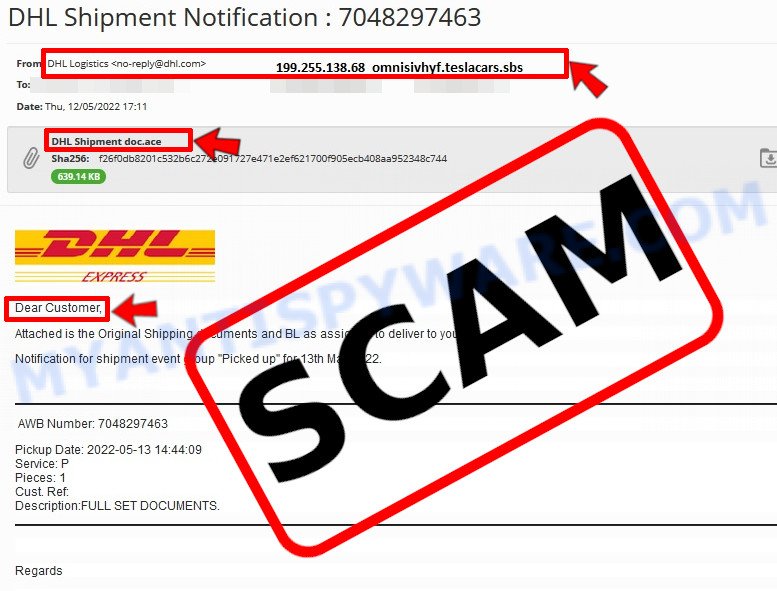
- ✉️ Inconsistencies in Email Addresses: The most obvious way to spot a scam email is by finding inconsistencies in email addresses and domain names. If the email claims to be from a reputable company, like Amazon or PayPal, but is sent from a public email domain such as “gmail.com”, it’s probably a scam.
- 🔠 Misspelled Domain Names: Look carefully for any subtle misspellings in the domain name, such as “arnazon.com” where the “m” is replaced by “rn,” or “paypa1.com,” where the “l” is replaced by “1.” These are common tricks used by scammers.
- 👋 Generic Greetings: If the email starts with a generic “Dear Customer”, “Dear Sir”, or “Dear Madam”, it may not be from your actual shopping site or bank.
- 🔗 Suspicious Links: If you suspect an email may be a scam, do not click on any links. Instead, hover over the link without clicking to see the actual URL in a small popup. This works for both image links and text links.
- 📎 Unexpected Attachments: Email attachments should always be verified before opening. Scan any attachments for viruses, especially if they have unfamiliar extensions or are commonly associated with malware (e.g., .zip, .exe, .scr).
- ⏰ Sense of Urgency: Creating a false sense of urgency is a common tactic in phishing emails. Be wary of emails that claim you must act immediately by calling, opening an attachment, or clicking a link.
- 📝 Spelling and Grammar Errors: Many phishing emails contain spelling mistakes or grammatical errors. Professional companies usually proofread their communications carefully.
- 🔒 Requests for Sensitive Information: Legitimate organizations typically do not ask for sensitive information (like passwords or Social Security numbers) via email.
Conclusion
The Victory Creek Accounting “Your 2025 Tax Forms Are Now Available” email is a phishing scam designed to steal your personal information by tricking you into clicking on a malicious link. This fraudulent email uses urgent language and appears to come from a legitimate accounting firm to create a false sense of trust and urgency. The link labeled “View completed document” redirects victims to a phishing website that may capture sensitive data such as login credentials or financial information.
Instead of providing any legitimate tax documents, this scam exploits your concern about tax paperwork and electronic signatures to lure you into clicking unsafe links. The email uses official-sounding details like a company address, phone number, and references to electronic signature services to mimic a credible business, but these are simply tactics to increase the scam’s legitimacy in appearance.
Bottom Line: Do not click any links or download attachments from unexpected or suspicious emails about tax forms. Always verify such communications directly with your accounting provider or the tax agency using official contact information. Be cautious about emails requesting immediate action, and avoid sharing your personal details through suspicious links or websites. If an email seems too urgent or asks for sensitive information without prior notice, it is more than likely a phishing attempt intended to steal your data. Stay vigilant and protect your personal and financial security.





