Beware the “Your iPhone Is Not Protected” calendar scam that’s been flooding iPhones with alarming fake alerts. These notifications claim your device is at risk, pushing users to click suspicious links that lead to phishing sites or malware downloads. But here’s the truth: Apple never sends security warnings through calendar invites or pop-up alerts like this.
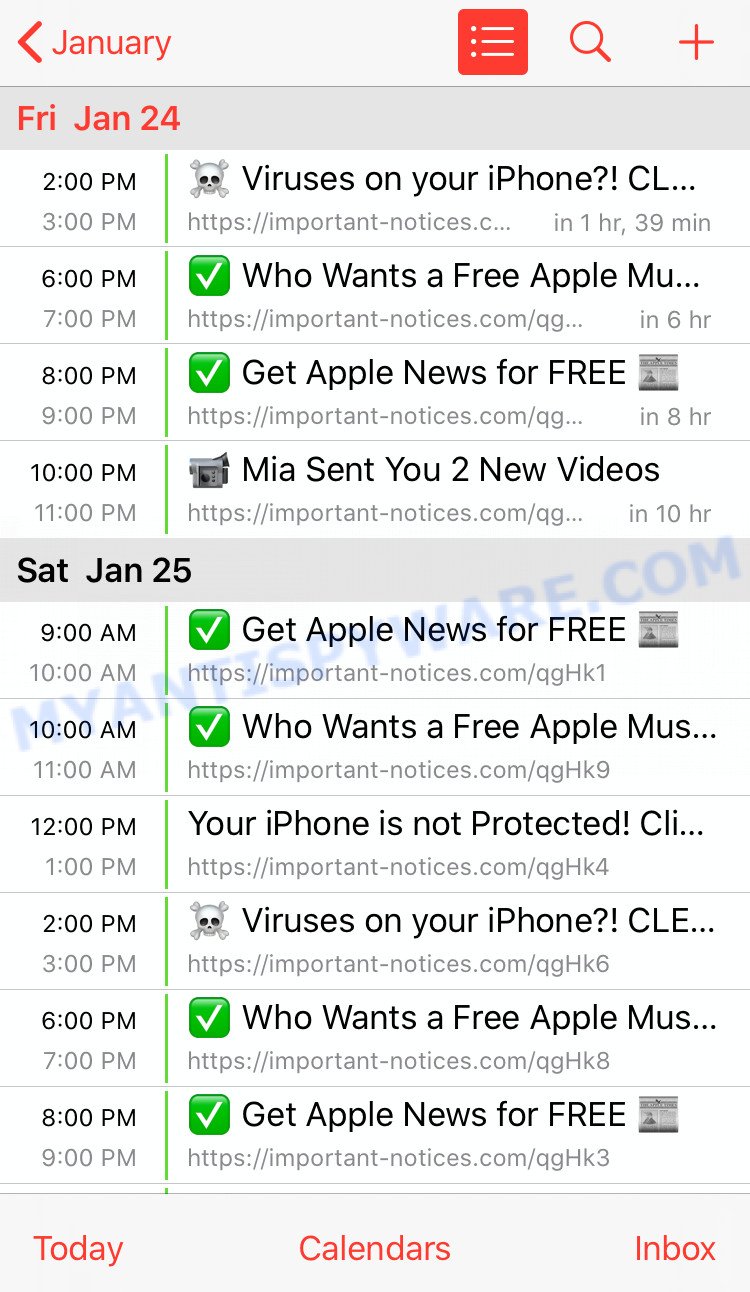
Iphone Calendar spam – example
This scam exploits the iPhone’s calendar syncing feature to sneak bogus messages right into your daily schedule—making it feel urgent and real. Once you interact, scammers try to steal your personal info or trick you into downloading harmful software. It’s a clever hack that preys on fear and urgency, using the familiar interface of your iPhone against you.
The key takeaway? Your iPhone’s calendar should never be a channel for security alerts. If you see “Your iPhone Is Not Protected” pop-ups, it’s a fake designed to scam you. Stay vigilant, delete suspicious calendar subscriptions, and never click links from unknown sources. Your best protection is knowledge—and a healthy dose of skepticism when your device suddenly starts sounding alarms.
💡 Heads-up: Similar Scams Are Everywhere. Your IPhone Is Not Protected is not unique. It is one of many fake supplements, gadgets, and other schemes we expose in our Fact Checks section. All of them aim to grab your personal data or money. The people behind these scams run slick websites, spread bogus promo codes, and even pose as trusted brands or experts. Below are a few recent scams that follow the same playbook as Your IPhone Is Not Protected: Neurocept, Clara Hart Minnesota, Flash Burn Liquid Drops, MemoGold, Glyvorin.


Table of Contents
🕵️♂️ How the “Your iPhone Is Not Protected” Calendar Scam Operates
“Your iPhone Is Not Protected” Calendar Scam is a phishing fraud targeting iPhone users. 🚨 It is a deceitful tactic where scammers exploit the iPhone’s calendar alert feature to trick users into believing their device has security issues that do not exist. 🔗 Step-by-Step Breakdown of the Scam:
🛒 Inserting Fake Calendar Alerts
Scammers find ways to add fraudulent calendar events or alerts titled “Your iPhone Is Not Protected” onto victims’ iPhone calendars without their informed consent. These alerts are designed to alarm users by mimicking legitimate Apple security warnings.
🕸️ Creating Deceptive Messages and Links
These calendar events often contain alarming messages urging users to click on included links for “urgent security updates” or to “protect your device now.” The links redirect users to fake websites crafted to steal personal information or prompt installation of malicious apps.
📢 Promoting Panic to Induce Hasty Actions
The scam leverages fear by displaying urgent-sounding alerts multiple times to make users believe their iPhone is at risk. This pressure tactic pushes victims to act quickly without verifying the legitimacy of the warnings.
💼 Falsifying Security Warnings
The fraudulent alerts mimic Apple branding and typical Apple alert phrasing to appear authentic. However, Apple does not send security notices via calendar alerts or unsolicited calendar invitations, making these warnings fake.
💸 Attempting to Extract Personal Data or Money
The scam’s end goal is often to trick victims into submitting sensitive information like Apple ID passwords, credit card details, or to pay for fake antivirus software or services that do not exist.
🌟 Using Fake Website Designs
The linked scam websites replicate official Apple pages or popular security sites, complete with logos and branding, to increase credibility and deceive users into trusting them.
⚖️ Misleading Legal and Safety Claims
These sites falsely guarantee safety and official endorsement by Apple, assuring users that following their instructions is necessary and secure, which is untrue.
🛍️ Difficult to Remove Calendar Alerts
Once added, removing the fraudulent calendar events can be confusing for users, as they may come from unknown subscribed calendars that users accidentally accepted, leading to repeated alerts.
📦 Delivering No Real Protection
The calendar alerts do not provide any real security benefits—there is no actual threat to the device. Instead, they exist solely to deceive and manipulate the user.
In summary, the “Your iPhone Is Not Protected” calendar scam deceives iPhone users by inserting fake security warnings into their device calendars. It uses fear tactics, fake websites, and misleading links to trick victims into revealing personal information or paying for bogus services. Apple never uses calendar alerts to notify users of security issues. Users should be cautious, avoid clicking suspicious calendar event links, and thoroughly verify alerts before taking action.
🧹 How to Remove “Your iPhone Is Not Protected” Calendar Scam Alerts
Follow these steps to remove the scam calendar alerts from your iPhone and stop receiving intrusive notifications:
1. Open the Calendar app on your iPhone.
2. Tap on “Calendars” at the bottom center of the screen.
3. Look for any unfamiliar or suspicious calendars listed under the “Subscribed” section. These often have strange or random names.
4. Tap the info (i) icon next to the suspicious calendar.
5. Scroll down and select “Delete Calendar” to remove it from your device.
6. Confirm the deletion when prompted.
7. Restart your iPhone to ensure the changes take effect.
8. To prevent future subscription scams, avoid clicking unknown calendar invite links or suspicious pop-ups requesting calendar access.
9. If you suspect your personal information was compromised, consider changing your Apple ID password and enabling two-factor authentication.
😱 What to Do If Scammed
If you find yourself ensnared by the Your IPhone Is Not Protected Scam, immediate action is crucial. Here’s what you should consider doing:
🛑 Stop Further Transactions
The first step is to halt any additional transactions that might be in process. Contact your bank or credit card provider and inform them that you’ve fallen victim to a scam. They can help by blocking the card or reversing any unauthorized transactions.
📞 Report the Fraud
File a report with your local police and provide all the available evidence, such as screenshots, emails, and website URLs. Additionally, report the scam to online portals like the Better Business Bureau (BBB) at www.bbb.org or the Federal Trade Commission (FTC) at reportfraud.ftc.gov. If you’re in another country, reach out to your national consumer protection agency.
💻 Take Screenshots
Before the scam website gets taken down or changes, make sure to capture screenshots of your transactions and communications. These can serve as evidence if you decide to pursue legal action.
⚖️ Consult Legal Advice
Speak to a legal advisor about your situation. While pursuing legal action may be time-consuming and costly, it could be a possible avenue for recovering your lost money.
📢 Share Your Experience
Use social media platforms to share your experience and warn others about the scam. Your story could prevent someone else from falling victim to the same or similar scams.
Conclusion
The “Your iPhone Is Not Protected” calendar alerts are a scam, designed to trick users into believing their devices are at risk by flooding their calendars with alarming notifications. This scam uses fake alerts and misleading messages that mimic official Apple warnings to create unnecessary panic.
Instead of providing any real security benefit, these alerts aim to push victims toward fraudulent websites or malicious apps that claim to fix the supposed issue. The scammers exploit users’ fears using urgent and threatening language, but there is no legitimate connection to Apple or actual iPhone security problems.
Bottom Line: If you see calendar alerts saying “Your iPhone Is Not Protected,” do not click any links or provide personal information. This is a deceptive scam. Remove the unwanted calendar subscriptions from your device settings and only trust security warnings directly from Apple through official channels. Stay vigilant and verify any unexpected alerts before taking action to avoid falling victim to calendar scams.





