The “Payment For McAfee Subscription” email scam is a trick used by scammers to con people. These emails pretend to be from the McAfee Company, making you think you’ve bought a McAfee product. The emails look different; some might just be text, while others use McAfee’s logo and graphics to appear legit.
Inside the email, it often says you are being billed for some McAfee service. It also provides a phone number to call if you want to cancel. But here’s the catch: these emails are fake and not from the actual McAfee company.
This scam is a type of callback trick. When you call the number, scammers either try to get your personal info, trick you into sending them money, or even sneak malware onto your device. They act like support agents, but their goal is to rip you off.
💡 If you get one of these emails, don’t call the number or click any links. Just delete it to stay safe. Always double-check by using official McAfee websites for contact and support. Be cautious and protect yourself from these scams.
A typical “Payment For McAfee Subscription” scam email reads as follows:
INVOICE
Invoice Number: 2RU-AFU-ED40
Date: JAN 17, 2024
Customer Support
+1 (805)-354-1797
ORDER CONFIRMATION
Thank you for your order! This is confirmation that we have received your order amount of $499.99
You’ll find a summary of your recent Purchase blow
Item Description Quantity Amount
1 MCAFEE ANTIVIRUS 1 $499.99
Sub Total: $499.99
Sales Tax: (0%) $0
TOTAL: $499.99
PAYMENT INFORMATION:
Account/Card
This charge will be reflected in your statement within next 48 hrs.
HELP & SUPPORT
If you don’t recognize or not authorize then please contact us
Customer Care No :+1 (805)-354-1797
Summary Table
| Name | Payment For McAfee Subscription Scam |
| Type | Callback Email Scam |
| Goal | Steal personal information or money |
| Tactics | Fake billing emails with phone numbers |
| Scammer Phone Number(s) | +1 (805) 827-0666, +1 (828) 782-7324, +1(888) 390-5761, +1 (877) 371 2385, +1 (818) 293 8028, +1 (877) 260-7792, +1 (847) 794-8021, +1 (833) 882-4208, +1(888)-405-4401, +1 (888) 246-2390, +1 (888) 306-1173, +1 (805)-354-1797, +1 (888) 404-4624, +1 (888) 986-9208, +1 (320) 566-9101, +1 (830) 267-4097, +1 (877) 374-2075, +1 (808) 468-8860, +1 (855) 522-4401, +1 (833) 469-4751, +1 (740) 247-0459, +1 (888) 278-1649, +1 (805) 960-5349, +1 (843) 888-7720, +1 (888) 988-6921, +1 (808) 320-6786, +1 (855) 708-1312, +1 (844) 407-4215, +1 (808) 229-4068, +1 866 201 9479, +1 (843) 291-5838 |
📧 What to Do When You Receive the “Payment For McAfee Subscription” Scam Email
We advise everyone who receives this email to follow the simple steps below to protect yourself from potential scams:
- ❌ Do not believe this email.
- 🔒 NEVER share your personal information and login credentials.
- 📎 Do not open unverified email attachments.
- 🚫 If there’s a link in the scam email, do not click it.
- 🔍 Do not enter your login credentials before examining the URL.
- 📣 Report the scam email to the FTC at www.ftc.gov.
If you accidentally click a phishing link or button in the “Payment For McAfee Subscription” Email, suspect that your computer is infected with malware, or simply want to scan your computer for threats, use one of the free malware removal tools. Additionally, consider taking the following steps:
- 🔑 Change your passwords: Update passwords for your email, banking, and other important accounts.
- 🛡️ Enable two-factor authentication (2FA): Add an extra layer of security to your accounts.
- 📞 Contact your financial institutions: Inform them of any suspicious activity.
- 🔄 Monitor your accounts: Keep an eye on your bank statements and credit reports for any unusual activity.
🔍 How to Spot a Phishing Email
Phishing emails often share common characteristics; they are designed to trick victims into clicking on a phishing link or opening a malicious attachment. By recognizing these signs, you can detect phishing emails and prevent identity theft:
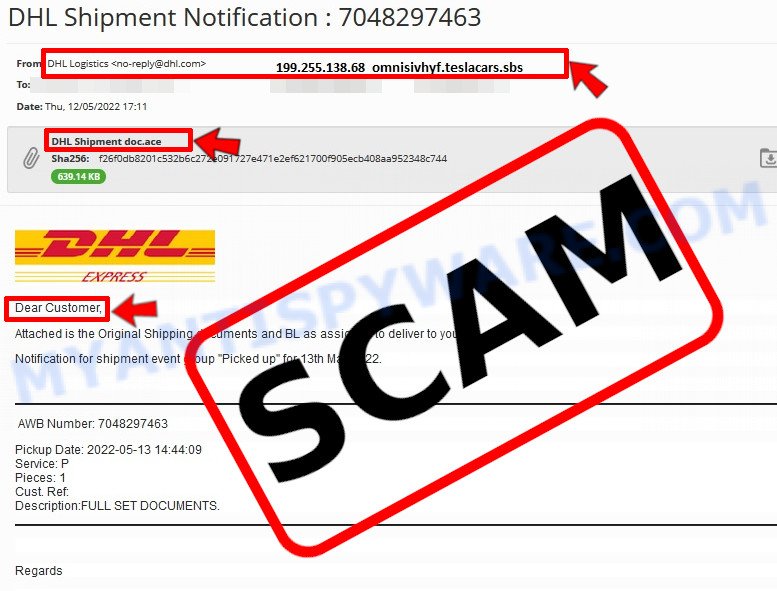
💡 Here Are Some Ways to Recognize a Phishing Email
- ✉️ Inconsistencies in Email Addresses: The most obvious way to spot a scam email is by finding inconsistencies in email addresses and domain names. If the email claims to be from a reputable company, like Amazon or PayPal, but is sent from a public email domain such as “gmail.com”, it’s probably a scam.
- 🔠 Misspelled Domain Names: Look carefully for any subtle misspellings in the domain name, such as “arnazon.com” where the “m” is replaced by “rn,” or “paypa1.com,” where the “l” is replaced by “1.” These are common tricks used by scammers.
- 👋 Generic Greetings: If the email starts with a generic “Dear Customer”, “Dear Sir”, or “Dear Madam”, it may not be from your actual shopping site or bank.
- 🔗 Suspicious Links: If you suspect an email may be a scam, do not click on any links. Instead, hover over the link without clicking to see the actual URL in a small popup. This works for both image links and text links.
- 📎 Unexpected Attachments: Email attachments should always be verified before opening. Scan any attachments for viruses, especially if they have unfamiliar extensions or are commonly associated with malware (e.g., .zip, .exe, .scr).
- ⏰ Sense of Urgency: Creating a false sense of urgency is a common tactic in phishing emails. Be wary of emails that claim you must act immediately by calling, opening an attachment, or clicking a link.
- 📝 Spelling and Grammar Errors: Many phishing emails contain spelling mistakes or grammatical errors. Professional companies usually proofread their communications carefully.
- 🔒 Requests for Sensitive Information: Legitimate organizations typically do not ask for sensitive information (like passwords or Social Security numbers) via email.
✅ Conclusion
We hope this article has helped you understand more about the “Payment For McAfee Subscription” Scam Email and how to avoid falling victim to scammers. If you have received a phishing email that is similar but not identical to the example above, please post it in the comments section of this article. This helps us warn other users about potential scams and improve our resources to protect you better. Stay safe and vigilant! 🛡️





I received the following email:
McAfee
Order Date: Monday, December 08, 2025
Order Number: 86697731
Bill Token Id: 508S21SWYMWSS31
Your membership renewal
Dear Roger F,
Please note that your McAfee membership will auto-renew today, and an amount of $500.97 will be withdrawn from your account.
The deducted amount will reflect on your statement within the next 24 hours.
For doubts or to halt the renewal, please reach out to the Customer Help Center.
The 5 Years membership will keep renewing automatically unless canceled at least 24 hours ahead of time. Contact the billing support team to manage your membership.
Warm Wishes
McAfee
+1 (808) 556-4517
+1 (828) 505-6871
Copyright (c) 2025 McAfee Inc, All rights reserved.
I already have been billed for a renewal without my previous approval!!
I am certain this is a scam and have not answered the email in any way.
How can I be sure that the previous “renewal” was actually correct?
It’s not helpful if the anti-scam program is itself a scam!