![]() | Do you have pop-ups or your computer infected with trojan or spyware ? Learn how to ask us for help, click here! |
How to remove Antispyware Soft (Uninstall instructions)
Antispyware Soft is a new rogue antispyware from the same family of rogues as Antivirus Suite, Antivirus Soft, Antivirus Live, etc. All brothers are identical except for their names and partially modified core files, which is necessary in order to remain undetected by legitimate antivirus and antispyware applications. As well as other similar malicious programs, it infects your computer with the help of trojans. When the trojan is activated, it will download and install Antispyware Soft onto your computer without your permission and knowledge.
In first step, Antispyware Soft will register itself in the Windows registry to run automatically when you logon into Windows. Once started, it will simulate a system scan and report a variety of infections that will not be fixed unless you first purchase the software. Of course, this is a scam, because the rogue is unable to detect or remove any infections. Important to know, all of these infections do not actually exist on your computer, so you can safely ignore the false scan results.
While Antispyware Soft is running, it may block any programs from running as an attempt to scare you into thinking that your computer is infected with malware. The following warning will be shown when you try to run the Notepad:
Application cannot be executed. The file notepad.exe is infected.
Do you want to activate your antivirus software now.
Also you will be shown a lot of nag screens, warnings and fake security alerts. In addition, Antispyware Soft will hijack your browser (Internet Explorer, Firefox) by changing its proxy settings, so that it will randomly show a warning page with the “Internet Explorer Warning – visiting this web site may harm your computer!” header. However, all of these warnings, alerts and pop-ups are a fake and like scan false results should be ignored!
As you can see, Antispyware Soft is a scam, that created with one purpose to scare your into purchasing so-called “full” version of the program. Most importantly, do not purchase it! If you find that your computer is infected with the rogue, then be quick and take effort to remove it immediately. Follow the removal guidelines below to remove Antispyware Soft and any associated malware from the system for free.
Symptoms in a HijackThis Log
R1 – HKCU\Software\Microsoft\Windows\CurrentVersion\Internet Settings,ProxyServer = http=127.0.0.1:5555
O4 – HKLM\..\Run: [{RANDOM}] %UserProfile%\Local Settings\Application Data\{RANDOM}\{RANDOM}tssd.exe
O4 – HKCU\..\Run: [{RANDOM}] %UserProfile%\Local Settings\Application Data\{RANDOM}\{RANDOM}tssd.exe
Use the following instructions to remove Antispyware Soft (Uninstall instructions)
Step 1.
Download HijackThis from here, but before saving HijackThis.exe, rename it first to iexplore.exe and click Save button to save it to desktop. If you can`t download the program, the you should repair the proxy settings of Internet Explorer. Run Internet Explorer, Click Tools -> Internet Options. Select Connections Tab and click to Lan Settings button. Uncheck “Use a proxy server” box. Click OK. Click Apply. Click OK.
Doubleclick on the iexplore.exe on your desktop for run HijackThis. HijackThis main menu opens.
Click “Do a system scan only” button. Look for lines that looks like:
R1 – HKCU\Software\Microsoft\Windows\CurrentVersion\Internet Settings,ProxyServer = http=127.0.0.1:5555
O4 – HKCU\..\Run: [apcmuqeo] C:\Documents and Settings\user\Local Settings\Application Data\oweiriewo\kjskdjftssd.exe
O4 – HKCU\..\Run: [vbcqtaea] C:\Documents and Settings\user\Local Settings\Application Data\sdklflksdf\mnsdmnfstssd.exe
Note: list of infected items may be different, but all of them have “tssd.exe” string in a right side and “O4″ in a left side.
Place a checkmark against each of them. Once you have selected all entries, close all running programs then click once on the “fix checked” button. Close HijackThis.
Step 2.
Download MalwareBytes Anti-malware (MBAM). Close all programs and Windows on your computer.
Double Click mbam-setup.exe to install the application. When the installation begins, keep following the prompts in order to continue with the installation process. Do not make any changes to default settings and when the program has finished installing, make sure a checkmark is placed next to Update Malwarebytes’ Anti-Malware and Launch Malwarebytes’ Anti-Malware, then click Finish.
If an update is found, it will download and install the latest version.
Once the program has loaded you will see window similar to the one below.

Malwarebytes Anti-Malware Window
Select Perform Quick Scan, then click Scan, it will start scanning your computer for Antivirus Soft infection. This procedure can take some time, so please be patient.
When the scan is complete, click OK, then Show Results to view the results. You will see a list of infected items similar as shown below. Note: list of infected items may be different than what is shown in the image below.
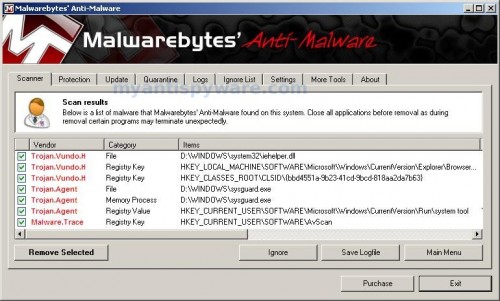
Malwarebytes Anti-malware, list of infected items
Make sure that everything is checked, and click Remove Selected for start Antispyware Soft removal process. When disinfection is completed, a log will open in Notepad and you may be prompted to Restart.
Note 1: if you can not download, install, run or update Malwarebytes Anti-malware, then follow the steps: Malwarebytes won`t install, run or update – How to fix it.
Note 2: if you need help with the instructions, then post your questions in our Spyware Removal forum.
Note 3: your current antispyware and antivirus software let the infection through ? Then you may want to consider purchasing the FULL version of MalwareBytes Anti-malware to protect your computer in the future.
Antispyware Soft creates the following files and folders
%UserProfile%\Local Settings\Application Data\{RANDOM}
%UserProfile%\Local Settings\Application Data\{RANDOM}\{RANDOM}tssd.exe
Antispyware Soft creates the following registry keys and values
HKEY_CURRENT_USER\Software\AvScan
HKEY_CURRENT_USER\Software\Microsoft\Windows\CurrentVersion\Run\{RANDOM}
HKEY_LOCAL_MACHINE\SOFTWARE\Microsoft\Windows\CurrentVersion\Run\{RANDOM}
180 Comments »
RSS feed for comments on this post.
Leave a comment
My Anti Spyware - Free antispyware programs and Spyware Removal Instructions.


Thank you so much this is much appreciated
Comment by ayushmaan — April 18, 2010 #
still getting fake popups from “antispywaresoft” even after cleaning registry and running spyware doctor
Comment by tony — April 21, 2010 #
I can’t download HijackThis. I can’t even open my Internet options long enough to unclick the proxy box. Any suggestions? thanks so much. This thing is terribly annoying.
Comment by BigCat — April 21, 2010 #
Tony, please start a new topic in our Spyware removal forum. I will help you.
Comment by Patrik — April 22, 2010 #
BigCat, boot your computer in Safe mode with networking and try the steps above once again.
Comment by Patrik — April 22, 2010 #
HijackThis won’t open!
Comment by Lora — April 22, 2010 #
Lora, you have renamed it before running ?
Comment by Patrik — April 23, 2010 #
I downloaded hijack this and renamed it, but the nasty program is keeping me from opening it still. Any help?
Comment by Josh — April 23, 2010 #
Josh, try run hijackthis in the Safe mode. Read my comments above.
Comment by Patrik — April 23, 2010 #
Do I need to delete all the 04′s or just the ones with tssd somewhere in the line?
Thanks for the help!
Comment by Alison — April 23, 2010 #
HijackThis works for me =) thanks a lot
Comment by SL — April 24, 2010 #
if you restart and quickly restore system it seems to get rid of it for me. quick and easy
Comment by spawn — April 24, 2010 #
Alison, you should remove only O4`s entries with tdss.
Comment by Patrik — April 24, 2010 #
early during bootup, press ctrl-alt-del then start task mgr before the annoying programs load. i end process for asam.exe, and processes ending with “tssd”. total 3 processes which i did not want running. then open browser internetExplorer-tools-internet options-connections-settings (diff from LAN settings)- proxy server delete the address 127.xx.xx.xxx
i next was able to run hijackthis which was on my desktop from prior download. (i did NOT rename the hijackthis.exe) check boxes and got rid of the processes beginning 04 end tssd, the asam, and the R1 HKCU proxy 127.xx.xx.xxx
at this point my computer was now working. i downloaded,saved and ran the myantispyware.com program which scanned my computer. but i would’ve had to buy that program to initiate the “fix checked”. no money, no credit card so i simply closed the program.
thx for the help.
Comment by sol — April 24, 2010 #
Thanks a lot, this spyware is a real pain in the ass…
Comment by Ugo — April 24, 2010 #
Thank very much for your invaluable help. I was really frustrated and panicked. My business computer caught a nasty malware – a scam: Antispywear Soft – a criminal enterprise. Infect with a Trojan, hijack your compouter, disable all functions (no internet except to thier site). I had to download Hi Jack this and your MalwareBytes programs to another computer, rename to firefox.exe and iexplorer.exe (as you recommeded), save to a CD, copy to the infected computer briefcase, and run them from there. Two scans with each program and I was squeeky clean. Right on! Thank you. I am buying your program!
Comment by Rick — April 24, 2010 #
This worked like a charm! Thanks SO much!
Comment by Kelcee — April 25, 2010 #
Can someone help me?I found R1 – HKCU\Software\Microsoft\Windows\CurrentVersion\Internet Settings,ProxyServer = http=127.0.0.1:5555, but none of them have tssd.You can’t even see the entire path of some.
Comment by tazmaniak — April 28, 2010 #
tazmaniak, open a new topic in our Spyware removal forum and post your HijackThis log. I will check it.
Comment by Patrik — April 28, 2010 #
Thank you so much
Comment by eduard — April 28, 2010 #
Thank you SO much for this! I was in a panic and no one else’s instructions made sense (and none of their programs actually REMOVED the junk, either). I have almost all of this thing off my PC, but there is one area where it’s still living.
I was unable to do anything with any of my F-keys, and so I had to do a Start–Run–msconfig to get the startup crap from this to stop. I’ve gotten all of this off as near as I can tell, using the steps you outlined and the Malwarebytes program. However, it’s still \in\ the startup registry, it’s just not selected. I can’t find it anywhere else via any kind of search, but I also can’t get it into the trash.
I’ve run every scan, and Malwarebytes (the free one, getting the full one as soon as I know this thing is GONE), but nothing shows it as there OTHER than in this startup in the registry.
Do I need to worry about this, as in, is it still there, ready to infect, or is it de-fanged since it’s not selected and there’s nothing of it anywhere else?
Comment by Jeanne — April 28, 2010 #
I did a selective startup and unchecked the 2 tssd lines but when I ran hijack I don’t see any tssd files to check. these are he 04 lines…
O4 – HKLM\..\Run: [SoundMan] SOUNDMAN.EXE
O4 – HKLM\..\Run: [QuickTime Task] “C:\Program Files\QuickTime\QTTask.exe” -atboottime
O4 – HKLM\..\Run: [IgfxTray] C:\WINDOWS\system32\igfxtray.exe
O4 – HKLM\..\Run: [HotKeysCmds] C:\WINDOWS\system32\hkcmd.exe
O4 – HKLM\..\Run: [Persistence] C:\WINDOWS\system32\igfxpers.exe
O4 – HKLM\..\Run: [HP Component Manager] “C:\Program Files\HP\hpcoretech\hpcmpmgr.exe”
O4 – HKLM\..\Run: [HP Software Update] “C:\Program Files\Hewlett-Packard\HP Software Update\HPWuSchd.exe”
O4 – HKLM\..\Run: [HPDJ Taskbar Utility] C:\WINDOWS\system32\spool\drivers\w32x86\3\hpztsb09.exe
O4 – HKLM\..\Run: [Zune Launcher] “c:\Program Files\Zune\ZuneLauncher.exe”
O4 – HKLM\..\Run: [WorksFUD] C:\Program Files\Microsoft Works\wkfud.exe
O4 – HKLM\..\Run: [SunJavaUpdateSched] “C:\Program Files\Java\jre1.6.0_07\bin\jusched.exe”
O4 – HKLM\..\Run: [Microsoft Works Update Detection] C:\Program Files\Microsoft Works\WkDetect.exe
O4 – HKLM\..\Run: [Microsoft Works Portfolio] C:\Program Files\Microsoft Works\WksSb.exe /AllUsers
O4 – HKLM\..\Run: [High Definition Audio Property Page Shortcut] HDAudPropShortcut.exe
O4 – HKLM\..\Run: [AlcWzrd] ALCWZRD.EXE
O4 – HKLM\..\Run: [Alcmtr] ALCMTR.EXE
O4 – HKLM\..\Run: [IObit Security 360] “C:\Program Files\IObit\IObit Security 360\IS360tray.exe” /autostart
O4 – HKLM\..\Run: [avast5] C:\PROGRA~1\ALWILS~1\Avast5\avastUI.exe /nogui
O4 – HKCU\..\Run: [ctfmon.exe] C:\WINDOWS\system32\ctfmon.exe
O4 – HKCU\..\Run: [MSMSGS] “C:\Program Files\Messenger\msmsgs.exe” /background
O4 – HKCU\..\Run: [EA Core] “C:\Program Files\Electronic Arts\EADM\Core.exe” -silent
O4 – HKCU\..\Run: [WMPNSCFG] C:\Program Files\Windows Media Player\WMPNSCFG.exe
O4 – HKCU\..\Run: [updateMgr] c:\Program Files\Adobe\Acrobat
Comment by Scott — April 29, 2010 #
Jeanne, try update Malwarebytes and perform a fresh scan. if result is zero, then you`re clean.
Comment by Patrik — April 29, 2010 #
Scott, these entries are ok.
Comment by Patrik — April 29, 2010 #
THANKS! Got the Antispyware Soft removed!
Comment by Frank — April 29, 2010 #
Had to save the hijack program to a flashdrive and was then able to load it on the infected computer. was able to download the malware program, BUT when i try to scan the computer turns itself off. any suggestions?
Comment by jackie — April 29, 2010 #
Hello. I downloaded HiJackThis, but i cant find any tssd entries. What should i do?
Comment by Mattias — April 29, 2010 #
I got the code 2 error and I dl’ed the random name executable file and I ended up getting to the Malaware program but right after i click \run scan\ the program closes
Comment by Jenny — April 30, 2010 #
Thank you so much!!! I could not find anything in hijack log but i went ahead and downloaded malwarebytes and it found 26 infected files, i removed them and restarted, by the way I did have to run in safe mode, anyways I use AVG for virus protector and it let this get pass, does anyone have advice on a new virus protector that is better then AVG? Thanks again so much for help, so far my computer seems to be ok again!
Comment by Colleen — April 30, 2010 #
Jackie, try run HijackThis in Safe mode.
Comment by Patrik — April 30, 2010 #
Mattias, open a new topic in our Spyware removal forum and post your HijackThis log.
Comment by Patrik — April 30, 2010 #
Woah, that worked like a dream…
Thanks to you my evening is saved!
Its really great there are people out there willing to help those in need against irritating stuff like these. Hats off.
Comment by just a Fin — April 30, 2010 #
Thank you so much for the easy to follow instructions. Got rid of the antispyware soft. Now to get rid of the buggers who started it. You deserve a medal.
Comment by Jamesy — April 30, 2010 #
Jenny, ask for help in our Spyware removal forum.
Comment by Patrik — April 30, 2010 #
thanks Patrik! I figured it out!
Comment by Jenny — May 1, 2010 #
Great instructions, I killed it, yeahhhh! Thanks a lot for your help.
Comment by metrotom — May 1, 2010 #
thank you sooo much!
everything worked fine
Comment by benny — May 1, 2010 #
hey i can’t rename this file is there any way?
Comment by lee — May 1, 2010 #
how do you resave the file in different name it does let you change it?
Comment by lee — May 1, 2010 #
After deleting the trojan, my internet browsers don’t work anymore! They all get a connection refused error, even after uninstalling and reinstalling the browser, and rebooting the machine! Help, please?
Comment by Alex — May 1, 2010 #
Thank you so much! This spyware is so annoying I swear that if I ever meet the ones who made it, I will torture them will all the most annoying stuff they can think of. lol
Thanks again!
Comment by Meg — May 1, 2010 #
Thanks you so much.. simple instruction and got the job done..
I had Norton 360 not sure how this let it through..
-Sanjay
Comment by Sanjay — May 1, 2010 #
Agh pressed fix for all 04 code lines and now obviously no internet connection got great protec tion though – whats the best fix now?
Thanks for the help
Comment by Theo Abbs — May 2, 2010 #
lee, you need remove a HijackThis.exe in a Save dialog.
Comment by Patrik — May 2, 2010 #
Alex, you have fixed “R1 – HKCU\Software\Microsoft\Windows\CurrentVersion\Internet Settings,ProxyServer = http=127.0.0.1:5555″ ?
Comment by Patrik — May 2, 2010 #
this seemed to work for me, i installed hijack this, then installed mbam, at which point my kaspersky caught the *tsd.exe files and did a quarantine, asked for a reboot and everything seems okay now…
in the future i am definetly going to install both anti virus and MBAM
Comment by KB24 — May 2, 2010 #
Theo Abbs, you need fix an infected entries only.
Comment by Patrik — May 2, 2010 #
IE would not keep the change in LAN settings, I have Firefox too, downloaded and changed name of file to iexplore.exe I see no sysguard.exe files nor ftav.exe following is the file list, am I to delete all “04″..nevermind could not copy and paste, they all have either HKLM, HKCU, HKUS…..do I delete all of them….this
Comment by Mark — May 2, 2010 #
OK, I’ve run malware twice and restarted PC each time, virus removed, I Explorer will not connect, called ISP, all checked on their end, re downloaded IE8, still no go, how do I get IE8 to connect again?
Comment by Mark — May 2, 2010 #
Mark, you have checked IE proxy settings ?
Comment by Patrik — May 2, 2010 #
I’ve done every step, removing, deleting, but after a few hour it comes back, any solution?
Comment by Henry — May 2, 2010 #
Henry, looks like your PC is infected with a trojan that reinstalls the rogue. Please begin a new topic in our Spyware removal forum. I will help you.
Comment by Patrik — May 2, 2010 #
Thank you so~~~much!
Comment by Heather — May 2, 2010 #
Patrik, proxy box is checked under LAN settings, it was checked when I went to look at it….still not working….thanks for your assistance!
Comment by Mark — May 3, 2010 #
hi ya patrik, this may sound silly but what you have put up above ( the MBAM ) doesnt come up with malwarebytes, it comes up with spyware doctor which you have to pay for. obvious problem, i havent got the money and dont wish to pay for it. if you could help that would be lovely
Comment by wattsy — May 3, 2010 #
i have done this several times. as soon as i log out of safe mode and back in to my normal account its back….. what can i do??
Comment by kieran — May 3, 2010 #
Thank you melware! great program, no need to buy. Fixed my problem perfectly!
Comment by Jason — May 3, 2010 #
Work fantastic. Followed exactly how you said, worked like a charm!!
Comment by Matt — May 3, 2010 #
Bless you folks! You are truly doing God’s work. Your information cleaned my system after many failures to do so on my own. I will seriously consider your advertisers for updates to my security. Thank you very much.
Comment by Cyber Gyber — May 4, 2010 #
Mark, you need uncheck the proxy box.
Comment by Patrik — May 5, 2010 #
wattsy, probably you have clicked to a google ads above. Open the page, scroll down to “download malwarebytes” and click to a link.
Comment by Patrik — May 5, 2010 #
kieran, start a new topic in our Spyware removal forum. I will check your PC.
Comment by Patrik — May 5, 2010 #
Thanks! The message stop popping up. One thing I noticed was that I wasn’t able to open the Internet Explorer Internet Option under Tools. Luckily, I was on Firefox and set my download folder to desktop. I only had one of the tssd or whatever. I hope one was the only one I need to remove!
Comment by Cindy — May 5, 2010 #
i am currently doing what is mentioed above..i hope it works buut diffnetly the only website that has come closest
Comment by natalie — May 5, 2010 #
After a bummer of a morning I found your site and it made my day better! Thank you soooo much for clear simpelk instryctions
Comment by Doug — May 5, 2010 #
Phew! Couldn’t download on affected user account. Couldn’t get network access in safe mode, even with networking selected, so created another user account and then followed the instructions from there. Worked like a charm. Thank you. Panic was setting in.
Comment by Mark — May 5, 2010 #
Wow – step-by-step service that got the job done. Thank you so much. A++
Comment by Susan — May 5, 2010 #
thank you thank you thank you. A while back i thought the only way to get this thing off my friends computer was to do a clean sweep of the hard drive. you just saved me a few hours on my own pc. amazing
Comment by Ben — May 5, 2010 #
Hey, this worked great! I was browsing the web and getting ready to sleep, then I saw the virus and I was sort of freaking out since I couldn’t open anything. Luckily I had firefox opened at the time and I googled the problem and the steps were great, it fixed everything.
Comment by Khanh — May 6, 2010 #
I only found your site after fighting the virus for a couple of days–figured out that I could open my VZAccess if I clicked on it before Antispyware Soft fully opened. Same with Explorer 8. Downloaded Malwarebytes,–could only open it in safe mode and managed to clean the computer after two scans. I had Panda and Iobit 360 Pro running but both let the malware through.
My computer now refuses to restore to any date, even in safe mode and explorer 8 won’t open even unchecking the proxy setting. Any other ideas??
Comment by Skip Waterhouse — May 6, 2010 #
thank you very much! i followed the instructions in the suggested order and was able to successfully remove the ugly virus in <10 mins. this was second infection in last 10 days and i had to reformat my HD last time.
I can't thank you enough for the simple yet very effective instructions…
Comment by boston babu — May 6, 2010 #
Hello, thank you for the quick and useful guide this has worked and it’s fully removed from my pc, but 1 problem remains my IE won’t load i’ve checked everything and nothing seems to work, is there a solution to this, thank you once again keep up the good work.
Comment by Alex — May 6, 2010 #
Ok downloaded HiJack This and changed to iexplore.exe scanned deleted what files from previous posts that looked infected. Also downloaded and ran scan from Malware however, when I select Remove Selected. MBAM says it was unable to fix/delete all infected files. Everything is running ok(a little slow) big problem is if I use my search toolbar(google,bing, etc..) everytime I get rerouted to other sites. I didn’t get rid of everything yet. Help please!
Comment by Jason — May 7, 2010 #
Hi i did all of this but now explorer will not run. When i log onto my account only the desktop background will load but no desktop items or the task bar. This is also the case when in safe mode. does anyone have any ideas as to how i can go about fixing it. Thanks
Comment by Miles — May 7, 2010 #
I discovered that pulling the network cable, rebooting, and logging on as local user instead of domain user allowed me to run virus scan. Hopefully I won’t need anything else. I’ll go grab MalwareBytes just in case and check the proxy and registry settings too.
Comment by Hank — May 7, 2010 #
You sir, are a lifesaver. Thank you so much for doing this.
Comment by Alex — May 7, 2010 #
Thanks alot, this was doing my head in for an hour. Weird thing is though, I scanned my PC with Malwarebytes after I deleted the entries and the scanner came up with nothing. Anyone else had that happen?
Comment by Adam — May 7, 2010 #
Whoo, definitely did the job. Currently scanning with Malwarebytes, hope nothing suddenly appears. A well deserved great big Thank You
.
Comment by Joe — May 7, 2010 #
Ran HiJack in safe mode.
Comment by Jason — May 7, 2010 #
Still same issue
Comment by Jason — May 7, 2010 #
Please begin a new topic in our Spyware removal forum. Post your HijackThis log.
Comment by Patrik — May 8, 2010 #
Jason, start a new topic in our Spyware removal forum. I will check your PC.
Comment by Patrik — May 8, 2010 #
Miles, looks like “explorer.exe” is blocked from running.Try the following:
once Windows loaded, press CTRL + ALT + DEL. Task manager opens. Click File, New task. Type explorer and press Enter. It should back your icons and Start button. Run Malwarebytes, update it and perform a fresh scan.
Comment by Patrik — May 8, 2010 #
Adam, try update Malwarebytes and perform a new scan.
Comment by Patrik — May 8, 2010 #
I performed a full scan on my system and that came up with the goods, thanks Patrik.
Comment by Adam — May 8, 2010 #
thanks this worked fine but i had to down load hi-jack this from another computer and then down load
on the messed up comp. then ran the hi jack this
THANK A BUNCH
Comment by powhatantracker — May 8, 2010 #
when you have downloaded and installed go to your program files and rename malwarebytes to ‘ iexplore.exe , this will let you run malwarebytes , make sure you preform a full scan
Comment by Steve — May 8, 2010 #
These steps worked for me too. Thanks!
Comment by Mark — May 8, 2010 #
hey, i was running windows security essentials and it got through. after i clean my comp will spyware doctor keep it clean?
Comment by Pete — May 8, 2010 #
when i did a scan with spyware doctor if found the trojan but when i clicked fix and restarted my comp it still started on startup. so i went to msconfig and foudn the program and unchecked the box for the rogue program and it nolonger started. this allows me to run programs however the program is still on my comp. if i go to the actual file location (c:\user\me\appdata\local\wlntvlnse\jsnvqtttssd.exe) and just delete it there will this fully get rid of the program?
Comment by Pete — May 8, 2010 #
Thank you so much. I tried 3 other techniques before finding this one. I’ve been working on this for 2 hours and you’re recommendations are much appreciated =) To anyone put in this terrible situation – this really works!!!
Comment by Delilah — May 9, 2010 #
thank you sooooooooo much Patrik! I used hijackthis 1st, then disabled iexplArer from the startup, then ran malwarebytes; restarted the pc and everything seems fixed now!!
And thanks hijackthis & malwarebytes developers <3
p.s. i always wondered who the hell spends their time creating viruses, malware and all kinds of popups? get a life, people..
Comment by nady — May 9, 2010 #
Pete, looks like you are clean.
Comment by Patrik — May 9, 2010 #
Thank you so much, I was about to give up when I found this website! It seems to work, hope it doesn’t reappear. Really nice of you to help people with no computer skills like me!
Comment by Julie — May 9, 2010 #
I simply downloaded Hi-jackThis from another computer, loaded it on a flash drive and uploaded it onto my infected computer. It immediately got rid of the nasty popups from Antispysoft. Thanks so much for all the info. It’s a huge help!
Comment by Kevin — May 9, 2010 #
HELP. i have the same problem but this time, its seriously worse. i try to open up the programs like spyware doctor and hijack this but it wont let me. as soon as it opens, it closes and the antispyware soft claims that it is infected. i also don’t know how to rename hijack this into the name given before saving the file. any help? please???
Comment by johnathan — May 10, 2010 #
Can someone help me out? I downloaded MWB and did scan and removed all off it. Pretty much all of the symptoms are gone except i still can’t use IE or Chrome and for some reason only Firefox works. I downloaded HiJack but couldn’t find any tssd files. Help?
Comment by Pat — May 10, 2010 #
I could open hijackthis but was unable to find the two tssd.exe files, I couldn’t even open MalwareBytes Anti-malware at all. After restarting in safe mode, did hijackthis again, and found the files, Malwarebytes also ran okay in safe mode and killed the files that it caught. Restarted back in regular mode, worked fine
Thank you very much for the detailed instructions. This is the second time i used you guys for cleaning up nasty spy-ware, the instructions are simple and easy to follow. Thanks again!!
Comment by BUNNY914 — May 10, 2010 #
Thanks for the help, it worked out
Comment by anonymous — May 11, 2010 #
johnathan, “rename” is simple. If you using Internet Explorer, then click to a link. Save dialog opens. In the Filename field type a new name (iexplorer.exe) and click Save button. If you using Firefox, then you need right click to a link and select Save Link As. Save dialog opens. Type a new name and press Save.
Comment by Patrik — May 11, 2010 #
Pat, check the proxy settings. Read the first part of the first step above.
Comment by Patrik — May 11, 2010 #
Thanks alot. Saved my life man. is it normal for my computer to be a tad bit slower?
Comment by Pat — May 11, 2010 #
I had the antispyware soft and did the quick restore, it worked magically….thanks for the advice.
Comment by Cbennett — May 12, 2010 #
Thank you very much. This saved me today. For what its worth, starting in safe mode was key. I skipped that step and it didn’t work. After I got to safe mode, though, this nasty problem went away.
Thanks again.
Comment by Greg — May 12, 2010 #
I can’t open anything without the stupid pop up comming like I’m trying to restore my computer but itblockd it
Comment by Don — May 12, 2010 #
This thing is taking me over! I cannot open my control panel, internet explorer is completely taken over, firefox still works but i can’t rename anything. nothing is working! Someone please help me!!!
Comment by Wes — May 13, 2010 #
Don, you have tried to rename HijackThis to iexplore before running ?
Comment by Patrik — May 13, 2010 #
Wes, if you using Firefox, you need right click to a link and select Save link as. Save dialog opens. In the filename field type iexplore.exe and press Save. Run it.
Comment by Patrik — May 13, 2010 #
I restarted in SAFE mode and got rid of this shit. Thanks all and Patrik
Comment by Wes — May 13, 2010 #
Logfile of Trend Micro HijackThis v2.0.4
Scan saved at 1:35:12 PM, on 5/13/2010
Platform: Windows Vista SP1 (WinNT 6.00.1905)
MSIE: Internet Explorer v7.00 (7.00.6001.18444)
Boot mode: Safe mode with network support
Running processes:
C:\Windows\Explorer.EXE
C:\Program Files\Internet Explorer\iexplore.exe
C:\Program Files\Mozilla Firefox\firefox.exe
C:\Program Files\Spyware Doctor\pctsTray.exe
C:\Users\Kelly.KellyBethke-PC\Downloads\HiJackThis.exe
C:\Windows\system32\DllHost.exe
…
–
End of file – 9351 bytes
I dont know what to do!!
Comment by kelly — May 13, 2010 #
Oh thanks so much! I was panicking for the better part of an hour! I was wondering where this so called “security software” came from since I sure as hell didn’t download it, and was also wondering why my own security program didn’t detect these “32 risky viruses”. Thank god I found this site and realised my computer wasn’t fully stuffed up. Just one pesky program!
Comment by Lisa — May 15, 2010 #
Thank you so much for these instructions, worked like a dream. However, my laptop does not seem to be running as fast as it was before it got infected. Is it possible that I could still have some infected files on there?
Comment by Rachel — May 15, 2010 #
kelly, run HijackThis and fix the following lines:
R1 – HKCU\Software\Microsoft\Windows\CurrentVersion\Internet Settings,ProxyServer = http=127.0.0.1:5555
O4 – HKCU\..\Run: [tyvdetmy] C:\Users\Kelly.KellyBethke-PC\AppData\Local\knwnpcclk\suksgnetssd.exe
Comment by Patrik — May 15, 2010 #
Rachel, try scan your PC with an online virus scanner or start a new topic in our Spyware removal forum. I will check your PC.
Comment by Patrik — May 15, 2010 #
i can’t rename the hijackthis file on my computer!
i’m using mozilla firefox since my ie is completely taken over..
i right click, save file as, but it just downloads and won’t let me rename!
please help me..
this virus is freaking me out..
Comment by paige — May 15, 2010 #
i managedto get the hijack program working..
but..
when i scan, it says “for some reason, your system denied write access to the host file..
Comment by paige — May 15, 2010 #
ahh, i got rid of the virus..
but my internet explorer won’t work..
when it said to fix check on hijacks..
i sorta just fixed everything since i couldn’t find what i needed!
what do i do? ><
Comment by paige — May 15, 2010 #
paige, begin a new topic in our Spyware removal forum. I will help you.
Comment by Patrik — May 16, 2010 #
Thank you very much! Very useful guide compared to the other confusing ones I found.
Comment by Link — May 17, 2010 #
I removed Antispyware Soft, but now I can’t seem to get any connection. I tried with a different account on the same computer and connection seemed fine.
Comment by Justin — May 17, 2010 #
Hey patrik
i am not able to log onto safe mode and hijack this is not running even after renaming
p;z help urgent
Comment by San — May 18, 2010 #
Patrik – you saved the day. I echo all of the comments on here about your work; I got this virus 3 days ago and have been struggling to find a solution; it’s consumed most of my time. When I found this site, I rushed home and it took 20-minutes to entirely remove this virus. You’re a good man, and it’s nice to know there are good people out there helping others to fight the morons who have too much time on their hands and need to invent viruses like this. Thank you, a million times over…
Comment by DanRat — May 18, 2010 #
Justin,
ping, instant messengers and others network apps don`t work too ?
Comment by Patrik — May 19, 2010 #
San, press CTRl + ALT + DEL. Task Manager opens. Look for processes that have a “tssd” string at right and stop them. Download and run Malwarebytes.
Comment by Patrik — May 19, 2010 #
Had to do it all in safe mode but it worked perfectly
Comment by Jake — May 19, 2010 #
Hi Thanks so much for this page.
1 thing – chrome now does not load pages. Anymore help on this?
Comment by matt — May 19, 2010 #
I completed the steps above and the antispware soft is still on my desktop and a bottom right icon on my screen. Have I done something wrong?
Comment by Michelle — May 19, 2010 #
I thought for sure your instructions would eliminate this crazy thing, but it keeps coming back when I get out of safe mode. In safe mode, I deleted all known problems, restart normally, and it is back instantly. I cannot open anything. Any new suggestions? Thanks!
Comment by Chris — May 20, 2010 #
matt, try the instructions. If it does not help, please start a new topic in our Spyware removal forum.
Comment by Patrik — May 20, 2010 #
Michelle, try update Malwarebytes and perform a fresh scan. If it does not help, please start a new topic in our Spyware removal forum. I will help you.
Comment by Patrik — May 20, 2010 #
Chris, begin a new topic in our Spyware removal forum. I will check your PC and help you.
Comment by Patrik — May 20, 2010 #
if you are able to get on the net google Hitman Pro 3.5 download and install and scan…it is amazing! 30 day free trial, but I’m on my 2nd 30 days and its still free. Have it on several of my pc’s now. I also use malware bytes. Good luck guys!
Comment by Judy — May 20, 2010 #
Question – I deleted my user account that I was logged into when I got this spyware, and then created a new administrator account. (I saved all the files from the original user account under the default Administrator account that comes with XP).
I am on the new account I created now, and there is no sign of the spyware at all. Does this mean I killed it by deleting the affected account, or is it still lurking in the saved files from the old account?
I am running Spybot as I type, while logged into the new account to see if I can find anything, and if it is clear, I was going to move my saved files from the default Administrator folder to the new folders I have created.
Does anyone have any idea if this is all safe? Or have I inadvertently managed to tangle this spyware up in my system even more than it was before?
Thanks, Jess x
Comment by Jessica — May 20, 2010 #
After removing antispyware my google chrome is telling me it can’t display page, like it isn’t connected to the internet but mozilla firefox works…help!
Comment by Ore — May 20, 2010 #
Patrik, I used many things. I tried kaspersky (blocked), malwarebytes (blocked), iobit security (blocked), norton (blocked). I’m at a loss and when I try to download hijackthis the site is blocked by Antispyware Soft on internet explorer. On Firefox it does not give me the option to rename it. please help me!!!!
Comment by Danny — May 21, 2010 #
Is the system restore on startup working for this virus? Dammit i hate people who are too lazy to work their ass off for money.
Comment by Danny — May 21, 2010 #
Oh and by the way the virus has practically blocked every single internet browser like safari, chrome, IE, but not firefox (strangely).
Comment by Danny — May 21, 2010 #
I found how to rename the file, but the virus has now obtained the ability to automatically close any type of software that can possibly fight it off. This virus is a B*T*H. My OS is vista home edition if that helps.
Comment by Danny — May 21, 2010 #
Thank you so much for explaining everything and providing help! I’ve downloaded so many software and researched a lot about removal methods but ur instructions worked!
After 24 hrs of tackling this virus it seems to have gone. But my Internet Explorer and Chrome won’t work…only FireFox. I don’t really mind IE since I don’t use it much but it keeps on popping up, saying unfound page.I tried to just uninstall IE but unfortunately I can’t find it in neither Programs & Features nor Updates on my Vista~
btw, the virus won’t let me open or d/l anything until I read ” safe mode w/ internet” step
You’ve no idea how much I appreciate this! God bless & may good triumph over evil
Comment by ang — May 21, 2010 #
THANK YOU!! Your detailed instructions are perfect, and worked like a charm.
Comment by Thanh — May 22, 2010 #
Jessica, looks like you are clean. But anyway, scan your PC with Malwarebytes.
Comment by Patrik — May 22, 2010 #
Ore, start a new topic in our Spyware removal forum. I will check your PC.
Comment by Patrik — May 22, 2010 #
Danny, to open a Save dialog in Firefox follow the steps:
Right click to a link and select Save Links as. Save dialog opens.
Comment by Patrik — May 22, 2010 #
This guide saved me a whole lot of headache last night. I couldn’t believe how easily this dam program go on my system. I have the latest security updates. Use Firefox for my internet browsing. I have Windows 7 64bit and use Microsoft Security Essentials. Which did detect the virus but couldn’t remove it. I thought I was going have to do a clean install of Windows. Thanks again.
Comment by Josh — May 22, 2010 #
Malwarebytes worked perfectly, I didn’t need to run IE and do the LAN stuff or do the PCDoctor,all I did was run Malwarebytes in SafeMode. Thank You all who wrote this tutorial
Comment by Erick — May 22, 2010 #
Thank you very much for publishing! I cant even fathom how pathetic you would have to be to create such garbage. would love to meet the creator in person.
Comment by Jason — May 23, 2010 #
Hi, I did all the steps and i’m pretty sure I got rid of the spyware, but now i’m unable to connect to the internet with ie or firefox. I went to internet explorer and unchecked the proxy server box but it’s still not working. Any ideas?
Comment by James — May 24, 2010 #
are malwarebytes and hijack free?
Comment by Julia — May 24, 2010 #
thank you so much, you are truely a lifesaver!
Comment by Julia — May 24, 2010 #
It keeps popping up inappropriate sites
Comment by Nuna Biznaz — May 24, 2010 #
Hey, for those of you who can’t get on the internet, try starting the task manager the *second* your user account is loaded (hit ctrl-alt-delete). Then go to the “processes” tab and right-click on anything ending in tssd.exe, and select “end process.” You have to be quick, but this should keep it from blocking you.
Comment by Crazydude — May 24, 2010 #
O4 – HKCU\..\Run[cxmwlety]C:\Documents and Settings\default\Local Settings\Application Data\nfijlrxmc\iggnpbstssd.exe
This is ok to “fix” then? It shows up twice on the list.
Comment by Katie — May 24, 2010 #
James, what shows your browser when you trying open any site ?
Comment by Patrik — May 25, 2010 #
Katie, yes fix this entry.
Comment by Patrik — May 25, 2010 #
I forget how to open in safe mode. If I ever catch these “people” a 2×4 to the head will be my choice
Comment by Glenn — May 25, 2010 #
Never mind. I figured it all out and am well again. Thanks for all the comments. You are all wonderful
Comment by Glenn — May 25, 2010 #
I found it helpful to quickly press ctrl alt delete at start up and end the processes ending in tssd.exe. This will allow you to open any program. Then continue to follow these instructions. This was so helpful thank you very much.
Comment by Devon — May 25, 2010 #
Well I looked at the toolbar and clicked the arrow and then customize toolbar (for Windows 7)and the nonsensicalname.exe shows up on the list and you search that name in the windows explorer and u can’t delete the file since it’s running but you can change its name to whatever so when you restart your computer it doesn’t startup with the spyware and annoying popups
Comment by Alan — May 26, 2010 #
I found your website after my computer got infected and followed the instructions and it worked perfectly. Thank you very much for your service.
Comment by Ed — May 27, 2010 #
THANK YOU!! These instructions were easy to follow and worked like a charm!
Comment by Carrie — May 27, 2010 #
The fix worked! I am so happy! Now I need to work on my relationships with my co-workers, since they hate me so much.
Comment by Chuck Hurst — May 28, 2010 #
Thank you so much. I am not very tech literate, so when I got this over an hour again I started to panic. Not only did this solve my problem, but the instructions (both at the beginning and in the comments) were simple, easy to follow, and worked like a charm. Thanks again for all your help!
Comment by Cortney — May 29, 2010 #
Thank you so much for this site. I am not very tech literate so when I got this over an hour ago I started to panic. Not only did this page work like a charm, but the instructions at the top and in the comments were simple, easy to follow, and precise. Thanks again for all your help!
Comment by Cortney — May 29, 2010 #
Thank you. Followed the instructions and worked great! Had to download from another computer and load with usb drive, then HiJack and mbites worked easy. Thanks, Nick
Comment by Nick — May 29, 2010 #
I Did everything you said and it seems it’s gotten rid of the virus and the program but I misread step 1 and accidentally deleted all O4 files. Now there is stuff missing from my toolbar. And internet explorer is not working please help!
Comment by Chris — May 29, 2010 #
i’ve already paid, how do i get money back?
Comment by Renee — May 29, 2010 #
I got this stupid virus today. PITA!!! Anyways, I rebooted my computer, and before it could activate the virus, I opened my task manager and looked for any weird entries (a hint provided by one of the other commenters on this page) and when I found one (the weird entry in my case was “oqdnjpitssd.exe”) and did a search on it. It came up with nothing, so I turned off that process. Since I still was unable to access the internet, I also went into my internet options and turned off my proxy server, which allowed me to get back online.
The next thing I did, was to do an online virus scan using Trend’s Housecall. It located two files (oqdnjpitssd.exe and 3.165899753.exe) I let housecall ‘fix’ the viruses (which by the way were both “TSPY_QAKBOT.SMG” viruses).
After that, I went through and checked all the files and registry entries to see if I had to fix anything else and everything was PERFECT! I didn’t need to do anything else. I tell ya… I gotta love the person who first told me about that site!
For those of you who are somewhat ‘computer handicapped’ this might be the way to go. I didn’t even need to use the HiJackThis program.
Good luck peeps!!
Comment by Saleen — May 31, 2010 #
Chris, you can repair all deleted entries. Run HijackThis, Click to “View list of backups” button. Select an entry that you want to repair, then click Restore.
Comment by Patrik — May 31, 2010 #
Renee, contact your credit card company and tell them what has happened.
Comment by Patrik — May 31, 2010 #
I too got this virus, and your program seemed to stop the “spysoft” popups. The only issue now is, I cant get Internet Explorer to work. I was using my laptop to download from your site, to fix my desktop, but the error message is Internet Explorer cannot display the web page. Im sure it is an easy fix, my mail program works, just not explorer.
Comment by gary — May 31, 2010 #
gary, you have unchecked “Use a proxy server” in Lan settings of Internet Explorer?
Comment by Patrik — June 1, 2010 #
Just wanted to say that these instructions worked! Thank you so much!
Comment by John — June 2, 2010 #
Followed all the directions as posted and so far so good for this computer idiot here. Thanks very much!
Comment by Jav — June 3, 2010 #
I accidentally checked all the “02″ boxes in Hijackthis. It made it so I could use IE for a bit though, which is how I was able to get the Malwarebytes downloaded, but now IE wont work anymore! =[ Any everytime I unclick the proxy box in IE it freezes and shuts down. Help =[ =[ = [
Comment by Chasity — June 3, 2010 #
Sratch that. I got the settings to stay, but now everytime I open it, it sends up an error message and wants to close. grrr
Comment by Chasity — June 3, 2010 #
Thanks for the detailed instructions. I had this virus about 2 weeks ago and removed – clean scan with malwarebytes. However, my internet connection has become intermittent and I was wondering if this is a lingering effect of the virus. I have Qwest DSL running through a PK5000 modem. Sometimes the internet works, sometimes it does not. Any help is appreciated.
Comment by Krawl — June 4, 2010 #
Chasity, boot your PC in Safe mode and try run IE once again.
Comment by Patrik — June 4, 2010 #
What shows your browser when you trying open any site ?
Comment by Patrik — June 4, 2010 #
Hi, I followed these instructions. Well first I went in safe mode with networking and typed msconfig and stopped the virus program and deleted some registry keys manually. Then I downloaded hijackthis and malwarebyte and ran norton. How can I be sure the virus is actually gone and my computer is safe to use?
Comment by Star Struck — June 6, 2010 #
Struck, you can also check your PC with an online scanner.
Comment by Patrik — June 9, 2010 #
