![]() | Do you have pop-ups or your computer infected with trojan or spyware ? Learn how to ask us for help, click here! |
How to remove User Protection (Uninstall instructions)
User Protection is a rogue antispyware program from the same family of rogues as Dr. Guard, Paladin Antivirus and Malware Defender. The program is distributed through the use of trojans. Once the trojan infects your computer, it will add itself to the startup programs to run whenever you start Windows, and then performs several actions. First, shows many fake security alerts that inform, for example, that computer is infected, or that detected the attack from the Internet. Second, downloads and installs on your computer User Protection.
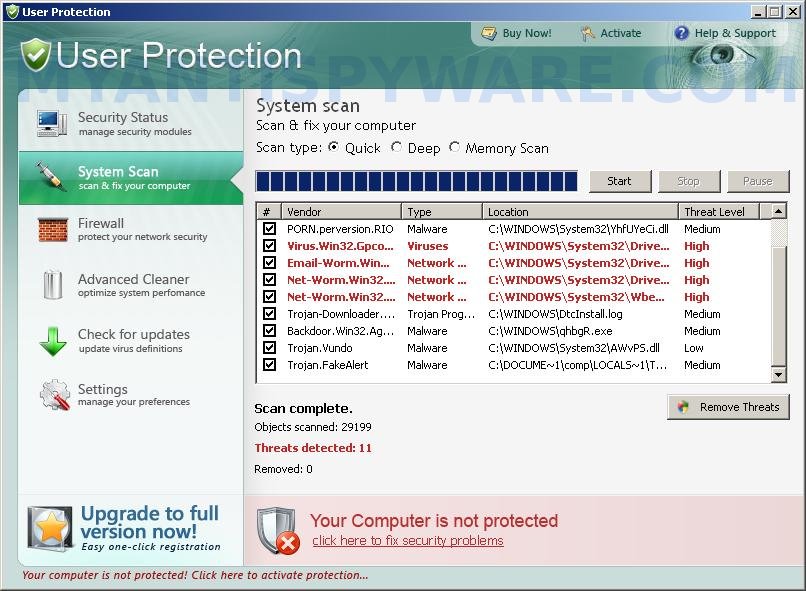
When User Protection is installed and started, it will first step register itself in the Windows registry to run automatically every time when Windows starts, Then it will ask you to uninstall legitimate antivirus and antispyware tools (Malwarebytes’ Anti-Malware, AVG, etc), to protect itself from uninstalling. After that, User Protection will run an imitation of system scan and detect numerous infections that will not be fixed unless you first purchase the software. Nothing new here, this is a scam. Like other rogue antispyware applications, the rogue is unable to detect or remove any infections and nor will be protect you from legitimate future threats. So you can safely ignore the false scan results.
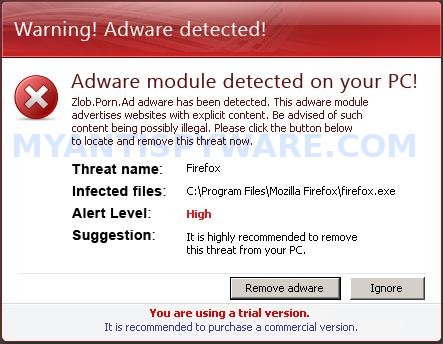
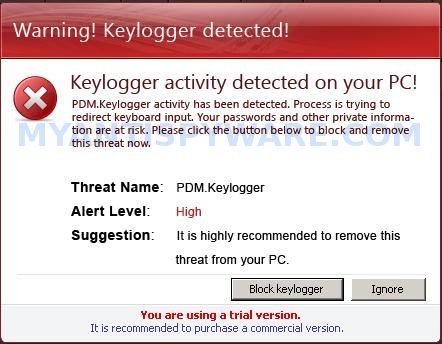
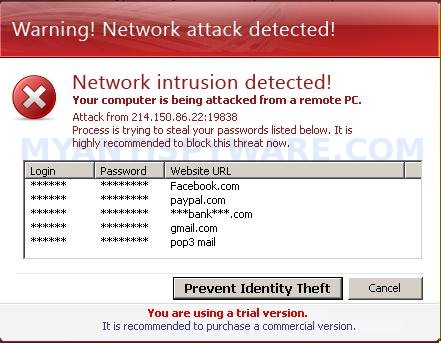
While User Protection is running, you will be shown nag screens and fake security warnings from Windows task bar. A few samples:
Danger!
Harmful viruses detected on your computer. Click on the
message to scan your computer for security threats for free.
Warning! Network attack detected!
Network intrusion detected!
Your computer is being attacked from a remote PC.
Danger!
Unauthorized person tries to steal your passwords and private
information. Click on the message to prevent identity theft.
Danger!
A security threat detected on your computer.
TrojanASPX.JS.Win32. It strongly recommended to remove
this threat right now. Click on the message to remove it.
Warning! Adware detected!
Adware module detected on your PC!
Warning! Keylogger detected!
Keylogger activity detected on your PC!
Of course, all of these alerts and warnings are a fake and like false scan results should be ignored! As you can see, User Protection is a scam, that created with one purpose to scare your into purchasing so-called “full” version of the program. Most importantly, do not purchase it!
Last but not least, the same trojan that installs User Protection will also download and install onto your computer a variant of TDSS trojan. The trojan may redirect search results in Google, Yahoo, MSN, block the ability to run various antivirus and antispyware programs and much more.
If you find that your computer is infected with the rogue, then be quick and take effort to remove it immediately. Follow the removal guide below to remove User Protection and any associated malware from your computer for free.
Symptoms in a HijackThis Log
O4 – HKCU\..\Run: [diskperfxp.exe] C:\DOCUME~1\comp\LOCALS~1\Temp\diskperfxp.exe
O4 – HKCU\..\Run: [User Protection] “C:\Program Files\User Protection\usrprot.exe” -noscan
More screen shoots of User Protection

Use the following instructions to remove User Protection (Uninstall instructions)
Step 1. Remove TDSS trojan-rootkit
Download TDSSKiller from here and unzip to your desktop.
Open TDSSKiller folder. Right click to tdsskiller and select rename. Type a new name (123myapp, for example). Press Enter. Double click the TDSSKiller icon to start scanning Windows registry for TDSS trojan. If it is found, the you will see a screen similar to the one below.

TDSSKiller
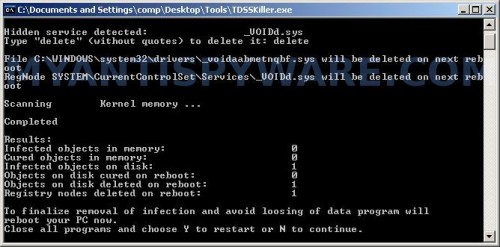
Type delete and press Enter. Once TDSSKiller has finished removing rootkit TDSS, you will see a windows as shown below.
TDSSKiller
Type Y and press Enter. Your computer will be rebooted.
Step 2. Remove User Protection and any associated malware.
Download MalwareBytes Anti-malware (MBAM). Once downloaded, close all programs and windows on your computer.
Double-click on the icon on your desktop named mbam-setup.exe. This will start the installation of MalwareBytes Anti-malware onto your computer. When the installation begins, keep following the prompts in order to continue with the installation process. Do not make any changes to default settings and when the program has finished installing, make sure a checkmark is placed next to “Update Malwarebytes’ Anti-Malware” and Launch “Malwarebytes’ Anti-Malware”. Then click Finish.
MalwareBytes Anti-malware will now automatically start and you will see a message stating that you should update the program before performing a scan. If an update is found, it will download and install the latest version.
As MalwareBytes Anti-malware will automatically update itself after the install, you can press the OK button to close that box and you will now be at the main menu. You will see window similar to the one below.

Malwarebytes Anti-Malware Window
Make sure the “Perform quick scan” option is selected and then click on the Scan button to start scanning your computer for User Protection infection. This procedure can take some time, so please be patient.
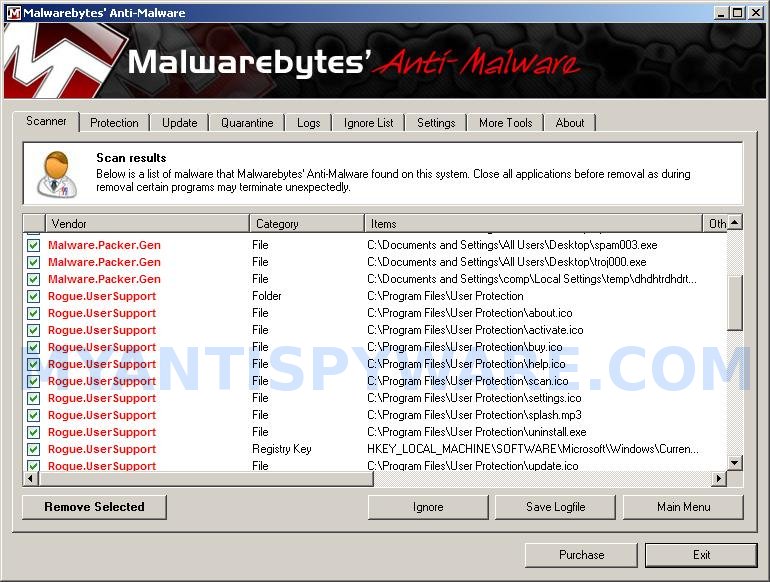
When the scan is finished a message box will appear that it has completed scanning successfully. Click OK. Now click “Show Results”. You will see a list of infected items similar as shown below.
Note: list of infected items may be different than what is shown in the image below.

Malwarebytes Anti-malware, list of infected items
Make sure all entries have a checkmark at their far left and click “Remove Selected” button to remove User Protection. MalwareBytes Anti-malware will now remove all of associated User Protection files and registry keys and add them to the programs’ quarantine. When MalwareBytes Anti-malware has finished removing the infection, a log will open in Notepad and you may be prompted to Restart.
Note: if you need help with the instructions, then post your questions in our Spyware Removal forum.
User Protection creates the following files and folders
C:\Program Files\User Protection
%UserProfile%\Start Menu\Programs\User Protection
C:\Program Files\User Protection\usrhook.dll
C:\Program Files\User Protection\usrprot.exe
%UserProfile%\Local Settings\temp\diskperfxp.exe
C:\Documents and Settings\All Users\Desktop\spam001.exe
C:\Documents and Settings\All Users\Desktop\spam003.exe
C:\Documents and Settings\All Users\Desktop\troj000.exe
C:\Program Files\User Protection\about.ico
C:\Program Files\User Protection\activate.ico
C:\Program Files\User Protection\buy.ico
C:\Program Files\User Protection\help.ico
C:\Program Files\User Protection\scan.ico
C:\Program Files\User Protection\settings.ico
C:\Program Files\User Protection\splash.mp3
C:\Program Files\User Protection\uninstall.exe
C:\Program Files\User Protection\update.ico
C:\Program Files\User Protection\usr.db
C:\Program Files\User Protection\usrext.dll
C:\Program Files\User Protection\virus.mp3
%UserProfile%\Start Menu\Programs\User Protection\About.lnk
%UserProfile%\Start Menu\Programs\User Protection\Activate.lnk
%UserProfile%\Start Menu\Programs\User Protection\Buy.lnk
%UserProfile%\Start Menu\Programs\User Protection\Scan.lnk
%UserProfile%\Start Menu\Programs\User Protection\Settings.lnk
%UserProfile%\Start Menu\Programs\User Protection\Update.lnk
%UserProfile%\Start Menu\Programs\User Protection\User Protection Support.lnk
%UserProfile%\Start Menu\Programs\User Protection\User Protection.lnk
%UserProfile%\Application Data\Microsoft\Internet Explorer\Quick Launch\User Protection.lnk
%UserProfile%\Desktop\User Protection Support.lnk
%UserProfile%\Desktop\User Protection.lnk
C:\Documents and Settings\All Users\Desktop\nudetube.com.lnk
C:\Documents and Settings\All Users\Desktop\pornotube.com.lnk
C:\Documents and Settings\All Users\Desktop\youporn.com.lnk
User Protection creates the following registry keys and values
HKEY_CURRENT_USER\SOFTWARE\Microsoft\Windows\CurrentVersion\Run\user protection
HKEY_CURRENT_USER\Software\Microsoft\Windows\CurrentVersion\Run\diskperfxp.exe
HKEY_CURRENT_USER\SOFTWARE\Microsoft\Windows\CurrentVersion\Policies\System\DisableTaskMgr
HKEY_LOCAL_MACHINE\SOFTWARE\Microsoft\Windows\CurrentVersion\Policies\System\DisableTaskMgr
73 Comments »
RSS feed for comments on this post.
Leave a comment
My Anti Spyware - Free antispyware programs and Spyware Removal Instructions.


i can’t start scanning Windows registry for TDSS trojan.
Comment by reena — March 19, 2010 #
i can’t start scanning Windows registry for TDSS trojan bcoz utility doesn’t support x64 operatig system!
Comment by reena — March 19, 2010 #
reena, then skip first step.
Comment by Patrik — March 19, 2010 #
ya, i skip it…
i’ve done step 2
but still appear this…
Danger!
A security threat detected on your computer.
TrojanASPX.JS.Win32. It strongly recommended to remove
this threat right now. Click on the message to remove it.
plz..
Comment by reena — March 19, 2010 #
reena, try update Malwarebytes and perform a fresh scan.
Comment by Patrik — March 19, 2010 #
Thank you! Thank you!
it works!!!
Comment by reena — March 19, 2010 #
Hello,
xp antimalware unregistred version open folder
when i open mozilla firefox and displayed virus information from taskbar what’s wrong with. how to rectify this error. please tell me a reason
by
sahana
Comment by sahana — March 19, 2010 #
I have cleaned my computer by formatting the drive and installing Windows again…But is there any way to protect the PC from getting infected again?? Is there any antivirus software that is tested and really stops it? I had NOD32, but it seems it made no difference at all….
Comment by Mirela — March 19, 2010 #
I cant access internet from the infected computer, would it work just by downloadin everything on another computer and transfering it on a usb key? CAn malwarebytes run from a usb to scan a computer?
Comment by So — March 19, 2010 #
sahana, to remove xp antimalware use the instructions.
Comment by Patrik — March 20, 2010 #
Mirela, no 100% protection. A few good suggestions here.
Comment by Patrik — March 20, 2010 #
So, yes try it. Also you can use Safe mode with networking to download TDSSkiller.
Comment by Patrik — March 20, 2010 #
thank you.this has help me a lot to uninstall User Protection.i was having a lot of problem with this software before but thanks to your help i managed to uninstall it…Good job guys
Kind regards to the Team,
Sameer
Comment by Sameer — March 21, 2010 #
Thank you so much i just got Windows 7. And this works.
Thank You so Much.
Comment by Jeff — March 21, 2010 #
Thank you so much!!!!!!
Comment by ludde — March 22, 2010 #
I can run this but only if I run as administrator. The app then downloads updates and says it will restart. However, it will NOT restart itself. Therefore I can only run the version as downloaded (i.e. not with updates). Any way around this?
Comment by Andrew — March 22, 2010 #
thanks so much. I finally removed it. It’s was making my computer a mess. Internet Explorer wouldnt work properly, my computer would shut down really often, and the most weirdest thing; the websites i was googling, it would change to some others. i had to use the cached words from google to open your website. thanks again a lottt
Comment by Ilir — March 22, 2010 #
After 8 hours of trying all types of random anti spyware scanners, most of which wouldn’t even run, I finally found this page on a different cpu. After I googled “uninstall user protection”, and wasnt able to load any of the pages, I knew something was fishy. I got on a different CPU, loaded this page, and 20 minutes later that POS program was gone. Thanks a ton!!!
Comment by Micah — March 22, 2010 #
Andrew, read the instructions and manually update Malwarebytes.
Comment by Patrik — March 24, 2010 #
Thanx!this in information really help me..=)
Comment by Osul Rasul — March 24, 2010 #
thanx!this really help me =)
Comment by Osul Rasul — March 24, 2010 #
Tons of thnaks…i found by your software program the salvation of really nusty infection on my pc…blue screens…fake warning icons on the lower right of the sidebar…i really panicked until i tried your guidance and Malwarebytes Anti-malware…thanks a lot…after a whole fimally i found the right software to save my pc….greetings from Greece
Comment by Stephanos — March 25, 2010 #
I did scanned my pc with Malwarebytes a few times, but unable to removed the virus/trojan.
Its appears when i connected to the internet
Comment by Yan — March 25, 2010 #
Yan, if the instructions above does not help you, then ask for help in our Spyware removal forum.
Comment by Patrik — March 25, 2010 #
i got this user protection thing from downloading a bot for runescape im using malwarebyts right now to fix it and like iddnt do the tdds thing yet ima first do malwarebytes and see if it will workd and if it doesnt ima do the tdds first then malwayre..lol if i dont get this resolved fast my dad will ground me and etc and wont be able to usse my computer its brand new too got it a week ago =/
Comment by delloptiplex — March 25, 2010 #
Alright here’s the deal…
I got home from school and my dad asked why that kept popping up. We later found that he downloaded User Protection. I downloaded, Extracted and Renamed TDSSKiller.exe to my123appmusic and ran it. No viruses were found. The results were:
0/0/0
0/0/0
Comment by Joemac — March 25, 2010 #
very nice .I follwed the instructions that is mentioned above and my problem solved easily.I had tried different antiviruses like nod32,nod smart sequrity,avira,trojan remover,… but non of them have taken effect finally I found this forum and acted according the instructions . it was really unbeilivable for me .it solved very fast and effectively . thanks alot for your forum.
Comment by sdstar — March 25, 2010 #
thanks alot patrik.
” charity of science is it’s publishing “.
Comment by sdstar — March 25, 2010 #
Thanx worked excellent fkn awesome!!!!
Comment by antz — March 26, 2010 #
TDSSKiller doesnt work with a 64bit system… HELP!!!!! Thanks!
Comment by Toby — March 26, 2010 #
I guess it helps if you read other posts… thanks for the info…
Comment by Toby — March 26, 2010 #
Toby, skip first step.
Comment by Patrik — March 26, 2010 #
Many thanks, Very helpful.
: )
Comment by Kunal — March 27, 2010 #
Thanks I was able to remove the items listed and the anying suer protection seems to be gone. I have Webroot running. Hope that helps the future. Thanks Again!
Comment by Karen — March 28, 2010 #
Hi there, I downloaded the files and followed the instruction, and it seems to be gone. But..when I try to install McAfee, it comes up as being in conflict with Mcafee and apparently is still inside my PC, someplace, any ideas?
Comment by Rob — March 29, 2010 #
Thanks for this! I had to reboot my laptop 2 times before I realised this ‘User Protection’ wasn’t genuine.
Comment by Josh — March 30, 2010 #
Rob, follow the steps below:
Click Start, Run.
Type wbemtest and press Enter.
Windows Management Instrumentation Tester opens.
Click Connect… button.
Type root\SecurityCenter and press Enter.
Click to Query button.
Type SELECT * FROM AntiVirusProduct and click on Apply button.
If there is more than one result, it means there is more than one Antivirus program installed. Double click on each result to view the properties for that Antivirus product.
Identify the product(s) installed and DELETE any records for an Antivirus software (or rogue security program) that is no longer installed.
Comment by Patrik — March 30, 2010 #
Hi, my boss brought his home computer in for me to look at (I’m the web designer at our non-profit). He’s definitely got User Protection, and I ran TDSSKILLER, which worked, but I can’t run MBAM – I install it from a flash drive, but by the time it gets to the launch & update phase, the mbam.exe has been removed. He also seems to have the “XP Security Tool” virus as well – which may be the problem with running MBAM, and I’m not sure what order to go about removing these pests. Any help would be most appreciated, and thanks for all the help so far.
Comment by Josh — March 30, 2010 #
He’s running XP 2002 SP3, by the way. Not sure if that makes a difference.
Comment by Josh — March 30, 2010 #
Safe yourself lots of aggrevation and download AVIRA install, run it, and forget about it!
It worked great!
Comment by Quito1958 — March 30, 2010 #
Josh, if boss`s PC is infected with “XP Security Tool” then use these steps.
Comment by Patrik — March 30, 2010 #
I tried! MBAM won’t run after taking those steps either. The setup program finishes, and when I click Yes to Run and Autoupdate, it just stops. When I try to browse to MBAM.exe, it’s not there! Ah well. Thanks for your time!
Comment by Josh — March 31, 2010 #
Josh, read these instructions and use the fix for your situation.
Comment by Patrik — April 1, 2010 #
I am actually having the same problem as Joemac I have run TDSSKiller but it just tells me i don’t have any virus all it comes up with is
0/0/0
0/0/0
Is there any particular reason for this?
Comment by rich — April 2, 2010 #
thanks so much everyone…
it works!!!
Comment by skywalker — April 2, 2010 #
rich, looks like your computer is not infected with TDSS trojan. If Malwarebytes won`t run, then ask for help in our Spyware removal forum.
Comment by Patrik — April 2, 2010 #
Hi, I have user prtection n my computer. I have found your site and downloaded both programs. I have unzipped, renamed and put them on my desktop. Now user protection does not allow me to open any file without asking with what program I would like to open / start it. So I have no chance to start any program? Any help on this? Thx Carsten
Comment by Carsten — April 4, 2010 #
Carsten, try the steps below:
Click Start, Run. Type command and press Enter.
Type notepad and press Enter.
Notepad opens. Copy the gray text below into Notepad.
Windows Registry Editor Version 5.00
[-HKEY_CURRENT_USER\Software\Classes\.exe]
[-HKEY_CURRENT_USER\Software\Classes\secfile]
[-HKEY_CLASSES_ROOT\secfile]
[-HKEY_CLASSES_ROOT\.exe\shell\open\command]
[HKEY_CLASSES_ROOT\exefile\shell\open\command]
@="\"%1\" %*"
[HKEY_CLASSES_ROOT\.exe]
@="exefile"
"Content Type"="application/x-msdownload"
Save this as fix.reg to your Desktop (remember to select Save as file type: All files in Notepad.)
Double Click fix.reg and click YES for confirm.
Reboot your computer.
Comment by Patrik — April 4, 2010 #
Hello. Performed the 1st step and seemed to work. When I run the malware scan, that seems to work. However, when a popup window comes up and states, click for your results, I click and Malwarebyte shuts down. Never get to see the results of click to fix. Thoughts?
Comment by card — April 6, 2010 #
card, reboot your computer in Safe mode and try scan with Malwarebytes once again.
Comment by Patrik — April 7, 2010 #
card,
I had the same problem, it ended up that there were more processes running. It is a computer at the shop I work at, and somehow someone downloaded a LOT of these rogue spyware programs. I had to kill them ALL before malware would scan and then let me click to fix.
Hope that helps.
Comment by chris — April 9, 2010 #
i did the second step and theres still those pop ups
and i repeated the step over 5 times is there something im missing
oh and my computer keeps on trying to download something called digitally protecter
please help
Comment by sean — April 11, 2010 #
I just got this virus yesterday,removed by disconnecting from internet,(do not click on fake alerts!)then ran a scan with malwarebytes,may have to do several times,also check startup for unusaul startup items and disable or delete them,I deleted with ccleaner,also turn off system restore till clean,clean prefetch folder,when clean restore browser to default settings,as I noticed it messes with browser settings.This malware installs itself without any user actions.
Comment by Tech — April 11, 2010 #
Hi…I did the malware scan and removed all the infected items but I noticed that the User Protection icon is still on my desktop/in my recycle bin…I ran the scan again and it showed no infected items but the icon is still there..could it still be on my comp and do I need to get rid of it some other way or can i just delete it from my recycle bin?
Comment by Hailey — April 11, 2010 #
…sorry i forgot to mention it DID remove all the popups..im just worried about the icons
Comment by Hailey — April 11, 2010 #
..sorry i just realized the icons are “Digital Protection” and “Digital Protection Support” could these be different viruses?
Comment by Hailey — April 11, 2010 #
i downloaded your program and unzipped it, but apparently i didn’t rename it BEFORE i opened it. and now it says,
Results:
Memory objects infected / cured / cured on reboot:
Registry objects infected / cured / cured on reboot:
File objects infected / cured / cured on reboot:
0/0/0
0/0/0
0/0/0
does it have something to do with me forgetting to rename it? but after i run the program, i closed it then i deleted the file and re-unzipped it for 2 times and it still says the same thing…
Comment by Joshua — April 12, 2010 #
so… help me?
Comment by Joshua — April 12, 2010 #
sean, try update Malwarebytes and rescan your PC. If it does not help, then open a new topic in our Spyware removal forum.
Comment by Patrik — April 12, 2010 #
Hailey, manually remove these icons
Comment by Patrik — April 12, 2010 #
Joshua, it means that your computer is free from TDSS trojan. Now you can download and run Malwarebytes Anti-malware.
Comment by Patrik — April 12, 2010 #
thanx…i’ve solved the problem..seriously this thing make me sick..once again thanx a lot..
sharing is caring..
Comment by ieqa — April 12, 2010 #
Thanks so much!
Comment by Hailey — April 12, 2010 #
What about windows 7 64-bit. My son somehow got this thing and the TDSSKiller app says it doesn’t support 64 bit when I run it. Any suggestions?
Comment by Sid — April 16, 2010 #
Sid, skip TDSSKiller step.
Comment by Patrik — April 17, 2010 #
Ok so I followed all the steps, but after Malware is done and Im clearing all the viruses off after the scan. Microsoft comes up and says thats the malware program is not working properly and shuts it down. I also still have the .lnk
%UserProfile%\Desktop\User Protection Support.lnk
%UserProfile%\Desktop\User Protection.lnk
C:\Documents and Settings\All Users\Desktop\nudetube.com.lnk
C:\Documents and Settings\All Users\Desktop\pornotube.com.lnk
C:\Documents and Settings\All Users\Desktop\youporn.com.lnk
icons on my desktop how should i remove those?
Comment by Noelle — April 22, 2010 #
Ok I tried again, I got all excited showed all the things you said it would load on my computer in quarantine. I did what you said made sure all ready to delete.
Then I get this message.
Microsoft Windows
Malwarebytes anti maleware has stopped working.
A problem cause the program to stop working correctly windows will closethe program and notify you if a solution is available
Comment by Noelle — April 22, 2010 #
Noelle, open a new topic in our Spyware removal forum. I will check your PC.
Comment by Patrik — April 23, 2010 #
I’ve ran the program and it worked before, but this time it keeps telling me that it can’t remove everything and it needs to restart windows. When it does, the pop ups come right back up. I just can’t seem to get rid of the files :/
Comment by Nathanb — April 26, 2010 #
Nathanb, try update Malwarebytes and perform a resh scan.
Comment by Patrik — April 27, 2010 #
Help me please.I am doing the scan but when i press ok the program closing and i cant press”see the results”.What can i do?
Comment by moudias — May 8, 2010 #
moudias, please start a new topic in our Spyware removal forum. I will check your PC.
Comment by Patrik — May 9, 2010 #
thank u very veryyyyy! much antispyware and you patrick when i see this dialog box i feel nervous i try to search a website that help me to prevent this malware…patrick and antipsyware moreeeeee powerrrr god bless. ur the best.to
Comment by Dominic — May 13, 2010 #