![]() | Do you have pop-ups or your computer infected with trojan or spyware ? Learn how to ask us for help, click here! |
How to remove XP Antimalware 2010
XP Antimalware 2010 also know as XP Antimalware is a rogue antispyware program, clone of XP Internet Security 2010, which is also a rogue antispyware. Nothing new here, as before, the rogue distributed through the use of trojans. When the trojan is initialized, it will download and install core component of XP Antimalware 2010 onto your computer without your permission. The same trojan will also configure the fake security program in such a way as to run automatically when you start any program on your computer. Using the method of running, the rogue can block any your programs, including legitimate antivirus and antispyware applications.
When XP Antimalware 2010 is started, it will perform a full scan of your PC. It It will state that your computer is infected with trojans, adware or malware and that you should purchase its “full” version to remove these infections. Important to know, XP Antimalware 2010 only imitates a system scan, the rogue is not able to perform any type of security related functions. It can`t protect your PC, detect malware files and so on.
What is more, to make a more complete illusion that your computer is infected, XP Antimalware 2010 displays numerous false alerts that the security of your computer at risk, or that a file is infected with a dangerous trojan, etc. The rogue will also hijack Internet Explorer and Firefox and display fake warnings when you opening a web site. As the scan results, all these messages and alerts – a fake, so you can safely ignore them
From the above it is obvious that XP Antimalware 2010 is an unwanted guest on your computer. This is a dangerous computer parasite, which should be removed as soon as possible. To remove XP Antimalware 2010, please follow the step by step guidelines below.
Use the following instructions to remove XP Antimalware 2010 (Uninstall instructions)
Step 1. Repair “running of .exe files”.
Method 1
Click Start, Run. Type command and press Enter. Type notepad and press Enter.
Notepad opens. Copy all the text below into Notepad.
Windows Registry Editor Version 5.00
[-HKEY_CURRENT_USER\Software\Classes\.exe]
[-HKEY_CURRENT_USER\Software\Classes\secfile]
[-HKEY_CLASSES_ROOT\secfile]
[-HKEY_CLASSES_ROOT\.exe\shell\open\command]
[HKEY_CLASSES_ROOT\exefile\shell\open\command]
@="\"%1\" %*"
[HKEY_CLASSES_ROOT\.exe]
@="exefile"
"Content Type"="application/x-msdownload"
Save this as fix.reg to your Desktop (remember to select Save as file type: All files in Notepad.)
Double Click fix.reg and click YES for confirm.
Reboot your computer.
Method 2
Click Start, Run. Type command and press Enter. Type notepad and press Enter.
Notepad opens. Copy all the text below into Notepad.
[Version]
Signature="$Chicago$"
Provider=Myantispyware.com
[DefaultInstall]
DelReg=regsec
AddReg=regsec1
[regsec]
HKCU, Software\Classes\.exe
HKCU, Software\Classes\secfile
HKCR, secfile
HKCR, .exe\shell\open\command
[regsec1]
HKCR, exefile\shell\open\command,,,"""%1"" %*"
HKCR, .exe,,,"exefile"
HKCR, .exe,"Content Type",,"application/x-msdownload"
Save this as fix.inf to your Desktop (remember to select Save as file type: All files in Notepad.)
Right click to fix.inf and select Install. Reboot your computer.
Step 2. Remove XP Antimalware 2010 associated malware.
Download MalwareBytes Anti-malware (MBAM). Once downloaded, close all programs and windows on your computer.
Double-click on the icon on your desktop named mbam-setup.exe. This will start the installation of MalwareBytes Anti-malware onto your computer. When the installation begins, keep following the prompts in order to continue with the installation process. Do not make any changes to default settings and when the program has finished installing, make sure a checkmark is placed next to “Update Malwarebytes’ Anti-Malware” and Launch “Malwarebytes’ Anti-Malware”. Then click Finish.
MalwareBytes Anti-malware will now automatically start and you will see a message stating that you should update the program before performing a scan. If an update is found, it will download and install the latest version.
As MalwareBytes Anti-malware will automatically update itself after the install, you can press the OK button to close that box and you will now be at the main menu. You will see window similar to the one below.

Malwarebytes Anti-Malware Window
On the Scanner tab, make sure the “Perform quick scan” option is selected, then click on the Scan button to start scanning your computer for XP Antimalware 2010 infection. This process can take quite a while,e, so please be patient.
When the scan is finished a message box will appear that it has completed scanning successfully. Click OK. Now click “Show Results”. You will see a list of infected items similar as shown below.
Note: list of infected items may be different than what is shown in the image below.
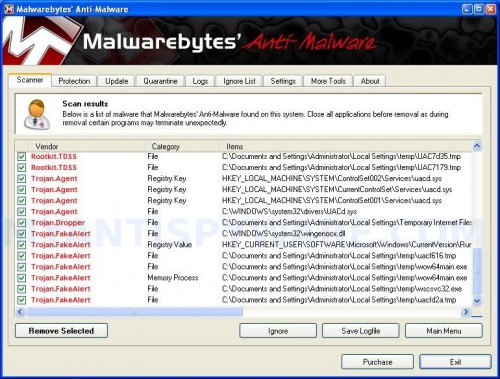
Malwarebytes Anti-malware, list of infected items
Make sure all entries have a checkmark at their far left and click “Remove Selected” button to remove XP Antimalware 2010. MalwareBytes Anti-malware will now remove all of associated XP Antimalware 2010 files and registry keys and add them to the programs’ quarantine. When MalwareBytes Anti-malware has finished removing the infection, a log will open in Notepad and you may be prompted to Restart.
Note 1: if you can not download, install, run or update Malwarebytes Anti-malware, then follow the steps: Malwarebytes won`t install, run or update – How to fix it.
Note 2: if you need help with the instructions, then post your questions in our Spyware Removal forum.
XP Antimalware 2010 creates the following files and folders
%AppData%\ave.exe
XP Antimalware 2010 creates the following registry keys and values
HKEY_CURRENT_USER\Software\Classes\.exe
HKEY_CURRENT_USER\Software\Classes\.exe\DefaultIcon
HKEY_CURRENT_USER\Software\Classes\.exe\shell
HKEY_CURRENT_USER\Software\Classes\.exe\shell\open
HKEY_CURRENT_USER\Software\Classes\.exe\shell\open\command
HKEY_CURRENT_USER\Software\Classes\.exe\shell\runas
HKEY_CURRENT_USER\Software\Classes\.exe\shell\runas\command
HKEY_CURRENT_USER\Software\Classes\.exe\shell\start
HKEY_CURRENT_USER\Software\Classes\.exe\shell\start\command
HKEY_CURRENT_USER\Software\Classes\secfile
HKEY_CURRENT_USER\Software\Classes\secfile\DefaultIcon
HKEY_CURRENT_USER\Software\Classes\secfile\shell
HKEY_CURRENT_USER\Software\Classes\secfile\shell\open
HKEY_CURRENT_USER\Software\Classes\secfile\shell\open\command
HKEY_CURRENT_USER\Software\Classes\secfile\shell\runas
HKEY_CURRENT_USER\Software\Classes\secfile\shell\runas\command
HKEY_CURRENT_USER\Software\Classes\secfile\shell\start
HKEY_CURRENT_USER\Software\Classes\secfile\shell\start\command
HKEY_CURRENT_USER\Software\Classes\.exe\shell\open\command | @ = “”%AppData%\ave.exe” /START “%1″ %*”
HKEY_CURRENT_USER\Software\Classes\.exe\shell\open\command | IsolatedCommand = “”%1″ %*”
HKEY_CURRENT_USER\Software\Classes\.exe | @ = “secfile”
HKEY_CURRENT_USER\Software\Classes\.exe | Content Type = “application/x-msdownload”
HKEY_CURRENT_USER\Software\Classes\secfile\shell\open\command | @ = “”%AppData%\ave.exe” /START “%1″ %*”
HKEY_CURRENT_USER\Software\Classes\secfile\shell\open\command | IsolatedCommand = “”%1″ %*”
180 Comments »
RSS feed for comments on this post.
Leave a comment
My Anti Spyware - Free antispyware programs and Spyware Removal Instructions.


Thanks! Great advice. Really appreciate it.
Comment by Heroh — March 17, 2010 #
Worked for me =)
Comment by John — March 17, 2010 #
Oh yeah… go through all of this to get a
\SPyware doctor must be purchased\ to get these items fixed..? Is this just another \xp antimalware\ game?
Comment by Bryan Allensworth — March 17, 2010 #
thanks veeeeeeeeeeeeery muuuuch
Comment by TUGI — March 18, 2010 #
Allensworth, use Malwarebytes Anti-malware, is free malware remover.
Comment by Patrik — March 18, 2010 #
Malwarebytes helped. Appreciated! Thanks.
Comment by Ren — March 18, 2010 #
thanks i will try this now
Comment by barakat — March 18, 2010 #
Seems to have worked for me. We’ll see tomorrow if there are still issues. Looking good now.
Comment by Tom — March 18, 2010 #
Follow the instructions this worked great. Thanks
Comment by Thomas — March 18, 2010 #
Thank you! The very first method worked great!
Comment by Elena — March 18, 2010 #
I had the same problem. The first method worked fine for me.
Comment by NYC King — March 19, 2010 #
Thank you! This is great.
Comment by Lynette — March 19, 2010 #
Worked very well for me! Thanks a lot!
Comment by dave — March 21, 2010 #
You guys are awesome. I had to use Google Crome browzer to get here. Obviously Internet Explorer wouldn’t work. I used method #2 and it solved the problem. During my infection with xp antimalware 2010, I tried to launch Malwarebytes with no luck. Xp Antimalware blocked it. Method 2 worked great for me. Thanks for taking the time to post this information. It was a life saver.
Also, I wanted to point out how I got infected with XP Antimalware 2010. I visited watch-movies.net and got infected. I was stupid! God bless you guys! Thanks!
Comment by Mark — March 21, 2010 #
I did both method 1 and method 2. I downloaded and ran Malwarebytes. The virus seems to be gone. However, I can only access the internet by going into “safe mode with networking” on my computer. Mozilla Firefox will not work at all (in normal or in safe mode), and any time that I try to use my computer in normal mode it is extremely slow or it will not run the program at all (especally any program associated with the internet – iTunes, Internet Exlorer, Firefox, etc.). Suggestions? Thanks for all of your help!
Comment by allison — March 22, 2010 #
I don’t understand how I can do all this if I can’t get on the internet on my infected computer. I don’t have Google Chrome on the computer unfortunately. Please help!
Comment by Sarah — March 22, 2010 #
Neither of the 2 methods in step one worked for me. I only had about five minutes without being completely blocked from everything after restarting my computer. Five restarts later and with the help of another computer I was finally able to download Malwarebytes.
It not only got rid of this problem, it also solved problems I’ve been having for months now.
Thanks so much!!
Comment by Cook — March 22, 2010 #
Thanks a million for this – method one worked to zap the .exe BS, then Antimalware cleaned up the rest of the cyberpoop.
God bless those guys – need to send them a donation. Reminds me of the old DOS days when people would use ripped-off versions of Norton to save their bacon, then end up sending money because the software had sevred them so well…
Comment by jamesTM — March 23, 2010 #
Thank you very much for this excellent advice, a life saver! Method 2 worked for me, however the spyware had stopped the Malwarebytes’ Anti-Malware updating process and stopped both Firefox and IE accessing and downloading from Malwarebytes’ and any other valid anti-spyware sites. Following advice elsewhere on your site, I finally had to update Malwarebytes’ Anti-Malware on my wife’s clean PC, then transfer and copy the ‘rules.ref’ file to Malwarebytes’ Anti-Malware on my PC. The program then eradicated the spyware completely!
Comment by Malcolm — March 23, 2010 #
Thanks guys a zillion. I chose method 1. Can’t say, it saved my marriage, but to my ex, I am back to “status : smart”!!! Thanks again.
Comment by Kosro — March 23, 2010 #
Sarah, go to first step. Once finished, Click Start, Run, type regedit and press Enter.
Registry editor opens.
Navigate in the left panel to HKEY_LOCAL_MACHINE \ SOFTWARE \ Clients \ StartMenuInternet \ IEXPLORE.EXE \ shell \ open \ command
I the right part of window click twice to “@”. You will see a screen with the contents like below: “C:\Documents and Settings\user\Local Settings\Application Data\av.exe” /START “C:\Program Files\Internet Explorer\iexplore.exe”
Remove left part, leave only “C:\Program Files\Internet Explorer\iexplore.exe”.
Reboot your computer.
Now try download Malwarebytes.
Comment by Patrik — March 24, 2010 #
ave.exe does not allow to run anti virus program? Pls, advice what to do asap.
Thanks.
Comment by Frank — March 25, 2010 #
Frank, before running any antivirus, follow the first step above.
Comment by Patrik — March 26, 2010 #
Amazing! the method 1 didntwork, but then I tried method 2 and it worked perfectly, withouteven having to download Malwarbytes!
Comment by ben — March 26, 2010 #
Is it possible that the virus came back? Used method 2 five days ago and it worked, but iexplorer kept playing ads in the background. It got worse, and it seems like the virus is. Back?
Comment by tommy — March 26, 2010 #
Tommy, probably your PC is infected with a trojan that can reinstall the rogue. Please open a new topic in our Spyware removal forum, i will check your PC.
Comment by Patrik — March 26, 2010 #
thank u soo mch..the vry 1st method worked fr me..nw i installed malwarebytes’ antimalware in my system..thanx fr the gr8 help
)
Comment by rashmita — March 27, 2010 #
I ran both methods and downloaded mbam from anoher pc, the exe wont run. any clues?
Comment by stevie — March 28, 2010 #
I think method 1 just worked for me.
Comment by Krishna — March 29, 2010 #
stevie, you can`t run Malwarebytes only or any programs ?
Comment by Patrik — March 29, 2010 #
Thanks, I will try it right now!
Comment by John — March 29, 2010 #
Everything OK!!!
This post helped me to fix my PC. Thankyou!!!
Comment by John — March 29, 2010 #
These instructions worked likea charm. THANK YOU VERYY MUCHHH
Comment by naib — March 29, 2010 #
Wow! This thing had my system highjacked. I did Method #2 – it worked perfectly.
Thanks!!!!!
Comment by Janne — March 29, 2010 #
I tried method one in safe mode, since my computer stopped booting up normally altogether. After using method 1, my computer booted up and I installed malwarebytes. when I tried to run it, my computer said it couldn’t be found.
after trying method 2 in safe mode, the .inf file just wanted to open up in text format, even though I saved it as \all files\ and selected install.
after trying method 1 again, my computer is back to not booting up at all, except in safe mode. very frustrating. any insight would be great.
Comment by Micah — March 30, 2010 #
Micah, open a new topic in our Spyware removal forum. I will check your PC.
Comment by Patrik — March 30, 2010 #
Thank you. Method two worked perfectly.
Comment by paulc — March 30, 2010 #
Malwarebytes doesnt show up every time i click on it. it wont install. It worked the first time but now the rouge is back on my comp. I just want to know what I might be doing wrong.
Comment by Omtay — April 1, 2010 #
OK, Found this while trying to get rid of 2010 Antimalware.
Went to Trendmicro housecall and it worked so good now I can’t start any program without it asking what program to use?
Knew I had a SystemSuite restore point from a day ago that would have fixed everything but now nothing will open?
Any ideas?
Please send me an email!
dblztuff23 @ earthlink dot net
Comment by Dave — April 1, 2010 #
OK, Turns out there was still stuff running! MalwareBytes saved me again. found 3 things running and removed and OK so far!
Comment by Dave — April 1, 2010 #
Omtay, open a new topic in our Spyware removal forum. I will check your PC.
Comment by Patrik — April 1, 2010 #
Dave, use first step above.
Comment by Patrik — April 1, 2010 #
On the page above, “Note 1″ includes this link:
http://www.myantispyware.com/2009/06/08/malwarebytes-wont-install-run-or-update-how-to-fix-it/
I couldn’t get malwarebytes to run until I followed the instructions on this page.
Comment by Alex — April 1, 2010 #
Works like a charm. Malwarebytes did not update the first time, when you click on the update tab current database information should be todays date.
Got infected from funnyor die.com, just clicked on a video
Comment by Andy — April 1, 2010 #
Thank you very much! this worked for me.
Comment by Chala — April 1, 2010 #
Ughhh i hate this stupid virus… Method 1 did nothing. So I followed Method 2, but now no programs will open on my computer. I can’t even run system restore, msconfig or malwarebytes. It comes up with the error that it can’t open the app and that I need to choose a program. It’s like all my apps (.exe’s) are unrecoginazable now. Any help would be appreciated. Thank you.
Comment by Zoe — April 2, 2010 #
I used the first method. worked a treat. Thanks guys x a million.
Comment by Stewart — April 2, 2010 #
Thank you!
Comment by Hacknhotq — April 2, 2010 #
Zoe, if both method does not work, then try repair registry keys manually or run Registry editor, click File and import fix.reg.
Comment by Patrik — April 2, 2010 #
Worked great. Got Rid of all the fake messages and system works good now.
Thank you very much.
Comment by Sandeep — April 2, 2010 #
Hi, I experienced this problem this morning – ran Malwarebites and it seemed to have worked initially but then the malware came back later under a slightly different name.
However I downloaded and ran SUPERantispyware and (as someone said above) the scan picked up a few things Malwarebytes had missed (namely the ave.exe file itself).
Thanks so much for posting these instructions, your effort is much appreciated.
Regards,
Gavin
Comment by Gavin — April 2, 2010 #
Thank you.
Comment by Spiceditup — April 2, 2010 #
My sister got this, and the steps here worked out perfectly. Not a single trace of it left on her system.
Wonderful website.
Comment by Jade — April 2, 2010 #
Oh my gosh…thank you so much for this. I was FREAKING out when that program started up. I had a feeling it was a fake. Couldn’t have gotten rid of that pest without this guide. THANK YOU!!!
Comment by Jamie — April 3, 2010 #
The second method worked for me. Thank you so much!
Comment by Judy Davis — April 3, 2010 #
Thank you!! I have no idea what all of that stuff means that you have to copy and paste, but it works. Thanks for the help, I was sure I’d have to go pay someone to get rid of all the stupid pop-ups.
Comment by Chelsea — April 3, 2010 #
No words to thank u guys… Great site… Way to go..
Comment by Vinoth — April 3, 2010 #
It worked, Thank you thank you
Comment by Mod — April 4, 2010 #
Method 1 worked a treat. Thanks guys.
Comment by Nefyn — April 5, 2010 #
It worked, Thank you very much
Comment by r2d2cp — April 5, 2010 #
Excellent Instructions – My advice would be to people using P2P Networks to think very carefully which sites they go on.
Keep up the good work, this saved me hours of manually removing this thing!!
Comment by Doctor Q — April 5, 2010 #
Hi… Method 1 seems to have removed the virus but now no programs will open on my computer. I can’t even run system restore, msconfig or malwarebytes. It comes up with the error that it can’t open the app and that I need to choose a program from the list or search the internet… have i broke my computer??
Please help
Thanks
Comment by Eamonn — April 6, 2010 #
Eamonn, you need repeat first step.
Comment by Patrik — April 7, 2010 #
Do i do all of Step 1? i.e. method 1 and 2? and my computer will work again?
Thanks!
Comment by Eamonn — April 8, 2010 #
Eamonn, try first method, if it does not help, then go to method 2.
Comment by Patrik — April 8, 2010 #
Hell Yeah son why didnt i think of this man i give thanks.
Comment by Matt — April 8, 2010 #
hi, i’ve tried both method 1 and 2 without success, also was able to get your scanning program to perform a quick scan but when it had completed and then had to press purchase, it froze up and wouldn’t move on. now i’ve had to open up the laptop “in the most current format” but i can’t get access to the internet so i’m sending the message from another pc. can you help? please!
Comment by andrea — April 8, 2010 #
Brilliant, think its worked now…. Cheers Patrik!
Comment by Eamonn — April 9, 2010 #
The registry is locked and can not be updates when the scan completes.
Comment by Joseph — April 9, 2010 #
Hi. Thanks a lot. 1st method worked for me. I was not allowed to launch any .exe file. It worked for my vista os.
Comment by NAVEEN — April 9, 2010 #
andrea, probably you have downloaded Spyware doctor from an ads. You need open Malwarebytes page (look a link above), then scroll down to Malwarebytes download direct link.
Comment by Patrik — April 9, 2010 #
THANK YOU! first method worked a treat!
Comment by Ollie — April 9, 2010 #
Thank you so much for articles like this!! Totally Awesome how quick this worked
Comment by Kim — April 9, 2010 #
I had trouble with The windows security version of this virus, followed your steps to have it removed yesterday, and i’m now encountering the xp malware 2010 version. Do you have any advise for getting rid of this and keeping it gone?
Comment by Dan — April 10, 2010 #
I did Method 1 and rebooted my computer and the Anitimalware icon was gone…thank GOODNESS!!! I have stopped receiving those fake alerts. So now, do I still have to do step 2 and download the MBAM? Or is there a way for me to manually access and delete the registry keys and values associated with this Antimalware–because I would prefer that. Either way, thank you so much for all of your help.
Comment by Cammie — April 10, 2010 #
Thank you well done job
Comment by Hesham — April 11, 2010 #
It looks like the first method worked for me. Thank you so much!
Comment by Momo — April 11, 2010 #
Dan, looks like your computer also infected with a trojan that reinstalls the rogue. Open a new topic in our Spyware removal forum, I will check your PC.
Comment by Patrik — April 11, 2010 #
Thank you so so much, method 1 seems to have worked for me! (fingers crossed anyway!)
Comment by Molly — April 11, 2010 #
hey i used Spy bot S&D and MBAM and it seemed to the Anti Malware out but when i get on with out safe mode,nothing loads up,and it is not acting normal,i cant open anything with out something that says “Open this with” and when i click on the security center it says blah blah is missing,my anti virus isent showing up,nothing is showing up like it normally is any help please?
Comment by dylan — April 11, 2010 #
Most Gracious!
Followed every step. Everything worked perfectly.
Some further concerns:
Is it possible to have ESET Nod32 Antivirus while scanning? Will this effect the malwarebytes’ efficiency in scanning?
Should we reformat after we’ve done this to ensure nothing ‘dirty’ is left on our computer?
How do we know if our pc is completely clean?
Thank you. Goodluck everyone.
Comment by mark t — April 11, 2010 #
dylan, follow the first step instructions above.
Comment by Patrik — April 12, 2010 #
mark, the rogue is a malware and can`t really infect your files. Also you can check your PC a few more using an online scanner.
Comment by Patrik — April 12, 2010 #
I used the first method, and unfortunately, it only worked on one of the two user accounts, and left the other one useless, so I used the second, and it fixed my computer up bright and shiny. Thank you for the help, both with this virus and Internet Security 2010. Malwarebytes’ is now being installed on all my computers just for safety’s sake.
Comment by Mackenzie — April 12, 2010 #
I followed all the instructions. Step 1, Repair of exe. files, was ok – seemed to load up ok. I downloaded MalwareBytes Anti-malware ok but it would just not run, even after trying every one of the recommended fixes detailed on the web site. In the end, in desparation, I did a system restore to a date just before I was struck down by the XP Antimalware 2010 menace. That seems to have to have fixed it, I hope!!! Has anybody else done the same?
Comment by Dave — April 13, 2010 #
thanks so much! worked perfectly.
Comment by smitty — April 13, 2010 #
oohh i see it,all i could see was Method 1 and thats all hah sry
Comment by dylan — April 13, 2010 #
okay i did exactly what it said,i put al that stuff in the notepad,saved it on desk top clicked it and press yes yes and then restarted the computer but nothing happened,am i doing something wrong? please help!
Comment by dylan — April 13, 2010 #
Thanks it works
Comment by xxDking — April 13, 2010 #
dylan, if the rogue is still here, try method 2.
Comment by Patrik — April 14, 2010 #
omg,i had tried that too but its not working,i think something is wrong help?!!
Comment by dylan — April 14, 2010 #
I cannot close all other windows while running step 2 because the rogue keeps opening new windows.
I am still running with infections so far. I am waiting for it to finish and reboot.
Any idea as to when and where is came from?
Comment by Lucknow — April 14, 2010 #
yes
method 2 and malwarebytes update = fix
thx
Comment by gerry — April 15, 2010 #
dylan, then open a new topic in our Spyware removal forum.
Comment by Patrik — April 15, 2010 #
You guys are the Hero Nerds, fighting the dark forces of the Evil Hacker Nerds! Thank you so much! I was able to run my Malwarebytes Anti-Malware in “Safe Mode with Networking”, update it, and successfully stop the malware from running, BUT – it had totally screwed all my .exe files. Thanks to your Method 1, they have now been fixed. You chaps have earned yourselves a lightsaber apiece.
Comment by Steve H — April 15, 2010 #
wow,i think i found the reason why,it had installed XP Defender Pro >.>,ima go follow the steps to try and get rid of it.
Comment by dylan — April 15, 2010 #
thanks.
Comment by Art — April 16, 2010 #
I used Step 1, Method 1 then d/l and ran MalwareBytes and it found 51 infections. However, it couldn’t remove a few. Any suggestion will be appreciated as to what to do to get rid of the leftovers? Thanks.
Comment by Penbob — April 16, 2010 #
thank you.
Comment by chitos — April 16, 2010 #
omg from antimalware,to defender pro to xp internet sercurity and non of these things are helping!! is there anything else i can do? T_T
Comment by dylan — April 16, 2010 #
Thanks heaps guys….work and i’m now free from that BS!!!!
Comment by Dougie — April 16, 2010 #
Penbob, open a new topic in our Spyware removal forum and post your Malwarebytes log.
Comment by Patrik — April 17, 2010 #
dylan, ask for help in our Spyware removal forum.
Comment by Patrik — April 17, 2010 #
THANK YOU!!!!
Comment by jen — April 17, 2010 #
WOW THAT WAS REALLY CLEAN REMOVE THANX A TON. THE FIRST OPTION WORKED FOR ME
Comment by DKN — April 17, 2010 #
Pratik,
This worked like magic. I tried step-1 and the mb download steps, and it solved. Ufff.. I was soo tensed before finding this solutions…
Thanks for all the help!
Comment by Kapil — April 17, 2010 #
An issue I encountered was not being able to run notepad. As I was assisting a novice over the phone I needed a way to edit the registry entries without being able to use any editors on the target computer.
A really useful too is http://www.etherpad.com which allowed me to copy in the registry changes into it and the target computer user to export the etherpad contents into the requisite file without involving any software on the target computer.
I add this just in case someone else encounters this difficulty.
Comment by Dominic — April 18, 2010 #
Well did step one from method one and it seemed to remove the problems that were visible. I tried the MBAM and ran it, it didn’t find any problems but at the same time my norton (free trial) had stopped something. I updated MBAM and ran it again, still nothing found. Is this ok? does that mean it is gone?
Comment by Nick — April 18, 2010 #
Yes, looks like you are clean. You also can scan your PC with an online scanner.
Comment by Patrik — April 19, 2010 #
thanks so muck, i was abosolutly s***ing myself wen i saw this on my computer, method 2 worked for my, thank you so much you guys
Comment by Tim — April 19, 2010 #
*much
Comment by Tim — April 19, 2010 #
Nice fix and simple to follow instructions. Saved two of our clients so far. Thanks. If you had a donations button I would be donating right now.
Comment by Gavin Killen — April 19, 2010 #
Thanks a million, twice i’ve been attacked by this now, METHOD 2 WORKS PERFECTLY thanks
Comment by Adam — April 19, 2010 #
I was dead in the water with XP Malware fighting everything. Was able to copy MalwareBytes onto a removeable USB storage key from my wifes computer, and then renamed it to copy via explorer onto my computer in safe mode. Since I wasn’t “allowed” to open note pad, I executed the Malwarebytes first with XP Malware fighting it every step of the way with false alerts and screens. Over 700 infections were wiped out. I rebooted and ran both method 1 and method 2 to be safe and ran MWB again. It found and removed 6 infected areas. At the same time NAV finally kicked in and quarantined 2 viruses. I’m operating again but the pest is still present. First it hijacked the IE7 default search and redirected to Gala search. I was able to reload Google to repair. Now Webroot Spysweeper keeps telling me that 15 sites are being added to my HOSTS file every time I start the computer. I tell SS to delete them but they return every startup. But the most serious lingering effect of this infection is that any website I try to navigate to is hijacked and redirected to a site I could care less about. I haven’t been able to fix the website hijacking nor the HOSTS file loading issues. Any suggestions?
Comment by Jim — April 19, 2010 #
The infection is certain entries in the root directory that invoke VMA.EXE. Nothing seems to work and the registry keys will not allow themselves to be deleted or edited. HELP!
Comment by Jim — April 19, 2010 #
I used the first method and it worked perfectly! But should I leave the fix.reg file, or whatever it is, (not a computer wizz I’m afraid), on there now or delete it?
Comment by Joshua — April 20, 2010 #
Cool, used opition 1 and worked well for me. Many thanks. I am novice with this and instructions esay to follow.
Comment by Chill2k — April 20, 2010 #
Here’s the morning update: The virus remains but it’s in the background. 15 spurious links get published to the HOSTS file but SS blocks them and I delete them. MWB then runs and quaratines the vma.exe registry item. I can put websites directly into my browser and it will go there, but I cannot hit links on a G search because I’ll always be redirected somewhere else. I’d like to KILL this sucker once and for all, but can use my PC for now.
Jim
Comment by Jim — April 20, 2010 #
Jim, open a new topic in our Spyware removal forum. I will check your computer.
Comment by Patrik — April 20, 2010 #
Jim, you have tried both method of the first step above ?
Comment by Patrik — April 20, 2010 #
Joshua, you can remove fix.reg.
Comment by Patrik — April 20, 2010 #
Jim, probably your PC is infected with TDSS trojan. Read the article.
Comment by Patrik — April 20, 2010 #
Okay. THANK-YOU SO MUCH !!
Comment by Joshua — April 20, 2010 #
I can’t even begin these instructions as my computer won’t even let me hit the start button!
help!!!
Comment by jleslie — April 20, 2010 #
I did the reg fix and downloaded and installed malware bytes. I did the update to 04/20/2010 and did a scan and it found nothing. So i went through the Documents and Settings folder and found some strange files with date/times of when i was infected (like an hour ago) :
1329389005
H2AT6812bbH
These files are in a bunch of folders under Documents and Settings (you need to search with Hidden file option on).
The VERY strange thing is i found the ave.exe file in //Local Settings/Application Data/ave.exe. So i ran malware bytes on it and it CAME UP CLEAR!! It said it WASNT malware… wtf!?
Comment by Grant — April 21, 2010 #
jleslie, try another way. Press CTRL + ALT + DEL, Task manager opens. Click File, New task. Type command and press Enter. Command console opens. Now follow the steps above.
Comment by Patrik — April 21, 2010 #
Thank you so much. I was in tears when thought I couldn’t resolve the problem without paying all that money.
Comment by Alison — April 21, 2010 #
Grant, you have updated Malwarebytes before scanning ?
Comment by Patrik — April 21, 2010 #
Thank you a lot for this!
I also recommend (after these steps) running the free Spyware Search & Destroy
Thanks again!!!
Comment by decoded — April 21, 2010 #
correction: not Spyware, Spybot!
Comment by decoded — April 21, 2010 #
Following this tutorial now, thanks. We’ve got an infected machine at work
Comment by John Daily Photo — April 22, 2010 #
Method 2 finally worked for me. When I tried to reboot after scanning with MBAM, the computer freezes before the windows logo comes up. I booting up in Safe Mode but it won’t boot. I have Windows XP. I do not want to buy a new computer, but I guess I will if I have to.
Comment by jeff — April 22, 2010 #
This worked great — a very quick resolution to an annoying problem. Make sure you get the updates of MBAM or else it won’t work. Thank you very much.
Comment by Sammie — April 23, 2010 #
Who can I give a donation to for such a great fix??? I am not an expert with computers and option 1 did the trick…Thank you and PLEASE let me know who to send a donation to…It is certainly worthy of some $$$!
Comment by Tangie — April 24, 2010 #
Tangie, I glad to help you and other peoples
Now i don`t have any donation way. But will be fine, if you will make a link from your blog, a site … to this article or the main page of myantispyware.com. It will help other peoples, who needs a help.
Comment by Patrik — April 24, 2010 #
Thanks for this. I was able to remove XP Antimalware 2010 and repair running of .exe files.
Comment by Aya — April 25, 2010 #
Last night I seemed to have suffered a “RAM version” of XP AntiMalware 2010. (My fault for visiting girlie xxx web site). I had all the symptoms: phony shield icon in the desk tray, bogus warning messages about infections/worms, IE navigating messed up, messages trying to make me buy the bogus product. I bitched to Symantec in Chat session about why didn’t NIS 2009 prevent it; they offered to have remote computer diagnosis for $99. But I never could find ave.exe or av.exe file in my computer or task list, and when I rebooted, my computer was fine. So I guess it was running as a VB script or something, but didn’t get installed permanently, so maybe NIS did prevent permanent infection. Whew! Just thought others may want to know of my temporary bad experience.
Comment by WB — April 26, 2010 #
This is frustrating! I have been at it for over an hour….. I’m running four scanners nothing has popped up unusual yet… This darn virus keeps popping up stuff too driving me crazy!
Comment by GRR — April 27, 2010 #
Your a genius thank you so much! You should really ad a donation button! Paypal is a good way to do it! Thank you thank you thank you thank you!
Comment by GRR — April 27, 2010 #
I ran both Norton and Malwarebytes and they appeared to fix the problem with some regedit fixes. But is it necessary to do the regedit fixes you suggest? I’m a little nervous about them.
Comment by ificandream — April 27, 2010 #
P.S. I’m also running a full system scan of Malwarebytes after the quick scan and it seems to have turned up one other suspicious file (scan is still running), though it may just be a tracking cookie.
Comment by ificandream — April 27, 2010 #
P.P.S. Would it also help to run system restore to before when the infection occurred?
Comment by ificandream — April 27, 2010 #
ificandream, if computer works fine, then don`t need follow the regedit fixes.
To P.P.S., if its ok.
Comment by Patrik — April 28, 2010 #
I didn’t though it will be so easy. It’s a simple as creating a notepad file, installing a software and running a scan. This is all you have to do to fix this ANNOYING malware.
Thanks guys!
Comment by M3galodon — April 29, 2010 #
So I got this last night, I have tried everything. It blocks my internet and opens weird ass pages but I already did have maleware bites
Can I do these methods out of safemode?
Comment by ugh — April 29, 2010 #
Okay so I removed Xp Antimalware I think but now I am still getting false security messages, and it blocks a couple of my things, using trojan remover helps unblock them, but it tries to lock me out of my task manager, I found the process and stopped them, and am running malware again, but now that the antimalware 2010 is gone, I get these annoying popups telling me the computed is infect how do I rid them? I also disconnected my comp from the internet because I was afraid it would mess it up.
Comment by ugh — April 29, 2010 #
ugh, looks like your computer also infected with a trojan FakeAlert. Please start a new topic in our Spyware removal forum. I will check your PC.
Comment by Patrik — April 30, 2010 #
This solution worked great, I plan on buying the professional version. Thank you!
Comment by Russell — May 1, 2010 #
We uninstalled anti-malware using Method 1, then ran the Malwarbytes scan. Now we can’t open any .exe files, including Intenet Explorer? What can we do to fix this? Thanks for any advice.
Thank you.
Comment by M Downey — May 1, 2010 #
M Downey, repeat the first step above.
Comment by Patrik — May 2, 2010 #
Tried both methods,got to the end of the second one and pressed Install and up came that it had failed.Any ideas on what I did wrong please?
Comment by Elaine — May 4, 2010 #
wow man it didnt work for me i think i got it out but when i turn off my comp. and turn it back on the pop up shit comes up but with out the other shit that messes up your computer screen when you try to do something…
can someone please help me?
Comment by spo — May 4, 2010 #
Elaine, check twice both scripts and try again.
Comment by Patrik — May 5, 2010 #
spo, what shows your PC when your trying the first step above ?
Comment by Patrik — May 5, 2010 #
nothing realy happens i did the first step it didnt change anything
when i turn on my computer it shows the warning sign then after the errors for the programs that couldnt open came up(the ones that say send or dont send) i also scaned it with MalwareBytes a few times so idk wats going on every time i have to remove it with the rkill log file so it will go away
Comment by spo — May 5, 2010 #
The problem I have is i can open firefox and ie, but still cannot connect to any network. Any suggestions on how to fix that?
Comment by Tom — May 6, 2010 #
Tom, you can ping any sites ? What displays IE when you trying open any site ?
Comment by Patrik — May 8, 2010 #
THANK YOU. THANK YOU THANK YOU. man you made me a believer. This AntiMalware B-llSh-t gave me a brain anuerysm the past six hours.(just like Brett Michaels). But then you guys came along and fixed this thing like it was nothing. You are the spyware busters! This AntiMalware can kiss my ass. They can burn in hell 5x over. Now I have my laptop back and running. And I have you guys to thank profusely. Thank you. THANK YOU.
Comment by Joe — May 18, 2010 #
Hi.
This virus is giving me no time to copy and paste the text from a document into the notepad! I have tried typing in method 1 & 2 manually but this does not seem to work.
Please help, I’m really beat here!
Comment by Barry — May 22, 2010 #
Barry, if you can`t create fix.inf, then download fix1.zip from here, unzip it. Right click fix.inf and select Install.
Comment by Patrik — May 25, 2010 #
Someone please help me. My dad was going to give me his fancy new laptop, and I asked If i could try it out first. And he said sure. And as soon as I got on like minutes later this virus came on. And I went through these instructions, plus another bunch of intructions. I’ve used Malwarebytes, and also Spyware Doctor. And yeah, It works and everything, the virus gets removed. But then I restart my computer and it’s back! It still pops up. And i’ve been trying and trying. I need this fixed before my dad asks for his laptop make or he will littterallly shoot me in the face.
Please contact me at:
emma.toddishAThotmailDOTcom
PLEASE HELP ME. D:
Comment by Emma — June 2, 2010 #
Emma, please ask for help in our Spyware removal forum. I will help you.
Comment by Patrik — June 4, 2010 #
Tried method one but get an error message that says the specified file is not a registry script. You can only import binary registry files from within the registry editor. Is this because I’m running in safe mode? It won’t allow me to get into notepad otherwise as it claims the file is infected.
Comment by Chris — July 9, 2010 #
Method 2 does nothing for me either. This malware is relentless!
Comment by Chris — July 9, 2010 #
Chris, check twice your .reg script. Looks like you have skipped the “Windows Registry Editor Version 5.00″ line.
Comment by Patrik — July 10, 2010 #
cheers mate its worked a treat nice 1 for that
Comment by vic — July 20, 2010 #
Thanks guys! Think it’s worked fine! x
Comment by Cube — July 26, 2010 #
Thanks so much, extremely user friendly instructions.
Comment by Claire — August 17, 2010 #
Thank you so much – this thing came out of nowhere and was driving me insane. This method worked just perfectly and now my computer is back to normal again. Can’t thank you guys enough for providing me a solution!
Comment by Claire M — August 24, 2010 #
Remember to type everything in the section including “Window Registry Editor Verson 5.00″.
It took me about 10 minutes to find my typing errors. As soon as I found them, everything worked again. Thanks so much.
Comment by nitewing — November 12, 2010 #
Hi
Thanks for the advice it encouraged me that the problem can be solved. I started with Method 1, but the PC did not want to accept it. The Method 2 worked and the XP Malware screens disappeared (however they later reappeared as soon as the Internet Explorer run). I ran again Method 2 (fix.inf), and the XP screens disappeared again. After this I ran Malwarebytes (freshly downloaded). After 1 hour work it showed no detection of viruses, Trojans, etc. At this stage I purchased the PC Tools Spyware-doctor-antivirus (40 GB pounds). After its installation and scan 5 Trojans were found (3 low and 2 high danger) and deleted. So again thanks for tips!
Vic
Comment by vic — November 12, 2010 #
IT WORKED. Used the notepad one. Thanks
Comment by Carl — November 17, 2010 #
what a pain in the a__ the XP Antivirus was…they should be strung up….annoying as hell….anyway, thank you very much for your fix as it totally eliminated that bug….thank you!!!
Comment by Dave — November 18, 2010 #
Thank You!!!!! <3
Comment by Annie — November 22, 2010 #
Thank you. It worked. Now going to upgrade my security
Comment by Elaine — November 30, 2010 #
It didn’t work in my case!!! I mean because when I open from Google other web pages I’d been redirected to other sites like Gomeo!
Can somebody help me to solve definetely with this fxxng infection!!!?????
Comment by diego — December 1, 2010 #
diego, start a new topic in our Spyware removal forum. I will help you to remove this malware.
Comment by Patrik — December 2, 2010 #
tried both methods in safe mode and nothing. Cannot perform the fixes in normal mode. Virus prevents me from accessing task manager or run. Please help!
Comment by Lee — March 2, 2011 #
OMG thank you so so so so MUCH!!
you’re the bomb man!
Cheers!!
Comment by Lily — March 24, 2011 #
From Indonesia : my PC is healed, thank you so much!
Comment by Adittya KIC Wirawan — April 22, 2011 #
