Do you have pop-ups or your computer infected with trojan or spyware ? Learn how to ask us for help, click here!

How to remove Total XP Security

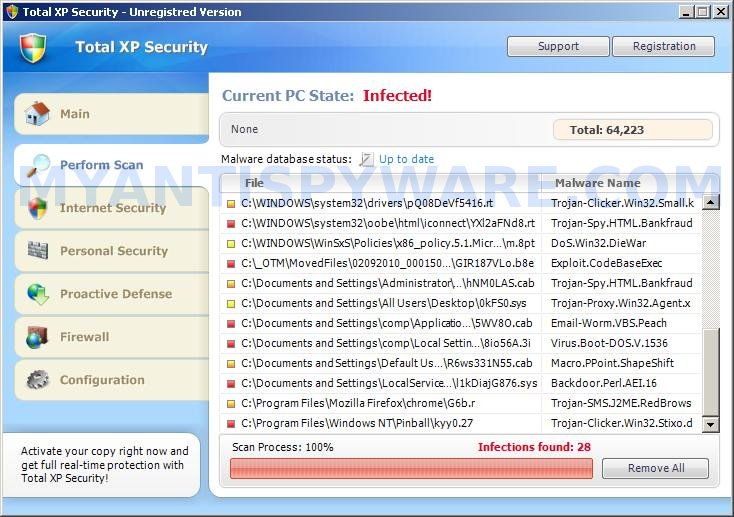
Total XP Security is fake security program, that also known as rogue antispyware application. The software is a new clone of XP Internet Security 2010, which is a rogue too. Nothing new here, Total XP Security is promoted and installed through the use of trojan. When the trojan is started, for some time it itself does not manifest, thus hiding the web site with which it entered on the computer. A few minutes later, the trojan will secretly download and install the rogue onto your computer without your permission and knowledge.

During installation, Total XP Security will configure itself to run automatically every time when you run any program that have “exe” extension (99% of Windows applications). The rogue also uses this method of running to block the ability to run any programs, including your antivirus and antispyware application.

When Total XP Security is started, it will imitate a system scan and report a variety of infections that will not be fixed unless you first purchase the software. Of course, this is a scam, because the rogue is unable to detect or remove any infections. Important to know, all of these infections do not actually exist on your computer, so you can safely ignore them.

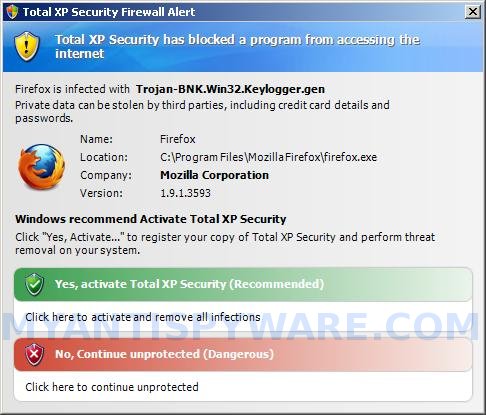
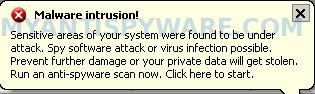
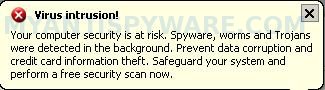
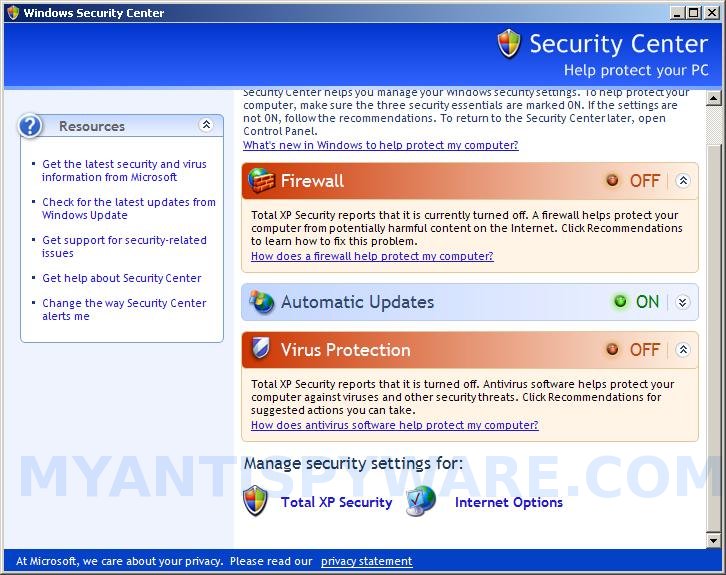
While Total XP Security is running, you will be shown nag screens and fake security warnings from Windows task bar. The fake security program will also hijack Internet Explorer and Firefox and display fake warnings when you opening a web site.

Obvious, Total XP Security is the program, whose presence on the computer is not desirable. It is created with one purpose, using deception and threats to force you to open your wallet and pull out the money. If your computer is infected with this malware, then most importantly, do not purchase it! Remove the rogue from your computer as soon as possible. Please follow the removal guide in order to remove this Total XP Security and any other associated malware from your computer for free.

More screen shoots of Total XP Security
Use the following instructions to remove Total XP Security (Uninstall instructions)

Step 1. Repair “running of .exe files”.

Method 1

Click Start, Run. Type command and press Enter. Type notepad and press Enter.
Notepad opens. Copy all the text below into Notepad.

Windows Registry Editor Version 5.00

[-HKEY_CURRENT_USER\Software\Classes\.exe]
[-HKEY_CURRENT_USER\Software\Classes\secfile]
[-HKEY_CLASSES_ROOT\secfile]
[-HKEY_CLASSES_ROOT\.exe\shell\open\command]

[HKEY_CLASSES_ROOT\exefile\shell\open\command]
@="\"%1\" %*"

[HKEY_CLASSES_ROOT\.exe]
@="exefile"
"Content Type"="application/x-msdownload"

Save this as fix.reg to your Desktop (remember to select Save as file type: All files in Notepad.)
Double Click fix.reg and click YES for confirm.
Reboot your computer.

Method 2

Click Start, Run. Type command and press Enter. Type notepad and press Enter.
Notepad opens. Copy all the text below into Notepad.

[Version]
Signature="$Chicago$"
Provider=Myantispyware.com

[DefaultInstall]
DelReg=regsec
AddReg=regsec1

[regsec]
HKCU, Software\Classes\.exe
HKCU, Software\Classes\secfile
HKCR, secfile
HKCR, .exe\shell\open\command

[regsec1]
HKCR, exefile\shell\open\command,,,"""%1"" %*"
HKCR, .exe,,,"exefile"
HKCR, .exe,"Content Type",,"application/x-msdownload"

Save this as fix.inf to your Desktop (remember to select Save as file type: All files in Notepad.)
Right click to fix.inf and select Install. Reboot your computer.

Step 2. Remove Total XP Security associated malware.

Download MalwareBytes Anti-malware (MBAM). Once downloaded, close all programs and windows on your computer.

Double-click on the icon on your desktop named mbam-setup.exe. This will start the installation of MalwareBytes Anti-malware onto your computer. When the installation begins, keep following the prompts in order to continue with the installation process. Do not make any changes to default settings and when the program has finished installing, make sure a checkmark is placed next to “Update Malwarebytes’ Anti-Malware” and Launch “Malwarebytes’ Anti-Malware”. Then click Finish.

MalwareBytes Anti-malware will now automatically start and you will see a message stating that you should update the program before performing a scan. If an update is found, it will download and install the latest version.

As MalwareBytes Anti-malware will automatically update itself after the install, you can press the OK button to close that box and you will now be at the main menu. You will see window similar to the one below.

malwarebytes-antimalware1
Malwarebytes Anti-Malware Window

Make sure the “Perform quick scan” option is selected and then click on the Scan button to start scanning your computer for Total XP Security infection. This procedure can take some time, so please be patient.

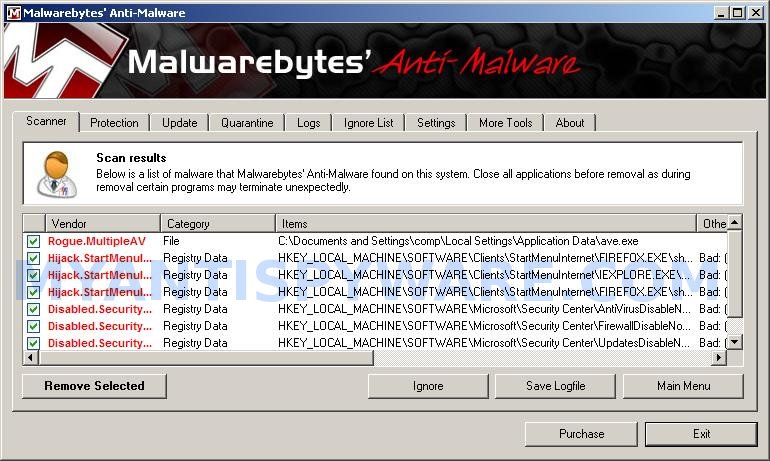
When the scan is finished a message box will appear that it has completed scanning successfully. Click OK. Now click “Show Results”. You will see a list of infected items similar as shown below.
Note: list of infected items may be different than what is shown in the image below.
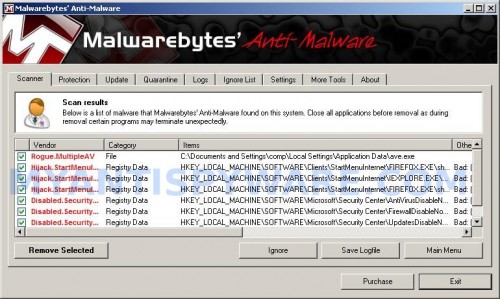

Malwarebytes Anti-malware, list of infected items

Make sure all entries have a checkmark at their far left and click “Remove Selected” button to remove Total XP Security. MalwareBytes Anti-malware will now remove all of associated Total XP Security files and registry keys and add them to the programs’ quarantine. When MalwareBytes Anti-malware has finished removing the infection, a log will open in Notepad and you may be prompted to Restart.

Note 1: if you can not download, install, run or update Malwarebytes Anti-malware, then follow the steps: Malwarebytes won`t install, run or update – How to fix it.

Note 2: if you need help with the instructions, then post your questions in our Spyware Removal forum.

Total XP Security creates the following files and folders

%AppData%\ave.exe

Total XP Security creates the following registry keys and values

HKEY_CURRENT_USER\Software\Classes\.exe
HKEY_CURRENT_USER\Software\Classes\.exe\DefaultIcon
HKEY_CURRENT_USER\Software\Classes\.exe\shell
HKEY_CURRENT_USER\Software\Classes\.exe\shell\open
HKEY_CURRENT_USER\Software\Classes\.exe\shell\open\command
HKEY_CURRENT_USER\Software\Classes\.exe\shell\runas
HKEY_CURRENT_USER\Software\Classes\.exe\shell\runas\command
HKEY_CURRENT_USER\Software\Classes\.exe\shell\start
HKEY_CURRENT_USER\Software\Classes\.exe\shell\start\command
HKEY_CURRENT_USER\Software\Classes\secfile
HKEY_CURRENT_USER\Software\Classes\secfile\DefaultIcon
HKEY_CURRENT_USER\Software\Classes\secfile\shell
HKEY_CURRENT_USER\Software\Classes\secfile\shell\open
HKEY_CURRENT_USER\Software\Classes\secfile\shell\open\command
HKEY_CURRENT_USER\Software\Classes\secfile\shell\runas
HKEY_CURRENT_USER\Software\Classes\secfile\shell\runas\command
HKEY_CURRENT_USER\Software\Classes\secfile\shell\start
HKEY_CURRENT_USER\Software\Classes\secfile\shell\start\command
HKEY_CURRENT_USER\Software\Classes\.exe\shell\open\command | @ = “”%AppData%\ave.exe” /START “%1″ %*”
HKEY_CURRENT_USER\Software\Classes\.exe\shell\open\command | IsolatedCommand = “”%1″ %*”
HKEY_CURRENT_USER\Software\Classes\.exe | @ = “secfile”
HKEY_CURRENT_USER\Software\Classes\.exe | Content Type = “application/x-msdownload”
HKEY_CURRENT_USER\Software\Classes\secfile\shell\open\command | @ = “”%AppData%\ave.exe” /START “%1″ %*”
HKEY_CURRENT_USER\Software\Classes\secfile\shell\open\command | IsolatedCommand = “”%1″ %*”

Share and Enjoy:

  • Print
  • Digg
  • Sphinn
  • del.icio.us
  • Facebook
  • Mixx
  • Google Bookmarks
  • Slashdot
  • Twitter
March 17, 2010 on 12:28 pm | In Malware removal, Rogue Anti Spyware | 139 Comments |


139 Comments »

RSS feed for comments on this post.

  1. Whoever figured this out…you’re a life saver! I had gotten rid of the files that sat under the “%ueraccount%\Local Settings\Application Data” but Malwarebytes (which had been installed because of an earlier virus – AntiVirus XP 2010) still wouldn’t run. I ran “Method 1″ and after the reboot, my antivirus came right up and I was able to update and run Malwarebytes. Thanks a ton!!!

    Comment by Jason — March 23, 2010 #

  2. my laptop freezes on the welcome page. I can only boot smoothly through safe mode. Can I do thris through safe mode?

    Comment by charlie — March 25, 2010 #

  3. charlie, yes, you can use Safe mode too.

    Comment by Patrik — March 26, 2010 #

  4. I am infected with the Total XP Security. I try to shutdown the computer and it stays on the computer is shutting down screen. I have to manually shut down. I tried to transfer the fix.reg and inf via a thumb drive but the usb ports will not recognize my thumb drive. I burned the fix.reg on another computer to a CD rom put it in the virus computer and ran it from there. Tried to shutdown again and no dice. I was able to run Malware and it removed the files and allowed my computer to shutdown and now the USB ports are working again. This was a bugger of a virus. Thank you. You saved me.

    Comment by Doug — March 29, 2010 #

  5. Hi!
    I also have a problem with this virus. I followed the description but when I want to doubleclic the fix.reg I get a message that the process of the registry is deactivated through the administrator. But I am the administrator.
    What can I do to solve this problem?

    Comment by Sora — March 30, 2010 #

  6. Sora, try method 2.

    Comment by Patrik — March 30, 2010 #

  7. Great work, thanks for posting, its a bugger of a trojan

    Comment by Tony — March 31, 2010 #

  8. Hi, I ran Method #1 and seem to be okay, but assumed (correctly) that MAB is an app that is not free. I’m on a work computer and cannot pay to install anything here. I’m re-running their up-to-date copy of ‘Microsoft Security Essentials’ (which found no threats earlier, when I definitely had a problem). Do I need to do anything else, and can I now trash that fix.reg file? I can’t let the employer see it.

    Thanks!

    Comment by Pete — March 31, 2010 #

  9. Hi, I’ve managed to run Malwarebytes, when it finishes scanning I click OK, but before I can click “Show Results” the program closes.

    After a few tries of this, the computer just stops responding. Please help!

    Comment by Hugh — April 1, 2010 #

  10. Pete, yes you can remove fix.reg. And MBAM is free to remove malware, but you need purchase the full version if you want enable the auto-protection module.

    Comment by Patrik — April 1, 2010 #

  11. Hugh, try run Malwarebytes from Safe mode. If it does not help, then ask for help in our Spyware removal forum.

    Comment by Patrik — April 1, 2010 #

  12. I am not IT savvy. I have this virus. What command do I type in the Start, Run field? thanks

    Comment by robert — April 2, 2010 #

  13. Robert, click Start button, then select Run option.
    Type command and press Enter. Then follow other instructions from first step above.

    Comment by Patrik — April 2, 2010 #

  14. Thanks a ton, you save everything on my computer, they are heaps of my memoried photoes in it. This is very helpful and very smart. Wish you all the best.

    Comment by Dat Nguyen — April 2, 2010 #

  15. very nice thing dear

    I got my solution and save my window to do format

    Comment by Tejinder Singh — April 3, 2010 #

  16. Thank You!

    Thank You!

    Thank You!

    Comment by Mark — April 3, 2010 #

  17. When I try the first method it tells me that editing the registry has been deactivated. When I try the second method it tells me that the installation has failed. And Malwarebytes won’t even run now. Any ideas?

    Comment by Carl — April 5, 2010 #

  18. Carl, please download exeHelper from here and save it to your desktop. Double-click on exeHelper.com to run the fix. A black window should pop up. Press any key to close once the fix is completed. Once finished, try run Malwarebytes.

    Comment by Patrik — April 5, 2010 #

  19. I used method 1 and it removed the program the only thing is it has also wiped out all my other exe files and I cannot even run my system restore or my internet.

    Now I have to take my computer to a tech to get him to fix it. This is a real bummer

    Comment by Christine — April 5, 2010 #

  20. Christine, try method 2.

    Comment by Patrik — April 5, 2010 #

  21. I had my user shut down his pc and restart Windows XP in safe mode [NOT safe mode with networking]

    then go to start – all programs – accessories – system tools – restore point

    select to restore to a previous point

    select a date several days before you began having this issue

    follow the prompts and once it finishes and restarts you are good! However, in our case the user was running an older version of Adobe Reader [version 7] and it was found to have security holes. They received a PDF attachment and got this issue.

    Updated Adobe Reader to the newest version and all seems to be good now.

    Good Luck! Maybe I just got lucky, but this process was quicker and less painful than having to do all of the above listed steps.

    Comment by Silvia — April 6, 2010 #

  22. I never bother to leave comments but i felt i had to with this virus i was ready to kill the computer itself…THANK U soooooooo much… i tried to be smart and skip straight to the malware and i can tell u not to waste ur time… followed method 1 and then did things right and bobs ur uncle worked perfectly!!!

    Comment by Angela — April 8, 2010 #

  23. Thanks a ton, method 1 worked like a charm!

    Comment by Az — April 9, 2010 #

  24. thanks a lot I have the same problem and it helps, but… not yet healed completely. after the thinking that I have won the game against the total xp security, I found myself facing a giant problem: a so-called smlmmh.exe(wich have no trace on the net) had appeared and it refuses to move away, it keeps replacing itself in %temp% whatever how you delete them, and it cannot be delete from the regedit, also it keeps making message box that says error:can’t write on adresse xx0011 something like that with 2 options: ok and annuler and it keeps appearing whatever your choise was. other messages box caused by the smlmmh.exe may appear from time to time (after hitting ok or cancel many times) says that it caused a fatal error and must be closed. I flew from happiness the first time I read it but…It doesn’t seem to be closed it keeps appearing again and again.I hope you can help me defeating the malchious processus. thanks alot.

    Comment by Firas — April 9, 2010 #

  25. Method 1 worked EXCELLENT.
    Thanks a lot!!!!!!!!!!!!!!!!!!!!!!!!!

    Comment by Raul — April 10, 2010 #

  26. cant these files be deleted instead of moved to quarantine ?

    Comment by Luka — April 10, 2010 #

  27. Luka, yes, you can remove all quarantined files.

    Comment by Patrik — April 11, 2010 #

  28. Thanks alot mate, weve had multiple versions of this virus within our company the last one was XP Internet Security 2010, and this has fixed the issue!

    Comment by John — April 13, 2010 #

  29. Thank you so much. Method 1 followed by the Malwarebytes scan worked perfectly. Your assistance is very much appreciated!

    Comment by Sidney — April 14, 2010 #

  30. Hi, I’ve used Method 1 which has stopped the pop-ups but I still can’t get online so can’t download the Malwarebytes. I can get online using my laptop, is there any way to save it and copy to PC?

    Comment by Rhonda — April 14, 2010 #

  31. Method 2 (not 1) followed by Malwarebytes worked. However, it had changed the firewall and virus monitor settings in the security centre – suggest that anyone with this problem checks all of the security centre settings as well, and make sure the security centre is running.

    Comment by John — April 14, 2010 #

  32. Method 1, did not work for me.

    Method 2 kicked ave.exe ‘s ass.

    From infection, to research, to this page, back to normal…. 4.5 hrs.

    Thanks you!

    Comment by T.M. — April 15, 2010 #

  33. Rhonda, try the following to repair your Internet Access.
    Click Start, Run, type regedit and press Enter.
    Registry editor opens.
    Navigate in the left panel to HKEY_LOCAL_MACHINE \ SOFTWARE \ Clients \ StartMenuInternet \ IEXPLORE.EXE \ shell \ open \ command
    I the right part of window click twice to “@”. You will see a screen with the contents like below: “C:\Documents and Settings\user\Local Settings\Application Data\ave.exe” /START “C:\Program Files\Internet Explorer\iexplore.exe”
    Remove left part, leave only “C:\Program Files\Internet Explorer\iexplore.exe”.

    If it does not help, then download Malwarebytes to another PC, then move it to your infected computer using a flash or cd disk.

    Comment by Patrik — April 15, 2010 #

  34. Gees that pi**ed me off got it sort guys!!
    Dont know why my Mcafee did poo!!

    10/10 for this site,

    1st– i did ‘Method 1′ which stop the annoying fake warnings, feewwwwwwyyyyy

    2nd– downloaded the listed ‘MalwareBytes’ software, installed/upated/ran scan, found 7 naughty files :( then click ‘delete’

    woooooooohoo problem gone, now i can go 2 bed!!
    THANK YOU AGAIN, peace out :D

    Comment by Chris — April 15, 2010 #

  35. THX! YOUR AWESOME , it worked wonderfully! TY TY TY TY

    Comment by Vickie — April 16, 2010 #

  36. OMFG THANK YOU i thought that my pc was fucked then i thought of why it wouldnt let me search on explorer luckly i had 1 page open from before it came up and i opend a new tab looked for help then this site came up i pondoured for 10mins should i follow the instructions then i finally did and now iam saved you guys are now just one of the websites that ill recomend to my friends THANK YOU!!!

    Comment by mike — April 17, 2010 #

  37. Tried both neither worked. BTW I am the stupid idiot that already paid the total xp security. In dispute with my credit card company now. But I tried method 1 and 2. Method 1 says registry error and I cannot import binding files. Method 2 says installation failed. Any ideas in this one??

    Comment by meisha — April 17, 2010 #

  38. Thanks guys saved me a lot of hassle. Method 2 worked great

    Comment by Kyle — April 18, 2010 #

  39. meisha, try method 1 once again.
    1. fix.reg should have “Windows Registry Editor Version 5.00″ as first line (w/o quotes)
    2. in Save dialog you need select ANSI in the encoding field.

    Comment by Patrik — April 18, 2010 #

  40. I have to say Thank GOD for this website and for you all I thought I was going to have to get a new computer it took me a while but I used method 1 and then I ran the MalwareBytes Anti-malware (MBAM). At first my computer would not let it download but I kept trying different sites and the anit-malware got all of the virusus off of the computer thank you sooo much!!!!

    Comment by Meeka — April 18, 2010 #

  41. This is distressing. I click Start, Run. Type command and press Enter. Then get a message: ‘Attempt to access invalid address’. It will not bring up the command prompt window.

    I also launch the Malwarebytes program and went through the install process. When the program tries to launch i get a message that it is unable to execute file mbam.exe.

    Is it possible that the Total Xp is blocking both of these things??

    Comment by Kirk — April 18, 2010 #

  42. Help! the mbam.exe file is not even in the program file for the Malwarebytes files I stalled. Did the damn Total XP block it?

    Comment by Kirk — April 18, 2010 #

  43. Kirk, looks like your computer is infected with Vundo trojan. Open the instructions and follow the “Malwarebytes Anti-malware won`t install or run, it displays a code 2 error box” steps.

    Comment by Patrik — April 19, 2010 #

  44. Thank you so much im not sure how on earth this total xp security got onto my computer i use the the default windows firewall and AVG is there any thing you can recommend me getting to keep my computer safe for gaming and web browsing, thanks a lot i was really destroit when this thing just keep taking over :D

    Comment by jordan — April 19, 2010 #

  45. I’m attempting to follow Method 1 and having issues. when i double click the fix.reg file i receive a note that states “cannot import c:\documents and settings\dell\deskstop\fix.reg: the specified file is not a registry file. You can only import registry files.”

    i’m running xp version 2002 sp 3. registry is 5.1

    Please help. thank you.

    Comment by dave — April 19, 2010 #

  46. Dave, check twice your fix.reg. It should have “Windows Registry Editor Version 5.00″ as first line and saved with ANSI encoding (look encoding field in the Save dialog).

    Comment by Patrik — April 20, 2010 #

  47. Before I found this website, I had already installed Malwarebytes and scanned and removed the Total XP Security virus. However, the only thing that it removed was the constant popups. My laptop still can’t perform a system restore- it says it has been turned off by group policy and to contact domain admin, etc and my start menu bar freezes on startup. So I came here and tried both methods on safe mode and then restarted my laptop normally and the same problems are still there. I’m running XP Pro by the way. Any ideas?

    Comment by Andrew — April 21, 2010 #

  48. Well I turned system restore back on but there are no restore points… oh well. I just went back to Malwarebytes to delete the infected files after they were quarantined and deleted the registry keys and values you listed above to be created by the Total XP Security virus… but my laptop still loads extremely slow with the start menu and task bar completely frozen. (I can still access and run most-all desktop icons and shortcuts). After about 15 minutes being frozen it regains normal functionality… I don’t know what’s wrong anymore…

    Comment by Andrew — April 21, 2010 #

  49. Hi! i’m infected with total XP security, i use method 2, then i scan my PC and in theory, MAMB detects the trojan and, in theory is deleted after the reboot but when i start again in my session, Total XP security is still f*cking my PC :(

    Comment by Nath — April 21, 2010 #

  50. I followed your instructions intensively and it worked!!!!! The viruses are gone and I’m amazed. THANK YOU!!!!

    Comment by Maggie — April 21, 2010 #

  51. Andrew, open a new topic in our Spyware removal forum. I will check your PC.

    Comment by Patrik — April 22, 2010 #

  52. Nath, repeat the first step above, then run Malwarebytes and update it. Then perform a new scan.

    Comment by Patrik — April 22, 2010 #

  53. Thank you so much.
    Method 1 for the win!

    Comment by Shay — April 24, 2010 #

  54. thankyou, I used method two.

    Comment by jeremy — April 26, 2010 #

  55. Method one did it for me – I love guys like you.
    Don’t ever quit, it dosen’t go unappreciated.

    Comment by Grant — April 26, 2010 #

  56. Thank you very much.
    Method 1 works for me!

    Comment by Fernan — April 27, 2010 #

  57. Thanks a heap dude this thing helped so much that friggin total xp thing was gone straight away. I think i though it was fake because the pop-ups were constant and both words didnt have capital letters. Anyway thanks a heap man.

    Comment by adog — April 27, 2010 #

  58. Thank you so much for the instructions. I had Malwarebytes but only the free version. The infection stopped it from running and I have spent the whole day yesterday trying to get rid of this until I came onto this website. Method 1 worked. I unlintalled the existing copy of Malwarebytes and re-installed it after the registry fix. The research was done on a different laptop as the internet browser was affected. This malware also stops your antivirus to come on. After the reboot unfortunately Fsecure still doesnt fire up.

    Many Thanks once again.

    Comment by Prash — April 27, 2010 #

  59. Method 1 worked for me. Thank you!

    Comment by Jill — April 27, 2010 #

  60. I followed both methods and everything seems “ok” but one problem I’m still having is when I click on many of the Google search results I get redirected to a site called searching4all.com. Is this a sign that this particular malware is still present in my system?

    Comment by Nathan — April 27, 2010 #

  61. hi ok ive done both 1 and 2 and run Malwarebytes Anti-malware seems to have stop pop ups but I still have probs with the internet keep getting sent to the k diretory site have reload fire fox and do not use internet explore? im running windows xp any help? on this btw ty for the help so far

    Comment by mark — April 27, 2010 #

  62. Nathan, looks like your computer is infected with TDSS trojan. Try the instructions.

    Comment by Patrik — April 28, 2010 #

  63. mark, check Internet Explorer proxy settings.

    Comment by Patrik — April 28, 2010 #

  64. Patrik, my computer is acting as Mark’s is. What should we do when we check the proxy settings?? Sorry, I’m not very computer literate.

    Comment by gg — April 28, 2010 #

  65. gg, for Internet Explorer follow the steps below:
    Run Internet Explorer, Click Tools -> Internet Options. Select Connections Tab and click to Lan Settings button. Uncheck “Use a proxy server” box. Click OK. Click Apply. Click OK.

    Comment by Patrik — April 29, 2010 #

  66. Would love to get my hand around the neck of the people that create these and would love to shake Yours!! Thank You for taking the time to post and help all the people that you have!!

    Comment by Sarcasm — April 29, 2010 #

  67. I tried the first, but when I double-clicked on fix.reg, it would only open as a Notepad file. What am I doing wrong? I tried the second, but when I right-clicked, I did not get \Install\, just the usual list of options. I typed the contents correctly and saved as \All files\ as instructed, but have I missed out something?

    Comment by Linda — May 2, 2010 #

  68. Linda, try another way.
    Run regedit through command console (if .exe files is blocked from running). Once Registry editor opens, click File, Import. In a dialog select fix.reg and press OK.

    Comment by Patrik — May 2, 2010 #

  69. Thank you so far so good very good walk-through… My Firefox was disabled though so I had to use the desktop and type all the commands instead of copy and pasting but it was worth it.

    Comment by Sean — November 26, 2010 #

  70. I purchased Spy Doctor yesterday and couldn’t get the s..t out. I used Method 1 and it was gone. What a wonderful thing … thank you, thank you.

    Comment by Rick — February 20, 2011 #

  71. I have tried option 1 and 2 and after reboot I still can’t run Malwarebytes or any other program for that matter. The only thing that runs is the xp total security program. Any other ideas?

    Comment by Doug — March 2, 2011 #

  72. Doug, try repeat the step 1 (method 1 or 2), but when you have done it, please don`t reboot your PC, instead, go to step 2.

    Comment by Patrik (Myantispyware admin) — March 4, 2011 #

  73. Patrik, thank you, that did the trick. I’m back up and running.

    Comment by Doug — March 4, 2011 #

  74. I have had this problem, labelled XP Total Security. I followed Method 1 and MalwareBytes, and it all ran though OK.

    But now I cannot run any programs. When I launch Excel, Word, Internet Explorer, etc. I get a box “Open With” asking me to chooose a program to use to open the file. When I select Internet Explorer for that application, I get two further boxes: “File Download Security Warning” do you want to run or save – I choose Run. Then “Internet Explorer Security Warning” do you want ro run this software Windows Internet Explorer 8 from Microsoft Corporation – I choose Run, then it loops back to the “Open With” box.

    Do you have any advice how to fix this please?

    Comment by Trev — March 6, 2011 #

  75. Method 1 worked great! Whoever wrote this is a lifesaver!!!

    Comment by aaron — March 6, 2011 #

  76. Ive just used this to clear XP Total Security but recently also had System Tool which I have also cleared thanks to your notes. However, since the first virus (System Tool) I sometimes get a blank desktop with no icons either at switch on or after the pc has been on a for a while. Is this still part of the same virus and if so how do I correct it?

    Comment by Hannah — March 6, 2011 #

  77. I have had the same infection called XP Total Security. I followed Method 1 and MalwareBytes, which was completely successful. However, I can’t open any programs now from the icons on my desktop. Get messages like Program not found, or Open With – choose the program you want to use to open this file. When I go through this for iexplore.exe it just loops and keeps asking me the same questions. Any advice please?

    Comment by Trev — March 6, 2011 #

  78. Trev, you need to repeat the first step above.

    Comment by Patrik (Myantispyware admin) — March 8, 2011 #

  79. Hannah, start a new topic in our Spyware removal forum. I will help you to check your PC.

    Comment by Patrik (Myantispyware admin) — March 8, 2011 #

  80. Step 1 has fixed it. Realise now that you need to run this for each user on the PC. Many thanks for your site and your help – BRILLIANT!

    Comment by Trev — March 9, 2011 #

  81. Many many thanks. I was getting quite desperate after I’d been led down the path by many sites purporting to offer a removal process when they only wanted to sell their product. I’m fuming that my McAfee let this onto my pc but luckily I had a netbook handy and managed to source your solution and download the files to usb key and restore my pc. Great stuff. thanks again.

    Comment by Irene Cameron — March 10, 2011 #

  82. THANKYOU SO MUCH! Method 1 really helped with the pop-ups and then method 2 secured it then Malware removed the nasty infected files. Thanks a ton.

    I was wondering if you possibly know how to increase computer speed because after the virus it is running a bit slow

    Thanks again,
    Connor

    Comment by Connor — March 11, 2011 #

  83. OMG that you so much – this kept coming up under my hubbys account. Method 1 worked for me perfectly.
    Is it possible that removing this has also made my pc run slightly quicker?
    (Picked up 6 infections)

    Comment by Susan — March 12, 2011 #

  84. update – :( it is still showing up under hubbys account. The security center says no firewall on or virus protection.
    Under mine (I am the administrator) all security center settings are fine. Ran malaware again and it is not picking up any infections or viruses. Should I just delete his account and set up a new one?

    Comment by Susan — March 12, 2011 #

  85. I have a residual problem – getting redirected in Windows Internet Explorer from Google search results to various advertising sites. I run McAfee. How do I stop redirection please?

    Comment by Trev — March 12, 2011 #

  86. Thank you!!!!!!!! I was very frustrated when Total XP Security invaded my computer. I Have Norton Antivirus, ran a scan last night, & it did not pick up the XP problem. I used method 2, and it worked right away…Again thank you for being better than the very expensive Norton and for saving my computer.

    Comment by Jessica — March 13, 2011 #

  87. HEY…I followed evrything u said in the instructions and once I rebooted my computer, the XP Security virus was thankfully gone but on my taskbar tray an icon warning me that my automatic updates is not on is still there. I tried to turn it on but it says tht my security center cant turn it on. On top of that, my internet isnt working. My local area connection is on and the internet on all my other computers that are connected to the network are working. I m riting this message from another comp right now and I relly need the internet on my own computer cuz i have a huge assignment due wich requires internet research….if u cud plz help…thnk u!

    Comment by lilly — March 16, 2011 #

  88. Thank You! Thank you! Thank you!
    Took all night just to just be able to access the net I had to use an earlier restore point & disconnect my external HD which would not let me download anything BUT I finally got both of the top methods & used both with each other. To cut a long story short well I’m using my computer now with no reissue problems to deal with & again a big THANK YOU!
    Michelle

    Comment by Phlan-Michelle — March 24, 2011 #

  89. Thank-you so uch! You are my god.
    Used Method 1, then installed MWAM.

    Comment by spacewarriorgirl — March 24, 2011 #

  90. Trev, try reset your HOSTS file and scan your PC with TDSSKiller.

    Comment by Patrik (Myantispyware admin) — March 25, 2011 #

  91. PERFECT !!!
    Thanks so much.

    Comment by Guy — March 26, 2011 #

  92. Thank you so much for the brilliant methods. Your tips helped me get rid of 2-hours’ anxiety n frustration in just 5 mins. Thanks a lot. Using Method-1, apparently it looks normal like before. I am not getting anymore pop-up. But my question is – if the infected files or threats still working in the background. There were 29 infections. Hope to hear. Thanks again.

    Comment by Pavel — March 30, 2011 #

  93. Thanks again – TDSSKiller seems to have done the trick. PC is quicker than it has been for a while, I can access Windows Update again, and don’t get redirected in Google searches. You are a great help.

    Comment by trev — March 31, 2011 #

  94. Pavel, i think you are clean, but you can also to check your PC with SuperAntispyware, Kaspersky virus removal tool …

    Comment by Patrik (Myantispyware admin) — April 1, 2011 #

  95. Thank You sooooo much whoever put these instructions up is a wonderful being in my book!!
    Method 2 worked right away,
    You should accept donations as I would
    happily support your efforts!

    Comment by Maureen — April 1, 2011 #

  96. oh and i forgot to mention, I had a blonde moment as I couldn’t figure out how to “copy” the suggested code if I was unable to connect to the internet because of stupid Total XP, then I realized i could just type it out myself from my other computer,it only took a few mins, and sooo worth it,
    thanks again!!

    Comment by Maureen — April 1, 2011 #

  97. Thanks a lot.

    Method no 2 worked.

    Comment by Dr. Omar — April 1, 2011 #

  98. THANK YOU! THANK YOU! THANK YOU! THANK YOU!
    I tried both methods and one seems to have worked so far.

    Comment by tangerine — April 1, 2011 #

  99. Really pleased with your advice,my sons netbook got this malware despite having an antivirus program & it has been a real nuisance until reading your solution.Many thanks.Mark

    Comment by mark tottman — April 2, 2011 #

  100. Hi Patrik,
    Probably doesn’t matter anymore after the 100 comments above, but thank you very much indeed! Adding this few lines to the registry completely stopped the autorun processes, my system is stable now and I’m working on deleting the infected stuff manually and with my antivir, that now works again :)
    I wonder, why is your site the only one of the 20 google top results that doesn’t advertise questionable removal tools or tells you to do stuff you can’t do (because it’s blocked by the virus), but really tells you how to handle the problem in a few easy steps?
    Thank you so much!

    Comment by Joe — April 3, 2011 #

  101. first time I’ve been caught by a virus, I did get a warning from my virus checker but hit the wrong button and ignored it.

    Followed method 1 then installed and back to normal – many many thanks

    Comment by phil — April 3, 2011 #

  102. thank you

    Comment by Jayesh Jethwani — April 3, 2011 #

  103. I am the type who is VERY careful with viruses. I use WOT, and never go on untrustworthy websites. But my dad clicked an ad which got this virus on the computer!
    I tried so many things! Method 2 worked and I could access mbam again! Its currently scanning! GOD BLESS YOUR SOUL!!!!!!!!!!

    Comment by John — April 3, 2011 #

  104. I am into the 3rd day of fighting this “XP AntiSpyware 2011″ been searching everywhere for an answer that I don’t have to download anything because I cannot. It won’t let me run any program or download anything or use any browser. It won’t even let me use a lot of innocuous internal Windows programs just because they are exe files.

    I tried copying as carefully as I could the fixes you gave. I had to go into safe mode to use the “run” command because it won’t let me use that either of course it is an exe file. I got an error message when clicking on the first file – “Cannot import: Documents and Settings\Sheila\Desktop\fix.ewg. The specified file is not a registry script. You can only import binary registry files within the registry editor.”

    For fix number 2 I just got a flat error message:
    “Installation failed”.

    So never mind getting to step 2 I am back at square one, got any more ideas anyone? I am desperate and very tired. My friend who I am borrowing a computer off of to find a solution to this would also like their puter back lol.

    Comment by Sheila — April 4, 2011 #

  105. I didn’t make a typo saving it as fix.reg, just in typing it here. Oh and I tried to do Method 1 and 2 back to back to see if that would work, no luck. I had trouble copying the text you gave ie where there were spaces in a line etc but I tried to be meticulous in copying them exactly as shown.

    Comment by Sheila — April 4, 2011 #

  106. Sheila, check twice that you have “Windows Registry Editor Version 5.00″ as first line in fix.reg script.

    Comment by Patrik (Myantispyware admin) — April 4, 2011 #

  107. Awesome! Method 1 worked for me!! Thanks!!

    Comment by Colin — April 4, 2011 #

  108. Thanks a bunch! I was able to “CURE” the kids’ computer and I know NADA about computers and how they work!
    I’m putting your link on my facebook to let people know how to do it too!
    DONT STOP what you’re doing!

    Comment by Izzy — April 4, 2011 #

  109. threw away so many computers from viruses in the past, i was expecting to throw this computer into can until i found this site. easy steps for computer illiterate like me, method 2 worked wonders, thanks a bunch, you are greatly appreciated, bretheren.

    Comment by tony lee from toronto — April 5, 2011 #

  110. I might just suggest to anyone who used a USB drive to copy registry files over, quarantine that USB after you fix the issue and format it. Had issues in the past with viruses copying themselves to removable media, which can become a hassle.

    Comment by Adam — April 5, 2011 #

  111. My problem is that I used \ad-aware\ to remove the virus because it was already on the computer. Now the majority of my programs will not run, {outlook, checkdisk, scandisk, office, etc.] basically only internet explorer and one other program will start. This is a work computer so i dont have downloading priveledges other than in safemode. can this be fixed? ps – pretty sure i got this virus through grooveshark..

    Comment by lucas — April 5, 2011 #

  112. Hi,
    I’ve been trying to use your methods and it all seems to work for a while but it never gets it out completely as it keeps coming back. I did all versions for methods and scanning for maleware. Help!

    Comment by kiki — April 5, 2011 #

  113. Thank you very much! Had to manually type into notepad as computer wouldn’t connect. Wasn’t too sure about doing it but it’s worked.

    Thank you!

    Comment by Craig — April 6, 2011 #

  114. Patrik, thank you so much for these instructions, I’m very relieved to have been referred to them, and found that they have worked.

    One question – on removing the problem with MalwareBytes and restarting, Microsoft Security Center opens up. Since this was mimicked by the virus, I’m not sure if I have got rid of all it? Would you expect Microsoft Security Center to open like that? The other problems it was causing all seem to have gone though.

    thanks again, Katie

    Comment by Katie — April 6, 2011 #

  115. Thank you so much, i thought I was pooched until I was able to find this site!

    Comment by Josh — April 6, 2011 #

  116. Thank you so much, I thought my computer was pooched until I found this site!

    Comment by Josh — April 6, 2011 #

  117. Patrik, thanks very much for these instructions, the first thing that worked for me. I’m very relieved to have been directed to your website.

    Although the pop-ups etc have gone, I think I might be suffering a few after effects. On booting up, Microsoft Security Center opens (a concern because the infrection was mimicking this), and says automatic updates are off. When I try to turn them back on in this window, I’m told this can’t be done & directed to Control Panel / System / Automatic updates. But in this window it says they are on…

    Also, I had an error message when pressing Ctrl Alt Delete, but that may have been a one off so won’t post here.

    Thanks for the work you’ve done so far, I’d appreciate any further advice on the above.

    Thanks, Katie

    Comment by Katie Davus — April 7, 2011 #

  118. kiki, ask for help in our Spyware removal forum.

    Comment by Patrik (Myantispyware admin) — April 7, 2011 #

  119. Thankyou very much.
    My win xp Pc was troubled by win xp total security.
    I tried method 1 and it worked first time up.
    Then I downloaded the Malwarebytes and it too
    got rid of the rmaining threats.

    Thanks a million.
    Bye.

    Comment by Martin Tan — April 7, 2011 #

  120. Thank you, these fake antispywares are really bothersome D:

    Comment by Ju — April 7, 2011 #

  121. The current version of “XP Total Security” blocks the opening of programs out of its control, even in Safe Mode. But it doesn’t restrict saving data. And you can run online AV scans, but only of pages out of its reach, hence those are useless. It is really a killer-program that is better dealt with by re-loading the OS. Current malware is placed in “user” files in “documents and settings.” I found it in 30 minutes, re-named then deleted it, thereby blocking all pop-ups. But that leaves the Registry blocks in place, and those aren’t easy to find. Tools/internet options/advanced has to be used to open “hidden files” in order to reach the .exe.

    Lesson: always have a 2nd user setup on your computer. Even with the pop-ups in place, I was able to use both Explorer and Firefox on the 2nd profile, although most system programs were blocked by phony “administrator” restrictions. You will have access to Shared Folders, even with a trojan. If you have only 1 profile, set up another, with Browser icons in place. Also, set a fixed update time each day – I use 3PM – and be really careful with firewall breach requests that come after same. Malware often includes references to “java,” “microsoft,” etc, to confuse. Watch what you “allow.”

    Comment by Jack Mutt — April 9, 2011 #

  122. Thanks man.
    IT wanted to format a co-workers laptop.
    I searched and found your site.
    Method 1 worked great.
    btw: you can run fix.reg from the command prompt.. then reboot after saying yes to “are you really sure you want to do that” popups…

    -og

    Comment by oldguy123 — April 11, 2011 #

  123. fixed this

    here’s the secret…. first, run sas_fixexefile.com

    find it at… superantispyware.com/downloads/SAS_FixEXEfile.com

    then, run combofix

    done!

    Comment by AllSanDiegoComputerRepair — April 11, 2011 #

  124. saw this today — fixed it, see my post here…

    technibble.com/forums/showthread.php?t=26309

    Comment by AllSanDiegoComputerR — April 11, 2011 #

  125. I got the XP Total security virus on Mon. I have tried the fixes above. I think I have gotten rid of the viruses but I still can’t get connected to the internet. Before it asked how I wanted to open the site. I used the Helper.exe and now it just says IE cannot display the website. Also the icons reapeared but I had to used it again after I turned my puter off and restarted. I am borowing a computer to get to this website.

    Comment by Brian — April 15, 2011 #

  126. Method 2 worked for me!! Took two hours and my roommates computer to follow this guide and now this nasty ass Trojan horse is gone. I could go biblical on the scumbags who created this shit storm and I feel sorry for the people who paid them. THANKS A MILLION for these instructions/website. Kind regards,

    Comment by Kylie — April 16, 2011 #

  127. worked method 1 thanks

    Comment by humara — April 17, 2011 #

  128. Here’s what worked for me:

    1. click the XP Total Security 2011 icon, continue to manual registration code entry. Type 1147-175591-6550 (I don’t know how long this code will work – check for updates on-line if it’s inactive)

    *This tricks the malware into thinking you purchased it, and allows Internet access.*

    2. Open a desktop folder, click Tools, View, “Hide Extentions for Known File Types” should NOT be checked

    *This allows you to change file extensions.*

    3. Restart computer – Hit F8 key during start up – select Safe Mode with Networking

    4. For FREE Malwarebytes Anti-Malware, go to malwarebytes.org/

    Save (do NOT run) download. Change the file extention to “. com” (I saved using the filename “firefox.com”)

    *This tricks the malware into allowing it to run. If it has .exe, it will be blocked.*

    5. Proceed with Malware Bytes Scan.

    When I rebooted after removing the infected files with Malware Bytes, the Windows Security Alert icon was red, but would not allow Automatic Updates

    To fix – click Start, Run, type regsvr32 wuaueng.dll

    Should be gone!

    Comment by TS — April 19, 2011 #

  129. Wow…! I was mad at my husband for the whole day because he was the one using our laptop before getting the “xp-anti spyware”.

    …I tried many sites but it didnt work until I found this site….

    THANK you very very much!

    Solima

    Comment by Solima — April 20, 2011 #

  130. I ran method 1 and the Malwarebytes Anti Malware. The computer works not, but I cannot open certain programs such as work or dropbox because Windows needs to know what program created it. How do I fix this?

    Comment by Ryan — April 20, 2011 #

  131. Hey Patrick, thanks for the help

    Method 1 seemed to have worked, although my Automatic Updates wont turn on… I have the red icon in the task bar that tells me of windows security alerts and my firewall is on, but my comp wont allow me to turn on automatic updates. This has happened after the Malwarebytes scan with Methos 2 used as well

    please help

    Comment by Jane — April 24, 2011 #

  132. I am not IT savy but step 1 worked. Thank you.

    Comment by Kevin — April 30, 2011 #

  133. I used method 1 which seems to have worked, however now I have issues with the my icons. My firefox icon won’t work right. When I click it, it pulls up the “open with” window, and of course I open with firefox… I can deal with that but it’s annoying. Also, I can’t seem to access my real security center. I’m not even sure it’s there anymore.

    The virus is gone though it seems. The only thing it has left behing is the fake security warning icon in my dashboard, but it’s useless.

    Comment by Ben — May 1, 2011 #

  134. I juste love you!!! :) Thanks a lot for litteraly saving my (computer’s) life! Would you marry me?? :P

    Comment by Isabelle — May 1, 2011 #

  135. thank you so much, life saver. method one is working very well.

    Comment by chen — May 5, 2011 #

  136. I used method one, works well. I will post this up on our companies support desk wiki.

    Kind Regards,
    James.
    IT Support Team Supervisor

    Comment by James — May 7, 2011 #

  137. Thanks a ton!!! Followed method 1 and it worked. The Malware didn’t instal initially but followed the ‘instructions’ and then succeeded in installing it. It all worked well later on!!! Thank u so much for this help!

    Comment by Chaitanya — May 21, 2011 #

  138. I, too, am not a frequent commenter, but I wanted to say “thank you.” Method 1 worked like a charm for me!

    Comment by Todd — May 25, 2011 #

  139. thank you so much!
    i used method 1 and malwarebyte togather right after my pc got infected with xp security without rebooting my computer. After malwarebyte finished scanning and removed the virus, my pc is fine again! thank you so so much!

    Comment by toma — May 26, 2011 #

Leave a comment

XHTML: <a href="" title=""> <abbr title=""> <acronym title=""> <b> <blockquote cite=""> <cite> <code> <del datetime=""> <em> <i> <q cite=""> <strike> <strong>


My Anti Spyware - Free antispyware programs and Spyware Removal Instructions.