Do you have pop-ups or your computer infected with trojan or spyware ? Learn how to ask us for help, click here!

How to remove smss32.exe, winlogon32.exe, helper32.dll (Fake Worm.Win32.Netsky Spyware Alert)

Smss32.exe, winlogon32.exe, helper32.dll are components of trojan FakeAlert. Once installed, the trojan will configure itself to run automatically when Windows starts. When the trojan is started, it will display a screen that stats that Worm.Win32.Netsky detected on your computer as an attempt to make you think your computer in danger. The alert is fake and you can safety ignore it.

What is more, the “smss32.exe, winlogon32.exe, helper32.dll” trojan may display a lot of popups, disable Windows Task Manager, change a desktop background, block the ability to run any applications including antivirus and antispyware programs. The trojan will also download and install Internet Security 2010 onto computer automatically without your permission. Internet Security 2010 is a rogue antispyware program, that reports false infections and shows fake security alerts as method to to trick you into purchase so-called “full” version of the software.

Use the removal guide below to remove smss32.exe, winlogon32.exe, helper32.dll and any associated malware from your computer for free.

Symptoms in a HijackThis Log

F2 – REG:system.ini: UserInit=C:\WINDOWS\system32\winlogon32.exe
O4 – HKLM\..\Run: [smss32.exe] C:\WINDOWS\system32\smss32.exe
O10 – Unknown file in Winsock LSP: c:\windows\system32\helper32.dll

Use the following instructions to remove remove smss32.exe, winlogon32.exe, helper32.dll (Remove Worm.Win32.Netsky Spyware Alert)

Step 1.

Download HijackThis from here and save it to your Desktop.
If you cannot run HijackThis, then re-download it, but before saving HijackThis.exe, rename it first to explorer.exe and click Save button to save it to desktop.

Run HijackThis. Click “Do a system scan only” button. Now select the following entries by placing a tick in the left hand check box, if present:

F2 – REG:system.ini: UserInit=C:\WINDOWS\system32\winlogon32.exe
O4 – HKLM\..\Run: [smss32.exe] C:\WINDOWS\system32\smss32.exe

Place a checkmark against each of them. Once you have selected all entries, close all running programs then click once on the “fix checked” button. Close HijackThis.

Step 2.

Download LSPFix from here and unzip it to your Desktop.

Run LSPFix. Place a tick in the “I know what i`m doing”.

In the KEEP box select helper32.dll and press “>>” button.

Press Finish>> button. When LSPFix is done removing the LSP you will see a summary box. Press OK.

Step 3.

Download MalwareBytes Anti-malware (MBAM). Once downloaded, close all programs and windows on your computer.

Double-click on the icon on your desktop named mbam-setup.exe. This will start the installation of MalwareBytes Anti-malware onto your computer. When the installation begins, keep following the prompts in order to continue with the installation process. Do not make any changes to default settings and when the program has finished installing, make sure a checkmark is placed next to “Update Malwarebytes’ Anti-Malware” and Launch “Malwarebytes’ Anti-Malware”. Then click Finish.

MalwareBytes Anti-malware will now automatically start and you will see a message stating that you should update the program before performing a scan. If an update is found, it will download and install the latest version.

As MalwareBytes Anti-malware will automatically update itself after the install, you can press the OK button to close that box and you will now be at the main menu. You will see window similar to the one below.

malwarebytes-antimalware1
Malwarebytes Anti-Malware Window

Make sure the “Perform quick scan” option is selected and then click on the Scan button to start scanning your computer for remove smss32.exe, winlogon32.exe, helper32.dll. This procedure can take some time, so please be patient.

When the scan is finished a message box will appear that it has completed scanning successfully. Click OK. Now click “Show Results”. You will see a list of infected items similar as shown below.
Note: list of infected items may be different than what is shown in the image below.
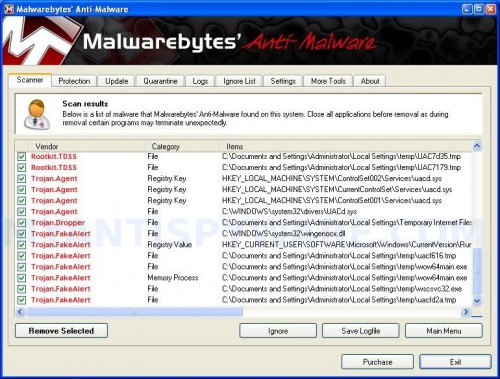
mbam
Malwarebytes Anti-malware, list of infected items

Make sure all entries have a checkmark at their far left and click “Remove Selected” button to remove THREATNAME. MalwareBytes Anti-malware will now remove all of associated remove smss32.exe, winlogon32.exe, helper32.dll files and registry keys and add them to the programs’ quarantine. When MalwareBytes Anti-malware has finished removing the infection, a log will open in Notepad and you may be prompted to Restart.

Note: if you need help with the instructions, then post your questions in our Spyware Removal forum.

Smss32.exe, winlogon32.exe, helper32.dll creates the following files and folders

C:\WINDOWS\system32\helper32.dll
C:\WINDOWS\system32\smss32.exe
C:\WINDOWS\system32\winlogon32.exe
C:\WINDOWS\system32\41.exe
C:\WINDOWS\system32\warning.html

Smss32.exe, winlogon32.exe, helper32.dll creates the following registry keys and values

HKEY_LOCAL_MACHINE\SOFTWARE\Microsoft\Windows\CurrentVersion\policies\ActiveDesktop | NoChangingWallpaper = 1
HKEY_LOCAL_MACHINE\SOFTWARE\Microsoft\Windows\CurrentVersion\policies\Explorer | NoSetActiveDesktop = 1
HKEY_LOCAL_MACHINE\SOFTWARE\Microsoft\Windows\CurrentVersion\policies\Explorer | NoActiveDesktopChanges = 1
HKEY_LOCAL_MACHINE\SOFTWARE\Microsoft\Windows\CurrentVersion\Run | smss32.exe = “C:\WINDOWS\system32\smss32.exe”
HKEY_CURRENT_USER\Software | 8636065b-fef0-4255-b14f-54639f7900a4 = “8636065b-fef0-4255-b14f-54639f7900a4″
HKEY_CURRENT_USER\Software\Microsoft\Internet Explorer\Desktop\General | Wallpaper = “C:\WINDOWS\system32\warning.html”
HKEY_CURRENT_USER\Software\Microsoft\Windows\CurrentVersion\Policies\Explorer | NoSetActiveDesktop = 1
HKEY_CURRENT_USER\Software\Microsoft\Windows\CurrentVersion\Policies\Explorer | NoActiveDesktopChanges = 1
HKEY_CURRENT_USER\Software\Microsoft\Windows\CurrentVersion\Policies\ActiveDesktop | NoChangingWallpaper = 1
HKEY_CURRENT_USER\Software\Microsoft\Windows\CurrentVersion\Policies\System | DisableTaskMgr = 1
HKEY_LOCAL_MACHINE\SOFTWARE\Microsoft\Windows NT\CurrentVersion\Winlogon | Userinit = “C:\WINDOWS\system32\winlogon32.exe”

Share and Enjoy:

  • Print
  • Digg
  • Sphinn
  • del.icio.us
  • Facebook
  • Mixx
  • Google Bookmarks
  • Slashdot
  • Twitter
January 7, 2010 on 10:37 am | In Trojan, Tutorials - HowTo | 190 Comments |


190 Comments »

RSS feed for comments on this post. TrackBack URI

  1. I tried this today, and it worked…that you so much for this. You’ve really saved a noob a lot of time, trouble and money.

    Comment by Dean — January 7, 2010 #

  2. Hey there, I followed the steps but helper32.dll was not there in step 2. I comtinued on to step 3 and it did get rid of the pop-ups but my background is still showing that warning about my system being infected. The lspfix showed mswsock.dll, winrnr.dll, mdsnNSP.dll and rsvpsp.dll. Should I remove any of these?
    Thanks so much.

    Comment by Heather — January 7, 2010 #

  3. No, mswsock.dll, winrnr.dll, mdsnNSP.dll and rsvpsp.dll are legitimate files.
    Right click to Desktop, choose Properties, Desktop tab and set your background.

    Comment by Patrik — January 7, 2010 #

  4. Worked like a Charm!!!
    Just follow step by step & if necessary apply your logical thinking too.
    Even my company tech. was not able to fix it says “I will come tomorrow after consulting my senior officer”

    I worked on it & did it. thanks to this site.

    Comment by Swapnil Mehta — January 8, 2010 #

  5. I got infected but since im using sandboxie, i deleted contents and it went away. Try using a virtual web browser like this to prevent getting viruses online.

    Comment by jo — January 8, 2010 #

  6. HELP: I have this virus on my desktop computer and before I found this thread, I ran a McAfee scan and it deleted the file: C:/Windows/System32/SMSS32.exe and now when I go to log on after a restart it keeps taking me back to the log on screen to hit ctrl alt delete to log on with my password, I enter my password and it keeps taking me back to the log on screen??? Any suggestions?

    Comment by Jason — January 8, 2010 #

  7. Thanks Patrick, I thought maybe my computer was still infected because that warning on the background was still there. I changed it and there are no more problems.
    Thanks for all your help… this is a great site.

    Comment by Heather — January 8, 2010 #

  8. Jason, looks like McAfee also removed winlogon32.exe.
    You need to boot your computer in Recovery console, then copy userinit.exe to winlogon32.exe and reboot your PC. Read comments here (only replace winlogon86 to winlogon32).

    Comment by Patrik — January 8, 2010 #

  9. So far these steps seem to be fitting my problem the most. Like Heather, I did not have the helper32.dll show up.

    However my problem with the virus is that it seems to be preventing me from opening any programs. I run the Malwarebytes and it closes instantly. It pops up in the task manager for barely a second. Is there something else that needs to be changed in order to run that program successfully? Something in the registry maybe?
    (my computer is a samsung notebook with windows xp if that helps any)

    Comment by Denise — January 9, 2010 #

  10. Denise, if you have done step1 and still Malwarebytes is blocked, then ask for help in our Spyware removal forum.

    Comment by Patrik — January 9, 2010 #

  11. I have smss32 on my dell and have now lost my desktop icons and my start button. Anybody know how I can get my desktop back. I ran superantispyware a buch of times and found the problem but it kept coming back after the program removed it.

    Comment by jim — January 9, 2010 #

  12. jim, you have done 1-2 steps ?
    If you need a help, then go to our Spyware removal forum.

    Comment by Patrik — January 9, 2010 #

  13. Since Internet Security 2010 solicits credit card payments, can’t the account holder be tracked and shut down?

    Comment by CR — January 10, 2010 #

  14. I had the virus smss32.exe on my desktop yesterday and since i didn’t know this website, spent hours to try to take the smss32.exe off the registry using regseeker but it came back always. So finally I had to reinstall my windows and all the 3 sce packs.

    Comment by Rich — January 10, 2010 #

  15. below’s how i manually removed this virus/spyware:

    1. delete from c:\windows\system32 (some of these files may also be in C:\ root folder)
    smss32.exe
    41.exe
    IS15.exe
    khkil.exe

    2. remove smss32.exe from startup profile using
    -> control panel -> admin tools -> system configuration

    3. edit registry (computer\hkey_local_machine\software\microsoft\windowsNT\currentversion\winlogon\)
    replace “winlogon32.exe” with “userinit.exe”

    4. restart windows, if everything’s normal, delete “winlogon32.exe” and “helper32.dll” from c:\windows\system32

    5. as a final check, do a complete system search for all above files to confirm files are completely removed.

    6. I haven’t done this but I plan to go into system restore to remove all the days where I know the computer is infected so I don’t end up restoring to an infected system.

    Comment by wl — January 10, 2010 #

  16. Thanks for the steps they successfully removed the trojan FakeAlert from my system in a few minutes, after I wasted two hours letting Symantic scan my system in hopes it would fix it. So yay for you!! :)

    Comment by pip — January 11, 2010 #

  17. This helped a lot!
    One comment: I was unable to login at all and can’t run the necessary tools in Recovery Console. So, started a XP REPAIR then hit SHIFT-F10 as soon as it rebooted into XP, while the repair counted down from 39 minutes. SHIFT-F10 opens a command window, where you can run REGEDIT, HijackThis, etc to fix the problems. Not sure a repair would be possible without doing this.

    Comment by Skio — January 11, 2010 #

  18. My computer had Win32.NetSky,
    Symptoms:
    1. Desktop on the computer showed that your computer is infected with Win32.NetSky
    2. In the system tray I see RED “X “ icon.
    3. Task Manager is disabled
    4. View->Field Options in Windows Explorer is also disabled.
    5. If I try to system restore to previous restore point it display the following message: “System restore has been turned off by your group policy. To turn on system restore; contact your domain administrator.”

    System restore was enabled on my system.

    What I did:
    I rebooted the system in safe mode, same behavior (task manager disable, system restore is not available etc.).

    Investigation:
    I found following files under C:\Windows\System32 with most recent date time stamp (say 1/13/2010):
    1. IS15.exe 0 bytes
    2. Helper32.dll 0 bytes
    3. IE Warning.htm 3kb
    4. wpa.dbl 2kb
    5. winlogon32.exe 21kb
    6. smss32.exe 21kb
    7. oh77tim.dll 145kb
    8. info.tmp 40kb

    Uncheck through MSCONFIG
    In Startup Tab I also UNCHECKED
    1. SMSS32 which point to C:\Windows\System32\SMSS32.EXE
    2. AWY84 which point to C:\Documents and Settings\\Local Settings\Temp\AWY84.EXE

    Deleting files while logged in SAFE mode:
    1. I deleted all the files from C:\Documents and Settings\\Local Settings\Temp.
    There were couple EXE (e.g. AWY84.EXE) files with most recent date time stamp.
    2. Deleted files form C:\Windows\System32
    a. IS15.exe 0 bytes
    b. Helper32.dll 0 bytes
    c. IE Warning.htm 3kb
    d. wpa.dbl 2kb
    e. winlogon32.exe 21kb
    f. smss32.exe 21kb
    g. oh77tim.dll 145kb
    h. info.tmp 40kb

    Rebooted:
    Now when I go to log on after a restart it keeps taking me back to the log on screen to hit ctrl alt delete to log on with my password, I enter my password and it keeps taking me back to the log on screen?

    Same behavior is happening in SAFE Mode as well.

    1. Put in your your Windows Disc and boot into Repair, you will see a dos mode, press “1″ go into “C:\Windows” directory and type in your user/admin password.
    after that go into your “System32″ folder by typing “cd System32″ without “quotes”
    then enter in:
    “copy winlogon.exe winlogon86.exe” and
    “copy winlogon.exe winupdate86.exe” <— just incase
    type: "exit" to restart
    I am unable to log-in to my system. When I log on after a restart it keeps taking me back to logon screen.

    I really, really appreciate if someone helps to resolve this issue.

    Thanks in anticipation.

    Comment by Sam Gil — January 13, 2010 #

  19. Please HELP! I have this virus on my computer and before I found this thread, I deleted the file: C:/Windows/System32/SMSS32.exe, C:/Windows/System32/IS15.exe,
    C:/Windows/System32/helper32.exe and now when I go to log on after a restart it keeps taking me back to the log on screen to hit ctrl alt delete to log on with my password, I enter my password and it keeps taking me back to the log on screen?

    I followed the instruction what U8MYR!CE suggested on

    But I am still unable to logon. System keeps taking me back to the log on screen.

    Any suggestions?

    Comment by Sam Gil — January 14, 2010 #

  20. In the Recovery console use the following commands:
    copy userinit.exe winlogon32.exe
    copy userinit.exe winlogon86.exe

    Comment by Patrik — January 14, 2010 #

  21. Thanks so much tried and worked perfectly. Did not find the file at step 2 but everything else worked great thank you.

    Comment by edith — January 14, 2010 #

  22. I used your steps and was able to rid my pc of the virus but after I restarted it I was no longer able to connect to the internet. I actually had my service provider send out a tech who found nothin wrong with the router….it works fine. I was on the internet following your steps but I haven’t been able to get on since. Do you know why that my be?

    Comment by javier — January 14, 2010 #

  23. Hi, thanx for help, it worked for me.

    Got a question, how could i get infected (or how do you get infected with this)… my computer is not in a network. Is there any patch/update for windows (mine is xp64) recomendend for protecting for this?

    Seeyo and thanx again. Sol from Argentina.

    Comment by Sol — January 14, 2010 #

  24. Sam Gil,
    the steps I outlined on my 10-Jan post are in sequence for a reason. The one thing I found during my trial and error of trying to remove the virus is that if I manually delete winlogon32.exe, I could not logon properly — not sure if that’s the same root cause for you. winlogon32.exe has to be properly removed via editing the registry. what i also found out is that winlogon32.exe spawns smss32.exe (and maybe other files too) during every startup and puts it into the startup profile — sneaky. You seem to have a bunch of other additional files listed (hope you don’t have more than one virus on your system).
    I didn’t include this on my previous post but thought I should add that my system is running regular Vista windows with Norton internet security 2009 when I got hit with the virus.

    Comment by wl — January 14, 2010 #

  25. Thank you, Patrik, and to all the people you may have worked with to put out this info. My computer is now disinfected. God bless

    Comment by Gil — January 15, 2010 #

  26. javier, try run WinSock XP Fix.

    Comment by Patrik — January 15, 2010 #

  27. I followed these steps, but, like Jim above, have lost all desktop icons, start button, etc. (after windows explorer repeatedly crashes).

    Help.

    Comment by BAC3 — January 15, 2010 #

  28. I did everything, but I cannot change my desktop or run taskmanger..any help would be great!

    Comment by frank — January 15, 2010 #

  29. I had this annoying “Worm.win32.netsky” warning message poping up on my Windows 7 pc…. my current AV software (well known brand) kept spotting a “generic fake alert!htm” and kept removing the “00000035.js” file. however, everytime I started the Pc the same pop-up with the virus warning kept coming up and the AV software kept removing the same file… In addition, I also kept seeing a pop-up that said the pc was infected and it was going to download some AV software (Internet Security 2010??).. My AV software was NOT stopping this….

    Your steps 1 to 3 above saved the day… all seems to be removed…. I did not find helper32.dll as per your step 2 (I think that it is still there – I saw a file in a windows directory with same name and size 0kb) but step 3 went well.. rebooted the pc and the “fake virus” seems to be GONE! Thank you for the help… the PC seems to be working well.

    nb. Malwarebytes’ Anti-Malware found a lot more “malwares” on my PC and removed them (My old/current Anti-virus program did NOT find them)

    Comment by Liquito — January 15, 2010 #

  30. Thank you so much! The instructions were very detailed and they worked. And I’m not very good with computers.
    You’re great!

    Comment by lely — January 15, 2010 #

  31. Thanks so much, this worked for me today.

    Comment by Cheryl Wolfe — January 15, 2010 #

  32. Bless you! Bless you! A thousand blessings upon you for the angst, and lost hair you have saved me. I got the whole package… smss32.exe, Win32.NetSky, etc. Things were deteriorating before my eyes. I thought it was all over…. I spent 3 hours running scans, antivirus software, etc., until I googled smss32 and found your site. I followed your instructions carefully; they were incredibly clear and concise, and best of all — EFFECTIVE!!!
    I was about to jump out the window — I hope you receive even a small portion of the rewards you deserve. What else is there to say: Thank you ever so much!

    Comment by JoelB — January 16, 2010 #

  33. A matter of concern for me is that simply visiting a webpage started the install process for this thing. I don’t recall clicking or accepting anything. Windows defender alerted me that winlogon32 and smss32 were trying to set up to autorun and I denied permission for that but the malware payload had already started running the bogus 2010 software. MS security essentials said it detected “Trojan:HTML/Fakeinit” and removed it. task manager was getting blocked but I used the defender “software explorer” to stop the 2010 program.
    I still had to manually repair the registry keys.
    I used the lsp-fix product, which I already had, to remove the helper32.dll

    Comment by Dana — January 16, 2010 #

  34. Followed this procedure this morning and it cleaned up the problem nicely. Thanks to all who put this together.

    Comment by Keith — January 16, 2010 #

  35. Thank you so much for these instructions, worked like a charm!

    Thanks

    Comment by Suhas — January 16, 2010 #

  36. So easy a caveman can do it! thanks guys.

    Comment by Jim — January 16, 2010 #

  37. BAC3, once Windows loaded, press CTRL + ALT + DEL.
    Task Manager should opens.
    Click File, New Task.
    Type explorer.exe and press Enter.
    It should load all icons and show windows task bar.
    Now run Malwarebytes Anti-malware and perform a scan.

    Comment by Patrik — January 17, 2010 #

  38. frank, ask for help in our Spyware removal forum.

    Comment by Patrik — January 17, 2010 #

  39. i have a little problem, i had to clean my hard hard and now i cant access to the internet, every connection is fine but the internet explorer says: internet explorer cannot display the web page…. what should i do about it?

    Comment by reaper — January 17, 2010 #

  40. Hey, everything worked for me, till the LPSFIX i never saw helper32.dll in there, help please?

    Comment by Robert — January 17, 2010 #

  41. reaper, try run WinSock XP Fix (look a link above), also check proxy settings of Internet Explorer.

    Comment by Patrik — January 17, 2010 #

  42. FROM A FRUSTRTAED GUY IN ATHENS, GREECE, WHO HAS BEEN TRYING FOR 20 HOURS TO GET RID OF THE LATEST VERSION OF THE VIRUS WITH OVERHYPED ANTIVIRUS PROGRAMS SUCH AS KASPERSKY, NORTON, AVIRA, LOCKED REGEDIT EDITORS, LOCKED SYSTEM RESTORE ETC., I HAVE ONE THING TO SAY TO YOU:

    YOU ROCK MORE THAN “TRAILER PARK BOYS” TV SHOW, ICED EARTH AND “CLERKS” MOVIE COMBINED

    THANK YOU

    Comment by ZAFIRATOS YANNI — January 17, 2010 #

  43. Running LSPFix did not highlight the helper32.dll for me either. But I saw others say that despite this, the process outlined here worked for them, so I continued. When I ran the the MALwarebytes software, it found and removed the helper32.dll file. Thank you very much for your help!!!

    Comment by Harold — January 17, 2010 #

  44. This worked like a charm. Thank you vary much for sharing the fix!

    Comment by RM — January 17, 2010 #

  45. What a lifesaver. Thank you x 1000.

    Comment by ChrisH — January 17, 2010 #

  46. This worked great for me. Step 2 did not highlight the helper32.dll but everything still worked regardless. Thank you SO SO very much for your help and publishing this article.

    Again Thank you

    Comment by Josh — January 17, 2010 #

  47. Thank you….Thank you….Thank you!!!

    Comment by Rocco — January 17, 2010 #

  48. Thanks so much for this fix! We have been trying to remove this thing for two days with no luck. on each reboot this \PITA\ kept coming back. Step by step instructions were perfect and the Malware program is a godsend. Microsoft’s and Spyware Doctor didn’t help us but following these steps and using the Malware did. Someone tell me again why we’re paying McAfee?

    Comment by Barbara — January 17, 2010 #

  49. Thanx so much, man. U rule!

    Comment by branimir — January 18, 2010 #

  50. I followed the steps and I am 10 times worse off than before. Now, I cannot execute ANY programs and whenever I try to go to any website, I am hijacked to a (I am sure) fake anti spyware site. I am sooooo upset

    Comment by judy — January 18, 2010 #

  51. i accidently delteted the other things that was with helpper32 did i mess this up

    Comment by zach — January 18, 2010 #

  52. Sam Gil,

    My laptop also kept booting me out even after accepting the pwd.
    So I booted using my WinXP Pro CD and chose to ” setup windows xp ” instead repair.

    This will detect your existing installation and reinstall all the system files without losing your data.

    Follow this link for a step by step procedure
    http://michaelstevenstech.com/XPrepairinstall.htm

    The virus was removed and I was able to login to my laptop.

    PS: you’ll need to have the original win xp product key to do this. In case you don’t have one…just google.

    Hope this helps

    Comment by Adi C — January 18, 2010 #

  53. After following the instructions here step by step and losing the desktop icons and start button, I managed to get my desktop back (by using system restore, which was now available to me), but now most of the programs won’t connect to the internet. Firefox Mozilla and Outlook Express WILL connect just fine. Nothing else connects, though (Internet Explorer, Dropbox, Itunes, all chat programs such as Yahoo Messenger, etc.).

    It obviously sounds like a firewall issue, but it’s apparently not. All permissions are granted. I’ve even shut down the firewall briefly to test, and same result.

    I’ll be your biggest fan (and you have a lot, obviously) if you can help me with this one.

    Comment by BAC3 — January 18, 2010 #

  54. Help please. I am struggling to install the Malwarebytes anti-malware software on my infected PC in safe mode. Getting message Unable to execute file: C\Program Files\Malwarebytes ‘Antimalware\mbam.exe Create Process failed; code 2. System cannot find specified file.
    I renamed the setup file to another name, but same result on installation.
    FYI: I downloaded purchased version of the antispyware onto another computer and via jump drive attempted install on infected pc. Any suggestions?
    I also have McAfee Security Suite and still got infected.

    Comment by stan — January 18, 2010 #

  55. FYI, I did step 1 and 2 (smss32.exe was removed – at least it is not showing up in task manager, but task manager shown bunch other processes: like smss.exe)

    Comment by stan — January 18, 2010 #

  56. Both Skype and Mozilla Thunderbird will connect just fine too.

    How do I get the other programs to connect?

    Comment by BAC3 — January 18, 2010 #

  57. Sorry. One more detail that might help. If I switch users in windows, the programs work logged in as the second user.

    Baffling to me.

    Help, please.

    Comment by BAC3 — January 18, 2010 #

  58. BAC3, look also to Internet Explorer proxy settings.
    Tools->Internet Options->Connections->Lan Settings->Uncheck “Use a proxy server”.

    Comment by Patrik — January 19, 2010 #

  59. stan, download this file and save it to C\Program Files\Malwarebytes ‘Antimalware\. Run it.

    Comment by Patrik — January 19, 2010 #

  60. Great Fix!

    Worked like a charm on my first try. Thank you very much for this post!

    Comment by charles — January 19, 2010 #

  61. Patrik for President. Or King. Something.

    Comment by BAC3 — January 19, 2010 #

  62. Thank you so much for sharing this!

    Comment by Marc S — January 19, 2010 #

  63. Patrick, I tried to install MBAM after I renamed the setup files to a made up name and it failed to install. Tom from Malwarebytes advised me to try install with random installer and if it fails he will look for the rootkit infected files in the log I will send him. I will resume tonight when I get home. Will keep you posted on progress, hoping others may benefit from this effort.

    Comment by stan — January 19, 2010 #

  64. Since my pc is infected with the fake alert Trojan I wanted to retrieve bunch of personal files (photos, etc) from the infected C drive: On save, I got message “$encrypted; data, do you want to proceed, continueing may cause harm or loss of content” poped up when saving entire subfolder to a jump drive (in safe mode)…Is this coming from the virus or McAfee? If yes, what software should I use to check and clean the copied data files in the jump drive?
    FYI, copying file by file did not give the message.

    Comment by stan — January 19, 2010 #

  65. Thanks so much, it all worked perfect for me and was so easy to follow – broadband seems to be alot slower now than before – is this due to the malware software?

    Comment by Paula — January 19, 2010 #

  66. I followed the steps and it appears that the virus was removed. However, now my computer pops up a message every 15-20 minutes saying that Generic Host Process for win32 Services has encountered an error and needs to shut down. I get a countdown timer that my system will reboot in 1 minute and it does – only to get the same message again in 15-20 minutes. Did I not get all the files or is one of my files now corrupted from the virus? Any help would be appreciated!

    Comment by pete — January 22, 2010 #

  67. pete, open a new topic on our Spyware removal forum. I will check your PC.

    Comment by Patrik — January 22, 2010 #

  68. I believe I have all the files removed and I have used Malware to scan serveral times over and it comes up with no infected objects.

    I had a problem with IE connecting to any sites, so I reset all the IE settings and it seems to be working again.

    Firefox on the otherhand cannot connect to gmail when I try. Then I’m forced to shut firefox down. The wondow closes but the firefox.exe keeps running. Opera apears to work correctly.

    Is there something I’m missing?

    Comment by dan — January 22, 2010 #

  69. Hero – Thank you.
    Iwas so impressed with your clear instructions
    I posted on my website

    yonokwetlands.awardspace.com/records_2010.html
    cheers mick

    Comment by Mick Davies — January 23, 2010 #

  70. dan, probably you infected with another trojan. Ask for help in our Spyware removal forum.

    Comment by Patrik — January 23, 2010 #

  71. Thanks so much for this site — a godsend and a good site quicker, easier, and cheaper than big-name commercial supposed-protection.

    Other than no longer being annoyed by popup warnings every minute, is there a good way to positively verify that all virus artifacts are, indeed, gone? Many thanks.

    Comment by MCAustin — January 23, 2010 #

  72. I followed all 3 steps but there was not an O4-HKLM\..Run[smss32.exe] file listed when I ran HijackThis. I proceded on through the remainder of the steps, ran malware bytes, and everything appeared to be working correctly. My desktop was restored after reboot but I thought I would check to make sure the smss32.exe file was gone. Well to my surprise it was still in my Window/prefetch folder. I might note that Norton IS had previously removed the Fake Internet Sercurity 2010 program and also said that it had done something with the smss32.exe. It now appears in the Quarantined listing in NIS. Am I overly concerned? My other computers do not have a smss32.exe file, so I assume it is created by this virus.

    Comment by Lee H — January 24, 2010 #

  73. After agonizing over this and even buying Norton with no success, I followed your instructions and everything was fixed within an hour. Thanks!!

    Comment by Brandon — January 24, 2010 #

  74. 1/24/2010
    Just finished all steps exactly as stated above. I now have everything back to normal. Many Thousand Thanks for flawless instructions to eliminate Netsky trojan.

    Comment by Don — January 24, 2010 #

  75. I can see the smss32 and helper32.dll files in my system32 folder.

    But when I try to manually delete them, I get a popup saying access is denied. Perhaps those files are write-protected?

    How can I manually delete them? thanks.

    Comment by Bev — January 25, 2010 #

  76. that worked… just update your malwarebyte links coz that isnt working anymore…
    anyway i got another one and thats done now…

    thx dude !

    Comment by AfftasS — January 25, 2010 #

  77. Bev, goto step 1, before removing anything.

    Comment by Patrik — January 25, 2010 #

  78. Patrik –

    I got rid of those files now (thanks), but I have another problem. The desktop takes about 15 minutes to load now.

    When I boot up, the blue “welcome” message that appears on the screen before you get to the desktop “freezes” for about 20 seconds. This was happening yesterday when the computer was first infected. It was my first clue something was wrong.

    I no longer have those fake popup spyware warning messages, and I no longer have my desktop backround hijacked by the warning message.

    But, the desktop images and the software programs and files on the deskop take about 15 minutes to load, which they never used to. While they are loading, the computer makes a loud girgling noise.

    Things finally do load, but I wonder if the viruses has all been removed and what can be done about the extremely slow loading of the desktop.

    If I try to fire up IE, it takes about another 5 minutes. All this was not taking place before the virus set in yesterday.

    Thanks for any help.

    Comment by Bev — January 25, 2010 #

  79. This worked better than I could ever have imagined, thanks!

    Comment by Allan — January 25, 2010 #

  80. thank you so much for this simple and clear instruction; I was able to remove Internet Security 2010 and all other junks in my computer that I ran the scan using Mcaffee for 4 hrs and did not work…you are a great one…thanks a million!

    Comment by pete — January 26, 2010 #

  81. Thanks for the writeup. it worked great!!

    Comment by Marc D. — January 26, 2010 #

  82. Brilliant – worked a treat, many thanks

    Comment by Tim — January 26, 2010 #

  83. followed the instructions, it worked like a charm. thanks so much!!

    Comment by nrot — January 26, 2010 #

  84. Thanks guys. Worked perfectly. 18 minutes.

    Comment by Edgar Escobar — January 26, 2010 #

  85. Hi, I had encountered this virus on the 17th but by another name SPM/LX. I tracked new files, renamed them, Malwarebytes deleted a few files and several reg strings, and all seemed fine til I tried to get online, dial up. My IP could see me there but IE would not go. I read your fix, ran hijackthis and it stated helper32.dll was missing so I renamed and restored the helper32.dll, ran the fix and all seems well. Note to others, never delete stuff, rename it and put it in a folder somewhere different, you may need it like I just did. Had I deleted it I’d be sunk. My question is Malwarebytes calls this file out as a virus should I delete it? I renamed and moved it and can still get on the web so I’d normally just delete it but somewhere I read windows needs the file, I think. Additionally I have files named IS15.exe and winlogon32.exe from system32 being held as renamed captives to be sure I don’t need them. They were never restored and subject to hijackthis or LSP Fix so I’m not sure if they should have been part of the fix. I also have a file named s that was on C. It is 4kb. Also never ran through the fix, it’s renamed and saved as well. Should I rename and restore them and rerun the fix or just delete them? Thanks.

    Comment by Mike — January 27, 2010 #

  86. Thank you so much! I couldn’t get rid of this malware for days; followed your instructions and voila! I had to remove the dll’s and exe’s in the recovery console but besides that the instructions were dead on.

    Comment by illogic — January 27, 2010 #

  87. Thanks very much for this much-needed service. I was able to follow the directions easily and my desktop is more or less restored, though with all of the icons highlighted for some reason.
    Do you know a way of preventing a recurrence of this problem?

    Comment by Jonathan — January 27, 2010 #

  88. Took me 2 days to get rid of this swine of a trojan and my job is creating Windows images for a large corporation, so I really feel you guys with less IT experience.
    Thanks for the help.

    Comment by TonyH — January 27, 2010 #

  89. I was able to fix the smss32.exe virus manually. But my computer was part of a network so I fixed it from another PC. Also, I am running IE8. I’m sure IE7 is similar but haven’t tried.

    Eventually these two fixes were what did it.

    First Fix.

    1) Copied authentic Windows file smss.exe to smss32.exe then made it Read-Only.

    2) After reboot, I am logged off as soon as I logged in to Windows XP.

    3) On a second PC on the network, I ran regedit and connected to the infected PC to bring up its registry.

    4) Went to: HKEY_LOCAL_MACHINE\SOFTWARE\Microsoft\Windows NT\CurrentVersion\Winlogon

    5) Changed the Userinit entry to “C:\WINDOWS\system32\userinit.exe”. (It was changed by the smss32.ex virus to “smsss32.exe”.)

    6) Rebooted caused me to lose Internet. I can’t surf the web.

    Second Fix.
    1) Ran IE8.

    2) IE8 said there’s something wrong and shows a big button saying “diagnose network connection”.

    3) I clicked that and then it said something’s wrong with “VSockets LSP” do I want to remove it.

    4) I clicked “Yes”.

    5) I rebooted and I got back the Internet.

    I hope this helps. I am really annoyed by people who write viruses. I hope everyone who finds a solution posts it on the Internet so we can defeat virus writers all the time.

    Comment by VVCarpio — January 27, 2010 #

  90. Thinking about it some more, maybe I didn’t have to do steps #1 and #2 in the First Fix. I was grasping at straws at the time.

    Comment by VVCarpio — January 27, 2010 #

  91. Mike, if HijackThis does not show symptoms of the infection, then you can remove both files (IS15.exe and winlogon32.exe).

    Comment by Patrik — January 27, 2010 #

  92. Jonathan, you should use: a good antivirus, an antispyware (SpyBot for example), a firewall (Windows firewal should be enables as minimum). And most important, be careful when opening attachments and downloading files and use only an alternate browser (Firefox or Opera).

    Comment by Patrik — January 27, 2010 #

  93. Got this one from an infected website even though I am using Chrome and have AVG running.

    Your info was very helpful. Thank you.

    I had already deleted the new files in windows\system32

    When I found I couldn’t reboot ala Sam Gil above, I booted from a Linux USB stick and copied the registry files from my ERUNT backup back to windows\system32\config

    A few minor cleanups were required to re-enable taskmanager and restore my wallpaper.

    Malwarebytes, HijackThis and other scans are now reporting clean. I sure hope so.

    The biggest time savers for me were having a tested USB boot thumb drive that allowed me to edit the infected drive directly without running the Windows XP and ERUNT created registry backups that could be used to manually restore it. I recommend preparedness to save a lot of time under stress.

    Comment by GeoNomad — January 27, 2010 #

  94. Thanks – your instructions worked for me. I had tried various other approaches to no avail. This was a lifesaver.

    Comment by jeswald — January 27, 2010 #

  95. Thanks Patrick, hijackthis states I’m missing d3d932.dll where can I get that and do I need it? Everthing so far seems fine. LSP-Fix shows mswsock.dll (Tcpip), winrnr.dll (NTDS) and rsvpsp.dll (Protocol handler) in Keep. Should I do anything with them? Thanks again!

    Comment by Mike — January 27, 2010 #

  96. I got this virus last night playing a simple text game on Yahoo! in Firefox. I play this game all the time, but the green screen and warning just popped up.

    I searched many forums, tried many things to remove and found this process. This worked, I did the process as Administrator in Safe Mode. However, it corrupted Windows Explorer in my regular user profile. I couldn’t do anything in it, (Windows Explorer has encountered an error and needs to close before anything loads after logon). Screen would only show my wallpaper, so had to go back to Safe Mode as Admin and create a new user profile and migrate my docs and settings over.

    Still have a bunch of settings to re-do that don’t migrate (re-setup accounts in Outlook, reset desktop, and other settings/logins/passwords I used in other programs). Has anyone else encountered this? Does anyone have a solution?

    Comment by Cinnamon — January 27, 2010 #

  97. I too fell pray to the IS1020/Netsky thing. Did all the scan and got back my PC. Next day had the FakeAV thing showed up. Scanned again and it was gone but lost my Internet. All other forms of internet worked like e-mail, IM and ftp but no browser. Did uninstall of IE7 to IE6 and back. No Go. Finally ran HijackThis. I saw this thing in my Registry:
    HKCU\Software\Microsoft\Windows\CurrentVersion\Internet Settings,ProxyServer = http=127.0.0.1:5555
    Looked it up. It it as Loopback address. This is what I saw at the bottom of the browser. I deleted the whole damn thing and now I can surf again. Hope this helps the rest of you kids.

    Anthony in Kansas

    Comment by AnthonyJasso — January 27, 2010 #

  98. Thanks Patrick your steps worked perfectly. However, my computer is running very, very slow now. I am having the same problem as Bev. However, when I boot up, the blue “welcome” message that appears on the screen before you get to the desktop goes “black” for about 20 seconds. In addition, trying to use my programs like the internet, Microsoft Word etc.., are very slow and my computer makes loud gurgling noises too. Do you have any idea how to remedy the problem? Has the virus damaged my computer or is there another virus perhaps?

    Thank you in advance!

    Comment by Felicia — January 27, 2010 #

  99. I don’t have much money and cannot afford an expensive anti-virus/anti-malware program but if I did I would certainly donate to you. Simply outstanding job; keep up the good work. You are a professional and a gentleman.

    Thanks,

    John

    Comment by John — January 28, 2010 #

  100. Many thanks for this absolutely first class assistance. Worked like a charm !!TOP MAN.

    Comment by Tony C — January 28, 2010 #

  101. Dear All,

    I also got that virus, Fake Alert. Thanks to all for the published advices that helped me to get rid of that virus.

    Best regards,

    Sorin

    Comment by Sorin G. — January 28, 2010 #

  102. Cinnamon, probably your PC infected with a trojan that blocks your old account. Ask for help in our Spyware removal forum.

    Comment by Patrik — January 28, 2010 #

  103. Felicia, probably your PC is infected with another virus or trojan. Open a new topic in our Spyware removal forum.

    Comment by Patrik — January 28, 2010 #

  104. Thanks, but the instructions didn’t work for me. I ran a few scanners, while they did detect and remove some things but they didn’t get rid of the problem completely and some of the infections returned. What mainly worked for me was Trojan Remover (www.simplysup.com). Before running Trojan Remover, Malwarebytes wouldn’t install and Windows Security Center, Task, Manager, and Desktop Display Properties were all disabled. Once I finished scanning with Trojan Remover, I was able to install Malwarebytes and everything was enabled once again. I then ran Malwarebytes, Spybot Search & Destroy, CCleaner, and a Registry Cleaner to remove what was left over. Now my pc is showing up clean. I thought I would have to reformat my system. Thank God I didn’t have to. I hope this never happens again because it took me almost three days to get rid of this nasty malware.

    Comment by Dap — January 28, 2010 #

  105. Thanks Patrick your steps worked perfectly. However, my computer is running very, very slow now. I am having the same problem as Bev. However, when I boot up, the blue “welcome” message that appears on the screen before you get to the desktop goes “black” for about 20 seconds. In addition, trying to use my programs like the internet, Microsoft Word etc.., are very slow and my computer makes loud gurgling noises too. Do you have any idea how to remedy the problem? Has the virus damaged my computer or is there another virus perhaps?

    Thank you in advance!

    (EDIT)

    Hi Patrick!

    I forgot to mention that after I followed your steps, I had to re-install Windows XP, because my computer kept automatically logging me out

    Comment by Felicia — January 28, 2010 #

  106. Hi. Need your help.

    I manually removed this virus/spyware: using the same instruction as “wl” did posted 01/10/10. However i lost my network connection to our server. no internet no network. i tried using “netsh winsock reset”. it works for my internet. But still, how come i could not connect to my local network? When I am trying to map a network folder i receive the error message “The drive could not be mapped because no network was found”.
    Is there a virus/worm/spyware still hanging out with my pc? Or i just need to do something with my network. Also right-click for Properties isn’t working.

    Thanks in advance to anyone who will help.

    Comment by CheSteR — January 28, 2010 #

  107. I terminated the virus process to enable malwareytes by using process explorer from a usb stick.

    Comment by Dave H — January 29, 2010 #

  108. Big thanks!
    Followed the instructions and the computer is now clean!
    Before this I ran ad-aware + avg but to no success.

    Comment by Krille — January 29, 2010 #

  109. Worked very fine. Since I never heard of “Malwarebytes Anti Malware” I used Avira’s Antivir to clean the remains. I know this is Malewarebyte’s site – but can we trust the program “Anti Malware”?

    Comment by Commentator — January 29, 2010 #

  110. Commentator, Malwarebytes Anti-malware is really good program.

    Comment by Patrik — January 29, 2010 #

  111. A surefire fix is to take the infected hard drive out of the infected computer, connect it to another computer as a slave drive or use an enclosure. Boot up your second computer like normal with the infected drive attached. When the drive appears in “My Computer” right-click on it and use your virus scanner of choice on it. It will find all the infections related to smss32.exe. It appears to hide itself with a rootkit when it’s running. Too bad it cant hide if it’s in a slave drive and can’t start. HA! HA! You probably have to manually restore the proper logon programs if you do it this way.

    Comment by Erik — January 30, 2010 #

  112. Excellent. Your instructions worked a treat. I had tried other methods but the virus reappeared after rebooting. But not this time! Many thanks.

    Comment by PW — January 30, 2010 #

  113. First of all thanks for this helpful site…the steps worked for mee, everything was present, malware found 16 items and i deleted them (all in safe recovery mode). But when i started my computer again the desktop was green stating my system is infected! i ran malwarebytes again, it found 1 object – did not resolve the problem. My task manager is working again…and the warning messages and the red button in the taskbar are gone…just this green desktop with the warning. Hope you can help me!

    Comment by natalia — January 31, 2010 #

  114. Uh, now it is gone…just that the \warning\ is still available in the pictures for my desktop…i have gone through all above stated files and registry changes the worm is doing and deleted all or changed to right value (after the process described here HKEY_CURRENT_USERSoftware | 8636065b-fef0-4255-b14f-54639f7900a4 was still there, I deleted it)…

    Comment by natalia — January 31, 2010 #

  115. Patrick for your information,

    After following the instructions described in http://www.myantispyware.com/2009/12/02/remove-fake-spyware-alert/ and again the instructions here I still couldn’t remove all of the virus and my Pc still had symptoms: No access to task manager, programes suddenly shutting down, getting kicked out of firefox etc etc

    I noticed two exe files on my running processes (mscjm.exe and mscj.exe) with their corresponding entries on hijackthis
    O4 – HKCU\..\Run: [mscjm] c:\documents and settings\..\application data\msa\mscjm.exe
    O4 – HKCU\..\Run: [mscj] c:\documents and settings\..\application data\msa\mscj.exe

    by then I was getting pretty desperate so decided to try my own solution so ticked the “fix” bottom on hijacthis before running Malwarebytes for a fourth time. This time it seems everything is fine.

    Comment by mik — January 31, 2010 #

  116. Patrik you’re advice has helped me before. Now I need it again.

    Was infected with Internet Security 2010 and winlogon32 and smss32. Ran the instructions above, all three steps. Step 1 found and checked both items indicated. Step 2 found a removed helper32.dll as indicated. Ran MalwareBytes again and removed 29 infected items. (Note it said it couldn’t remove one item, but would do so upon rebooting. Have rebooted and still have problems accessing certain websites and doing searches on google through mozilla. Have gone thru the steps a few times since; none of the items appear in steps 1 or 2 anymore, but the problem still occurs once I reboot. Not sure what the next step should be. Any ideas, Patrik?

    Comment by Bart — January 31, 2010 #

  117. natalia, Right click to desktop, select Properties and choose a background/wallpaper.

    Comment by Patrik — February 1, 2010 #

  118. Bart, probably your computer is infected with TDSS trojan. Ask for help in our spyware removal forum.

    Comment by Patrik — February 1, 2010 #

  119. Patrik – thanks, I’ll do that when I get home tonight. I did notice that I can’t seem to get rid of the SOUNDMAN.EXE trojan with Malwarebytes.

    Comment by Bart — February 1, 2010 #

  120. I did all the steps and it removed lots of spyware from my computer. Malware bytes removed over 300 items. I thought all was well but it started happening again. I ran the startup registry and saw smss32 was on there still, but unchecked. Also, on the task manager i saw smss32.exe running and it would not let me end the process. I previously had Avira anti-spyware on there and it occasionally pops up and tells me that trojan such and such is up and the path name is in the svchost and the tempfile section. Can someone please help?
    TR/Crypt.ULPM.Gen Tojan is the error I keep getting in my svchost.exe I do not know the tempfolde name.

    Comment by Daniel — February 1, 2010 #

  121. Daniel, open a new topic in our Spyware removal forum.

    Comment by Patrik — February 1, 2010 #

  122. After I did all of this, my computer began to lock up on me. Is there any specific reason for this and how can I fix it?

    Comment by Scott — February 2, 2010 #

  123. Scott, what you mean “lock up on me” ?

    Comment by Patrik — February 3, 2010 #

  124. After a while, my computer will just freeze and I can’t do anything.

    Comment by Scott — February 3, 2010 #

  125. I’d just like to say thanks Patrik. You’ve helped lots of people out with this, including myself, and I just thought I’d take the time to show some appreciation!

    Cheers buddy.

    Comment by Ama — February 3, 2010 #

  126. Scott, try boot your PC in Safe mode, run Malwarebytes Anti-malware and perform a scan.

    Comment by Patrik — February 3, 2010 #

  127. Thanks! Your instructions worked well to clear up the problem in minimal time. It was necessary to run the scan three times to uncover the infected files. The first time using quick scan while connected to the network the scan stopped after uncovering 3 infected files. I disconnected the computer from the network, ran quick scan again and it uncovered 11 more infected files. I then ran a full scan which found 5 more infected files. Now fully connected, pop ups are gone and no other problems are noted. It should be noted the Norton did not stop the infection, nor did it recognize the malware and infected files. Your suggested fix quickly located the infection and allowed easy deletion. Bravo!

    Comment by Walt — February 4, 2010 #

  128. Hi, Patrik,

    thanks for your info. I managed to delete the virus. however, the virus redirect webpages??
    any solution for it or do i still have the virus?

    Malwarebytes detected no virus anymore?!!

    thanks

    Comment by amy — February 5, 2010 #

  129. amy, probably you have infected with a variant of TDSS trojan. Follow the steps.

    Comment by Patrik — February 5, 2010 #

  130. Patrik, Thanks for posting the fix for this. When my computer was infected, I deleted smss32.exe and winlogon32.exe from c:\windows\system32 and removed their registry references (reg edit), before I sought help online. I then tried to restart my computer and it wouldn’t let me log on. I can’t get past the welcome screen. It goes through a loop on the log on screen, both for my user profile and administrator. I just read this post and found then deleted helper32.dll , 41.exe and warning.html through the recovery console but I still can’t log on. The only access I have to my computer is through the recovery console, so I can’t run any programs or edit the registry. And I can’t do an XP repair install because I have XP pro and I’m running the recovery console with an XP home cd. Also, I don’t have a floppy drive. I had to make a slipstream XP disk. Any help would be greatly appreciated. thanks!

    Comment by Blair — February 5, 2010 #

  131. Forgot to mention I can’t log on to safe mode either and the last known good configuration doesn’t work either. I did a dir command and didn’t find any files associated with the TSDD trojan in the directories listed in the link above. I think I also had a process running called xuxfncpmxbyudddjltgvw and that was also listed as the company name when I right clicked smss32.exe and winlon\gon32.exe under properties>version:company. Thanks again.

    Comment by Blair — February 5, 2010 #

  132. Blair, boot your PC in Recovery console.
    You will now see the Prompt c:\windows>

    Type cd system32 and press Enter.
    Type copy userinit.exe winlogon86.exe and press Enter.
    Type copy userinit.exe winlogon32.exe and press Enter.
    Type del winupdate86.exe and press Enter.
    Type del smss32.exe and press Enter.
    Type del critical_warning.html and press Enter.
    Type exit and press Enter.

    Reboot your computer and run Malwarebytes Anti-malware.

    Comment by Patrik — February 6, 2010 #

  133. Patrick,
    Thanks for this thread. Your instructions are very clear and concise.

    My problem is similar to Blair’s (deleted smss32.exe and winlogon32.exe before I found this thread. I have the endless loop of logging in and immediately shutting down. I can’t boot in safe mode. My big problem is I’ve misplaced my xp install disk so I can’t boot in Recovery console to follow your instructions.

    Any suggestions would be appreciated.
    Thanks!

    Comment by Ken — February 6, 2010 #

  134. Thanks so much Worked very well Thanks so much

    Comment by essam — February 7, 2010 #

  135. Hi Patrik,
    Thanks for your detailed instructions.

    My problem is similar to Blair’s (i.e., I removed smss32.exe, winlogon32.exe, and helper32.dll before I found this thread) I am now in the endless loop of logging in with machine immediately logging off. I am unable to boot in safe mode at all.
    My real problem is I’ve misplaced my Windows XP install disc and thus am unable to boot PC in Recovery console.
    I am able to interrupt the process and get to Set Up. Am wondering if I use SetUp/Maintenance/Load Defaults (to restore factory defaults) will it restore the system without deleting any other updates?
    Please help!

    Comment by Ken — February 8, 2010 #

  136. Thank you so much. Did everything in Safe Mode with Networking, and it worked wonderfully. I can’t thank you enough.

    Comment by Jojo — February 9, 2010 #

  137. After scanning with Malwarebytes Anti-Malware, I clicked “remove selected ” and the system froze up while trying to remove the following line:
    HKEY_CURRENT_USER\Software\Microsoft\Windows\CurrentVersion\Policies\System\DisableTaskMgr
    Any help is appreciated.

    Comment by Bill M — February 9, 2010 #

  138. I’ve completed steps 1 and 2 but cannot get Malware to run. When I click on it nothing happens. I’ve tried running it from a usb stick and nothing happens when I double click on it. Help!

    Comment by Mona — February 9, 2010 #

  139. Ken, you need download and/or build yourself a bootable CD that also has the facility to edit the Windows registry off-line.
    Try ultimatebootcd.com
    Run from the disk, run registry editor, open HKEY_LOCAL_MACHINE\SOFTWARE\Microsoft\Windows NT\CurrentVersion\Winlogon
    and change the Userinit entry to “C:\WINDOWS\system32\userinit.exe”

    Comment by Patrik — February 10, 2010 #

  140. Bill, try run Malwarebytes in Safe mode.

    Comment by Patrik — February 10, 2010 #

  141. Mona, ask for help in our Spyware removal forum.

    Comment by Patrik — February 10, 2010 #

  142. I see this often and pretty much what many state for removal. Patrik was right. I use ERD Commander to boot from:
    1. Edit the registry:
    HKEY_LOCAL_MACHINE\SOFTWARE\Microsoft\Windows NT\CurrentVersion\Winlogon\winlogon32.exe and replace winlogon32.exe to userinit.exe
    2. Delete smss32.exe and winlogon32.exe
    3. Run combofix then malwarebytes.
    4. Should be fixed.

    Comment by Bret — February 10, 2010 #

  143. Hi,

    3 days ago I got the SMSS32.exe appearing on my desktop, but Avira couldn’t recognize any virus. Task manager disappeared and Internet security 2010 also popped-up all the time.
    On the recommandation of a collegue I reinstalled Windows7 and then Avira could recognize winlogon32.exe, which I let quarantaining/repairing, and now, buy restarting my computer, I just have a black screen… I can’t do anything now ==>> Is there a solution to my problem? I am no expert in computer and a little hopeless. Thx in advance for any help,

    C.

    Comment by toffer — February 10, 2010 #

  144. Thank you very much….It worked just fine….Finally that annoying thing is off my computer..thanks once again….

    Comment by Nicholas — February 10, 2010 #

  145. Toffer, read my comments above “Comment by Patrik — February 6, 2010 to Blair”, and Comment by Patrik — February 10, 2010 to Ken”

    Comment by Patrik — February 11, 2010 #

  146. Thank you, thank you, thank you! Worked perfectly, although my laptop is running slowly at startup!

    Comment by Sarah — February 11, 2010 #

  147. Thanks so much for your clear and detailed advice. Something that is so often missing on other advice sites. You saved me from a meltdown.

    Comment by Michael — February 13, 2010 #

  148. Its awesome work man…Its worked for me…keep going

    Comment by Bhaskar — February 13, 2010 #

  149. omg this worked. easy to follow and actually quite quick. i got these horrible viruses on my mums laptop a couple of days ago from downloading torrents. anyway longstory short i just spent a coupld frantic hours trying to fix the problems. so im here now sitting with my desktop pc with like 20 forums opened and my mums laptop on my desk blocking my second moniter. this really worked. ive only restareted once so i think really i wont know until after a couple days but signs are very good for this

    Comment by w giles — February 13, 2010 #

  150. WOW. I’m Scanning with malwarebytes at the moment, and so far it has found 45! I really hope this works! This weird sound comes up saying something about getting a girl, having 3 kids and so on! at the moment my AVG9 keeps on popping up every 5 seconds, saying TROJAN HORSE! TROJAN HORSE! it finds up to 8 at a time!

    Comment by ComputerPro101 — February 14, 2010 #

  151. Now Malwarebytes is up to 58!!!

    Comment by ComputerPro101 — February 14, 2010 #

  152. My task manager is disabled, my regedit is disabled, what’s coming up now? I have to restart now.

    Comment by ComputerPro101 — February 14, 2010 #

  153. I’m STUNNED, AMAZED etc… I have never had a virus before. NOW PLEASE TELL ME WHERE THE HECK THIS THING CAME FROM!!!!!!!!!!!!!!! I would like to see what caused it, and uninstall the program or change the web browser or WHATEVER! Thank you so much!!!!!! I didn’t have helper32 or the desktop background change, nor did i have the gone taskbar and icons. Thank you Thank you Thank you!!!!!! NOW I HAVE MY TASK MANAGER BACK, MY REGEDIT BACK, AND neither did I have the startup reboot loop.!!!!!!!!!!!!!!!!!!!!!!!!!!!!!!!!!!! Thank You SO MUCH
    THANK YOU VERY MUCH!!!

    Comment by ComputerPro101 — February 14, 2010 #

  154. can I uninstall hijectthis and Malwarebytes after I have removed my virus?

    Comment by kris — February 15, 2010 #

  155. Kris, yes of course.

    Comment by Patrik — February 15, 2010 #

  156. Worked like a charm! Thank you!

    Comment by Morssa — February 15, 2010 #

  157. Works like a dream the very first time…
    I actually followed this to fix my mom’s pc via a remote control server. Just goes to show, it works, nice and easy to follow.

    Comment by Kris — February 15, 2010 #

  158. Great!
    Thanks for safing a lot of my time .-)

    Comment by chris — February 15, 2010 #

  159. tnx patrik! =)

    Comment by kris — February 15, 2010 #

  160. Well, it worked, but now my SYSTEM RESTORE is “turned off”. I tried turning it on in the following ways:
    1.) Right Click My Computer, Go to System, System Restore Tab ,BUT THE TAB IS NOT THERE!

    2.) Opened System Restore by Start Menu> All Programs> Accessories> System Tools> System Restore.
    It says the Following:
    “System Restore has been turned off by group policy. To turn on System Restore, contact your domain Administrator.”.
    3.) Hacked Registry to try and unlock it. NOPE-DIDN’T WORK!

    A LITTLE HELP?

    I do not know of any other way to turn it on- I shouldn’t have to, anyways!

    I do not know what to do now. Like I was saying:
    A LITTLE HELP?

    Comment by ComputerPro101 — February 15, 2010 #

  161. I have winXP by the way. Planning on upgrading to 7 soon, but I still want SysRestore incase something goes bad.
    I DO NOT WANT THIRD PARTY SOFTWARE THOUGH!!!

    Comment by ComputerPro101 — February 15, 2010 #

  162. Hello. I am having trouble running HijackThis. I have downloaded it and renamed it multiple times as explorer.exe however I get an error message which states it “is not a valid Win32 application.”

    Comment by matt — February 15, 2010 #

  163. Thank you! I got hit by this and following your instructions, the whole thing was cleared up in no time. I second ‘ComputerPro101′: I got this thing while browsing – most likely and infected Blog. Any hints on how it was injected into my computer? I suspect something like an infected Flash or other such.

    Comment by Ed Subelman — February 15, 2010 #

  164. ComputerPro101, you have tried:
    1. remove DisableConfig and DisableSR values from “HKEY_LOCAL_MACHINE \ Software \ Policies \ Microsoft \ Windows NT \ SystemRestore” key of Windows registry
    2. click Start, Run, type gpedit.msc and press Enter. Navigate to Computer Configuration-> Administrative Templates-> System-> System Restore and set “Turn off System Restore” to “Not Configured” and “Turn off Configuration” to “Not Configured”

    Comment by Patrik — February 16, 2010 #

  165. matt, try re-download this file or use another computer.

    Comment by Patrik — February 16, 2010 #

  166. Thankyou so much, you saved me alot of time and effort with this.

    Comment by Neil — February 16, 2010 #

  167. Excellent article! Exactly, what I was looking for. You save me a lot of time. My computer was clean in 20 minutes, following the steps above.
    Many many thanks and good luck!

    Comment by Dich — February 16, 2010 #

  168. Forgot to tell you…
    My Windows XP Pro SP3 was snowing blue screen before logon dialog with the following error:

    windows logon process system process terminated unexpectedly with a status of 0xc0000005

    After the repear of the OS, I understood, that it was infected.

    Comment by Dich — February 16, 2010 #

  169. thank you for your help so far… we’ve run through all these steps but now every time we get into the desktop on windows it says that our active desktop has changed and there’s a big white screen with an exclamation mark. Also, we get a pop up that says “your system has recovered from a serious error”- no kidding! Anyways, we can’t get this pop up to go away and when we try to change the desktop the computer shuts off and restarts, same when we get on again and try to run Malwarebytes again… basically after 5 minutes it reboots itself. We started it up in safe mode this time and went looking for the files you mentioned above to Blair and they are gone so that’s good. We ran Malwarebytes againin SafeMode this time. It found 2 more issues and we removed them. Then we rebooted the computer again and went in normally… again we got about a dozen “your system has recovered from a serious error” send this report to Microsoft. I said yes to one of them and no to the rest. Then I was able to change the background and actually get the internet back up and running. But everything is really, really slow… any suggestions for getting things back to their regular speed??

    BTW- we picked up this virus on perezhilton.com so watch out for his site right now!

    Comment by Ciara — February 17, 2010 #

  170. thanks a lot
    this post really help

    i got these virus but i try to do other way
    the result is i cant login to windows

    so i try to fix my registry by Hiren boot CD
    after i can login ti windows then I use all anti virus as in this page and it work perfectly.
    it really save all my work in Harddisk

    many many thanks

    Comment by chomphol — February 18, 2010 #

  171. Well I’ll be damned, it worked! Or at least it appears to have worked after five minutes after restarting my computer.

    Comment by Ryan Glanzer — February 19, 2010 #

  172. Was cleaning a friends computer of this before I came on your page, I cleaned everything out succesfully. I installed an anti virus program on his computer and it picked up the helper32 and removed it. Now the computer can’t connect to the internet, explorer just crashes and firefox forever stays at untitled.

    Any advice on how to fix this?

    Wish I came across this page before I started cleaning his comp >_< woulda saved me a few headaches.

    Comment by Sim — February 20, 2010 #

  173. Sim, use the step 2 above.

    Comment by Patrik — February 20, 2010 #

  174. I want to thank the autors of this extremely useful post. I followed the virus removal instructions and everything went very smoothly (I was not able to login and I had to use first the Recovery Console).

    Thank you very much!

    Comment by DF — February 25, 2010 #

  175. Has anyone gone through these steps and gotten a 0 problem malware report and then in a few days found the Userinit registry key to have returned to c:\windows system32\winlogon32.exe? I have done these steps 3 times now and still get this registry key change. I will copy userinit.exe to winlogon32.exe but expect that Symantec corporate will delete the file. I fear that there must be something still lurking on the machine. Has any one experienced this and successfully repaired without a wipe and reload?

    Comment by Mike Fisher — February 27, 2010 #

  176. Mike, open a new topic in our Spyware removal forum. I will check your computer.

    Comment by Patrik — February 28, 2010 #

  177. Thanks much. Instructions were very easy to follow, infection on my daughter’s PC was removed/quarantined, and it now appears that all is ok. Entire process took less than one hour (although researching for a solution and deciding to go with your approach took several hours)!!

    Comment by DT — March 5, 2010 #

  178. Many thanks from France !!

    Comment by Christophe — May 1, 2010 #

  179. Thanx for posting this, helped me a lot! I successfully removed all files from a friends computer and got rid of the messages, however the network still seems to be blocked now.

    Can’t run ‘InternetOptions’ or IE. Firefox doesn’t load any pages, skype/MSN/updates for antivirus programm can’t access the internet.

    A ping works, so DNS is not the problem. Did not apply the LSPfix yet, will do it tonight to see if helper32.dll is still in there.

    I’ll try also to check proxy-server settings via registry then, maybe that’s the problem?
    When LSPfix doesn’t show helper32.dll, would running ‘WinsockXPfix’ maybe help?

    Any other ideas?

    Comment by jaydee — May 4, 2010 #

  180. jaydee, you have tried run Malwarebytes ?

    Comment by Patrik — May 5, 2010 #

  181. I GOT the problam where i cant log on i deleted those files what can i do i cant fix what do i do it has all my buisness stuff on it please help

    Comment by MaRK — May 6, 2010 #

  182. MaRK, if the instructions above does not help you, then ask for help in our Spyware removal forum.

    Comment by Patrik — May 8, 2010 #

  183. Procedure worked perfectly. How did it get on my computer and why didn’t my AVG 9.0 software catch it?

    Comment by jon — May 10, 2010 #

  184. @patrik

    hey thanks man, copied userinit.exe to winlogon32.exe and its now not logging me off! Dont forgot to navigate to C:\windows\system32 or else you will get file not located error

    Comment by MrGrinch — May 20, 2010 #

  185. Great Job, very good, a lot of thanks to MBAM. Great program.

    Comment by Morris — May 21, 2010 #

  186. This worked perfectly for me too, all good so far!! Thank you very much, I’m smiling now. Go neiri leat

    Comment by Marguerite — May 21, 2010 #

  187. Thanks so much for the excellent/detailed instructions. It worked for me just fine. A true Lifesaver! Yes, MBAM is a great program.

    Comment by Steve Davis — July 21, 2010 #

  188. Trying to follow the above fix and was working fine. However, Malwarebytes found 101 objects infected and has been running for over 46 hours and “stuck” on the same registery item for over a day.

    Anybody seen this?

    The PC was incredibly slow with this virus, but this seems a little too long.

    Should I follow the manual instructions in the background that is shown in post 15?

    Comment by jimbo — August 4, 2010 #

  189. jimbo, you can try it, but before doing anything, try scan your computer with Malwarebytes in Safe mode.

    Comment by Patrik — August 4, 2010 #

  190. manually removed the items in 15 and did a regedit to delete the keys that are created by smss32. viola, fixed. thanks for the help!! Running malwarebytes now and it’s rocking.

    Comment by jimbo — August 4, 2010 #

Leave a comment

XHTML: <a href="" title=""> <abbr title=""> <acronym title=""> <b> <blockquote cite=""> <cite> <code> <del datetime=""> <em> <i> <q cite=""> <strike> <strong>


My Anti Spyware - Free antispyware programs and Spyware Removal Instructions.
