Do you have pop-ups or your computer infected with trojan or spyware ? Learn how to ask us for help, click here!

How to remove Malware Defense (Uninstall instructions)

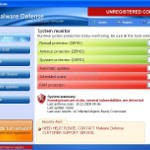
Malware_DefenseMalware Defense is a rogue antispyware program from the same family as Anti Malware. The rogue is usually distributed through the use of trojans. Once the trojan is running, it will download and install Malware Defense onto your computer.

When installed, Malware Defense will configure itself to run automatically each time when you login to Windows. Once running, the rogue will simulate a system scan and lists numerous infections to make you think that your computer in danger, is infected with a lot of worms, trojans, spyware and other malware. It uses the real names of infection to make the scam look more realistic. However, Malware Defense won’t remove those infections unless you purchase so-called “full” version of the program. Most importantly, do not purchase it! All of these threats are fake. So you can safely ignore the scan results!

What is more, while running, the rogue will flood your computer with warnings, fake security alerts and notifications from Windows task bar. Of course, all of these warnings and alerts nothing more but a scam and like false scan results should be ignored!

As you can see, this program is a scam and should be removed from the system upon detection. Please follow the guidelines below to remove Malware Defense and any associated malware from your computer for free.

Symptoms in a HijackThis Log

O4 – HKCU\..\Run: [Malware Defense] “C:\Program Files\Malware Defense\mdefense.exe” -noscan

Use the following instructions to remove Malware Defense (Uninstall instructions)

Step 1. Remove H8SRT trojan (Rootkit TDSS)
Some variants of Malware Defense installed with a H8SRT trojan-rootkit that blocks the ability to run a lot of antivirus and antispyware programs, including Malwarebytes Anti-Malware.

Download TDSSKiller from here and unzip to your desktop.

Open TDSSKiller folder.

Double click the TDSSKiller icon and follow the prompts.

Step 2. Remove Malware Defense and any any associated malware.

Download MalwareBytes Anti-malware (MBAM). Close all programs and Windows on your computer.

Double Click mbam-setup.exe to install the application. When the installation begins, keep following the prompts in order to continue with the installation process. Do not make any changes to default settings and when the program has finished installing, make sure a checkmark is placed next to Update Malwarebytes’ Anti-Malware and Launch Malwarebytes’ Anti-Malware, then click Finish.

If an update is found, it will download and install the latest version.

Once the program has loaded you will see window similar to the one below.

malwarebytes-antimalware1
Malwarebytes Anti-Malware Window

Select Perform Quick Scan, then click Scan, it will start scanning your computer for Malware Defense infection. This procedure can take some time, so please be patient.

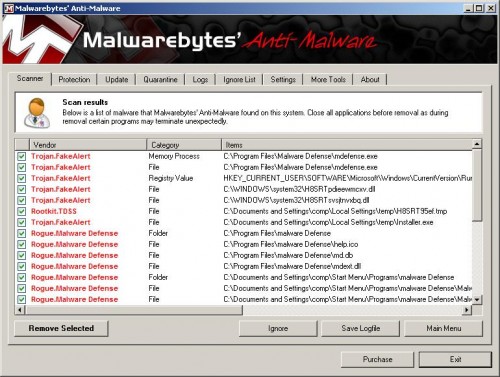
When the scan is complete, click OK, then Show Results to view the results. You will see a list of infected items similar as shown below. Note: list of infected items may be different than what is shown in the image below.
Malware_Defence_remover
Malwarebytes Anti-malware, list of infected items

Make sure that everything is checked, and click Remove Selected for start Malware Defense removal process. When disinfection is completed, a log will open in Notepad and you may be prompted to Restart.

Note: if you need help with the instructions, then post your questions in our Spyware Removal forum.

Malware Defense creates the following files and folders

C:\Program Files\Malware Defense\mdefense.exe
C:\Program Files\malware Defense\help.ico
C:\Program Files\malware Defense\md.db
C:\Program Files\malware Defense\mdext.dll
C:\Documents and Settings\comp\Start Menu\Programs\malware Defense\Malware Defense Support.lnk
C:\Documents and Settings\comp\Start Menu\Programs\malware Defense\Malware Defense.lnk
C:\Documents and Settings\comp\Start Menu\Programs\malware Defense\Uninstall Malware Defense.lnk
C:\Documents and Settings\comp\Desktop\Malware Defense.lnk
C:\Documents and Settings\comp\Desktop\Malware Defense Support.lnk
C:\Documents and Settings\comp\Desktop\Malware Defense ReadMe.txt
C:\Documents and Settings\comp\Application Data\Microsoft\Internet Explorer\Quick Launch\Malware Defense.lnk

Malware Defense creates the following registry keys and values

HKEY_LOCAL_MACHINE\SOFTWARE\Malware Defense
HKEY_LOCAL_MACHINE\SOFTWARE\Microsoft\Windows\CurrentVersion\Uninstall\Malware Defense
HKEY_CURRENT_USER\SOFTWARE\Microsoft\Windows\CurrentVersion\Run\malware defense

Share and Enjoy:

  • Print
  • Digg
  • Sphinn
  • del.icio.us
  • Facebook
  • Mixx
  • Google Bookmarks
  • Slashdot
  • Twitter
December 20, 2009 on 1:09 am | In Rogue Anti Spyware, Tutorials - HowTo | 140 Comments |


140 Comments »

RSS feed for comments on this post. TrackBack URI

  1. I want to say thanks! This is very useful.

    Comment by Albert — December 24, 2009 #

  2. Ty Ty TY!

    that spam was driving me crazy!

    very helpfull

    Comment by jules — December 25, 2009 #

  3. Thank you for providing this fix, indeed it was a very irritating trojan.

    Comment by Daniel — December 25, 2009 #

  4. how is it we get these files on our computers? when windows defender detected it all i was doing was browsing the movie section of the isohunt torrent website

    Comment by Daniel — December 25, 2009 #

  5. It may infect your computer through a vulnerability in an already installed programs (mostly in InternetExplorer).

    Comment by Patrik — December 25, 2009 #

  6. waoo, thanks men it was very helpfull

    Comment by efren — December 26, 2009 #

  7. I can’t download TDSSKiller.

    Comment by dashy — December 26, 2009 #

  8. Thank you VERY much for this guide! Exelent job! It helped me to prevent this crap from spreading around and to help me get the power over my computer back! =D

    Thank you Thank you THANK YOU!

    Comment by Johnny K — December 26, 2009 #

  9. Just wanted to express my gratitude for posting this simple and seemingly very effective solution. Thanks and keep up the great work!

    Comment by Andreas — December 26, 2009 #

  10. thanks this really helped me.

    Comment by joe — December 26, 2009 #

  11. dashy, try download it using Safe mode with networking.

    Comment by Patrik — December 27, 2009 #

  12. Det var verkligen en hjälp i nöden, blev skitskraj när jag fick detta skit igår….
    Nu känns datorn fräsch igen.

    Comment by Thomas — December 27, 2009 #

  13. i have the same problem now. im trying the solution now, i think it will work. I don’t know, how i got infected. The last thing i did, was surfing Brazzers.com and then suddenly the popups came.. i will write again if it worked and sorry for bad english.

    Comment by primax — December 27, 2009 #

  14. THANKS!!!!!!! i had to access this site on my PS3 to see step by step…

    Comment by Meric — December 28, 2009 #

  15. I really thought that I would have to reboot my pc as always, but thanks to your guide I don’t have to. *Two thumbs up* (or) *5/5* you decide :)

    Comment by John — December 29, 2009 #

  16. Hey Thanks Very Much! I Finally Installed Anti-Malware. I Was Wondering Why It Wouldn’t Install. Thanks!!!

    Comment by Abel — December 29, 2009 #

  17. Thanks for your help. After spending 22 straight hours, I was able to run malwarebytes on my machine to remove malware defence.
    Following step was real important for me to get through.

    Step 1. Remove H8SRT trojan (Rootkit TDSS)
    Some variants of Malware Defense installed with a H8SRT trojan-rootkit that blocks the ability to run a lot of antivirus and antispyware programs, including Malwarebytes Anti-Malware.

    Download TDSSKiller from here and unzip to your desktop.”

    God Bless!

    Comment by reuben — December 29, 2009 #

  18. Thanks a LOT.
    Five machines got infected yesterday.
    Cl;eaned all of them .
    Thums up.

    Comment by Biswajit — December 30, 2009 #

  19. this really works, the tdsskiller is very important to remove the malware defense.

    Comment by Adrian — December 30, 2009 #

  20. I love you. You…..complete me.

    Thanks a million!

    Comment by I'm in Love — December 30, 2009 #

  21. More thumbs up!

    Ow man, this was a nightmare… Finally I got rid of that Malware Defence!

    Thanks again!

    Comment by Dennis — December 30, 2009 #

  22. I have no idea how I got infected…??? But this instructions worked perfectly! Very useful. All cleaned up now. THANKS!!!

    Comment by Tripel — December 31, 2009 #

  23. Thank you very much! This is the only working description for this problem. I tried out a lot before, so thanks again and happy new year!

    Comment by Chris — January 1, 2010 #

  24. Thanks so much

    You savec my laptop and my work

    Antoine

    Comment by ant1 — January 1, 2010 #

  25. Just got this today hope this works

    Comment by TB — January 2, 2010 #

  26. When you “remove” the infected items, what happens to them?
    I mean like what if they are important things that are needed to run the operating system correctly?
    or does it not matter?
    I don’t get it :(

    Comment by Neng — January 2, 2010 #

  27. Hi thx i’ve been able to remove malware defense,but my internet still doesn’t work my and i know is not my firewall,it tells me i’m connected though.
    oh i press f11 to run quick restore 4 days ago when malware defnse appeared,has it got something to do with that?

    Comment by Belynda — January 2, 2010 #

  28. Just wanted to say thanks for the awesome and simple guide to removing this annoying trojan. I appreciate it! Keep up the good work!

    Comment by IR — January 2, 2010 #

  29. All “infected” files are components of trojan. So you can safely remove them.

    Comment by Patrik — January 3, 2010 #

  30. Belynda you have tried to run Malwarebytes ?

    Comment by Patrik — January 3, 2010 #

  31. best help ever, tried all night before i found this guide….less than 10min and all were solved!

    Comment by johan — January 3, 2010 #

  32. thatnk you..looks like its gone

    Comment by kk — January 3, 2010 #

  33. Just stopped by to say Thank you : )
    Your Tutorial works perfectly !

    Comment by Private — January 3, 2010 #

  34. blessings to you, and curses on those who make these insidious and harmful programs…

    these people should be hunted down and have all their fingers broken… at the very least.

    who is behind malware defense? I would like to meet them in person, seriously, is there any info on these a**sholes?

    Comment by gavin dickinson — January 3, 2010 #

  35. it works, you have to follow the instructions, and load the one thing before downloading the actual program, this disables the malware from blocking your loading the other software.

    “”"

    Download TDSSKiller from here and unzip to your desktop.

    “”"”

    I did not do this at first, and was unable to complete loading this software, or any other anti spyware/malware software… once I did that step, I was able to get through the process.

    follow the instructions, it works!

    Comment by gavin dickinson — January 3, 2010 #

  36. I might add that I am on my 11 year old’s computer, and this malware was also loading three links to porn sites, with naked icons… very offensive, I am very upset, and want to find these people…

    Comment by gavin dickinson — January 3, 2010 #

  37. When I follow the propts for the tdsskiller, it says cured and then my computer kinda freezes. How long should I wait before proceeding to step two? I alredy have Malwarebytes installed but, of course, can’t run it? HELP!

    Comment by kim — January 3, 2010 #

  38. thank you! that piece of shit virus downloaded itself onto my computer and the spam was driving me craazy!

    Comment by emily — January 4, 2010 #

  39. it works. THX. so easy. THX

    Comment by gomezito71 — January 4, 2010 #

  40. thank you very much

    Comment by sovit — January 4, 2010 #

  41. Worked like a charm.

    This trojan injection method is no different than protection rackets in Al Capone’s days.

    First break Windows, (pardon the pun) then promise it won’t happen again if you pay me.

    Comment by zone — January 4, 2010 #

  42. thank you so much for your help in removing this problem

    Comment by tony — January 4, 2010 #

  43. What a nasty piece of fake anti-spyware is Malware Defense It seemed to appear earlier today and installed itself. After spending time in safe mode, I realised that it had crippled my version of Malware Bytes.

    I tried manually deleting all the files, but it had some strong defences and reappeared every time I booted normally into Windows.

    I was able to reinstall after your helpful tip about removing a H8SRT trojan (Rootkit TDSS).

    Thanks for your concise guide.

    Comment by John Hilvert — January 5, 2010 #

  44. Have Malware defense infection. Tried downloading your Malwarebytes with the anti trojan bit before but I STILL cannot get it to run and scan. Tried to call it something else but that didn’t work either. Can anyone help? Desperate!

    Comment by Jill Saville — January 5, 2010 #

  45. Jill, you have used TDSSKiller before Malwarebytes ?

    Comment by Patrik — January 5, 2010 #

  46. Fixed the nasty rootkit for me…. Thank You!

    Comment by Alex — January 5, 2010 #

  47. OMG!! When I reboot Windows XP asks me to activate my copy of the OS!! So I introduce my product key and it doesn´t work!!! (fyi, I have an original copy of Windows XP, with a legitimate key). WHY DID THIS HAPPENED!!?? I can´t enter Windows now!!!

    Comment by bk — January 5, 2010 #

  48. Thank you soooooo much! this is the only site Ive found that really helps! you are a true hero mate.. your efforts are much appreciated (im sure i can speak for everyone here) by us all

    Comment by Steve — January 5, 2010 #

  49. Belynda you have tried to run Malwarebytes ?
    yea i did run it and and i also get “one library files needed to run this application cannot be found”

    Comment by Belynda — January 5, 2010 #

  50. oh my gosh, I hated these guys. Put porn on the computer and screwed everything up. thanks so much for the help, trying it now.

    Comment by Eli — January 5, 2010 #

  51. I have tried all steps but I still get the “blue screen of death” whenever I try to run in regular mode – safe mode with networking seems fine…any suggestions?

    Comment by RIchard — January 6, 2010 #

  52. Maybe this will be a bit more helpful..

    I have followed all the steps but I still get the blue screen of death whenever I reboot.

    When I run TDSKiller, it gives the following screen:

    UnHookRegistry: Cannot get access to KLMD, error 2

    For the results, it has “0″ next to every entry, including “infected objects in memory,” “cured objects in memory,” “infected objects on disk,” etc.

    Comment by RIchard — January 6, 2010 #

  53. Belynda, try reinstall Malwarebytes Anti-malware.

    Comment by Patrik — January 6, 2010 #

  54. RIchard, make a new topic in our Spyware removal forum.

    Comment by Patrik — January 6, 2010 #

  55. Malwarebytes is a godsend. It’s nice to know there is something out there that will help remove these malicious programs and that is actually free with no gimmicks. It has helped me on more than one occasion. My advice is to try the quick scan first as the full scan will often freeze due to the malware popups. once you remove the shown threats with quick scan and reboot you should then be able to run the full scan with no problems. Good Luck

    Comment by Sherri — January 6, 2010 #

  56. Thankyou so much this help was priceless!!!

    Comment by Carlos — January 6, 2010 #

  57. Just want to thank you for that easy guide :) It was sent from above :)

    Comment by Skagen — January 6, 2010 #

  58. Great advice!!! I just got my laptop infected today… and in no more than 15 minutes I cleaned it using these guidelines.

    Thanks a lot… I almost buy the #$%$ Malware Defense

    Comment by Cesar — January 6, 2010 #

  59. You saved my life! THANK YOU SO MUCH!

    Comment by Felix — January 6, 2010 #

  60. amazing, changing the .exe to .com on malwarebytes was phenomenal, thanks a million, amazing advice

    Comment by Mike — January 7, 2010 #

  61. That seems to have done the job.

    Thank you very much.

    About 25 files had to be deleted. From other sites I had a list of 14. So I was not going to be successful in deleting the registry files myself. It’s good to know that there are some white hats patrolling.

    Thanks again!!

    Comment by Brock — January 7, 2010 #

  62. Belynda, try reinstall Malwarebytes Anti-malware.
    it is installed and working just fine,is the “one library files needed to run this application cannot be found”i can only get acess to internet when i press f8 and run it in safe mode

    Comment by Belynda — January 7, 2010 #

  63. Thanks a million! it was very helpfull!

    Comment by Dilara Sweden — January 7, 2010 #

  64. i followed the instructions and the virus stopped creating pop-ups, but malware defense is still installed in my computer and there are now a few porn icons on my desktop…what do i do?

    Comment by j. wood — January 7, 2010 #

  65. j. wood, if you still having a few icons of malware defense on your desktop, then you can remove them manually.

    Comment by Patrik — January 7, 2010 #

  66. It didnt work!!!

    Comment by Alex — January 8, 2010 #

  67. Alex, then ask for help in our Spyware removal forum.

    Comment by Patrik — January 8, 2010 #

  68. Thanks!!!!
    Works perfect!!!!

    Comment by Vladdi — January 8, 2010 #

  69. Worked perfectly! Thank you so much!

    Comment by Sarah — January 8, 2010 #

  70. You guys are doing a great job! Many thanks for cleaning up our computers, this is much appreciated!

    Comment by abduladarula — January 8, 2010 #

  71. why can’t i download the mbam-setup.exe? please help me

    Comment by glenne — January 9, 2010 #

  72. pls help me.

    Comment by glenne — January 9, 2010 #

  73. glenne, you need use TDSSKiller before Malwarebytes.

    Comment by Patrik — January 9, 2010 #

  74. whoever you are you’re my new hero

    Comment by Matt — January 9, 2010 #

  75. Thanks so much you are a champ

    Comment by peter — January 9, 2010 #

  76. Thanks.

    Comment by new victim — January 10, 2010 #

  77. Thank you. I followed your instruction and removed the trash Malware Defense. I wonder whether people can sue the company who produce Malware Defense.

    Comment by new victim — January 10, 2010 #

  78. Thank you, thank you, thank you. This worked!

    Comment by Will — January 10, 2010 #

  79. THANKS DUDE!!!!!!!!!!!!!!!!!!!!!!!

    aloha :)

    Comment by BOBBY — January 10, 2010 #

  80. I can’t thank you enough for this page!!
    Finally, put an end to this foul scourge.

    Comment by Triumph — January 10, 2010 #

  81. Indeed, stay away from isohunt.com without adequate virus protection. Just a visit to the site seemed to bring on the Malware nonsense…

    Comment by Dr. No — January 10, 2010 #

  82. oh and thanks very much, it worked…

    Comment by Dr. No — January 10, 2010 #

  83. I am getting this as well when I run TDSS Killer program- I can’t find the “new Spyware removal forum” that Patrik you asked Richard to start.

    UnHookRegistry: Cannot get access to KLMD, error 2

    For the results, it has “0″ next to every entry, including “infected objects in memory,” “cured objects in memory,” “infected objects on disk,” etc

    Comment by Chris — January 11, 2010 #

  84. Chris, our Spyware removal forum is located here.

    Comment by Patrik — January 11, 2010 #

  85. Thank you

    I had tried and failed previously; using the “TDSS rootkit removing tool” made the difference.

    The main process then took over an hour on my old Pentium 2GHz, so be patient!

    I already had partial installations of Kaspersky and Avira, but these didn’t really cause hiccups.

    Comment by Andrew — January 11, 2010 #

  86. Works like a charm, I have Windows Vista. Scan took like 5 minutes so be pacient, algo got it looking for PSP ISO, the websited named above might be the one. Thanks a lot!

    Comment by John — January 11, 2010 #

  87. is there a dumb version to these instructions ?

    Comment by tinnk — January 11, 2010 #

  88. Oh my god has this been a nightmare! Thank you, thank you, thank you. Now I’m wondering how I got this in the first place? Over the 10 hours researching, one post suggested a fake Java update. That’s the only thing I allowed to be downloaded in the last week. Any body else have any ideas on how this “Malware Defense” came into your machine?

    Comment by Neal — January 11, 2010 #

  89. Thank you so much! I had tried many methods of getting rid of this virus, and this was both understandable and very effective. The TDSS Killer was the key!

    Comment by Laura — January 12, 2010 #

  90. Thanks so much for all your help you are the zeal of awesomeness!!! I hope everyone who comes across this nastiness finds your wonderful help!

    Comment by Jenishappynow:) — January 12, 2010 #

  91. THANK YOU! THANK YOU! THANK YOU!

    Where’s your PayPal button? :-)

    Comment by Paul — January 12, 2010 #

  92. So I ran the TDSS Killer program, which succeeded, and then I installed malwarebytes. I was able to remove the infected objects and yes it succeeded in stopping the malware defense and i THINK it removed the malware defense + fake windows security alerts. HOWEVER- for some reason as a result, my network connections folder is all empty (so I cannot get online- I’m using someone else’s computer right now), I can’t establish a new network connection, and my HP wireless assistant has disappeared as well. I tried uninstalling and re-installing the network adaptors- nothing works!

    Comment by Viv — January 12, 2010 #

  93. Thank you. Worked perfectly!

    Comment by Chris — January 12, 2010 #

  94. Paul, glad to help you and other peoples here :)
    I don`t have a paypal acc :)

    Comment by Patrik — January 13, 2010 #

  95. Viv, open Device Manager, look for network card and remove it. Then reboot your computer to reinstall network card device drivers.

    Comment by Patrik — January 13, 2010 #

  96. PLEASE HELP!
    When I run TDSSkiller the command prompt says:
    “driver load error!
    press any key to continue…”

    what is wrong here???

    Comment by Joe — January 13, 2010 #

  97. Thanks a million! This guide saved my pc! :D

    Comment by Hein — January 13, 2010 #

  98. Joe, if you using Vista or Windows 7, try run it as administrator.

    Comment by Patrik — January 14, 2010 #

  99. Hello, to the people who put this up…just wanted to say THANK YOU from the bottom of my heart. I dont know what was happening, the errors and this Malware crap that kept popping up…THANK YOU it worked for me

    Comment by Tiffanie — January 14, 2010 #

  100. thank you so much – the tdss killer was not loading in safe mode with networking but once I did it in normal mode, it worked fine for me. Malwarebytes also seems like a good antivirus software.

    Comment by R — January 14, 2010 #

  101. Thank you so so so much! You really saved me! I thought I would lose all my data because of this **** malware (why?!). so again: thanks :D

    Comment by K — January 14, 2010 #

  102. thank you so much. if you have this problem, you can trust these guys.

    Comment by k — January 15, 2010 #

  103. System restore also deletes it. Just turn off your computer, then when you restart it press F8 repeatedly. Then Repair Computer. Then choose System Restore. You can restore it to an earlier date. Then when you log onto your account Malaware Defense is gone!

    Comment by Donnie — January 16, 2010 #

  104. Another success – followed the instructions including installing and running TDSSkiller – sorted in a few minutes. Thank you!

    Comment by Andy — January 16, 2010 #

  105. This works great..!!!! Thank you very much. I’ll recommend it to every body.

    Comment by Carlos — January 17, 2010 #

  106. The most frustrating thing about this is that “Malware Defense” wanted me to uninstall my anti-virus software, and it tried to do it automatically… several times.

    When my anti-virus software finally finished running it did get rid of the trojan, but I needed MBAM to get rid of the malware. Thank you for this.

    Comment by Deep Search — January 17, 2010 #

  107. It took my friend a day to remove the malware defense and I actually need to pay him something. I just got an invoice from Malware Defense. How are you coming to deal with the invoice ?

    Comment by Taurus — January 17, 2010 #

  108. Thank you SOSO much! I was freaking out so much about why that stupid program was forcing itself onto my computer aughhh This has been very helpful!

    Comment by Sharlene — January 17, 2010 #

  109. Thank you. Worked like a charm.

    Comment by Jogi — January 17, 2010 #

  110. Ran the TDSSKiller, then MBAM, but it didn’t solve the problem. Had to do a system restore, but now all is good.

    Comment by N.V. — January 17, 2010 #

  111. Grazie per la guida ottima!!

    Comment by Fabio — January 19, 2010 #

  112. This Malware Defense was on my PC from a popup ad that asked questions while it was secretly loading some of the symptoms I had were takeover of mouse and keyboard, asking for a google.dll file and playing a commercial jingle for about 10 seconds..(God knows where those came from!) I have run your fix and so far everything seems to have been dealt with! Thanks guys keep up the fight, you guys are definitely needed in this world.

    Comment by Rod — January 19, 2010 #

  113. First of all, thanks so much for this helpful post.
    I haven’t tried TDSSKiller (because I didn’t know it). Yesterday I managed to get rid of that Malware Defence only with Malwarebytes (had to change the name to run it though). Everything seemed to be fine and the antivirus started to run again and I’m able to go in the net as usual.
    However, as I tried to create a restore point of the system, I couldn’t (very strange, has never happened before). I read somewhere that this could be due to the Rootkit still hidden somewhere in my system. I run Malwarebytes again, and it found an entry in the register (Rootkit.tdss). Malwarebytes deletes it, but any time I reboot the PC it is again there.
    Has anybody had the same problem? I’ll try to kill definitely with TDSSKiller later at home, but I’d be very grateful if somebody with the same problem can give me a hint. Thank you!

    Comment by Gabriel — January 20, 2010 #

  114. A thousand thank yous for coming up with this fix. That was a pesky little bugger and I was happy to see it gone. The TDSSKiller worked like a charm and it allowed me to run MBAM, which took the removal the rest of the way. Lesson learned: never, EVER, go to Isohunt to look for ANYTHING!!!

    Comment by Mike — January 20, 2010 #

  115. Thank you for the easy and straightforward fix! It all took less than 10 minutes for me. This worked magnificently.

    Comment by Melissa — January 20, 2010 #

  116. Hi,
    in case it helps somebody: when scanning with Malwarebytes, disconnect the LAN cable first. Once Malwarebytes has found the whole evil files and register entries, it is not enough to delete them from that first report list, you have to go to the “quarantine” tab and then delete them again. Reboot and plug in the LAN cable. Everything should be fine.

    Comment by Gabriel — January 21, 2010 #

  117. Thanks,

    This nasty bugger hit me on a busy Friday afternoon. Thanks to you, I can still make it home Friday evening.

    Comment by stamper — January 22, 2010 #

  118. Thank you, so so much. This was my work laptop that I just fixed! Took me about 6 hours of struggling until i finally learned about the TDSSkiller, which allowed me to finally run malwarebytes and update it, which finally allowed me to destroy that damn malware defense virus!!!!!

    HOOORAY!!! Thank you soooooooo much! I’ll share my experience here in case it benefits others:

    I got hit with “malware defense” virus today while surfing @ isohunt.com. It scared the crap out of me because of how violent it was and debilitating to the computer; i immediately started manually deleting the registry keys that belonged to the virus; i even got malwarebytes to run in safe mode; but to my surprise, as soon as i got back into normal windows mode, it reinstalled itself!!!! AHHH! So, after hours of battling back and forth and trying to get malwarebytes to work (mind you, its an excellent program, there’s nothing wrong with it!), i stumble across this TDSSKiller program; ran it in normal windows mode, then restarted. Started up malwarebytes quickly and then updated it quickly (THAT WAS THE KEY, need the LATEST UPDATE!); ran a quick scan and found so much more than before, and restarted. Now, everything is in order and I’m going to let the program do a full system scan… I hope this helps someone in the future, because this virus was truly dangerous, especially for my work computer. I can’t say thank you enough! :D

    Comment by Kyle — January 23, 2010 #

  119. followed the instructions & good by malware defence.thanx guys!!!

    Comment by chuck — January 24, 2010 #

  120. Thank you so much for solving this problem for all of us. You guys are heroes!

    Comment by Thom — January 24, 2010 #

  121. After spending about 6 hours struggling with trying to remove this thing following other instructions I read on line, I decided to give your steps a try as a last ditch effort before resorting to running a clean reinstall of XP (system restore wasn’t functional for some reason). About 15 minutes later, I’ve got a clean machine again. Thanks!

    Comment by chris — January 26, 2010 #

  122. I unzipped and double clicked the TDSSKiller but on a black box it says it does not support a x64 operating system. can anyone help me with this?

    Comment by Carol — January 26, 2010 #

  123. i downloaded and unzipped the TDSSkiller but it says in a black box that it doesn’t support a x64 operating system. does anyone know how to fix this? thanks in advance!

    Comment by Carol — January 26, 2010 #

  124. Carol, ask for help in our Spyware removal forum.

    Comment by Patrik — January 27, 2010 #

  125. Hi, I just wanted to thank you for the software provided on this site. I got the Malware Defense on my computer, and was able to successfully get it off as well as a number of other malware’s with the software given. Thanks again!

    Aaron

    Comment by Aaron — January 27, 2010 #

  126. Hi I’m running win xp64, looks like your program won’t work with it, any suggestions, this malware defense trojan is ridiculous it even shuts down my computer every once in a while all by itself.

    Comment by mike — January 29, 2010 #

  127. Mike, open a new topic in our Spyware removal forum.

    Comment by Patrik — January 29, 2010 #

  128. Just wanted to state my appreciation after weeks of trying to fix my computer finally something that worked. Thanks!

    Comment by raul — January 30, 2010 #

  129. Thank you so much for these instructions. After battling with Malware defense for 2 days- i finally came across this page and as a last resort i thought i’d try the instructions given here. WOWWWWW!!!!!!!!!! I am so thrilled that it worked. The key was the TDSS killer because i couldn’t launch malwarebytes prior to that. I changed the name and i was able to run it but though the software kept killing the various malware, it kept reinstalling itself. All malware was cleaned up only when i ran TDSS first and then ran the updated version of malwarebytes. The windows security icon at the bottom right of my desktop shows a red shield with a white X on it – but i guess that’s ok and it’s because i need to update the antivirus.
    Thank you so much for sharing your expertise on this site. You helped me clean up my computer without losing any data!!! Keep up the great work!

    Comment by Uma — February 1, 2010 #

  130. I’m with the above statement, I love you, you complete me. haha. No seriously, this fix is awesome, almost makes me feel like “so you gotta virus, what’s the big deal”. So simple and quick. My Daughter was using an app. on facebook when she allowed something and boom, popups, porn, and blocking all antivirus and malware apps. Printed this page from my computer, took it to her computer and followed the instructions. computer froze while running malwarebytes so i had to run it in safe mode. Worked beautifully and computer has a clean bill of health. Thank you. I bookmarked this page for future reference and for family and friends.

    Comment by Teri — February 3, 2010 #

  131. Been having a lot of fun with Paladin ANtivirus for the last three days – NOT! The first thing it did was delete my McAfee, I bought Norton and it wouldn’t load it on properly. Managed to run housecall which sorted the TDSS virus but could not run malwarebytes – it let me load in safe mode but not run. I had got rid of some of the functionality manually – I was getting no more pop ups but it was blocking websites and I need to sort out my printer and network card when I have finished scanning. In desparation, took the advice of changing Malwarebytes name – went into its directory and renamed it “Fred”! – It is now running the Malwarebytes scanner and has found 8 infected items so far, so touch wood, throw salt and avoid ladders for me! Feeling a lot more optimistic now, since everyone seems to think Malwarebytes will work, so thanks (although I may be back if things go wrong!)

    Comment by jillg — February 12, 2010 #

  132. Can anyone post a link to the forum-topic explaining the tdss killer problem on x64 operating sysyems? Can’t seem to find it..

    Thanks!

    Comment by Vicky — February 16, 2010 #

  133. when i try to open TDSS killer it doesent open, it shows the loading sign but nothing happens. HELP!!

    Comment by quinn — May 14, 2010 #

  134. quinn, try rename it before running.

    Comment by Patrik — May 15, 2010 #

  135. I have download the TDSS killer and extracted it onto my desktop. However when i double click it to open it an error just comes up saying that the file is infected?

    Comment by Brad — July 24, 2010 #

  136. Then when i open malwarebytes it does the same thing ( comes up with a security error )

    Comment by Brad — July 24, 2010 #

  137. Brad, looks like the rogue blocks all programs from running. Open a new topic in our Spyware removal forum. Further, download RSIT by random/random from here but before saving, in the Save dialog, rename rsit.exe to rsit.com or iexplore.exe and save it to your desktop. Run RSIT. Click Continue at the disclaimer screen. Once it has finished, two logs will open. If it does not automatically open, then these logs can be found at %systemdrive%\rsit folder (typically C:\rsit). Post both logs into your topic.

    Comment by Patrik — July 25, 2010 #

  138. Ok thanks i will do that now

    Comment by Brad — July 25, 2010 #

  139. Right i’ve loaded the logs into my topic

    Comment by Brad — July 25, 2010 #

  140. THANK YOU SO MUCH! IT WORKED :D Cheers for your help

    Comment by Brad — July 25, 2010 #

Leave a comment

XHTML: <a href="" title=""> <abbr title=""> <acronym title=""> <b> <blockquote cite=""> <cite> <code> <del datetime=""> <em> <i> <q cite=""> <strike> <strong>


My Anti Spyware - Free antispyware programs and Spyware Removal Instructions.
