Do you have pop-ups or your computer infected with trojan or spyware ? Learn how to ask us for help, click here!

How to remove CoreGuard Antivirus 2009 (Uninstall instructions)

CoreGuard Antivirus 2009 is a rogue antivirus/antispyware program. Like other rogue antispyware programs, it uses fake alerts and false positives to trick you into buying the software.

coreguard-antivirus-2009
CoreGuard Antivirus 2009 (more screen shoots 1, 2, 3)

When installed, CoreGuard Antivirus 2009 configures itself to run automatically every time, when you start your computer. Also the rogue software during installation, detects and attempts to uninstall antvirus/antispyware software (MalwareBytes Antimalware, NOD32, Avast – a few examples).

coreguard-antivirus-2009-install-alert
CoreGuard Antivirus 2009 – Remove Malwarebytes Anti-malware

Once running, CoreGuard Antivirus 2009 will scan your computer and reports false or exaggerated system security threats on the computer that cannot be removed unless you first purchase the software. Running of CoreGuard Antivirus 2009 may drastically slow the performance of your computer.

While CoreGuard Antivirus 2009 is running your computer will display fake firewall alerts. Please ignore these alerts. Use the free instructions below to remove the rogue antispyware and any associated malware from your computer.
Continue reading How to remove CoreGuard Antivirus 2009 (Uninstall instructions)…

April 30, 2009 on 4:35 am | In Rogue Anti Spyware, Tutorials - HowTo | No Comments |


How to remove Virus Shield 2009 (Uninstall instructions)

Virus Shield 2009 also known as Virus Shield is a rogue antispyware/antivirus program from Virus Doctor rogue family (Extra Antivirus, Virus Sweeper, Ultra Antivir2009, Virus Alert, Virus Melt). Like other rogue antispyware programs, it uses fake alerts and false positives to trick you into buying the software.

virusshield2009
Virus Shield 2009

When installed, Virus Shield 2009 configures itself to run automatically every time, when you start your computer. Once running, it will scan your computer and reports false or exaggerated system security threats on the computer that cannot be removed unless you first purchase the software. Running of Virus Shield 2009 may drastically slow the performance of your computer.

Virus Shield 2009 can be safely removed from your computer along with any other malware if the proper steps are taken. If you are a non-techie computer user then this method of removing the rogue is for you.
Continue reading How to remove Virus Shield 2009 (Uninstall instructions)…

April 28, 2009 on 9:05 pm | In Rogue Anti Spyware, Tutorials - HowTo | No Comments |


How to remove PCAntiMalware (Uninstall Guide)

PCAntiMalware is a rogue antispyware program that usually installed itself onto your computer without your permission, through trojans and browser security holes. The rogue is a fresh version of Cleaner2009. Like other rogue antispyware programs, it uses fake alerts and false positives to trick you into buying the software.

pcantimalware
PCAntiMalware (more screen shots 1, 2, 3, 4, 5)

During installation, PCAntiMalware is set to start automatically when your computer starts and immediately after launch, PCAntiMalware starts scanning the computer and found a lot of trojans and spyware. Then, it said that you should purchase the rogue in order to remove them and protect your PC.

While PCAntiMalware is running your computer will display fake security alerts from your windows taskbar. These alerts are a fake and should be ignored! Computer users are urged to avoid purchasing this bogus program! The rogue antispyware can be safely removed from your computer along with any other trojan infections if the proper steps are taken. If you are a non-techie computer user then this method of removing PCAntiMalware and any associated malware from your computer is for you.
Continue reading How to remove PCAntiMalware (Uninstall Guide)…

April 28, 2009 on 8:16 am | In Rogue Anti Spyware, Tutorials - HowTo | No Comments |


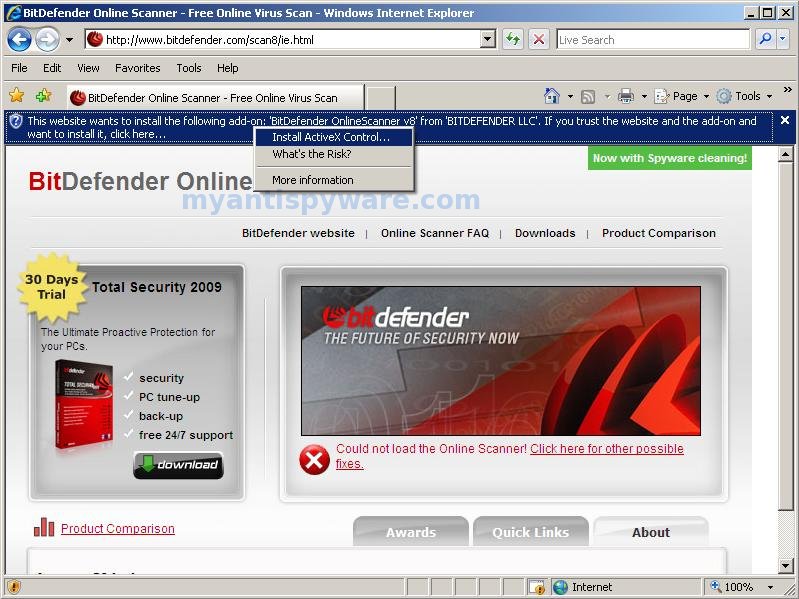
How to use BitDefender Online Scanner

BitDefender Online Scanner is a fully functional antivirus product. It features all required elements for thorough antivirus scanning and effective cleaning: it scans your system’s memory, all files, folders and drives’ boot sectors, providing you with the option to automatically clean the infected files.

BitDefender Online Scanner uses ActiveX technology to perform the scan which is only compatible with Internet Explorer.
Continue reading How to use BitDefender Online Scanner…

April 27, 2009 on 1:31 am | In Online Scanners, Tutorials - HowTo | 4 Comments |


How to remove Advanced Spyware Detect (Uninstall instructions)

Advanced Spyware Detect is rogue antispyware program that designed to trick users into buying the fake software by using scare tactics (fake alerts and false positives).

advanced spyware detect

During installation, Advanced Spyware Detect is set to start automatically when your computer starts. Immediately after launch, the program starts scanning the computer and randomly select various programs on your computer and labels them as malware. All these infections are fake. Use the free instructions below to remove Advanced Spyware Detect and any associated malware from your computer.
Continue reading How to remove Advanced Spyware Detect (Uninstall instructions)…

April 23, 2009 on 11:11 pm | In Rogue Anti Spyware, Tutorials - HowTo | No Comments |


How to remove gxvxcserv.sys trojan (google redirect virus)

gxvxcserv.sys trojan is a fresh version of W32.Tidserv trojan also known as Trojan-Downloader.Win32.Agent.brpo, that may represent security risk for the infected computer. The trojan uses rootkit-specific techniques designed to hide the software presence in the system.

Once infected it blocks user access to security websites, search results in Google, Yahoo, MSN and other redirect you to other non related sites. Also gxvxcserv.sys trojan changes the DNS server options to one of the following fixed IPs: 85.255.112.156, 85.255.112.129, 85.255.112.70,85.255.112.127.

gxvxcserv.sys trojan spreads by copying itself to all removable drives as %DriveLetter%\resycled\[random name].com, after that the trojan creates %DriveLetter%\autorun.inf file on all removable drives so that it executes whenever the drive is accessed.
Continue reading How to remove gxvxcserv.sys trojan (google redirect virus)…

April 22, 2009 on 9:24 am | In Trojan, Tutorials - HowTo | 20 Comments |


How to remove MalwareCleaner (Uninstall instructions)

MalwareCleaner is a rogue antispyware program that designed to trick users into buying the fake software by using scare tactics (fake alerts and false positives).

malwarecleaner
MalwareCleaner (more screen shoots: 1, 2)

During installation, MalwareCleaner is set to start automatically when your computer starts. In addition the program drops many fake files with random names, these files during the scan will determine as trojans, malware and spyware. Immediately after launch, MalwareCleaner starts scanning the computer and found a lot of trojans and spyware. Then, it said that you should purchase the rogue in order to remove them and protect your PC.

While MalwareCleaner is running your computer will display fake Windows Security Center that will recommend you register MalwareCleaner and fake security alerts from your Windows taskbar. Please ignore these alerts. Use the free instructions below to remove MalwareCleaner and any associated malware from your computer.
Continue reading How to remove MalwareCleaner (Uninstall instructions)…

April 22, 2009 on 5:29 am | In Rogue Anti Spyware, Tutorials - HowTo | No Comments |


How to uninstall Extra Antivirus (Removal instructions)

Extra Antivirus is a rogue antispyware program that is a fresh version of Virus Sweeper, Ultra Antivir2009, Virus Alert, Virus Melt and Virus Doctor. Like other rogue antispyware programs, it is distributed through the use trojans and uses fake alerts and false positives to trick you into buying the rogue.

Once installed, Extra Antivirus configures itself to run automatically every time, when you start your computer. Once running, it will scan your computer and reports false or exaggerated system security threats on the computer that cannot be removed unless you first purchase the software. In addition the program creates a few files, these files during the scan will determine as trojans and spyware.

While Extra Antivirus is running your computer will display fake security alerts from your windows taskbar.These alerts and warnings are a fake and should be ignored! Use the free instructions below to remove Extra Antivirus and any associated malware from your computer.
Continue reading How to uninstall Extra Antivirus (Removal instructions)…

April 20, 2009 on 2:52 am | In Rogue Anti Spyware, Tutorials - HowTo | No Comments |


How to remove WiniBlueSoft (Uninstall instructions)

WiniBlueSoft is a rogue antispyware program that uses fake alerts and false positives to trick you into buying the software. The rogue is distributed through the use trojans.

During installation, WiniBlueSoft configures itself to run automatically every time, when you start your computer. Once running, it will scan your computer and reports false or exaggerated system security threats on the computer that cannot be removed unless you first purchase the software. In addition the program creates many files in the C:\Windows and C:\Windows\System32 folders. These files during the scan will determine as trojans and spyware.

winibluesoft
WiniBlueSoft window (more screen shoots: 1, 2, 3)

While WiniBlueSoft is running your computer will display fake Windows Security Center that will recommend you register WiniBlueSoft and fake security alerts from your Windows taskbar. Please ignore these alerts. Use the free instructions below to remove WiniBlueSoft and any associated malware from your computer.
Continue reading How to remove WiniBlueSoft (Uninstall instructions)…

April 19, 2009 on 8:16 am | In Rogue Anti Spyware, Tutorials - HowTo | 1 Comment |


How to remove AV Antispyware (Uninstall instructions)

AV Antispyware is a rogue antispyware that looks like PAntispyware09, MS Antispyware 2009 and Pro Antispyware 2009. Like other rogue antispyware programs, it is distributed through the use trojans. Once infected with these trojans your computer will display large amount of security alerts and popups that tells you that your computer is infected and you should install AV Antispyware in order to protect your computer.
During installation, AV Antispyware configures itself to run automatically every time, when you start your computer. Immediately after launch, the program starts scanning the computer and found a lot of trojans and spyware. All these infections are fake. Then AV Antispyware said that you should purchase the program in order to remove them and protect your computer.

While AV Antispyware is running, your computer will display fake Windows Security Center that will recommend you register the AV Antispyware, fake security alerts from your Windows taskbar. Please ignore these alerts. If you are a non-techie computer user then this method of removing AV Antispyware and any associated malware from your computer is for you.
Continue reading How to remove AV Antispyware (Uninstall instructions)…

April 19, 2009 on 7:13 am | In Rogue Anti Spyware, Tutorials - HowTo | No Comments |


Next Page »

My Anti Spyware - Free antispyware programs and Spyware Removal Instructions.