![]() | Do you have pop-ups or your computer infected with trojan or spyware ? Learn how to ask us for help, click here! |
How to remove Personal Antivirus (Uninstall instructions)
Personal Antivirus is rogue antivirus/antispyware program, new version of General Antivirus. The rogue antispyware uses trojans, fake online malware scanners and advertising on the Internet for distribution. This advertisement tells that your computer is infected and offers to download and install Personal Antivirus to clean your computer.
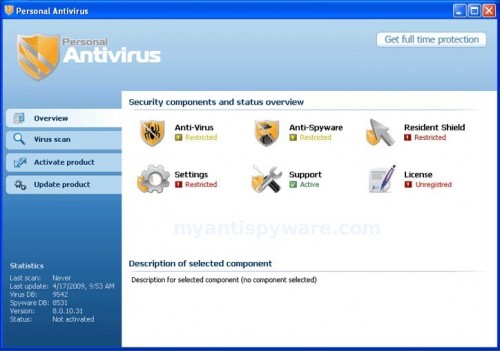
Personal Antivirus
When installed, Personal Antivirus configures itself to run automatically every time, when you start your computer. Once running, it will scan your computer and list a large amount of infections, but these “infections” are fake. Then, Personal Antivirus said that you should purchase the program in order to remove them. Running of it may drastically slow the performance of your computer.
While Personal Antivirus is running your computer will display fake security alerts from your Windows taskbar. These alerts are a fake and should be ignored! Personal Antivirus can be safely removed from your computer along with any other trojan infections if the proper steps are taken. If you are a non-techie computer user then this method of removing Personal Antivirus and any associated malware from your computer is for you.
Symptoms in a HijackThis Log
O2 – BHO: (no name) – {2e59498d-7e44-4452-9044-0973b080b9e8} – C:\WINDOWS\system32\winexplorer.dll
O2 – BHO: BHO – {abd45510-9b22-41cd-9acd-8182a2da7c63} – C:\WINDOWS\system32\iehelper.dll
O4 – HKLM\..\Run: [PAV] c:\program files\pav\pav.exe
O4 – HKCU\..\Run: [Personal Antivirus] “C:\Program Files\Personal Antivirus\PerAvir.exe” /s
O4 – HKCU\..\Run: [Microsoft Windows logon process] C:\Documents and Settings\lab\Application Data\Microsoft\Windows\winlogon.exe
O4 – HKCU\..\Policies\Explorer\Run: [iv] “C:\Documents and Settings\lab\Local Settings\Application Data\Microsoft\Internet Explorer\iv.exe”
O23 – Service: Guard Service (ITGrdEngine) – Unknown owner – %UserProfile%\Local Settings\Application Data\Microsoft\Windows\services.exe
Use the following instructions to remove Personal Antivirus
Download Avenger from here and unzip to your desktop.
Run Avenger, copy,then paste the following text in Input script Box:
Registry keys to delete:
HKEY_LOCAL_MACHINE\SOFTWARE\Microsoft\Windows\CurrentVersion\Explorer\Browser Helper Objects\{2e59498d-7e44-4452-9044-0973b080b9e8}
HKEY_LOCAL_MACHINE\SOFTWARE\Microsoft\Windows\CurrentVersion\Explorer\Browser Helper Objects\{abd45510-9b22-41cd-9acd-8182a2da7c63}
Registry values to delete:
HKEY_LOCAL_MACHINE\Software\Microsoft\Windows\CurrentVersion\Run | PAV
Files to delete:
%programfiles%\PAV
%windir%\system32\winexplorer.dll
%windir%\system32\iehelper.dll
%UserProfile%\Application Data\Personal Antivirus
%programfiles%\Personal Antivirus
You will see window similar to the one below.
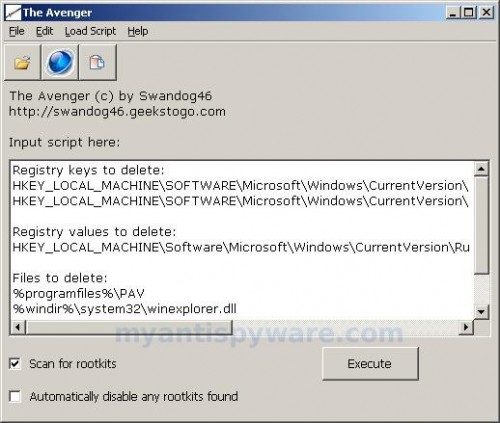
Avenger
Click on ‘Execute’. You will be asked Are you sure you want to execute the current script?. Click Yes.
You will now be asked First step completed — The Avenger has been successfully set up to run on next boot. Reboot now?. Click Yes.
Your PC will now be rebooted.
Download MalwareBytes Anti-malware (MBAM). Close all programs and Windows on your computer.
Double Click mbam-setup.exe to install the application. When the installation begins, keep following the prompts in order to continue with the installation process. Do not make any changes to default settings and when the program has finished installing, make sure a checkmark is placed next to Update Malwarebytes’ Anti-Malware and Launch Malwarebytes’ Anti-Malware, then click Finish.
If an update is found, it will download and install the latest version.
Once the program has loaded you will see window similar to the one below.

Malwarebytes Anti-Malware Window
Select “Perform Quick Scan”, then click Scan. The scan may take some time to finish,so please be patient.
When the scan is complete, click OK, then Show Results to view the results. You will see a list of infected items similar as shown below. Note: list of infected items may be different than what is shown in the image below.
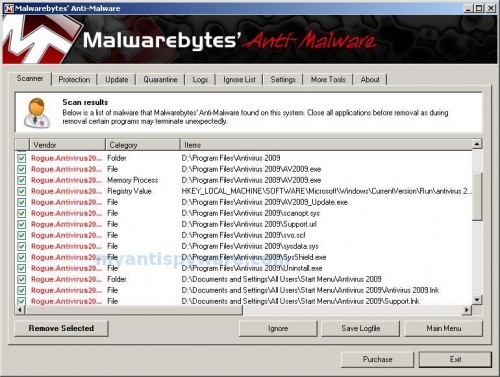
Malwarebytes Anti-malware, list of infected items
Make sure that everything is checked, and click Remove Selected. When disinfection is completed, a log will open in Notepad and you may be prompted to Restart.
Note: if you need help with the instructions, then post your questions in our Spyware Removal forum.
Personal Antivirus creates the following files and folders
%UserProfile%\Application Data\Microsoft\Internet Explorer\Quick Launch\Personal Antivirus.lnk
%UserProfile%\Application Data\Personal Antivirus
%UserProfile%\Application Data\Personal Antivirus\settings.ini
%UserProfile%\Application Data\Personal Antivirus\uill.ini
%UserProfile%\Application Data\Personal Antivirus\unins000.exe
%UserProfile%\Application Data\Personal Antivirus\Uninstall Personal Antivirus.lnk
%UserProfile%\Application Data\Personal Antivirus\db
%UserProfile%\Application Data\Personal Antivirus\db\config.cfg
%UserProfile%\Application Data\Personal Antivirus\db\Timeout.inf
%UserProfile%\Application Data\Personal Antivirus\db\Urls.inf
%UserProfile%\Local Settings\Application Data\Microsoft\Windows\log.txt
%UserProfile%\Local Settings\Application Data\Microsoft\Windows\pguard.ini
%UserProfile%\Local Settings\Application Data\Microsoft\Windows\services.exe
%programfiles%\Personal Antivirus
%programfiles%\Personal Antivirus\activate.ico
%programfiles%\Personal Antivirus\Explorer.ico
%programfiles%\Personal Antivirus\PerAvir.exe
%programfiles%\Personal Antivirus\unins000.dat
%programfiles%\Personal Antivirus\uninstall.ico
%programfiles%\Personal Antivirus\working.log
%programfiles%\Personal Antivirus\db
%programfiles%\Personal Antivirus\db\DBInfo.ver
%programfiles%\Personal Antivirus\db\ia080614.db
%programfiles%\Personal Antivirus\db\ia080618x.db
%programfiles%\Personal Antivirus\Languages
%programfiles%\Personal Antivirus\Languages\IAEs.lng
%programfiles%\Personal Antivirus\Languages\IAFr.lng
%programfiles%\Personal Antivirus\Languages\IAGer.lng
%programfiles%\Personal Antivirus\Languages\IAIt.lng
%UserProfile%\Application Data\Microsoft\Windows\winlogon.exe
%UserProfile%\Local Settings\Application Data\Microsoft\Internet Explorer\iGSh.png
%UserProfile%\Local Settings\Application Data\Microsoft\Internet Explorer\iMSh.png
%UserProfile%\Local Settings\Application Data\Microsoft\Internet Explorer\iPSh.png
%UserProfile%\Local Settings\Application Data\Microsoft\Internet Explorer\iv.exe
%UserProfile%\Local Settings\Application Data\Microsoft\Windows\log.txt
%UserProfile%\Local Settings\Application Data\Microsoft\Windows\pguard.ini
%UserProfile%\Local Settings\Application Data\Microsoft\Windows\services.exe
c:\Documents and Settings\All Users\Desktop\Personal Antivirus.lnk
c:\Documents and Settings\All Users\Start Menu\Programs\Personal Antivirus
c:\Documents and Settings\All Users\Start Menu\Programs\Personal Antivirus\Personal Antivirus Home Page.lnk
c:\Documents and Settings\All Users\Start Menu\Programs\Personal Antivirus\Personal Antivirus.lnk
c:\Documents and Settings\All Users\Start Menu\Programs\Personal Antivirus\Purchase License.lnk
162 Comments »
RSS feed for comments on this post. TrackBack URI
Leave a comment
My Anti Spyware - Free antispyware programs and Spyware Removal Instructions.


Excellent dude, It works for me. Thankyou.
Comment by Gajen — April 15, 2009 #
THANK YOU! Worked, a life saver!
Comment by Amanda — April 27, 2009 #
Thank you. The cost was $0 and it removed the Personal Antivirus.
Comment by Rocio V. — May 1, 2009 #
i used this to get rid of it yesterday, but it came back today
Comment by Benny — May 7, 2009 #
Did u go back into the same (usually adult) website u got it from in the first place?
Comment by KC — May 7, 2009 #
Yes worked ok for me, hope it stays away.
Comment by Graham — May 8, 2009 #
Hey thanks a lot, it worked for me as well.
I’m happy I didn’t get hooked by that fussy software.
Comment by Anchal — May 11, 2009 #
Hey thankyou very much, it worked for ma as well.
Comment by Vicky — May 11, 2009 #
This is seems to be working for the time being.. However did not get all of the PAV folders that you stated in the malwarebytes scan only got 2-3 PAV virus folders. Never-the-less it seems to work so thanks very much!!. P.S. make sure you have a zip extractor for Avenger program. Trying to download one with PAV running in the background is more than a little anoying.
Many Thanks
Comment by jason — May 12, 2009 #
This worked for me so far so good. Me crosses her fingers…..wasn’t difficult to do either—Thank You sooo much….My McAfee couldnt even get rid of this program—-THANK YOU THANK YOU THANK YOU!!
Comment by Kelly — May 14, 2009 #
OH and I got mine from a baby poem website—was a link for a baby shower wishing well poem….so those who think you get it from porno sites—-think again—virus can attack from any site including children’s sites.
Comment by Kelly — May 14, 2009 #
That took care of the problem. I just wish we could prevent people like those at PAV from scamming the public. Thank you for your help!!
Comment by Jerry Schwartz — May 15, 2009 #
THANK YOU!!!! it worked! now do i uninstall the malwarebytes?
Comment by crepang — May 15, 2009 #
Dude thankyou when i deleted it i wet my pants
Comment by JOLLYROGER — May 16, 2009 #
Worked great I used several other tools with no success. Hijack this although an excellent program was not able to find it. I knew of course it was there cause it would always start on boot.
Comment by James — May 18, 2009 #
thank u sooooooooooooooooo much i thought i wud never get that dumb program off my computer! it kept making the computer and internet slow and when i went to uninstall in control panel it wasnt even there! i was like wtf? lol but yes thanks again the only problem i had is like the scan took 20 minutes but besides that everything is good now thanks!!
Comment by alaysia — May 19, 2009 #
OMG..I officially love you. This worked like a charm, you guys rock!
Comment by Lucy — May 20, 2009 #
Thank you so much. I really thought this could have been part of the scam. I really appericate this site and will defintely past the word on. Once again thank you.
Comment by Monique — May 20, 2009 #
Seems to have worked. Thanks.
Comment by Steve — May 21, 2009 #
thank you easy to follow and costs nothing i was close to giving up and was just going to replace my computer i was getting that frustrated but then i followed ur instuctions and seems to work so u have saved me alot of money
Comment by bammo — May 22, 2009 #
waaahh!!
thank u sO much!
u saved my life!
i got so sweaty while configurin out how to uninstall this shit anti virus! thank God! ur the answer to my prayer! whew!
Comment by tOni — May 22, 2009 #
yehaa!worked for me thanks alot
Comment by ant — May 25, 2009 #
yehaa!your a diamond thanks
Comment by ant — May 25, 2009 #
It was like magic. Thanks a lot!
Comment by DanielJr82 — May 25, 2009 #
This is the best thing ever. I tried 3 or 4 different antivirus products. It would get rid of part of the Personal Antivirus but not all of it. I kept getting the pop up blocker, a website blocker and this weird warning that every web page was corrupt. Thank you, Thank you, Thank you
Comment by Tyguy — May 25, 2009 #
THANK YOU!!!!!!! A little kid put it on my computer…he fancy’s himself as a computer genius….he is no longer allowed on computers!!!!
Comment by TaylorRumsey — May 26, 2009 #
THANK YOU SOOOO MUCH!!!!!!!!
Comment by TaylorRumsey — May 26, 2009 #
Cheers mate this has worked a treat. I wrote to the tossers asking them how to remove this shite from my computer to no avail. I thought it was some sort of scam and it was doing my bonce in with all the pop-ups. The only thing slowing my comp down was that crap. Once again mate thanks…
Comment by Dave — May 27, 2009 #
Thank you , i got this on my laptop and i fort oh my dayz , i only been on facebook in the last day but then there is some pop ups on that, i jus rememberd there was a free screen saver pop up that came on my screen but i accidently clicked on so it could have been that .
Comment by charl — May 27, 2009 #
Well wonders beyond wonders the tosspot support team actually got back to me after slagging them off with the spiel on how to uninstall their programme. Just adding it here in case it helps any other unsuspecting downloaders but in all fairness to the guy who posted these details here his version worked for me. Happy Days Lol:
Dear customer,
Thank you for contacting Customer Support Center.
Please follow my instructions to uninstall Personal Antivirus
1.Open My computer, choose Disk C;
2.Find C:\Program Files\Common Files\Uninstall\PAV\Uninstall.lnk
3.Run the Uninstall file.
4.Reboot your computer.
There are other options to find the uninstall file:
-paste the following string to Windows Explorer address bar and execute it (Press Enter key):
C:\Program Files\Common Files\Uninstall\PAV\Uninstall.lnk
or
Start->Run->C:\Program Files\Common Files\Uninstall\PAV\Uninstall.lnk
After that our product will be removed.
If you have any questions concerning our software, please contact our Customer Support Service.
—————–
Kate Connor
Antivirus Customer Support Specialist
Comment by Dave — May 27, 2009 #
Hi Guys,
This fix worked for me and I am really gratefull for your help.
Many thanks
Comment by AdrianL — May 28, 2009 #
thank u for u r help,nice job u have done
Comment by saiprathap — May 28, 2009 #
THANK YOU SO MUCH!!!!
Comment by Veronica — May 28, 2009 #
Kudos!
HIGHLY RECOMMENDED!
Great help…
Cheers ^_^
Comment by aloysius — May 29, 2009 #
HIGHLY RECOMMENDED
I followed the steps and it was gone in minutes
THANK YOU
Comment by russ — May 30, 2009 #
Thanks a lot…….it really works…
Comment by shikhil — June 1, 2009 #
Awesome! Worked for me too! I can tell you how many other adware and virus scanning things I did until I tried this. Thanks a bunch!
Comment by kryjen — June 1, 2009 #
THANK YOU! THANK YOU! THANK YOU!!!!!!!!!!!
oh wow, Avenger rocks!!
i’ve just removed the anti-virus and i’m hoping my laptop now stays clean after days of this trash in my system, thank you again.
Comment by wolfe — June 1, 2009 #
Thank you. The software worked like a charm, removed that virus instantly.
Comment by Gene Kriegsmann — June 1, 2009 #
Thanks, this worked straight away! NO MORE FAKE SECURITY POP UPS
D
Comment by Alan — June 3, 2009 #
thankyou the program works to my laptop =)
Comment by hainaqoe — June 4, 2009 #
Ahahahahaha! Yeay!
THANK YOU SOOO MUCH!
Recommended by me!!! xxx
Comment by Amy — June 5, 2009 #
plzz call me at this number i need to talk to someone live, walk me thru this deletion process 787-252-4843 URGENT!!!!!!!! THANKYOU
Comment by Minerva — June 5, 2009 #
thank u so much it really worked on my computer..it was getting on my nourves so thank u…=:)
Comment by jay — June 6, 2009 #
Thank u so much…..it really worked on my laptop and it is easy to use..
Comment by sushant chandel — June 9, 2009 #
A million thanks for this, I’ve been tearing my hair out and smoking myself to death trying to get rid of this. It seems to have worked ok – here’s hoping it continues to.
Comment by Bill Hogg — June 9, 2009 #
would you please show me how to remove PC MightyMax 2009. PLEASE!!!
Comment by Nanning — June 12, 2009 #
Nanning, make a new topic at our Spyware removal forum. I will help you.
Comment by Patrik — June 12, 2009 #
erm i need help…i follow the steps and it seems to remove it but i still kept getting the pop up blocker, a website blocker and this weird warning that every web page was corrupt..plz tell me what to do..
Comment by Song ying — June 19, 2009 #
Please ask help at our Spyware removal forum.
Comment by Patrik — June 19, 2009 #
its very nice yaar , but it takes lot of time , definitely u need patience .
Comment by cvakrish — June 20, 2009 #
This did not work, after I reboot the computer, the system just keep shutting the computer off saying there is a problem and shutting down to protect the computer. what now.
Comment by dottie — June 21, 2009 #
dottie, please follow these steps.
Comment by Patrik — June 21, 2009 #
I love you, man. After going through many other sites, this was the most helpful. If I could give you a hug, I would. Lol!
Comment by Drew — June 22, 2009 #
Hey Thanks! This really worked out well.. I was so scared…. Thanks again! I appreciate true siters willing to assist! Much Love!
Comment by Yulonda — June 24, 2009 #
Thanks alot! Was so scared when all these stuff started popping up about some type of thing called a trojan. The Personal Antivirus thing was completely removed and I’m real happy bout that. By the way it got downloaded onto my computer when my brother clicked on a war poems website.
Comment by vLES — June 25, 2009 #
Hey Drew i can handle that hug if your local Lol. X
Comment by Dave — June 25, 2009 #
Thank you so much!!! It took no time to scan and as soon as I did a restart the Personal Antivirus was gone!
Comment by Casey — June 25, 2009 #
Thank you so much!!! This removed the personal antivirus in a quick scan and restart!
Comment by Casey — June 25, 2009 #
THANK YOU SO MUCH!!! IT WORKED PERFECTLY!!!
Comment by Dakota — June 26, 2009 #
BUT WAIT IF I REBOOT MY COMPUTER DOSENT THAT MEAN THAT EVERY THING ELSE IN MY COMPUTER WILL GET ERASED TOO?
Comment by Allan — June 27, 2009 #
it won’t let me unzip the file. it says its empty
Comment by christine — June 27, 2009 #
Allan, NO
Comment by Patrik — June 27, 2009 #
christine, try to download and unzip Avenger again.
Comment by Patrik — June 27, 2009 #
thank you soo much so far is seems to have worked. My friend has this virus too but can’t get on the internet to download the information.
Comment by Laura — June 28, 2009 #
when I try to uninstall through program files, it says personalav/.pav is not a Win32 file. running avenger gets me an abort message. help!
Comment by Allison — June 28, 2009 #
Allison, looks like your PC also infected with malware that blocks removal process. Ask help at our Spyware removal forum.
Comment by Patrik — June 28, 2009 #
Thank you guys soo much! It removed it in an hour tops and i would like to thank all of you cause my dad would have killed me if that was on here when he gets on. so Thank you again! You guys are life savers!
Comment by Brooke — June 29, 2009 #
Freedom !
Thanks for your time and energy to save us alot of headache, but I was wondering…
Has anybody here reported ‘Personal Antivirus’
to the Better Business Bureau yet ? (bbbonline.org)
Because that’s what I was going to do until I found this great website here.
Fake anti-virus scams should be reported and out-of-business !
Comment by Steve — July 3, 2009 #
so I was hesitant to try this at first because I didn’t wanna get screwed with another virus… but to my surprise it actually worked THANK GOD… I got mine from a freaking Cake Decorating website. I finally decided to by Norton and stop being a cheap ass lol that virus really gave me a scare because my midterms are right around the corner and I could have lost all of my info for school.
You guys are awesome for posting this for free thank you so much
Comment by Annie — July 6, 2009 #
I downloaded avenger but it keeps telling me it’s empty. So i can’t unzip it. What should i do?
Comment by Mike — July 8, 2009 #
Mike, disable your antivirus and try again (download and unzip).
Comment by Patrik — July 9, 2009 #
Thanks a loooooot !! finally I got rid of the b*****d software!!
Comment by Sigrid — July 9, 2009 #
I get an error cannot open runonce registry key execution aborted
What am I doing wrong
Comment by Wendy — July 10, 2009 #
this is not workin for me how do i make it work
Comment by gaby — July 13, 2009 #
I ran the malwarebytes program and it appeared to remove the program but after the computer restarted it came up again in the bottom task bar. Hadn’t removed fully. I ran malwarebytes again but this time it didn’t detect the Personal antivirus…..any ideas??
Comment by MisMac — July 13, 2009 #
MisMac and gaby, ask help at our Spyware removal forum.
Comment by Patrik — July 13, 2009 #
I HAVE IT AND I NEED HELP PLEASE
Comment by Robert Laratta — July 15, 2009 #
Thanks, It works great. Life is good…….
Comment by Frank — July 15, 2009 #
Robert, if above instructions does not help you, then ask help at our Spyware removal forum.
Comment by Patrik — July 15, 2009 #
A big thank you! It worked for me too and I am so relieved and happy. You’ve made my week!
Comment by Lucy — July 16, 2009 #
OMG!!!! thank you so much i didnt have to spend between $40-$120 to get my computer fixed!! thank you soooo much
Comment by Shelby — July 18, 2009 #
If I reboot will my personal documents get deleted. Like music and pictures ?
Comment by Kate — July 19, 2009 #
No.
Comment by Patrik — July 19, 2009 #
this worked great thanks, I was getting scared I would not get rid of that crap. thanks.
Comment by johnny chingas — July 20, 2009 #
That was amazing and so easy, thank you!
Comment by britt — July 21, 2009 #
thank god!!!
my dad flipped shit on me.
good thing i was able to get rid of it
Comment by player1punkdub — July 22, 2009 #
these commands work perfectly, thanks!
Comment by bill — July 24, 2009 #
Spent $30 on Spyhunter….didn’t get rid of it. Came across your solution and it worked…
Save your $$ don’t buy spyhunter
Comment by Ken — July 25, 2009 #
Thanks so much this worked great.
Comment by Waldron — July 25, 2009 #
spy hunter IS sucks
it worked you saved me
and dont bye spy hunter!
Comment by ??? — July 26, 2009 #
totaly saved my ass. best help ive ever gotten
Comment by aleasha — July 29, 2009 #
I just did it and it seems to have cleared up the problem. if it last this is fantastic. I owe someone a couple of beers.
Thanks,
Dave
Comment by daver16 — July 29, 2009 #
This worked for me – whoever created this, is a genius! This is the best help I’ve ever gotten with no charge. I’m so glad that the annoying pop ups from personal antivirus are now completely gone. Thank you so much for you help – YOU GUYS ROCK!!
Comment by John — July 30, 2009 #
Thanks! This worked perfectly to remove the stupid personal antivirus popups. I was infected by a facebook app
Comment by Jen — August 1, 2009 #
thank you, I successfully removed it. but i was still getting the your computer is infected, download personal anti virus thing. I would also like to add if you are using firefox. Add the no script add on. I have and so far I haven’t been getting that stupid message
Comment by serenity9900 — August 2, 2009 #
I got thru the 1st step, but when my computer reboots, it hangs. Can you pls tell me what happens? what should i do or what I did something wrong? Thanks…
Comment by tim — August 4, 2009 #
tim, try boot your computer in Safe mode and run MalwareBytes.
Comment by Patrik — August 4, 2009 #
works perfectly, thx dude
Comment by Wenry — August 5, 2009 #
Ok so i took a short break. managed to download the MalwareBytes prog and Run it. And it seems to have worked. comp is faster, has not locked up for at least 5 minutes so far! (that’s new!) and no more popup security alerts. THANKS
Now on another point – we all need to help the people of #Iranelection via Twitter etc. These free tech IT skills are so excellent, we could share our freedom with the People of Iran via IT support, proxy Servers etc. Visit www. Haystack etc. Thanks for Helping me already!
Comment by Peter — August 6, 2009 #
Hey,i panicked and downloaded this crap! I am not great with computers as it is and am now completely lost! When I try to download the Avenger my own anti virus(REAL) says it is very dangerous and I shouldn’t use it basically. Being terrible with computers, should I try this or buy Spyware Doctor to do the job. I don’t want to make things worse than they are?!?
Comment by Chelle — August 6, 2009 #
Just went for it and all seems to be removed. Thank you so much, you are a life-saver!!!
Comment by Chelle — August 6, 2009 #
Thank you so much. So far it has worked awesome
Comment by christie — August 8, 2009 #
Ahhh! Thank you sooo much! I was so scared that my new laptop had been ruined by the stupid Personal Antivirus! Once again, thank you!
Comment by Kaili — August 9, 2009 #
I got thru to the first step but now I’m unable to download step two. Even when I do a search for the program I can’t find it. My internet completely shuts down when I click the link. What should I do?
Comment by Jennifer — August 9, 2009 #
thank you sooo much for this program… it worked YES !!!!!!!!!!!!!!
Comment by chrstine — August 9, 2009 #
Chelle, Avenger is a free and very good program. Look the Avenger homepage – swandog46.geekstogo.com
Comment by Patrik — August 12, 2009 #
Jennifer, if you can`t download MalwareBytes, try make it in the Safe mode with networking.
Comment by Patrik — August 12, 2009 #
Thank U so much. It worked perfectly.
Comment by Steph — August 15, 2009 #
Please remove personal antivirus from my computer
thank you
Comment by Chere Sims — August 15, 2009 #
unbelievable…I wish I found this in the 1st place instead of wasting my whole day with the other programs. Yeah so simple and in a matter of minutes.
Comment by karen — August 15, 2009 #
Chere Sims, if above instructions does not help you, then ask for help at our Spyware removal forum.
Comment by Patrik — August 15, 2009 #
thank you soooo much!!:)
Comment by marry — August 16, 2009 #
I did everything it said but .. when I turn on the computer it was still there, the Personal Anti-Virus, i mean.
Help? I’m goind crazy!!!
Comment by Shermane — August 17, 2009 #
hey
i was downloaded the avenger and pasted the script that u given by you and i clicked execute and then it shows an error message widow like
Error:Invalidscript a valid script must begin with a command directive aborting execution!
ok
then i clicked ok button then it again shows an error message window that is can’t open file ‘c:/avanger.txt ‘ (error 5: access is denied
Comment by jagadeesh — August 18, 2009 #
Thanks alot–The frustration, anger and annoyance were far more bearable –knowing this was free and legitimate help–and that it worked for so many others.
Comment by Joe M — August 18, 2009 #
OMG THIS ACTUALLY WORKED!!!!!!! THNX SOO MUCH!
Comment by Sara — August 21, 2009 #
Thank You sooooo much for helping me i was so scared we ended up getting this when we were in facebook. So even before downloading anything on here i looked up the Downloads and was happy to see it was all good
And I was so happy i didn’t have to buy anything!!! I have a question i backed up my pc on my external HD will that personal antivirus be on my back up too?
Thanks Again!!!!
Comment by Amy — August 22, 2009 #
I got it through Facebook for some reason today. Found this website, ran the Avenger and Malware, and by the looks of it, it’s gone. THANKS!
Comment by Erwin — August 22, 2009 #
jagadeesh, check inserted script twice, looks like you have made a mistake.
Comment by Patrik — August 23, 2009 #
Amy, if computer is ok. Then, make a new backup now.
Comment by Patrik — August 23, 2009 #
Thank you Thank you Thank you! After several attempts to resolve this issues, I came across this site and so glad that I found this site! It really worked! Very easy to follow for non-computer savy people or techies! You saved my laptop!! Thank you for all your help! You truly are a God sent! ;D
Comment by Brenda — August 23, 2009 #
Like others, I got this while on Facebook. It makes it seem like you have a virus and when you click to get rid of it, it downloads onto your computer. Follow the directions and it removes it completely! I am so relieved!!! THANK YOU!!!
Comment by Sara — August 24, 2009 #
OMG is gone!!!!! thank you!!!
You guys rock!!!!
Is this a trail version? It is amazing…the fake Anti virus is gone…
Comment by Valerie — August 26, 2009 #
I ment…trial version?
Comment by Valerie — August 26, 2009 #
hey it really works wooohoooooo thanx a lot!
Comment by Sumi — August 26, 2009 #
Thanks a lot!! Fake antivirus is deleted, now I can go to sleep
Comment by Ella — August 27, 2009 #
this appears to have worked! i’ve already recommended it to my colleagues! Thank you easter bunny!
Comment by wingnut — August 28, 2009 #
Patrik,
I want to thank you so very much for the info
on deleting PAV, it woked like a charm. I am thinking about purchasing the protection module
but was wondering if it will pose a conflict with
the McAfee security suite that I currently have on
my computer ( provided by Yahoo ) or will they both run okay
Comment by Bob — August 29, 2009 #
this truly works i cant belive it thank you so much for this site
Comment by brown — August 29, 2009 #
Bob, if you want to purchase a full version of MBAM, then YES, you can use it with McAfee w/o problems.
Comment by Patrik — August 29, 2009 #
I tried your removal process and it didnot work for me. I received error message:
\
Comment by bill branch — August 30, 2009 #
error message received is :
“could not RunOnce key to register cleanup”
Comment by bill branch — August 30, 2009 #
I seriously love you guys!!!
This worked like a charm.
You’re a life saver well actaully
computer saver.
Comment by Karen — August 30, 2009 #
Well so far so good… I have to say I was very skeptical but it seems to have worked… You guys rock!
Comment by Loki — August 30, 2009 #
OMG, thanks so much for this. it helped so much. it removed my antivirus. i was worrying me head big time. but wat i want to know is why does my laptop takes so long to boot up now.
Comment by Angy — August 31, 2009 #
To all your guys !
Thanks a million to get rid off Personal Antivirus
What a challenge , I wonder why we tolerate a almost blackmailing sales praxis like this. Should be against the law , very unethical. But thanks again !
Best regards Elfi
Comment by Elfi — September 1, 2009 #
Thanks a million !!!
Thank you very much for your help .I finally got rid off this anoing software. Should be against the law very unethical sales pactice
Best regards Elfi
Comment by Elfi — September 1, 2009 #
thanks so much!!! finally it was removed!!!
Comment by hernan — September 2, 2009 #
Hey thanks a lot, it worked for me as well.
I’m happy I didn’t get hooked by that fussy software. Its really means to me…Luv u so much guys, helping me on it..:)
Comment by SyamShah_Apai — September 2, 2009 #
Hey, Avenger(for which you had given the link) is not working in my system.It’s giving application error.
Comment by Rohith — September 3, 2009 #
Then skip Avenger steps.
Comment by Patrik — September 3, 2009 #
I’m so glad I found you. Thank You so much for all the help. I thought I was going to go crazy trying to get rid of that Personal Antivirus crap! It just downloaded its self, I hate it when that happens! Your instructions were great, I followed them to a T and everything is now back to normal. I can’t thank you enough
Comment by Natalie — September 4, 2009 #
Outstanding! Thank you very much for providing this service. McAfee did not do the trick – you did! Thank you. Thank you!
Comment by Pat — September 5, 2009 #
Thank You Thank You Thank You this worked 100% and that annoying Personal AntiVirus is gone. Much appreciated.
Comment by Jessica — September 8, 2009 #
I need to know how to remove this my personal antivirus if it has screw up your computer so bad that it won’t boot up to get to this website to download the program? Isn’t there a f7 that you can hit to go into safety mode… I’ve tried this also, doesn’t work… someone please help me…
Comment by M'Liss — September 8, 2009 #
M’Liss, try to press F8 key, to boot your PC in Safe mode. Read more about safe mode How to reboot computer in Safe mode.
Comment by Patrik — September 9, 2009 #
How to remove other antivirous (total security)
my pc. change or remove program is not working.remove for his anti virous. so plz guide me.
Comment by vinod sharma — September 19, 2009 #
vinod sharma, use these total security removal instructions.
Comment by Patrik — September 19, 2009 #
hey … i am pretty unaware of d registiry n stuff… kindly elaborate if u dnt mind ….. in simple steps…. as to find these data where n how?
i would be highly grateful if u could mail me too… my laptop infected with personal antivirus… its painful….
Comment by Aneesh — September 19, 2009 #
Aneesh, if instructions avove does not help you, than ask for help in our Spyware removal forum.
Comment by Patrik — September 20, 2009 #
Thank you so much. I was ready to chuck the whole computer out and start again. This worked beautifully.
Comment by Carley — September 20, 2009 #
thanks a lot i was getting so annoyed i couldnt even go on a website without it saying possible threat buy personal antivirus but this site worked perfectly fine so thank you
Comment by millsy — September 20, 2009 #
i did everything it said to do on here and the program is still running!!! and is killing my computer and my internet connection
Comment by Emma — September 21, 2009 #
Emma, probably your PC infected with a new version of the rogue. Ask for help in our Spyware removal forum.
Comment by Patrik — September 22, 2009 #
Thank you so much
Comment by Michelle — September 22, 2009 #
Thank you so much
Very nice
Comment by Cindy — September 23, 2009 #
Thanks soooooo much!!!!!!! Will pass this on at first i thought it was another scam but no you are the real deal!!!!!!! thank’s
Comment by Jock — October 11, 2009 #
thanks a ton!~!~! I appreciate it to no end! very easy to do, and i can’t tell you how many headaches this saves.
Comment by memama411 — December 28, 2009 #
thanks a lot man you rock
Comment by AMM — January 14, 2010 #
Thanks a lot. It seems to have worked.
Comment by champ66 — February 15, 2010 #
Hi everyone.
I have just repaired a friends system that was infected with PAV. This rogue prevented any application or installation running in normal mose so I rn Avenger in safe mode but it failed to find any of the entries that you indicated. I then rebooted into safe mode again and ran the latest Malwarebytes but that came up clen as well.
In the end I ran my old favorite SmitfraudFix 2.43
and bingo all is well.
Sorry about the long winded post but obviously PAV have made some tricky changes to their piece of crap so this may help some other victims out there.
Thanks for your help anyway and keep up the good work
Comment by Uppy — February 23, 2010 #
