![]() | Do you have pop-ups or your computer infected with trojan or spyware ? Learn how to ask us for help, click here! |
Flash Disinfector – free autorun.inf trojans removal tool
Flash Disinfector is free autorun.inf trojans and USB/Flash disks trojans remover. This is a program designed and developed by sUBs (author of combofix) to clean autorun.inf trojans that are running on the system.
How to use Flash Disinfector
Download Flash Disinfector from here and save it to your Desktop. When Flash Disinfector has finished downloading you will now see an icon on your desktop similar to the one below.

![]()
Flash Disinfector icon
Double-click Flash_Disinfector.exe icon to run it and you will see a prompt similar to the figure below.
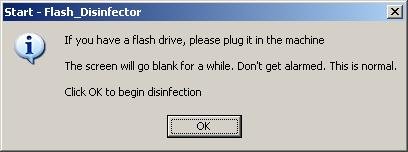
Plug flash/USB/Pen drive – Flash Disinfector – prompt.
Please insert your flash drive and/or other removable drives including your mobile phone and click OK button.
Please do so and allow the utility to clean up those drives as well. Wait until it has finished scanning.
When Flash Disinfector has finished running, you will see a prompt as shown below.

Flash Disinfector is done!
Reboot your computer when done.
Note: Flash_Disinfector will create a hidden file named autorun.inf in each partition and every USB drive plugged in when you ran it. Don’t delete this folder. It will help protect your drives from future infection.
If you need help with the instructions, then post your questions in our Anti spyware forum.
Related articles:
How to remove Flash Disinfector protection (autorun.inf folder)
How to disable the autorun feature to prevent malware from spreading.
How to remove trojans that uses autorun.inf file.
117 Comments »
RSS feed for comments on this post. TrackBack URI
Leave a comment
My Anti Spyware - Free antispyware programs and Spyware Removal Instructions.


this is a very interested web site
Comment by BahiaMohamed — January 9, 2009 #
Hello, thanks for the software, I just want to try deleting the autorun.inf folder for testing. But the computer says it can’t find the specified file. How to remove this folder? Thanks.
Comment by b!d — January 12, 2009 #
b!d , if you want to remove autorun.inf folder created by Flash disinfector, then follow these steps.
Comment by Patrik — January 13, 2009 #
thanks
Comment by kanti — January 18, 2009 #
hey guys, i can find the link to download the application Flash Disinfector, please show me the link or route
regards
PS.- Very helpful page
Comment by Felipe — January 22, 2009 #
Felipe, download Flash Disinfector from here.
Comment by Patrik — January 22, 2009 #
Thanks Patrik!!!
Comment by Felipe — January 23, 2009 #
I have virus in my usb drive
I need to remove it please
Comment by ASAD HABAB — January 26, 2009 #
ASAD, first run Flash Disinfector, second read and follow these steps.
Comment by Patrik — January 26, 2009 #
Hi This is a really helpful site. Thanks alot for everything. I also had a problem with this trojan in my flash drive. By running the Flash Disinfector I resolved it. thanks
Comment by San — January 29, 2009 #
GOOD
Comment by ALIRIO — January 29, 2009 #
hi again.
the flashdisinfector link above, accdng to antivir contains a worm.
the link posted in the comments won’t load…
Comment by angelaA — January 29, 2009 #
angelaA, just checked, both links are ok.
This is false alert.
Comment by Patrik — January 30, 2009 #
thanks greet tool
Comment by sameh — February 1, 2009 #
very nice software
Comment by k — February 3, 2009 #
thank you for this shareware info
Comment by SADIK — February 3, 2009 #
Give my chance to check your “Disinfector”
Comment by Vard — February 6, 2009 #
virus detected in avira antivirus classic 8.1.xxx (updated)
Comment by guest — February 11, 2009 #
Thank you. It works !!! Great software.
Comment by spanniard — February 11, 2009 #
this such an important utility for those who use pen drives or other flash drives
thanks for thiss nice software it helps me a lot and i m very thankful to the maker uploader of this software on net
Comment by raj khatri — February 12, 2009 #
thanks a lot.
if i remove the autorun.inf folder by following your steps…. i again get the worm…..is there a way to remove both the worm and folder permanently?
thanks
Comment by mayur — February 12, 2009 #
mayur, you have removed autorun.inf folder created by Flash Disinfector ? Please follow these steps. I will help you.
Comment by Patrik — February 12, 2009 #
thanx
Comment by AS — February 15, 2009 #
THANKS ….YOURE GRAET …HELPED ME A FUCKING LOT THX
Comment by timmey12345678 — February 16, 2009 #
Amazing!!!!!! Simply incredible. Incompetent chat support specialists for my computer couldn’t even help me fix this. Your program fixed it in under ten seconds.
Comment by Bruce — February 22, 2009 #
why is it i don’t get any flash disinfector prompt?
Comment by Lenie — February 27, 2009 #
Disable your antivirus/antispyware software before start Flash Disinfector.
Comment by Patrik — February 27, 2009 #
i already done what u said, but it is still the same, nothing happens. i am using windows vista, is it compatible?
Comment by Lenie — February 28, 2009 #
Yes.
Comment by Patrik — March 1, 2009 #
Great Tool
Thanx
Comment by شات — March 1, 2009 #
ok
Comment by imran — March 3, 2009 #
i have been hearing about great things concerning this website and i will be so greatful if i can download this software
Comment by beneth — March 3, 2009 #
I HAVE BEING SEEING THIS SOFTWARE WORKING PERFECTLY FOR OTHER PEOPLE AND IF I CAN HAVE IT I WILL BE GREATFUL THANKS.
Comment by KENNETH — March 5, 2009 #
hi nice
Comment by sha — March 18, 2009 #
Hi I am wondering if you can help I cannot save docs to my c drive they automatically save to d. This therefore means I cannot get anything to open aaarggh please help.
Comment by catherine — March 21, 2009 #
catherine, you can`t open any files from disk C, run any programs ?
Comment by Patrik — March 21, 2009 #
useful tool
Comment by muthu — March 27, 2009 #
super tool
Comment by muthu — March 27, 2009 #
superb
Comment by Divakar — March 29, 2009 #
Hope it will fix my problem
Comment by Thuong — March 30, 2009 #
Thanks
Comment by Thuong — March 30, 2009 #
I would like to download this tool…
Comment by Thuong — March 30, 2009 #
hey thanks for this program i liked it helped me as well my partations like E D F did not open but when i download this all is working but i have one more problem there is afile saving lpt3.This folder was created by Flash_Disinfector
and i cant delet why ? i think this file coused many times clossing my partations so i wana fix and delet this plz help me even i tried this flash still i cant delet he said
cannot delet lpt3.This folder was created by Flash_Disinfector cannot find the specified file make sure you specify the correct path and file name some help me
Comment by mustafqaan — March 30, 2009 #
mustafqaan, autorun.inf folder and lpt3 file will help protect your drives from future infection. But if you want remove it, then follow these steps: How to remove Flash Disinfector protection (autorun.inf folder)
Comment by Patrik — March 30, 2009 #
Hope it will fix my problem
Comment by Paolo — April 1, 2009 #
I downloaded flash disinfector but it can be run. After i double click it,it stated: the system can not find the path.Why it is happen?
Comment by muuna — April 1, 2009 #
muuna, ask help at our forum.
Comment by Patrik — April 1, 2009 #
Thanks a LOT, your a BIG help
God Bless You!
SALAM!
Comment by mhanz — April 16, 2009 #
Thank you so much! that was amazing
Comment by Jam — April 21, 2009 #
This is so insanely simple, the guy is a genius!
In the worst case, one of these flash drive trojans can prevent access to any drive on your machine. Click on the drive and nothing happens, or a warning comes up that the drive is not accessible or some weird piece of software (like notepad) runs.
The way a flash drive spreads a virus or trojan actively (as opposed to just copying infected files which the method above does not stop), is by the autorun.inf file being set to run the trojan on the flash. That then infects the whole machine and any drive connected also gets infected. In the mean time the trojan can go off and download hundreds of other payloads. Good luck to clean that lot.
One way of stopping it is to turn off autorun properly (not easy – most solutions don’t work in special cases) or do what this does.
Just delete the autorun.inf and add a folder with the same name that is locked. So the autorun file can never be written. Then do that to the other drives on your machine and you are 100% protected against any other flash drive.
Why didn’t I think of that?? Duh!
Comment by Maynard — April 22, 2009 #
Maynard, yes bot variants are good. But autorun.inf folder is more simple and can to protect your Flash drives.
Comment by Patrik — April 23, 2009 #
thannnnnnnnnnnnnnnnnnnnnkkkkkkkkkkkkkkkssssssssss
Comment by nazar ali — April 27, 2009 #
I have downloaded this several times – to desktop and also downloads. Both open to a “do you trust this program” screen, I click Allow, and nothing else happens. I have Vista with a virus coming up as ‘Worm/Autoit.yry’ that had been solved beforehand(by someone else). I just used my USB drive (previously infected before fixing) and now it has same-named apps dated 19.10.08 in all the folders. Curious at first, I clicked on one, but nothing happened and I can’t delete it now. I can’t open task manager. What do you suggest?
Comment by L — May 4, 2009 #
You have disabled your antivirus ?
Also you can ask help at our forum.
Comment by Patrik — May 4, 2009 #
mmmm…
i use avira or kaspersky for deleted that viruses..
but not always can detect the new trojans..
for that, i use KiyoScanner v0.3 =)
can desinfect all virus usb:
edia32.exe
c0nime.exe
lying.exe
data7933?.sys
msdccrt.exe
msvce32.exe
odbcasvc.exe
ncscv32.exe
nvscv32.exe
realschd.exe
recycler.exe
run1132.exe
spo0lsv.exe
ssopure.exe
wdfmgr32.exe
wsvbs.exe
rpcs.exe
tmp.exe
backup.reg
ctmontv.exe
WinDriver.exe
amvo.exe
sxs.exe
kido.exe
and 2000 more types of usb malware
and can repair regedit =)
Comment by charlie — May 9, 2009 #
THANKS
Comment by elroy — May 11, 2009 #
you link is a trojan…..
Comment by tec B — May 15, 2009 #
Tec, this is false alert. Some security programs will incorrectly identify this tool as potentially or actually malicious due to some of it’s components. Although these files can be used maliciously, they are an integral part of the fix and I recommend you disable your antivirus.
Comment by Patrik — May 15, 2009 #
well, I installed disinfector, restarted the computer. I did everything as u said but the trojan is still there…why is that? …
thanx
Comment by cmulka — May 17, 2009 #
cmulka, probably you infected with a new version of autorun.inf trojan. Please follow these steps. I will help you.
Comment by Patrik — May 18, 2009 #
Logfile of Trend Micro HijackThis v2.0.2
Scan saved at 20:16:33, on 19.5.2009
Platform: Windows XP SP3 (WinNT 5.01.2600)
MSIE: Internet Explorer v7.00 (7.00.5730.0013)
Boot mode: Normal
…
–
End of file – 8053 bytes
Comment by cmulka — May 19, 2009 #
cmulka, please make a new topic at our Spyware removal forum.
Comment by Patrik — May 20, 2009 #
Hi
How long does the program take to disinfect the drives,taking into consideration that I’ve not got any external flash drives plugged in?
Thanks
Comment by Syed — May 20, 2009 #
well it is nice
Comment by haneef — May 21, 2009 #
the link for download kiyoscanner: kiyo.com.mx/kiyoscanner
version: 0.3
Comment by charlie — May 22, 2009 #
thanks
Comment by ayman — May 26, 2009 #
God bless u
Comment by fof — May 27, 2009 #
i used it b4 it work great
Comment by edi — May 29, 2009 #
really gud!!!!!
Comment by satheesh — June 7, 2009 #
Works rapidly and beautifully.
May Lord Palani Muruga from India shower his blessings on you.
Comment by Alagu Ram — June 18, 2009 #
good
Comment by sfgiant — June 21, 2009 #
This Software was very great and powerfull tnx
Comment by philip — June 26, 2009 #
thank you! That looks like a great resource
Comment by web design company — June 26, 2009 #
Your software didn’t help me with trojan d1vmq.exe… please, mail me if You have know what to do…
Comment by GRDK_EUGEN — June 28, 2009 #
GRDK_EUGEN, ask help at our Spyware removal forum.
Comment by Patrik — June 28, 2009 #
very good tool
Comment by shaji — July 5, 2009 #
it saves my computer
Comment by shaji — July 5, 2009 #
Great piece of software thanx to all who made it available!
I had been banging my head trying to get rid of malware that got in my flash from a quick visit to a net-cafe (!$#%*.
I also suggets everyone use a very good anti-malware stand alone. After Flash Disinfector I ran Prevx 3.0 which found 3 more that the original Flash infection had blocked. Prevx now runs constantly – good prog!
Thanx again.
Comment by Blooloo — July 12, 2009 #
my saviour.. tried of reformating my laptop over and over again
Comment by hum — July 17, 2009 #
hi!, my problem was i can’t format my usb flash drive
it says my usb flash dive was write protected.
but my usb drive was no write protect option.
i just installed already flash disinfector. i can’t delete, copy, or even rename my flash drives name!
can someone help me with this?!
what should i do?
oh by the way, my usb capacity is 4gb
Comment by nhezthor1 — July 22, 2009 #
Looks like your drive is broken.
Comment by Patrik — July 22, 2009 #
good thing
Comment by Abdul — August 4, 2009 #
EXCELLENT TOOL
Comment by Leonard Phiri — August 14, 2009 #
very good
Comment by jith — August 15, 2009 #
Very Good
Comment by Amir Soliman — August 18, 2009 #
it doens’t work on vista sevice pack 2
Comment by Vincent — August 19, 2009 #
try panda usbvaccine
Comment by Vincent — August 19, 2009 #
Stops this pest from showing but is there any way to remove the problem from the computer once infected apart from reformating?.
Comment by Graham Mills — August 21, 2009 #
it Works rapidly and beautifully.
May Lord Palani Muruga from India shower his blessings on you.
Comment by intzarazad — August 22, 2009 #
very well
Comment by thanapalan — August 22, 2009 #
Graham, if you need a help with removing autorun.inf trojan, then ask for help at our Spyware removal forum.
Comment by Patrik — August 23, 2009 #
Ok stuff
Comment by Bobby — September 10, 2009 #
it’s really working great, thank u so much……….
Comment by Suraj Solanki — September 22, 2009 #
nice work
Comment by gbett — October 2, 2009 #
Patrick
Can You help me to remove autorun.inf & m9ma.exe from my external HDD. I followed all step you showed above & I removed them from my USB Flash that’s Ok. But my external HDD that I can not remove them.
Thanks
Comment by Newbie — October 8, 2009 #
Attach external HDD and run Flash Disinfector. If it does not help, then ask for help in our Spyware removal forum.
Comment by Patrik — October 8, 2009 #
i like that software.
Comment by talha — October 23, 2009 #
this is a great program. my school uses it. but how do i remove an autorun from my actual PC?
Comment by dave — October 24, 2009 #
very nice software…big thanks to you bro
Comment by ariel — November 23, 2009 #
This tool is a great help.
It also protects flash drives from becoming infected by autoruns.
God Bless
Comment by Diego — November 30, 2009 #
thanks! for this software I tried some steps for some sites but it doesn’t work when I tried this it really works wtf!!
Comment by dyey-ar — November 30, 2009 #
thnks for the software
Comment by pramod — December 2, 2009 #
does running this software delete the files and folders i have on my flash drive?
Comment by matan — December 7, 2009 #
matan, no.
It will remove only infected files.
Comment by Patrik — December 8, 2009 #
i like that flash_disinfector
Comment by mohan — December 9, 2009 #
unfortunately …This Program Caused Problems With Rename Drivers And Partitions ..
Here how to Solve this :
http://www.myantispyware.com/2009/01/13/how-to-remove-flash-disinfector-protection-autoruninf-folder/#comment-276564
Comment by Noxchi — December 17, 2009 #
very good tools.
Comment by anwar — December 21, 2009 #
nice tool
Comment by dan — December 29, 2009 #
Thank You Works Great
Comment by Gord — February 9, 2010 #
Thank you Patrik. Will this help to remove V1CBVSMQ.EXE trojan which had affected my pendrive?
Comment by farzana — February 10, 2010 #
farzana, if Flash Disinfector does not help you, then ask for help in our Spyware removal forum.
Comment by Patrik — February 11, 2010 #
very good tool superb
Comment by nicky — February 21, 2010 #
I somehow can not run the flash infector program. Double clicked the icon but nothing happened. Pls help. Thanks.
Comment by Mike — February 21, 2010 #
Mike, try run the program in Safe mode.
Comment by Patrik — February 22, 2010 #
great tool!
I was scared previously as few antivirus showed false positive.
No I have full trust on it.
It used simple logic to beat so big problem of USB infection.
Salute to it !!
Comment by Akash — February 24, 2010 #
I can download the link fine for the flash disinfector, but after I try to open it, it says application not found. I think it is from the virus or problem? please help thanks.
Comment by Justin — February 26, 2010 #
Justin, yes, its possible. Try download and run it in Safe mode with networking.
Comment by Patrik — February 27, 2010 #
