Beware of a new phishing scam disguised as a Microsoft Teams missed voicemail email. These fake notifications claim you have a voicemail waiting, complete with caller details and a tempting “PLAY NOW” button. But clicking that link doesn’t play any message — it redirects you straight to a phishing website designed to steal your login credentials and personal data.

This scam cleverly mimics legitimate Microsoft Teams emails, even using official-sounding language and headers like “Microsoft Teams” and “From: [email protected]” to trick you into letting your guard down. The core trick? Promising a missed message but delivering a trap instead.
If you get an unexpected voicemail email from Microsoft Teams, don’t click any links without verifying the sender or checking directly in the official Teams app. Remember: real Microsoft emails won’t ask you to install software or log in via suspicious websites. Stay sharp and don’t fall for the bait disguised as professional communication.
A typical “Microsoft Teams Missed Voicemail” scam email reads as follows:
Microsoft Teams [XXXXX] [email protected]
Microsoft Teams
Missed Voicemail In Teams
Voicemail Details:
Receiver: contact@[XXXXXXXX]
Date: 2/19/2026 5:13:56 a.m.
Duration: 01m 11s
Caller ID: [Ref ID: 7142641012…
Press play to listen to your voicemail.
PLAY NOW…Install Microsoft Teams now
© 2025 Microsoft Corporation, One Microsoft Way, Redmond, WA 98052. Read our privacy policy.
🕵️♂️ How the Microsoft Teams Missed Voicemail Email Scam Operates
The Microsoft Teams Missed Voicemail Email Scam is a phishing fraud targeting users by mimicking official Microsoft notifications. 🚨 This scam tricks recipients into clicking malicious links that lead to phishing websites designed to steal personal information or install malware. 🔗 Step-by-Step Breakdown of the Scam:
📩 Sending Fake Microsoft Teams Emails
Scammers send emails impersonating Microsoft Teams notifications, often from addresses like [email protected], falsely claiming the recipient has a missed voicemail. The email appears official and includes Microsoft branding to build trust.
▶️ Including a Malicious “PLAY NOW” Link
The email urges recipients to “Press play to listen to your voicemail” with a prominent “PLAY NOW” button. This link does not open a voicemail but instead directs users to a phishing website designed to capture login credentials or infect devices with malware.
🕸️ Crafting Convincing Email Content
The scam email includes details such as receiver email, date, duration, and caller ID to appear legitimate. It also invites the recipient to “Install Microsoft Teams now,” creating urgency and pressure to act quickly.
🌐 Using Realistic Microsoft Branding
The emails use Microsoft logos, address lines like “One Microsoft Way, Redmond,” and privacy policy notices to appear authentic and avoid raising suspicion.
⚠️ Exploiting User Trust and Curiosity
By using missed voicemail notifications, the scammers tap into users’ fear of missing important messages, which increases the likelihood of clicking the link without verifying its authenticity.
🚫 No Actual Voicemail or Valid Link
The emails promise voicemail content but never deliver it. Instead, they direct victims to fraudulent websites designed to harvest sensitive data or download harmful software.
🔐 Risks of Clicking the Link
Victims who click the “PLAY NOW” button risk exposing login credentials, installing malware, or having their devices compromised, potentially leading to identity theft or financial loss.
📨 Difficulty in Undoing Damage
Once compromised, victims often struggle to regain control of accounts or mitigate the effects, as the attackers may use stolen credentials quickly and invisibly.
In summary, the Microsoft Teams Missed Voicemail Email Scam deceives recipients with realistic-looking emails falsely claiming missed voicemails. The scam relies on fake links leading to phishing sites that steal credentials or infect devices. Users should be cautious of unexpected emails requesting urgent action and always verify messages through official Microsoft channels before clicking any links.
📧 What to Do When You Receive the “Microsoft Teams Missed Voicemail” Scam Email
We advise everyone who receives this email to follow the simple steps below to protect yourself from potential scams:
- ❌ Do not believe this email.
- 🔒 NEVER share your personal information and login credentials.
- 📎 Do not open unverified email attachments.
- 🚫 If there’s a link in the scam email, do not click it.
- 🔍 Do not enter your login credentials before examining the URL.
- 📣 Report the scam email to the FTC at www.ftc.gov.
If you accidentally click a phishing link or button in the “Microsoft Teams Missed Voicemail” Email, suspect that your computer is infected with malware, or simply want to scan your computer for threats, use one of the free malware removal tools. Additionally, consider taking the following steps:
- 🔑 Change your passwords: Update passwords for your email, banking, and other important accounts.
- 🛡️ Enable two-factor authentication (2FA): Add an extra layer of security to your accounts.
- 📞 Contact your financial institutions: Inform them of any suspicious activity.
- 🔄 Monitor your accounts: Keep an eye on your bank statements and credit reports for any unusual activity.
🔍 How to Spot a Phishing Email
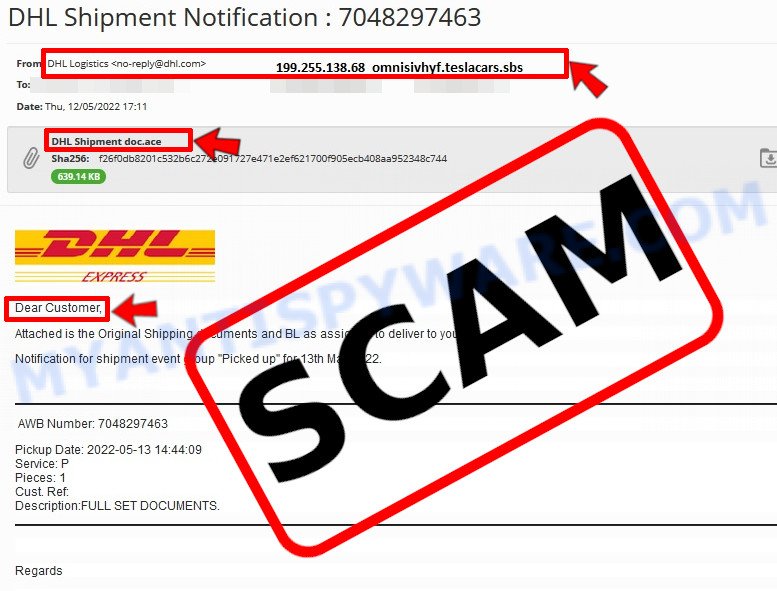
Phishing emails often share common characteristics; they are designed to trick victims into clicking on a phishing link or opening a malicious attachment. By recognizing these signs, you can detect phishing emails and prevent identity theft:
💡 Here Are Some Ways to Recognize a Phishing Email
- ✉️ Inconsistencies in Email Addresses: The most obvious way to spot a scam email is by finding inconsistencies in email addresses and domain names. If the email claims to be from a reputable company, like Amazon or PayPal, but is sent from a public email domain such as “gmail.com”, it’s probably a scam.
- 🔠 Misspelled Domain Names: Look carefully for any subtle misspellings in the domain name, such as “arnazon.com” where the “m” is replaced by “rn,” or “paypa1.com,” where the “l” is replaced by “1.” These are common tricks used by scammers.
- 👋 Generic Greetings: If the email starts with a generic “Dear Customer”, “Dear Sir”, or “Dear Madam”, it may not be from your actual shopping site or bank.
- 🔗 Suspicious Links: If you suspect an email may be a scam, do not click on any links. Instead, hover over the link without clicking to see the actual URL in a small popup. This works for both image links and text links.
- 📎 Unexpected Attachments: Email attachments should always be verified before opening. Scan any attachments for viruses, especially if they have unfamiliar extensions or are commonly associated with malware (e.g., .zip, .exe, .scr).
- ⏰ Sense of Urgency: Creating a false sense of urgency is a common tactic in phishing emails. Be wary of emails that claim you must act immediately by calling, opening an attachment, or clicking a link.
- 📝 Spelling and Grammar Errors: Many phishing emails contain spelling mistakes or grammatical errors. Professional companies usually proofread their communications carefully.
- 🔒 Requests for Sensitive Information: Legitimate organizations typically do not ask for sensitive information (like passwords or Social Security numbers) via email.
Conclusion
The Microsoft Teams Missed Voicemail Email is a phishing scam designed to trick recipients into clicking on malicious links. The email falsely claims you have a missed voicemail in Microsoft Teams and urges you to “PLAY NOW” to listen to the message. However, the link redirects to a phishing website aimed at stealing your personal information or installing malware.
The scammers spoof official Microsoft branding and sender addresses like [email protected] to appear legitimate and create a sense of urgency. They exploit trusted company names and use realistic email layouts to deceive users into clicking unsafe links.
Bottom Line: Do not click on any links or download attachments from suspicious emails claiming missed voicemails from Microsoft Teams, especially if the sender address looks unrelated or the message is unexpected. Always verify the message directly within the official Microsoft Teams app or your corporate communication channels. When in doubt, report such emails as phishing and delete them immediately to protect your accounts and data. Stay vigilant and exercise caution to avoid falling victim to these common email scams.





