[email protected] is an email address that cyber criminals use to contact victims of new GlobeImposter ransomware variant. Ransomware is a type of malware that blocks access to files by encrypting them, until the victim pays a ransom.
[email protected] virus locks up the files using strong encryption method, that makes it impossible to unlock the encrypted data by the victim without obtaining a key and a decryptor, which is the only way to decrypt affected files. It can be obtained only in the case of payment of the required ransom through cryptocurrency wallet. The ransomware virus encrypts almost of database, videos, documents, music, web application-related files, archives and images, including common as:
.asset, .bar, .itdb, .zw, .bay, .yal, .wn, .mpqge, .pptx, .docm, .crt, .das, .psk, .p7c, .gdb, .odc, .odm, .1, .forge, .zabw, .wbz, .x3f, .pst, .sis, .kdc, .hkdb, .jpe, .sum, .raw, .wps, .wp6, .ptx, .pdf, .cfr, .map, .z3d, .y, .xls, .crw, .ncf, .1st, .xlsb, .wp, .ybk, .gho, .accdb, .z, .png, .sid, .xlsx, .zdb, .webp, .js, .xml, .wsd, .snx, .wdb, .ysp, .wma, .iwi, .x, .wbm, .layout, .ppt, .vcf, .dxg, .hkx, .css, .xx, .litemod, .raf, .dcr, .wbk, .dba, .vpp_pc, wallet, .der, .x3f, .lrf, .sql, .csv, .wm, .wmo, .wp4, .rtf, .epk, .wpg, .srf, .xpm, .wmv, .r3d, .xwp, .wotreplay, .eps, .jpeg, .xy3, .mrwref, .psd, .wp7, .sidd, .vpk, .wmd, .zif, .xyp, .xls, .mddata, .zi, .xbdoc, .3dm, .wbmp, .w3x, .xf, .bc6, .p7b, .dazip, .3fr, .qdf, .arch00, .wot, .txt, .odt, .wpe, .vfs0, .mef, .fpk, .xlsm, .apk, .rar, .wpa, .zdc, .orf, .srw, .xmmap, .xlsm, .m4a, .arw, .dmp, .wpw, .xdl, .mcmeta, .fsh, .rofl, .re4, .m2, .esm, .0, .doc, .qic, .tax, .2bp, .mlx, .ai, .pfx, .wcf, .wpb, .svg, .xar, .rgss3a, .rim, .upk, .xlk, .x3d, .bik, .sb, .ztmp, .wav, .db0, .wri, .bsa, .ws, .vdf, .icxs, .fos, .rwl, .wma, .rw2, .xyw, .big, .cer, .hplg, .wbd, .pkpass, .wp5, .xll, .wpd, .odb, .mdf, .desc, .dwg, .jpg, .mdb, .kdb, .mp4, .sav, .itm, .m3u, .wpl, .3ds, .wmv, .bc7, .odp, .dng, .vtf, .ff, .mov, .wpd, .ltx, .cdr, .mdbackup, .kf, .wb2, .webdoc, .bkp, .ods, .sidn, .pdd, .flv, .xdb, .sr2, .wire, .wbc, .nrw, .pef, .yml, .t12, .wpt
With the encryption process is finished, all encrypted files will now have a new extension appended to them. In every directory where there are encrypted files, [email protected] virus drops a file called ‘HOW_RECOVER.html’. This file contains a ransom note that is written in the English. The ransom message directs victims to make payment in exchange for a key needed to unlock personal files.
Summary
| Email address | [email protected] |
| Related ransomware | GlobeImposter family |
| Encrypted Files Extension | .[[email protected]] |
| Ransom note | HOW_RECOVER.html |
| Ransom amount | $300 – $1000 |
| Removal | Free Malware Removal Tools |
| Recover Encrypted files | How to recover ransomware encrypted files |
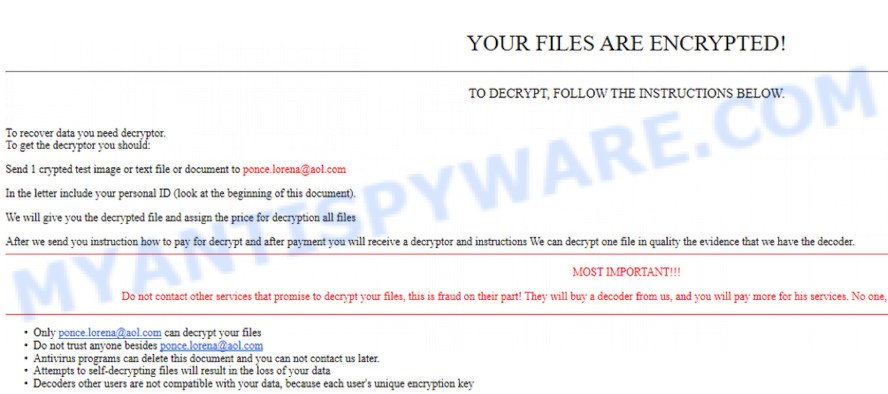
Text presented in the ransom demand message:
YOUR FILES ARE ENCRYPTED!
TO DECRYPT, FOLLOW THE INSTRUCTIONS BELOW.To recover data you need decryptor.
To get the decryptor you should:
Send 1 crypted test image or text file or document to [email protected]
In the letter include your personal ID (look at the beginning of this document).We will give you the decrypted file and assign the price for decryption all files
After we send you instruction how to pay for decrypt and after payment you will receive a decryptor and instructions We can decrypt one file in quality the evidence that we have the decoder.
MOST IMPORTANT!!!Do not contact other services that promise to decrypt your files, this is fraud on their part! They will buy a decoder from us, and you will pay more for his services. No one, except [email protected], will decrypt your files.
Only [email protected] can decrypt your files
Do not trust anyone besides [email protected]
Antivirus programs can delete this document and you can not contact us later.
Attempts to self-decrypting files will result in the loss of your data
Decoders other users are not compatible with your data, because each user’s unique encryption key
How to recover .[[email protected]] files
Unfortunately, at the moment it is impossible to decrypt .[[email protected]] files, but do not despair. Fortunately, there are several alternative methods that can allow everyone to recover the contents of encrypted files. Each of these methods does not involve the use of special knowledge and paid programs and can be performed by everyone. We have prepared an instruction with illustrations, which describes in detail the process of data recovery. Before you begin data recovery, check your computer for malware using free malware removal tools. You must be 100% sure that [email protected] virus is completely removed.





