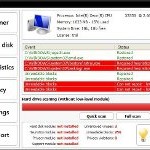
 Palladium Pro is a rogue (fake) antivirus program that is distributed through the use of Microsoft Security Essentials Alert trojan. This malware displays false information that states “Unknown Win32/Trojan was detected on your computer” and then will suggest you to perform a scan of your PC. It will reports that a program is infected with Trojan.Horse.Win32.PAV.64.a. Remember, the fake antivirus is unable to detect or rid your system of parasites nor will be protect you from legitimate future threats. You need to remove Palladium Pro from your computer as quickly as possible!
During installation, this malware configures itself to start automatically every time, when your computer loads. Once the installation is complete, it will reboot your computer. When Windows is loaded, you will be shown the Palladium Pro start screen instead of Windows desktop. But there is no any choice, only “Safe startup” button is active. After click to it, Palladium Pro starts scanning your computer and list a lot of infections to trick you into thinking your PC in danger. It will report that was able to clean the majority of infected files, but was not able to cure a few important Windows files, such as firefox.exe, taskmgr.exe, iexplore.exe and offer to purchase its full version to clean them. However, the scan results is a scam, because the program can`t detect any infections. So, you may easily ignore all that Palladium Pro will display you.
As you can see, Palladium Pro is a totally scam that hides your desktop, displays false information and detects fake infections. The program created with one purpose to trick you into purchasing so-called “full” version of the program. Most important do not pay for the bogus program! Please use the removal guide below in order to remove Palladium Pro and any associated malware from your computer for free.
Use the following instructions to remove Palladium Pro
Step 1. Stop Palladium Pro process
Once Windows loaded you will see a window similar to the one below.
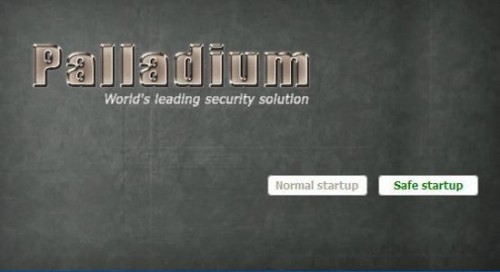
ThinkPoint screen
Now press CTRL + ALT + DEL. It will open Windows Task manager. Select palladium.exe process as shown in the screen below.
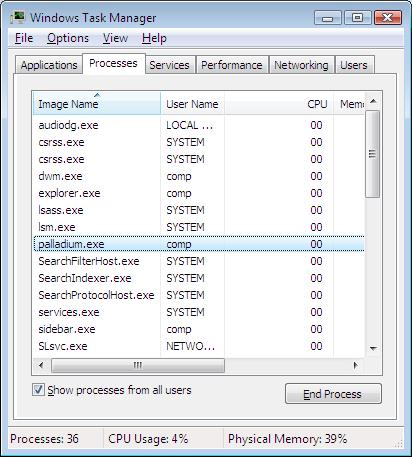
Windows Task manager
Click “End Process” button. It will close Palladium Pro.
Now click File, New Task. Type explorer and press Enter. It will back the Start button and task bar.
Step 2. Remove Palladium Pro associated malware
Download MalwareBytes Anti-malware (MBAM). Close all programs and Windows on your computer.
Double Click mbam-setup.exe to install the application. When the installation begins, keep following the prompts in order to continue with the installation process. Do not make any changes to default settings and when the program has finished installing, make sure a checkmark is placed next to Update Malwarebytes’ Anti-Malware and Launch Malwarebytes’ Anti-Malware, then click Finish.
If an update is found, it will download and install the latest version.
Once the program has loaded you will see window similar to the one below.

Malwarebytes Anti-Malware Window
Select Perform Quick Scan, then click Scan, it will start scanning your computer for Palladium Pro infection. This procedure can take some time, so please be patient.
When the scan is complete, click OK, then Show Results to view the results. You will see a list of infected items similar as shown below. Note: list of infected items may be different than what is shown in the image below.
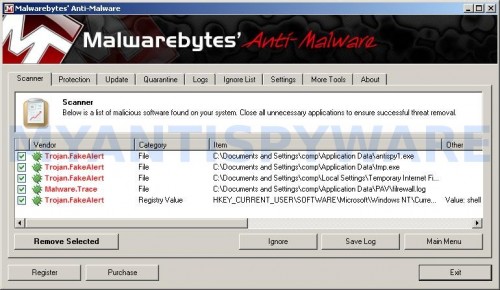
Malwarebytes Anti-malware, list of infected items
Make sure all entries have a checkmark at their far left and click “Remove Selected” button to remove Palladium Pro. MalwareBytes Anti-malware will now remove all of associated Palladium Pro files and registry keys and add them to the programs’ quarantine. When MalwareBytes Anti-malware has finished removing the infection, a log will open in Notepad and you may be prompted to Restart.
Palladium Pro removal notes
Note 1: if you can not download, install, run or update Malwarebytes Anti-malware, then follow the steps: Malwarebytes won`t install, run or update – How to fix it.
Note 2: if you need help with the instructions, then post your questions in our Spyware Removal forum.
Note 3: your current antispyware and antivirus software let the infection through ? Then you may want to consider purchasing the FULL version of MalwareBytes Anti-malware to protect your computer in the future.
Palladium Pro creates the following files and folders
%AppData%\palladium.exe
%AppData%\{RANDOM}.bat
Palladium Pro creates the following registry keys and values
HKEY_CURRENT_USER\Software\Microsoft\Windows\CurrentVersion\Internet Settings | “WarnonBadCertRecving” = “0”
HKEY_CURRENT_USER\Software\Microsoft\Windows\CurrentVersion\Internet Settings | “WarnOnPostRedirect” = “0”
HKEY_CURRENT_USER\Software\Microsoft\Windows NT\CurrentVersion\Winlogon | Shell = “%AppData%\palladium.exe”





thank you thank you thank you so much
thanks very much for the help
Thanks for helping!
I followed your instructions for removal of Paradigm. It worked for a while but its back again. But now it onto allow me to sign onto the task master to access the stop or remove the program. What do I do now to remove it.
Palladium not paradigm
Thank you so much.
Youve saved me alot of stress.
Thanks for the help I will use and recommend you
Lamont, probably your computer is infected with a trojan that reinstalls the rogue. Start a new topic in our Spyware removal forum. I will help you to clean your PC.
Oh my God! Thank you so so so much. I thought I lost my laptop definitely…..thank you again! Great instruction!
Thank you so so much!!!
Where do you access those registry keys/values?
I did the CTRL + ALT + DEL and cannot view the processes runnung. What do I do?
Beth, have you selected the Processes tab ?
thanks a lot for the info
It’s a great topic
bless you!
Help please! this thing has taken over and my computer is toast!
When i type explorer it responds back
C:\windows\explorer.exe is not a valid win32 application
What next?
THanks massively
still completely dead – any help?
thx as oer comment below
Palladium
Help please! this thing has taken over and my computer is toast!
When i type explorer it responds back
C:\windows\explorer.exe is not a valid win32 application
What next?
THanks massively
Life saver!!! Thank u sooo much!! Easy and accurate instructions!!
By far most helpful site. Saved me!!! Thanks
geoff, probably explorer.exe has been damaged by virus. Start a new topic in our Spyware removal forum. We can to try some steps to repair your computer.
thank you soooooo much 🙂 have spent over an hour trying fixes and this one has worked 🙂
thanks very much for the fix – really appreciated
I think I got rid of the virus…mostly. But now my computer no longer recognizes removable disks and when I click on a search result, I get redirected. I have Norton, but apparently it’s not working. Please advise
Hi, my missus’ computer has this virus. I’ve tried to remove it but I’ve fallen at the first hurdle. C+A+D fires back the following:
The applicatin taskmgr.exe was launched succesfully but it was forced to shut down due to security reasons. etc etc
Please help.
Martyn, start a new topic in our Spyware removal forum. I will help you to remove this malware.
I tried this and got stuck on the first step! I’ve tried opening Windows Task Manager many times and it won’t. It won’t even open after I’ve gone through the ‘scan’ and accessed my account homescreen.
Katie, probably your PC is infected with a new version of the rogue. To remove this malware, ask for help in our Spyware removal forum.
IM having the same problem as katie at the palladium screen you guys tell me to press alt ctrl del but it just turns my screen black now i have removed scams before but this one is a little tricky can you post further instruction or can you post a downloadable link where i can use my usb driver to download and then upload it to the infected cpu..