Do you have pop-ups or your computer infected with trojan or spyware ? Learn how to ask us for help, click here!

How to remove Digital Protection (Uninstall instructions)

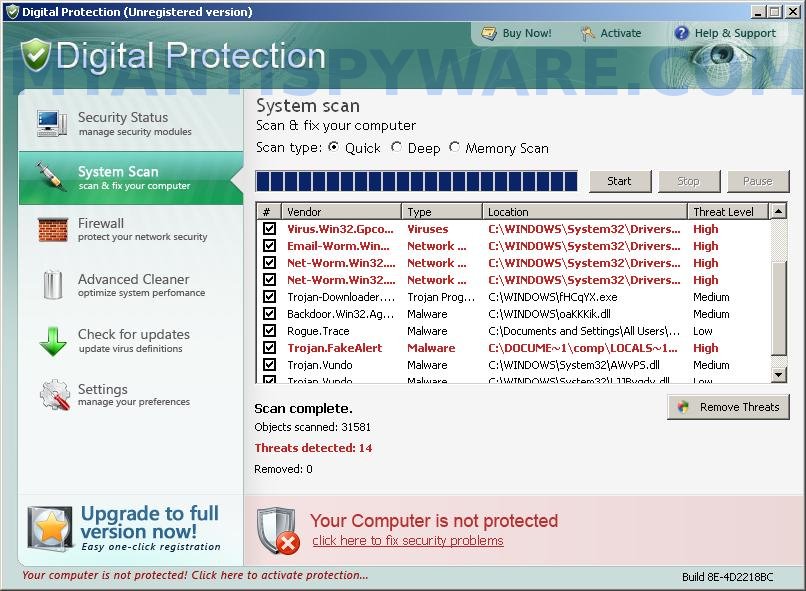
Digital Protection is a fresh rogue antispyware program from same family of malware as Your Protection, User Protection, Dr. Guard, etc. The difference between the first program an others very slightly. First, changed the name of the program and secondly, have been partially modified the core components of the program in order to protect them from detection by the legit antivirus and antispyware programs. Otherwise, everything remained as before.

Like other rogue antispyware programs, Digital Protection promoted and installed through the use of trojans. When the trojan is activated, it first does not manifest itself so that the user did not find the source of it on the computer. But after awhile, it starts to show a lot of fake security alerts and warnings that the computer is in danger and urgently needed to install and activate antivirus, this “antivirus” – Digital Protection. Even if you ignore all of these alerts, what is right, this trojan secretly start the download core components of this malicios program and then install it without your permission and knowledge.

During installation, Digital Protection scans your computer for an already installed antivirus and antispyware programs, and if they are found, required to uninstall them under the pretext that they may conflict with it by showing the following alert:

There is unauthorized antivirus software detected on your computer. It is recommended you to remove it, otherwise it could conflict with Digital Protection.

Further, Digital Protection will register itself in the Windows registry to run automatically every time you start Windows. When the program is started, it begins to scan the computer and detects a large number of trojans, viruses, worms, etc that will not be removed unless you first purchase the software. However, these results, as well as self scanning, is nothing but a scam. In reality Digital Protection cannot detect and remove any infections, as well as not be able to protect you from possible infections in the future. Thus, you can safely ignore all that the rogue antispyware will show you.

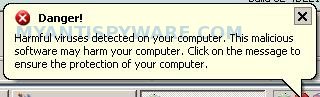
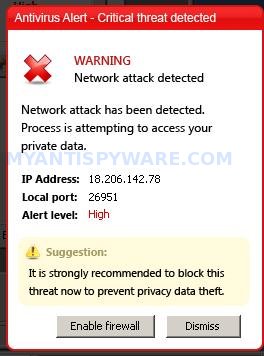
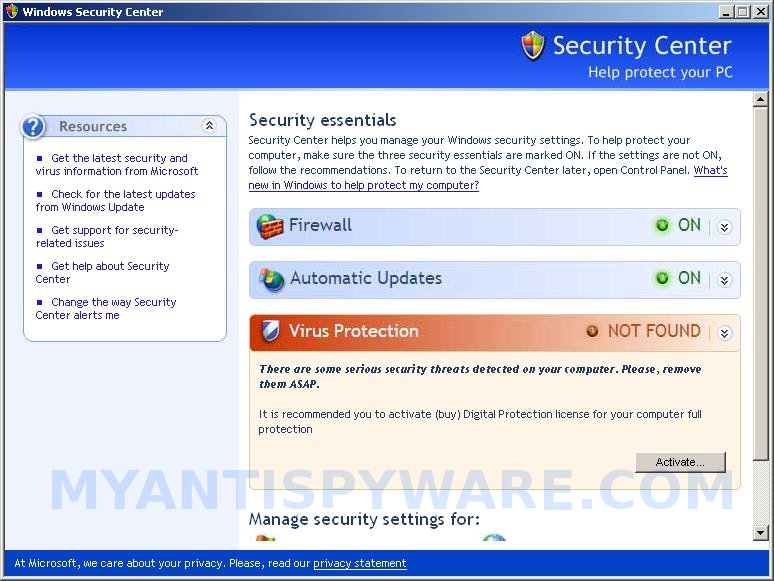
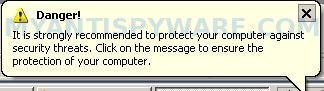
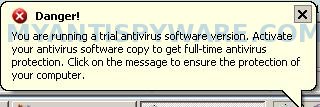
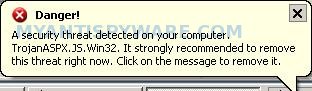
While Your Protection is running, it will display nag screens, fake security alerts and warnings from Windows task bar. A few examples:

Danger!
A security threat detected on your computer.
TrojanASPX.JS.Win32. It strongly recommended to remove
this threat right now. Click on the message to remove it.

Warning! Adware detected!
Adware module detected on your PC!

Warning! Keylogger detected!
Keylogger activity detected on your PC!

Of course, all of these alerts and warnings are a fake and like false scan results should be ignored.

What is more, the trojan which installs Digital Protection, can also download and install a variant of TDSS trojan. This trojan is very dangerous because it can block the work of most antivirus and antispyware applications, so that they will not even start. But it’s not all, TDSS trojan can also redirect you from sites that you want to visit on a completely other.

As you can see, Digital Protection is a scam, which has been created with one purpose to scare your into purchasing so-called “full” version of the program. Most importantly, do not purchase it! This fake antispyware utility should be removed immediately after detection. To remove Digital Protection and other computer parasites that could get on the computer with it, use the instructions below.

More screen shoots of Digital Protection
Symptoms in a HijackThis Log

O4 – HKCU\..\Run: [davclnt.exe] C:\DOCUME~1\comp\LOCALS~1\Temp\davclnt.exe
O4 – HKCU\..\Run: [Digital Protection] “C:\Program Files\Digital Protection\digprot.exe” -noscan

Use the following instructions to remove Digital Protection (Uninstall instructions)

Step 1. Remove TDSS trojan-rootkit
First you need remove TDSS trojan, after that, you will be able to remove Digital Protection without any problem.

Download TDSSKiller from here and unzip to your desktop.

Open TDSSKiller folder. Right click to tdsskiller and select rename. Type a new name (123myapp, for example). Press Enter. Double click the TDSSKiller icon to start scanning Windows registry for TDSS trojan. If it is found, the you will see a screen similar to the one below.


TDSSKiller

Type delete and press Enter. Once TDSSKiller has finished removing rootkit TDSS, you will see a windows as shown below.
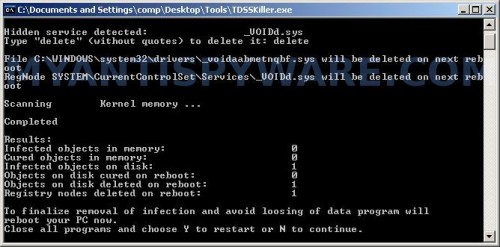

TDSSKiller

Type Y and press Enter. Your computer will be rebooted.

Step 2. Remove Digital Protection and any associated malware.

Download MalwareBytes Anti-malware (MBAM). Once downloaded, close all programs and windows on your computer.

Double-click on the icon on your desktop named mbam-setup.exe. This will start the installation of MalwareBytes Anti-malware onto your computer. When the installation begins, keep following the prompts in order to continue with the installation process. Do not make any changes to default settings and when the program has finished installing, make sure a checkmark is placed next to “Update Malwarebytes’ Anti-Malware” and Launch “Malwarebytes’ Anti-Malware”. Then click Finish.

MalwareBytes Anti-malware will now automatically start and you will see a message stating that you should update the program before performing a scan. If an update is found, it will download and install the latest version.

As MalwareBytes Anti-malware will automatically update itself after the install, you can press the OK button to close that box and you will now be at the main menu. You will see window similar to the one below.

malwarebytes-antimalware1
Malwarebytes Anti-Malware Window

Make sure the “Perform quick scan” option is selected and then click on the Scan button to start scanning your computer for Digital Protection infection. This procedure can take some time, so please be patient.

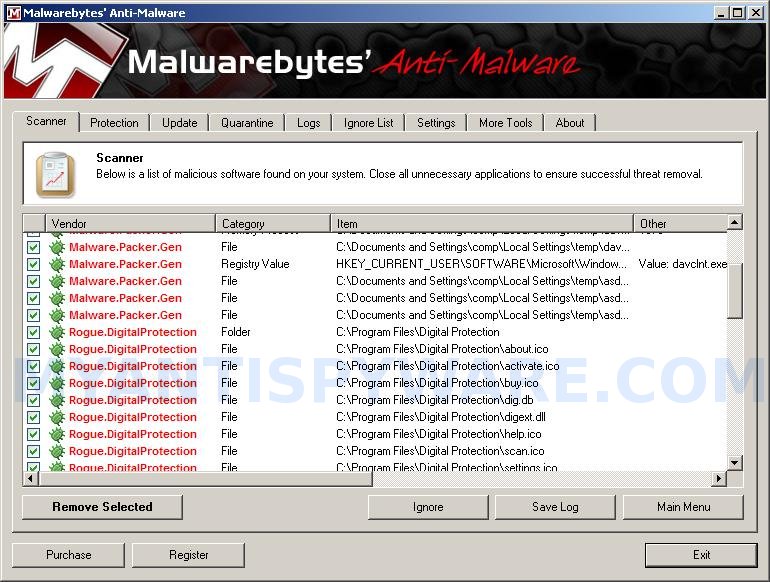
When the scan is finished a message box will appear that it has completed scanning successfully. Click OK. Now click “Show Results”. You will see a list of infected items similar as shown below.
Note: list of infected items may be different than what is shown in the image below.
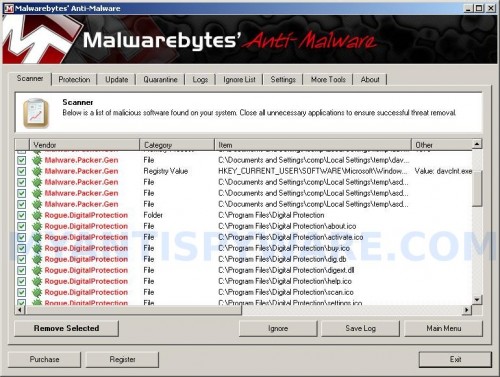

Malwarebytes Anti-malware, list of infected items

Make sure all entries have a checkmark at their far left and click “Remove Selected” button to remove Digital Protection. MalwareBytes Anti-malware will now remove all of associated Digital Protection files and registry keys and add them to the programs’ quarantine. When MalwareBytes Anti-malware has finished removing the infection, a log will open in Notepad and you may be prompted to Restart.

Note 1: if you can not download, install, run or update Malwarebytes Anti-malware, then follow the steps: Malwarebytes won`t install, run or update – How to fix it.

Note 2: if you need help with the instructions, then post your questions in our Spyware Removal forum.

Note 3: your current antispyware and antivirus software let the infection through ? Then you may want to consider purchasing the FULL version of MalwareBytes Anti-malware to protect your computer in the future.

Digital Protection creates the following files and folders

C:\Program Files\Digital Protection
%UserProfile%\Start Menu\Programs\Digital Protection
C:\Program Files\Digital Protection\dighook.dll
C:\Program Files\Digital Protection\digprot.exe
%UserProfile%\Local Settings\temp\davclnt.exe
C:\Program Files\Digital Protection\about.ico
C:\Program Files\Digital Protection\activate.ico
C:\Program Files\Digital Protection\buy.ico
C:\Program Files\Digital Protection\help.ico
C:\Program Files\Digital Protection\scan.ico
C:\Program Files\Digital Protection\settings.ico
C:\Program Files\Digital Protection\splash.mp3
C:\Program Files\Digital Protection\uninstall.exe
C:\Program Files\Digital Protection\update.ico
C:\Program Files\Digital Protection\dig.db
C:\Program Files\Digital Protection\digext.dll
C:\Program Files\Digital Protection\virus.mp3
%UserProfile%\Start Menu\Programs\Digital Protection\About.lnk
%UserProfile%\Start Menu\Programs\Digital Protection\Activate.lnk
%UserProfile%\Start Menu\Programs\Digital Protection\Buy.lnk
%UserProfile%\Start Menu\Programs\Digital Protection\Scan.lnk
%UserProfile%\Start Menu\Programs\Digital Protection\Settings.lnk
%UserProfile%\Start Menu\Programs\Digital Protection\Update.lnk
%UserProfile%\Start Menu\Programs\Digital Protection\Digital Protection Support.lnk
%UserProfile%\Start Menu\Programs\Digital Protection\Digital Protection.lnk
%UserProfile%\Application Data\Microsoft\Internet Explorer\Quick Launch\Digital Protection.lnk
%UserProfile%\Desktop\Digital Protection Support.lnk
%UserProfile%\Desktop\Digital Protection.lnk

Digital Protection creates the following registry keys and values

HKEY_CURRENT_USER\SOFTWARE\Microsoft\Windows\CurrentVersion\Run\digital protection
HKEY_CURRENT_USER\Software\Microsoft\Windows\CurrentVersion\Run\davclnt.exe
HKEY_CURRENT_USER\SOFTWARE\Microsoft\Windows\CurrentVersion\Policies\System\DisableTaskMgr
HKEY_LOCAL_MACHINE\SOFTWARE\Microsoft\Windows\CurrentVersion\Policies\System\DisableTaskMgr

Share and Enjoy:

  • Print
  • Digg
  • Sphinn
  • del.icio.us
  • Facebook
  • Mixx
  • Google Bookmarks
  • Slashdot
  • Twitter
April 10, 2010 on 11:12 pm | In Malware removal, Rogue Anti Spyware | 63 Comments |


63 Comments »

RSS feed for comments on this post.

  1. tdss-rootkiller says it does nto support my system…what now?

    Comment by Ross — April 11, 2010 #

  2. Ross, skip first step.

    Comment by Patrik — April 12, 2010 #

  3. Hello Patrik.

    I tried everything written above, but Digital Protection is still present and bugging me, I figured that I should try a Full Scan on Malwarebytes but after an hour or so, I get this message saying that “Windows will shut down due to software damages” or something, I can’t exactly remember the message, but it gives be a countdown of 20 seconds and urges me to save my work.

    Is this part of the Digital Protection virus, I’m also going to note that I seem to have the rouge “Security Centre” virus. Currently trying to get rid of that too.

    Comment by Conor — April 16, 2010 #

  4. Conor, looks like your computer is infected with a new version of the rogue. Please open a new topic in our Spyware removal forum. I will help you.

    Comment by Patrik — April 17, 2010 #

  5. Just wanted to leave a ty note. This worked excellent for me. You can be very proud of your work!

    Comment by Jeroen(Belgium) — April 18, 2010 #

  6. is there a chance TDSSrootkiller can damage my computer? is it 100% safe to use?

    Comment by Lester — April 18, 2010 #

  7. TDSSKiller created by Kaspersky lab. Anyway, if you want, you can make a restore point or backup the Windows registry.

    Comment by Patrik — April 19, 2010 #

  8. I just wanted to thank you. It worked perfectly well.
    Thanks again, hehe.

    Comment by Alejandro (Chile) — April 19, 2010 #

  9. thanks for ur help on anti malware doctor but im having trouble getting the rootkiller; it seems the link is dead to me

    thanks

    Comment by lamb — April 19, 2010 #

  10. Hi
    Thank so much that was very very nice info and help. ;)

    Comment by Amin — April 20, 2010 #

  11. Hey,

    Just wanted to say thanks for the info. Our CSM’s personal laptop got this problem and this information got it off.

    Appreciate it!

    Kris

    Comment by Kris — April 20, 2010 #

  12. lamb, probably a trojan blocks the link. Try use another PC to download TDSSKiller.

    Comment by Patrik — April 20, 2010 #

  13. Having the same problem as Conor, would really appreciate some help.

    Comment by Jamal — April 21, 2010 #

  14. Hi this has got hold of my pc on a new level.

    I carried out step 1 with regrads to TDDS. Everything was fine. PC was rebooted, but then i was unable to open any website to download malewarebytes program as i was being denied access to the sites. On top of all that when i try and open a program the “open with” box appears.

    What do i do?

    Comment by Jaz — April 21, 2010 #

  15. I have digital protection but the tdsskiller isn’t detecting it so I cant remove it! Help?!!

    Comment by chi — April 21, 2010 #

  16. Jamal, if your need a help, ask your questions in our Spyware removal forum.

    Comment by Patrik — April 21, 2010 #

  17. Jaz, to fix “open with” use the following step:
    Click Start, Run. Type notepad and press Enter.
    Notepad opens. Copy all the text below into Notepad.

    Windows Registry Editor Version 5.00

    [-HKEY_CURRENT_USER\Software\Classes\.exe]
    [-HKEY_CURRENT_USER\Software\Classes\secfile]
    [-HKEY_CLASSES_ROOT\secfile]
    [-HKEY_CLASSES_ROOT\.exe\shell\open\command]


    [HKEY_CLASSES_ROOT\exefile\shell\open\command]
    @="\"%1\" %*"


    [HKEY_CLASSES_ROOT\.exe]
    @="exefile"
    "Content Type"="application/x-msdownload"

    Save this as fix.reg to your Desktop (remember to select Save as file type: All files in Notepad.)
    Double Click fix.reg and click YES for confirm.
    Reboot your computer.

    What shows your PC when you trying open any site ?

    Comment by Patrik — April 21, 2010 #

  18. hi, followed ur instructions 2 days ago. My laptop was cured….or so it seemed; 2 days on same problems started to appear; went thru procedure again…did not cure; then did full scan….again appeared not to cure at first, but after a while, on its own the symtoms disappeared. seems to be ok again, but can i be sure?? plz advise, many thnx.

    Comment by Mas — April 21, 2010 #

  19. patrik,

    I have followed all the steps up to the malware “remove selected” and the system reboot. but it’s still there. what do i do?please help

    Comment by mark C — April 21, 2010 #

  20. Nvm Patrik thank you for the help, solved it. Thanks a lot for the guide. :D

    Comment by Jamal — April 21, 2010 #

  21. hi, me again! the problem has not gone away….no matter how many times i perform quick/full scans, each time infected items picked up and removed, but on reboot problem still present!! HELP!!!

    Comment by Mas — April 22, 2010 #

  22. Chi, start a new topic in our Spyware removal forum. I will check your computer.

    Comment by Patrik — April 22, 2010 #

  23. Mas, probably your computer is infected with a hidden trojan that reinstalls the rogue. Please open a new topic in our Spyware removal forum. I will check your PC.

    Comment by Patrik — April 22, 2010 #

  24. Mark, looks like your PC is infected with a new version of the rogue, Try update Malwarebytes and perform a fresh scan. If it does not help, then ask for help in our Spyware removal forum.

    Comment by Patrik — April 22, 2010 #

  25. very useful and very informative. ty

    Comment by a — April 22, 2010 #

  26. hey patrick im having the same issues man =( i followed steps but upon reboot digital protection is back so yeah i think its re-installing itself with a hidden trojan. also tdsskiller didnt find anything on my comp. i will open new topic thank you for your help.

    Comment by bmurder — April 24, 2010 #

  27. bmurder, looks like your computer is infected with a new version of the malware. Please start a new topic in our Spyware removal forum. I will help you.

    Comment by Patrik — April 24, 2010 #

  28. Patrick, I downloaded and ran the tdss killer and it found nothing. Then I ran the scan for the first time. The scan found, I beleive it was about 48 files. I rebooted and it seemed to be fine, at least for a few minutes. Then it all reappeared. I did the update and ran it again and this this time it lasted a little longer but it came back again. Please help!!

    Comment by Jay — April 25, 2010 #

  29. I had XP Spyware, Security Tool & Digital Protection all at once and removed them in that order following your directions. I scanned with MalwareBytes after each one but that did not remove the software until I took the first step. After the first step to removing Digital Protection I did a full scan instead of a quick scan. It identified 6 infections. When I clicked OK on the message prior to remove all, MalwareBytes simply closed without allowing me to remove the infections. I rescanned, figuring I had made a mistake, but had the same result. A quick scan then removed the malware. When I do a full scan now, 3 infections are reported, but the software does not allow me to remove them. When I click on OK on the message saying the scan is complete, the software simply closes with no further action. What is going on?

    Comment by Jim — April 26, 2010 #

  30. I cant rename TSSDkiler and when i open it, it doesnt find the trojan, if i skip that step and just use the spyware, the digital protection doesnt get removed.

    Comment by satnam — April 26, 2010 #

  31. This does not work, Im tearing my hair out here, its seems to be getting more progressive, After rebooting with this tdskiller rubbish- the virus is still present regardless. It will not let any of my anti virus software work, its runs in safe mode, its disabled internet explorer and even trend micro cant remove it. This is the worst virusive ever had, its leveled my equipment

    Comment by mark_f — April 26, 2010 #

  32. Ok, i’ve done alot but the things giving me trouble is the .dll files that I just cant seem to delete, digext.dll when I delete it in CMD PRMT, it says its successful. But the other one is dighook.dll and it says it cant find the entry point, any advice please?

    Comment by Pissed — April 26, 2010 #

  33. Scratch that, I deleted digext.dll and it says it was successful in deleting it but its still there. Please help on this. W/e designed this deserves aids and herpes.

    Comment by Pissed — April 26, 2010 #

  34. Jay, looks like your computer is infected with a hidden trojan that reinstalls this malware. Please open a new topic in our Spyware removal forum. I will check your PC.

    Comment by Patrik — April 27, 2010 #

  35. Jim, what are “three infections” ?

    Comment by Patrik — April 27, 2010 #

  36. Patrik,I am having the same exact problems as Jay. My tdss is not detecting anything and digital protection keeps reinstalling itself. I have posted a new topic named ‘digital protection cannot be removed by malewarebytes’ please check it out I really need your help!

    Comment by Yamimi — April 27, 2010 #

  37. satnam, probably your PC is infected with a new version of the rogue. Try update Malwarebytes and perform a fresh scan. If it does not help, then open a new topic in our Spyware removal forum. I will help you.

    Comment by Patrik — April 28, 2010 #

  38. mark_f, then only one – ask for help in our Spyware removal forum.

    Comment by Patrik — April 28, 2010 #

  39. Pissed, try remove the files from Safe mode or using malwarebytes anti-malware.

    Comment by Patrik — April 28, 2010 #

  40. PLLZ help! Digital protection just wont go away. The tdss killer is not detecting it and it keeps reinstalling itself.I have put a topic in the spyware removal Patrik so please chexk it out!!

    Comment by Yamimi — April 28, 2010 #

  41. I tried the TDSSKiller but when i extract the files change the name and double click it nothing happens?? Am i doing something wrong?

    Comment by Jamie — April 28, 2010 #

  42. Now i really need help, i read one of ur replys in the forum page and added the programme you suggested, but when i saved to windows clipboard the pc crashed , now it wont even load!!!! i just get a black screen PLEASE HELP!!!!!!!!!!!!!!!!!!!!!!

    Comment by Jamie — April 28, 2010 #

  43. Patrik, when the MalwareBytes software finishes, the screen tells me there are three infected files. I can’t see what they are because the dialogue box comes up to tell me the scan is finished and to click OK to continue to remove the infected files. When I click OK, the dialogue box and the software close so I cannot remove the infected files.

    Comment by Jim — April 28, 2010 #

  44. I downloaded the TDSS killer and it didn’t detect any digital protection although DP still is overtaking my computer and becoming quite the annoyance. Do you have any ideas about what I should do? Thanks

    Comment by nate — April 28, 2010 #

  45. Jamie, try boot your PC in Safe mode or Last good configuration.

    Comment by Patrik — April 29, 2010 #

  46. Jim, try scan your computer in Safe mode.

    Comment by Patrik — April 29, 2010 #

  47. nate, TDSSKiller is designed to detect and remove TDSS trojan.

    Comment by Patrik — April 29, 2010 #

  48. I tried in safe mode and lgc but ut only loads so far and then stops , it gives me a list of partitons or something???

    Comment by Jamie — April 29, 2010 #

  49. Hi Patrik,
    I’ve tried pretty much everything but nothing seems to be able to get rid of this. The TDSKiller does not run – nothing happens when you double click on it, my task manager has also somehow been disabled. I think I have deleted the files but thats it. The malware software (when it works) scans everthing but then you click on OK and it just disappears. Please help!

    Comment by Rich — April 30, 2010 #

  50. Rich, probably your PC is infected with a new version of the rogue. Ask for help in our Spyware removal forum.

    Comment by Patrik — April 30, 2010 #

  51. ok well what I meant to say is the TDSSKiller didn’t detect or remove any TDSS trojan, any tips? Do you think I have the same problem as Rich?

    Comment by nate — May 2, 2010 #

  52. nate, try skip TDSS step. If Malwarebytes won`t run, then ask for help in our Spyware removal forum.

    Comment by Patrik — May 2, 2010 #

  53. I have a Digital Protection malware problem. I tried using system restore but the program will not work past the accaptance of the date to restore?

    Comment by davod — May 3, 2010 #

  54. davod, the rogue can block the system restore service. Try the steps above to remove this malware.

    Comment by Patrik — May 5, 2010 #

  55. You rock, big high five!! up high…….

    Comment by matt — May 5, 2010 #

  56. Hi Patrick, im having the same trouble as connor – except the scans, quick of full, wont “complete”, and is still resent on my system.
    Could you please help me?
    cheers
    tennille

    Comment by Tennille — June 4, 2010 #

  57. Tennille, please start a new topic in our Spyware removal forum. I will help you.

    Comment by Patrik — June 5, 2010 #

  58. Hi Patrick,
    This is now the second time I got this annoying bug. I downloaded the TDSS Killer and the Malwarebyte software again and used both, but it keeps coming back again. I feel like I am missing something. I think I am maybe missing a step that I did back in April but I cant remember what it is. Can you please help me again?

    Jay

    Comment by Jay — June 20, 2010 #

  59. Jay, probably you infected with an updated version of the rogue. Please begin a new topic in our Spyware removal forum. I will help you to remove this malware.

    Comment by Patrik — June 20, 2010 #

  60. My own experience when digital protection hits me i was using nod32 and i scan and it says no threat found lol !!!

    then after aloooot browsing and searching for a solution i finally decided to insall comodo and superantispyware and truly they stoped it and remove it as a program

    after quite some time i decided to try a new antivirus i tried to insatall avg but it give me a message that digital protection is still in my pc but only as files its not making any harm to me just this message from avg setup and i want to get rid of it and i really cant find a way to get rid of it i tried everything from registry to malware
    propaly i’ll just skip the final step

    Comment by Mustafa — September 2, 2010 #

  61. Mustafa, try the following:
    Click Start, Run.
    Type wbemtest and press Enter.
    Windows Management Instrumentation Tester opens.
    Click Connect… button.
    Type root\SecurityCenter and press Enter.
    Click to Query button.
    Type SELECT * FROM AntiVirusProduct and click on Apply button.
    If there is more than one result, it means there is more than one Antivirus program installed. Double click on each result to view the properties for that Antivirus product.
    Identify the product(s) installed and DELETE any records for “digital protection”

    Comment by Patrik — September 3, 2010 #

  62. Patrik it worked finally i get rid of digital protection man i dont know how thank you
    you seems to know wot u r doin :)
    Thanks alot dude

    Comment by Mustafa — October 21, 2010 #

  63. I need help in my email settings to remove the Digital ID. I don’t have a digital id, but it keeps asking me to get one and I cannot send my personal email til this is resolved. Please help me! :(

    Comment by Denise — March 1, 2011 #

Leave a comment

XHTML: <a href="" title=""> <abbr title=""> <acronym title=""> <b> <blockquote cite=""> <cite> <code> <del datetime=""> <em> <i> <q cite=""> <strike> <strong>


My Anti Spyware - Free antispyware programs and Spyware Removal Instructions.