Do you have pop-ups or your computer infected with trojan or spyware ? Learn how to ask us for help, click here!

How to remove Personal Security (Uninstall instructions)

PersonalSecurityPersonal Security is a rogue antispyware program from the same family as widely spread Cyber Security, which is also a fake antispyware program. It is distributed mostly through the use of trojans that may come from fake online malware scanners and misleading websites. When the trojan is downloaded and installed, it will install Personal Security onto computer and will register the fake antispyware in the Windows registry to run automatically when computer starts.

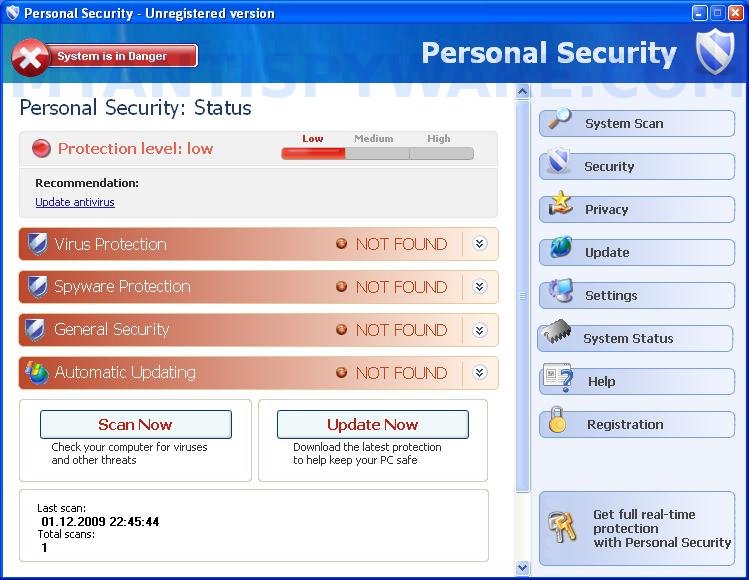
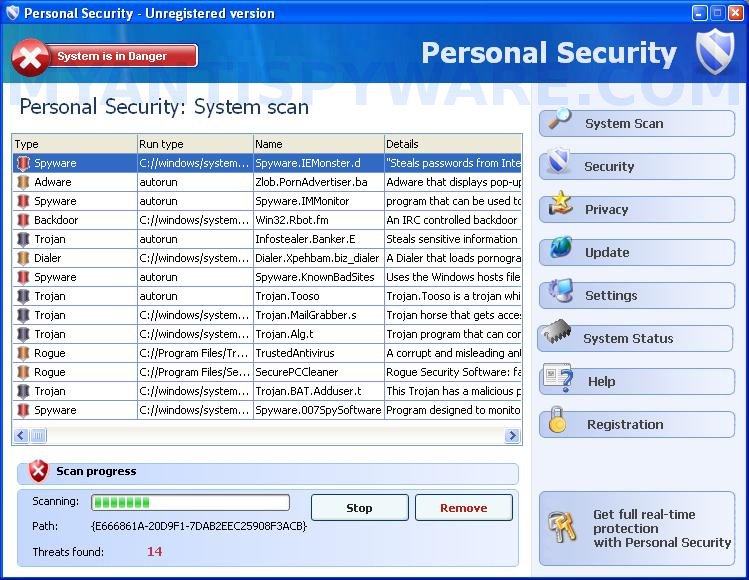
When installed, Personal Security will begin to scan your computer and list a variety of infections that will not be fixed unless you first purchase the program. All of these infections are fake and do not actually exist on your computer, so you can safely ignore them.

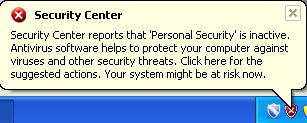
While Personal Security is running, you will be shown nag screens, notifications from Windows task bar and other pop-ups. Some of the alerts:

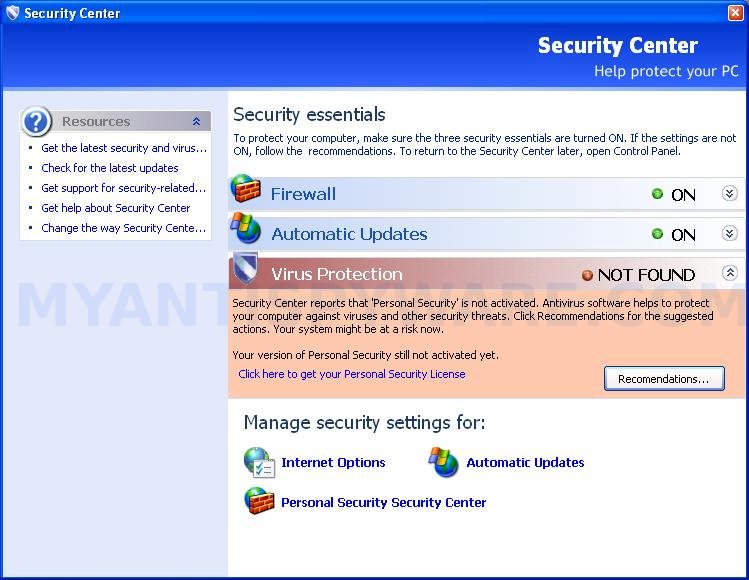
Security Center
Security Center reports that ‘Personal Security’ is inactive.
Antivirus software helps to protect your computer againts
viruses and other security threats. Click here for the
suggested actions. Your system might be at risk now.

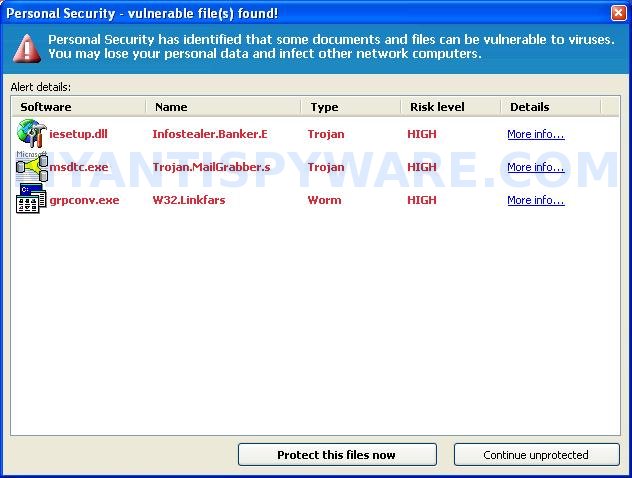
Personal Security – vulnerable file(s) found!
Personal Security has identified that some documents nd files can be vulnerable to viruses.
You may lose your personal data and infect other network computers.

Personal Security Alert!
Protect your PC from violent virus attack!

The rogue will also show fake Windows Security Center that will suggest you register Personal Security. Of course, all of these warnings and suggestions are fake and should be ignored!

As you can see, Personal Security is a scam and should be removed from the system as soon as possible. Use these Personal Security removal instructions below in order to remove this infection and any associated malware from your computer for free.

More screen shoots of Personal Security
Symptoms in a HijackThis Log

O2 – BHO: &Security Update – {35A5B43B-CB8A-49CA-A9F4-D3B308D2E3CC} – C:\WINDOWS\system32\win32extension.dll
O4 – HKCU\..\Run: [PSecurity] C:\Program Files\PSecurity\psecurity.exe

Use the following instructions to remove Personal Security (Uninstall instructions)

Step 1.

Download Avenger from here and unzip to your desktop.

Run Avenger, copy, then paste the following text in Input script Box:

Drivers to delete:
NDISRD

Registry keys to delete:
HKEY_LOCAL_MACHINE\SOFTWARE\Microsoft\Windows\CurrentVersion\Explorer\Browser Helper Objects\{35A5B43B-CB8A-49CA-A9F4-D3B308D2E3CC}

Folders to delete:
%ProgramFiles%\Common Files\PSecurityUninstall
%ProgramFiles%\PSecurity
%ProgramFiles%\PersonalSec
%ProgramFiles%\PersSecurity

Files to delete:
%WinDir%\system32\win32extension.dll
%WinDir%\system32\drivers\NDISRD.sys
%WinDir%\tasks\PersonalSec.job

You will be asked Are you sure you want to execute the current script?. Click Yes. You will now be asked “First step completed — The Avenger has been successfully set up to run on next boot. Reboot now?”. Click Yes.

Your PC will now be rebooted.

Step 2.

Download MalwareBytes Anti-malware (MBAM). Close all programs and Windows on your computer.

Double Click mbam-setup.exe to install the application. When the installation begins, keep following the prompts in order to continue with the installation process. Do not make any changes to default settings and when the program has finished installing, make sure a checkmark is placed next to Update Malwarebytes’ Anti-Malware and Launch Malwarebytes’ Anti-Malware, then click Finish.

If an update is found, it will download and install the latest version.

Once the program has loaded you will see window similar to the one below.

malwarebytes-antimalware1
Malwarebytes Anti-Malware Window

Select Perform Quick Scan, then click Scan, it will start scanning your computer for Personal Security infection. This procedure can take some time, so please be patient.

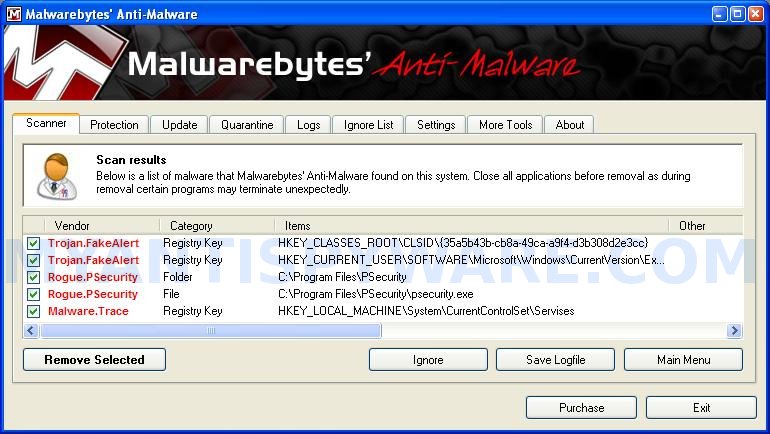
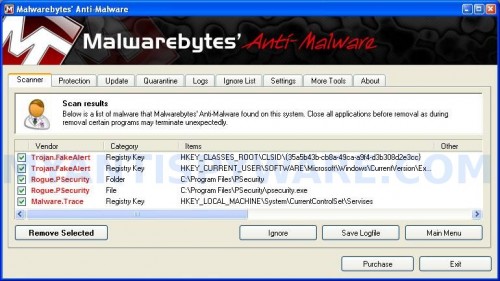
When the scan is complete, click OK, then Show Results to view the results. You will see a list of infected items similar as shown below. Note: list of infected items may be different than what is shown in the image below.
Personal_Security_remover
Malwarebytes Anti-malware, list of infected items

Make sure that everything is checked, and click Remove Selected for start Personal Security removal process. When disinfection is completed, a log will open in Notepad and you may be prompted to Restart.

Note: if you need help with the instructions, then post your questions in our Spyware Removal forum.

Personal Security creates the following files and folders

C:\Program Files\Common Files\PSecurityUninstall
C:\Windows\system32\win32extension.dll
C:\Program Files\PSecurity
C:\Windows\system32\drivers\NDISRD.sys

Personal Security creates the following registry keys and values

HKEY_LOCAL_MACHINE\SOFTWARE\Microsoft\Windows\CurrentVersion\Explorer\Browser Helper Objects\{35A5B43B-CB8A-49CA-A9F4-D3B308D2E3CC}
HKEY_CURRENT_USER\Software\Microsoft\Windows\CurrentVersion\Run\PSecurity

Share and Enjoy:

  • Print
  • Digg
  • Sphinn
  • del.icio.us
  • Facebook
  • Mixx
  • Google Bookmarks
  • Slashdot
  • Twitter
December 1, 2009 on 11:35 am | In Rogue Anti Spyware, Tutorials - HowTo | 158 Comments |


158 Comments »

RSS feed for comments on this post. TrackBack URI

  1. Thanks for this I will try it out and let you know how it goes.

    Comment by thor — December 2, 2009 #

  2. Hi I would like to say im over the moon with the help this site has given me.

    Ive been looking for a personal security remover all day found some but they required payment which felt as if they were just as bad as the virus.

    Im very happy to get things done and dusted thanks to your help and will highly recommend this site to anyone looking to get rid of personal security thanks again.

    Nathan.

    Comment by nathan — December 3, 2009 #

  3. fake? this excally pictures same one i have but i paid personal security 99.00 already it say once lifetime. and now it smooth no more snag so is that from pc tools spyware doctor scam?… pc tools was new install last Oct 29th .. should i get pay back from both?

    Comment by Vikki — December 4, 2009 #

  4. ok i have done step one butt i tryed to copy and paste what i need to putt in the Avenger and it cant find it am i suppost to copy it all or just a part of it some one please help me

    Comment by debra kennedy — December 4, 2009 #

  5. Vikki, PC Tools is legitimate security program, but Personal Security is Fake!
    If you have already purchase the program, contact your credit card company and tell them to make chargeback.

    Comment by Patrik — December 4, 2009 #

  6. debra, you need to paste all grey text.

    Comment by Patrik — December 4, 2009 #

  7. Personal Security Is tottally fake:(
    It just tries to bully you into buying its software so you can continue using the internet.

    Does programers want to scare you pretending that you have malicous code(virus)and give you the blue screen of death.
    They should be sued for selling software that really does not do anything.
    People that arent programmers or have a good understanding of programs dont know what there getting into.
    dirty cheap bastards

    Comment by Felipe — December 6, 2009 #

  8. I already remove personal security,called creditcard, my computer gettin slow…pc tools website says banned PHORONIXSOFTWARE.COM $29.90 BREEZESYSMARKET.COM $99.90

    Comment by Vikki — December 8, 2009 #

  9. Vikki, probably your computer is infected with hidden trojan/rootkit. Open a new topic in our Spyware removal forum, i will help you.

    Comment by Patrik — December 8, 2009 #

  10. I just wanted to thank you. I tried for days to get rid of Personal Security. Then I found you and BAM….gone in no time with little effort!! Thank you!!!!

    Comment by Bud — December 8, 2009 #

  11. brilliant got rid of that rubbish

    Comment by nigel — December 8, 2009 #

  12. Patrik, can u help me with that rid of hidden trojan/rootkit..pls.. thks :)

    Comment by Vikki — December 9, 2009 #

  13. I want to cancel this, I was unable to use it and I do not want to be charged with it.
    This is not a very good site to find help on. PLEASE contact me NOW as to how I can get a FULL refund!!!

    Comment by cheryl mace — December 10, 2009 #

  14. Vikki,
    yes, please make a new topic in our Spyware removal forum.

    Comment by Patrik — December 11, 2009 #

  15. cheryl, i do not sell any programs here. All instructions are free and both programs (Avenger and Malwarebytes Anti-malware) are free too!

    Comment by Patrik — December 11, 2009 #

  16. this seem a zeroday virus attack..i also infected with this mystery and cruel virus..and i believe many of them that infected are going to reformat their pc..Lwhen my comp was infected with this virus..its always blocked my internet explorer and tell me that my computer is infected and ask for buying fake antivirus…and my P**da anti virus seems cant detect this..event i update it regularly..others problem is when i try to restart my comp. on normal way,i couldnt get to my desktop..only desktop screensaver is appear while my desktop and taskbar is gone..i had try many ways to solve it..go in safe mode again and again..but not work..then i get back to normal ways to start..then i do CTRL+ALT+DELETE..on windows task manager > click file > click (new task run > browse > then i go to desktop >right click on my network..(at first i want to try to connect to internet..then i click on properties..so on (Open) bar..then suddenly My desktop is Visible again..YAy!!..then i go search for that Virus (inst_257.exe )<<the real name..or it can be total security,personal security,cyber security or else..I remove it..connect to internet..when i connect to google for finding a solution..my i.e page is blocked by the virus..then i push back button..and from that i download 2 antispyware..malwarebytes anti malware and spydoctor full crack..hehehe..I HAD TO DO THAT for some reason and i know its illegal..malwarebytes anti malware had gives many detection of the virus..but the rest of the virus i found it using spware doctor..and..This virus also infected and damaging my hard disk partition volume and infected on many files..Luckily i had software that can fix this to previous condition before the time of infections..Also can use ur anti virus if have backup on it..but make sure the time and date is before the infection..Fuh!!I Just cant imagine if i lost my data and all of important software that i collect for several years gone that easy…

    Comment by ryexxx21 — December 12, 2009 #

  17. Thank you so so much was tricky, only cos Im an amatuer, Thank u thank u thank u

    Comment by Karen — December 12, 2009 #

  18. Thanks a lot guys!! Where do I donate my thanks!!

    Comment by Mick — December 14, 2009 #

  19. Thank you Patrik, my problem is solved.

    Comment by Noah — December 16, 2009 #

  20. Hi. I have contracted this personal security virus through facebook and it has started sending links to other people on my facebook with the virus attached. I have started downloading avenger but when i click on it to run it the warning that it comes up with worries me a bit. It says that it is a kernal level windows driver designed to remove highly persistant malicious software. Please use only under qualified supervision. And there is no warranty and safety cannot be 100% guaranteed. I am a little anxious to run it as I have things on my computer that I do not want to lose!! Please help me!!

    Comment by Laura — December 17, 2009 #

  21. Laura, try skip first step.

    Comment by Patrik — December 17, 2009 #

  22. Hi its me again! I’ve tried missing the 1st step and going straight to the 2nd step but when i do the scan it comes back saying that no malicious items were found but personal security is still there. Should i just try the whole thing starting with the avenger step and then the anti malware step? Thanks for your help!

    Comment by Laura — December 18, 2009 #

  23. Laura, then you have two following variants:
    1. try first step
    2. ask fo help in our Spyware removal forum.

    Comment by Patrik — December 18, 2009 #

  24. Hi Patrik. I’ve run the whole thing and the malware found a worm and deleted it but i still have the problem. It now keeps wiping my desktop about a minute after i log on. How long should the avenger step take as it only took 2 seconds on my computer? which topic should i join on the spyware removal forum?
    Thanks

    Comment by Laura — December 19, 2009 #

  25. I am able to download avenger to my desktop and unzip but when I run I don’t get ANYTHING. HELP

    Comment by Stephanie — December 19, 2009 #

  26. Laura, you need open a new topic in Spyware removal forum.

    Comment by Patrik — December 20, 2009 #

  27. Stephanie, probably a malware blocks Avenger. Follow these steps.

    Comment by Patrik — December 20, 2009 #

  28. I have tried the avenger and Malwarebytes Anti-Malware but Personal Security is still there. there were some files avenger couldn’t find. Please help this fake Anti-Virus is very annoying.

    Comment by Frank — December 21, 2009 #

  29. Frank, ask for help in our Spyware removal forum.

    Comment by Patrik — December 22, 2009 #

  30. hey…i tried the first step and my machine was continuously getting restarted…i tried getting into BIOS, but nothing helped. Please advice ASAP..thanks

    Comment by gomsi — December 22, 2009 #

  31. Worked a treat thanks tryed all the others but did not work recommend this.

    Comment by sammy — December 23, 2009 #

  32. gomsi, try boot your PC in the last good configuration mode.

    Comment by Patrik — December 24, 2009 #

  33. Hey, fantastic solution! Very helpful site, great work! :D

    Comment by roo — December 25, 2009 #

  34. I did not get my refund for soft ware. Who do I contact. I was promised a full refund.

    Comment by Robert Gfroerer — December 26, 2009 #

  35. I am looking for contact number for Breezeasymarket

    Comment by Robert Gfroerer — December 26, 2009 #

  36. tried many solutions to this sh1tty problem, but the virus personal security wont let me download any files to comp-so cant finish step 1, ne ideas wud be appreciated

    Comment by lee86 — December 26, 2009 #

  37. I also got this disaster software on my system and could not remove it

    The only way i could do it was to ring McAfee and they did it remotely for a price of $159.00. they cleaned the computer and got it working again. If you want to abuse the company for the software their email is
    support@premium-mail-support.com.

    This should be traced and the people behind it prosecuted for this pain in the butt software

    Comment by virushater — December 28, 2009 #

  38. ‘Followed your clear instructions and was rid of this horrible software in exactly 3 minutes, including the reboot time! Thank you so much.
    Where can I report these bastards?

    Comment by pdtlbt — December 29, 2009 #

  39. I tried removing the Personal security by deleting the “uninstalled Per Sec” file I found under “my documents”, then I restarted my computer, had to click “safe mode” to restart windows. It worked for 5 min and I had to reboot, now Windows won’t start. After reading more about this virus removal, I realised that I should have remove more files after the first re-start. Any ideas on how to get the windows to start? Thanks!

    Comment by Katya — December 29, 2009 #

  40. NICE..!..

    Thanks for the instructions. It was difficult without this..

    Geir

    Comment by geir — December 29, 2009 #

  41. Well,, I saw he othr coments..
    and I would lik to add.

    Do all this in: windows securemode, with network connections.

    I had the same problems, but it worked in secure mode…

    ;o)

    Comment by geir — December 29, 2009 #

  42. What does Avenger do? I stopped the processes with DOS command, and then ran Malware, but it did not remove it, as it still shows up on my Start Menu.

    Comment by Ken — December 30, 2009 #

  43. Katya, try boot your computer in the Last good configuration mode.

    Comment by Patrik — December 30, 2009 #

  44. Avenger should remove core component of this malware.

    it still shows up on my Start Menu

    Look like its a shortcut. Remove it manually.

    Comment by Patrik — December 30, 2009 #

  45. personal security has taken over my computer and freezes everything it won’t let me uninstall it through your steps. HELP PLEASE!

    Comment by lizzie — December 30, 2009 #

  46. Hello!

    I came across this site, as I googled for a solution of getting rid of this malicious malware „Personal Security“. I thought and hoped it might be a great help at last.

    Well, after having read all the comments and the procedures of how to eliminate the malware, I tried to apply the small programs, which I had downloaded using my desktop computer (Windows XP)

    Now my son’s notebook PC, Windows Vista installed, it seems to me, has been totally, infected, contaminated and taken over completely by this malware. Since it blocks from surfing in the internet, I had to use my own Desktop , as I mentioned in the first paragraph, to download the “rkill.com”,mbam-setup.exe”, “spyware-doctor.exe”, and “avenger.zip”, in the hope that I can copy and paste or transfer them into the Notebook.

    Every attempt to copy and paste and execute them in the Notebook, however, failed without exception.I wondered that Personal Security hinders all the necessary operations really hard not to be gotten rid of.

    Every time I tried to install “rkill.com” or “mbam-setup.exe” or “spyware-doctor.exe” and “avenger.zip, a so-called permission message pops up one after another, I naturally allow myself to proceed to go on in the right direction, but in vain.

    I am really wondering and debating myself if there is a real solution for a Windows Vista computer which had been infected and numbed by Personal Security. Every operation I tried, especially installing the said small programs or trying to go into the Registry editor in the hope of deleting the Personal Security related files, I needed each time a permission, which was turned down probably by Personal Security, so that the malware can stay intact within the Notebook (?).

    I am at a loss right now for a right solution of eliminating Personal Security. The solutions offered in the website seem to apply only to Windows XP computers?

    Comment by Hiro — December 31, 2009 #

  47. lizzie, ask for help in our Spyware removal forum.

    Comment by Patrik — January 1, 2010 #

  48. Hiro, shold work on Vista too. Probably your computer is infected with a new version of the rogue. Ask for help in our Spyware removal forum.

    Comment by Patrik — January 1, 2010 #

  49. The program doesn’t let you download any software. We sent a message to the company that created Personal Security on the “customer service” link that we would track them down and sue them for attacking our kids computer. They emailed this solution and it worked in less than one minute. We still downloaded and ran an antispyware program afterwards to make sure nothing remained. This was their response which worked:

    “Dear customer,

    Thank you for contacting Customer Support Center.
    Please follow my instructions to uninstall the program:
    Paste the following string to Windows Explorer address bar and execute it (Press Enter key):
    C:\Program Files\Common Files\PSecurityUninstall\Uninstall

    or

    1. Open My computer, choose Disk C;
    2. Find Program Files=>Common Files=>PSecurityUninstall=>Uninstall
    3. Run the file Uninstall.lnk

    After that our product will be removed.Sometimes it takes more than one try to remove the product due to temporary technical difficulties, so please try to do it several times.
    If you have any questions concerning our software, please contact our Customer Support Service.

    With best wishes,

    Customer Support Team

    Comment by Michael Ditkowsky — January 3, 2010 #

  50. After cleaning this virus off I still can’t get IE to work. I have went to tools-internet options-connections-LAN settings and unchecked proxy settings, but IE will still not work. Any help would be appreciated.

    Comment by Jason — January 4, 2010 #

  51. k, sooo i accidently ended up putting personal security on my computer as well and when i entered the input script and pressed execute, it says there is an error but it is succesffuly completed? i dont understandd and ir eaaly want this off my computer cuz its all messed up now soo if u could please message me back and tell me what to do id love that a lot. thanks :)

    Comment by justine — January 4, 2010 #

  52. incase u need to knoww
    the error message says:
    ERROR: Could not open RunOnce key to register cleanup.
    Abortinf execution! (error0: the operation completed succesfully)
    ahah thanksss

    Comment by justine — January 4, 2010 #

  53. Jason, IE only does not work ? or firefox too ?

    Comment by Patrik — January 5, 2010 #

  54. justine, try run Avenger from Safe mode.

    Comment by Patrik — January 5, 2010 #

  55. Thank you so much for posting this, it helped me get rid of personal security which was blocking my computer and driving me insane.

    Comment by Cath — January 5, 2010 #

  56. Thanks a lot for these instructions! It worked fine in Safe mode. Cheers.

    Comment by johann — January 7, 2010 #

  57. Thaaaaaaaanksss alooottt,,it works and my pc now is FAST and CLEAN ,,THANKKKKKKKKKKKKKKKKKKKKKKKKKKS :) :)

    Comment by Shehab Gammoh — January 8, 2010 #

  58. I cant get the Malware to run the scan. Everytime i open the software it only stays open for a few seconds and then shuts down automatically. Any suggestions?

    Comment by Jason — January 9, 2010 #

  59. Jason, you have done first step ? If yes, and MBAM still won`t run, then ask for help in our Spyware removal forum.

    Comment by Patrik — January 9, 2010 #

  60. hi guys…thnx alot for the inf…was getting very annoyed at this personal security crap..downed malwarebytes anti malware and it dissapeared…well at least i think it did

    Comment by markus — January 10, 2010 #

  61. This worked great for me! Thank you!

    Comment by Dani — January 10, 2010 #

  62. hey someone help me i can’t access malwarebytes to remove personal security

    Comment by jieo — January 11, 2010 #

  63. jieo,if you can`t run Malwarebytes after using Avenger, then ask for help in our Spyware removal forum.

    Comment by Patrik — January 11, 2010 #

  64. OMG – After HOURS (like 13) of trying to get “Personal Secuirty” removed – to include purchasing Spyware Doctor and it didn’t do it – THIS worked. Thank you, thank you, thank you!!!!!!!!!!

    Comment by Von — January 11, 2010 #

  65. Sweet site..! That personal security BULLSHIT was doin my freakin head in..!Site worked a treat..! Definitely recommend this to anyone having this very annoying problem..!

    Comment by Jazzy B — January 11, 2010 #

  66. Thanx for the help it did the job. The only instructions that have worked for me after hours of trying other sites.

    Comment by Martin — January 12, 2010 #

  67. the only instrucions that have worked for me after hours of trying other sites

    Comment by Martin — January 12, 2010 #

  68. I have tried this solution starting with step one and never got a box to paste the suggestion into. My computer has crashed three times just tring to do step one. It is 230 am PST and I am doint step one for the fourth time and it takes a really long time.

    Comment by bfwiaaj — January 13, 2010 #

  69. PS has swiped out my desktop, CD and DVD drives which means I cannot read the disc that I downloaded the links to and rhank goodness I can get through now b/c I keep getting blocked from your site too.

    Comment by bfwiaaj — January 13, 2010 #

  70. Am writting to let you know that i am not using this software now. So it is better to refund my money. After I paid you you decided draw money twice from my account. I don’t like the software now.
    Thanks

    Comment by Bosco Achini — January 13, 2010 #

  71. I have already install new window that caused me.
    Thanks

    Comment by Bosco Achini — January 13, 2010 #

  72. Bosco Achini, i don`t sell any programs here. If you have purchased anything from google ads, then you should ask a software support for an information “how to make a charge back”.

    Comment by Patrik — January 13, 2010 #

  73. i’m FRUStrated..i thought this Personal security is legit that goes with windows program..now they block all the pages i want and want to charge ME…Help..!!!
    I got ear ache now my pc are aching me to anger…
    which one are FREE and legit here that requires no Payment to show me it’s real?

    Comment by sunjay — January 13, 2010 #

  74. I have two words for the help I received in this topic–YOU ROCK!!!! My dad had a corrupted email file that I was helping him find a solution to, until I had to go out of town this past weekend. That was the point he downloaded this awful Personal Security malware. I am totally a “front end user” but was able to follow your instructions and, with perseverance, remove it from his pc. People who try this should be warned, the malware will attempt to block this site and I imagine any other “helpful” site. I continued to click “back” and hit the link for this site and click “back” again until this page did finally load. I also had trouble after running the script in avenger with the reboot. Again, with perseverance (and even several “blue screens of death”!!!!) I was able to reboot and run the MBAM. Thank you, thank you, thank you!!!

    Comment by Mary — January 13, 2010 #

  75. Thank You, Thank You, Thank YOU!

    Comment by Jonathan — January 13, 2010 #

  76. I am able to download both Avenger and Hijack This but once downloaded, I can’t run either program. Please Help!

    Comment by Jenn — January 13, 2010 #

  77. Awesome, this is the only thing that worked on my mom’s computer. Thanks for the information…it was awesome.

    Comment by Michael Morrison — January 13, 2010 #

  78. After rebooting a few times I was able to install everything and get rid of the virus. Thanks for all the info. Your site is great!

    Comment by Jenn — January 13, 2010 #

  79. I tried numerous times (avenger, rkill, etc..) to get rid of the Personal Security software with now luck. Then I read the comment posted by Michael Ditkowsky AND IT WORKED THE FIRST TIME. Thanks Mike…

    1. Open My computer, choose Disk C;
    2. Find Program Files=>Common Files=>PSecurityUninstall=>Uninstall
    3. Run the file Uninstall.lnk

    After that our product will be removed.Sometimes it takes more than one try to remove the product due to temporary technical difficulties, so please try to do it several times.
    If you have any questions concerning our software, please contact our Customer Support Service.

    With best wishes,

    Customer Support Team

    Comment by Michael Ditkowsky — January 3, 2010 #

    Comment by Barry Torres — January 13, 2010 #

  80. Jenn, re-donlowad them, but in save dialog, rename avenger.exe to explorer.exe and press Enter.
    Try run it.

    Comment by Patrik — January 14, 2010 #

  81. I was able to get this to work, but I was having the same issue as others not being able to run the mbam-set.exe. You have to start your computer in safe mode (f8)then run it. Problem is I could even get to a web page to download. I had to go to another computer and use a usb drive to drop it on my desktop. To run in safe mode you start the computer and during start hit the f8 key. This wasn’t working for me because I was on a HP proliant server and for whatever reason it wouldn’t work. So I logging on to window, went to the run command off the menu and ran msconfig at the run command prompt. This start the System Configuration Utility. I went to the Boot.ini tab and checked off the safeboot option. You’ll get a prompt to reboot. when you do you’ll be in safe mode and can then run the mbam-setup.exe. This worked for me. Good luck!

    Comment by Lili — January 15, 2010 #

  82. Thank you, thank you, thank you. This program does not uninstall, it will not let you go online, it will not let you clean the disk, and it will not let you go into Task Manager and end the program. It takes the entire computer over. I took the battery out of my laptop, put it back in, booted up in safe mode, deleted the Personal Security files I could find, it helped, but it still would not let me go online. Wow, without your help, I had worked on this since early this morning, was pulling my hair out. Thank you so much for providing this service to people.

    Comment by Joan — January 15, 2010 #

  83. CANCEL ORDER #ID210770-iP
    Registration # B3C343FC-28AC-4545A371EBF8AF5
    PURCHASED 1-3-2010 COST $ 29.95
    iSSUE CREDIT TO MY CREDIT CARD.

    Comment by Richard A George — January 16, 2010 #

  84. thanks barry tottes that worked 1. Open My computer, choose Disk C;
    2. Find Program Files=>Common Files=>PSecurityUninstall=>Uninstall
    3. Run the file Uninstall.lnk

    Comment by carl keegan — January 16, 2010 #

  85. Running the Avenger program worked. Had to save it to the desktop and run in Safe Mode because PC Security wouldn’t let any programs run in normal mode.

    This website saved my old man’s laptop.

    Thanks

    Comment by Josh P — January 17, 2010 #

  86. I have a computer with the Personal Security problem. I have tried to follow the directions to remove it but with no success. I am not able to install the software to remove the program. Any help would be appreciated.
    Thanks,
    Don

    Comment by Don — January 17, 2010 #

  87. Don, try re-download Avenger, but in the Save dialog, rename avenger.exe to iexplore.exe and save it to desktop.
    Run it and follow the above steps.

    Comment by Patrik — January 18, 2010 #

  88. really thanx mates!!!

    cant be more grateful

    Comment by sof — January 18, 2010 #

  89. Hi tried the comment posted by Michael Ditkowsky and that worked great, thanks for your info great site
    greg

    Comment by greg — January 20, 2010 #

  90. hey, I cant download avenger coz after i download it nothing appears or happens later. my internet is also slowed down.any help will be appreciated.

    Comment by Daniel — January 20, 2010 #

  91. Daniel, if Avenger won`t run, try rename it (use any random name) and run once again.

    Comment by Patrik — January 20, 2010 #

  92. Ive got Personal Security removed …however i still dont have an internet connection?

    Comment by Paul — January 20, 2010 #

  93. nevermind…just uninstalled the connection and rebooted… all good now!

    Comment by Paul — January 20, 2010 #

  94. Thank you all for all the good info!! my sons netbook had that damn personal security on it, and i couldnt get anything to download, it stopped it!! it wouldnt run the antivirus program nothing! the only way i could get it removed was threw my computer/program files, etc… U ROCK!! THANK YOU!!

    Comment by liz — January 22, 2010 #

  95. I can’t get avenger to unzip. Help.

    Comment by Melanei — January 22, 2010 #

  96. hey i just want to know does rebooting my computer mean that all my data would be gone?

    Comment by Janelle — January 22, 2010 #

  97. Melanei, right click the file, then select Extract all. Follow the prompts. If it does not work, then try download and use WinZip.

    Comment by Patrik — January 23, 2010 #

  98. Janelle, Avenger and Malwarebytes will only remove malware files.

    Comment by Patrik — January 23, 2010 #

  99. i can’t get Avenger to open after i downloaded it. I went to Hijakthis and the download there will not open. I need this removed from my system because it is driving me crazy and i can’t get my homework done. thank for andy and all advice.

    Comment by andrea — January 25, 2010 #

  100. EDITED VERSION
    I just finish helping a friend get rid of this. No programs seemed to work on it. Run/Regedit, mbam. rkill, hijackthis wouldn’t work in normal mode
    This is what finally worked
    Safemode/Command prompt/regedit/Delete the Following
    HKEY_CURRENT_USER\Software\Microsoft\Windows\CurrentVersion\Run “PSecurity”
    HKEY_LOCAL_MACHINE\SOFTWARE\Microsoft\Windows\CurrentVersion\Internet Settings\5.0\User Agent\post platform “WinTSI
    I could then clean it up with hijackthis

    Hope this helps

    Comment by Mike — January 25, 2010 #

  101. andrea, try re-download Avenger, but before saving, rename avenger.exe to explorer.exe and click Save button.
    Run it.

    Comment by Patrik — January 25, 2010 #

  102. Hi, I can’t download anything cause personal security won’t allow me to. It also isn’t allowing me to just uninstall. Any ideas?
    Thanks Tania

    Comment by Tania Johnston — January 27, 2010 #

  103. Tania, use another PC to download Avenger and MBAM, then move them to infected PC using a flash disk or cddisk.

    Comment by Patrik — January 28, 2010 #

  104. why does my laptop keep shutting down and restarting on its own (while i’m working on my laptop). pls help. thanks.

    Comment by calvin — January 30, 2010 #

  105. Thanks so much for the tips! Worked like a charm.
    It’s noow 3:20AM so I can go to bed finally! What a nasty pain the the A^*^* ‘Personal Security’ is!

    Thanks again!

    Comment by Kay — January 30, 2010 #

  106. calvin, ask for help in our Spyware removal forum.

    Comment by Patrik — January 30, 2010 #

  107. i couldn’t get rid of this annoying virus thing ‘personel security’ or wot ever its called it does my head. i am now system restoring my laptop i hope it works or im gonna cry. i tried to download the spywere removal but i can’t open it. a warning comes up saying there is a problem with the the program it won’t open!! i can’t even open my task manager. and my anti virus program doesn’t detect it. wot sort of annoying virus is this!! grrr! please some on help me get rid of this f***ing program

    Comment by helen — January 30, 2010 #

  108. yeah it worked!!! its not on my system anymore. but i don’t know if i should download the avenger thing. i checked it on programs and feature! yeepeeeeeeee. everything is back to normal now.

    Comment by helen — January 30, 2010 #

  109. KEEGAN?? THANK’S A MILLION!! I HAVE BEEN TRYING TO GET RID OF THAT PAIN IN THE A$$ FOR 2 DAYS…LOL! That is the simpliest way to get rid of it. I have never been so frustrated and irritated. Thanks, again!! To those interested…read keegan’s post on january 16th, 2010. I followed those instructions and “wha la” LATER SUCKER!!

    Comment by michelle — February 1, 2010 #

  110. Michelle of 2/1/10 – Thanks for sending me to Carl Keegan’s 1/16/10 comment. Worked Perfectly First Time! Thanks Bunches Carl Keegan & Barry Tottes!!!
    Here is their fix:

    thanks barry tottes that worked 1. Open My computer, choose Disk C;
    2. Find Program Files=>Common Files=>PSecurityUninstall=>Uninstall
    3. Run the file Uninstall.lnk

    Comment by carl keegan — January 16, 2010

    Comment by Sharon Raab — February 3, 2010 #

  111. I have tried all of your suggestions on my desktop and I can’t get rid of the Personal Security. I did the uninstall and it said it was successful, but I’m still getting the pop ups and I still can’t get to the internet. I went into the registry and none of the folders and/or files are listed. I went into safe mode and that didn’t seem to help either. I’m at a loss and really need some help. My desktop is still running XP. Don’t know if that makes any difference.

    Comment by Skeeter — February 5, 2010 #

  112. Skeeter, if the above instructions does not help you, then ask for help in our Spyware removal forum.

    Comment by Patrik — February 6, 2010 #

  113. THANK YOU! Worked great! Highly recommend this sight!!

    Comment by Grandedog — February 6, 2010 #

  114. ive downloaded avenger and unzipped it onto my desktop but as i did that personal security popped up and said a virus was attacking my desktop, now none of my files are showing up on the desktop. I cant get into avenger now and so im pretty much stuck can anyone help me please?????

    Comment by Monique — February 7, 2010 #

  115. just to echo on whats been said already, thank you very much for this site its good to know there are some decent people online who are there to help when crap like Personal security is around. If you were local id buy you a drink! Thanks again
    Anthony

    Comment by Anthony — February 10, 2010 #

  116. THX GUYS IM SO HAPPY THANKS FOR ALL THX THX THX I CANT FORGOT THAT I FIXD MY PC THX!!!!

    Comment by anti spam — February 12, 2010 #

  117. You guys are great !!!!!!!!!!!!!!Thanks !!!!!!

    Comment by andy — February 13, 2010 #

  118. Hey thanks so much for this. We have spent hours today trying to get rid of that horrible virus with no luck until we followed ur instructions. Thank you

    Comment by Becca — February 13, 2010 #

  119. The program doesn’t let you download any software. We sent a message to the company that created Personal Security on the “customer service” link that we would track them down and sue them for attacking our kids computer. They emailed this solution and it worked in less than one minute. We still downloaded and ran an antispyware program afterwards to make sure nothing remained. This was their response which worked:

    “Dear customer,

    Thank you for contacting Customer Support Center.
    Please follow my instructions to uninstall the program:
    Paste the following string to Windows Explorer address bar and execute it (Press Enter key):
    C:\Program Files\Common Files\PSecurityUninstall\Uninstall

    or

    1. Open My computer, choose Disk C;
    2. Find Program Files=>Common Files=>PSecurityUninstall=>Uninstall
    3. Run the file Uninstall.lnk

    After that our product will be removed.Sometimes it takes more than one try to remove the product due to temporary technical difficulties, so please try to do it several times.
    If you have any questions concerning our software, please contact our Customer Support Service.

    With best wishes,

    Customer Support Team

    Comment by barry — February 13, 2010 #

  120. cannot get avenger to unzip, can you help???

    Comment by rebecca — February 13, 2010 #

  121. Rebecca, right click to Avenger.zip and select Extract All.

    Comment by Patrik — February 14, 2010 #

  122. Hi, i had been infected with this personal security thing too… my desktop icons cant be seen but wallpaper still thereand i cannot actually run any program beside ie, and my computer… i am using windows vista and i tried downloading avanger but the program do not seems like it’s running after the download i unzip but it do not pop out any program basically i cannot uninstall it ! HELP !

    Comment by Leo — February 17, 2010 #

  123. Perfect. Thanks so much!

    Comment by dd's — February 17, 2010 #

  124. Leo, rename Avenger.exe to myapp.exe and try run it again.

    Comment by Patrik — February 17, 2010 #

  125. thank youuuuuuuuuuu! BIG HELP!

    Comment by diane — February 24, 2010 #

  126. Aww man.Thx, this was quite a nasuance.Best wishes ^^

    Comment by Adayy — February 25, 2010 #

  127. I am a bit worried. Should I trust Avenger and Malware Byte?

    Comment by Fred Karamagi — March 1, 2010 #

  128. Fred, you can trust them.

    Comment by Patrik — March 1, 2010 #

  129. The instructions for removal works!!!! Thanks!!!!

    Comment by Richard — March 1, 2010 #

  130. I thought this was just another “catch”. Thank you for the help provided through this webpage!!!!

    Comment by Carlos — March 3, 2010 #

  131. Thank you!

    Comment by Sam — March 5, 2010 #

  132. thanks very much. the pop up came just as i was clicking and unfortunately i pressed install. Gone now thanks to you guys appreciated.

    Comment by vince — March 6, 2010 #

  133. lISTEN i DID DON WANT TO PURCHASE SOME SOFTWARE i DID NOT HAVE THE MONEY BUT COULD NOT GET OUT OF IT. YOU TOOK 29.90 AND THE granosoftshop.COM TOOK OUT 79.90 ON 01/11/2010. i DESPERATELY NEED THESE MONEY BACK THE COMPUTER IS SHOT AND i NEVER ORDERED THIS AND CAN’T GET TO YOU PEOPLE ANY WAY. lISTEN i WAS JUST DIAGNOISED WITH lUKEMKIA AND i NEED ALL THE MONEY i CAN GET. THIS CAused 100.00 of dollars in Over draftd. Will you bPlease reimburse me. Mt Number is 414-331-6884
    Please Lois Dominiak I need help where do I go?

    Comment by lois Dominiak — March 8, 2010 #

  134. Alhamdulillah it is working , i remove it , thank you ,,

    Comment by G.Ashraf Ali — March 9, 2010 #

  135. lois Dominiak, i can`t help you here, because I do not have any contact with “Personal Security” virus writers.

    Comment by Patrik — March 9, 2010 #

  136. Thank you Michael D…your solution worked within seconds!!

    Comment by andrea — March 18, 2010 #

  137. Avenger is so awesome! Thank you SOOO MUCH!

    Comment by Candace — March 19, 2010 #

  138. Same here, I tried numerous times to get rid of the Personal Security software with now luck. Then I read the comment posted by Michael Ditkowsky AND IT WORKED THE FIRST TIME UNDER WITH MY PC UNDER SAFE MODE. Thanks Mike…

    1. Open My computer, choose Disk C;
    2. Find Program Files=>Common Files=>PSecurityUninstall=>Uninstall
    3. Run the file Uninstall.lnk

    Comment by Victor L — March 22, 2010 #

  139. Dear Friends, thank you for posting the fix for PersSecurity malware. I ran Avenger, followed the instrux, malwarebytes, etc. It worked! I couldn’t be happier. Thank you. ~ Brian D. Baker

    Comment by Brian D. Baker — March 25, 2010 #

  140. Patrik, Recently removed “Security Center” malware from a PC at work. Our users don’t have admin rights. How did this install without admin rights? FYI, “security center” appeared in start menu for all users. Thanks.

    Comment by AnthonyH — March 26, 2010 #

  141. AnthonyH, a hardisk of the computer is formatted in NTFS or FAT ?

    Comment by Patrik — March 26, 2010 #

  142. hi need your help please where do i find input script box. thankyou

    Comment by lana — March 30, 2010 #

  143. “input script box” is the big text area in the Avenger window.

    Comment by Patrik — March 30, 2010 #

  144. can i remove the personal security with another computer. My internet is not working

    Comment by gabbywicks — March 31, 2010 #

  145. gabbywicks, anyway you need download the suggested tools above, then move them to your infected PC using a flash or cd disk, then follow the steps above.

    Comment by Patrik — April 1, 2010 #

  146. Awesome….truly great !!!!!
    it works
    n 1 more suggestion from me……incase dis personal security has disabled all ur applications and nuthin is runnin (jus like my case) start in safe mode n do the above process…!!!!

    Comment by Kunal — April 12, 2010 #

  147. Thanks guys! This worked a treat for me, i will be reccomending your site to everyone i know. I had been trying to remove xp security for 24 hours,to no avail, then came across your great site – what a godsend!

    Comment by jacci — April 27, 2010 #

  148. Boy, this Personal Security issue was not fun. It was blocking everything on my desktop, and the ability to download-run programs, access websites, etc to fix the situation. It even blocked my anti-virus security software. I read one of the posts here which suggested the following:

    1. Open My computer, choose Disk C;
    2. Find Program Files=>Common Files=>PSecurityUninstall=>Uninstall
    3. Run the file Uninstall.lnk

    To my absolute amazement, and major relief it worked with no issues what so ever. It was like my computer came back to me the way it was before this issue happened within seconds.

    Thank you thank you thank you to all who provided this suggestion and feedback!! I am extremely grateful!! If anyone is reading this before they try any steps to remove Personal Security, I highly recommend you trying this first! It will save you a boat load of time!!

    Comment by Megan — May 1, 2010 #

  149. I just wanted to add something to my previous post. Initially, before PS blocked my anti-virus security software, I did a full system scan and my security software detected it. I followed their suggestion to clean my computer and it said it was gone. However, PS was still showing up on my computer, and it started really causing problems. I then did the steps I mentioned in my previous post. So not sure if it was a combination of doing both things, or if I could have just done the steps. I guess if it were to happen again I would do both just to be sure.

    Comment by Megan — May 1, 2010 #

  150. Thank you Mike Ditkowsky you are the only one to hit it on the head I wasin big trouble til I followed your instructions and Viola off it came and it had me good.

    Comment by Timothy Febbie — May 9, 2010 #

  151. thank you thank you I did it I remove the beast from my computer, of course I updated your program and now we are free of viruses and bugs…
    thanks for your brilliant instructions…

    Comment by barbara — May 11, 2010 #

  152. Hello!

    I have a VERY BIG PROBLEM!!
    After installing Avenger and copy the text and stuff, I clicked Yes at “Reboot now?”. Then my computer restarted itself, but the only thing I saw then was a screen of Person Security. I didn’t saw a task bar or desktop on my screen, only the screen of Person Security. Nothing helps!

    PLEASE HELP ME! :(

    Thnx!

    Comment by Gertjan — May 13, 2010 #

  153. Gertjan, press CTRl + ALT + DEL. Task Manager opens. Click File, New task. Type explorer and press Enter. You icons and taskbar should back. Try run Malwarebytes and perform a fresh scan.

    Comment by Patrik — May 15, 2010 #

  154. thank you so much, it took a bit of working out only coz im an amatue. but i work and thats the most important thing. wow… i’m glad i didn’t throw the laptop out the window! it was touch and go there for a while!!
    cheers jess

    Comment by jess — May 17, 2010 #

  155. Should this be done in safe mode

    Comment by Ben — May 19, 2010 #

  156. I found that I had to stop process ‘psecurity’ before the virus would allow me to install avenger. After that no problem

    Comment by Andy — May 20, 2010 #

  157. Ben, you can use Normal mode.

    Comment by Patrik — May 20, 2010 #

  158. I went thru same nightmare with personal security. The easy fix is go into program files and find the common folder and you will find the uninstall personal security file. Hope you idiots who created this PSECURITY got your rocks off messin with people. I do free bisecotomies for people like you! Let me know!

    Comment by Rick — May 23, 2010 #

Leave a comment

XHTML: <a href="" title=""> <abbr title=""> <acronym title=""> <b> <blockquote cite=""> <cite> <code> <del datetime=""> <em> <i> <q cite=""> <strike> <strong>


My Anti Spyware - Free antispyware programs and Spyware Removal Instructions.