![]() | Do you have pop-ups or your computer infected with trojan or spyware ? Learn how to ask us for help, click here! |
How to remove Antivirus Pro 2010 (Removal instructions)
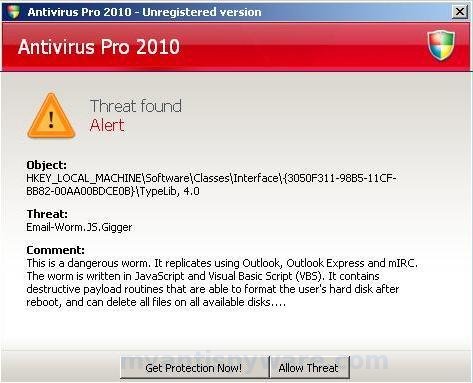
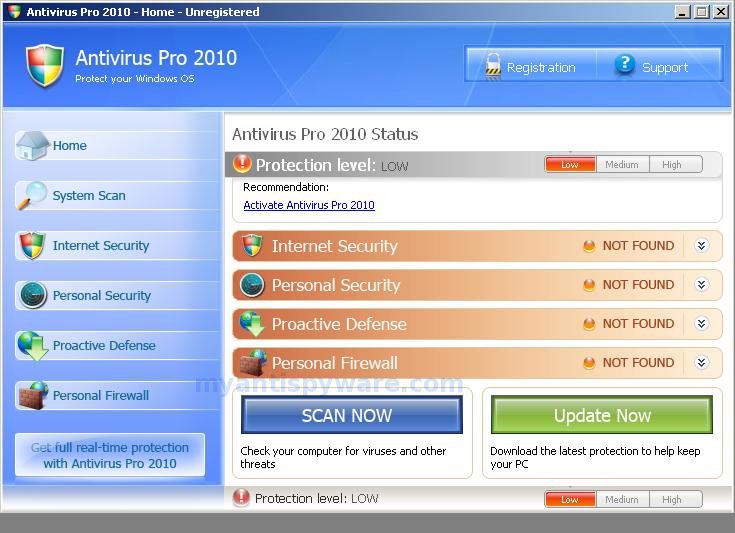
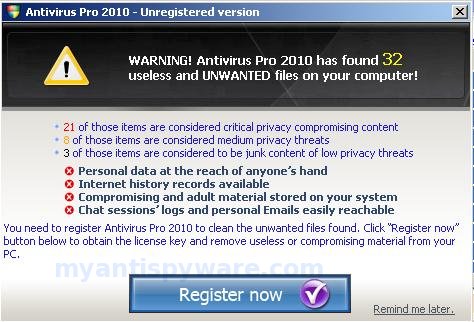
Antivirus Pro 2010 is a fake antivirus program (rogue antispyware software). Antivirus Pro 2010 uses system warnings and alerts, pop-ups, false scan results in order to trick you into buying the software. The scareware does not offer any protection to computer!
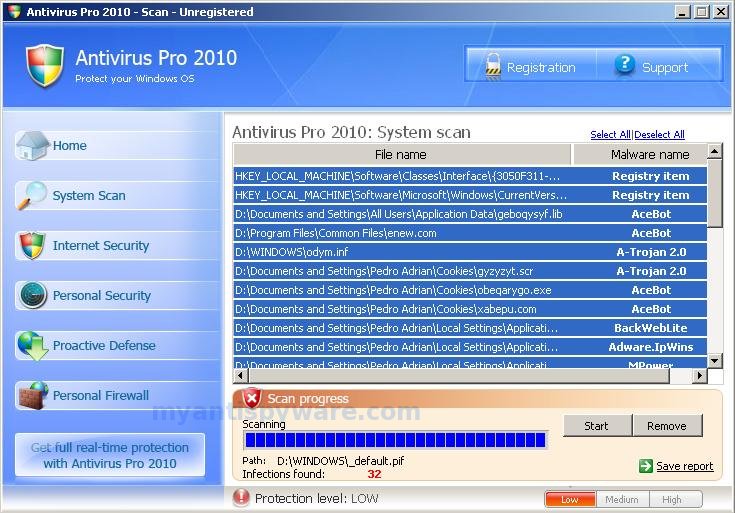
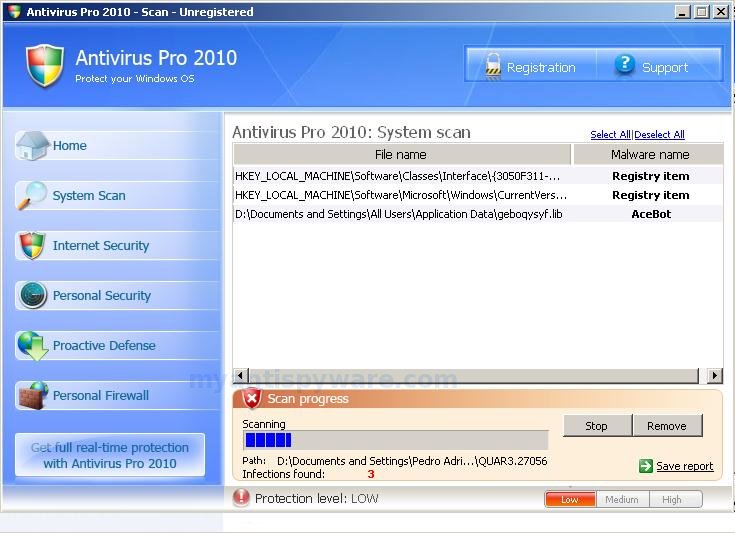
Once Antivirus Pro 2010 installed, it will automatically start every time Windows is started. Once running, Antivirus Pro 2010 will scan your computer and display false scan results that state the PC is infected with a lot of trojans and viruses. All these scan results are fake! These infections not exist on your computer, so you can safely ignore them.
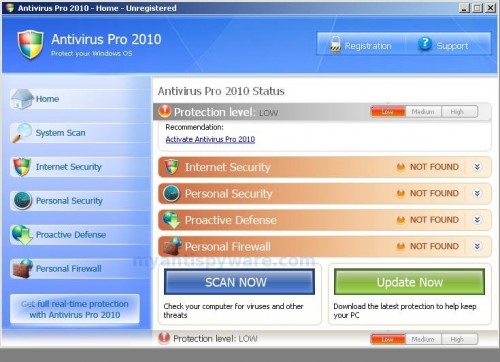
Antivirus Pro 2010
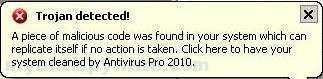
When Antivirus Pro 2010 is running your PC will show fake security alerts from Windows taskbar and nag screens. Some of the alerts:
Trojan detected!
A piece of malicious code was found in your system which can
replicate itself if no action taken. Click here to have your system
cleaned by Antivirus Pro 2010.
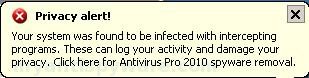
Privacy alert!
Your system was found to be infected with intercepting
programs. These can log your activity and damage your
privacy. Click here for Antivirus Pro 2010 spyware removal.
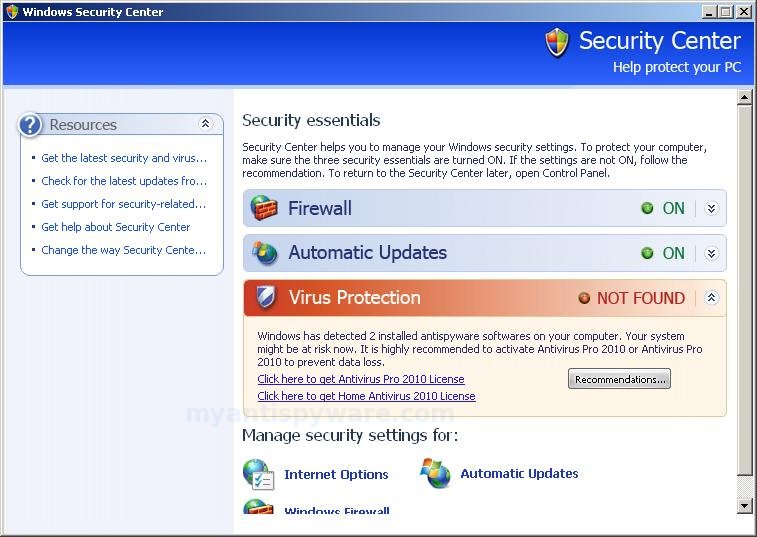
Also the program will display fake Windows Security Center that will recommend you use Antivirus Pro 2010. Instead of doing so, use these Antivirus Pro 2010 removal instructions below in order to remove this infection and any associated malware from your computer for free.
More Antivirus Pro 2010 Screen Shoots
Symptoms in a HijackThis Log
O4 – HKLM\..\Run: [Antivirus Pro 2010] “C:\Program Files\AntivirusPro_2010\AntivirusPro_2010.exe” /hide
Use the following instructions to remove Antivirus Pro 2010 (Uninstall instructions)
1. Remove Antivirus Pro 2010 main components.
Please download OTM by OldTimer from hereand save it to desktop.
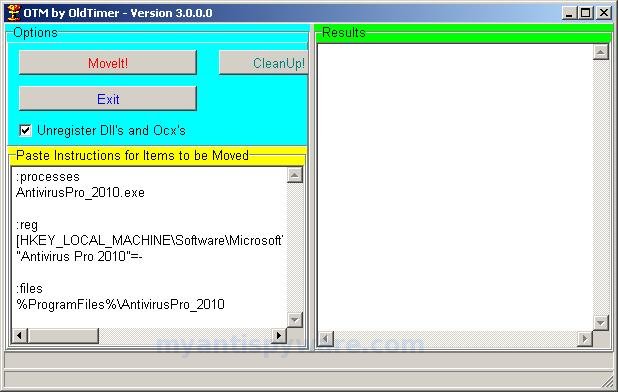
Run OTM. Copy,then paste the following text in “Paste Instructions for Items to be Moved” window (under the yellow bar):
:processes
AntivirusPro_2010.exe
:reg
[HKEY_LOCAL_MACHINE\Software\Microsoft\Windows\CurrentVersion\Run]
"Antivirus Pro 2010"=-
:files
%ProgramFiles%\AntivirusPro_2010
You will see window similar to the one below.
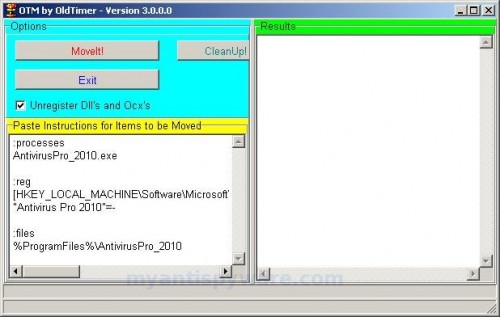
OTM
Click the red Moveit! button. When the tool is finished, it will produce a report for you. If you are asked to reboot the machine choose Yes.
2. Remove Antivirus Pro 2010 associated malware.
Download MalwareBytes Anti-malware (MBAM). Close all programs and Windows on your computer.
Double Click mbam-setup.exe to install the application. When the installation begins, keep following the prompts in order to continue with the installation process. Do not make any changes to default settings and when the program has finished installing, make sure a checkmark is placed next to Update Malwarebytes’ Anti-Malware and Launch Malwarebytes’ Anti-Malware, then click Finish.
If an update is found, it will download and install the latest version.
Once the program has loaded you will see window similar to the one below.

Malwarebytes Anti-Malware Window
Select Perform Quick Scan, then click Scan, it will start scanning your computer for Antivirus Pro 2010 infection. This procedure can take some time, so please be patient.
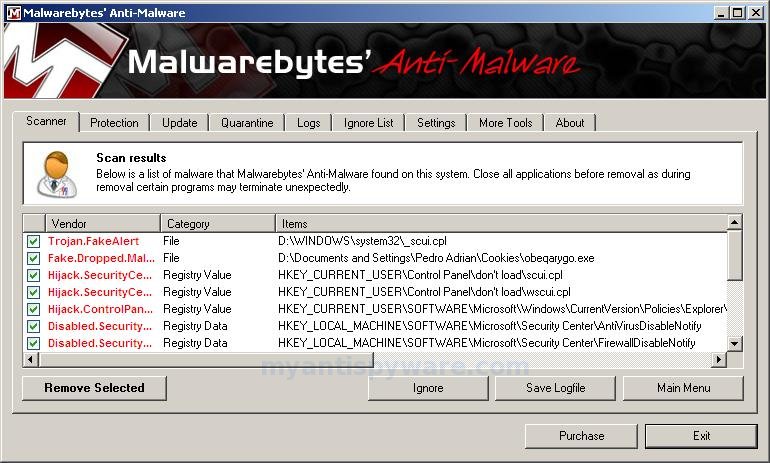
When the scan is complete, click OK, then Show Results to view the results. You will see a list of infected items similar as shown below. Note: list of infected items may be different than what is shown in the image below.
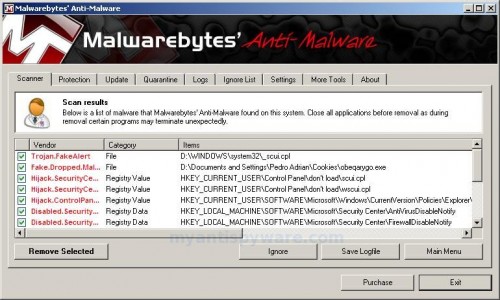
Malwarebytes Anti-malware, list of infected items
Make sure that everything is checked, and click Remove Selected for start Antivirus Pro 2010 removal process. When disinfection is completed, a log will open in Notepad and you may be prompted to Restart.
Note: if you need help with the instructions, then post your questions in our Spyware Removal forum.
Antivirus Pro 2010 creates the following files and folders
C:\Program Files\AntivirusPro_2010
C:\Program Files\AntivirusPro_2010\AntivirusPro_2010.exe
C:\Program Files\AntivirusPro_2010\AVEngn.dll
C:\Program Files\AntivirusPro_2010\AntivirusPro_2010.cfg
C:\Program Files\AntivirusPro_2010\pthreadVC2.dll
C:\Program Files\AntivirusPro_2010\Uninstall.exe
C:\Program Files\AntivirusPro_2010\wscui.cpl
C:\Program Files\AntivirusPro_2010\data\daily.cvd
C:\Program Files\AntivirusPro_2010\microsoft.vc80.crt\Microsoft.VC80.CRT.manifest
C:\Program Files\AntivirusPro_2010\microsoft.vc80.crt\msvcm80.dll
C:\Program Files\AntivirusPro_2010\microsoft.vc80.crt\msvcp80.dll
C:\Program Files\AntivirusPro_2010\microsoft.vc80.crt\msvcr80.dll
Antivirus Pro 2010 creates the following registry keys and values
HKEY_LOCAL_MACHINE\SOFTWARE\Microsoft\Windows\CurrentVersion\Run\antivirus pro 2010
September 6, 2009 on 11:42 pm | In Rogue Anti Spyware, Tutorials - HowTo | 104 Comments |104 Comments »
RSS feed for comments on this post. TrackBack URI
Leave a comment
My Anti Spyware - Free antispyware programs and Spyware Removal Instructions.


Very detailed guide! I will try to spread this around.
Comment by pp — September 8, 2009 #
Thank you so much. Removing that persistent nag Antivirus Pro 2010 was a snap with your easy-to-follow instructions. I am grateful.
Comment by Dennis Merrill — September 9, 2009 #
Bless your heart!
It’s taken 7 hours to get ris the the bastard anti virus 2010, until I found your site.
Thanks
Comment by Wildbill72 — September 11, 2009 #
This does NOT work.
I have Antivirus Pro 2010 on my computer and it has resisted all attempts to remove it including this one! I followed instructions above after I downloaded MBAM and started the quick scan within seconds the MBAM application closes without any warnings then any further attempts to restart it stops with a Window message : \
Comment by user — September 11, 2009 #
user, probably your computer also infected with braviax trojan. Try these braviax removal instructions.
Comment by Patrik — September 12, 2009 #
Thanks very very very much! This little fu*ker had been screwing my computer for the past couple of days, but thanks to you and your very clear and easy-to-follow intstructions the problem is gone. I was praying that the alert message would be gone after I restarted my computer and it was. I’m not a huge computer “geek”, but I truly have respect for people who know what they are doing with this machine. Just a little question, why doesn’t virus programs like Norton 360 destroy these trojans? I did destroy a few but your tips destroyed a whole lot more. Thanks, and greetings from Finland.
Comment by Arska — September 12, 2009 #
Thank you, thank you, thank you! I have had this on my computer for the last three days, and nothing has worked until now!
Comment by me — September 12, 2009 #
Thank you so very much for this information. I am so happy to have Antivirus Pro 2010 off my computer!
Comment by Grateful One — September 12, 2009 #
Thank you! This process worked perfectly and was very easy to follow! It took a little more than an hour for the malaware scan to complete, but once it did it’s job and I restarted as prompted all traces of that yucky virus seem to be gone. Thanks again!
Comment by Stephanie — September 12, 2009 #
Thx so much! Really appreciate it…i dont kno wat i would’ve done about that punk-a** virus…
Comment by Justin — September 12, 2009 #
You are the man. Keep up the great work!! Thanks
Comment by Gixxa Killa — September 13, 2009 #
I did Malware removal first before I found this site.
Fingers crossed the icons in the system tray removed. We’ll see what happens….
Comment by zman — September 13, 2009 #
I did the OTM but it still wont let me install malware i have not only Antivirus Pro 2010but i also have Police Pro and have no use of my keyboard. how do i get it to work???
Comment by ben — September 13, 2009 #
Ben, probably yor PC also infected with braviax trojan. Try it.
Comment by Patrik — September 14, 2009 #
Thanks so much. So far so good. Your step by step guide has worked like a charm. You have my respect, and I will be coming back again as more problems come up.
Comment by Sean M. — September 14, 2009 #
THANK YOU!! followed you’re very simple instructions and it worked perfectly.This was driving me crazy.
Comment by Dion — September 14, 2009 #
I want to take a moment and sincerely thank you for putting this resource up. It worked for me even though I was very skeptical and scared. (It worked on combination with the braviax trojan fix instructions). THANK YOU VERY MUCH!!!
This “Antivirus Pro 2010″ was severely annoying!!
Again thank you and keep up the great work.
Comment by Alice — September 14, 2009 #
I have this on my computer also. I actually had the spyware 2009 issue at first and I got rid of that a month ago.
Then I received that Genuine windows error which I thought was slowing down my computer. Just now I had the antivrus pro 2010 pop up. My issue I am running into is that my computer is randomly shutting down. Can this be because of this virus?
Comment by Anthony — September 15, 2009 #
Anthony, probably your computer also infected with braviax trojan. Read my previous comment.
Comment by Patrik — September 16, 2009 #
It worked! Thanks!, could you just clarify the propose of running OTM???
As I deleted manually all entries on the register, OTM gave an error, I still ran Malwarebytes Anti-Malware and after 20 mins scanning gave me the report and had to reboot, all came back to normal, my AVG, my WinDefender, my Lavasoft and my WinSecurity. All these and still got infected by that Antivirus2010 sucker!
I’m back to normal, thanks!
Comment by CMF — September 16, 2009 #
Thanks a bunch.
Comment by W. Holder — September 21, 2009 #
You rock! I was goin crazy trying to get rid of this! Thank you sooooooo very much!!
Comment by A. Everidge — September 21, 2009 #
I removed everything with spyware doctor. However, I still have the red x in my right lower toolbar corner that keeps popping up the little message, how do I get rid of it?
Comment by Jeff — September 23, 2009 #
Jeff, looks like your PC still infected with trojan FakeAlert or braviax. Ask for help in our Spyware removal forum.
Comment by Patrik — September 24, 2009 #
THANK YOUUUUUUUU SOOOOOOO MUCH
Comment by Ahmed — September 25, 2009 #
open windows task manager (control-alt-delete)
select Antivirus pro,then end task. my computer had two running in the manager. Then go to find files and folders> search antivirus pro > select all, then delete..this worked for me and its gone
Comment by easy fix — September 25, 2009 #
I followed the directions and now windows does not start. It goes to check disk then reboots everytime when its checking the indexs. Anyone know what this means?
Comment by R.U. — September 28, 2009 #
R.U. looks like a few system files were damaged by a trojan. Try safe mode and last good configuration.
Comment by Patrik — September 28, 2009 #
Thanks for the quick response. I cant even get into safe mode. It automatically goes into chkdsk. Think I can at least extract the data that was in here by plugging the HD into another comp?
Comment by R.U. — September 28, 2009 #
Malwarebytes keeps freezeing for my while performing extra and heuristics scan, any ideas?
Comment by adam — October 1, 2009 #
adam, ask for help in our Spyware removal forum.
Comment by Patrik — October 2, 2009 #
Tried several different web sites to no avail, but these instructions worked perfectly. Thank you!!!
Comment by Ed — October 2, 2009 #
thank you very much, I installed three different spyware programs and could not delete it and you made my day, thanks again =)
Comment by barro — October 2, 2009 #
Thank you soooooooooo much! I was freak out about that damned virus. You are a life saver. bless you!!!!!
Comment by Jessica S. — October 3, 2009 #
Hey guys, i have used spyware doctor and paid for the license, and it has removed most of the virus I.e popups, Internet hijacks. However, I still have the small red and White ‘x’ icon in the system tray. Does this mean I still have it? How do I get rid of it?
Comment by Randy — October 4, 2009 #
Two variants:
1. This ‘X’ is a icon of Windows Security Center. Probably it alerts you that your antivirus or autoupdate or firewall is disabled. Click twice to the icon and check it.
2. Probably your computer still infected with an trojan fakeAlert.
Comment by Patrik — October 4, 2009 #
Thanks a lot. It helped me to get rid of that stupid virus.
I was trying hard with other tools since yesterday, but could do it only after meeting your website.
-Sowjanya
Comment by Sowjanya — October 4, 2009 #
i am still confused on the #2 where it says to download malwarebytes anti-malware. where do i do that?
Comment by sarah — October 4, 2009 #
I have been reading all the comments people have been leaving you and they are all 100% right in their gratitude towards you for helping them remove this damn virus!!! You are a computer life saver!!! A million thank you’s from New York. YOU TRULY ARE THE MAN!!!!
Comment by Iris — October 4, 2009 #
Download Malwarebytes Anti-malware from here. Run it and perform a scan.
Comment by Patrik — October 5, 2009 #
IT WORKED! Thanks a lot!
Comment by MH — October 5, 2009 #
Thanks…it really worked
Comment by Diesel — October 5, 2009 #
hi , im not that clever with computers but after following your guide , antivirus pro 2010 ,, is no more ,, thanky guys , you are topps
Comment by tom — October 5, 2009 #
Has anyone had the program install itself as a shortcut?
Comment by Kat — October 6, 2009 #
I get a message saying “Your current security settings will not allow this file to be downloaded
Comment by Jim Davison — October 6, 2009 #
Thank you soo much for the run through. This really helped me out
Comment by Freddie — October 6, 2009 #
Freddie, try use Firefox to download malwarebytes.
Comment by Patrik — October 7, 2009 #
You are a fucking star mate!!! That worked a treat, thank you so much, it was a piece of piss to remove!
Thanks again!
Comment by Baz — October 7, 2009 #
Thanks easy fix. This worked for me!
After using the task manager to stop the pop-ups, I uninstalled programme first and then deleted those files found by the search.
Comment by Winnie — October 7, 2009 #
THIS IS THE BEST I HAD THIS PROBLEM BEFORE AND RESTORED MY COMPUTER BACT TO FACTORY SETTINGS IF ONLY I KNEW ABOUT THIS THEN
THANK YOU SO MUCH
V-GOOD DESCRIPTION ON HOW TO USE THE SOFTWARE
Comment by ROB — October 8, 2009 #
Tried both steps and it did not work. The download bar for the virus reappeared and the problem still persists
Comment by Des — October 10, 2009 #
I was a bit nerves downloading something that says it’s going to fix my problem with ANTI VIRUS PRO but it really did work!!! Very pleased!! thanks!
Comment by sara — October 10, 2009 #
Thank you so much. I removed anitvirus pro 2010 using the instructions above very easily. However, when I go to my control panel, I cannot see the “remove hardware” icon. Any tips? Thanks!
Comment by YC — October 10, 2009 #
Des, ask for help in our Spyware removal forum.
Comment by Patrik — October 10, 2009 #
You mean “Add hardware” icon ?
Comment by Patrik — October 10, 2009 #
I remember in the past, before I got the virus, there is an add/remove hardware icon. I may be mistaken though. However, is there a way I can remove certain software/hardware? Reason being, I d/l\’ed Spyware Doctor, but not sure how to remove it now. Thank you.
Comment by YC — October 10, 2009 #
YC, go to Control panel, Add/Remove programs panel and uninstall Spyware Doctor.
Comment by Patrik — October 11, 2009 #
Thank you!
Comment by YC — October 11, 2009 #
http://info.prevx.com/aboutprogramtext.asp?PX5=CE703701006274B43ACA0606F09E7D00A657C2D4
Comment by ucant4it@yahoo.com — October 13, 2009 #
ucant4it, this is a false positive. Otm is not a malware, but a program used to stop malware processes. Antivirus programs cannot distinguish between “good” and “malicious” use of such programs, therefore they may alert the user.
Comment by Patrik — October 13, 2009 #
It really works. Thanks a lot!
Comment by Bonnie — October 14, 2009 #
Hi i followed exactly the same instruction as above but i am unable to remove this antivirus pro 2010.After pasting the information as above in the OTM and it is not recognising the path and it comes as a not found. Alert threat as Nuker.Win32.SmbDie…. this alert changes everytime to a different one. previous to this one they had Trojan… i will be greatful if somebody could help me….
Comment by alwin — October 15, 2009 #
alwin, make a new topic in our Spyware removal forum.
Comment by Patrik — October 15, 2009 #
Hi, I also followed the directions exactly but for some reason malwarebytes can’t seem to remove any of the infections it finds. It keeps saying it will remove them upon rebooting but it never works. In the meanwhile I keep getting hijacked by this stupid thing. Is this happening to anyone else?
Comment by christine — October 15, 2009 #
Huge thanks to your website! I appreciate your efforts and would like to know if I can make a donation to your site?
Comment by Dean — October 16, 2009 #
Christine, looks like your PC is infected with trojan that reinstalls at every Windows reboot. Ask for help in our Spyware removal forum.
Comment by Patrik — October 16, 2009 #
Dean, if you want support us, you can make it by linking to our website from your homesite, blog or newsgroup.
Comment by Patrik — October 16, 2009 #
Thank you so much i had this on my computer for 3 MONTHS and i couldn’t get it off
Comment by sean — October 17, 2009 #
thank you so much i had that piece of shit for 3 MONTHS and now its gone
Comment by sean — October 17, 2009 #
Well, whatever people say, this works!!! I have been working with PC’s for over 20 years. This bugger (******) caught me off guard! I normally have a pretty safe and sound PC setup. But I got this on my laptop! I never use this lappy for anything other than my work, no major surfing or any other activities that would lead to anything like this. So I and have to say that this was the best solution! I tried a few others, but this was the one that worked for me and save my self (***) from having to restore from a ghost image.
I normally make an image of my Laptop & Desktop every week (Symantec Ghost). It only takes about 30 minutes. I always keep a few weeks of previous images, just to be safe. Never know. But for some reason, I had not made one for the laptop for a few weeks and there was tons of new emails, docs, proposals and other stuff since the last image I had. I was going crazy thinking that I would lose all of this if I had to restore or take at least 1 or 2 days to make sure I copied all the files, backup the emails, etc… you get the picture!
Lessons learned here, keep doing the backups every week! Don’t skip LOL! But that is the best preventatitve solution to making sure you have everything safe.!!!!
Again, this was the best solution and the explanation is quite clear, even for a noob!
Wish we had more people helping people(like here) instead of coming up with these scheme to give people headaches!!
Anyaway thank you very much! Good job!
Comment by Sam — October 18, 2009 #
Thank you very much. I was unable to uninstall that fake antivirus until i tried your solution !
It worked like a charm ! Thanks again !!
Comment by Yves — October 20, 2009 #
Check in “C:/Documents and Settings/yourname/Application data”. If you have the files: “Seres.exe” or “svcst.exe”, remove them. They are the trojan that installed “AV-pro 2010″ in the first place. Start in failsafe mode and remove them or use “Freefixer”(google it).
(This only removes the trojan)
Comment by abbe — October 21, 2009 #
thank you so much,you are the best. microsft could not do it. you are the best, i spned 5 hours trying everything..good job
Comment by babak — October 23, 2009 #
Thank you very much. It works!!
I am glad that I found your note after I met this fuxking Antivirus Pro
Comment by Billy — October 28, 2009 #
Tryed the procedure, looked like all the files were removed, upon reload the virus software reappeared. I ran the EXE of the antiviruspro 2010 and then ran the malware to delete the files. Upon reload the antiviruspro did not reappear, i check the computer for the next 30 minutes and it was fine. Thanks.
Comment by Thomas — October 31, 2009 #
Did not work for me. I tried Anti-Malware, it said it was successful, rebooted, it came back. I rebooted into Safe Mode, used SDFix to get rid of what I assumed was braviax, it claimed to be successful, I rebooted, AntiVirusPro 2010 still there. Rebooted in Safe Mode again, ran Anti-Malware, it said it successfully removed it, rebooted, the blasted thing is still there. I don’t know what else I can do at this point.
Comment by Chaim Mattis Keller — November 3, 2009 #
Chaim, ask for help in our Spyware removal forum.
Comment by Patrik — November 3, 2009 #
HEY everyboyd i recently got antivurs pro 2010 on my computer idk how. but anyways i followed all these rules step by step to the letter and still couldndt get rid of it. what i figured out you have to do is hit “ctrl” “alt” “delete” and go into task manager and end the process of of the “antivurs pro” it was something like “uosync” end that process and go online and download AVG 9.0 free 30 day version (or buy it) and thats the only program i found that could get rid of it. i am a long time user of “malawarebytes” and “AVAST” which both could not get rid of it.
Comment by Brandy boy — November 20, 2009 #
I’ve tried everything to remove this antivirus from my son’s laptop. I copied over the otm but spyware will not allow the program to launch. I see the app screen come up at times, for a split second then it goes away and spyware says the .exe file is infected. I cannot get any further with any of the processes to remove this thing. Any other ideas?
Comment by jim — December 2, 2009 #
jim, if you can`t run OTM, re-download it, but in Save dialog rename otm.exe to explorer.exe and click Save button to save it.
Run the file.
If it does not help you, then open a new topic in our Spyware removal forum.
Comment by Patrik — December 2, 2009 #
******* attention!!**********
((Firefox works even when this bullshit Antivrius 2010 pro is working on))
Steps to get rid of this Antivirus 2010 pro my ass.
1. re-start your computer and boot with safe mode.(press F8 while the booting)
(You need to change one setting to see this hidden folder where this bull shit program is.)
2. start -> control panel -> (classic view) -> folder option -> go to ‘view’ tab -> click ‘show hidden files and folders’ -> click ‘OK’
(This is where the bull shit file is located. c:\Documents and Settings\**your user name:delete this part and put your user name**\Local Settings\Application Data\oklojg\lcwdsysgurd.exe)
3. delete ‘oklojg’ folder. this folder is full of bullshit.
4. start -> run -> type ‘msconfig’ -> go to ‘startup’ tab -> uncheck ‘lcwdsgurd’
5. restart your computer and boot normaly. It should work fine. good job!
ps. thank you for dumbasses who made this program.. people with mental Disability who still don’t know how to make their own money and sucking at life.go to hell. you guys are not needed for the earth.
Comment by das — December 3, 2009 #
it wont let me get on the internet 2 do it….im on the laptop right now…so how do i get on the internet?
Comment by alyssa — December 9, 2009 #
alyssa, you have tried bot your PC in the Safe mode with networking ? or use another browser ?
Comment by Patrik — December 11, 2009 #
Everything else failed, then your eureka worked.
Thanks and keep up the good work.
Comment by Rsiddhu — December 23, 2009 #
I have a worse problem! I have 2010 antivirus and probably a few trojans. I tried to get rid of them using spybot program, but when I rebooted windows xp pro will only open to the login page. And then it gets stuck. Tried rebooting with the CD, but no luck. Crazy thing is that I have never put passwords on my login. Have tried starting in safe mode. No luck. Tried changing bios to boot from CD. No luck. Any ideas before I take it to the computer doctor???
Comment by Jim — January 17, 2010 #
THANK YOU! This completely worked! I tried everything- system reboot, manual removal etc, this is the only thing that worked.
What worked for me: task mgr as windows started. stop the process it was running under, un-do the proxy thing so I could access internet, then followed the directions above.
Comment by MNGirl25 — January 24, 2010 #
Thank you man, i just want to say god bless you, thank you for spending the time to help others instead of screwing people over like the hackers behind this nasty virus. Again, much appricaited..
Comment by Marc — January 30, 2010 #
hi.. tq very much… its work wonder…. dammm hacker….. thanks again….. keep a good work…bro
Comment by yen — February 5, 2010 #
otm didnt pick up anything altho mine still infected !!!
Comment by scott — February 6, 2010 #
didn’t work! otm could find the HKEY files altho im invected with it !
Comment by scott — February 6, 2010 #
Scott, then ask for help in our Spyware removal forum.
Comment by Patrik — February 6, 2010 #
dude that’s so pimp. u awesome budy! u inspire me to go and help others. =)
Comment by pimpbobski — February 7, 2010 #
THANK YOU VERY MUCH
Comment by THANKS — March 7, 2010 #
this malware has evolved. its now av.exe. cant be seen by process explorer and autoruns. Used killbox to kill the app, keeps on coming
Comment by raymer — March 8, 2010 #
raymer, try the instructions.
Comment by Patrik — March 9, 2010 #
Hi Patrick! I was able to get rid of the anti-virus 2010, and my computer was working fine for a while but now malwarebytes won’t open up. Every time I try to open in (regardless of where I try to open it) a missing shorcut box opens and says that it cannot find mbam.exe. So then I try browsing for it and I find it but it still will not open up!! What do I do???
Comment by Kelly — April 19, 2010 #
Oh and also whenever I get on the internet to look for this website on google, random websites pop up that have nothing to do with this website, and the computer runs slower.
Comment by Kelly — April 19, 2010 #
Kelly, probably your PC is infected with Vundo trojan and TDSS trojan. Open the instructions and try “Malwarebytes Anti-malware won`t install or run, it displays a code 2 error box” fix. Once finished, try the instructions.
Comment by Patrik — April 20, 2010 #
Okay, I read the first set of instructions, and tried to open Malwarebytes’ Anti-Malware in the way specified but it will NOT open. Do I continue with the instructions? Or what?
Comment by Kelly — April 20, 2010 #
Does it mean open the Malwarebytes Anti-Malware folder? Or the program itself? If it’s the folder then that will open, but the program itself will not.
Comment by Kelly — April 20, 2010 #
Kelly, probably your computer is infected with TDSS trojan. Use second link instructions that i have posted in my previous comment.
Comment by Patrik — April 21, 2010 #
Okay, I followed all of your instructions, but when I rebooted the computer a bunch of pop-ups all saying “The application or DLL C:\WINDOWS\system32\sizulase.dll is not a valid Windows image. Please check this against your installation diskette.” So I tried opening Malwarbytes and it opened, but while running the scan it suddenly exited. When I tried opening it up again, it did the exact same thing as before! And that TDSS Killer is not finding anything either! Help!
Comment by Kelly — April 21, 2010 #
Kelly, looks like your computer also infected with Vundo trojan. You need start a new topic in our Spyware removal forum. I will help you.
Comment by Patrik — April 22, 2010 #
I removed this by restarting my computer in safe mode with networking and then using the restore system to an earlier date option.
Comment by Michael — July 17, 2010 #